ARTICLE · 1073634
Halo插件:支持GitHub的图床附件策略
🌹 图床附件 🌹
plugin-picbed-dominickonode —— Halo 的附件存储插件,将GitHub图床添加为附件策略,配合Cloudflare代理,实现国内也能顺畅访问,支持重命名格式,避免文件名冲突。
特性
基于 Halo
AttachmentHandler扩展点,安装启用后,在「附件 → 存储策略」里新建「🌹图床附件🌹 @DKK」即可使用。上传/删除走 GitHub REST API,公开访问默认走你的 Cloudflare 自定义域名(干净、不带 token,仓库私有也能读)。
支持重命名格式:
{y}/{m}/{d}{h}{i}、{origin}、{timestamp}、{rand:N}。GitHub Token 存于 Halo Secret,绝不明文落库。
上传/删除按「仓库+分支」串行,兼容 GitHub 并发写分支的 ref 竞态问题。
使用教程
安装本插件并启用。
在Halo应用商店安装:搜索「图床附件」(在努力上架了T^T)
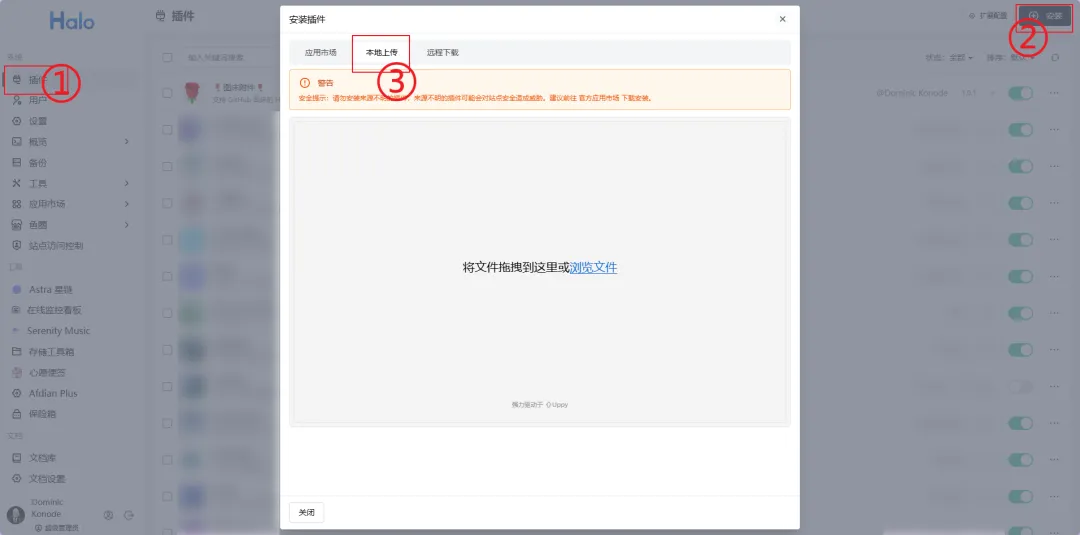
手动安装: 下载最新jar包 GitHub release 👉https://github.com/Dominic-KK/halo-plugin-picbed/releases👈 蓝奏云 👉https://www.ilanzou.com/s/4JXrj2Q1?code=dckk👈 上传jar包安装/更新
前往 附件 → 存储策略 → 新建,选择「🌹图床附件🌹 @DKK」。
填写以下配置。
配置项说明
github | ||
owner/repo | Dominic-KK/xxxxxx | |
main | ||
/ 结尾 | halo-atta/ | |
https://api.github.com;国内直连不稳时再填自建代理,如果你不知道这是什么,建议保持默认。 | https://api.github.com | |
https://your-domain.com | ||
{y}/{m}/{d}{h}{i}-{rand:3} |
如果你还没有自己的GitHub图床或自定义代理域名,可以看看这篇文章👇
GitHub + Cloudflare + Picgo 搭建你的免费图床
与 PicGo-github 插件的对应关系:
仓库/分支/存储路径/自定义域名/重命名格式分别对应你 PicGo 里的github.repo / branch / path / customUrl / picgo-plugin-rename-file.format,可直接照搬。
// picgo github 插件配置{"picBed": {"current": "github","github": {"repo": "Dominic-KK/xxxxxx","branch": "main","token": "ghp_xxxxxx","path": "picgo/","customUrl": "https://your-domain.com"}},"picgoPlugins": {"github": true,"picgo-plugin-rename-file": true},"picgo-plugin-rename-file": {"format": "{y}/{m}/{d}{h}{i}-{rand:3}"}}
本文资源可以点击下方查看原文获取,或在后台发送 260924
👇查看原文👇