 夜雨聆风
夜雨聆风OpenClaw(小龙虾)是命令行/服务型工具,优先用官方一键卸载,失败再走手动清理,下面按系统给完整步骤。
一、Windows 卸载(最常用)
方法1:官方一键卸载(推荐)
以管理员身份打开 PowerShell(Win+X → Windows PowerShell(管理员))
执行一键卸载(自动删服务、数据、配置):
openclaw uninstall --all --yes --non-interactive若提示“不是内部命令”,用 npx 临时调用:
npx -y openclaw uninstall --all --yes --non-interactive彻底删除 CLI 工具:
npm uninstall -g openclaw验证(无输出即成功):
Get-Command openclaw -ErrorAction SilentlyContinue
方法2:手动卸载(一键失败时)
停止并删除后台任务:
schtasks Delete /F /TN "OpenClaw Gateway"删除全局 CLI:
npm uninstall -g openclaw删除用户数据目录:
rm -r $env:USERPROFILE\.openclawrm -r $env:APPDATA\openclawrm -r $env:LOCALAPPDATA\openclaw重启电脑。
二、macOS 卸载
方法1:官方一键卸载
打开终端(Terminal)
执行:
openclaw uninstall --all --yes删除 CLI:
npm uninstall -g openclaw
方法2:手动深度清理
停止并卸载网关服务:
launchctl bootout gui/$UID/ai.openclaw.gateway 2>/dev/null删除启动配置文件:
rm -f ~/Library/LaunchAgents/ai.openclaw.*.plistrm -f ~/Library/LaunchAgents/com.openclaw.*.plistlaunchctl unload ~/Library/LaunchAgents/ 2>/dev/null删除数据与配置:
rm -rf ~/.openclawrm -rf /Applications/OpenClaw.app # 桌面版验证(无输出/提示 command not found 即成功):
which openclawopenclaw --version
三、Linux 卸载
停止并禁用服务:
systemctl --user disable --now openclaw-gateway.servicerm -f ~/.config/systemd/user/openclaw-gateway.servicesystemctl --user daemon-reload官方卸载:
openclaw uninstall --all --yes删除 CLI:
npm uninstall -g openclaw删除数据:
rm -rf ~/.openclaw
四、通用清理(所有系统)
清理包管理器缓存(npm/pnpm/bun):
# npmnpm cache clean --force# pnpmpnpm store prune# bunbun pm cache rmDocker 部署额外清理:
docker stop $(docker ps -q --filter name=openclaw)docker rm $(docker ps -aq --filter name=openclaw)docker rmi $(docker images -q --filter reference=openclaw)
常见问题:
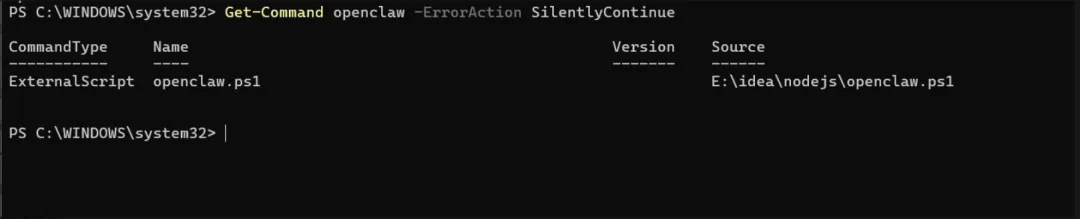
说明之前的卸载没有清理干净
从你的 PowerShell 输出可以看到,openclaw 命令仍然存在,是一个外部脚本文件 E:\idea\nodejs\openclaw.ps1,说明之前的卸载没有清理干净。
🔧 彻底清理步骤
删除残留脚本文件
直接删除这个残留的脚本文件:
Remove-Item -Path "E:\idea\nodejs\openclaw.ps1" -Force
清理用户数据与配置
执行以下命令删除所有 OpenClaw 相关数据目录:
Remove-Item -Recurse -Force $env:USERPROFILE\.openclaw -ErrorAction SilentlyContinueRemove-Item -Recurse -Force $env:APPDATA\openclaw -ErrorAction SilentlyContinueRemove-Item -Recurse -Force $env:LOCALAPPDATA\openclaw -ErrorAction SilentlyContinue
删除计划任务(如果存在)
schtasks Delete /F /TN "OpenClaw Gateway" 2>$null验证是否清理完成
再次执行验证命令:
Get-Command openclaw -ErrorAction SilentlyContinue
卸载成功:
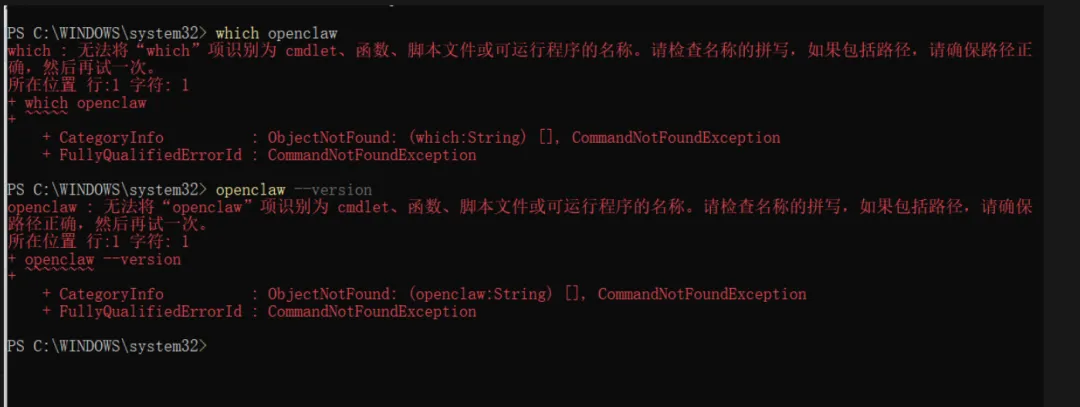
💡 补充说明
Windows 下替代
which的命令:如果你想再次验证,在 PowerShell 中应该用:powershell
Get-Command openclaw -ErrorAction SilentlyContinue
若执行后无任何输出,就代表命令已彻底清理。
最后收尾:
建议重启一次电脑,确保后台没有残留进程。
若曾配置过 API Key,记得去对应服务商页面废弃旧密钥,保证账号安全。
飞书教程:https://vcnpb34v56u8.feishu.cn/wiki/PkvjwXcVniGS91keJrOcSeRjnab?from=from_copylink

