夜雨聆风
夜雨聆风背景:
在学习安卓系统对的ai支持交互部分内容时候,发现了google官方有一篇让app使用AppFunctions来让自己的app成为一个tools,提供给ai大模型进行识别和使用的。
先直观理解AppFunction在整个AI应用的角色是啥?下面这个架构图可以清晰看出
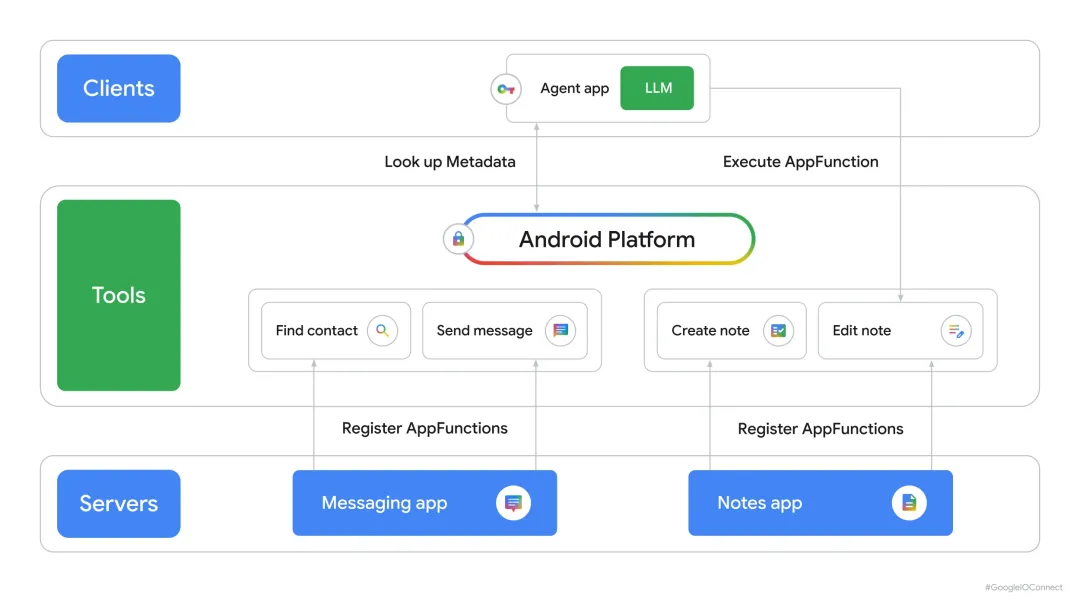
简单说就是让各个app提供相关的tools给LLM,然后LLM可以工具情况下进行查找tool和调用。
下面看看这篇官方文章:

概述 / Overview
欢迎回到"构建智能 Android 应用"系列博文,我们将在此系列博文中介绍如何将基本的 Android 应用转变为个性化、智能化的智能体体验。在我们的上一篇博文中,我们探讨了如何利用 Firebase AI Logic 构建云托管式和混合式 AI 功能。
传统的移动界面擅长处理专注的动手任务,而 Android 智能系统则引入了补充功能,让复杂的、多步骤的操作变得更加简单。通过补充传统的用户界面,AppFunctions 提供了一个强大的新入口点:设备上的特权智能体可以在后台访问应用功能。当用户开车、走路或执行其他多任务操作时,这会特别有用。
在本文中,我们将向您展示如何使用 Android AppFunctions 设计这些功能并将其集成到我们的旅行计划应用 JetPacker 中。我们将探讨选择这些功能的理由,讨论我们用于加快开发的专用工具,并深入了解让这一切正常运行的代码。
设计支持 AI 的功能:为用户做出重要选择
Designing AI-ready features: making choices that matter for your users
为了选择要提供给智能系统的功能,我们寻找了语音或文本命令比点击屏幕更快完成的任务。在此并排屏幕录制中,您可以清楚地看到这种对比:左侧是用户点击多个屏幕来记录费用;右侧是同一任务通过特权智能体在后台即时完成。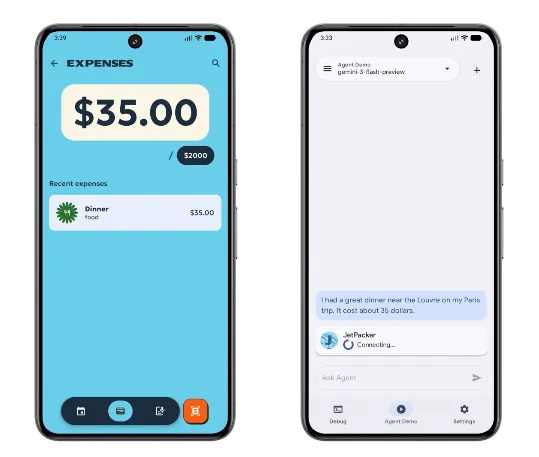
费用跟踪 / Expense tracking
我们的首选是费用跟踪。在旅行期间记录咖啡费用通常需要多次点击操作:解锁手机、打开应用、找到正在进行的旅行、导航到"费用"标签页、点击"添加"按钮、拍摄收据照片,然后检查结果。通过将 addExpense 和 getExpenses 功能作为 AppFunctions 提供,系统智能体可以处理繁重的工作。当用户说"将 5 美元的咖啡费用添加到我的巴黎旅行中"时,智能体会自动在后台搜索正确的旅行 ID 并插入费用,完全跳过手动界面流程。
行程管理 / Itinerary management
我们还优先考虑了行程管理。在繁忙的旅行行程中查找下一个活动通常需要滚动浏览密集的时间轴视图。通过向系统提供 getItinerary 和 addItineraryEvent,用户只需问"我在巴黎的下一个活动是什么?",即可立即获得答案。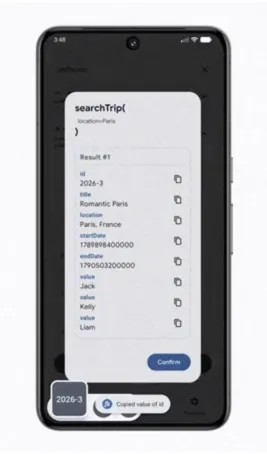
免手动操作的笔记捕获 / Hands-free note capturing
最后,我们专注于免手动操作的笔记捕获。在繁忙的街道上行走时,输入提醒或笔记既困难又不安全。通过公开语音记事功能,用户可以说"航班很棒,我看到了美丽的日落,而且睡得很好",特权智能体会自动转写并使用 addVoiceNote AppFunction 将其直接保存到旅行数据库中。
由 AppFunctions 提供支持的 Android MCP
Android MCP powered by AppFunctions
整个体验都基于 Android MCP 构建。在此设计下,应用充当本地 MCP 服务器。您无需使用远程 API,而是直接向设备端智能系统提供应用功能。
Android AppFunctions 是将此概念付诸实践的 API。它会读取带注释的 Kotlin 函数,并将其编译为类型安全的沙盒工具定义,特权智能体可以在设备上本地发现和调用这些定义。
架构说明 / Architecture:
在 Android MCP 模型下,您的应用充当公开结构化工具的本地 MCP 服务器,而 Android 平台则充当中央工具注册表。在 MCP 客户端方面,智能体应用在获得访问注册表的系统特权权限后,会向智能系统注册。
当用户与注册的智能体互动时,其 LLM 会确定请求是否可以由 AppFunction 处理,查询平台的元数据,并在后台执行适当的注册函数。这种本地 MCP 客户端-服务器设计让您可以完全掌控:您可以准确选择智能体可以访问的功能,同时确保应用的其他数据保持私密。
+------------------+ +--------------------+ +------------------+| Agent App | | Android Platform | | Your App || (MCP Client) |<--->| (Tool Registry) |<--->| (MCP Server) || | | | | || - LLM evaluates | | - AppFunction | | - @AppFunction || user request | | metadata | | annotations || - Queries | | - Permission | | - Structured || platform | | enforcement | | tool defs |+------------------+ +--------------------+ +------------------+我们如何借助 Android 技能加快开发速度
How we accelerated development with Android skills
为了简化集成流程,我们利用了 AppFunctions 开发技能。AppFunctions 开发技能是一个完整的开发助手。它指导我们完成了整个生命周期:
将 Kotlin 数据类映射到序列化参数 生成必要的 Service入口点优化 KDoc文档以确保 LLM 了解参数边界使用 ADB 设置自动化测试
向智能系统提供应用功能
Providing app features to the intelligence system
配置和依赖项设置 / Configuration and dependency setup
首先添加 AppFunctions 依赖项。一个用于 API,另一个用于 Kotlin Symbol Processing 编译器。
implementation("androidx.appfunctions:appfunctions:1.0.0-alpha10")ksp("androidx.appfunctions:appfunctions-compiler:1.0.0-alpha10")对自定义数据类型进行建模 / Modeling custom data types
与智能体交换的任何自定义对象都必须使用 @AppFunctionSerializable 进行注释。在 TripSerializable.kt 文件中,我们定义了行程数据模型:
@AppFunctionSerializable(isDescribedByKDoc = true)dataclassTripSerializable(/** The trip's unique identifier. */val id: String,/** The trip's title. */val title: String,/** The trip's destination location. */val location: String,/** The trip's start date in milliseconds. */val startDate: Long,/** The trip's end date in milliseconds. */val endDate: Long,/** A list of participants. */val participants: List<String>,)使用 @AppFunction 注释提供功能 / Providing features using @AppFunction
接下来,该技能编写了执行数据库查询的 Kotlin 函数,并使用 @AppFunction 对其进行注释。我们可以在 searchTrip 中查看此内容:
/** * Looks for trips based on optional filters like id, title (name), location, and dates. * * @param id The unique identifier of the trip. * @param title The title or name of the trip. * @param location The destination location. * @param startDate The minimum start date in milliseconds. * @param endDate The maximum end date in milliseconds. * @return A list of trips matching the filters. */@AppFunction(isDescribedByKDoc = true)suspendfunsearchTrip( id: String? = null, title: String? = null, location: String? = null, startDate: Long? = null, endDate: Long? = null): List<TripSerializable> {return withContext(Dispatchers.IO) {// implementation }}注意 / Note: 由于 AppFunctions 默认在界面线程上运行,因此使用
withContext(Dispatchers.IO)切换到后台调度程序。此外,KDoc 应使用清晰的命令式动词并指定参数约束。此文档直接编译到工具的架构中,特权智能体使用该架构来解析参数并处理运行时错误。
服务入口点和 Hilt 集成 / Service entry point and Hilt integration
为了向智能系统注册这些功能,我们创建了一个扩展 AppFunctionService 的抽象基类。使用 @AppFunctionServiceEntryPoint 对其进行注释:
@RequiresApi(36)@AndroidEntryPoint@AppFunctionServiceEntryPoint( serviceName = "JetPackerAppFunctionService", appFunctionXmlFileName = "jetpacker_app_function_service")abstractclassBaseJetPackerAppFunctionService : AppFunctionService() {@Injectinternallateinitvar tripDao: TripDao// DAOs and database references are injected here...}在编译期间,KSP 会生成最终的具体服务子类 JetPackerAppFunctionService,如 serviceName 参数所声明的那样。还需要在应用的清单中注册 app_metadata.xml。此文件为 JetPacker 声明的 AppFunctions 提供了全局操作规则。
测试和验证 AppFunctions
Testing and validating AppFunctions
实现后,您应验证 AppFunctions 是否已注册并正常运行。
对于运行 Android 17 或更高版本的设备或模拟器,您可以使用终端中的 ADB 命令来列出和调用函数:
列出所有注册函数 / List all registered functions:
adb shell cmd app_function list-app-functions执行特定函数 / Execute a specific function:
adb shell cmd app_function execute-app-function传递原始 JSON 参数字符串即可测试其数据库集成。
除了这些 ADB 命令之外,您还可以使用 AppFunctions 测试智能体来检查配置、列出和执行 AppFunctions,甚至可以查看 AppFunctions 在实际对话流程中的行为。
总结 / Summary
在考虑可以使用 AppFunctions 向智能系统贡献的应用功能时,我们需要稍微改变对代码和文档的思考方式。AppFunctions 使您能够为应用使用这种新的互动模型,从而允许使用智能体访问应用功能。
关键要点:
AppFunctions 开发技能 是必不可少的生命周期工具,可帮助您发现功能、实现和优化应用中的 AppFunctions。 KDoc 注释是编译后的 API 资产;清晰的参数说明直接影响系统智能体的执行准确性。 Android MCP 提供本地优先执行,允许应用安全地与 AI 智能体协作。
通过 AppFunctions 贡献应用功能可让您的应用为智能系统做好准备。
系列博文导航 / Series navigation
| 第 4 部分(本文) | 系统集成 | 使用 AppFunctions 与 Android 智能系统集成 |
来源: Android Developers Blog - Build intelligent Android apps: Integrate into Android's intelligence system using AppFunctions
https://android-dot-devsite-v2-prod.appspot.com/blog/posts/build-intelligent-android-apps-integrate-into-android-s-intelligence-system-using-app-functions?hl=zh-cn
更多vip干货独享知识,及面试定制指导上岸fw工程师服务,课程优惠购买成为vip学员进入vip群,积极讨论各种行业难点痛点疑难问题,答疑服务等。
请联系马哥微信: