ARTICLE · 1235845
保姆级学习开发安卓手机软件实战(十三)--设备管理功能的完善
保姆级学习开发安卓手机软件实战(十三)--设备管理功能的完善
我们主界面现在是虚拟的设备,这节完成真实的添加设备操作吧。 新界面如下: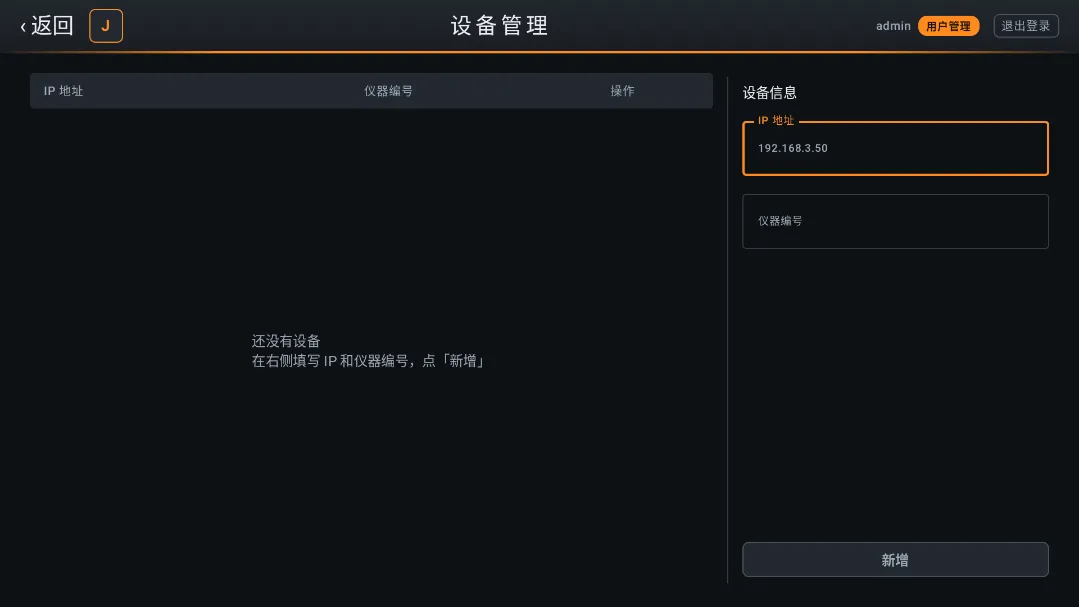
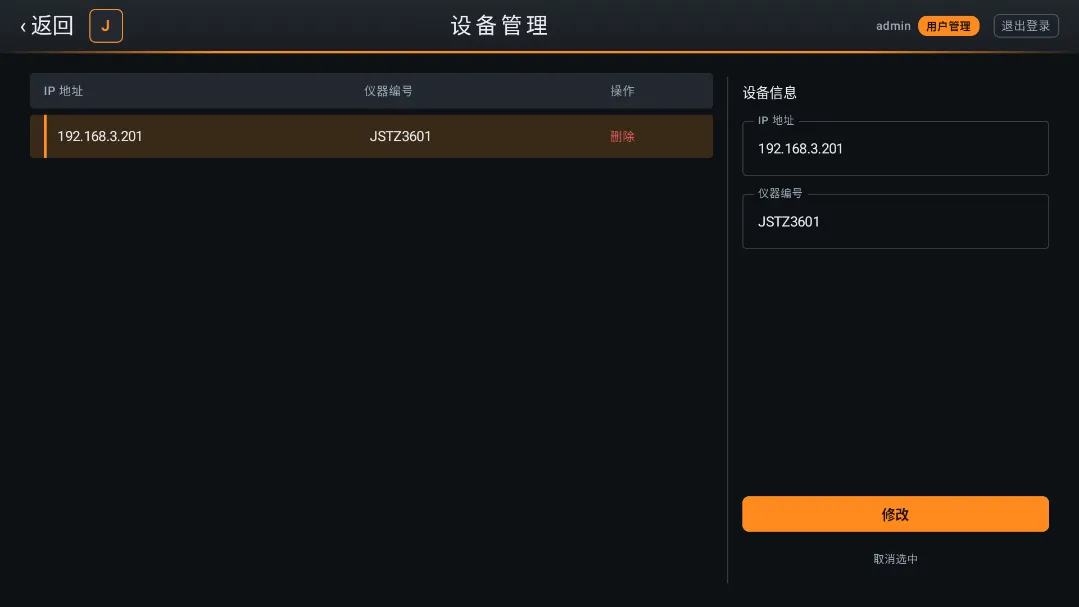
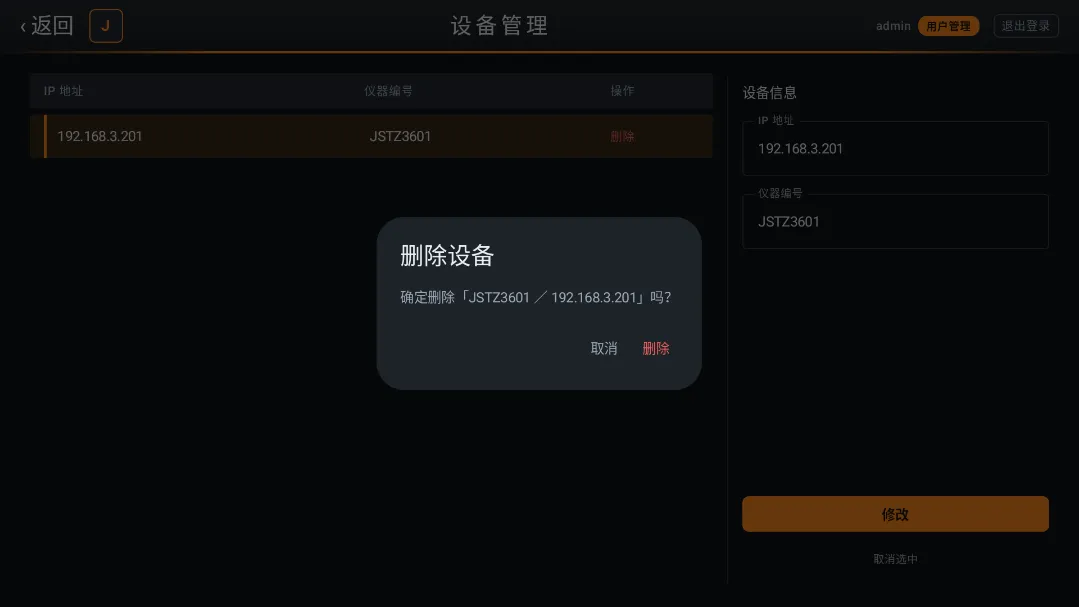
首先删除之前的虚拟数据。
第1 步:删掉种子数据
DeviceRepository.kt文件: 因为后续我们自己增加删除设备,不需要再启动假数据,所以这边要删掉。
// 整块删掉private val DEFAULT_DEVICES: List<Device> = List(6) { ... }
// 整块删掉suspend funloadOrSeed(): List<Device> { ... }
同时删掉 ViewModel init 里的调用:
viewModelScope.launch { repo.loadOrSeed() }DevicePreferences.kt 的 decodeDevices进行修改:
.mapNotNull { line ->val parts = line.split(",")if (parts.size < 2) return@mapNotNull nullval devId = parts[0]val ip = parts[1]// 旧格式是 devId,enable(如 aaaa0001,1)——ip 位是 0/1,不是真 IP,丢弃if (ip.count { it == '.' } != 3) return@mapNotNull nullDevice(devId = devId, ip = ip)}
第2步:修改Device类
data class Device (val devId: String, // 设备码val ip:String)
我这里添加了一个ip,然后把其他两个状态删掉了,是根据需求变动的,在线状态直接判断即可,不用存,是否启动因为改为设备管理直接增删也去掉了,所以大家看要不要去掉吧,去了之后很多地方连着变动,主要是仓库,其他地方大家看着删除即可: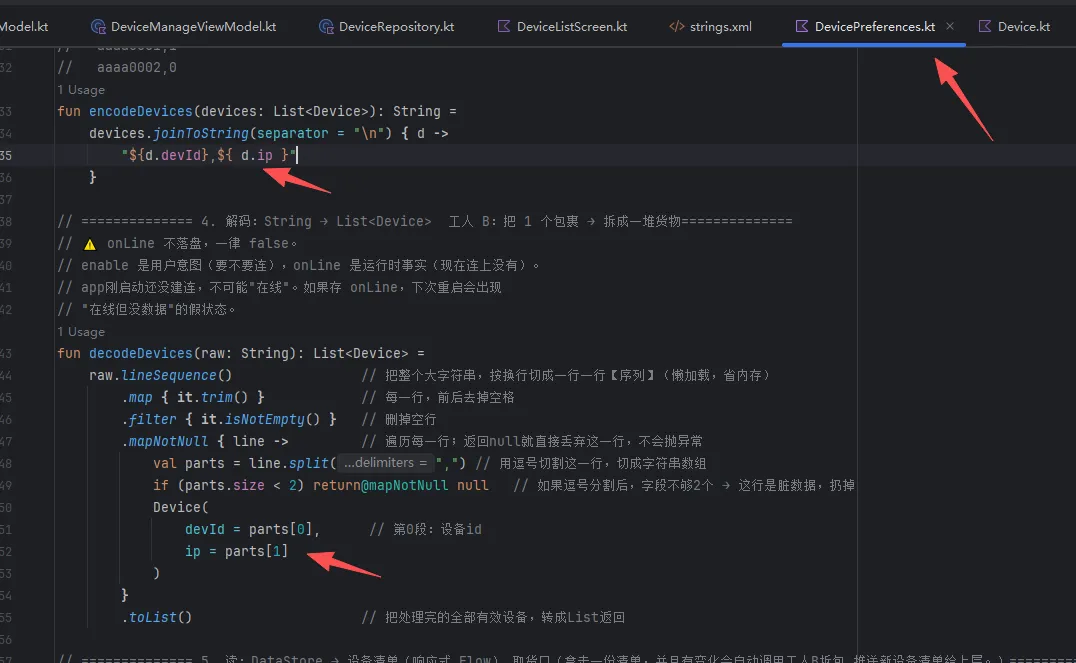
第 3 步:—— 结构调整
因为我们上节用的是设备列表页作为主界面,但是实际应该是有一个主界面,然后根据不同的选择,进入不同的界面,所以这里我们先实现这个逻辑。 新增jstz1/ui/screen/MainSreen.kt:
package com.example.jstz1.ui.screenimport androidx.compose.foundation.backgroundimport androidx.compose.foundation.borderimport androidx.compose.foundation.layout.Boximport androidx.compose.foundation.layout.Columnimport androidx.compose.foundation.layout.Rowimport androidx.compose.foundation.layout.Spacerimport androidx.compose.foundation.layout.fillMaxSizeimport androidx.compose.foundation.layout.fillMaxWidthimport androidx.compose.foundation.layout.heightimport androidx.compose.foundation.layout.paddingimport androidx.compose.foundation.layout.sizeimport androidx.compose.foundation.layout.widthimport androidx.compose.foundation.shape.RoundedCornerShapeimport androidx.compose.material3.MaterialThemeimport androidx.compose.material3.Surfaceimport androidx.compose.material3.Textimport androidx.compose.runtime.Composableimport androidx.compose.runtime.getValueimport androidx.compose.runtime.mutableStateOfimport androidx.compose.runtime.rememberimport androidx.compose.ui.Alignmentimport androidx.compose.ui.Modifierimport androidx.compose.ui.graphics.Brushimport androidx.compose.ui.graphics.Colorimport androidx.compose.ui.res.stringResourceimport androidx.compose.ui.text.font.FontWeightimport androidx.compose.ui.unit.dpimport androidx.compose.ui.unit.spimport com.example.jstz1.Rimport com.example.jstz1.ui.theme.TopAimport com.example.jstz1.ui.theme.TopBimport androidx.compose.foundation.clickableimport androidx.compose.runtime.setValueprivate enum class ScreenType {设备列表,设备管理,}@ComposablefunMainScreen(modifier: Modifier = Modifier) {var screenType by remember { mutableStateOf(ScreenType.设备列表) }var title = when (screenType) {ScreenType.设备列表 -> stringResource(R.string.app_nameTitle)ScreenType.设备管理 -> "设备管理"}Surface(modifier = modifier.fillMaxSize(),color = MaterialTheme.colorScheme.background) {Column(Modifier.fillMaxSize()) {TopBar(//从DeviceListScreen里面剪贴过来的,修改添加了两个参数title,onBack = if (screenType == ScreenType.设备列表) null else ({ screenType = ScreenType.设备列表 })//其他界面点击返回,直接)when (screenType) {ScreenType.设备列表 -> DeviceListScreen(modifier = Modifier.fillMaxWidth().weight(1f),onNavigateToManage={screenType = ScreenType.设备管理}//管理设备的跳转)ScreenType.设备管理 -> DeviceManageScreen(modifier = Modifier.fillMaxWidth().weight(1f))}}}}@Composableprivate funTopBar(title: String, onBack:(()-> Unit)?=null) {Column(Modifier.fillMaxWidth().background(Brush.verticalGradient(listOf(TopA, TopB)))) {Row(Modifier.fillMaxWidth().height(52.dp).padding(horizontal = 20.dp),verticalAlignment = Alignment.CenterVertically) {if(onBack!=null){Text("‹ 返回",modifier = Modifier.clickable(onClick = onBack).padding(vertical = 6.dp),style = MaterialTheme.typography.titleLarge,color = MaterialTheme.colorScheme.onBackground)Spacer(Modifier.width(16.dp))}// logoBox(Modifier.size(34.dp).background(MaterialTheme.colorScheme.surfaceVariant, RoundedCornerShape(6.dp)).border(1.dp, MaterialTheme.colorScheme.primary, RoundedCornerShape(6.dp)),contentAlignment = Alignment.Center) {Text("J",style = MaterialTheme.typography.titleMedium,fontWeight = FontWeight.Bold,color = MaterialTheme.colorScheme.primary)}Spacer(Modifier.weight(1f))Text(text = title ,style = MaterialTheme.typography.titleLarge,color = MaterialTheme.colorScheme.onBackground,letterSpacing = 4.sp)Spacer(Modifier.weight(1f))// 用户 + 角色Text("admin",style = MaterialTheme.typography.labelMedium,color = MaterialTheme.colorScheme.onSurfaceVariant)Spacer(Modifier.width(6.dp))Box(Modifier.background(MaterialTheme.colorScheme.primary, RoundedCornerShape(9.dp)).padding(horizontal = 8.dp, vertical = 2.dp)) {Text("用户管理",style = MaterialTheme.typography.labelSmall,fontWeight = FontWeight.Bold,color = MaterialTheme.colorScheme.onPrimary)}Spacer(Modifier.width(14.dp))// 退出登录Text("退出登录",style = MaterialTheme.typography.labelMedium,color = MaterialTheme.colorScheme.onSurfaceVariant,modifier = Modifier.border(1.dp,MaterialTheme.colorScheme.outlineVariant,RoundedCornerShape(6.dp)).padding(horizontal = 8.dp, vertical = 4.dp))}// 底部橙色装饰线Box(Modifier.fillMaxWidth().height(2.dp).background(Brush.horizontalGradient(0.0f to Color.Transparent,0.2f to MaterialTheme.colorScheme.primary,0.8f to MaterialTheme.colorScheme.primary,1.0f to Color.Transparent)))}}
则原有设备列表界面也有需要修改的地方: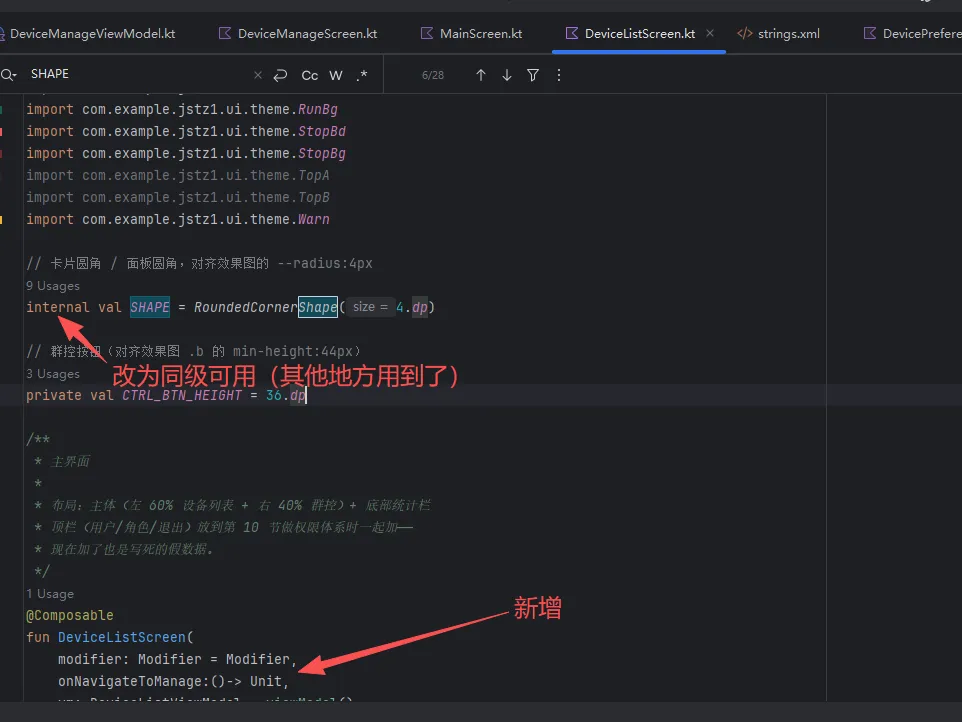
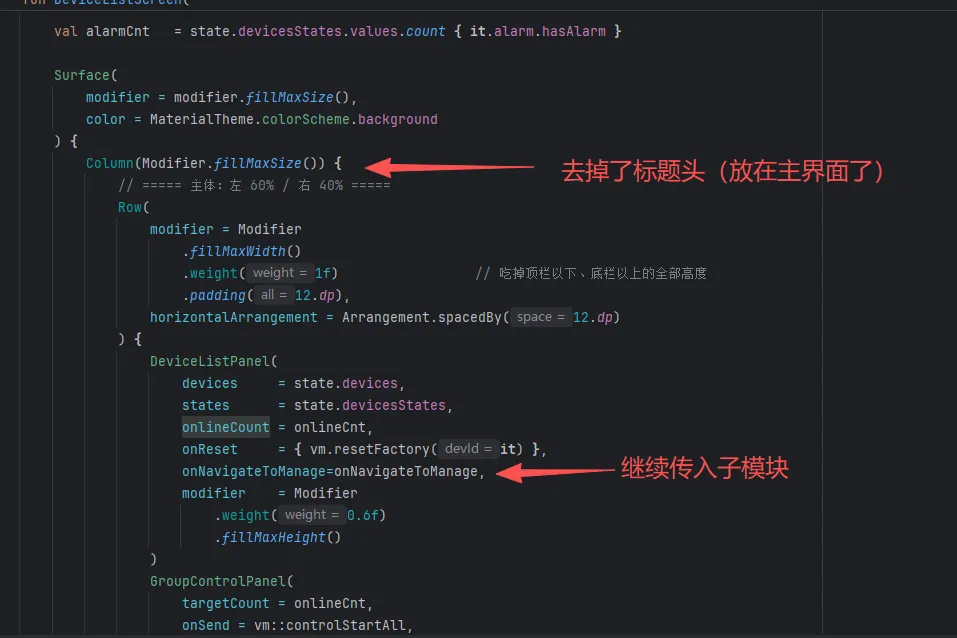
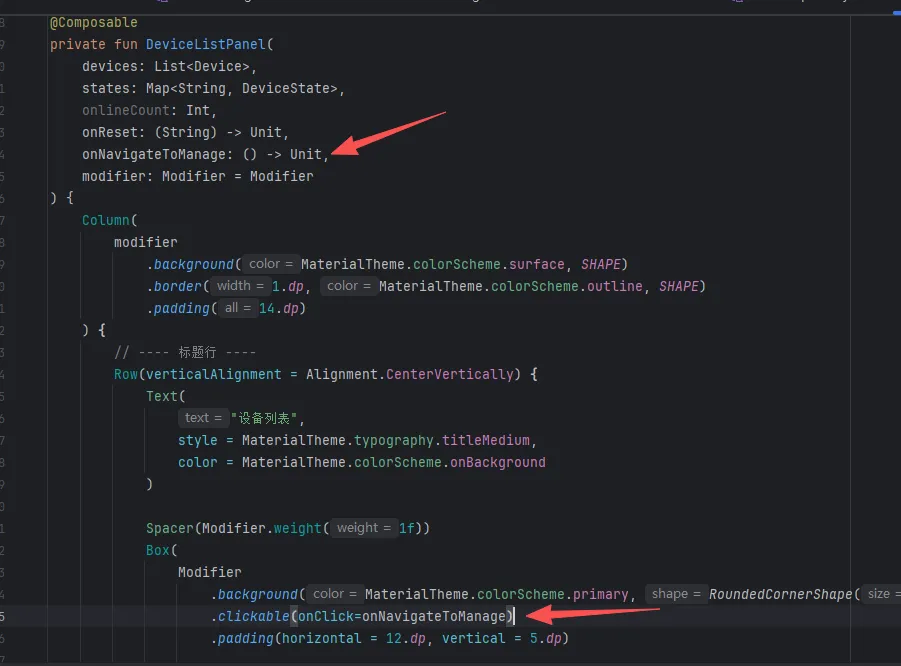
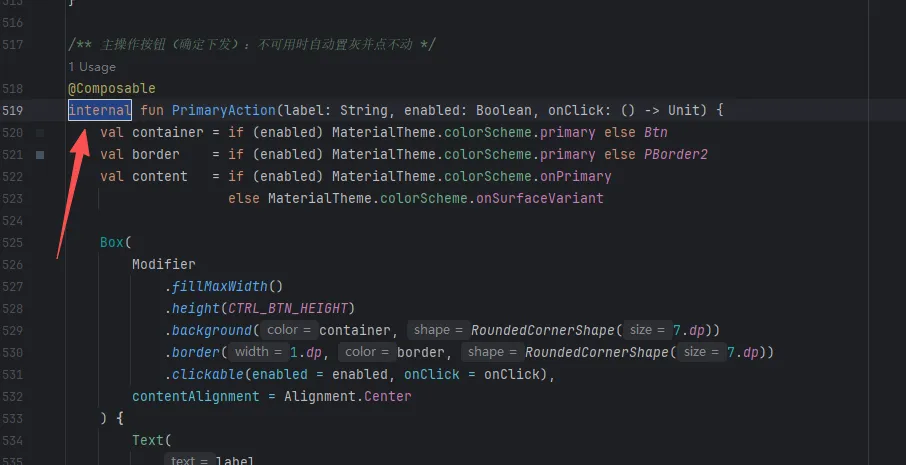 这里其实是为了复用,后续我们抽取出来单放吧。
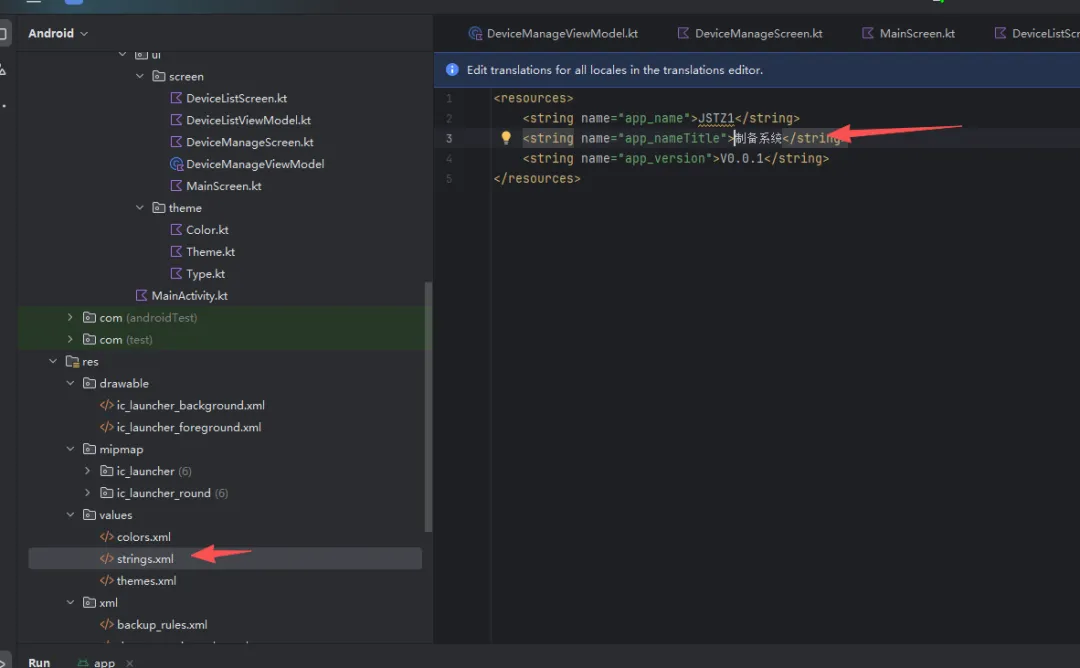
然后标题也是用了资源文件:
最后启动地方改下名称: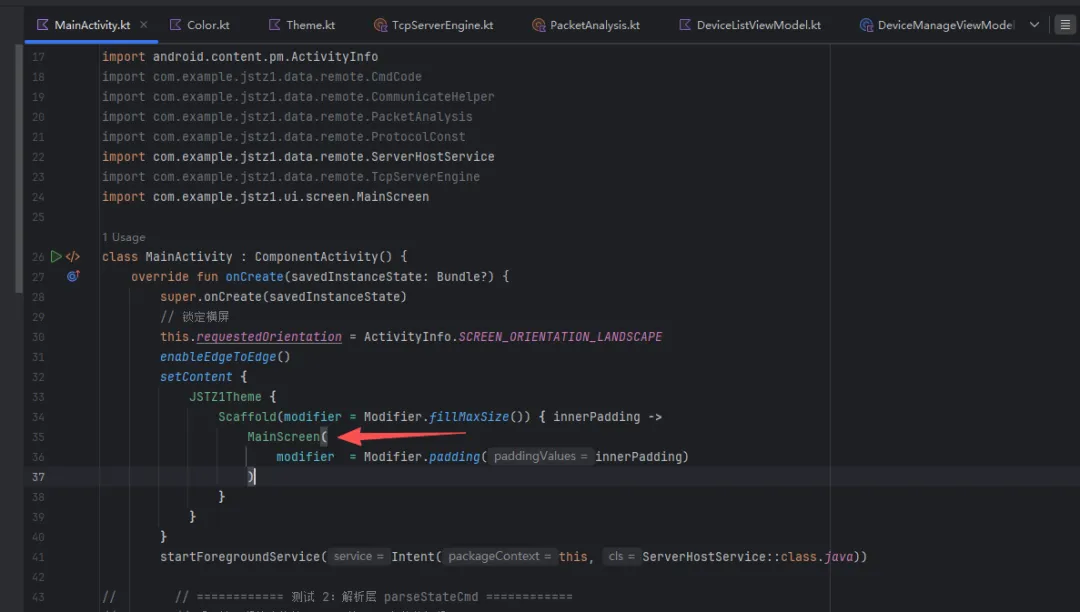
第 4 步:—— 完善后台ViewModel
因为设备管理功能也是对仓库的操作,所以一样需要订阅仓库。
新建文件jstz1/ui/screen/DeviceManageViewModel.kt
package com.example.jstz1.ui.screenimport android.app.Applicationimport androidx.lifecycle.AndroidViewModelimport androidx.lifecycle.viewModelScopeimport com.example.jstz1.data.model.Deviceimport com.example.jstz1.data.repository.DeviceRepositoryimport kotlinx.coroutines.flow.MutableStateFlowimport kotlinx.coroutines.flow.StateFlowimport kotlinx.coroutines.flow.asStateFlowimport kotlinx.coroutines.launch/*** 管理页专用的 VM** 【只订阅设备清单,不订阅设备状态】** 和主界面数据同步不靠共享 VM,靠共享仓库:* 两个 VM 都读同一个 DataStore → 天然一致,不需要互相通知*/class DeviceManageViewModel (application: Application): AndroidViewModel(application){private val repo= DeviceRepository(application)private val _devices= MutableStateFlow<List<Device>>(emptyList())val devices: StateFlow<List<Device>> = _devices.asStateFlow()init {viewModelScope.launch {repo.devices.collect {list->_devices.value=list}}}// ==================== 设备管理(增删改) ====================funaddDevice(devId: String, ip: String): String? {val id = devId.trim()val addr = ip.trim()if (id.isBlank()) return "仪器编号不能为空"if (id.length > 8) return "仪器编号最多 8 位"if (!isIp(addr)) return "IP 格式不对,形如 192.168.3.50"if (_devices.value.any { it.ip == addr }) return "这个 IP 已经添加过了"save(_devices.value + Device(devId = id, ip = addr))return null}funupdateDevice(oldIp: String, devId: String, ip: String): String? {val id = devId.trim()val addr = ip.trim()if (id.isBlank()) return "仪器编号不能为空"if (id.length > 8) return "仪器编号最多 8 位"if (!isIp(addr)) return "IP 格式不对,形如 192.168.3.50"if (addr != oldIp && _devices.value.any { it.ip == addr })return "这个 IP 已经添加过了"save(_devices.value.map { if (it.ip == oldIp) Device(devId = id, ip = addr) else it })return null}funremoveDevice(ip: String) {save(_devices.value.filter { it.ip != ip })}// ---- 内部小工具 ----private funsave(list: List<Device>) {_devices.value = list // ① 界面立刻变viewModelScope.launch { repo.save(list) } // ② 后台存盘}private funisIp(s: String): Boolean {val parts = s.split(".")if (parts.size != 4) return falsereturn parts.all { p ->p.isNotEmpty() && p.length <= 3 && p.all { it.isDigit() } && p.toInt() <= 255}}}
第 5 步:—— 搭建设备管理UI
新建文件jstz1/ui/screen/DeviceManageScreen.kt:
package com.example.jstz1.ui.screenimport androidx.compose.foundation.backgroundimport androidx.compose.foundation.clickableimport androidx.compose.foundation.layout.Arrangementimport androidx.compose.foundation.layout.Boximport androidx.compose.foundation.layout.Columnimport androidx.compose.foundation.layout.Rowimport androidx.compose.foundation.layout.Spacerimport androidx.compose.foundation.layout.fillMaxHeightimport androidx.compose.foundation.layout.fillMaxSizeimport androidx.compose.foundation.layout.fillMaxWidthimport androidx.compose.foundation.layout.heightimport androidx.compose.foundation.layout.paddingimport androidx.compose.foundation.layout.widthimport androidx.compose.foundation.lazy.LazyColumnimport androidx.compose.foundation.lazy.itemsimport androidx.compose.foundation.text.KeyboardOptionsimport androidx.compose.material3.AlertDialogimport androidx.compose.material3.MaterialThemeimport androidx.compose.material3.OutlinedTextFieldimport androidx.compose.material3.Textimport androidx.compose.runtime.Composableimport androidx.compose.runtime.getValueimport androidx.compose.runtime.mutableStateOfimport androidx.compose.runtime.rememberimport androidx.compose.runtime.setValueimport androidx.compose.ui.Alignmentimport androidx.compose.ui.Modifierimport androidx.compose.ui.graphics.Colorimport androidx.compose.ui.text.input.KeyboardTypeimport androidx.compose.ui.unit.dpimport androidx.lifecycle.compose.collectAsStateWithLifecycleimport androidx.lifecycle.viewmodel.compose.viewModelimport com.example.jstz1.data.model.Deviceimport com.example.jstz1.ui.theme.Warn/*** 设备管理页(全屏)** 左侧列表 + 右侧表单:* 点某一行 → 表单填入该设备 → 底部按钮由「新增」变「修改」** 为什么用 ip 定位而不是 devId:* 出厂初始化时所有设备编号可能都叫 1 号,只有 IP 能区分物理设备。*/@Composableinternal funDeviceManageScreen(modifier: Modifier = Modifier,vm: DeviceManageViewModel = viewModel()){val devices by vm.devices.collectAsStateWithLifecycle()// ========== 状态:全部在"最低的共同父级" ==========var selectedIp by remember { mutableStateOf<String?>(null) } // 表格选择的行,null = 没选中任何一台var formIp by remember { mutableStateOf("") }//右边文本框的输入ip值var formDevId by remember { mutableStateOf("") }//右边文本框的输入仪器编号值var error by remember { mutableStateOf<String?>(null) }//错误信息var pendingDel by remember { mutableStateOf<Device?>(null) }val dupIds = remember(devices) {devices.groupBy { it.devId }.filterValues { it.size > 1 }.keys}val editing = selectedIp != nullRow(modifier.padding((16.dp))) {// ---- 主体:左表格 / 右表单 ----ManageTable(devices = devices,dupIds = dupIds,selectedIp = selectedIp,onSelect = { d ->selectedIp = d.ipformIp = d.ipformDevId = d.devIderror = null},onDelete = { d -> pendingDel = d },modifier = Modifier.weight(0.68f).fillMaxHeight())Box(Modifier.width(1.dp).fillMaxHeight().padding(vertical = 8.dp).background(MaterialTheme.colorScheme.outline))ManageForm(editing = editing,ip = formIp,devId = formDevId,error = error,conflict = formDevId in dupIds,onIpChange = { formIp = it; error = null },onDevIdChange = { formDevId = it; error = null },onCancelEdit = {selectedIp = null; formIp = ""; formDevId = ""; error = null},onSubmit = {val old = selectedIpval err = if (old != null) vm.updateDevice(old, formDevId, formIp)else vm.addDevice(formDevId, formIp)if (err == null) {selectedIp = null; formIp = ""; formDevId = ""; error = null} else error = err},modifier = Modifier.weight(0.32f).fillMaxHeight())}pendingDel?.let { d ->AlertDialog(onDismissRequest = { pendingDel = null },containerColor = MaterialTheme.colorScheme.surface,title = { Text("删除设备", color = MaterialTheme.colorScheme.onSurface) },text = {Text("确定删除「{d.ip}」吗?",color = MaterialTheme.colorScheme.onSurfaceVariant)},confirmButton = {Text("删除",modifier = Modifier.clickable {vm.removeDevice(d.ip)if (selectedIp == d.ip) {selectedIp = null; formIp = ""; formDevId = ""}pendingDel = null}.padding(8.dp),color = MaterialTheme.colorScheme.error)},dismissButton = {Text("取消",modifier = Modifier.clickable { pendingDel = null }.padding(8.dp),color = MaterialTheme.colorScheme.onSurfaceVariant)})}}/** 左侧设备列表:IP / 仪器编号 / 操作 */@Composableprivate funManageTable(devices: List<Device>,dupIds: Set<String>,selectedIp: String?,onSelect: (Device) -> Unit,onDelete: (Device) -> Unit,modifier: Modifier = Modifier) {Column(modifier.padding(horizontal = 14.dp, vertical = 4.dp)) {Row(Modifier.fillMaxWidth().height(36.dp).background(MaterialTheme.colorScheme.surfaceVariant, SHAPE).padding(horizontal = 14.dp),verticalAlignment = Alignment.CenterVertically) {Text("IP 地址", Modifier.weight(1.3f),style = MaterialTheme.typography.labelMedium,color = MaterialTheme.colorScheme.onSurfaceVariant)Text("仪器编号", Modifier.weight(1f),style = MaterialTheme.typography.labelMedium,color = MaterialTheme.colorScheme.onSurfaceVariant)Text("操作", Modifier.width(90.dp),style = MaterialTheme.typography.labelMedium,color = MaterialTheme.colorScheme.onSurfaceVariant)}Spacer(Modifier.height(6.dp))if (devices.isEmpty()) {Box(Modifier.fillMaxSize(), contentAlignment = Alignment.Center) {Text("还没有设备\n在右侧填写 IP 和仪器编号,点「新增」",style = MaterialTheme.typography.bodyMedium,color = MaterialTheme.colorScheme.onSurfaceVariant)}} else {LazyColumn(modifier = Modifier.fillMaxSize(),verticalArrangement = Arrangement.spacedBy(4.dp)) {items(items = devices, key = { it.ip }) { d ->val selected = d.ip == selectedIpval dup = d.devId in dupIdsRow(Modifier.fillMaxWidth().height(44.dp).background(if (selected) MaterialTheme.colorScheme.primaryContainerelse Color.Transparent,SHAPE).clickable { onSelect(d) }.padding(horizontal = 14.dp),verticalAlignment = Alignment.CenterVertically) {Box(Modifier.width(3.dp).fillMaxHeight().background(if (selected) MaterialTheme.colorScheme.primaryelse Color.Transparent))Spacer(Modifier.width(11.dp))Text(d.ip, Modifier.weight(1.3f),style = MaterialTheme.typography.bodyMedium,color = if (dup) Warn else MaterialTheme.colorScheme.onSurface,maxLines = 1)Text(d.devId, Modifier.weight(1f),style = MaterialTheme.typography.bodyMedium,color = if (dup) Warn else MaterialTheme.colorScheme.onSurface,maxLines = 1)Text("删除",Modifier.width(90.dp).clickable { onDelete(d) }.padding(vertical = 10.dp),style = MaterialTheme.typography.labelMedium,color = MaterialTheme.colorScheme.error,maxLines = 1,softWrap = false)}}}}}}/** 右侧表单 */@Composableprivate funManageForm(editing: Boolean,ip: String,devId: String,error: String?,conflict: Boolean,onIpChange: (String) -> Unit,onDevIdChange: (String) -> Unit,onCancelEdit: () -> Unit,onSubmit: () -> Unit,modifier: Modifier = Modifier) {Column(modifier.padding(14.dp),verticalArrangement = Arrangement.spacedBy(10.dp)) {Text("设备信息",style = MaterialTheme.typography.titleSmall,color = MaterialTheme.colorScheme.onSurface)FormField(label = "IP 地址",value = ip,onValueChange = onIpChange,placeholder = "192.168.3.50",keyboardType = KeyboardType.Decimal)FormField(label = "仪器编号",value = devId,onValueChange = onDevIdChange,placeholder = "JSTZ0001",keyboardType = KeyboardType.Ascii,maxLength = 8)when {error != null -> Text("⚠ $error",style = MaterialTheme.typography.labelSmall,color = MaterialTheme.colorScheme.error)conflict -> Text("⚠ 该编号已有其他设备使用,请修改后再提交",style = MaterialTheme.typography.labelSmall,color = Warn)}Spacer(Modifier.weight(1f))PrimaryAction(label = if (editing) "修改" else "新增",enabled = ip.isNotBlank() && devId.isNotBlank(),onClick = onSubmit)if (editing) {Box(Modifier.fillMaxWidth().height(36.dp),contentAlignment = Alignment.Center) {Text("取消选中",modifier = Modifier.clickable(onClick = onCancelEdit).padding(8.dp),style = MaterialTheme.typography.labelSmall,color = MaterialTheme.colorScheme.onSurfaceVariant)}}}}/** 带标题的单行输入框 */@Composableprivate funFormField(label: String,value: String,onValueChange: (String) -> Unit,placeholder: String = "",keyboardType: KeyboardType = KeyboardType.Text,maxLength: Int = Int.MAX_VALUE) {OutlinedTextField(value = value,onValueChange = { if (it.length <= maxLength) onValueChange(it) },modifier = Modifier.fillMaxWidth(),label = { Text(label, style = MaterialTheme.typography.labelSmall) },placeholder = {Text(placeholder,style = MaterialTheme.typography.labelSmall,color = MaterialTheme.colorScheme.onSurfaceVariant)},singleLine = true,textStyle = MaterialTheme.typography.bodyMedium,keyboardOptions = KeyboardOptions(keyboardType = keyboardType),shape = SHAPE)}
这里和大家说一句,因为改动有点多,可能有的没说明,大家可以留言或者私信我~~~有时间我都会回的。