ARTICLE · 1244034
.NET 模板中的“Swagger”功能已经消失了.
Swagger Is Gone From the .NET Template. Here’s What Replaced It.
.NET 模板中的“Swagger”功能已经消失了。现在有了新的替代功能来取代它。
#.NET 模板中的“Swagger”功能已经消失了。
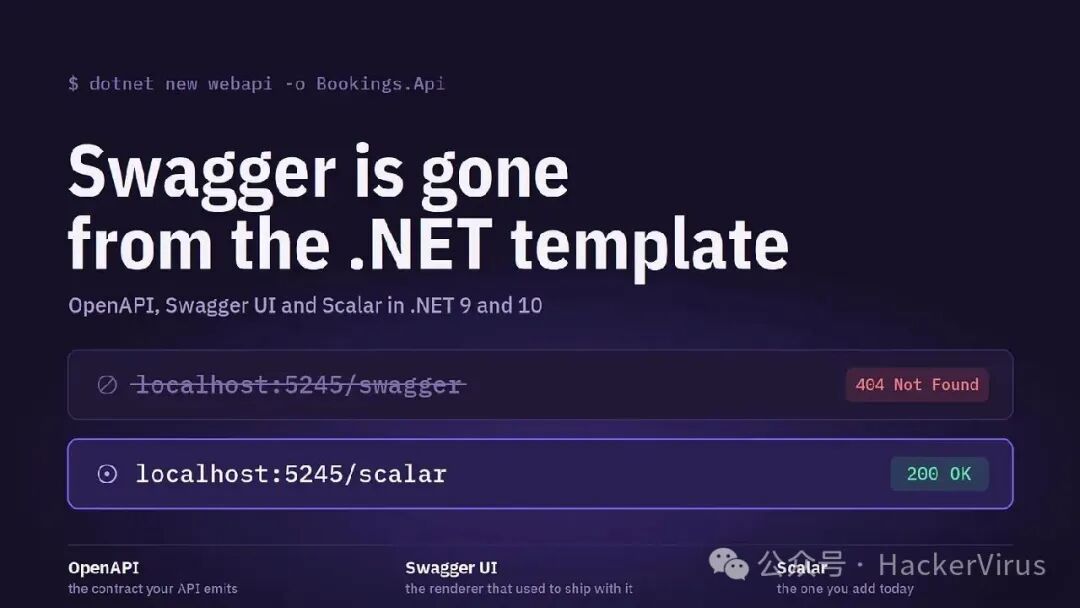
You spin up a new Web API, run it, type /swagger out of habit, and get a 404.你创建了一个新的 Web API,运行它,出于习惯输入了 /swagger ,结果得到了 404 错误。
Nothing is broken. Starting with .NET 9, Microsoft removed Swashbuckle from the dotnet new webapi template and replaced it with its own Microsoft.AspNetCore.OpenApi package. The document is still there. The UI is not, because Microsoft stopped picking one for you.没有任何东西被损坏了。从.NET 9 开始,微软将 Swashbuckle 从 dotnet new webapi 模板中移除,并替换为自己的 Microsoft.AspNetCore.OpenApi 包。文档仍然存在。不过,用户界面部分已经不再有 Swashbuckle 了,因为微软不再为你自动选择用户界面了。
Three names, three jobs三个名字,三个职位
OpenAPI is the specification — the JSON or YAML document that describes your endpoints, parameters, schemas and responses. It’s a contract, not a screen.OpenAPI 是一种规范——即那些用 JSON 或 YAML 格式描述的文档,它们详细规定了你的接口、参数、数据格式以及响应内容。OpenAPI 实际上是一种契约,而不是一个简单的界面。
Swagger UI is a renderer. It takes that document and turns it into a browsable page with the collapsible endpoint list and the “Try it out” button you know.Swagger UI 是一个文档渲染工具。它可以将那些文档转换成可浏览的页面,页面上会有可折叠的端点列表,还有那个著名的“尝试一下”按钮。
Scalar is a newer renderer for the same document. Same input, very different output: a documentation site with a proper API client attached.Scalar 是一种用于同一文档的新颖渲染工具。虽然输入相同,但输出却大相径庭:最终得到的是一个具有完整 API 客户端的文档网站。
Once you separate those, the .NET 9 change is small. Microsoft took over document generation and left the UI to you.一旦将这些分开考虑,那么.NET 9 中的改动其实并不大。微软负责了文档生成的工作,而用户界面方面则交给了用户自己处理。
The setup, end to end整个系统的设置,从始至终
Your new project already generates the document:你的新项目已经生成了文档:
var builder = WebApplication.CreateBuilder(args);builder.Services.AddOpenApi();var app = builder.Build();app.MapOpenApi(); // serves /openapi/v1.jsonThat’s the whole generation story. Now pick a UI:这就是整个世代的故事。现在请选择一种用户界面吧。
dotnet add package Scalar.AspNetCoreif (app.Environment.IsDevelopment()){ app.MapOpenApi(); app.MapScalarApiReference(); // /scalar}Two lines and you have an interactive reference backed by your live document. Keep it behind an environment check, or put an auth policy in front of it if you expose it in production.两条线即可实现与实时文档的互动式引用功能。可以将此功能置于环境检查之后,如果是在生产环境中使用,则需要在其前面添加身份验证策略。
app.UseSwaggerUI(o => o.SwaggerEndpoint("/openapi/v1.json", "v1"));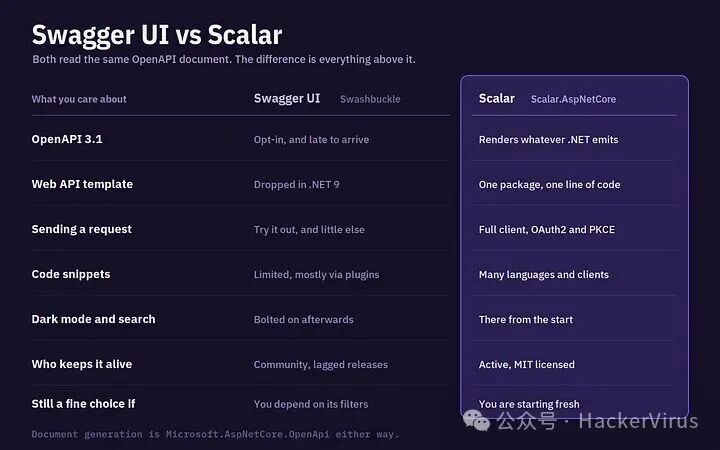
Three things stand out in daily use.在日常使用中,有三件事特别值得注意。
The test client is the big one. Swagger UI’s “Try it out” is a form that fires a request. Scalar ships something closer to a lightweight Postman: OAuth2 with PKCE, bearer tokens and API keys handled in the UI, without the custom filters you used to write just to get a working lock button.测试客户端确实很重要。Swagger UI 的“尝试一下”功能是一个可以发送请求的表单。Scalar 则提供了一种更轻量的接口——OAuth2 协议,带有 PKCE 机制,使用 bearer 令牌和 API 密钥进行通信。而且,无需使用那些为了让锁定按钮正常工作而编写的自定义过滤器。
Code snippets come for free. Scalar generates ready-to-paste requests across a long list of languages and HTTP clients — curl, C#, Python, JavaScript, Go, from the same document. Swagger UI needs plugins for a much smaller version of this.这些代码片段可以免费获取。Scalar 能够生成适用于多种语言的请求模板,支持多种 HTTP 客户端——如 curl、C#、Python、JavaScript、Go 等。对于 Swagger UI 来说,只需要一些插件就能实现更简单的使用方式。
And the defaults are better. Dark mode, instant search across endpoints, a cleaner hierarchy on large APIs. Small things, but you look at this page every day.而且默认设置已经得到了改进。暗模式、能够在各个终端设备进行即时搜索、在复杂的接口结构中实现更清晰的层次划分。这些细节虽然微不足道,但每天使用这个页面时,这些改进还是让人感觉很不错。