ARTICLE · 1083361
模板化数据提取已成过去式,下一代方案来了

传统基于模板的文档提取方式已过时。Amazon Bedrock Data Automation (BDA) 利用生成式 AI 和基础模型,提供了一种全托管、可扩展的方案,能够自动处理文档、图像、音频和视频等非结构化多模态数据,将其高效转化为结构化、可操作的业务洞察。
译自:Template-based data extraction is dead. Here's what comes next.[1]
作者:Hafiz Hassan
现代企业正陷入一场与非结构化数据处理相关的持续、艰苦的斗争:包括 PDF、合同、扫描图像、客户通话录音、会议视频等。传统严重依赖模板化提取或僵化规则的文档自动化工作流曾经行之有效。但文档格式已经发生变化;它们呈现多样性且不符合标准格式,这使得昂贵、脆弱的传统系统成为了历史遗迹。
“现代企业正陷入一场与非结构化数据处理相关的持续、艰苦的斗争。”
企业需要更快、更准确的处理方式,这引出了一个问题:我们如何在无需大量人工投入的情况下,可靠地将混乱的多模态内容转化为结构化、可操作的洞察?
这就是 Amazon Bedrock Data Automation (BDA) 的用武之地。
什么是 Amazon Bedrock Data Automation (BDA)?
Amazon Bedrock[2] Data Automation (BDA) 是亚马逊云科技 (Amazon Web Services) 上的一项由生成式 AI 驱动的完全托管服务,用于实现端到端的文档和媒体自动化。它使用户能够自动化处理跨模态(如文档、图像、音频和视频)的非结构化内容的提取、分类和转换。
“其核心是基础模型,它实现了对内容的智能提取和理解。”
其核心是 基础模型 (FMs)[3],它实现了对内容的智能提取和理解。它允许用户为常见用例配置标准输出,甚至可以使用为您业务量身定制的蓝图(blueprints)来定义自定义提取逻辑。BDA 专为可扩展性、准确性和可审计性而设计,非常适合企业工作流。
操作指南:创建项目,以及使用蓝图实现标准输出和自定义输出
1. 通过控制台创建项目
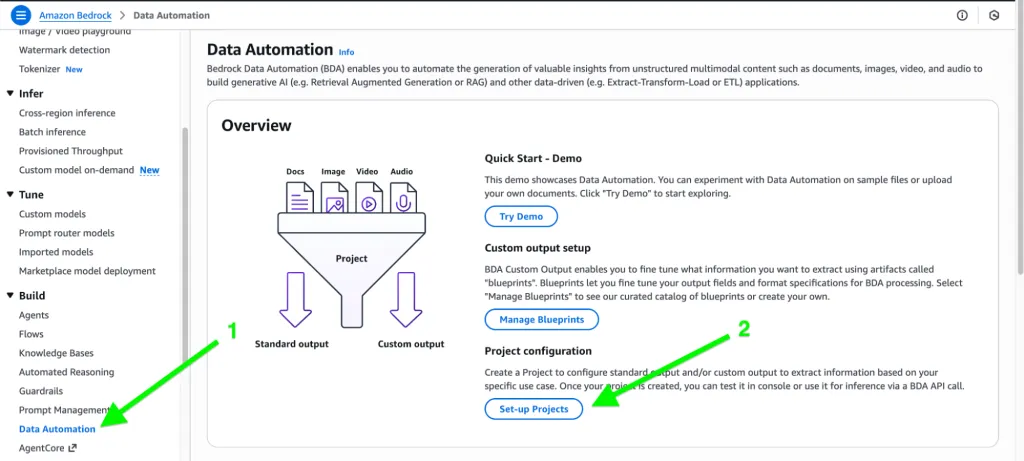
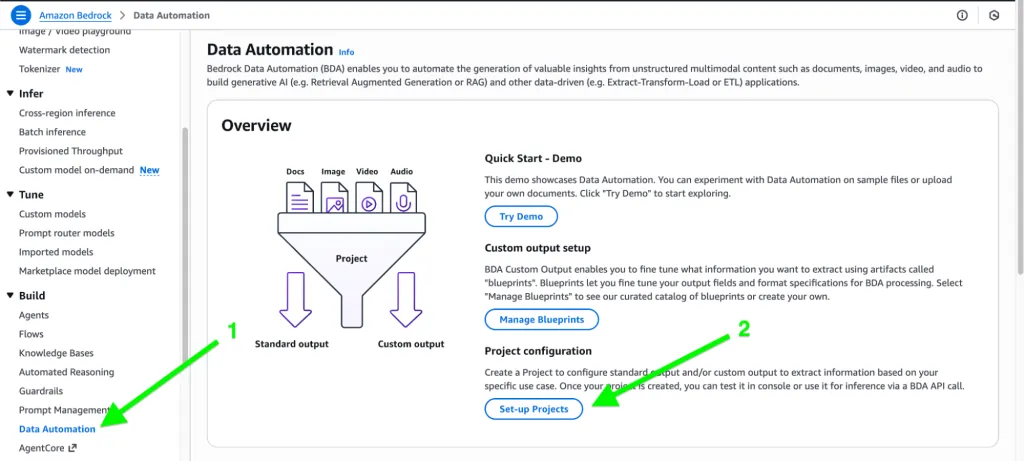
在 Amazon Bedrock 控制台中,导航至 Data Automation → Create Project。
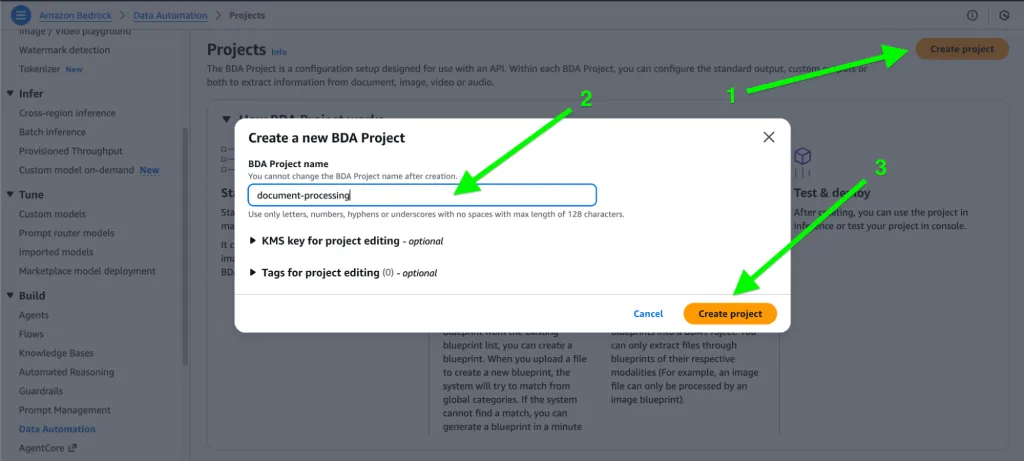
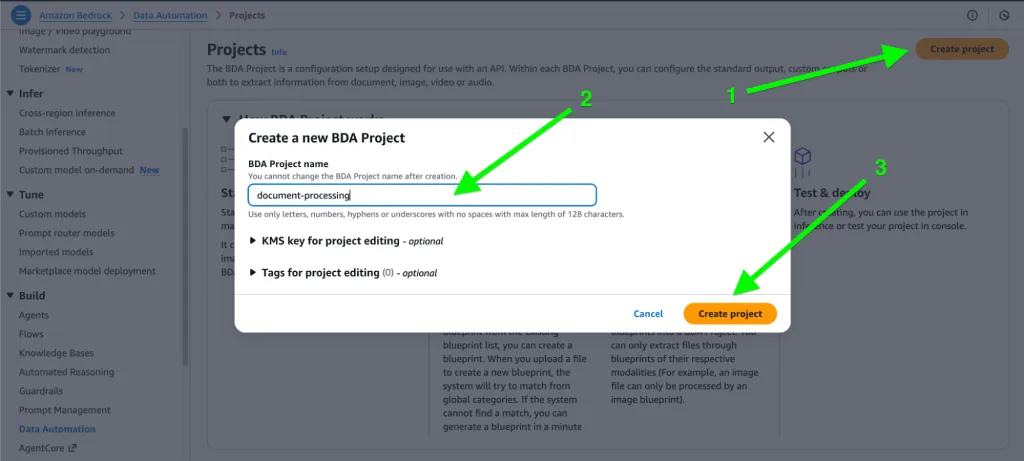
输入项目名称:
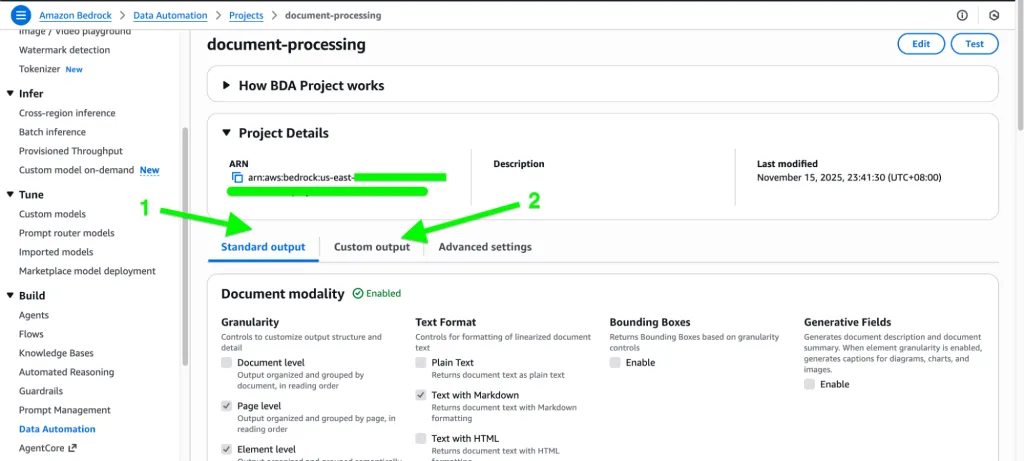
2. 标准输出:
标准输出为您提供模型直接从数据自动化管道生成的 默认、非结构化响应(文本、图像、音频或视频)。
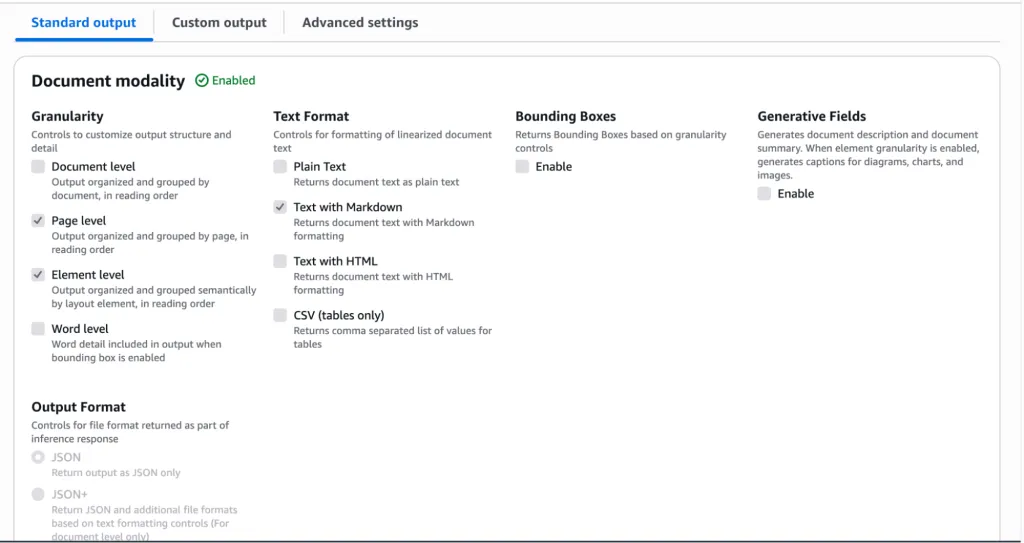
在标准输出中,每种模态对于所需的输出都有其自己的选项。
文档:
图像与视频:
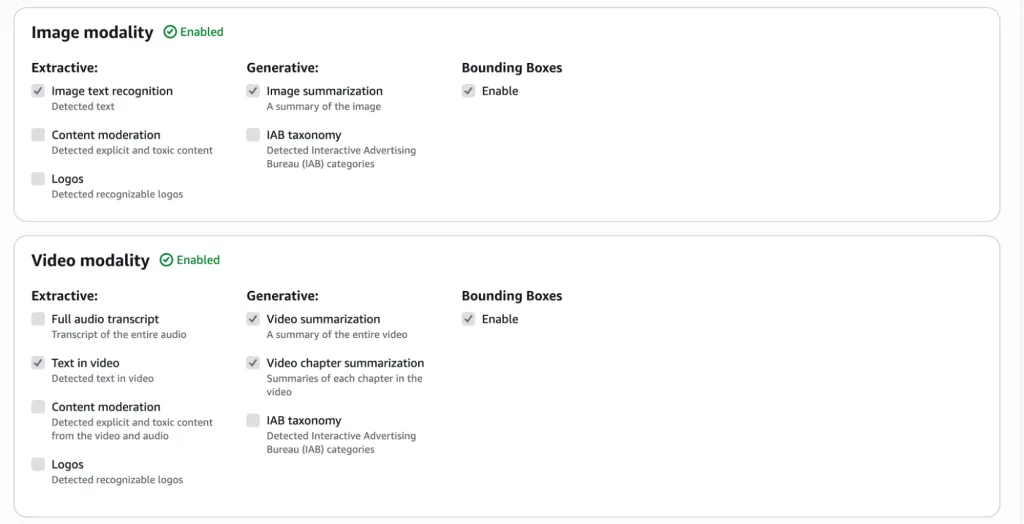
音频:
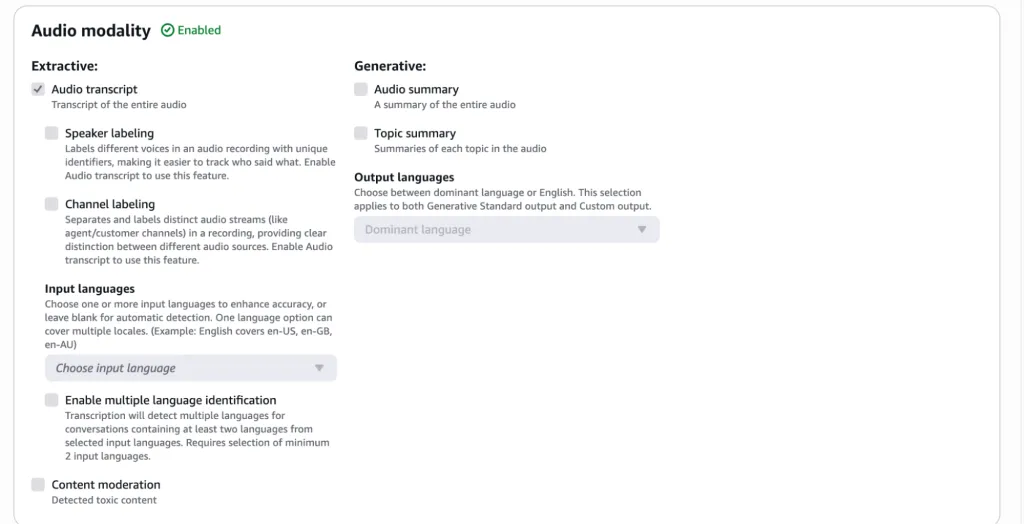
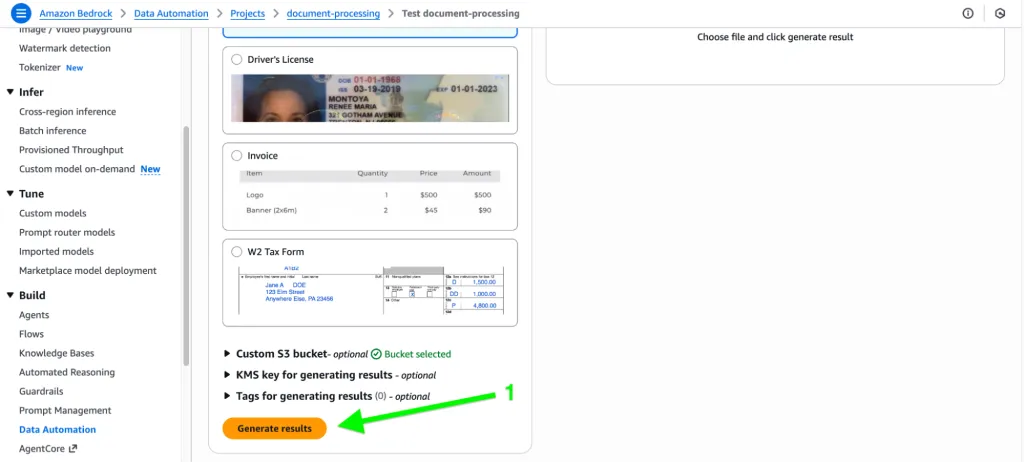
现在让我们测试标准输出的文档模态:
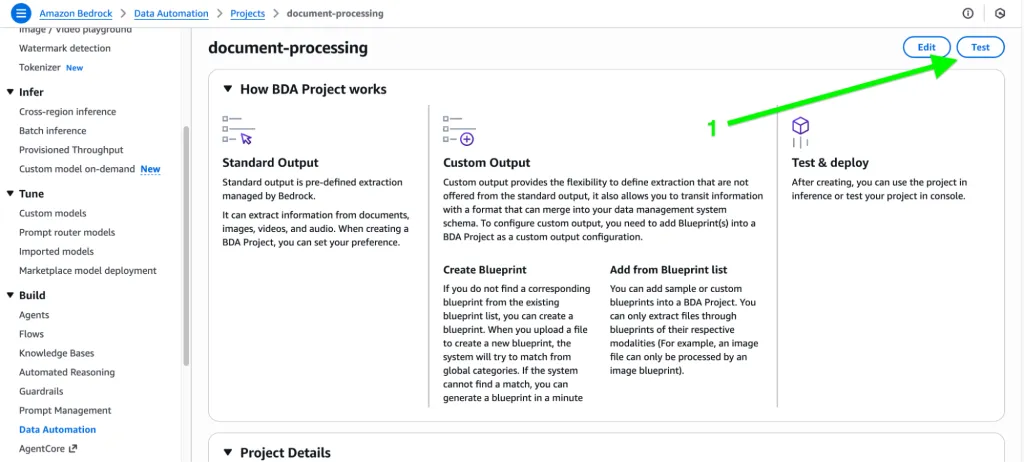
首先,点击右上角的“Test”。
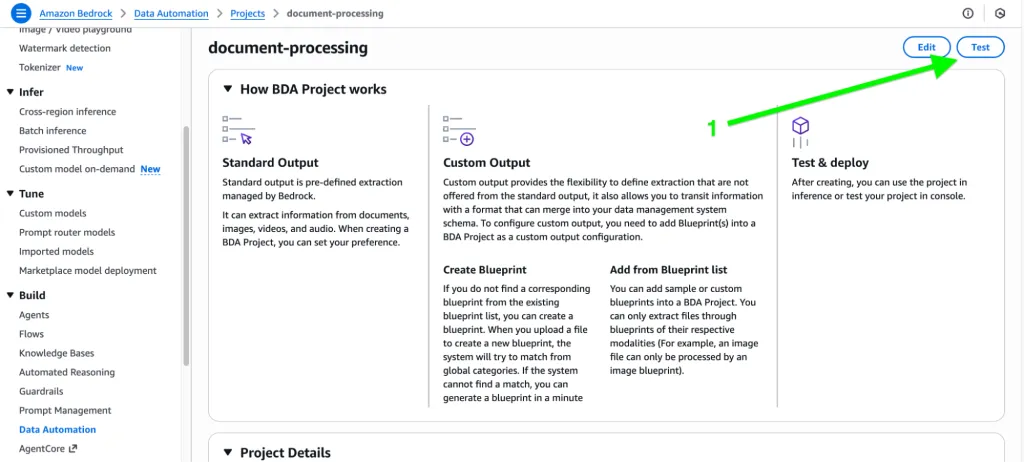
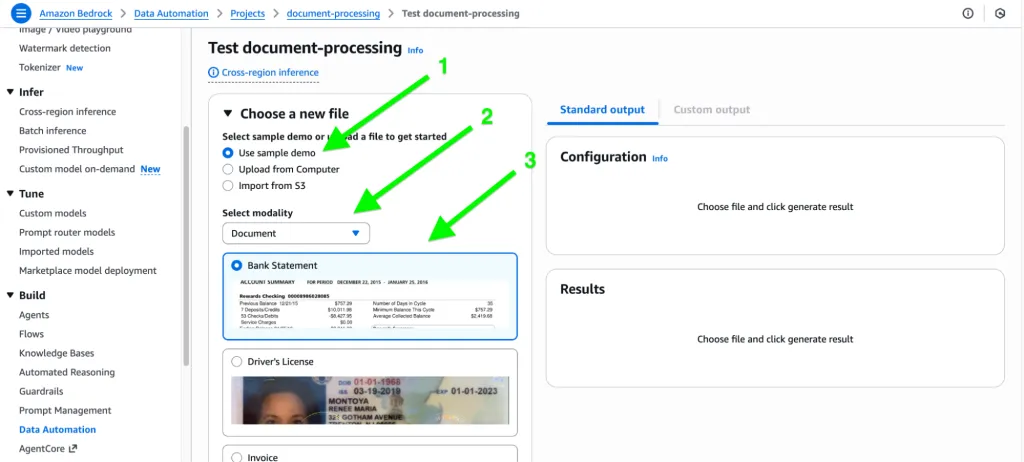
接下来,从系统、示例或 S3 中选择文档,并从下拉菜单中选择模态。
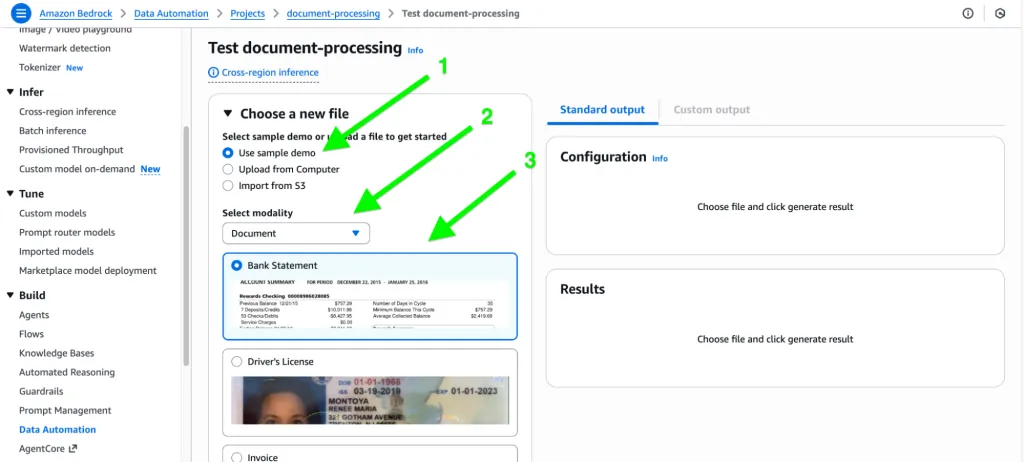
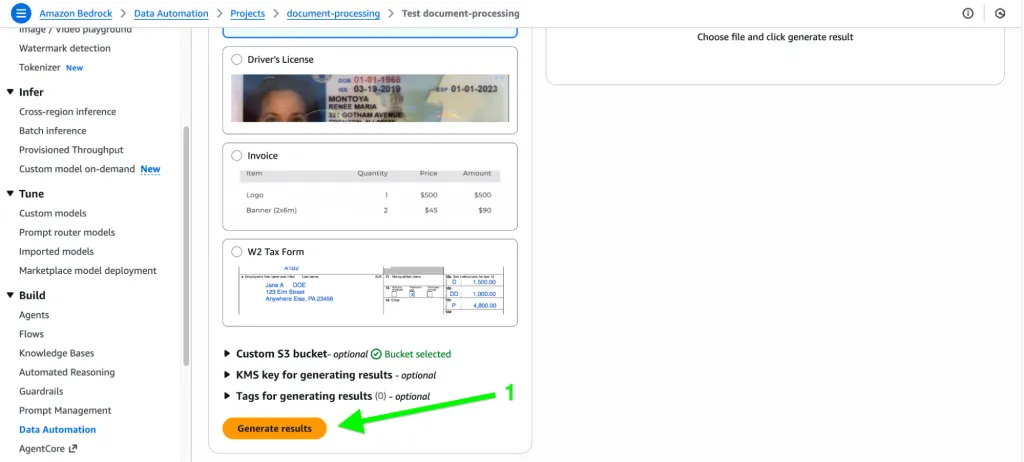
点击“Generate results”按钮:
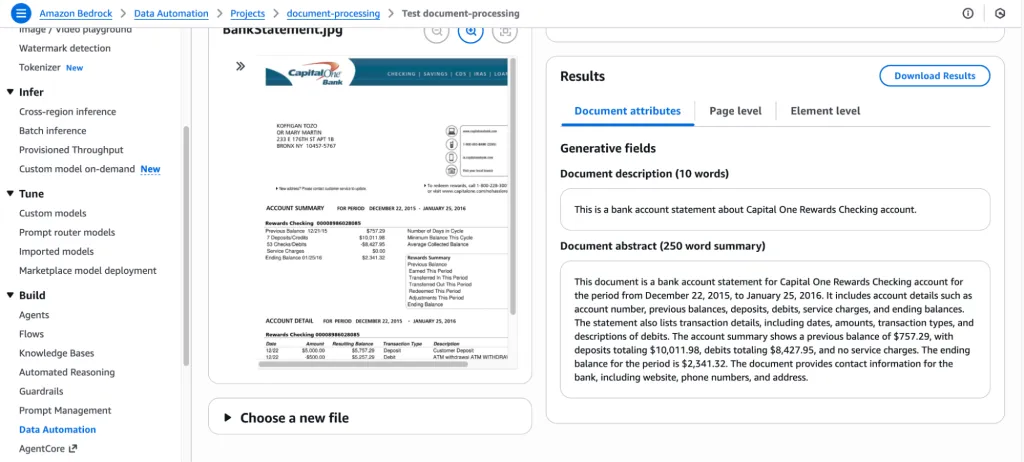
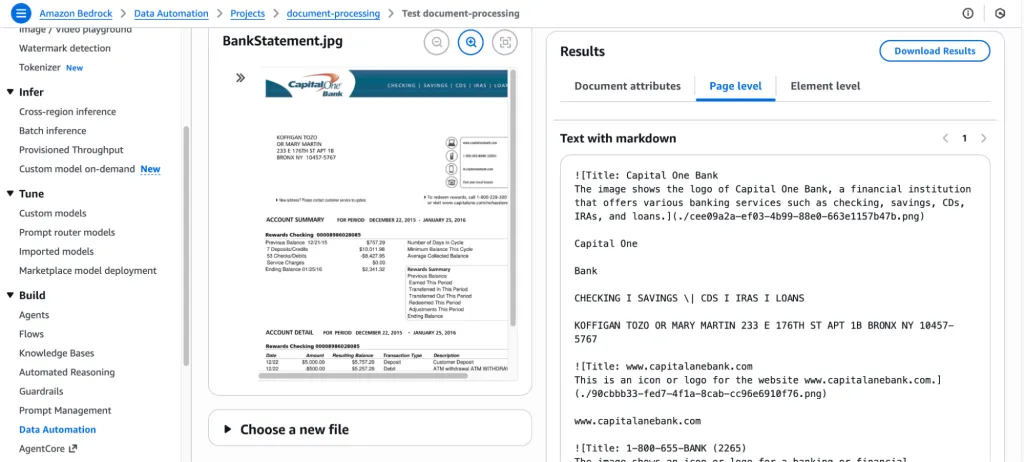
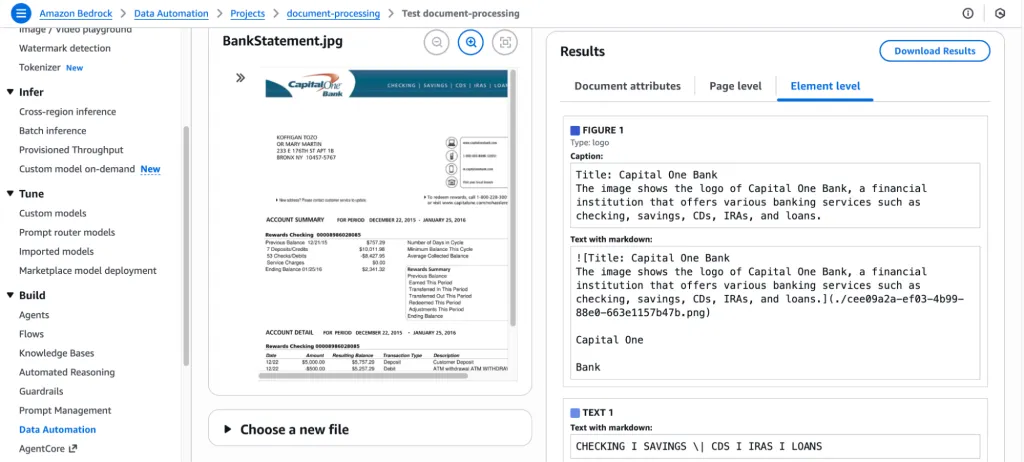
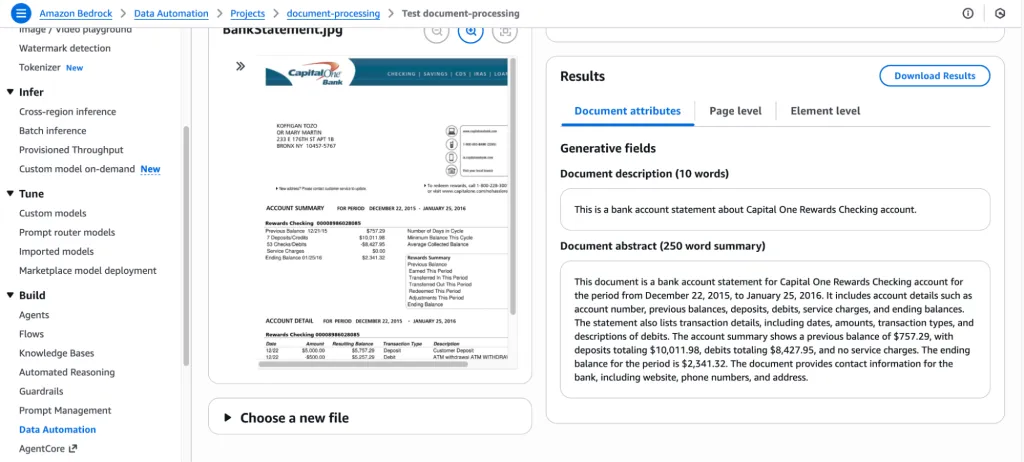
处理后,它将显示文档的摘要和内容:
自定义输出(蓝图):
自定义输出允许您使用蓝图定义 结构化、可预测的格式,从而确保输出与您的确切模式、字段和业务规则相匹配。
让我们使用蓝图为同一文档测试自定义输出:
导航至“Custom output”并点击“Add Blueprint”:
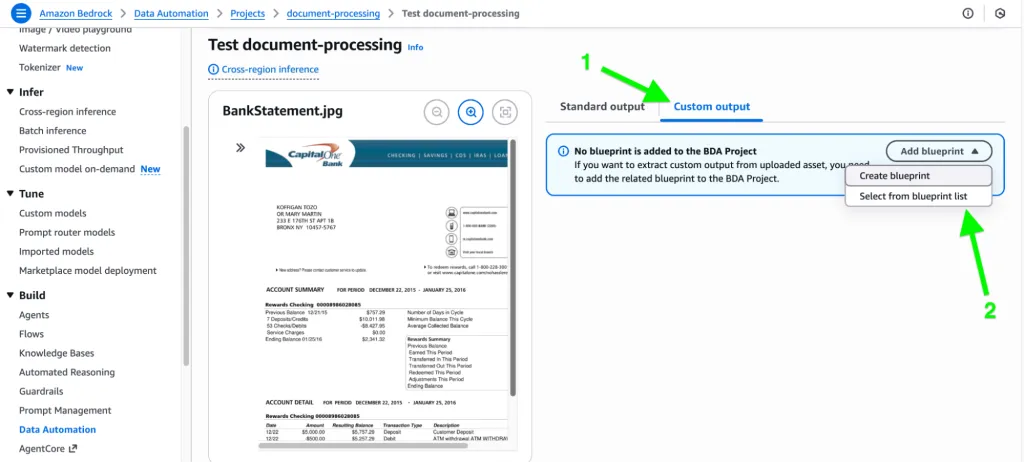
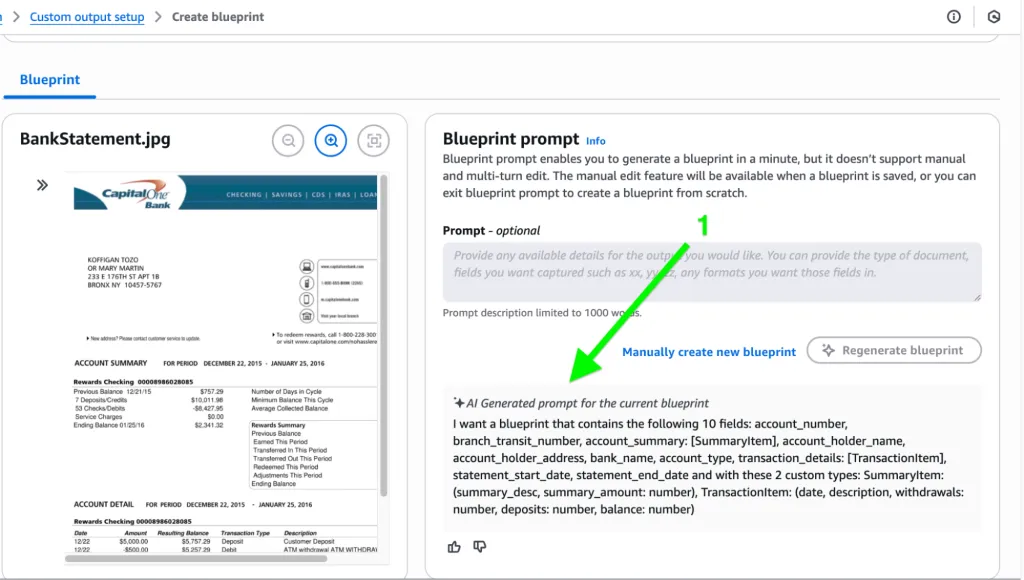
在此处,将出现两个选项。您可以利用 LLM 的能力来生成蓝图(它会检查文档),或者选择手动输入字段名称、指令和其他信息。
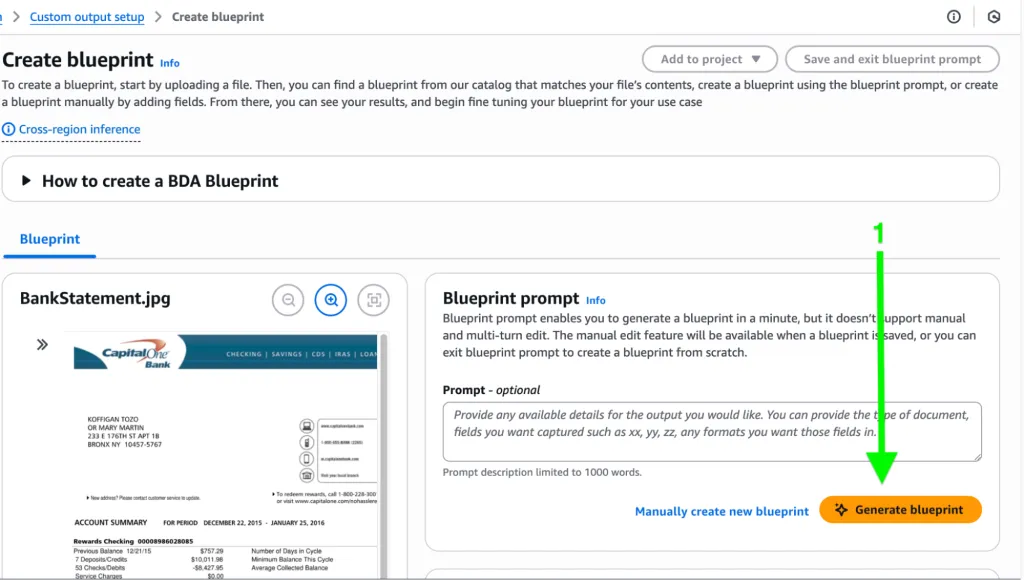
下面是由 LLM 生成的蓝图,它已经从文档中提取了所有可能的字段和表格:
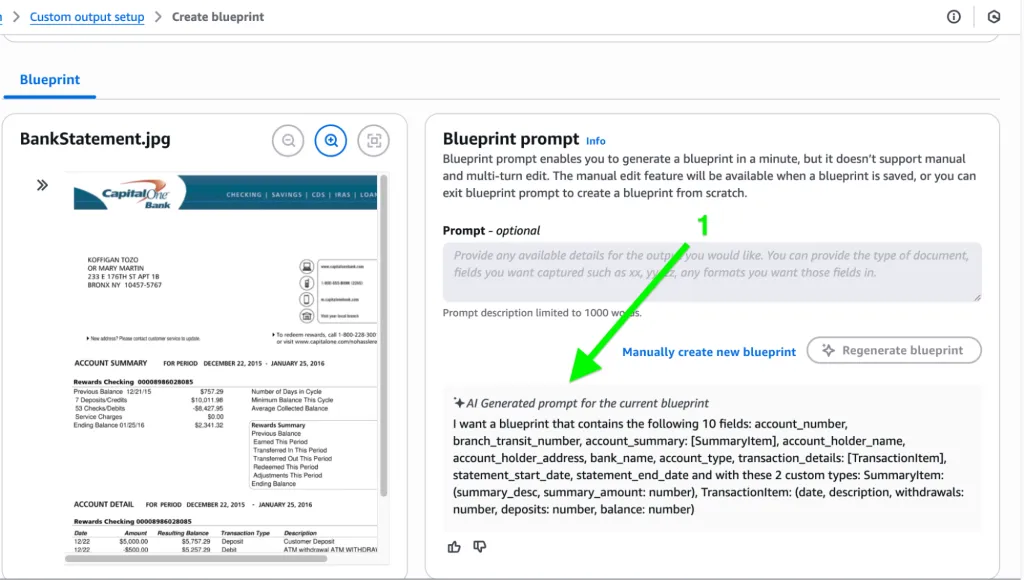
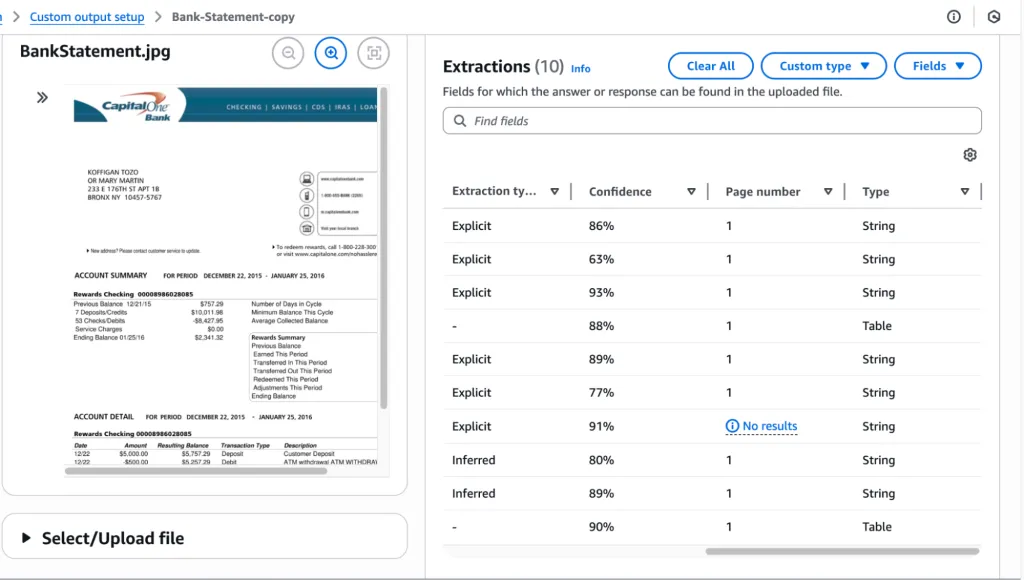
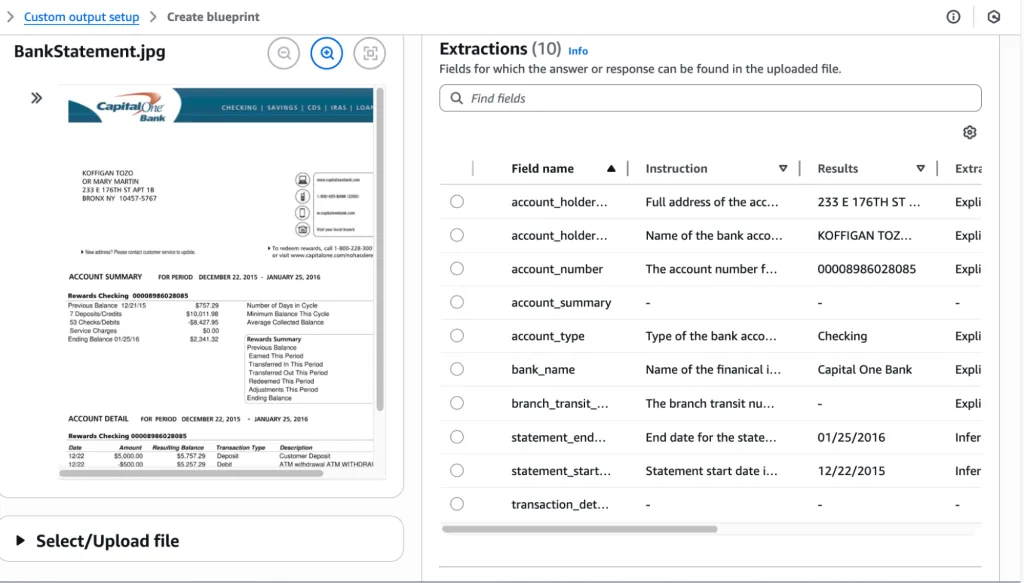
它使用蓝图提取了信息,如下所示,包括字段名称、指令和结果:
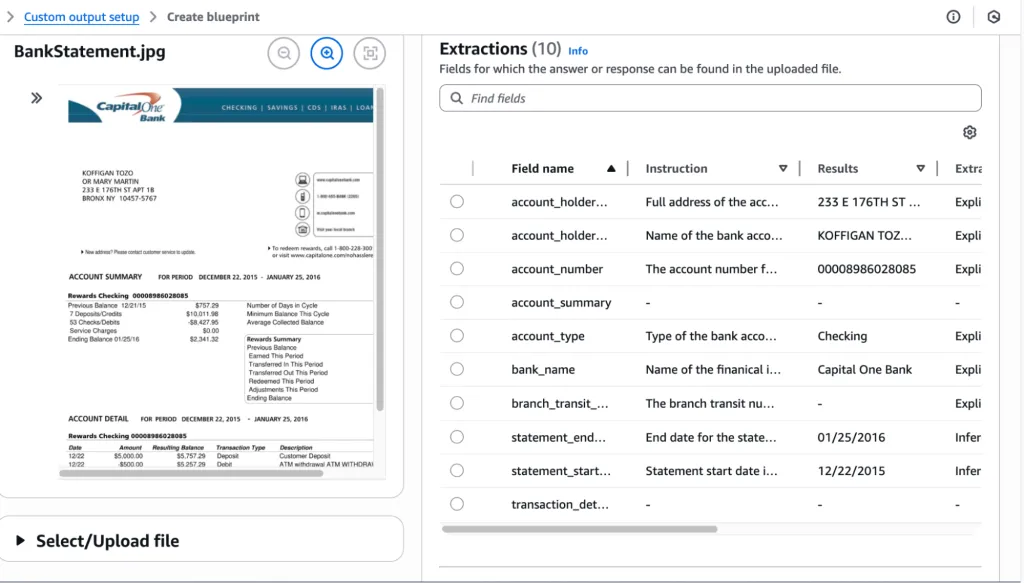
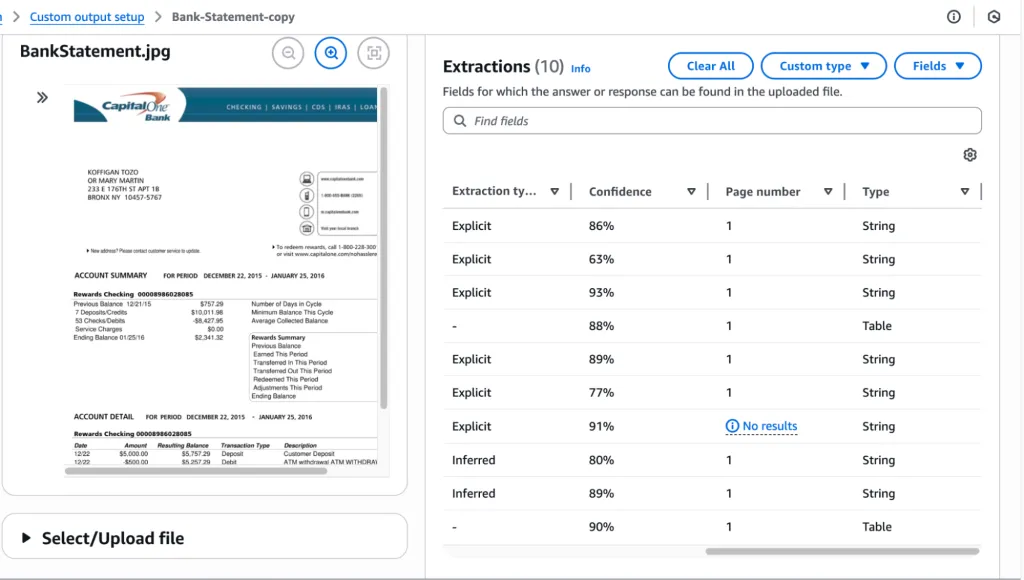
它还提供了提取类型(可以是显式的或推断的)、置信度百分比以及其他相关信息。
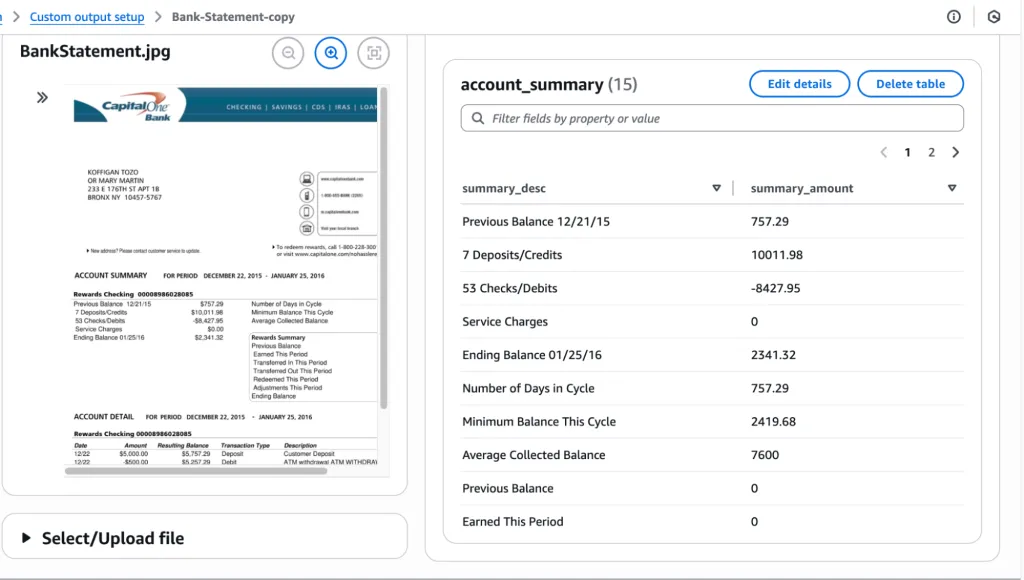
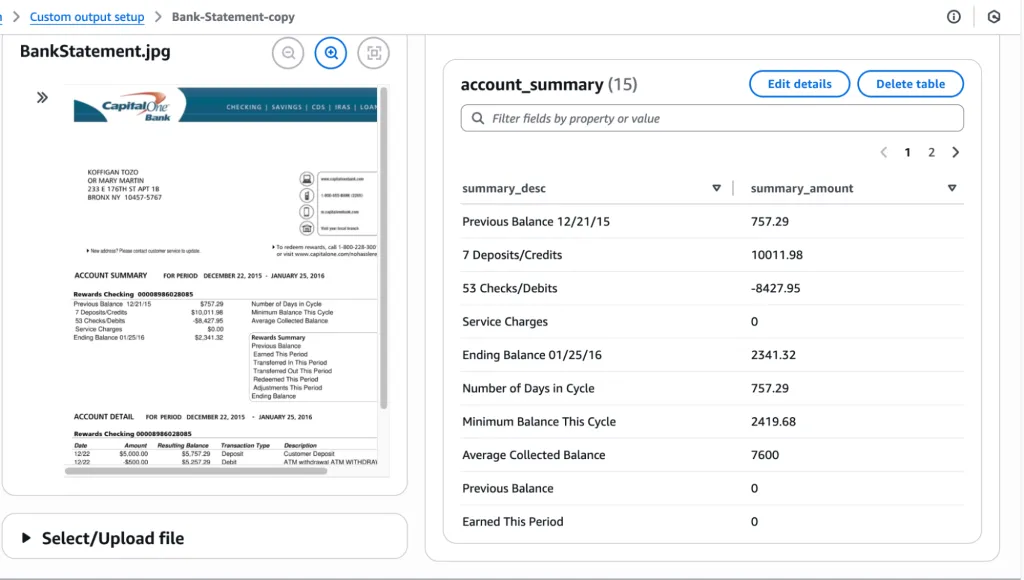
此外,它还可以以表格形式提取信息,例如账户摘要或交易信息:
代码示例
Amazon Bedrock Data Automation (BDA) Utility ModuleDescription: Helper functions to create BDA projects, blueprints, invoke jobs, monitor job status, and fetch results.import boto3import timeimport jsonimport botocoreclass BedrockDataAutomation: def __init__(self, region="us-east-1"): self.bda = boto3.client("bedrock-data-automation", region_name=region) self.runtime = boto3.client("bedrock-data-automation-runtime", region_name=region) # ------------------------------------------------------------ # BLUEPRINT OPERATIONS # ------------------------------------------------------------ def create_blueprint(self, name, schema, description="", stage="LIVE"): """ Create a BDA Custom Output Blueprint from a JSON schema. """ print(f"Creating blueprint: {name}") response = self.bda.create_blueprint( blueprintName=name, blueprintStage=stage, type="DOCUMENT", schema=json.dumps(schema) ) return response["blueprint"]["blueprintArn"] # ------------------------------------------------------------ # PROJECT OPERATIONS # ------------------------------------------------------------ def create_project(self, name, description, standard_output_config, custom_output_config=None): """ Create a BDA Project with Standard or Custom Output. """ print(f"Creating project: {name}") response = self.bda.create_data_automation_project( projectName=name, projectDescription=description, projectStage="LIVE", standardOutputConfiguration=standard_output_config, customOutputConfiguration=custom_output_config or {} ) return response["projectArn"] # ------------------------------------------------------------ # INVOCATION OPERATIONS # ------------------------------------------------------------ def invoke_project(self, project_arn, profile_arn, input_s3_uri, output_s3_uri, blueprints=None): """ Invoke a BDA project using async invocation. """ print(f"Invoking project: {project_arn}") kwargs = {"inputConfiguration": {"s3Uri": input_s3_uri},"outputConfiguration": {"s3Uri": output_s3_uri},"dataAutomationConfiguration": {"dataAutomationProjectArn": project_arn,"stage": "DEVELOPMENT"},"dataAutomationProfileArn": profile_arn} if blueprints:kwargs["blueprints"] = blueprints response = self.runtime.invoke_data_automation_async(**kwargs) invocation_arn = response["invocationArn"] print("Invocation ARN:", invocation_arn) return invocation_arn # ------------------------------------------------------------ # JOB STATUS POLLING # ------------------------------------------------------------ def wait_for_job(self, invocation_arn, poll_interval=10): """ Poll until job finishes. Returns final status object. """ print("Polling job:", invocation_arn) while True: try: resp = self.runtime.get_data_automation_status( invocationArn=invocation_arn ) except Exception as e: print("Error fetching status:", e) raise status = resp["status"] print(f"Status: {status}") if status in ("SUCCEEDED", "FAILED", "CANCELLED"): return resp time.sleep(poll_interval)# --------------------------------------------------------------------# EXAMPLE USAGE# --------------------------------------------------------------------if __name__ == "__main__": bda = BedrockDataAutomation(region="us-east-1") # 1. Create Blueprint blueprint_schema = { "type": "object", "properties": { "account_holder": {"type": "string"}, "balance": {"type": "string"}, "transactions": { "type": "array", "items": { "type": "object", "properties": { "date": {"type": "string"}, "description": {"type": "string"}, "amount": {"type": "string"} } } } }, "required": ["account_holder", "transactions"] } blueprint_arn = bda.create_blueprint( name="BankStatementBlueprint", schema=blueprint_schema, description="Extract fields from bank statements." ) # 2. Create Standard Output Config standard_config = { "document": { "extraction": { "granularity": {"types": ["PAGE", "LINE"]}, "boundingBox": {"state": "ENABLED"} }, "outputFormat": { "textFormat": {"types": ["PLAIN_TEXT", "CSV"]} } } } # 3. Create Project with Custom Blueprint project_arn = bda.create_project( name="BankStatementProject", description="Process PDF bank statements", standard_output_config=standard_config, custom_output_config={ "blueprints": [ { "blueprintArn": blueprint_arn, "blueprintStage": "DEVELOPMENT", "blueprintVersion": "1" } ] } ) # 4. Invoke the project # Ensure you replace <ACCOUNT_ID> with your actual AWS Account ID profile_arn = "arn:aws:bedrock:us-east-1:<ACCOUNT_ID>:data-automation-profile/us.data-automation-v1" invocation_arn = bda.invoke_project( project_arn=project_arn, profile_arn=profile_arn, input_s3_uri="s3://your-bucket/input/statement.pdf", output_s3_uri="s3://your-bucket/output/", blueprints=[ { "blueprintArn": blueprint_arn, "version": "1", "stage": "DEVELOPMENT" } ] ) # 5. Poll job status final_status = bda.wait_for_job(invocation_arn) print("Final status:", json.dumps(final_status, indent=4))文档蓝图的类型
在处理文档时,BDA 支持五种核心自动化类型:
1. 分类 (Classification):发票、银行对账单、身份证、合同、人力资源信函等。 2. 提取 (Extraction):提取实体、字段、表格、元数据。
• 示例:从银行对账单中 → 日期、描述、金额、余额。
3. 转换 (Transformation):修改或重组数据。
• 示例:将家庭住址转换为独立字段 -> 街道、城市、邮政编码等。
4. 规范化 (Normalization):标准化数据值。
• 示例:转换多种日期格式 (MM/DD/YYYY → YYYY-MM-DD)。
5. 验证 (Validation):根据规则验证提取的字段。
• 示例:金额必须是数字;日期必须符合格式;余额必须核对一致。
说明业务价值的用例
BDA 提供显著投资回报率 (ROI) 的现实场景包括:
• 金融服务:自动化处理银行对账单、发票和贷款申请,减少人工劳动并加快对账或承保速度。 • 保险:接收并提取索赔单、医疗报告和受损资产照片中的数据。 • 人力资源 / 法律:处理简历、合同和录用信;提取结构化数据,包括技能、条款、薪资和相关方。 • 客户支持:转录并总结通话,提取意图和情感,并将这些洞察反馈到 CRM 或案例系统中。 • 安全与合规:分析闭路电视录像或会议记录以检测关键行动、总结上下文并标记合规问题。
BDA 证明了其灵活性和强大功能,因为它既支持基础工作流的标准输出,也支持通过蓝图进行精细调整的自定义模式。它是 可扩展且稳健的[4],其项目支持批处理和版本控制(开发与实时),以便进行安全测试。它还便于审计,提供带有类型、规范化规则和验证逻辑的结构化字段。

传统基于模板的文档提取方式已过时。Amazon Bedrock Data Automation (BDA) 利用生成式 AI 和基础模型,提供了一种全托管、可扩展的方案,能够自动处理文档、图像、音频和视频等非结构化多模态数据,将其高效转化为结构化、可操作的业务洞察。
译自:Template-based data extraction is dead. Here's what comes next.[1]
作者:Hafiz Hassan
现代企业正陷入一场与非结构化数据处理相关的持续、艰苦的斗争:包括 PDF、合同、扫描图像、客户通话录音、会议视频等。传统严重依赖模板化提取或僵化规则的文档自动化工作流曾经行之有效。但文档格式已经发生变化;它们呈现多样性且不符合标准格式,这使得昂贵、脆弱的传统系统成为了历史遗迹。
“现代企业正陷入一场与非结构化数据处理相关的持续、艰苦的斗争。”
企业需要更快、更准确的处理方式,这引出了一个问题:我们如何在无需大量人工投入的情况下,可靠地将混乱的多模态内容转化为结构化、可操作的洞察?
这就是 Amazon Bedrock Data Automation (BDA) 的用武之地。
什么是 Amazon Bedrock Data Automation (BDA)?
Amazon Bedrock[2] Data Automation (BDA) 是亚马逊云科技 (Amazon Web Services) 上的一项由生成式 AI 驱动的完全托管服务,用于实现端到端的文档和媒体自动化。它使用户能够自动化处理跨模态(如文档、图像、音频和视频)的非结构化内容的提取、分类和转换。
“其核心是基础模型,它实现了对内容的智能提取和理解。”
其核心是 基础模型 (FMs)[3],它实现了对内容的智能提取和理解。它允许用户为常见用例配置标准输出,甚至可以使用为您业务量身定制的蓝图(blueprints)来定义自定义提取逻辑。BDA 专为可扩展性、准确性和可审计性而设计,非常适合企业工作流。
操作指南:创建项目,以及使用蓝图实现标准输出和自定义输出
1. 通过控制台创建项目
在 Amazon Bedrock 控制台中,导航至 Data Automation → Create Project。
输入项目名称:
2. 标准输出:
标准输出为您提供模型直接从数据自动化管道生成的 默认、非结构化响应(文本、图像、音频或视频)。
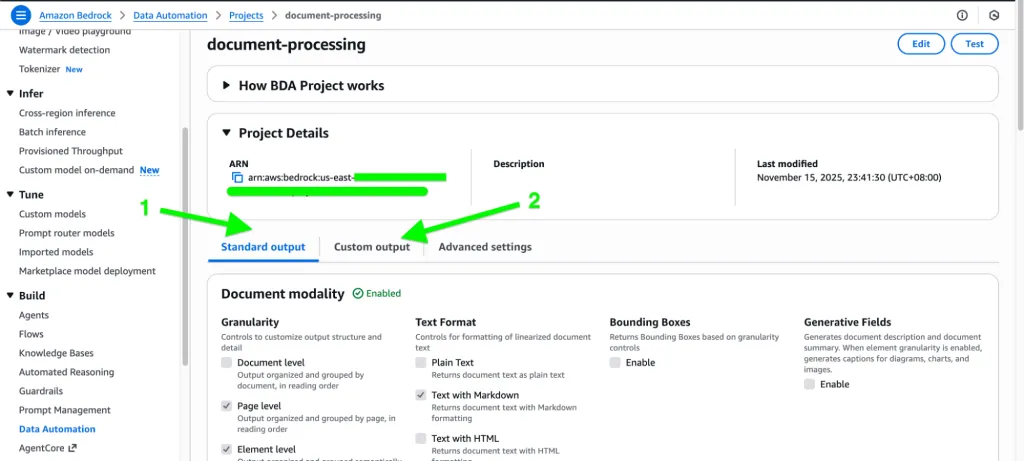
在标准输出中,每种模态对于所需的输出都有其自己的选项。
文档:
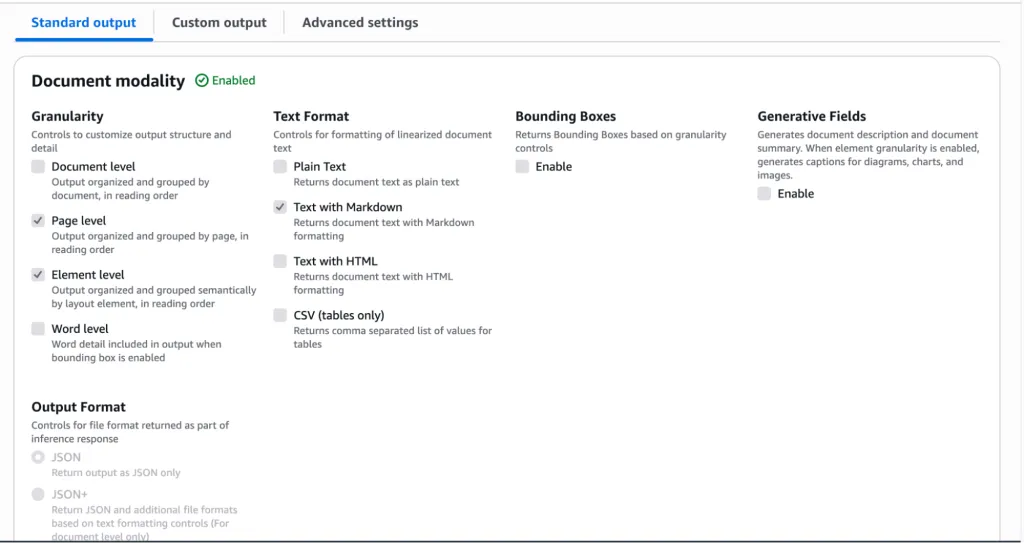
图像与视频:
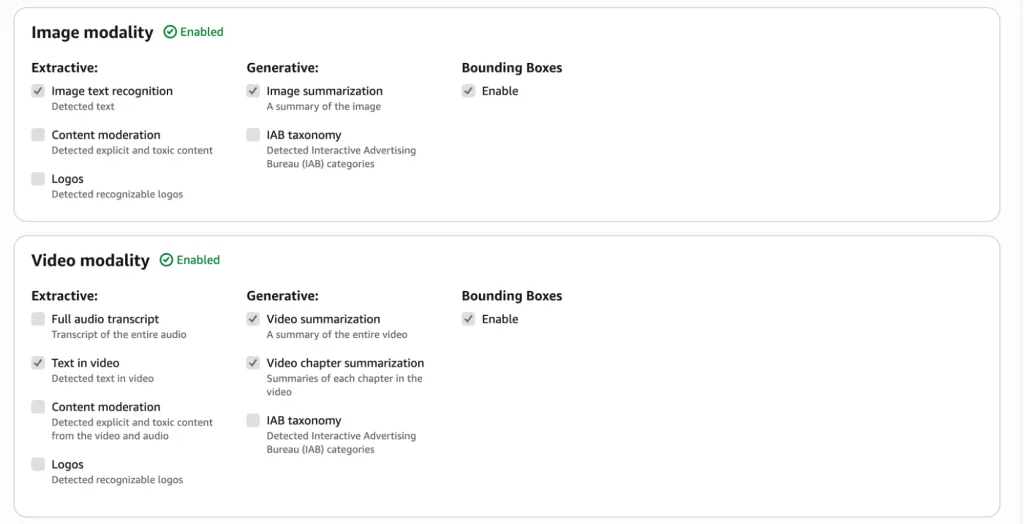
音频:
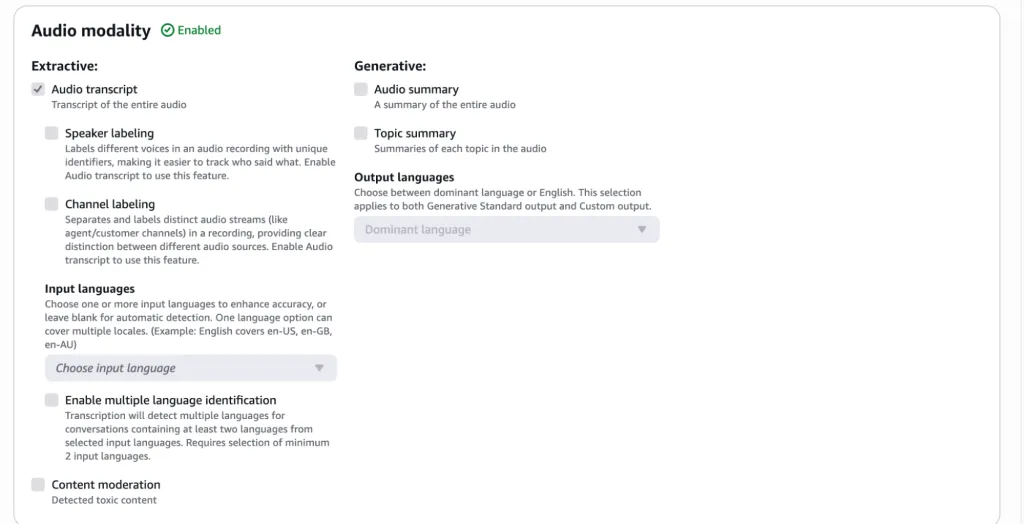
现在让我们测试标准输出的文档模态:
首先,点击右上角的“Test”。
接下来,从系统、示例或 S3 中选择文档,并从下拉菜单中选择模态。
点击“Generate results”按钮:
处理后,它将显示文档的摘要和内容:
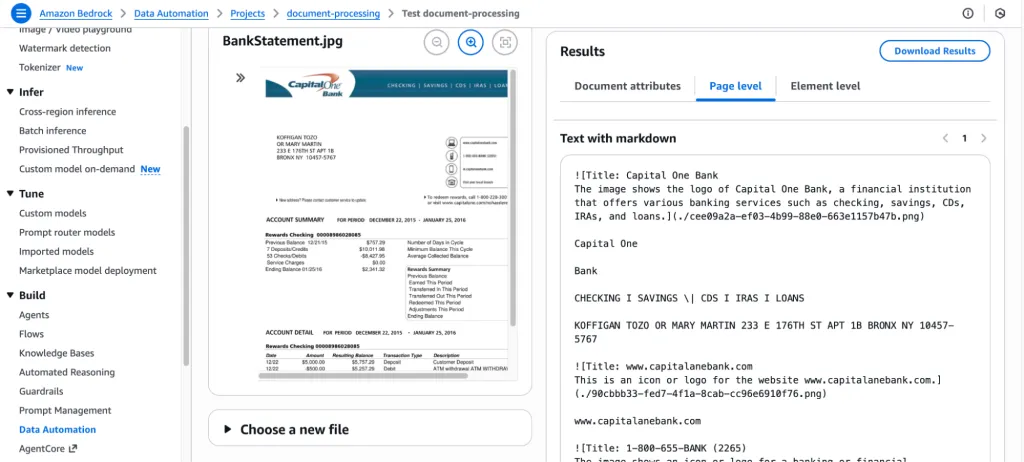
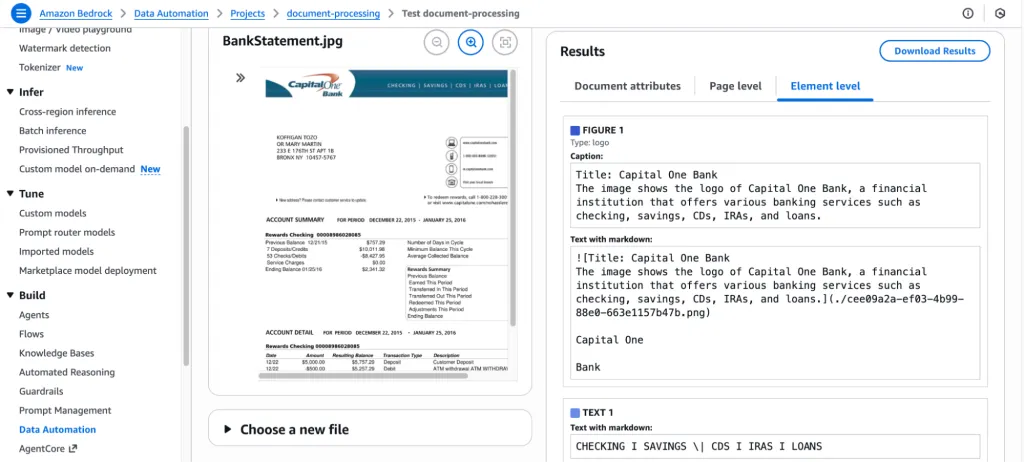
自定义输出(蓝图):
自定义输出允许您使用蓝图定义 结构化、可预测的格式,从而确保输出与您的确切模式、字段和业务规则相匹配。
让我们使用蓝图为同一文档测试自定义输出:
导航至“Custom output”并点击“Add Blueprint”:
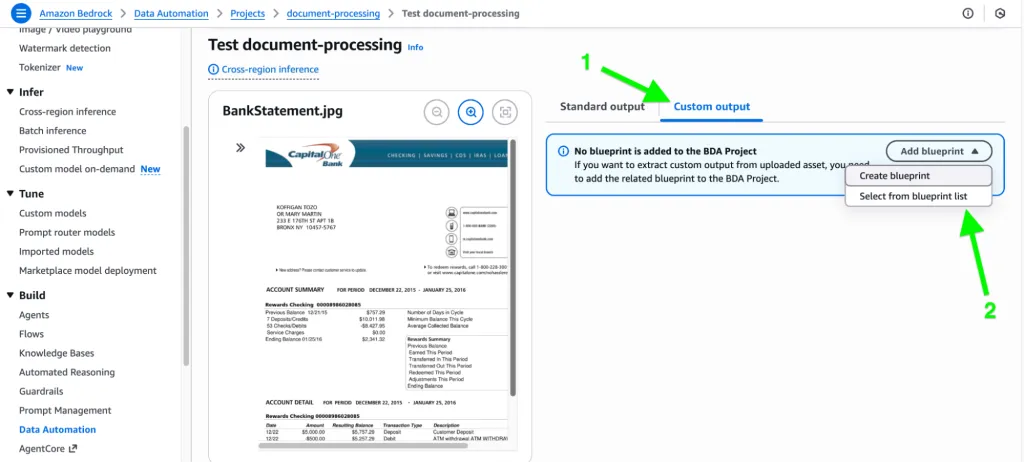
在此处,将出现两个选项。您可以利用 LLM 的能力来生成蓝图(它会检查文档),或者选择手动输入字段名称、指令和其他信息。
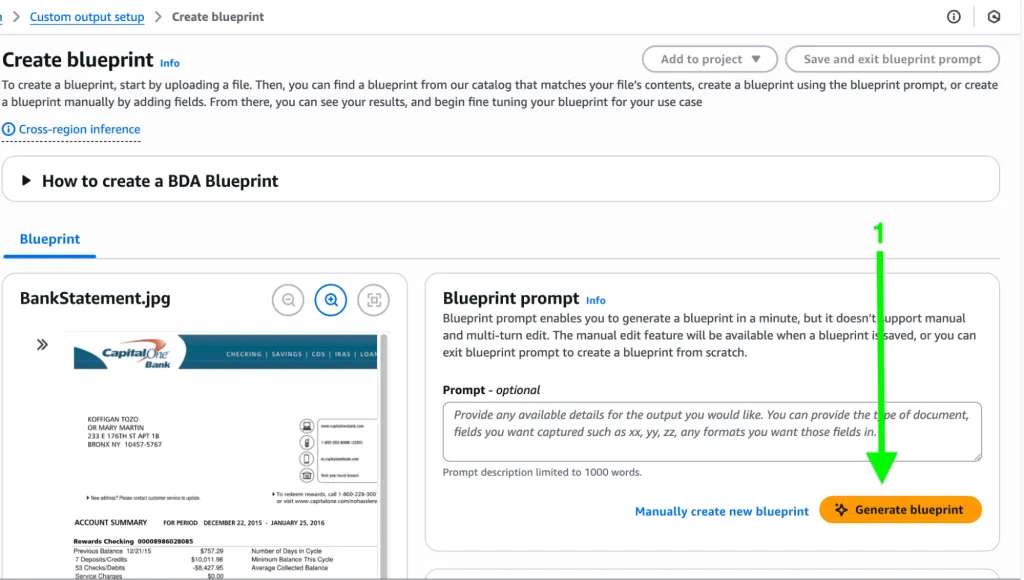
下面是由 LLM 生成的蓝图,它已经从文档中提取了所有可能的字段和表格:
它使用蓝图提取了信息,如下所示,包括字段名称、指令和结果:
它还提供了提取类型(可以是显式的或推断的)、置信度百分比以及其他相关信息。
此外,它还可以以表格形式提取信息,例如账户摘要或交易信息:
代码示例
Amazon Bedrock Data Automation (BDA) Utility ModuleDescription: Helper functions to create BDA projects, blueprints, invoke jobs, monitor job status, and fetch results.import boto3import timeimport jsonimport botocoreclass BedrockDataAutomation: def __init__(self, region="us-east-1"): self.bda = boto3.client("bedrock-data-automation", region_name=region) self.runtime = boto3.client("bedrock-data-automation-runtime", region_name=region) # ------------------------------------------------------------ # BLUEPRINT OPERATIONS # ------------------------------------------------------------ def create_blueprint(self, name, schema, description="", stage="LIVE"): """ Create a BDA Custom Output Blueprint from a JSON schema. """ print(f"Creating blueprint: {name}") response = self.bda.create_blueprint( blueprintName=name, blueprintStage=stage, type="DOCUMENT", schema=json.dumps(schema) ) return response["blueprint"]["blueprintArn"] # ------------------------------------------------------------ # PROJECT OPERATIONS # ------------------------------------------------------------ def create_project(self, name, description, standard_output_config, custom_output_config=None): """ Create a BDA Project with Standard or Custom Output. """ print(f"Creating project: {name}") response = self.bda.create_data_automation_project( projectName=name, projectDescription=description, projectStage="LIVE", standardOutputConfiguration=standard_output_config, customOutputConfiguration=custom_output_config or {} ) return response["projectArn"] # ------------------------------------------------------------ # INVOCATION OPERATIONS # ------------------------------------------------------------ def invoke_project(self, project_arn, profile_arn, input_s3_uri, output_s3_uri, blueprints=None): """ Invoke a BDA project using async invocation. """ print(f"Invoking project: {project_arn}") kwargs = {"inputConfiguration": {"s3Uri": input_s3_uri},"outputConfiguration": {"s3Uri": output_s3_uri},"dataAutomationConfiguration": {"dataAutomationProjectArn": project_arn,"stage": "DEVELOPMENT"},"dataAutomationProfileArn": profile_arn} if blueprints:kwargs["blueprints"] = blueprints response = self.runtime.invoke_data_automation_async(**kwargs) invocation_arn = response["invocationArn"] print("Invocation ARN:", invocation_arn) return invocation_arn # ------------------------------------------------------------ # JOB STATUS POLLING # ------------------------------------------------------------ def wait_for_job(self, invocation_arn, poll_interval=10): """ Poll until job finishes. Returns final status object. """ print("Polling job:", invocation_arn) while True: try: resp = self.runtime.get_data_automation_status( invocationArn=invocation_arn ) except Exception as e: print("Error fetching status:", e) raise status = resp["status"] print(f"Status: {status}") if status in ("SUCCEEDED", "FAILED", "CANCELLED"): return resp time.sleep(poll_interval)# --------------------------------------------------------------------# EXAMPLE USAGE# --------------------------------------------------------------------if __name__ == "__main__": bda = BedrockDataAutomation(region="us-east-1") # 1. Create Blueprint blueprint_schema = { "type": "object", "properties": { "account_holder": {"type": "string"}, "balance": {"type": "string"}, "transactions": { "type": "array", "items": { "type": "object", "properties": { "date": {"type": "string"}, "description": {"type": "string"}, "amount": {"type": "string"} } } } }, "required": ["account_holder", "transactions"] } blueprint_arn = bda.create_blueprint( name="BankStatementBlueprint", schema=blueprint_schema, description="Extract fields from bank statements." ) # 2. Create Standard Output Config standard_config = { "document": { "extraction": { "granularity": {"types": ["PAGE", "LINE"]}, "boundingBox": {"state": "ENABLED"} }, "outputFormat": { "textFormat": {"types": ["PLAIN_TEXT", "CSV"]} } } } # 3. Create Project with Custom Blueprint project_arn = bda.create_project( name="BankStatementProject", description="Process PDF bank statements", standard_output_config=standard_config, custom_output_config={ "blueprints": [ { "blueprintArn": blueprint_arn, "blueprintStage": "DEVELOPMENT", "blueprintVersion": "1" } ] } ) # 4. Invoke the project # Ensure you replace <ACCOUNT_ID> with your actual AWS Account ID profile_arn = "arn:aws:bedrock:us-east-1:<ACCOUNT_ID>:data-automation-profile/us.data-automation-v1" invocation_arn = bda.invoke_project( project_arn=project_arn, profile_arn=profile_arn, input_s3_uri="s3://your-bucket/input/statement.pdf", output_s3_uri="s3://your-bucket/output/", blueprints=[ { "blueprintArn": blueprint_arn, "version": "1", "stage": "DEVELOPMENT" } ] ) # 5. Poll job status final_status = bda.wait_for_job(invocation_arn) print("Final status:", json.dumps(final_status, indent=4))文档蓝图的类型
在处理文档时,BDA 支持五种核心自动化类型:
1. 分类 (Classification):发票、银行对账单、身份证、合同、人力资源信函等。 2. 提取 (Extraction):提取实体、字段、表格、元数据。
• 示例:从银行对账单中 → 日期、描述、金额、余额。
3. 转换 (Transformation):修改或重组数据。
• 示例:将家庭住址转换为独立字段 -> 街道、城市、邮政编码等。
4. 规范化 (Normalization):标准化数据值。
• 示例:转换多种日期格式 (MM/DD/YYYY → YYYY-MM-DD)。
5. 验证 (Validation):根据规则验证提取的字段。
• 示例:金额必须是数字;日期必须符合格式;余额必须核对一致。
说明业务价值的用例
BDA 提供显著投资回报率 (ROI) 的现实场景包括:
• 金融服务:自动化处理银行对账单、发票和贷款申请,减少人工劳动并加快对账或承保速度。 • 保险:接收并提取索赔单、医疗报告和受损资产照片中的数据。 • 人力资源 / 法律:处理简历、合同和录用信;提取结构化数据,包括技能、条款、薪资和相关方。 • 客户支持:转录并总结通话,提取意图和情感,并将这些洞察反馈到 CRM 或案例系统中。 • 安全与合规:分析闭路电视录像或会议记录以检测关键行动、总结上下文并标记合规问题。
BDA 证明了其灵活性和强大功能,因为它既支持基础工作流的标准输出,也支持通过蓝图进行精细调整的自定义模式。它是 可扩展且稳健的[4],其项目支持批处理和版本控制(开发与实时),以便进行安全测试。它还便于审计,提供带有类型、规范化规则和验证逻辑的结构化字段。
“与基于规则的系统相比,基础模型在各方面都实现了更好的语义提取。”
一个真正的关键优势是 BDA 在各种格式上都是多模态的。用户可以使用 BDA 框架来处理文档、图像、音频和视频。最重要的是,它非常准确。与基于规则的系统相比,基础模型在各方面都实现了更好的语义提取。
Amazon Bedrock Data Automation 使企业能够将非结构化的、多模态的内容转化为结构化的、可信赖且可操作的数据。凭借最少的设置、高度可定制的蓝图和可扩展的基于项目的架构,BDA 帮助组织减少了人工工作量并更快地挖掘出洞察。
引用链接
[1] Template-based data extraction is dead. Here's what comes next.: https://thenewstack.io/amazon-bedrock-data-automation/[2] Amazon Bedrock: https://thenewstack.io/mcp-summit-aws-bedrock/[3] 基础模型 (FMs): https://thenewstack.io/physical-ai-models-frontier/[4] 可扩展且稳健的: https://thenewstack.io/sustainable-development-balancing-innovation-with-longevity/
一个真正的关键优势是 BDA 在各种格式上都是多模态的。用户可以使用 BDA 框架来处理文档、图像、音频和视频。最重要的是,它非常准确。与基于规则的系统相比,基础模型在各方面都实现了更好的语义提取。
Amazon Bedrock Data Automation 使企业能够将非结构化的、多模态的内容转化为结构化的、可信赖且可操作的数据。凭借最少的设置、高度可定制的蓝图和可扩展的基于项目的架构,BDA 帮助组织减少了人工工作量并更快地挖掘出洞察。
引用链接
[1] Template-based data extraction is dead. Here's what comes next.: https://thenewstack.io/amazon-bedrock-data-automation/[2] Amazon Bedrock: https://thenewstack.io/mcp-summit-aws-bedrock/[3] 基础模型 (FMs): https://thenewstack.io/physical-ai-models-frontier/[4] 可扩展且稳健的: https://thenewstack.io/sustainable-development-balancing-innovation-with-longevity/