 夜雨聆风
夜雨聆风大家好我是:HeatShare,使用流行的UniApp快速搭建微信二次元动漫小程序,沉浸感拉满,支持一键刷新、保存壁纸,新手也能直接上手开发!
无论你是想做一个专属自己的动漫壁纸小程序,还是练手UniApp开发,这份完整教程和可直接运行的代码,都能帮你省超多时间!
有用的话点个关注,不定期分享ai和web相关互联网知识!

老规矩先看图片:
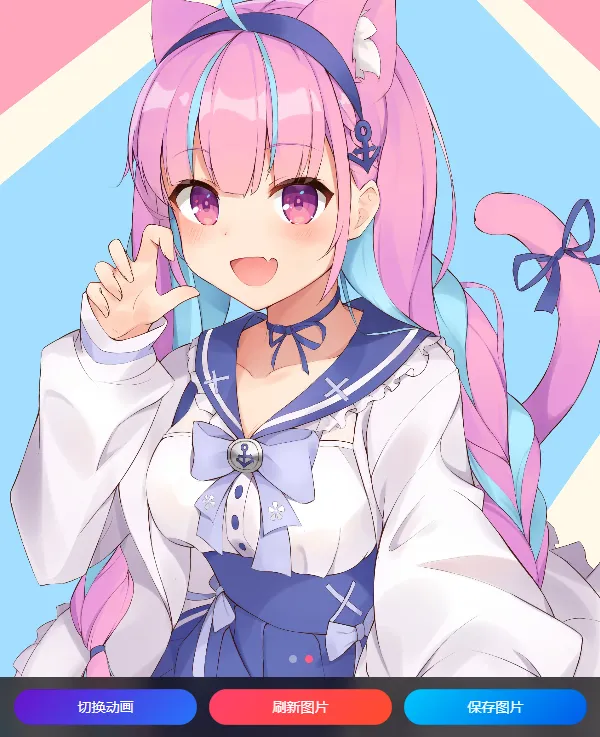
核心功能拆解
1. 页面结构
整个小程序只有1个核心页面,分为两部分:满屏轮播区域+底部固定功能栏,代码轻量,后期也可灵活修改。
轮播支持自动播放、循环播放,指示器颜色适配深色主题;图片加载失败会自动提示,避免页面异常。
2. 核心功能实现
接口请求:自动请求指定接口(demo.com),解析返回JSON数据,渲染动漫图片、作者信息等;
切换动画:一键切换自动播放状态,贴心提示操作结果,避免误触;
刷新图片:uni.request请求接口,快速加载最新动漫图片,满足换壁纸需求;
图片保存:下载当前显示的动漫图片,保存到手机相册,无需跳转。
3. 配置简单,直接运行
只需3步,就能将项目运行起来:
1. 将提供的代码复制到UniApp项目对应目录;
2. 替换接口地址为你的真实接口(demo.com);
3. 运行项目,发行到微信小程序,即可正常使用。
完整代码(可直接复制)
已整理好完整代码(页面文件+配置文件),无需自己编写,复制粘贴即可使用,新手也能轻松驾驭。
uniapp新建uni-app项目,pages下新建index页面,内容如下:
【页面文件 pages/index/index.vue】
<template><!-- 全屏容器 --><viewclass="slide-container"><!-- 轮播组件:满屏、自动播放、无边距 --><swiperclass="swiper"indicator-dotsautoplayinterval="3000"duration="500"circularindicator-color="rgba(255,255,255,0.4)"indicator-active-color="#ff5e87"><swiper-itemv-for="(item, index) in imgList":key="index"><!-- 满屏图片 --><image:src="item.url"class="slide-img"mode="aspectFill"@error="loadError(index)"></image></swiper-item></swiper><!-- 底部固定功能按钮栏 --><viewclass="bottom-bar"><button @click="changeSlide"class="bar-btn">切换动画</button><button @click="refreshData"class="bar-btn refresh-btn">刷新图片</button><button @click="downloadImage"class="bar-btn download-btn">保存图片</button></view></view></template><script>export default {data() {return {// 图片列表imgList: [],// 轮播自动播放状态isAutoPlay: true,// 当前轮播索引currentIndex: 0};},onLoad() {// 页面加载获取图片数据this.getAnimeImages();},methods: {// 请求接口获取动漫图片async getAnimeImages() {uni.showLoading({ title: '加载中...' });try {// 替换为你的真实接口:demo.comconst res = await uni.request({url: 'https://demo.com',method: 'GET'});// 接口返回数据处理if (res.data && res.data.results) {this.imgList = res.data.results;}} catch (error) {uni.showToast({ title: '加载失败', icon: 'error' });// 演示用:接口不可用时使用示例数据this.imgList = [{"artist_name":"もいち","artist_href":"https://www.pixiv.net/en/users/64870797","source_url":"https://www.pixiv.net/en/artworks/124596373","url":"https://nekos.best/api/v2/neko/889e0c35-7c8f-4d82-98f0-f9756132521c.png"},{"artist_name":"しろみ","artist_href":"https://www.pixiv.net/en/users/56415026","source_url":"https://www.pixiv.net/en/artworks/85527936","url":"https://nekos.best/api/v2/neko/4dd46ae9-c4af-462d-9afe-ccdbf4b06395.png"}];} finally {uni.hideLoading();}},// 切换轮播动画(开启/关闭自动播放)changeSlide() {this.isAutoPlay = !this.isAutoPlay;uni.showToast({title: this.isAutoPlay ? '已开启自动播放' : '已关闭自动播放',icon: 'success'});},// 刷新图片列表refreshData() {this.getAnimeImages();uni.showToast({ title: '刷新成功', icon: 'success' });},// 保存当前图片到手机async downloadImage() {if (this.imgList.length === 0) return;const currentImg = this.imgList[this.currentIndex].url;uni.showLoading({ title: '保存中...' });try {// 下载文件到临时路径const downloadRes = await uni.downloadFile({ url: currentImg });// 保存到相册await uni.saveImageToPhotosAlbum({filePath: downloadRes.tempFilePath});uni.showToast({ title: '保存成功!', icon: 'success' });} catch (error) {uni.showToast({ title: '保存失败', icon: 'error' });} finally {uni.hideLoading();}},// 轮播切换时更新当前索引swiperChange(e) {this.currentIndex = e.detail.current;},// 图片加载失败处理loadError(index) {console.log('图片加载失败:', this.imgList[index].url);}}};</script><stylescoped>/* 全屏容器 */.slide-container {width: 100vw;height: 100vh;background-color: #12121c;position: relative;overflow: hidden;}/* 轮播满屏 */.swiper {width: 100%;height: 100%;}/* 图片满屏填充 */.slide-img {width: 100%;height: 100%;display: block;}/* 底部固定按钮栏 */.bottom-bar {position: fixed;bottom: 0;left: 0;width: 100%;height: 60px;background: rgba(0, 0, 0, 0.7);backdrop-filter: blur(10px);display: flex;justify-content: space-around;align-items: center;padding: 0 10rpx;box-sizing: border-box;z-index: 999;}/* 按钮样式 */.bar-btn {flex: 1;height: 36px;line-height: 36px;font-size: 14px;border-radius: 18px;margin: 0 6px;color: #fff;border: none;background: linear-gradient(135deg, #6a11cb 0%, #2575fc 100%);}/* 刷新按钮颜色 */.refresh-btn {background: linear-gradient(135deg, #ff416c 0%, #ff4b2b 100%);}/* 下载按钮颜色 */.download-btn {background: linear-gradient(135deg, #00c6fb 0%, #005bea 100%);}</style>
{"pages": [{"path": "pages/index/index","style": {"navigationBarTitleText": "二次元动漫幻灯片","navigationBarBackgroundColor": "#12121c","navigationBarTextStyle": "white","backgroundColor": "#12121c"}}],"window": {"backgroundTextStyle": "light","navigationBarBackgroundColor": "#12121c","navigationBarTitleText": "动漫壁纸","navigationBarTextStyle": "white"},"sitemapLocation": "sitemap.json"}
总结
此款简易的UniApp二次元动漫幻灯片小程序,既满足了二次元爱好者看壁纸、存壁纸的需求,也适合前端新手练手!
留言区聊聊:你还想开发什么的小程序?(比如壁纸、图片、ai工具等)