夜雨聆风
夜雨聆风

Python,速成心法
敲代码,查资料,问Ai
练习,探索,总结,优化

★★★★★博文创作不易,源码代码的过程中,如有疑问的地方,欢迎大家指正留言交流。喜欢的老铁可以多多点赞+收藏分享+置顶,小红牛在此表示感谢。★★★★★
↓ 完整源码如下 ↓
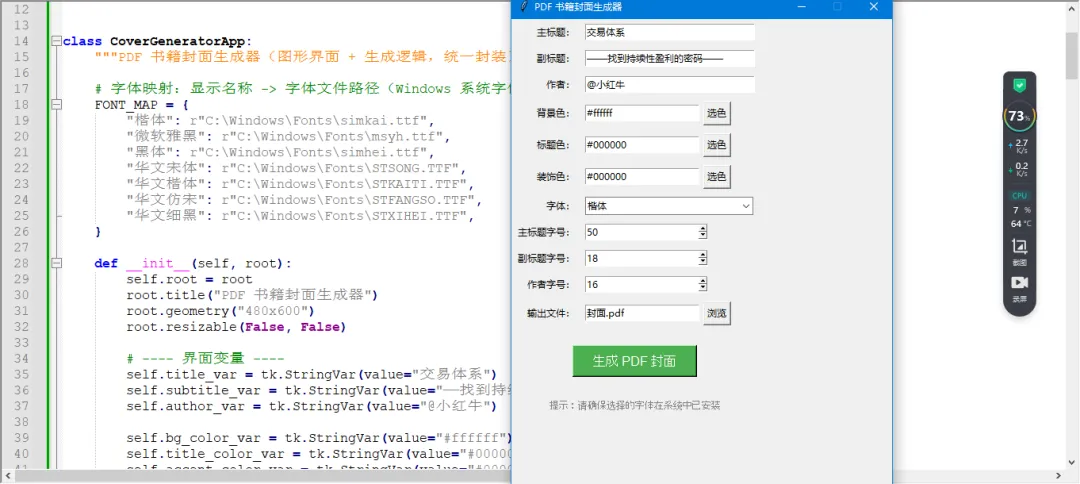
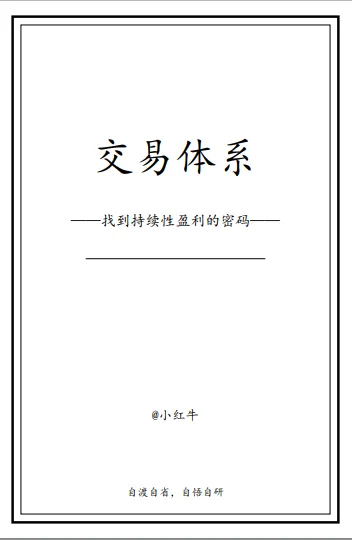
# -*- coding: utf-8 -*-# @Author : 小红牛# 微信公众号:wdPythonimport osimport subprocessimport sysimport tkinter as tkfrom tkinter import colorchooser, filedialog, messagebox, ttkfrom reportlab.lib.pagesizes import letterfrom reportlab.pdfgen import canvasfrom reportlab.lib.units import inchfrom reportlab.pdfbase import pdfmetricsfrom reportlab.pdfbase.ttfonts import TTFontfrom reportlab.lib.colors import HexColorclass PdfGeneratorApp:# 字体映射:显示名称 -> 字体文件路径(Windows 系统字体)FONT_MAP = {"楷体": r"C:\Windows\Fonts\simkai.ttf","微软雅黑": r"C:\Windows\Fonts\msyh.ttf","黑体": r"C:\Windows\Fonts\simhei.ttf","华文宋体": r"C:\Windows\Fonts\STSONG.TTF","华文楷体": r"C:\Windows\Fonts\STKAITI.TTF","华文仿宋": r"C:\Windows\Fonts\STFANGSO.TTF","华文细黑": r"C:\Windows\Fonts\STXIHEI.TTF",}def __init__(self, root):self.root = rootroot.title("PDF 书籍封面生成器")root.geometry("480x600")root.resizable(False, False)# ---- 界面变量 ----self.title_var = tk.StringVar(value="交易体系")self.subtitle_var = tk.StringVar(value="——找到持续性盈利的密码——")self.author_var = tk.StringVar(value="@小红牛")self.bg_color_var = tk.StringVar(value="#ffffff")self.title_color_var = tk.StringVar(value="#000000")self.accent_color_var = tk.StringVar(value="#000000")self.font_name_var = tk.StringVar(value="楷体")self.title_size_var = tk.IntVar(value=50)self.subtitle_size_var = tk.IntVar(value=18)self.author_size_var = tk.IntVar(value=16)self.output_var = tk.StringVar(value="封面.pdf")# ---- 构建界面 ----self._build_widgets()def _build_widgets(self):"""构建所有 GUI 控件"""row = 0pad = 5tk.Label(self.root, text="主标题:").grid(row=row, column=0, sticky='e', padx=pad, pady=pad)tk.Entry(self.root, textvariable=self.title_var, width=30).grid(row=row, column=1, padx=pad, pady=pad)row += 1tk.Label(self.root, text="副标题:").grid(row=row, column=0, sticky='e', padx=pad, pady=pad)tk.Entry(self.root, textvariable=self.subtitle_var, width=30).grid(row=row, column=1, padx=pad, pady=pad)row += 1tk.Label(self.root, text="作者:").grid(row=row, column=0, sticky='e', padx=pad, pady=pad)tk.Entry(self.root, textvariable=self.author_var, width=30).grid(row=row, column=1, padx=pad, pady=pad)row += 1def color_picker(var):color = colorchooser.askcolor(title="选择颜色")[1]if color:var.set(color)tk.Label(self.root, text="背景色:").grid(row=row, column=0, sticky='e', padx=pad, pady=pad)bg_frame = tk.Frame(self.root)bg_frame.grid(row=row, column=1, sticky='w', padx=pad, pady=pad)tk.Entry(bg_frame, textvariable=self.bg_color_var, width=20).pack(side='left')tk.Button(bg_frame, text="选色", command=lambda: color_picker(self.bg_color_var)).pack(side='left', padx=5)row += 1tk.Label(self.root, text="标题色:").grid(row=row, column=0, sticky='e', padx=pad, pady=pad)tc_frame = tk.Frame(self.root)tc_frame.grid(row=row, column=1, sticky='w', padx=pad, pady=pad)tk.Entry(tc_frame, textvariable=self.title_color_var, width=20).pack(side='left')tk.Button(tc_frame, text="选色", command=lambda: color_picker(self.title_color_var)).pack(side='left', padx=5)row += 1tk.Label(self.root, text="装饰色:").grid(row=row, column=0, sticky='e', padx=pad, pady=pad)ac_frame = tk.Frame(self.root)ac_frame.grid(row=row, column=1, sticky='w', padx=pad, pady=pad)tk.Entry(ac_frame, textvariable=self.accent_color_var, width=20).pack(side='left')tk.Button(ac_frame, text="选色", command=lambda: color_picker(self.accent_color_var)).pack(side='left', padx=5)row += 1tk.Label(self.root, text="字体:").grid(row=row, column=0, sticky='e', padx=pad, pady=pad)font_combo = ttk.Combobox(self.root, textvariable=self.font_name_var,values=list(self.FONT_MAP.keys()), state='readonly', width=27)font_combo.grid(row=row, column=1, sticky='w', padx=pad, pady=pad)row += 1tk.Label(self.root, text="主标题字号:").grid(row=row, column=0, sticky='e', padx=pad, pady=pad)tk.Spinbox(self.root, from_=10, to=100, textvariable=self.title_size_var, width=20).grid(row=row, column=1, sticky='w', padx=pad, pady=pad)row += 1tk.Label(self.root, text="副标题字号:").grid(row=row, column=0, sticky='e', padx=pad, pady=pad)tk.Spinbox(self.root, from_=8, to=60, textvariable=self.subtitle_size_var, width=20).grid(row=row, column=1, sticky='w', padx=pad, pady=pad)row += 1tk.Label(self.root, text="作者字号:").grid(row=row, column=0, sticky='e', padx=pad, pady=pad)tk.Spinbox(self.root, from_=8, to=60, textvariable=self.author_size_var, width=20).grid(row=row, column=1, sticky='w', padx=pad, pady=pad)row += 1tk.Label(self.root, text="输出文件:").grid(row=row, column=0, sticky='e', padx=pad, pady=pad)out_frame = tk.Frame(self.root)out_frame.grid(row=row, column=1, sticky='w', padx=pad, pady=pad)tk.Entry(out_frame, textvariable=self.output_var, width=20).pack(side='left')tk.Button(out_frame, text="浏览", command=self._choose_output).pack(side='left', padx=5)row += 1tk.Button(self.root, text="生成 PDF 封面", command=self._generate,bg='#4CAF50', fg='white', font=('Arial', 12), padx=20, pady=5)\.grid(row=row, column=0, columnspan=2, pady=20)row += 1tk.Label(self.root, text="提示:请确保选择的字体在系统中已安装", fg='gray', font=('Arial', 9))\.grid(row=row, column=0, columnspan=2, pady=5)def _choose_output(self):file_path = filedialog.asksaveasfilename(defaultextension=".pdf",filetypes=[("PDF files", "*.pdf")],initialfile=self.output_var.get())if file_path:self.output_var.set(file_path)# ---------- 核心生成逻辑(接收字体路径) ----------def _generate_pdf(self, title, subtitle, author,bg_color, title_color, accent_color,font_path,title_size, subtitle_size, author_size,output_path):if not os.path.exists(font_path):raise FileNotFoundError(f"字体文件未找到:{font_path}")pdfmetrics.registerFont(TTFont('CustomFont', font_path))width, height = 6 * inch, 9 * inchc = canvas.Canvas(output_path, pagesize=(width, height))c.setFillColor(HexColor(bg_color))c.rect(0, 0, width, height, fill=1, stroke=0)c.setStrokeColor(HexColor(accent_color))c.setLineWidth(3)c.rect(20, 20, width - 40, height - 40, fill=0, stroke=1)c.setLineWidth(0.5)c.rect(30, 30, width - 60, height - 60, fill=0, stroke=1)c.setFont('CustomFont', title_size)c.setFillColor(HexColor(title_color))c.drawCentredString(width / 2.0, height * 0.68, title)c.setFont('CustomFont', subtitle_size)c.setFillColor(HexColor(accent_color))c.drawCentredString(width / 2.0, height * 0.58, subtitle)c.setStrokeColor(HexColor(accent_color))c.setLineWidth(1)c.line(width * 0.25, height * 0.52, width * 0.75, height * 0.52)c.setFont('CustomFont', author_size)c.setFillColor(HexColor(title_color))c.drawCentredString(width / 2.0, height * 0.22, author)c.setFont('CustomFont', 13)c.setFillColor(HexColor('#000000'))c.drawCentredString(width / 2.0, height * 0.08, "自渡自省,自悟自研")c.save()return True# ---------- 新增:跨平台打开 PDF ----------@staticmethoddef _open_pdf(file_path):"""用系统默认程序打开 PDF 文件(跨平台)"""if sys.platform.startswith('win'):os.startfile(file_path)elif sys.platform.startswith('darwin'): # macOSsubprocess.run(['open', file_path], check=False)else: # Linux 及其他subprocess.run(['xdg-open', file_path], check=False)# ---------- 修改后的 _generate(增加预览询问) ----------def _generate(self):title = self.title_var.get().strip()subtitle = self.subtitle_var.get().strip()author = self.author_var.get().strip()bg = self.bg_color_var.get().strip()tc = self.title_color_var.get().strip()ac = self.accent_color_var.get().strip()font_name = self.font_name_var.get()title_size = self.title_size_var.get()subtitle_size = self.subtitle_size_var.get()author_size = self.author_size_var.get()out = self.output_var.get().strip()if not title:messagebox.showwarning("警告", "主标题不能为空!")returnif not out.endswith('.pdf'):out += '.pdf'self.output_var.set(out)font_path = self.FONT_MAP.get(font_name)if not font_path or not os.path.exists(font_path):messagebox.showerror("字体错误", f"所选字体 '{font_name}' 不存在,请检查系统字体。")returntry:self._generate_pdf(title=title,subtitle=subtitle,author=author,bg_color=bg,title_color=tc,accent_color=ac,font_path=font_path,title_size=title_size,subtitle_size=subtitle_size,author_size=author_size,output_path=out)# 生成成功后询问是否预览if messagebox.askyesno("预览", f"PDF 已成功生成:{out}\n是否立即打开预览?"):self._open_pdf(out)else:messagebox.showinfo("完成", "封面已生成,未预览。")except Exception as e:messagebox.showerror("生成失败", str(e))if __name__ == "__main__":root = tk.Tk()app = PdfGeneratorApp(root)root.mainloop()
完毕!!感谢您的收看
------★★历史博文集合★★------