夜雨聆风
夜雨聆风


软件自动化测试工具RANOREX STUDIO(六十二)–测试移动网站
软件自动化测试工具RANOREX STUDIO(六十二)–测试移动网站
测试移动网站
如果我们想要在我们的iOS设备或者simulator上自动化web测试,我们可以使用已经调制过的RXBrowser app。按照下面描述的步骤即可:
下载并且解压RXBrowser XCode项目(RXBRowser_401.zip)到我们的Mac
使用XCode打开该项目
clean然后build项目,并且将其部署到我们的iOS设备或者simulator上
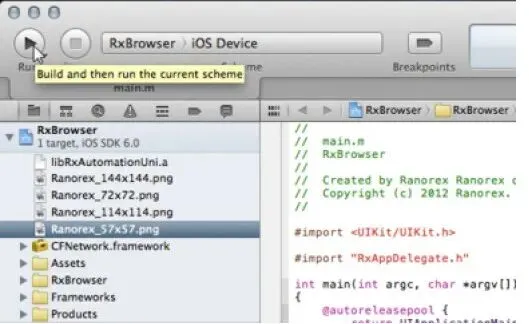
图:clean然后build项目,并且将其部署到我们的iOS设备或者simulator上
在执行了上述步骤之后,我们就可以像使用其他调制过的app那样使用RXBrowser app. 跳转到前面的’Add your iOS device’章节来操作RXBrowser应用吧。
注意:要录制和回放我们的测试,我们需要保证我们的RXBrowser app已经在我们的iOS设备或者simulator上启动了。
WEB测试
Ranorex网页插件(适用Microsoft Internet Explorer, Mozilla Firefox, Google Chrome 和 Apple Safari)可以让我们像测试桌面程序一样,自动化测试网页程序界面。
Ranorex框架中的网页结构
AJAX处理
搜索或过滤页面元素
表元素及其CSS样式设置
跨浏览器测试
设置输入,tag属性以及在不用鼠标的情况下进行点击
录制和对象库
执行javascript代码
层级菜单处理
Ranorex框架中的网页结构
Ranorex能够获取web文档的全部HTML结构。Ranorex在自动化测试过程中,使用Ranorex Spy分析网页程序的结构和内容,识别出可访问的信息。
每个打开的网页都表现为spy tree中的一个DOM节点。除了标准的浏览器程序,Ranorex还可以识别内嵌的浏览器对象(比如:已编译的帮助文件)。另外,浏览器窗口中的每个tab项在spy tree中也是一个为单独的DOM节点。
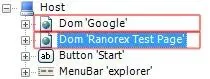
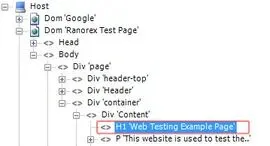
Web文档及其HTML结构是通过RanoreXPatch识别的。与HTML中的XPath类似,RanoreXPath为搜寻web页面中一个或多个web元素提供了一种简单的搜索机制。
WebDocument适配器
WebDocument适配器代表一个包含所有tag的完整的网页,(比如:header,body等tag)。此外,它提供了一些实用的方法,让测试脚本更加有效。
下面的示例说明了这些特性的使用方法:
C#
// Identify a web document by its title
WebDocument webDocument = “/dom[@caption=’Ranorex Test Page’]”;
// Open a website
webDocument.Navigate(“http://www.ranorex.com”);
// Wait until the document is loaded
webDocument.WaitForDocumentLoaded();
// Execute a javascript code
webDocument.ExecuteScript(“history.back();”);
VB.NET
‘ Identify a web document by its title
Dim webDocument As WebDocument = “/dom[@caption=’Ranorex Test Page’]”
‘ Open a website
webDocument.Navigate(“http://www.ranorex.com”)
‘ Wait until the document is loaded
webDocument.WaitForDocumentLoaded()
‘ Execute a javascript code
webDocument.ExecuteScript(“history.back();”)
搜索或过滤页面元素
针对每个HTML标记元素,Ranorex框架提供了大范围的适配器(比如:ATag适配 tags)。每个适配器都有特定的方法和属性;比如,链接标签()有特定属性HREF,TARGET和REL。
C#
// Start IE with a specific website
System.Diagnostics.Process.Start(“iexplore.exe”, “www.ranorex.com/web-testing-examples”);
// Identify the webdocument by its title
WebDocument webDocument = “/dom[@caption=’Ranorex Test Page’]”;
// Find a link by its link text (innertext)
ATag link = webDocument.FindSingle(“.//a[@innertext=’simple link’]”);
link.Click();
VB.NET
‘ Start IE with a specific website
System.Diagnostics.Process.Start(“iexplore.exe”, “www.ranorex.com/web-testing-examples”)
‘ Identify the webdocument by its title
Dim webDocument As WebDocument = “/dom[@caption=’Ranorex Test Page’]”
‘ Find a link by its link text (innertext)
Dim link As ATag = webDocument.FindSingle(“.//a[@innertext=’simple link’]”)
link.Click()