 夜雨聆风
夜雨聆风


OpenClaw系列文章 | 你的AI慢?社区最痛的性能问题,这里有解
从启动75秒到秒开,5个性能瓶颈的根因分析与优化方案
不是OpenClaw设计差,是默认配置没针对你的场景优化
一、37万星的”小龙虾”,为什么有人觉得慢?
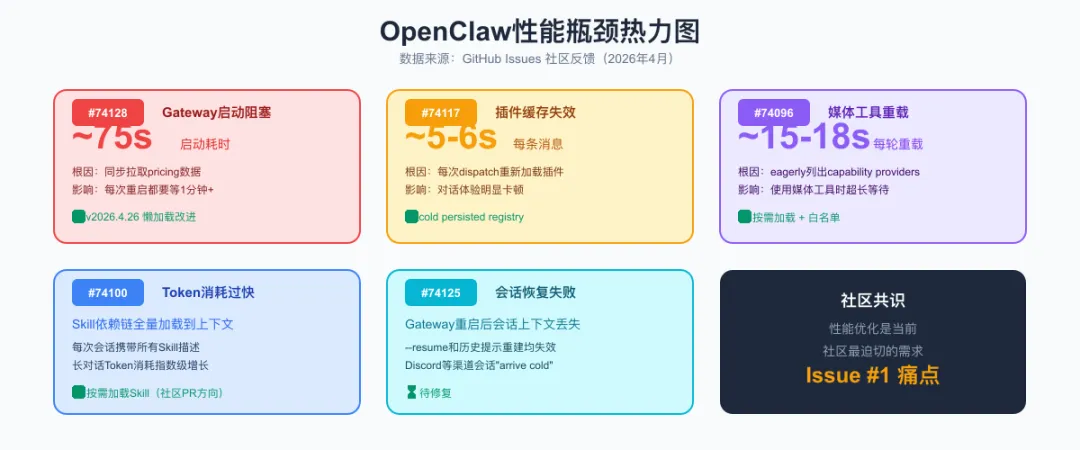
二、问题1:Gateway启动要75秒(社区第一痛点)
根因分析
[boot] Loading provider registry...[boot] Fetching pricing data for deepseek... (同步阻塞)[boot] Fetching pricing data for zhipu... (同步阻塞)[boot] Fetching pricing data for doubao... (同步阻塞)[boot] Fetching pricing data for qwen... (同步阻塞)[boot] Fetching pricing data for openai... (同步阻塞)[boot] Fetching pricing data for claude... (同步阻塞)[boot] Initializing channel runtimes...[boot] Loading cron scheduler...[boot] Initializing MCP loopback server...[boot] Loading embedded runner......(总计约75秒)
解决方案
# 升级到最新版本npm update -g openclaw@latest# 验证版本openclaw --version# 应该输出 v2026.4.26 或更高
// ~/.openclaw/openclaw.json{providers: {// 只保留你实际使用的providerdeepseek: {apiKey: "sk-xxx",model: "deepseek-v4-pro"}// 注释掉或删除不用的provider// zhipu: { ... },// doubao: { ... },},// 跳过不需要的组件gateway: {skipInit: ["cron", "mcp-loopback", "embedded-runner"]}}
// ~/.openclaw/openclaw.json{gateway: {// 将pricing数据拉取改为异步延迟加载lazyPricing: true,// 或者设置定价数据缓存(本地文件缓存24小时)pricingCache: {enabled: true,ttl: 86400 // 24小时,单位秒}}}
三、问题2:每条消息处理延迟5-6秒
根因分析
[dispatch] Received message from feishu...[plugins] ensureRuntimePluginsLoaded called[plugins] Cache invalid, re-scanning plugin manifests... ← 每次都这样[plugins] Loading plugin: web-tools[plugins] Loading plugin: file-manager[plugins] Loading plugin: code-runner...(每次消息都要走一遍)
解决方案
# 升级后,重建插件注册表openclaw plugins registry --rebuild
|
|
|
|
|---|---|---|
|
|
|
|
|
|
|
|
|
|
|
|
|
|
|
|
# 列出所有已安装插件openclaw plugins list# 禁用不需要的插件(不会卸载,只是不加载)openclaw plugins disable web-toolsopenclaw plugins disable music-generator# 只保留核心插件openclaw plugins enable file-manageropenclaw plugins enable code-runner
四、问题3:媒体工具重载15-18秒
根因分析
解决方案
// ~/.openclaw/openclaw.json{tools: {media: {// 只启用你需要的media providerproviders: ["sharp"],// 跳过capability探测(如果你确定provider可用)skipProbe: true,// 缓存provider能力列表cacheCapabilities: {enabled: true,ttl: 3600 // 1小时}}}}
{tools: {// 全局工具加载策略loadingStrategy: "lazy", // "eager" | "lazy" | "on-demand"media: {loadingStrategy: "lazy",// 预加载列表:只预加载你常用的工具preload: ["image-processor"]// video和music相关工具保持懒加载}}}
# 禁用整个媒体工具组openclaw tools disable media# 或者精确禁用单个openclaw tools disable video-processoropenclaw tools disable music-generator
五、问题4:Token消耗过快
根因分析
[context] Loading SOUL.md... (3000 tokens)[context] Loading TOOLS.md... (5000 tokens)[context] Skill triggered: code-reviewer[context] Loading dependency: git-helper SKILL.md... (2000 tokens)[context] Loading dependency: security-scanner SKILL.md... (2500 tokens)[context] Loading dependency: report-generator SKILL.md... (1500 tokens)[context] Loading dependency: template-engine SKILL.md... (1000 tokens)[context] Total context: ~15000 tokens (before user message)[context] User message: "检查一下这个PR" (50 tokens)
解决方案
// ~/.openclaw/openclaw.json{skills: {// 只加载直接匹配的Skill,不递归加载依赖链loadDependencies: false,// 或者设置最大加载深度maxDependencyDepth: 1, // 只加载一层依赖// 排除不需要自动加载的SkillexcludeFromAutoLoad: ["template-engine","report-generator"]}}
# 优化前(约3000 tokens)你是一个专业的AI助手,精通Python、JavaScript、Go、Rust等多种编程语言,熟悉Linux系统管理、Docker容器化、Kubernetes编排、CI/CD流水线等DevOps技能,擅长数据分析、机器学习、自然语言处理等AI领域,同时具备项目管理、团队协作、文档撰写等软技能...# 优化后(约500 tokens)你是一个运维向的AI Agent,擅长:服务器巡检、代码审查、自动化脚本。语言偏好:中文。输出风格:简洁、结构化、先结论后过程。
|
|
|
|
|---|---|---|
|
|
|
|
|
|
|
|
|
|
|
|
|
|
|
|
|
|
|
|
// ~/.openclaw/openclaw.json{models: {// 日常对话用便宜的模型default: "deepseek/deepseek-v4-flash",// 复杂任务自动升级escalation: {enabled: true,model: "deepseek/deepseek-v4-pro",triggerConditions: ["code_review","complex_reasoning","long_context"]}}}
六、问题5:会话恢复失败
根因分析
[boot] Loading conversation history from disk... OK[boot] Resuming session abc123...[context] Assembled context not found in memory ← 这里[context] Falling back to history-based reconstruction...[context] Warning: reconstruction may lose tool call context
目前的缓解方案
// ~/.openclaw/openclaw.json{gateway: {// 实验性:将上下文组装状态持久化到磁盘persistContextState: true,contextStateDir: "~/.openclaw/context-state",// 重启后自动恢复最近N个会话的上下文autoResumeCount: 5}}
# 在任务执行过程中创建checkpointopenclaw session checkpoint --name "deploy-step-3"# Gateway重启后从checkpoint恢复openclaw session resume --checkpoint "deploy-step-3"
# 查看当前活跃会话openclaw sessions list --active# 导出会话上下文openclaw sessions export abc123 --output ~/session-backup.json# 重启后导入openclaw sessions import ~/session-backup.json
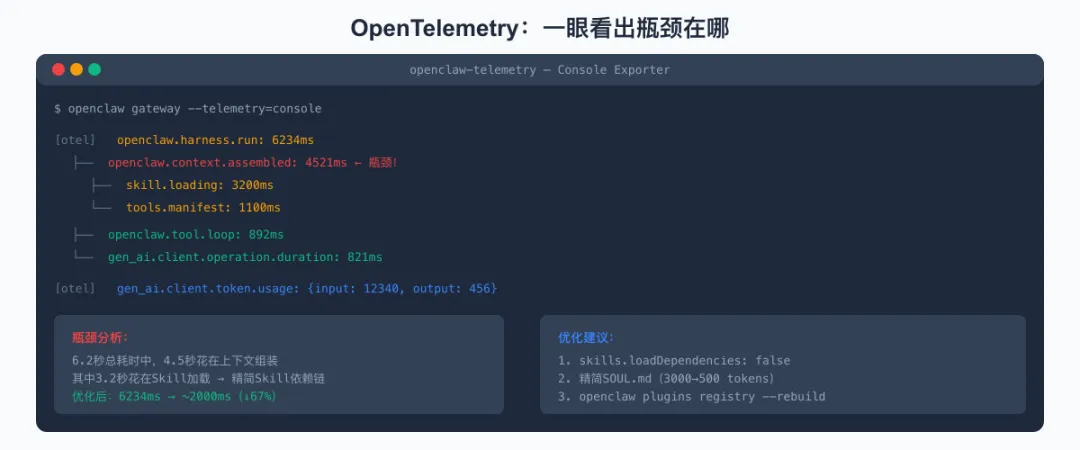
七、OpenTelemetry:用数据找到你的瓶颈
|
|
|
|
|---|---|---|
|
openclaw.context.assembled |
|
|
|
openclaw.tool.loop |
|
|
|
openclaw.exec |
|
|
|
openclaw.harness.run |
|
|
|
gen_ai.client.token.usage |
|
|
|
gen_ai.client.operation.duration |
|
|
开启OpenTelemetry
// ~/.openclaw/openclaw.json{telemetry: {enabled: true,// 输出到控制台,方便本地调试exporter: "console",// 采样率:1.0 = 全量,0.1 = 10%采样sampleRate: 1.0}}
[otel] openclaw.harness.run: 6234ms[otel] openclaw.context.assembled: 4521ms ← 瓶颈在这里![otel] skill.loading: 3200ms[otel] tools.manifest: 1100ms[otel] openclaw.tool.loop: 892ms[otel] gen_ai.client.operation.duration: 821ms[otel] gen_ai.client.token.usage: {input: 12340, output: 456}
// ~/.openclaw/openclaw.json{telemetry: {enabled: true,exporter: "otlp",endpoint: "http://localhost:4317"},plugins: {diagnostics: {prometheus: {enabled: true,// 抓取端点:http://localhost:18789/metricsport: 18789,path: "/metrics"}}}}
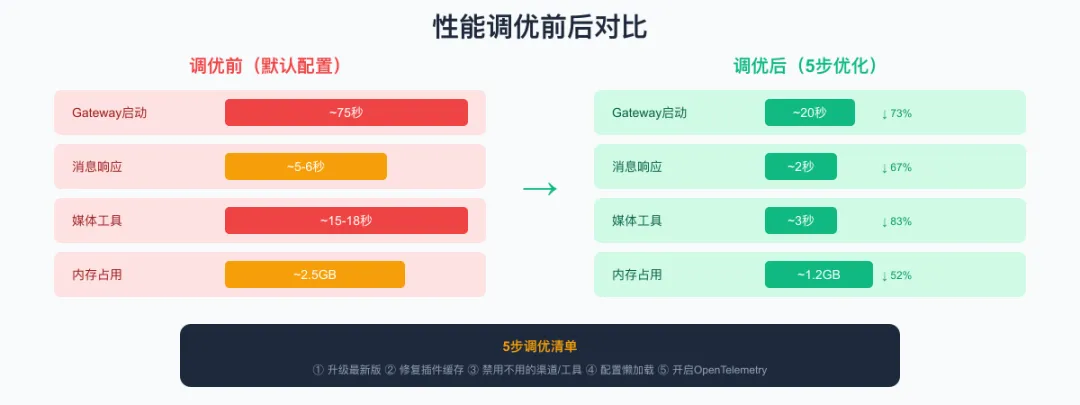
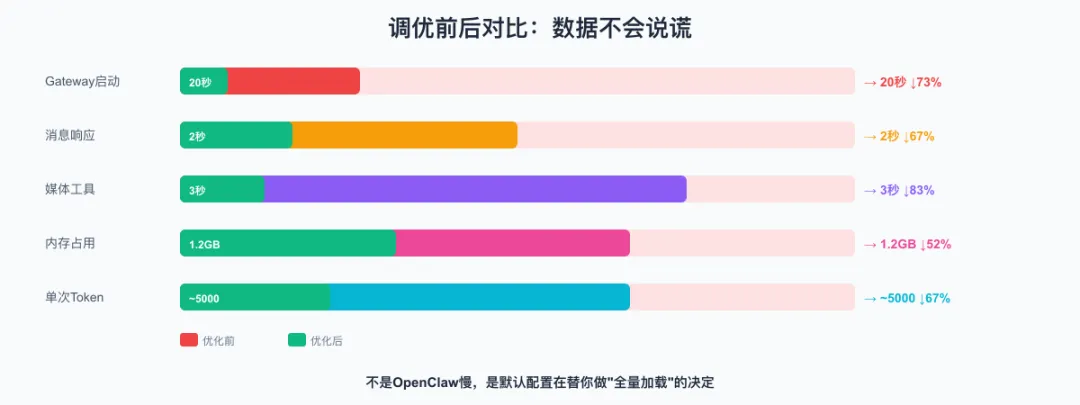
八、调优前后对比
|
|
|
|
|
|
|---|---|---|---|---|
| Gateway启动时间 |
|
|
|
|
| 消息响应延迟 |
|
|
|
|
| 媒体工具加载 |
|
|
|
|
| 内存占用 |
|
|
|
|
| 单次对话Token消耗 |
|
|
|
|
-
启动慢 → 异步化 + 按需加载
-
响应慢 → 缓存机制 + 插件精简
-
Token贵 → 上下文瘦身 + 模型分级
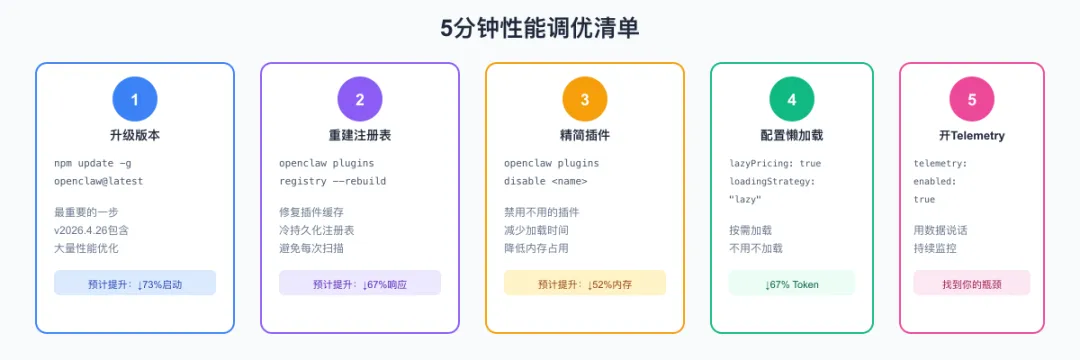
九、5分钟性能调优清单
# 1. 升级到最新版本(最重要的一步)npm update -g openclaw@latestopenclaw --version # 确认 >= v2026.4.26# 2. 重建插件注册表(修复缓存问题)openclaw plugins registry --rebuild# 3. 查看当前插件和工具列表,禁用不需要的openclaw plugins listopenclaw plugins disable <不需要的插件名># 4. 查看当前Provider配置,删除不用的openclaw config show# 编辑 ~/.openclaw/openclaw.json,移除不用的provider
{// === Gateway启动优化 ===gateway: {lazyPricing: true,pricingCache: { enabled: true, ttl: 86400 },skipInit: ["cron", "mcp-loopback"] // 按需调整},// === 插件加载优化 ===plugins: {loadingStrategy: "lazy"},// === Skill加载优化 ===skills: {loadDependencies: false,maxDependencyDepth: 1},// === 媒体工具优化 ===tools: {media: {skipProbe: true,cacheCapabilities: { enabled: true, ttl: 3600 }}},// === 遥测监控(建议长期开启) ===telemetry: {enabled: true,exporter: "console",sampleRate: 0.1 // 生产环境用10%采样}}
十、结语:性能调优不是一次性的事
-
开Telemetry,看数据。 不要凭感觉优化,用 openclaw.context.assembled 和 gen_ai.client.token.usage 这两个指标做决策。 -
每升一次级,重新跑一遍清单。 新版本往往会优化启动和加载逻辑,但你的旧配置可能还禁用了某些已经改进的组件。 -
关注GitHub Issues。 社区的高频问题往往有最快的修复方案——v2026.4.26的很多优化就是直接从Issue里来的。
你现在的OpenClaw配置,是出厂默认还是自己调过的?如果没调过——你可能正在为那些你根本不用的功能买单。
花5分钟跑一遍上面的清单,可能帮你省下每天几十分钟的等待。