ARTICLE · 1105542
【App Service 】WebJobs 多实例实验:谁在运行,什么时候运行?
问题描述
把 Azure App Service 扩展到 3 个实例后,WebJob 会不会也同时运行 3 份?
如果每天定时生成一份报表,会不会生成 3 份?
在门户里手动点击一次 Run,又会由哪个实例执行?
答案取决于 WebJob 的类型,不能仅根据 App Service 的实例数量判断。
持续型默认在所有应用实例上运行;
手动触发和定时触发每次由一个实例执行,不会因为应用有 3 个实例就广播执行 3 次。
这篇文章用同一个 PowerShell 脚本做对照实验,记录实例 ID、UTC 时间和运行批次,让“在哪个实例运行”可以直接从日志判断。
问题解答
门户中的三种常见用法是 Continuous、Triggered/Manual 和 Triggered/Scheduled。
微软文档明确说明,Scheduled 也是 Triggered,只是触发来源从手动操作变成了时间计划。
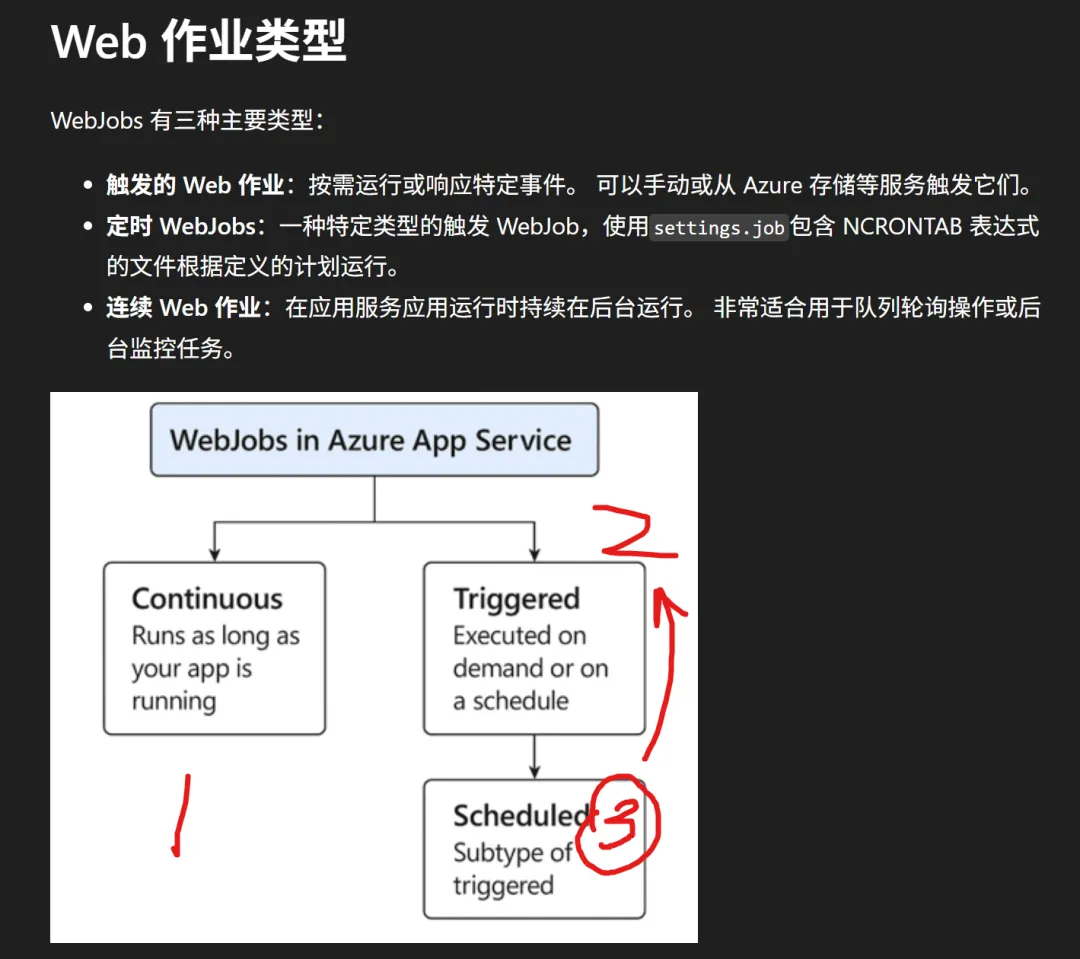
假设目标应用稳定运行在 3 个实例上,行为如下:
is_singleton: true 后,只在一个实例运行该任务 | |||
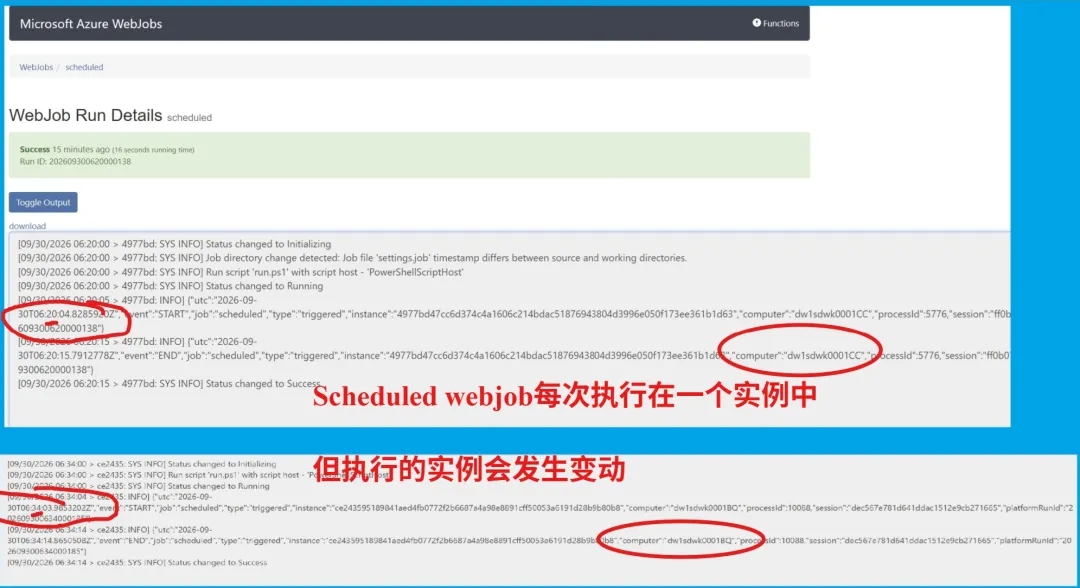
这里的“一个实例”不意味着“永远固定在同一台机器”。下一次触发、实例替换或持续型单实例任务接管后,执行实例可能发生变化。
平台也不承诺手动触发会依次轮询 A、B、C,所以连续点击几次却一直落在 A 上,并不违反上述规则。
实验准备
在同一段PowerShell脚本中,输出当前webjob运行的时间,实例ID等信息,以判断它是多实例运行还是单实例运行。
param([ValidateRange(1, 3600)][int]$HeartbeatSeconds = 10,[ValidateRange(0, 3600)][int]$WorkSeconds = 10,[ValidateRange(0, 10000)][int]$MaxHeartbeats = 0,[string]$OutputRoot)$ErrorActionPreference = 'Stop'$instance = $env:WEBSITE_INSTANCE_IDif (-not $instance) { $instance = 'local-not-azure' }$job = $env:WEBJOBS_NAMEif (-not $job) { $job = 'local-demo' }$type = $env:WEBJOBS_TYPEif (-not $type) { $type = 'triggered' }$session = [guid]::NewGuid().ToString('N')if (-not $OutputRoot) {if ($env:WEBSITE_INSTANCE_ID -and $env:HOME) {$OutputRoot = Join-Path $env:HOME 'data\webjob-instance-demo'} else {$OutputRoot = Join-Path ([IO.Path]::GetTempPath()) 'webjob-instance-demo'}}$safeJob = $job -replace '[^a-zA-Z0-9_-]', '_'$safeInstance = $instance -replace '[^a-zA-Z0-9_-]', '_'$directory = Join-Path (Join-Path $OutputRoot $safeJob) $safeInstance$null = New-Item -ItemType Directory -Path $directory -Force$logPath = Join-Path $directory "$session.jsonl"functionWrite-Record([string]$EventName) {$record = [ordered]@{utc = [DateTime]::UtcNow.ToString('o')event = $EventNamejob = $jobtype = $typeinstance = $instancecomputer = $env:COMPUTERNAMEprocessId = $PIDsession = $sessionplatformRunId = $env:WEBJOBS_RUN_ID}$line = $record | ConvertTo-Json -CompressWrite-Output $line# One file per process session: instances never append to the same file.Add-Content -LiteralPath $logPath -Value $line -Encoding UTF8}functionTest-Shutdown {return ($env:WEBJOBS_SHUTDOWN_FILE -and(Test-Path -LiteralPath $env:WEBJOBS_SHUTDOWN_FILE))}functionWait-OrShutdown([int]$Seconds) {for ($i = 0; $i -lt $Seconds; $i++) {if (Test-Shutdown) { return }Start-Sleep -Seconds 1}}Write-Record 'START'if ($type -eq 'continuous') {$count = 0while (-not (Test-Shutdown)) {Write-Record 'HEARTBEAT'$count++# A finite limit is for LOCAL tests only. Azure continuous jobs restart.if ($MaxHeartbeats -gt 0 -and $count -ge $MaxHeartbeats) { break }Wait-OrShutdown $HeartbeatSeconds}} else {# Simulate a short task. This delay is not an exactly-once guarantee.Wait-OrShutdown $WorkSeconds}if (Test-Shutdown) { Write-Record 'STOP_REQUESTED' }else { Write-Record 'END' }
把以上内容复制到文件 run.ps1 中,然后分别打包为四个zip文件:continuous-multi.zip , continuous-single.zip,manual.zip 和 scheduled.zip。
然后通过App Service的Web Job门户分别创建四个web job,参考在门户上创建WebJob的文档:https://docs.azure.cn/zh-cn/app-service/quickstart-webjobs?tabs=windows#add-the-webjob-in-the-azure-portal
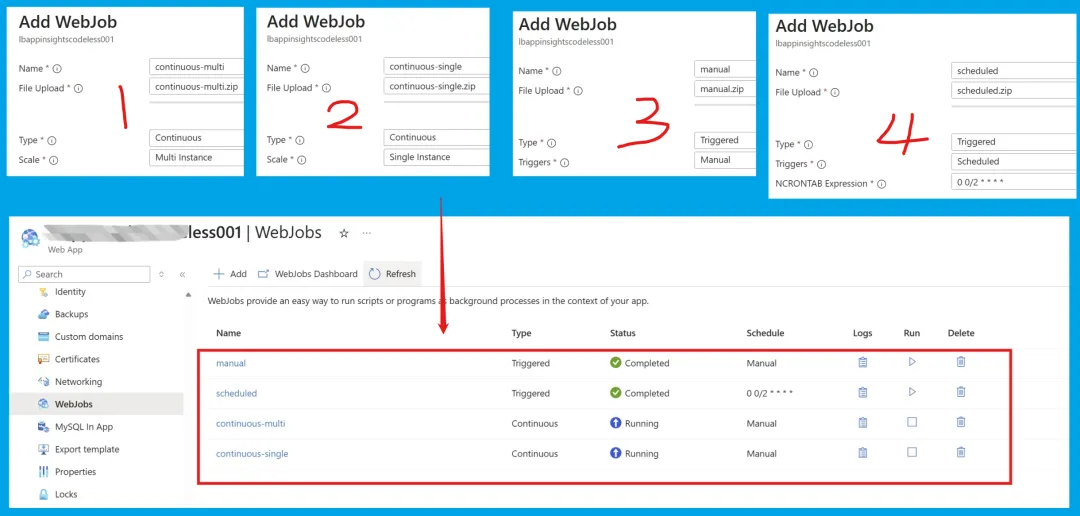
实验结果
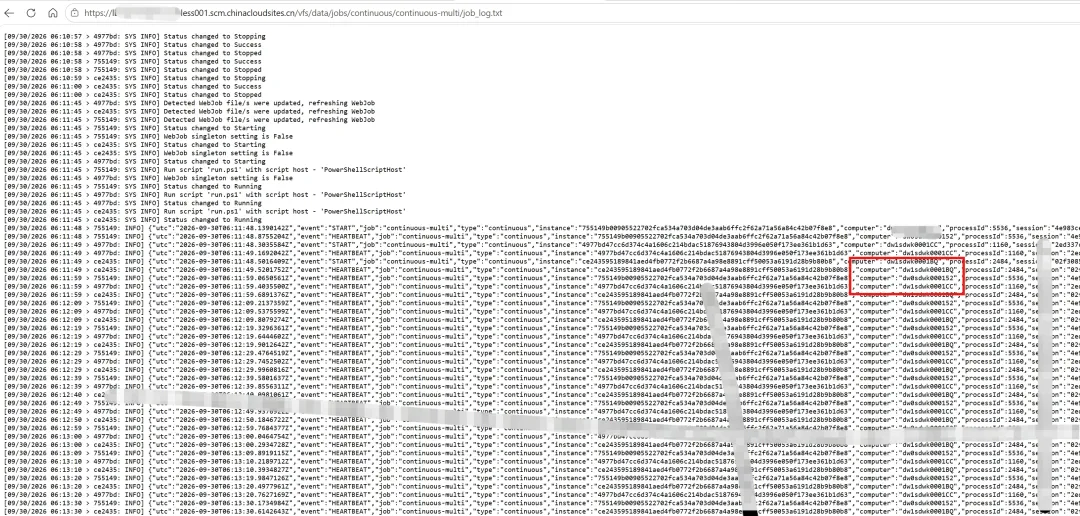
1:continuous-multi , 连续运行的多实例部署结果为,在3个实例上,这个webjob在每一个实例上都在执行。
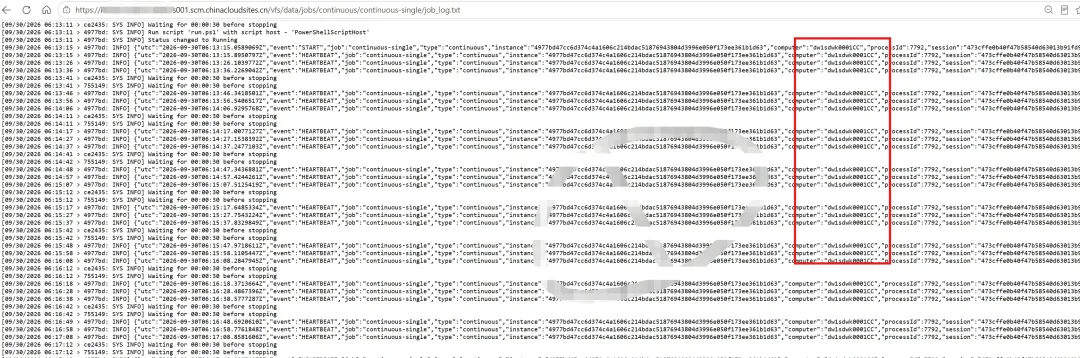
2:continuous-single, 连续运行的单实例部署结果为,在3个实例的环境中,这个webjob只在一个实例上执行。
3:manual,手动触发的webjob,在3个实例的环境中,每次只在一个实例上执行。
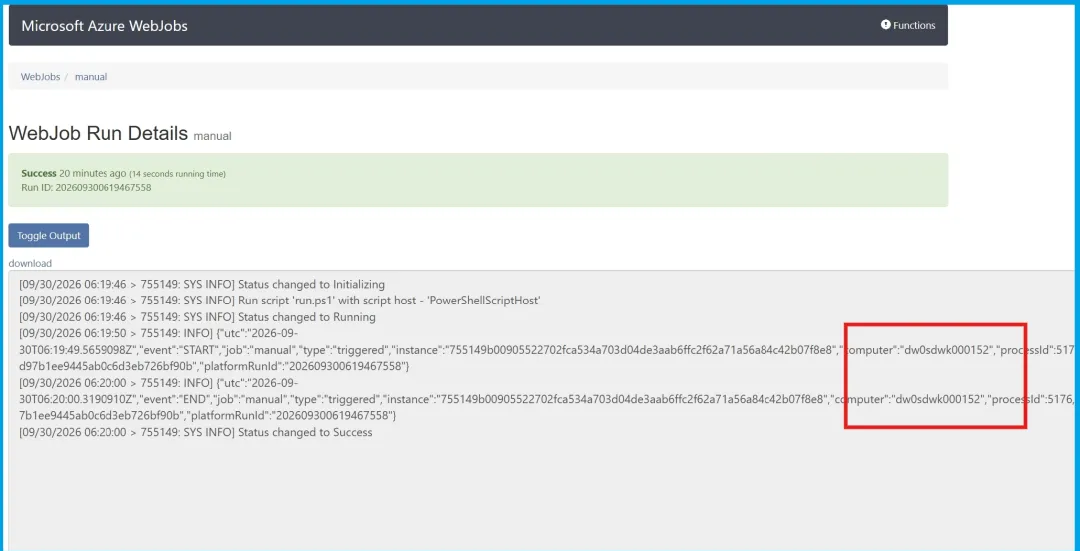
4:scheduled,按时触发的webjob,在3个实例的环境中,每次只在一个实例上执行。只是,后一次执行的实例可能发生变化。
参考资料
应用服务 WebJobs 概述 : https://docs.azure.cn/zh-cn/app-service/overview-webjobs
How would I scale a timer triggered webjob on an Azure App service to multiple app service instances? https://learn.microsoft.com/en-us/answers/questions/1689283/how-would-i-scale-a-timer-triggered-webjob-on-an-a
当在复杂的环境中面临问题,格物之道需:
浊而静之徐清,安以动之徐生。
云中,恰是如此!