乐于分享
好东西不私藏

在 Ubuntu 上部署 OpenClaw 完整教程

在 Ubuntu 上部署 OpenClaw 完整教程

在 Ubuntu 上部署 OpenClaw 完整教程

本文记录我在 Ubuntu 22.04 服务器上从零部署 OpenClaw 并接入飞书的完整过程,包括遇到的坑和解决方法。

环境信息

  • • 系统: Ubuntu 22.04 LTS
  • • 配置: 4核 8GB 内存,100M 带宽
  • • 类型:CPU

一、安装依赖

1.1 更新系统包索引

sudo apt update

1.2 安装 curl

sudo apt install -y curl

1.3 通过 NodeSource 安装最新稳定 LTS 版本

# 添加 NodeSource 仓库并安装
curl -fsSL https://deb.nodesource.com/setup_lts.x | sudo -E bash -
sudo apt-get install -y nodejs

# 安装完成后,验证版本
node -v
npm -v

实际输出:

ubuntu@gt-ubuntu22-04-cmd-v3-0-8gb-100m:~$ node -v
v24.14.0
ubuntu@gt-ubuntu22-04-cmd-v3-0-8gb-100m:~$ npm -v
11.9.0

1.4 设置淘宝镜像(最常用)

npm config set registry https://registry.npmmirror.com 

# 查询是否配置成功
npm config get registry

验证输出:

ubuntu@gt-ubuntu22-04-cmd-v3-0-8gb-100m:~$ npm config get registry
https://registry.npmmirror.com 

二、安装 OpenClaw

执行安装脚本(注意:安装过程中要勾选 yes):

curl -fsSL https://openclaw.ai/install.sh | bash

完整安装日志:


 ubuntu@gt-ubuntu22-04-cmd-v3-0-8gb-100m:~$ curl -fsSL https://openclaw.ai/install.sh | bash

  🦞 OpenClaw Installer
  The only crab in your contacts you actually want to hear from. 🦞

✓ Detected: linux

Install plan
OS: linux
Install method: npm
Requested version: latest

[1/3] Preparing environment
✓ Node.js v24.14.0 found
· Active Node.js: v24.14.0 (/usr/bin/node)
· Active npm: 11.9.0 (/usr/bin/npm)

[2/3] Installing OpenClaw
✓ Git already installed
· Configuring npm for user-local installs
✓ npm configured for user installs
· Installing OpenClaw v2026.2.26
✓ OpenClaw npm package installed
✓ OpenClaw installed

[3/3] Finalizing setup

! PATH missing npm global bin dir: /home/ubuntu/.npm-global/bin
  This can make openclaw show as "command not found"in new terminals.
  Fix (zsh: ~/.zshrc, bash: ~/.bashrc):
export PATH="/home/ubuntu/.npm-global/bin:$PATH"

🦞 OpenClaw installed successfully (2026.2.26)!
All done! I promise to only judge your code a little bit.

· Starting setup


🦞 OpenClaw 2026.2.26 (bc50708) — Ship fast, log faster.

▄▄▄▄▄▄▄▄▄▄▄▄▄▄▄▄▄▄▄▄▄▄▄▄▄▄▄▄▄▄▄▄▄▄▄▄▄▄▄▄▄▄▄▄▄▄▄▄▄▄▄▄
██░▄▄▄░██░▄▄░██░▄▄▄██░▀██░██░▄▄▀██░████░▄▄▀██░███░██
██░███░██░▀▀░██░▄▄▄██░█░█░██░█████░████░▀▀░██░█░█░██
██░▀▀▀░██░█████░▀▀▀██░██▄░██░▀▀▄██░▀▀░█░██░██▄▀▄▀▄██
▀▀▀▀▀▀▀▀▀▀▀▀▀▀▀▀▀▀▀▀▀▀▀▀▀▀▀▀▀▀▀▀▀▀▀▀▀▀▀▀▀▀▀▀▀▀▀▀▀▀▀▀
                  🦞 OPENCLAW 🦞                    

┌  OpenClaw onboarding

◇  Security ─────────────────────────────────────────────────────────────────────────────────╮
│                                                                                            │
│  Security warning — please read.                                                           │
│                                                                                            │
│  OpenClaw is a hobby project and still in beta. Expect sharp edges.                        │
│  By default, OpenClaw is a personal agent: one trusted operator boundary.                  │
│  This bot can read files and run actions if tools are enabled.                             │
│  A bad prompt can trick it into doing unsafe things.                                       │
│                                                                                            │
│  OpenClaw is not a hostile multi-tenant boundary by default.                               │
│  If multiple users can message one tool-enabled agent, they share that delegated tool      │
│  authority.                                                                                │
│                                                                                            │
│  If you’re not comfortable with security hardening and access control, don’t run           │
│  OpenClaw.                                                                                 │
│  Ask someone experienced to help before enabling tools or exposing it to the internet.     │
│                                                                                            │
│  Recommended baseline:                                                                     │
│  - Pairing/allowlists + mention gating.                                                    │
│  - Multi-user/shared inbox: split trust boundaries (separate gateway/credentials, ideally  │
│    separate OS users/hosts).                                                               │
│  - Sandbox + least-privilege tools.                                                        │
│  - Shared inboxes: isolate DM sessions (`session.dmScope: per-channel-peer`) and keep      │
│    tool access minimal.                                                                    │
│  - Keep secrets out of the agent’s reachable filesystem.                                   │
│  - Use the strongest available model for any bot with tools or untrusted inboxes.          │
│                                                                                            │
│  Run regularly:                                                                            │
│  openclaw security audit --deep                                                            │
│  openclaw security audit --fix                                                             │
│                                                                                            │
│  Must read: https://docs.openclaw.ai/gateway/security                                      │
│                                                                                            │
├────────────────────────────────────────────────────────────────────────────────────────────╯

◇  I understand this is personal-by-default and shared/multi-user use requires lock-down. Continue?
│  Yes

◇  Onboarding mode
│  QuickStart

◇  QuickStart ─────────────────────────╮
│                                      │
│  Gateway port: 18789                 │
│  Gateway bind: Loopback (127.0.0.1)  │
│  Gateway auth: Token (default)       │
│  Tailscale exposure: Off             │
│  Direct to chat channels.            │
│                                      │
├──────────────────────────────────────╯

◇  Model/auth provider
│  Z.AI

◇  Z.AI auth method
│  CN

◇  How do you want to provide this API key?
│  Paste API key now

◇  Enter Z.AI API key
│  xxx.xxxx

◇  Model configured ───────────────╮
│                                  │
│  Default model set to zai/glm-5  │
│                                  │
├──────────────────────────────────╯

◇  Default model
│  zai/glm-4.7

◇  Channel status ────────────────────────────╮
│                                             │
│  Telegram: needs token                      │
│  WhatsApp (default): not linked             │
│  Discord: needs token                       │
│  Slack: needs tokens                        │
│  Signal: needs setup                        │
│  signal-cli: missing (signal-cli)           │
│  iMessage: needs setup                      │
│  imsg: missing (imsg)                       │
│  IRC: not configured                        │
│  Google Chat: not configured                │
│  Feishu: install plugin to enable           │
│  Google Chat: install plugin to enable      │
│  Nostr: install plugin to enable            │
│  Microsoft Teams: install plugin to enable  │
│  Mattermost: install plugin to enable       │
│  Nextcloud Talk: install plugin to enable   │
│  Matrix: install plugin to enable           │
│  BlueBubbles: install plugin to enable      │
│  LINE: install plugin to enable             │
│  Zalo: install plugin to enable             │
│  Zalo Personal: install plugin to enable    │
│  Synology Chat: install plugin to enable    │
│  Tlon: install plugin to enable             │
│                                             │
├─────────────────────────────────────────────╯

◇  How channels work ───────────────────────────────────────────────────────────────────────╮
│                                                                                           │
│  DM security: default is pairing; unknown DMs get a pairing code.                         │
│  Approve with: openclaw pairing approve <channel> <code>                                  │
│  Public DMs require dmPolicy="open" + allowFrom=["*"].                                    │
│  Multi-user DMs: run: openclaw config set session.dmScope "per-channel-peer" (or          │
│  "per-account-channel-peer"for multi-account channels) to isolate sessions.              │
│  Docs: channels/pairing              │
│                                                                                           │
│  Telegram: simplest way to get started — register a bot with @BotFather and get going.    │
│  WhatsApp: works with your own number; recommend a separate phone + eSIM.                 │
│  Discord: very well supported right now.                                                  │
│  IRC: classic IRC networks with DM/channel routing and pairing controls.                  │
│  Google Chat: Google Workspace Chat app with HTTP webhook.                                │
│  Slack: supported (Socket Mode).                                                          │
│  Signal: signal-cli linked device; more setup (David Reagans: "Hop on Discord.").         │
│  iMessage: this is still a work in progress.                                              │
│  Feishu: 飞书/Lark enterprise messaging with doc/wiki/drive tools.                        │
│  Nostr: Decentralized protocol; encrypted DMs via NIP-04.                                 │
│  Microsoft Teams: Bot Framework; enterprise support.                                      │
│  Mattermost: self-hosted Slack-style chat; install the plugin to enable.                  │
│  Nextcloud Talk: Self-hosted chat via Nextcloud Talk webhook bots.                        │
│  Matrix: open protocol; install the plugin to enable.                                     │
│  BlueBubbles: iMessage via the BlueBubbles mac app + REST API.                            │
│  LINE: LINE Messaging API bot for Japan/Taiwan/Thailand markets.                          │
│  Zalo: Vietnam-focused messaging platform with Bot API.                                   │
│  Zalo Personal: Zalo personal account via QR code login.                                  │
│  Synology Chat: Connect your Synology NAS Chat to OpenClaw with full agent capabilities.  │
│  Tlon: decentralized messaging on Urbit; install the plugin to enable.                    │
│                                                                                           │
├───────────────────────────────────────────────────────────────────────────────────────────╯

◇  Select channel (QuickStart)
│  Skip for now
Updated ~/.openclaw/openclaw.json
Workspace OK: ~/.openclaw/workspace
Sessions OK: ~/.openclaw/agents/main/sessions

◇  Skills status ─────────────╮
│                             │
│  Eligible: 4                │
│  Missing requirements: 40   │
│  Unsupported on this OS: 7  │
│  Blocked by allowlist: 0    │
│                             │
├─────────────────────────────╯

◇  Configure skills now? (recommended)
│  No

◇  Hooks ──────────────────────────────────────────────────────────────────╮
│                                                                          │
│  Hooks let you automate actions when agent commands are issued.          │
│  Example: Save session context to memory when you issue /new or /reset.  │
│                                                                          │
│  Learn more: https://docs.openclaw.ai/automation/hooks                   │
│                                                                          │
├──────────────────────────────────────────────────────────────────────────╯

◇  Enable hooks?
│  Skip for now
Config overwrite: /home/ubuntu/.openclaw/openclaw.json (sha256 f763f7d577aba2ed75a863a91e3e9a116eab6ecc856e7731972988b006426453 -> 8eac9ee80087618bf88b5f7a2f1f6bdb4b5abf5dfa646c22bf65f64e92063204, backup=/home/ubuntu/.openclaw/openclaw.json.bak)

◇  Systemd ────────────────────────────────────────────────────────────────────────────────╮
│                                                                                          │
│  Linux installs use a systemd user service by default. Without lingering, systemd stops  │
│  the user session on logout/idle and kills the Gateway.                                  │
│  Enabling lingering now (may require sudo; writes /var/lib/systemd/linger).              │
│                                                                                          │
├──────────────────────────────────────────────────────────────────────────────────────────╯

◇  Systemd ───────────────────────────────╮
│                                         │
│  Enabled systemd lingering for ubuntu.  │
│                                         │
├─────────────────────────────────────────╯

◇  Gateway service runtime ────────────────────────────────────────────╮
│                                                                      │
│  QuickStart uses Node for the Gateway service (stable + supported).  │
│                                                                      │
├──────────────────────────────────────────────────────────────────────╯

◐  Installing Gateway service…
Installed systemd service: /home/ubuntu/.config/systemd/user/openclaw-gateway.service
◇  Gateway service installed.

◇  
Agents: main (default)
Heartbeat interval: 30m (main)
Session store (main): /home/ubuntu/.openclaw/agents/main/sessions/sessions.json (0 entries)

◇  Optional apps ────────────────────────╮
│                                        │
│  Add nodes for extra features:         │
│  - macOS app (system + notifications)  │
│  - iOS app (camera/canvas)             │
│  - Android app (camera/canvas)         │
│                                        │
├────────────────────────────────────────╯

◇  Control UI ─────────────────────────────────────────────────────────────────────╮
│                                                                                  │
│  Web UI: http://127.0.0.1:18789/                                                 │
│  Web UI (with token):                                                            │
│  http://127.0.0.1:18789/#token=2962e8f5116c63d86ea9c8224bc8d6445cce2e806ed1e183  │
│  Gateway WS: ws://127.0.0.1:18789                                                │
│  Gateway: reachable                                                              │
│  Docs: https://docs.openclaw.ai/web/control-ui                                   │
│                                                                                  │
├──────────────────────────────────────────────────────────────────────────────────╯

◇  Start TUI (best option!) ─────────────────────────────────╮
│                                                            │
│  This is the defining action that makes your agent you.    │
│  Please take your time.                                    │
│  The more you tell it, the better the experience will be.  │
│  We will send: "Wake up, my friend!"                       │
│                                                            │
├────────────────────────────────────────────────────────────╯

◇  Token ─────────────────────────────────────────────────────────────────────────────────╮
│                                                                                         │
│  Gateway token: shared auth for the Gateway + Control UI.                               │
│  Stored in: ~/.openclaw/openclaw.json (gateway.auth.token) or OPENCLAW_GATEWAY_TOKEN.   │
│  View token: openclaw config get gateway.auth.token                                     │
│  Generate token: openclaw doctor --generate-gateway-token                               │
│  Web UI stores a copy in this browser's localStorage (openclaw.control.settings.v1).    │
│  Open the dashboard anytime: openclaw dashboard --no-open                               │
│  If prompted: paste the token into Control UI settings (or use the tokenized dashboard  │
│  URL).                                                                                  │
│                                                                                         │
├─────────────────────────────────────────────────────────────────────────────────────────╯

◇  How do you want to hatch your bot?
│  Open the Web UI

◇  Dashboard ready ────────────────────────────────────────────────────────────────╮
│                                                                                  │
│  Dashboard link (with token):                                                    │
│  http://127.0.0.1:18789/#token=2962e8f5116c63d86ea9c8224bc8d6445cce2e806ed1e183  │
│  Copy/paste this URL in a browser on this machine to control OpenClaw.           │
│  No GUI detected. Open from your computer:                                       │
│  ssh -N -L 18789:127.0.0.1:18789 ubuntu@10.0.20.195                              │
│  Then open:                                                                      │
│  http://localhost:18789/                                                         │
│  http://localhost:18789/#token=2962e8f5116c63d86ea9c8224bc8d6445cce2e806ed1e183  │
│  Docs:                                                                           │
│  https://docs.openclaw.ai/gateway/remote                                         │
│  https://docs.openclaw.ai/web/control-ui                                         │
│                                                                                  │
├──────────────────────────────────────────────────────────────────────────────────╯

◇  Workspace backup ────────────────────────────────────────╮
│                                                           │
│  Back up your agent workspace.                            │
│  Docs: https://docs.openclaw.ai/concepts/agent-workspace  │
│                                                           │
├───────────────────────────────────────────────────────────╯

◇  Security ──────────────────────────────────────────────────────╮
│                                                                 │
│  Running agents on your computer is risky — harden your setup:  │
│  https://docs.openclaw.ai/security                              │
│                                                                 │
├─────────────────────────────────────────────────────────────────╯

◇  Shell completion ────────────────────────────────────────────────────────╮
│                                                                           │
│  Shell completion installed. Restart your shell or run: source ~/.bashrc  │
│                                                                           │
├───────────────────────────────────────────────────────────────────────────╯

◇  Web search (optional) ─────────────────────────────────────────────────────────────────╮
│                                                                                         │
│  If you want your agent to be able to search the web, you’ll need an API key.           │
│                                                                                         │
│  OpenClaw uses Brave Search for the `web_search` tool. Without a Brave Search API key,  │
│  web search won’t work.                                                                 │
│                                                                                         │
│  Set it up interactively:                                                               │
│  - Run: openclaw configure --section web                                                │
│  - Enable web_search and paste your Brave Search API key                                │
│                                                                                         │
│  Alternative: set BRAVE_API_KEY in the Gateway environment (no config changes).         │
│  Docs: https://docs.openclaw.ai/tools/web                                               │
│                                                                                         │
├─────────────────────────────────────────────────────────────────────────────────────────╯

◇  What now ─────────────────────────────────────────────────────────────╮
│                                                                        │
│  What now: https://openclaw.ai/showcase ("What People Are Building").  │
│                                                                        │
├────────────────────────────────────────────────────────────────────────╯

└  Onboarding complete. Use the dashboard link above to control OpenClaw.

ubuntu@gt-ubuntu22-04-cmd-v3-0-8gb-100m:~$ 


三、解决 PATH 问题

安装完成后,如果执行 which openclaw 找不到命令,需要手动配置 PATH:

# 检查 openclaw 是否在 PATH 中
which openclaw

# 如果找不到,查看 npm 全局安装目录
npm prefix -g

# 查看当前 shell
echo$SHELL
# 如果输出 /bin/bash,使用 ~/.bashrc
# 如果输出 /bin/zsh,使用 ~/.zshrc

# 将 npm 全局 bin 目录添加到 PATH
echo'export PATH="$(npm prefix -g)/bin:$PATH"' >> ~/.bashrc

# 重新加载配置文件
source ~/.bashrc

# 验证添加是否成功
echo$PATH | grep npm

四、访问控制界面

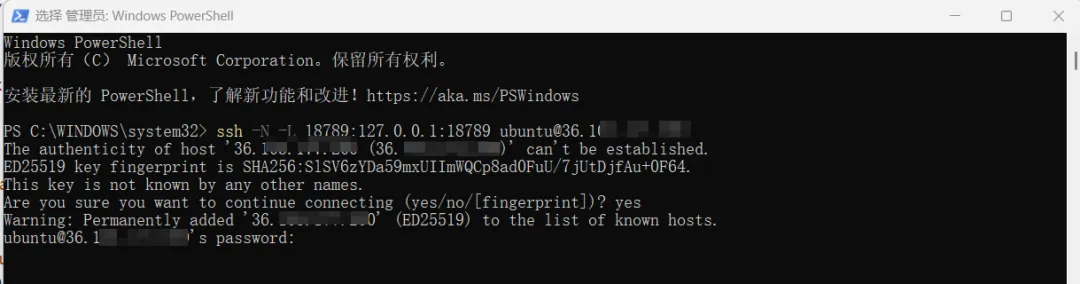
4.1 本地ssh连接服务器

在本地电脑执行,按提示输入远程linux云主机密码即可:

ssh -N -L 18789:127.0.0.1:18789 ubuntu@你的云主机IP
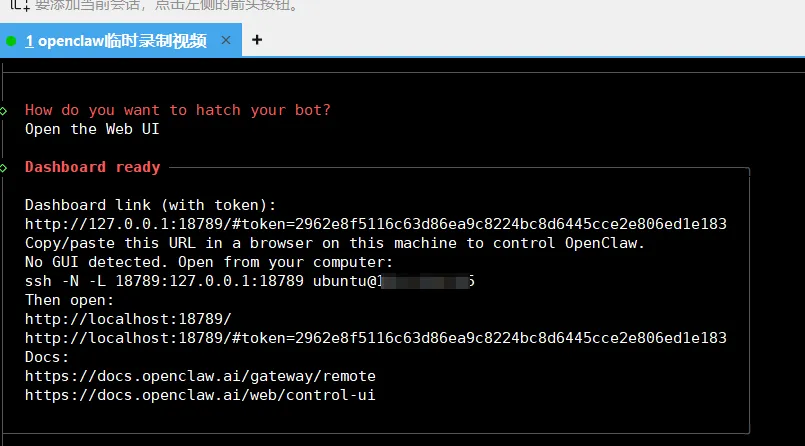
4.2 访问openclaw web ui

携带部署过程中生成的Dashboard link在本地进行访问,如下图:

http://localhost:18789/#token=你的token
4.3 测试

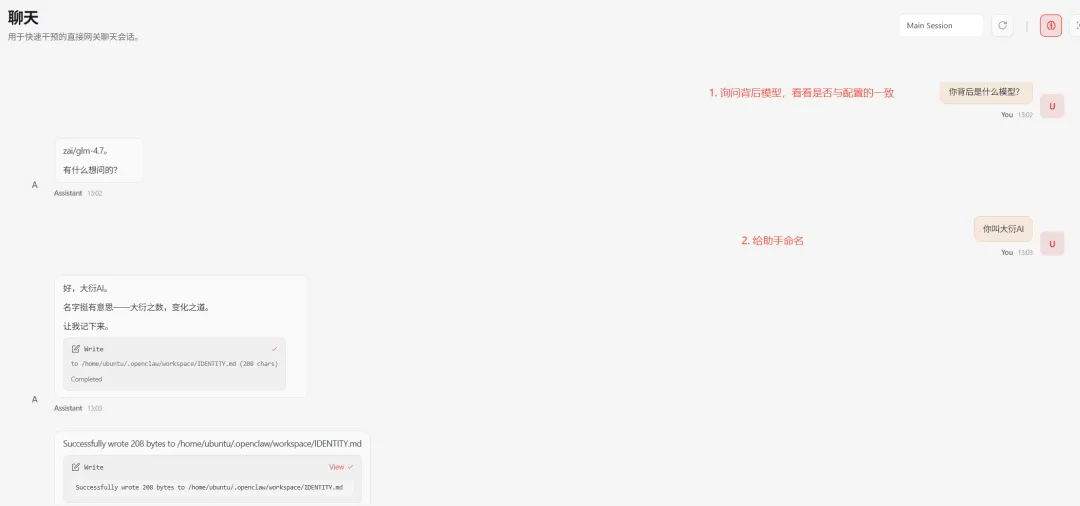
  1. 1. 询问背后模型,如下图告知是glm4.7,与配置的一致
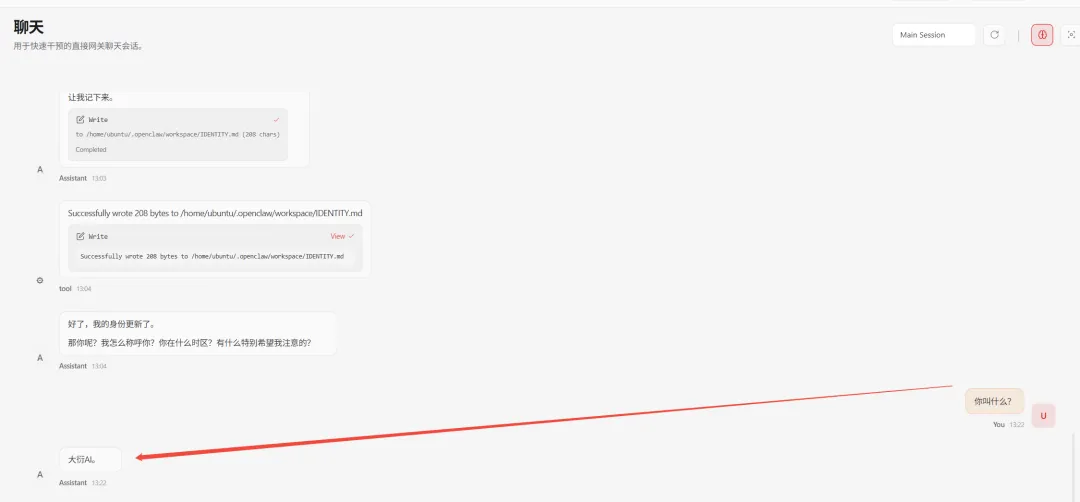
  2. 2. 给AI助手起名为“大衍AI”,如下图,可切换界面等待其生效

五、总结

本文详细记录了在 Ubuntu 22.04 服务器上从零部署 OpenClaw 的完整流程,包括:

  • • 环境准备:Node.js LTS 安装与 npm 镜像配置
  • • OpenClaw 安装:通过官方脚本一键安装,处理 PATH 配置问题
  • • 初始化配置:QuickStart 模式、Z.AI 模型接入
  • • 远程访问:通过 SSH 隧道访问 Web 控制界面进行问答

六、后续内容预告

OpenClaw 的功能远不止于此,接下来我将在博客和B站频道推出更多深度内容,包括:

  • • 🔧 进阶配置:自定义 Skills 技能、Hooks 自动化、多 Agent 管理
  • • 🔒 安全加固:生产环境部署、访问控制、审计日志配置
  • • 🛠️ 插件开发:自定义飞书工具插件、接入企业内部系统
  • • 🤖 模型调优:Prompt 工程、多模型切换、上下文管理
  • • 📊 实战案例:搭建团队知识库助手、自动化工作流机器人

六、视频教程

如果您觉得文字教程不够直观,欢迎访问我的 B 站频道观看完整视频版部署教程:

👉 点击观看《Ubuntu 部署 OpenClaw 手把手教学》

视频中我会实时演示每一步操作,详细讲解配置选项的含义,并演示如何在飞书中与机器人进行交互。建议搭配本文一起食用,效果更佳!

基本 文件 流程 错误 SQL 调试
  1. 请求信息 : 2026-04-14 15:24:32 HTTP/1.1 GET : https://www.yeyulingfeng.com/a/527885.html
  2. 运行时间 : 0.186719s [ 吞吐率:5.36req/s ] 内存消耗:4,858.05kb 文件加载:145
  3. 缓存信息 : 0 reads,0 writes
  4. 会话信息 : SESSION_ID=cde9fec933796319fea9bc5dfa043b06
  1. /yingpanguazai/ssd/ssd1/www/wwww.yeyulingfeng.com/public/index.php ( 0.79 KB )
  2. /yingpanguazai/ssd/ssd1/www/wwww.yeyulingfeng.com/vendor/autoload.php ( 0.17 KB )
  3. /yingpanguazai/ssd/ssd1/www/wwww.yeyulingfeng.com/vendor/composer/autoload_real.php ( 2.49 KB )
  4. /yingpanguazai/ssd/ssd1/www/wwww.yeyulingfeng.com/vendor/composer/platform_check.php ( 0.90 KB )
  5. /yingpanguazai/ssd/ssd1/www/wwww.yeyulingfeng.com/vendor/composer/ClassLoader.php ( 14.03 KB )
  6. /yingpanguazai/ssd/ssd1/www/wwww.yeyulingfeng.com/vendor/composer/autoload_static.php ( 6.05 KB )
  7. /yingpanguazai/ssd/ssd1/www/wwww.yeyulingfeng.com/vendor/topthink/think-helper/src/helper.php ( 8.34 KB )
  8. /yingpanguazai/ssd/ssd1/www/wwww.yeyulingfeng.com/vendor/topthink/think-validate/src/helper.php ( 2.19 KB )
  9. /yingpanguazai/ssd/ssd1/www/wwww.yeyulingfeng.com/vendor/ralouphie/getallheaders/src/getallheaders.php ( 1.60 KB )
  10. /yingpanguazai/ssd/ssd1/www/wwww.yeyulingfeng.com/vendor/topthink/think-orm/src/helper.php ( 1.47 KB )
  11. /yingpanguazai/ssd/ssd1/www/wwww.yeyulingfeng.com/vendor/topthink/think-orm/stubs/load_stubs.php ( 0.16 KB )
  12. /yingpanguazai/ssd/ssd1/www/wwww.yeyulingfeng.com/vendor/topthink/framework/src/think/Exception.php ( 1.69 KB )
  13. /yingpanguazai/ssd/ssd1/www/wwww.yeyulingfeng.com/vendor/topthink/think-container/src/Facade.php ( 2.71 KB )
  14. /yingpanguazai/ssd/ssd1/www/wwww.yeyulingfeng.com/vendor/symfony/deprecation-contracts/function.php ( 0.99 KB )
  15. /yingpanguazai/ssd/ssd1/www/wwww.yeyulingfeng.com/vendor/symfony/polyfill-mbstring/bootstrap.php ( 8.26 KB )
  16. /yingpanguazai/ssd/ssd1/www/wwww.yeyulingfeng.com/vendor/symfony/polyfill-mbstring/bootstrap80.php ( 9.78 KB )
  17. /yingpanguazai/ssd/ssd1/www/wwww.yeyulingfeng.com/vendor/symfony/var-dumper/Resources/functions/dump.php ( 1.49 KB )
  18. /yingpanguazai/ssd/ssd1/www/wwww.yeyulingfeng.com/vendor/topthink/think-dumper/src/helper.php ( 0.18 KB )
  19. /yingpanguazai/ssd/ssd1/www/wwww.yeyulingfeng.com/vendor/symfony/var-dumper/VarDumper.php ( 4.30 KB )
  20. /yingpanguazai/ssd/ssd1/www/wwww.yeyulingfeng.com/vendor/guzzlehttp/guzzle/src/functions_include.php ( 0.16 KB )
  21. /yingpanguazai/ssd/ssd1/www/wwww.yeyulingfeng.com/vendor/guzzlehttp/guzzle/src/functions.php ( 5.54 KB )
  22. /yingpanguazai/ssd/ssd1/www/wwww.yeyulingfeng.com/vendor/topthink/framework/src/think/App.php ( 15.30 KB )
  23. /yingpanguazai/ssd/ssd1/www/wwww.yeyulingfeng.com/vendor/topthink/think-container/src/Container.php ( 15.76 KB )
  24. /yingpanguazai/ssd/ssd1/www/wwww.yeyulingfeng.com/vendor/psr/container/src/ContainerInterface.php ( 1.02 KB )
  25. /yingpanguazai/ssd/ssd1/www/wwww.yeyulingfeng.com/app/provider.php ( 0.19 KB )
  26. /yingpanguazai/ssd/ssd1/www/wwww.yeyulingfeng.com/vendor/topthink/framework/src/think/Http.php ( 6.04 KB )
  27. /yingpanguazai/ssd/ssd1/www/wwww.yeyulingfeng.com/vendor/topthink/think-helper/src/helper/Str.php ( 7.29 KB )
  28. /yingpanguazai/ssd/ssd1/www/wwww.yeyulingfeng.com/vendor/topthink/framework/src/think/Env.php ( 4.68 KB )
  29. /yingpanguazai/ssd/ssd1/www/wwww.yeyulingfeng.com/app/common.php ( 0.03 KB )
  30. /yingpanguazai/ssd/ssd1/www/wwww.yeyulingfeng.com/vendor/topthink/framework/src/helper.php ( 18.78 KB )
  31. /yingpanguazai/ssd/ssd1/www/wwww.yeyulingfeng.com/vendor/topthink/framework/src/think/Config.php ( 5.54 KB )
  32. /yingpanguazai/ssd/ssd1/www/wwww.yeyulingfeng.com/config/alipay.php ( 3.59 KB )
  33. /yingpanguazai/ssd/ssd1/www/wwww.yeyulingfeng.com/vendor/topthink/framework/src/think/facade/Env.php ( 1.67 KB )
  34. /yingpanguazai/ssd/ssd1/www/wwww.yeyulingfeng.com/config/app.php ( 0.95 KB )
  35. /yingpanguazai/ssd/ssd1/www/wwww.yeyulingfeng.com/config/cache.php ( 0.78 KB )
  36. /yingpanguazai/ssd/ssd1/www/wwww.yeyulingfeng.com/config/console.php ( 0.23 KB )
  37. /yingpanguazai/ssd/ssd1/www/wwww.yeyulingfeng.com/config/cookie.php ( 0.56 KB )
  38. /yingpanguazai/ssd/ssd1/www/wwww.yeyulingfeng.com/config/database.php ( 2.48 KB )
  39. /yingpanguazai/ssd/ssd1/www/wwww.yeyulingfeng.com/config/filesystem.php ( 0.61 KB )
  40. /yingpanguazai/ssd/ssd1/www/wwww.yeyulingfeng.com/config/lang.php ( 0.91 KB )
  41. /yingpanguazai/ssd/ssd1/www/wwww.yeyulingfeng.com/config/log.php ( 1.35 KB )
  42. /yingpanguazai/ssd/ssd1/www/wwww.yeyulingfeng.com/config/middleware.php ( 0.19 KB )
  43. /yingpanguazai/ssd/ssd1/www/wwww.yeyulingfeng.com/config/route.php ( 1.89 KB )
  44. /yingpanguazai/ssd/ssd1/www/wwww.yeyulingfeng.com/config/session.php ( 0.57 KB )
  45. /yingpanguazai/ssd/ssd1/www/wwww.yeyulingfeng.com/config/trace.php ( 0.34 KB )
  46. /yingpanguazai/ssd/ssd1/www/wwww.yeyulingfeng.com/config/view.php ( 0.82 KB )
  47. /yingpanguazai/ssd/ssd1/www/wwww.yeyulingfeng.com/app/event.php ( 0.25 KB )
  48. /yingpanguazai/ssd/ssd1/www/wwww.yeyulingfeng.com/vendor/topthink/framework/src/think/Event.php ( 7.67 KB )
  49. /yingpanguazai/ssd/ssd1/www/wwww.yeyulingfeng.com/app/service.php ( 0.13 KB )
  50. /yingpanguazai/ssd/ssd1/www/wwww.yeyulingfeng.com/app/AppService.php ( 0.26 KB )
  51. /yingpanguazai/ssd/ssd1/www/wwww.yeyulingfeng.com/vendor/topthink/framework/src/think/Service.php ( 1.64 KB )
  52. /yingpanguazai/ssd/ssd1/www/wwww.yeyulingfeng.com/vendor/topthink/framework/src/think/Lang.php ( 7.35 KB )
  53. /yingpanguazai/ssd/ssd1/www/wwww.yeyulingfeng.com/vendor/topthink/framework/src/lang/zh-cn.php ( 13.70 KB )
  54. /yingpanguazai/ssd/ssd1/www/wwww.yeyulingfeng.com/vendor/topthink/framework/src/think/initializer/Error.php ( 3.31 KB )
  55. /yingpanguazai/ssd/ssd1/www/wwww.yeyulingfeng.com/vendor/topthink/framework/src/think/initializer/RegisterService.php ( 1.33 KB )
  56. /yingpanguazai/ssd/ssd1/www/wwww.yeyulingfeng.com/vendor/services.php ( 0.14 KB )
  57. /yingpanguazai/ssd/ssd1/www/wwww.yeyulingfeng.com/vendor/topthink/framework/src/think/service/PaginatorService.php ( 1.52 KB )
  58. /yingpanguazai/ssd/ssd1/www/wwww.yeyulingfeng.com/vendor/topthink/framework/src/think/service/ValidateService.php ( 0.99 KB )
  59. /yingpanguazai/ssd/ssd1/www/wwww.yeyulingfeng.com/vendor/topthink/framework/src/think/service/ModelService.php ( 2.04 KB )
  60. /yingpanguazai/ssd/ssd1/www/wwww.yeyulingfeng.com/vendor/topthink/think-trace/src/Service.php ( 0.77 KB )
  61. /yingpanguazai/ssd/ssd1/www/wwww.yeyulingfeng.com/vendor/topthink/framework/src/think/Middleware.php ( 6.72 KB )
  62. /yingpanguazai/ssd/ssd1/www/wwww.yeyulingfeng.com/vendor/topthink/framework/src/think/initializer/BootService.php ( 0.77 KB )
  63. /yingpanguazai/ssd/ssd1/www/wwww.yeyulingfeng.com/vendor/topthink/think-orm/src/Paginator.php ( 11.86 KB )
  64. /yingpanguazai/ssd/ssd1/www/wwww.yeyulingfeng.com/vendor/topthink/think-validate/src/Validate.php ( 63.20 KB )
  65. /yingpanguazai/ssd/ssd1/www/wwww.yeyulingfeng.com/vendor/topthink/think-orm/src/Model.php ( 23.55 KB )
  66. /yingpanguazai/ssd/ssd1/www/wwww.yeyulingfeng.com/vendor/topthink/think-orm/src/model/concern/Attribute.php ( 21.05 KB )
  67. /yingpanguazai/ssd/ssd1/www/wwww.yeyulingfeng.com/vendor/topthink/think-orm/src/model/concern/AutoWriteData.php ( 4.21 KB )
  68. /yingpanguazai/ssd/ssd1/www/wwww.yeyulingfeng.com/vendor/topthink/think-orm/src/model/concern/Conversion.php ( 6.44 KB )
  69. /yingpanguazai/ssd/ssd1/www/wwww.yeyulingfeng.com/vendor/topthink/think-orm/src/model/concern/DbConnect.php ( 5.16 KB )
  70. /yingpanguazai/ssd/ssd1/www/wwww.yeyulingfeng.com/vendor/topthink/think-orm/src/model/concern/ModelEvent.php ( 2.33 KB )
  71. /yingpanguazai/ssd/ssd1/www/wwww.yeyulingfeng.com/vendor/topthink/think-orm/src/model/concern/RelationShip.php ( 28.29 KB )
  72. /yingpanguazai/ssd/ssd1/www/wwww.yeyulingfeng.com/vendor/topthink/think-helper/src/contract/Arrayable.php ( 0.09 KB )
  73. /yingpanguazai/ssd/ssd1/www/wwww.yeyulingfeng.com/vendor/topthink/think-helper/src/contract/Jsonable.php ( 0.13 KB )
  74. /yingpanguazai/ssd/ssd1/www/wwww.yeyulingfeng.com/vendor/topthink/think-orm/src/model/contract/Modelable.php ( 0.09 KB )
  75. /yingpanguazai/ssd/ssd1/www/wwww.yeyulingfeng.com/vendor/topthink/framework/src/think/Db.php ( 2.88 KB )
  76. /yingpanguazai/ssd/ssd1/www/wwww.yeyulingfeng.com/vendor/topthink/think-orm/src/DbManager.php ( 8.52 KB )
  77. /yingpanguazai/ssd/ssd1/www/wwww.yeyulingfeng.com/vendor/topthink/framework/src/think/Log.php ( 6.28 KB )
  78. /yingpanguazai/ssd/ssd1/www/wwww.yeyulingfeng.com/vendor/topthink/framework/src/think/Manager.php ( 3.92 KB )
  79. /yingpanguazai/ssd/ssd1/www/wwww.yeyulingfeng.com/vendor/psr/log/src/LoggerTrait.php ( 2.69 KB )
  80. /yingpanguazai/ssd/ssd1/www/wwww.yeyulingfeng.com/vendor/psr/log/src/LoggerInterface.php ( 2.71 KB )
  81. /yingpanguazai/ssd/ssd1/www/wwww.yeyulingfeng.com/vendor/topthink/framework/src/think/Cache.php ( 4.92 KB )
  82. /yingpanguazai/ssd/ssd1/www/wwww.yeyulingfeng.com/vendor/psr/simple-cache/src/CacheInterface.php ( 4.71 KB )
  83. /yingpanguazai/ssd/ssd1/www/wwww.yeyulingfeng.com/vendor/topthink/think-helper/src/helper/Arr.php ( 16.63 KB )
  84. /yingpanguazai/ssd/ssd1/www/wwww.yeyulingfeng.com/vendor/topthink/framework/src/think/cache/driver/File.php ( 7.84 KB )
  85. /yingpanguazai/ssd/ssd1/www/wwww.yeyulingfeng.com/vendor/topthink/framework/src/think/cache/Driver.php ( 9.03 KB )
  86. /yingpanguazai/ssd/ssd1/www/wwww.yeyulingfeng.com/vendor/topthink/framework/src/think/contract/CacheHandlerInterface.php ( 1.99 KB )
  87. /yingpanguazai/ssd/ssd1/www/wwww.yeyulingfeng.com/app/Request.php ( 0.09 KB )
  88. /yingpanguazai/ssd/ssd1/www/wwww.yeyulingfeng.com/vendor/topthink/framework/src/think/Request.php ( 55.78 KB )
  89. /yingpanguazai/ssd/ssd1/www/wwww.yeyulingfeng.com/app/middleware.php ( 0.25 KB )
  90. /yingpanguazai/ssd/ssd1/www/wwww.yeyulingfeng.com/vendor/topthink/framework/src/think/Pipeline.php ( 2.61 KB )
  91. /yingpanguazai/ssd/ssd1/www/wwww.yeyulingfeng.com/vendor/topthink/think-trace/src/TraceDebug.php ( 3.40 KB )
  92. /yingpanguazai/ssd/ssd1/www/wwww.yeyulingfeng.com/vendor/topthink/framework/src/think/middleware/SessionInit.php ( 1.94 KB )
  93. /yingpanguazai/ssd/ssd1/www/wwww.yeyulingfeng.com/vendor/topthink/framework/src/think/Session.php ( 1.80 KB )
  94. /yingpanguazai/ssd/ssd1/www/wwww.yeyulingfeng.com/vendor/topthink/framework/src/think/session/driver/File.php ( 6.27 KB )
  95. /yingpanguazai/ssd/ssd1/www/wwww.yeyulingfeng.com/vendor/topthink/framework/src/think/contract/SessionHandlerInterface.php ( 0.87 KB )
  96. /yingpanguazai/ssd/ssd1/www/wwww.yeyulingfeng.com/vendor/topthink/framework/src/think/session/Store.php ( 7.12 KB )
  97. /yingpanguazai/ssd/ssd1/www/wwww.yeyulingfeng.com/vendor/topthink/framework/src/think/Route.php ( 23.73 KB )
  98. /yingpanguazai/ssd/ssd1/www/wwww.yeyulingfeng.com/vendor/topthink/framework/src/think/route/RuleName.php ( 5.75 KB )
  99. /yingpanguazai/ssd/ssd1/www/wwww.yeyulingfeng.com/vendor/topthink/framework/src/think/route/Domain.php ( 2.53 KB )
  100. /yingpanguazai/ssd/ssd1/www/wwww.yeyulingfeng.com/vendor/topthink/framework/src/think/route/RuleGroup.php ( 22.43 KB )
  101. /yingpanguazai/ssd/ssd1/www/wwww.yeyulingfeng.com/vendor/topthink/framework/src/think/route/Rule.php ( 26.95 KB )
  102. /yingpanguazai/ssd/ssd1/www/wwww.yeyulingfeng.com/vendor/topthink/framework/src/think/route/RuleItem.php ( 9.78 KB )
  103. /yingpanguazai/ssd/ssd1/www/wwww.yeyulingfeng.com/route/app.php ( 3.94 KB )
  104. /yingpanguazai/ssd/ssd1/www/wwww.yeyulingfeng.com/vendor/topthink/framework/src/think/facade/Route.php ( 4.70 KB )
  105. /yingpanguazai/ssd/ssd1/www/wwww.yeyulingfeng.com/vendor/topthink/framework/src/think/route/dispatch/Controller.php ( 4.74 KB )
  106. /yingpanguazai/ssd/ssd1/www/wwww.yeyulingfeng.com/vendor/topthink/framework/src/think/route/Dispatch.php ( 10.44 KB )
  107. /yingpanguazai/ssd/ssd1/www/wwww.yeyulingfeng.com/app/controller/Index.php ( 9.87 KB )
  108. /yingpanguazai/ssd/ssd1/www/wwww.yeyulingfeng.com/app/BaseController.php ( 2.05 KB )
  109. /yingpanguazai/ssd/ssd1/www/wwww.yeyulingfeng.com/vendor/topthink/think-orm/src/facade/Db.php ( 0.93 KB )
  110. /yingpanguazai/ssd/ssd1/www/wwww.yeyulingfeng.com/vendor/topthink/think-orm/src/db/connector/Mysql.php ( 5.44 KB )
  111. /yingpanguazai/ssd/ssd1/www/wwww.yeyulingfeng.com/vendor/topthink/think-orm/src/db/PDOConnection.php ( 52.47 KB )
  112. /yingpanguazai/ssd/ssd1/www/wwww.yeyulingfeng.com/vendor/topthink/think-orm/src/db/Connection.php ( 8.39 KB )
  113. /yingpanguazai/ssd/ssd1/www/wwww.yeyulingfeng.com/vendor/topthink/think-orm/src/db/ConnectionInterface.php ( 4.57 KB )
  114. /yingpanguazai/ssd/ssd1/www/wwww.yeyulingfeng.com/vendor/topthink/think-orm/src/db/builder/Mysql.php ( 16.58 KB )
  115. /yingpanguazai/ssd/ssd1/www/wwww.yeyulingfeng.com/vendor/topthink/think-orm/src/db/Builder.php ( 24.06 KB )
  116. /yingpanguazai/ssd/ssd1/www/wwww.yeyulingfeng.com/vendor/topthink/think-orm/src/db/BaseBuilder.php ( 27.50 KB )
  117. /yingpanguazai/ssd/ssd1/www/wwww.yeyulingfeng.com/vendor/topthink/think-orm/src/db/Query.php ( 15.71 KB )
  118. /yingpanguazai/ssd/ssd1/www/wwww.yeyulingfeng.com/vendor/topthink/think-orm/src/db/BaseQuery.php ( 45.13 KB )
  119. /yingpanguazai/ssd/ssd1/www/wwww.yeyulingfeng.com/vendor/topthink/think-orm/src/db/concern/TimeFieldQuery.php ( 7.43 KB )
  120. /yingpanguazai/ssd/ssd1/www/wwww.yeyulingfeng.com/vendor/topthink/think-orm/src/db/concern/AggregateQuery.php ( 3.26 KB )
  121. /yingpanguazai/ssd/ssd1/www/wwww.yeyulingfeng.com/vendor/topthink/think-orm/src/db/concern/ModelRelationQuery.php ( 20.07 KB )
  122. /yingpanguazai/ssd/ssd1/www/wwww.yeyulingfeng.com/vendor/topthink/think-orm/src/db/concern/ParamsBind.php ( 3.66 KB )
  123. /yingpanguazai/ssd/ssd1/www/wwww.yeyulingfeng.com/vendor/topthink/think-orm/src/db/concern/ResultOperation.php ( 7.01 KB )
  124. /yingpanguazai/ssd/ssd1/www/wwww.yeyulingfeng.com/vendor/topthink/think-orm/src/db/concern/WhereQuery.php ( 19.37 KB )
  125. /yingpanguazai/ssd/ssd1/www/wwww.yeyulingfeng.com/vendor/topthink/think-orm/src/db/concern/JoinAndViewQuery.php ( 7.11 KB )
  126. /yingpanguazai/ssd/ssd1/www/wwww.yeyulingfeng.com/vendor/topthink/think-orm/src/db/concern/TableFieldInfo.php ( 2.63 KB )
  127. /yingpanguazai/ssd/ssd1/www/wwww.yeyulingfeng.com/vendor/topthink/think-orm/src/db/concern/Transaction.php ( 2.77 KB )
  128. /yingpanguazai/ssd/ssd1/www/wwww.yeyulingfeng.com/vendor/topthink/framework/src/think/log/driver/File.php ( 5.96 KB )
  129. /yingpanguazai/ssd/ssd1/www/wwww.yeyulingfeng.com/vendor/topthink/framework/src/think/contract/LogHandlerInterface.php ( 0.86 KB )
  130. /yingpanguazai/ssd/ssd1/www/wwww.yeyulingfeng.com/vendor/topthink/framework/src/think/log/Channel.php ( 3.89 KB )
  131. /yingpanguazai/ssd/ssd1/www/wwww.yeyulingfeng.com/vendor/topthink/framework/src/think/event/LogRecord.php ( 1.02 KB )
  132. /yingpanguazai/ssd/ssd1/www/wwww.yeyulingfeng.com/vendor/topthink/think-helper/src/Collection.php ( 16.47 KB )
  133. /yingpanguazai/ssd/ssd1/www/wwww.yeyulingfeng.com/vendor/topthink/framework/src/think/facade/View.php ( 1.70 KB )
  134. /yingpanguazai/ssd/ssd1/www/wwww.yeyulingfeng.com/vendor/topthink/framework/src/think/View.php ( 4.39 KB )
  135. /yingpanguazai/ssd/ssd1/www/wwww.yeyulingfeng.com/app/controller/Es.php ( 3.30 KB )
  136. /yingpanguazai/ssd/ssd1/www/wwww.yeyulingfeng.com/vendor/topthink/framework/src/think/Response.php ( 8.81 KB )
  137. /yingpanguazai/ssd/ssd1/www/wwww.yeyulingfeng.com/vendor/topthink/framework/src/think/response/View.php ( 3.29 KB )
  138. /yingpanguazai/ssd/ssd1/www/wwww.yeyulingfeng.com/vendor/topthink/framework/src/think/Cookie.php ( 6.06 KB )
  139. /yingpanguazai/ssd/ssd1/www/wwww.yeyulingfeng.com/vendor/topthink/think-view/src/Think.php ( 8.38 KB )
  140. /yingpanguazai/ssd/ssd1/www/wwww.yeyulingfeng.com/vendor/topthink/framework/src/think/contract/TemplateHandlerInterface.php ( 1.60 KB )
  141. /yingpanguazai/ssd/ssd1/www/wwww.yeyulingfeng.com/vendor/topthink/think-template/src/Template.php ( 46.61 KB )
  142. /yingpanguazai/ssd/ssd1/www/wwww.yeyulingfeng.com/vendor/topthink/think-template/src/template/driver/File.php ( 2.41 KB )
  143. /yingpanguazai/ssd/ssd1/www/wwww.yeyulingfeng.com/vendor/topthink/think-template/src/template/contract/DriverInterface.php ( 0.86 KB )
  144. /yingpanguazai/ssd/ssd1/www/wwww.yeyulingfeng.com/runtime/temp/c935550e3e8a3a4c27dd94e439343fdf.php ( 31.80 KB )
  145. /yingpanguazai/ssd/ssd1/www/wwww.yeyulingfeng.com/vendor/topthink/think-trace/src/Html.php ( 4.42 KB )
  1. CONNECT:[ UseTime:0.000828s ] mysql:host=127.0.0.1;port=3306;dbname=wenku;charset=utf8mb4
  2. SHOW FULL COLUMNS FROM `fenlei` [ RunTime:0.000856s ]
  3. SELECT * FROM `fenlei` WHERE `fid` = 0 [ RunTime:0.000297s ]
  4. SELECT * FROM `fenlei` WHERE `fid` = 63 [ RunTime:0.000277s ]
  5. SHOW FULL COLUMNS FROM `set` [ RunTime:0.000471s ]
  6. SELECT * FROM `set` [ RunTime:0.000190s ]
  7. SHOW FULL COLUMNS FROM `article` [ RunTime:0.000499s ]
  8. SELECT * FROM `article` WHERE `id` = 527885 LIMIT 1 [ RunTime:0.000443s ]
  9. UPDATE `article` SET `lasttime` = 1776151472 WHERE `id` = 527885 [ RunTime:0.008125s ]
  10. SELECT * FROM `fenlei` WHERE `id` = 64 LIMIT 1 [ RunTime:0.000261s ]
  11. SELECT * FROM `article` WHERE `id` < 527885 ORDER BY `id` DESC LIMIT 1 [ RunTime:0.000446s ]
  12. SELECT * FROM `article` WHERE `id` > 527885 ORDER BY `id` ASC LIMIT 1 [ RunTime:0.000356s ]
  13. SELECT * FROM `article` WHERE `id` < 527885 ORDER BY `id` DESC LIMIT 10 [ RunTime:0.004884s ]
  14. SELECT * FROM `article` WHERE `id` < 527885 ORDER BY `id` DESC LIMIT 10,10 [ RunTime:0.003136s ]
  15. SELECT * FROM `article` WHERE `id` < 527885 ORDER BY `id` DESC LIMIT 20,10 [ RunTime:0.004891s ]
0.188631s