夜雨聆风
夜雨聆风Claude Code 插件通过特定领域的技能、命令和工作流来扩展 Claude 的能力。在本文中,我们将逐步了解插件生态系统,探索三种可用的插件类型,并构建一个可运行的示例 —— 一个 Streamlit Web 应用,它使用来自 Anthropic 的 knowledge-work-plugins 中的法律插件来分析合同和保密协议。
什么是 Claude Code 插件?
插件是基于文件的扩展(markdown 和 JSON —— 无需编译代码),它们教会 Claude 如何执行 specialized 任务。一个插件可以包含:
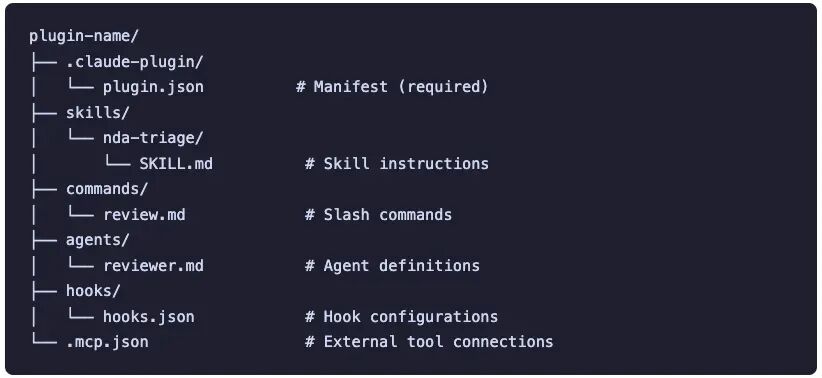
技能 (Skills) —— Claude 根据上下文自动触发的领域知识(例如,知道如何对保密协议进行分类) 命令 (Commands) —— 您手动调用的斜杠命令(例如 /legal:nda-triage)智能体 (Agents)** —— 用于多步工作流的 specialized 代理定义 钩子 (Hooks) —— 响应事件而触发的 Shell 命令 MCP 服务器 —— 与外部工具(Slack、Jira、HubSpot 等)的连接
每个插件都遵循标准的目录结构:
三种类型的插件
1. 官方插件 (claude-plugins-official)
这些插件由 Anthropic 维护,并在您安装 Claude Code 时默认可用。无需设置市场。
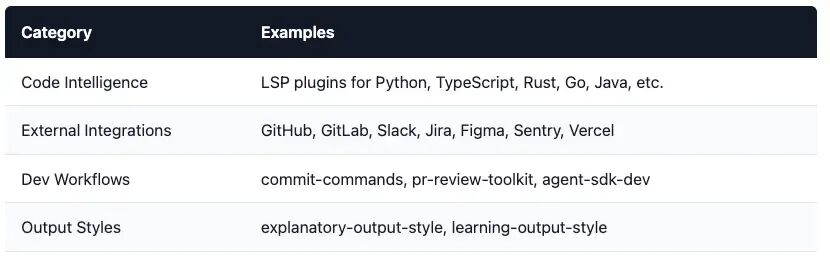
/plugin install typescript-lsp@claude-plugins-official/plugin install github@claude-plugins-official源码:github.com/anthropics/claude-plugins-official
2. 社区/外部插件 (anthropics/claude-code)
Anthropic 维护着一个演示市场,其中包含示例和社区贡献的插件。在安装之前,您必须手动添加此市场。
# 添加市场/plugin marketplace add anthropics/claude-code# 然后安装/plugin install commit-commands@anthropics-claude-code任何人都可以通过托管一个包含 .claude-plugin/marketplace.json 文件的仓库来创建和分发自己的市场。
源码:github.com/anthropics/claude-code/tree/main/plugins
3. 知识工作插件 (anthropics/knowledge-work-plugins)
这些是为知识工作者(不仅仅是开发者)设计的特定角色插件。Anthropic 开源了 11 个涵盖特定工作职能的入门插件:
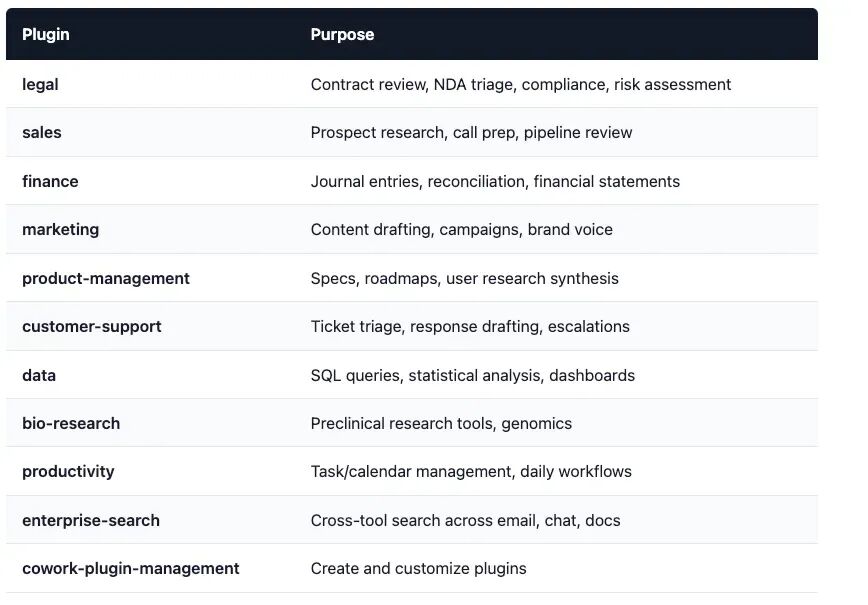
# 添加市场/plugin marketplace add anthropics/knowledge-work-plugins# 安装法律插件/plugin install legal@knowledge-work-plugins源码:github.com/anthropics/knowledge-work-plugins
入门:逐步设置
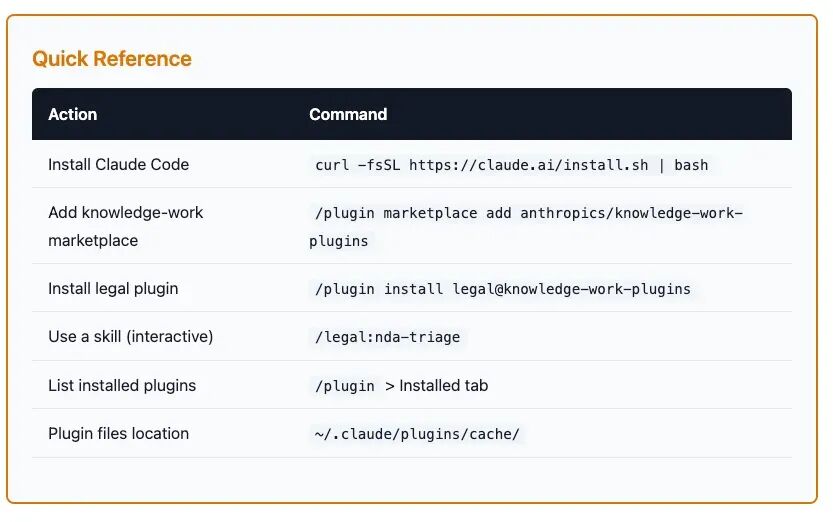
安装 Claude Code
# 推荐:原生安装程序curl -fsSL https://claude.ai/install.sh | bash# 替代方案:通过 npm(需要 Node.js 18+)npm install -g @anthropic-ai/claude-code# 验证安装:claude --version设置您的 Anthropic API 密钥
创建一个 .env 文件或在您的 shell 中导出密钥:
export ANTHROPIC_API_KEY="sk-ant-your-key-here"添加知识工作插件市场
官方市场 (claude-plugins-official) 是预配置的。但知识工作插件市场必须手动添加:
# 启动 Claude Codeclaude# 添加市场/plugin marketplace add anthropics/knowledge-work-plugins安装法律插件
# 安装到用户范围(在所有项目中可用)/plugin install legal@knowledge-work-plugins验证安装
# 打开插件管理器/plugin# 转到 "Installed"(已安装)选项卡,确认法律插件已列出安装后,插件的技能即可使用:
当 Claude 检测到相关上下文时,技能会自动触发 斜杠命令如 /legal:nda-triage、/legal:contract-review变为可用
插件保存的位置
安装后,插件会被缓存在本地:
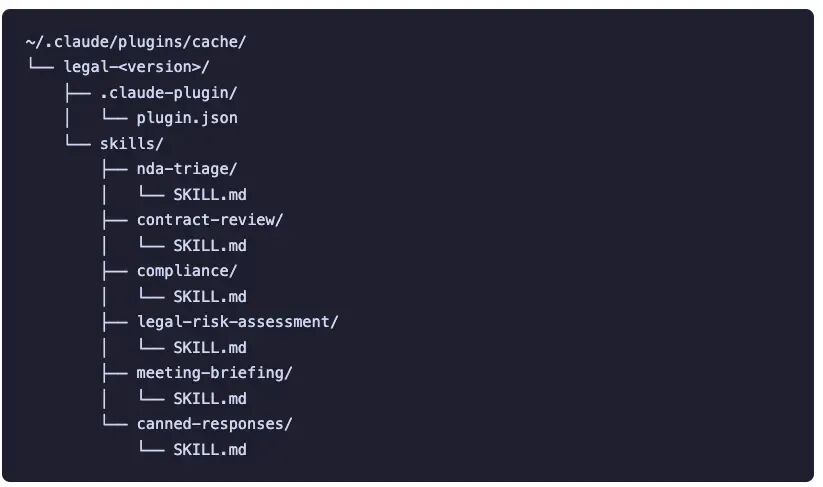
这种基于文件的结构正是插件如此强大的原因 —— 它们是任何应用都可以读取和使用的纯 markdown 文件。
构建法律文档分析器:示例应用
现在我们已经了解了插件生态系统,让我们来看一个利用这些插件技能的实际应用。我们的应用 (app.py) 是一个 Streamlit Web 应用,它可以:
扫描您本地磁盘上已安装的 Claude Code 插件 让您选择一个插件和一个特定的技能(例如,NDA 分类) 上传一个 PDF 文档 将技能指令作为系统提示 + 文档文本发送给 Anthropic API 显示分析结果
代码详解
1. 配置和导入
import osimport jsonfrom pathlib import Pathfrom typing import Optional, Dict, List, Tupleimport streamlit as stfrom dotenv import load_dotenvfrom pypdf import PdfReaderfrom anthropic import Anthropicload_dotenv()DEFAULT_PLUGIN_SEARCH_DIRS = [ Path.home() / ".claude", Path.home() / ".claude" / "plugins", Path.home() / ".claude" / "cache",]应用加载环境变量(用于 ANTHROPIC_API_KEY)并定义 Claude Code 存储已安装插件的默认目录。这些是标准位置 —— ~/.claude 及其子目录。
2. 插件发现
def find_plugin_roots(search_root: Path) -> List[Path]: hits: List[Path] = []ifnot search_root.exists():return hitsfor plugin_json in search_root.rglob(".claude-plugin/plugin.json"): hits.append(plugin_json.parent.parent)return sorted(set(hits))此函数递归扫描目录,查找任何包含 .claude-plugin/plugin.json 的文件夹 —— 这是 Claude Code 插件的标准标记。它返回插件根目录(.claude-plugin/ 的父目录)。
3. 加载插件元数据
def load_plugin_manifest(plugin_root: Path) -> Optional[Dict]: manifest_path = plugin_root / ".claude-plugin" / "plugin.json"ifnot manifest_path.exists():return Nonetry:return json.loads(manifest_path.read_text(encoding="utf-8")) except Exception:return None读取 plugin.json 清单以获取元数据,如插件名称、版本和描述。这与 Claude Code 内部使用的清单文件相同。
4. 发现插件中的技能
def list_skill_dirs(plugin_root: Path) -> List[Path]: skills_dir = plugin_root / "skills"ifnot skills_dir.exists():return []return sorted([p.parent for p in skills_dir.rglob("SKILL.md")])def read_text_file(path: Path) -> str:return path.read_text(encoding="utf-8", errors="replace")技能位于 skills/ 目录下。每个技能都是一个包含 SKILL.md 文件的文件夹。对于法律插件,这将返回诸如 nda-triage、contract-review、compliance 等文件夹。
5. 加载技能包
def load_skill_bundle(skill_dir: Path) -> str: """ 从选定的技能文件夹加载所有内容: - SKILL.md(必需) - 同一目录中的任何其他 .md 文件(可选) 在输出中,SKILL.md 放在第一位,然后是其他 .md 文件。 """ skill_md = skill_dir / "SKILL.md"ifnot skill_md.exists():raise FileNotFoundError(f"Missing SKILL.md in: {skill_dir}") parts: List[str] = [] parts.append(read_text_file(skill_md).strip()) # 添加文件夹中的任何其他 .md 文件(如果存在)for p in sorted(skill_dir.glob("*.md")):if p.name == "SKILL.md":continue parts.append("\n\n" + read_text_file(p).strip())return"\n".join([p for p in parts if p]).strip()这是集成的核心。它加载 SKILL.md 文件(主要技能指令)以及同一文件夹中的任何其他 .md 文件。合并后的文本成为 Anthropic API 调用的系统提示。SKILL.md 文件包含详细的指令,如分类标准、输出格式、决策框架 —— Claude 执行 specialized 任务所需的一切。
6. PDF 文本提取
def extract_pdf_text(uploaded_file) -> str: uploaded_file.seek(0) reader = PdfReader(uploaded_file) parts: List[str] = []for i, page in enumerate(reader.pages): txt = page.extract_text() or"" parts.append(f"\n\n--- PAGE {i+1} ---\n{txt}")return"\n".join(parts).strip()使用 pypdf 从上传的 PDF 的每一页提取文本。文本格式带有页面标记,以便 Claude 在分析中可以引用特定页面。
7. 调用 Anthropic API
def run_anthropic(model, system_instructions, user_text, max_tokens): client = Anthropic(api_key=os.environ["ANTHROPIC_API_KEY"]) resp = client.messages.create( model=model, max_tokens=max_tokens, system=system_instructions, # <-- 技能包放在这里 messages=[{"role": "user", "content": user_text}], # <-- 文档文本 ) out: List[str] = []for block in resp.content or []:if getattr(block, "type", None) == "text": out.append(block.text)return"\n".join(out).strip()这就是插件技能与 API 结合的地方。设计有意保持简洁:
系统提示 = 仅包含技能的 markdown 指令(没有额外的包装) 用户消息 = 仅包含原始文档文本
这模仿了 Claude Code 内部使用技能的方式 —— 技能指令定义了角色和任务框架,用户内容则是要分析的输入。
8. Streamlit UI
UI 分为三个部分:
侧边栏 —— 插件发现和选择:可配置的搜索根目录、插件下拉菜单和技能下拉菜单 主区域,左列 —— PDF 上传 主区域,右列 —— 加载的技能指令预览 下方 —— 模型选择(Sonnet 4.5、Opus 4.6、Haiku 4.5)、最大令牌数滑块和“运行分析”按钮
st.set_page_config(page_title="Legal Skill POC", layout="wide")st.title("📄 Legal Skill POC (Streamlit + Claude Code plugin skills)")if"ANTHROPIC_API_KEY"not in os.environ ornot os.environ["ANTHROPIC_API_KEY"].strip(): st.error("ANTHROPIC_API_KEY is missing. Add it to your environment or .env file.") st.stop()st.sidebar.header("Plugin discovery")# 提供默认的搜索根目录(DEFAULT_PLUGIN_SEARCH_DIRS 中第一个存在的目录)default_root = next((p for p in DEFAULT_PLUGIN_SEARCH_DIRS if p.exists()), DEFAULT_PLUGIN_SEARCH_DIRS[0])search_root_str = st.sidebar.text_input("Search root (where Claude plugins are stored)", value=str(default_root), help="We will scan recursively for .claude-plugin/plugin.json under this folder.",)search_root = Path(search_root_str).expanduser()with st.sidebar:if st.button("🔍 Scan for plugins"): st.session_state["scan_requested"] = Trueif"scan_requested"not in st.session_state: st.session_state["scan_requested"] = True # 首次加载时自动扫描plugin_roots: List[Path] = []if st.session_state.get("scan_requested"): plugin_roots = find_plugin_roots(search_root)ifnot plugin_roots: st.warning("No plugins found under that folder.\n\n""Try setting search root to \`~/.claude\` (or wherever Claude Code caches plugins)." ) st.stop()# 构建插件列表(名称 -> 根目录)plugins: List[Tuple[str, Path]] = []for root in plugin_roots: manifest = load_plugin_manifest(root) # 如果没有清单,则回退使用目录名 name = (manifest or {}).get("name", root.name) plugins.append((name, root))plugins.sort(key=lambda x: x[0].lower())plugin_name = st.sidebar.selectbox("Select plugin", [p[0] for p in plugins])plugin_root = dict(plugins)[plugin_name]st.sidebar.caption("Selected plugin root:")st.sidebar.code(str(plugin_root))# 技能目录选择skill_dirs = list_skill_dirs(plugin_root)ifnot skill_dirs: st.error("No skills found in this plugin (missing skills/*/SKILL.md).") st.stop()selected_skill_dir = st.sidebar.selectbox("Select skill (folder)", skill_dirs, format_func=lambda p: p.name, # 显示文件夹名称,如 "nda-triage")# 加载选定的技能包(文件夹中的所有内容)try: skill_instructions = load_skill_bundle(selected_skill_dir)except Exception as e: st.error(f"Failed to load selected skill: {e}") st.stop()# 主 UIcol1, col2 = st.columns([1, 1])with col1: st.subheader("1) Upload document (PDF)") pdf_file = st.file_uploader("Upload NDA / contract PDF", type=["pdf"])with col2: st.subheader("2) Loaded skill instructions (read-only)") st.caption(f"Skill folder: {selected_skill_dir}") # 显示前 N 个字符以保持 UI 快速 preview = skill_instructions[:100] + ("\n\n... (truncated)"if len(skill_instructions) > 100else"") st.code(preview, language="markdown")st.divider()st.subheader("3) Run")model = st.selectbox("Model", ["claude-sonnet-4-5", "claude-opus-4-6", "claude-haiku-4-5"])max_tokens = st.slider("Max tokens", 300, 4000, 1500, 100)run_btn = st.button("▶ Run analysis", type="primary", disabled=(pdf_file is None))if run_btn: with st.spinner("Extracting PDF text..."): doc_text = extract_pdf_text(pdf_file) with st.spinner("Calling Anthropic API..."): # 重要:不添加额外指令,如要求所示: # system = 仅技能包 # user = 仅文档文本 output = run_anthropic( model=model, system_instructions=skill_instructions, user_text=doc_text, max_tokens=max_tokens, ) st.success("Done.") st.subheader("Output") st.write(output)运行应用
# 安装 Python 依赖pip install streamlit anthropic pypdf python-dotenv# 设置您的 API 密钥export ANTHROPIC_API_KEY="sk-ant-your-key-here"# 运行streamlit run app.py该应用将在您的浏览器中打开。从侧边栏选择法律插件,选择一个技能如 nda-triage,上传一个 PDF,然后点击“运行分析”。
使用插件的好处
无需微调即可实现专门化
插件使用纯 markdown 指令将通用模型转变为领域专家。无需模型训练,无需微调基础设施 —— 只需精心编写的指令来指导 Claude 的行为。
可跨应用复用
一旦安装,相同的插件技能可以通过斜杠命令在 Claude Code (CLI) 中使用,通过插件市场在 Claude Cowork (网页) 中使用,以及通过读取技能文件在您自己的应用中使用。
可为您的组织定制
插件是基于文件的。Fork 仓库,使用您公司的合同审查手册、合规要求、内部术语和首选输出格式自定义 SKILL.md 文件。
无需编码
插件是 markdown 和 JSON 文件。法律团队、合规官员和其他非开发人员无需编写代码即可审查和编辑技能指令。
可组合
技能、命令、代理、钩子和 MCP 服务器可以在单个插件中混合使用。将 Claude 连接到您的工具(通过 MCP),定义它应如何工作(通过技能),并自动化触发器(通过钩子)。
版本控制
由于插件只是文件,它们可以与 Git 自然地协同工作。跟踪更改、审查拉取请求、回滚错误 —— 适用标准开发工作流。
总结
Claude Code 插件提供了一种标准的、基于文件的方式来扩展 Claude 的特定领域能力。三个插件来源 —— 官方 (claude-plugins-official)、社区 (anthropics/claude-code) 和知识工作 (anthropics/knowledge-work-plugins) —— 涵盖了从代码智能到法律合同审查的一切。
从我们的示例应用中得到的关键启示是:插件技能是可移植的。它们是包含结构化指令的 markdown 文件。您可以通过斜杠命令在 Claude Code 中使用它们,或者以编程方式读取它们并通过 Anthropic API 将它们集成到您自己的应用中。插件系统提供专门化能力;您可以选择如何交付它。