 夜雨聆风
夜雨聆风


软件自动化测试工具RANOREX STUDIO(六十四)–录制和对象库
软件自动化测试工具RANOREX STUDIO(六十四)–录制和对象库
录制和对象库
Ranorex Recorder为标准桌面客户端程序和web程序提供了相同的捕获和回放功能。Recorder会自动在其动作列表中为每个录制的用户操作创建动作条目,对应的对象库也包含了动作列表中所有必需的UI网页元素的对象。
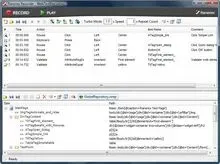
对象库和WebDcument
下面的例子演示了如何使用对象库访问WebDocument的方法:
C#
// Load repository
ProjectRepository repo = ProjectRepository.Instance;
// Open a website
repo.WebPage.Self.Navigate(“http://www.ranorex.com”);
// Wait until the document is loaded
repo.WebPage.Self.WaitForDocumentLoaded();
VB.NET
‘ Load repository
Dim repo As ProjectRepository = ProjectRepository.Instance
‘ Open a website
repo.WebPage.Self.Navigate(“http://www.ranorex.com”)
‘ Wait until the document is loaded
repo.WebPage.Self.WaitForDocumentLoaded()
处理Ajax
C#
GlobalRepository repo = GlobalRepository.Instance;
WebDocument webDocument = repo.WebPage.Self;
// Fill out the AJAX form
InputTag input1 = webDocument.FindSingle(“.//form[@id=’ajax-form’]/fieldset//input[@name=’value1′]”);
input1.EnsureVisible();
input1.Value = “Size”;
InputTag input2 = webDocument.FindSingle(“.//form[@id=’ajax-form’]/fieldset//input[@name=’value2′]”);
input2.Value = “Weight”;
InputTag checkbox = webDocument.FindSingle(“.//form[@id=’ajax-form’]/fieldset//input[@name=’checkbox2′]”);
checkbox.Checked = “true”;
SelectTag selectColor = webDocument.FindSingle(“.//form[@id=’ajax-form’]/fieldset//select[@name=’color2′]”);
selectColor.TagValue = “blue”;
// Submit data
InputTag submit = webDocument.FindSingle(“.//form[@id=’ajax-form’]//input[@id=’submit-ajax’]”);
submit.Click();
// Wait for the ajax request for max 10 seconds (10000 milliseconds)
PreTag result = webDocument.FindSingle(“.//div[@id=’ajax_response’]/div/pre”, 10000);
VB.NET
Dim repo As GlobalRepository = GlobalRepository.Instance
Dim webDocument As WebDocument = repo.WebPage.Self
‘ Fill out the AJAX form
Dim input1 As InputTag = webDocument.FindSingle(“.//form[@id=’ajax-form’]/fieldset//input[@name=’value1′]”)
input1.EnsureVisible()
input1.Value = “Size”
Dim input2 As InputTag = webDocument.FindSingle(“.//form[@id=’ajax-form’]/fieldset//input[@name=’value2′]”)
input2.Value = “Weight”
Dim checkbox As InputTag = webDocument.FindSingle(“.//form[@id=’ajax-form’]/fieldset//input[@name=’checkbox2′]”)
checkbox.Checked = “true”
Dim selectColor As SelectTag = webDocument.FindSingle(“.//form[@id=’ajax-form’]/fieldset//select[@name=’color2′]”)
selectColor.TagValue = “blue”
‘ Submit data
Dim submit As InputTag = webDocument.FindSingle(“.//form[@id=’ajax-form’]//input[@id=’submit-ajax’]”)
submit.Click()
‘ Wait for the ajax request for max 10 seconds (10000 milliseconds)
Dim result As PreTag = webDocument.FindSingle(“.//div[@id=’ajax_response’]/div/pre”, 10000)
表元素及其CSS样式设置
C#
GlobalRepository repo = GlobalRepository.Instance;
WebDocument webDocument = repo.WebPage.Self;
// List all elements of a table
foreach (TrTag row in repo.WebPage.DivTagContent.TableTagSimpletable.Find(“./tbody/tr”))
{
string rowInfo = “”;
TdTag rowNameCell = row.FindSingle(“./td[2]”);
rowInfo += “Row index: ” + rowNameCell.PreviousSibling.InnerText + “, “;
rowInfo += “Row name: ” + rowNameCell.InnerText + “, “;
rowInfo += “Row value: ” + rowNameCell.NextSibling.InnerText + “, “;
// Get all cells from the row
rowInfo += “All Cells: “;
foreach (TdTag cell in row.Find(“./td”))
{
rowInfo += cell.InnerText + “, “;
// Move the mouse to each cell element
cell.MoveTo();
// Set css style
cell.SetStyle(“background-color”,”#33ff00″);
}
Report.Info(rowInfo);
}
VB.NET
Dim repo As GlobalRepository = GlobalRepository.Instance
Dim webDocument As WebDocument = repo.WebPage.Self
‘ List all elements of a table
For Each row As TrTag In
repo.WebPage.DivTagContent.TableTagSimpletable.Find(“./tbody/tr”)
Dim rowInfo As String = “”
Dim rowNameCell As TdTag = row.FindSingle(“./td[2]”)
rowInfo += “Row index: ” & rowNameCell.PreviousSibling.InnerText & “, ”
rowInfo += “Row name: ” & rowNameCell.InnerText & “, ”
rowInfo += “Row value: ” & rowNameCell.NextSibling.InnerText & “, ”
‘ Get all cells from the row
rowInfo += “All Cells: ”
For Each cell As TdTag In row.Find(“./td”)
rowInfo += cell.InnerText & “, ”
‘ Move the mouse to each cell element
cell.MoveTo()
‘ Set css style
cell.SetStyle(“background-color”, “#33ff00”)
Next
Report.Info(rowInfo)
Next
设置输入,tag属性以及在不用鼠标的情况下进行点击
C#
// Use mouse and keyboard to set Name
repo.WebPage.TestForm.InputTagTestname.Click();
Keyboard.Press(“Test Name”);
// Set email address directly via ‘Value’
repo.WebPage.TestForm.InputTagTestemail.Value = “test@ranorex.com”;
// Open calendar form
repo.WebPage.TestForm.ButtonTagCalendar.Click();
// Select the 22th of the current month
repo.WebPage.TdTag_22nd.Click();
// Select each item of list box
foreach (OptionTag option in
repo.WebPage.TestForm.SelectTagTestmultiple.Find(“.//option”))
{
option[“selected”] = “selected”;
}
// Perform a click without moving the mouse to the button
repo.WebPage.TestForm.InputTagSubmit.PerformClick();
VB.NET
‘ Use mouse and keyboard to set Name
repo.WebPage.TestForm.InputTagTestname.Click()
Keyboard.Press(“Test Name”)
‘ Set email address directly via ‘Value’
repo.WebPage.TestForm.InputTagTestemail.Value = “test@ranorex.com”
‘ Open calendar form
repo.WebPage.TestForm.ButtonTagCalendar.Click()
‘ Select the 22th of the current month
repo.WebPage.TdTag_22nd.Click()
‘ Select each item of list box
For Each [option] As OptionTag In
repo.WebPage.TestForm.SelectTagTestmultiple.Find(“.//option”)
[option](“selected”) = “selected”
Next
‘ Perform a click without moving the mouse to the button
repo.WebPage.TestForm.InputTagSubmit.PerformClick()
执行javascript代码
C#
webDocument.ExecuteScript(“history.back();”);
VB.NET
webDocument.ExecuteScript(“history.back();”)
层级菜单处理
C#
WebDocument webDocument = “/dom[@caption=’Ranorex Test Page’]”;
DivTag topMenuDiv = webDocument.FindSingle(“.//div[@id=’top-menu’]”);
// Bring the main menu to the front
topMenuDiv.EnsureVisible();
// Automating a dropdown menu
foreach (LiTag item in topMenuDiv.Find(“.//li[@visible=’true’]”))
{
Mouse.MoveTo(item);
// Move the mouse to each submenu item
foreach (LiTag subitem in item.Find(“.//li[@visible=’true’]”))
Mouse.MoveTo(subitem);
}
VB.NET
Dim webDocument As WebDocument = “/dom[@caption=’Ranorex Test Page’]”
Dim topMenuDiv As DivTag = webDocument.FindSingle(“.//div[@id=’top-menu’]”)
‘ Bring the main menu to the front
topMenuDiv.EnsureVisible()
‘ Automating a dropdown menu
For Each item As LiTag In topMenuDiv.Find(“.//li[@visible=’true’]”)
Mouse.MoveTo(item)
‘ Move the mouse to each submenu item
For Each subitem As LiTag In item.Find(“.//li[@visible=’true’]”)
Mouse.MoveTo(subitem)
Next
Next
请在微信客户端打开