 夜雨聆风
夜雨聆风


PDF与DXF文件转换工具
软件功能
本工具提供以下核心功能:
- PDF 转 DXF:将 PDF 文件转换为 DXF 格式
- DXF 转 PDF:将 DXF 文件转换为 PDF 格式
- DXF 查看:直接查看 DXF 文件的图形内容
安装与配置
下载后双击运行,无需安装。
特殊配置
- Poppler:PDF 转 DXF 功能需要 Poppler 工具
- 请将 Poppler 文件夹放置在应用程序同一目录下
- 确保目录结构为:poppler\Library\bin
- 该目录应包含 pdftoppm.exe 和 pdftocairo.exe 等可执行文件
使用步骤
1. 启动软件
2. 选择输入文件
- 点击 “浏览” 按钮选择要处理的文件
- 支持的文件格式:
- PDF 文件(.pdf)
- DXF 文件(.dxf)
3. 设置输出文件路径
- 选择输入文件后,系统会自动生成输出文件路径
- 也可以点击 “浏览” 按钮自定义输出文件路径
- 输出文件格式会根据输入文件自动确定:
- 输入 PDF → 输出 DXF
- 输入 DXF → 输出 PDF
4. 执行操作
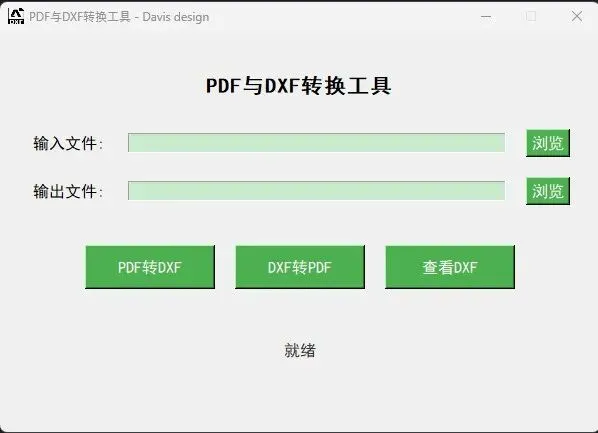
- PDF 转 DXF:点击 “PDF转DXF” 按钮
- DXF 转 PDF:点击 “DXF转PDF” 按钮
- 查看 DXF:点击 “查看DXF” 按钮(仅适用于 DXF 文件)
5. 查看结果
- 转换完成后,会显示成功提示
- 查看 DXF 时,会打开一个新窗口显示图形内容
- 状态标签会显示当前操作状态
功能说明
PDF 转DXF
- 系统会将 PDF 每页转换为图像
- 对图像进行边缘检测和轮廓提取
- 将提取的轮廓转换为 DXF 线条
- 保存为 DXF 文件
DXF 转PDF
- 读取 DXF 文件中的实体(线条、多段线、圆、圆弧等)
- 计算实体的边界框
- 自动缩放并调整布局
- 将实体绘制到 PDF 画布
- 保存为 PDF 文件
DXF 查看
- 打开一个新窗口显示 DXF 文件内容
- 支持滚动查看大型图形
- 显示文件信息和实体数量
- 自动调整图形大小以适应窗口
注意事项
- Poppler 配置:
- 确保 Poppler 文件夹正确放置在应用程序目录下
- 打包为可执行文件时,需确保包含 Poppler 文件夹
- 文件格式:
- 确保输入文件格式正确(PDF 或 DXF)
- 输出文件路径应包含正确的文件扩展名
- 性能:
- 处理大型 PDF 或 DXF 文件可能需要较长时间
- 请耐心等待转换完成
- 错误处理:
- 如遇错误,请查看错误提示信息
- 确保输入文件未损坏且格式正确
常见问题
Q: 转换失败,提示“unable to get page count is poppuler installed and in PATH?”
A: 请确保Poppler 文件夹正确放置在应用程序目录下,目录结构为 poppler\Library\bin
Q: 打包为exe 后找不到poppler 文件夹
A: 使用PyInstaller 打包时,请使用以下命令包含Poppler 文件夹:
plainText
pyinstaller –onefile –add-data “poppler;poppler” DxfPdf.py
Q: 查看DXF 时显示空白
A: 可能是DXF 文件格式问题或实体坐标范围过大,请尝试其他DXF 文件测试
链接: https://pan.baidu.com/s/16l9Lw-z1d0UzhMwP2baz-Q
提取码: w8xe
import tkinter as tk
from tkinter import filedialog, messagebox
import os
import sys
import tempfile
from pdf2image import convert_from_path
import cv2
from ezdxf import new
from ezdxf.entities import Line, LWPolyline, Circle, Arc, Polyline
from reportlab.pdfgen import canvas
from reportlab.lib.pagesizes import A4


class PDF2DXFApp:
def __init__(self, root):
self.root = root
self.root.title("PDF与DXF转换工具 - Davis design")
self.root.geometry("600x400")
self.root.resizable(False, False)
self.root.iconbitmap("dxf.ico")
# 设置应用图标,添加错误处理
try:
self.root.iconbitmap("dxf.ico")
except Exception:
pass  # 忽略图标设置错误,使用默认图标
# 设置字体和颜色
self.font = ("SimHei", 12)
self.bg_color = "#f0f0f0"
# 设置字体和颜色
self.font = ("SimHei", 12)
self.bg_color = "#f0f0f0"
self.btn_color = "#4CAF50"
self.btn_text_color = "white"
# 创建主框架
self.main_frame = tk.Frame(self.root, bg=self.bg_color)
self.main_frame.pack(fill=tk.BOTH, expand=True, padx=20, pady=20)

# 标题
self.title_label = tk.Label(self.main_frame, text="PDF与DXF转换工具", font=("SimHei", 16, "bold"),
bg=self.bg_color)
self.title_label.pack(pady=20)

# 输入文件路径
self.input_frame = tk.Frame(self.main_frame, bg=self.bg_color)
self.input_frame.pack(fill=tk.X, pady=10)

self.input_label = tk.Label(self.input_frame, text="输入文件:", font=self.font, bg=self.bg_color)
self.input_label.pack(side=tk.LEFT, padx=10)

self.input_entry = tk.Entry(self.input_frame, font=self.font, width=40)
self.input_entry.pack(side=tk.LEFT, fill=tk.X, expand=True, padx=10)

self.browse_btn = tk.Button(self.input_frame, text="浏览", font=self.font, bg=self.btn_color,
fg=self.btn_text_color, command=self.browse_input)
self.browse_btn.pack(side=tk.RIGHT, padx=10)

# 输出文件路径
self.output_frame = tk.Frame(self.main_frame, bg=self.bg_color)
self.output_frame.pack(fill=tk.X, pady=10)

self.output_label = tk.Label(self.output_frame, text="输出文件:", font=self.font, bg=self.bg_color)
self.output_label.pack(side=tk.LEFT, padx=10)

self.output_entry = tk.Entry(self.output_frame, font=self.font, width=40)
self.output_entry.pack(side=tk.LEFT, fill=tk.X, expand=True, padx=10)

self.output_btn = tk.Button(self.output_frame, text="浏览", font=self.font, bg=self.btn_color,
fg=self.btn_text_color, command=self.browse_output)
self.output_btn.pack(side=tk.RIGHT, padx=10)

# 转换按钮
self.convert_frame = tk.Frame(self.main_frame, bg=self.bg_color)
self.convert_frame.pack(pady=30)

self.pdf_to_dxf_btn = tk.Button(self.convert_frame, text="PDF转DXF", font=self.font, width=15, height=2,
bg=self.btn_color, fg=self.btn_text_color, command=self.pdf_to_dxf)
self.pdf_to_dxf_btn.pack(side=tk.LEFT, padx=10)

self.dxf_to_pdf_btn = tk.Button(self.convert_frame, text="DXF转PDF", font=self.font, width=15, height=2,
bg=self.btn_color, fg=self.btn_text_color, command=self.dxf_to_pdf)
self.dxf_to_pdf_btn.pack(side=tk.LEFT, padx=10)

self.view_dxf_btn = tk.Button(self.convert_frame, text="查看DXF", font=self.font, width=15, height=2,
bg=self.btn_color, fg=self.btn_text_color, command=self.view_dxf)
self.view_dxf_btn.pack(side=tk.RIGHT, padx=10)

# 状态标签
self.status_var = tk.StringVar()
self.status_var.set("就绪")
self.status_label = tk.Label(self.main_frame, textvariable=self.status_var, font=self.font, bg=self.bg_color,
fg="#333")
self.status_label.pack(pady=20)

def browse_input(self):
        file_types = [
            ("所有支持的文件", "*.pdf *.dxf"),
            ("PDF文件", "*.pdf"),
            ("DXF文件", "*.dxf")
        ]
        file_path = filedialog.askopenfilename(filetypes=file_types)
if file_path:
self.input_entry.delete(0, tk.END)
self.input_entry.insert(0, file_path)
# 自动生成输出文件路径
base_name = os.path.splitext(file_path)[0]
if file_path.lower().endswith('.pdf'):
                output_path = base_name + '.dxf'
else:
                output_path = base_name + '.pdf'
self.output_entry.delete(0, tk.END)
self.output_entry.insert(0, output_path)

def browse_output(self):
        input_path = self.input_entry.get()
if input_path.lower().endswith('.pdf'):
            file_types = [("DXF文件", "*.dxf")]
            default_extension = ".dxf"
else:
            file_types = [("PDF文件", "*.pdf")]
            default_extension = ".pdf"
file_path = filedialog.asksaveasfilename(filetypes=file_types, defaultextension=default_extension)
if file_path:
self.output_entry.delete(0, tk.END)
self.output_entry.insert(0, file_path)

def pdf_to_dxf(self):
        input_path = self.input_entry.get()
        output_path = self.output_entry.get()

if not input_path or not output_path:
            messagebox.showerror("错误", "请选择输入和输出文件路径")
return
        if not input_path.lower().endswith('.pdf'):
            messagebox.showerror("错误", "输入文件必须是PDF格式")
return
        try:
self.status_var.set("正在转换...")
self.root.update()

# 设置poppler路径
# 处理打包后的情况
if getattr(sys, 'frozen', False):
# 打包后的临时目录
current_dir = sys._MEIPASS
else:
# 未打包的情况
current_dir = os.path.dirname(os.path.abspath(__file__))
            poppler_path = os.path.join(current_dir, 'poppler', 'Library', 'bin')

# 转换PDF为图像
images = convert_from_path(input_path, poppler_path=poppler_path)

# 创建DXF文档
doc = new('R2010')
            msp = doc.modelspace()

# 处理每一页
for i, image in enumerate(images):
# 保存为临时文件
with tempfile.NamedTemporaryFile(suffix='.png', delete=False) as temp_file:
                    temp_path = temp_file.name
                image.save(temp_path, 'PNG')

# 读取图像并进行边缘检测
img = cv2.imread(temp_path)
                gray = cv2.cvtColor(img, cv2.COLOR_BGR2GRAY)
                edges = cv2.Canny(gray, 50, 150)

# 提取轮廓
contours, _ = cv2.findContours(edges, cv2.RETR_EXTERNAL, cv2.CHAIN_APPROX_SIMPLE)

# 将轮廓转换为DXF线条
for contour in contours:
if len(contour) > 1:
for j in range(len(contour) - 1):
                            x1, y1 = contour[j][0]
                            x2, y2 = contour[j + 1][0]
# 转换坐标(PDF坐标通常以左下角为原点)
msp.add_line((x1, img.shape[0] - y1), (x2, img.shape[0] - y2))

# 清理临时文件
os.unlink(temp_path)

# 保存DXF文件
doc.saveas(output_path)

self.status_var.set("转换完成")
            messagebox.showinfo("成功", f"PDF已成功转换为DXF文件:{output_path}")

except Exception as e:
self.status_var.set("转换失败")
            messagebox.showerror("错误", f"转换失败:{str(e)}")

def dxf_to_pdf(self):
        input_path = self.input_entry.get()
        output_path = self.output_entry.get()

if not input_path or not output_path:
            messagebox.showerror("错误", "请选择输入和输出文件路径")
return
        if not input_path.lower().endswith('.dxf'):
            messagebox.showerror("错误", "输入文件必须是DXF格式")
return
        try:
self.status_var.set("正在转换...")
self.root.update()

# 读取DXF文件
import ezdxf
            doc = ezdxf.readfile(input_path)
            msp = doc.modelspace()

# 创建PDF画布
c = canvas.Canvas(output_path, pagesize=A4)
            width, height = A4

# 计算所有实体的边界框
min_x = float('inf')
            min_y = float('inf')
            max_x = float('-inf')
            max_y = float('-inf')

for entity in msp:
if isinstance(entity, Line):
                    start = entity.dxf.start
                    end = entity.dxf.end
                    min_x = min(min_x, start[0], end[0])
                    min_y = min(min_y, start[1], end[1])
                    max_x = max(max_x, start[0], end[0])
                    max_y = max(max_y, start[1], end[1])
elif isinstance(entity, LWPolyline):
                    points = entity.get_points()
for point in points:
                        min_x = min(min_x, point[0])
                        min_y = min(min_y, point[1])
                        max_x = max(max_x, point[0])
                        max_y = max(max_y, point[1])
elif isinstance(entity, Polyline):
for vertex in entity.vertices:
                        loc = vertex.dxf.location
                        min_x = min(min_x, loc[0])
                        min_y = min(min_y, loc[1])
                        max_x = max(max_x, loc[0])
                        max_y = max(max_y, loc[1])
elif isinstance(entity, Circle):
                    center = entity.dxf.center
                    radius = entity.dxf.radius
                    min_x = min(min_x, center[0] - radius)
                    min_y = min(min_y, center[1] - radius)
                    max_x = max(max_x, center[0] + radius)
                    max_y = max(max_y, center[1] + radius)
elif isinstance(entity, Arc):
                    center = entity.dxf.center
                    radius = entity.dxf.radius
                    min_x = min(min_x, center[0] - radius)
                    min_y = min(min_y, center[1] - radius)
                    max_x = max(max_x, center[0] + radius)
                    max_y = max(max_y, center[1] + radius)

# 计算缩放比例和边距
if max_x > min_x and max_y > min_y:
                margin = 50  # 边距
width_available = width - 2 * margin
                height_available = height - 2 * margin
                scale_x = width_available / (max_x - min_x)
                scale_y = height_available / (max_y - min_y)
                scale = min(scale_x, scale_y)
else:
                scale = 1
margin = 50
# 绘制所有实体
for entity in msp:
if isinstance(entity, Line):
                    start = entity.dxf.start
                    end = entity.dxf.end
# 转换坐标到PDF坐标系
x1 = margin + (start[0] - min_x) * scale
                    y1 = margin + (start[1] - min_y) * scale
                    x2 = margin + (end[0] - min_x) * scale
                    y2 = margin + (end[1] - min_y) * scale
                    c.line(x1, height - y1, x2, height - y2)
elif isinstance(entity, LWPolyline):
# 处理多段线
points = entity.get_points()
if len(points) > 1:
for i in range(len(points) - 1):
                            x1 = margin + (points[i][0] - min_x) * scale
                            y1 = margin + (points[i][1] - min_y) * scale
                            x2 = margin + (points[i+1][0] - min_x) * scale
                            y2 = margin + (points[i+1][1] - min_y) * scale
                            c.line(x1, height - y1, x2, height - y2)
elif isinstance(entity, Polyline):
# 处理多段线
vertices = entity.vertices
if len(vertices) > 1:
for i in range(len(vertices) - 1):
                            x1 = margin + (vertices[i].dxf.location[0] - min_x) * scale
                            y1 = margin + (vertices[i].dxf.location[1] - min_y) * scale
                            x2 = margin + (vertices[i+1].dxf.location[0] - min_x) * scale
                            y2 = margin + (vertices[i+1].dxf.location[1] - min_y) * scale
                            c.line(x1, height - y1, x2, height - y2)
elif isinstance(entity, Circle):
# 处理圆
center = entity.dxf.center
                    radius = entity.dxf.radius
                    x = margin + (center[0] - min_x) * scale
                    y = margin + (center[1] - min_y) * scale
                    r = radius * scale
                    c.circle(x, height - y, r)
elif isinstance(entity, Arc):
# 处理圆弧
center = entity.dxf.center
                    radius = entity.dxf.radius
                    start_angle = entity.dxf.start_angle
                    end_angle = entity.dxf.end_angle
                    x = margin + (center[0] - min_x) * scale
                    y = margin + (center[1] - min_y) * scale
                    r = radius * scale
# 绘制圆弧(简化处理,绘制近似线段)
import math
                    num_segments = 36
angle_step = (end_angle - start_angle) / num_segments
                    points = []
for i in range(num_segments + 1):
                        angle = start_angle + i * angle_step
                        rad = math.radians(angle)
                        px = x + r * math.cos(rad)
                        py = height - (y + r * math.sin(rad))
                        points.append((px, py))
for i in range(len(points) - 1):
                        c.line(points[i][0], points[i][1], points[i+1][0], points[i+1][1])

# 保存PDF文件
c.save()

self.status_var.set("转换完成")
            messagebox.showinfo("成功", f"DXF已成功转换为PDF文件:{output_path}")

except Exception as e:
self.status_var.set("转换失败")
            messagebox.showerror("错误", f"转换失败:{str(e)}")

def view_dxf(self):
        input_path = self.input_entry.get()

if not input_path:
            messagebox.showerror("错误", "请选择要查看的DXF文件")
return
        if not input_path.lower().endswith('.dxf'):
            messagebox.showerror("错误", "输入文件必须是DXF格式")
return
        try:
self.status_var.set("正在加载...")
self.root.update()

# 创建查看窗口
view_window = tk.Toplevel(self.root)
            view_window.title(f"DXF查看器 - {os.path.basename(input_path)}")
            view_window.geometry("800x600")
            view_window.resizable(True, True)

# 创建画布
canvas_frame = tk.Frame(view_window)
            canvas_frame.pack(fill=tk.BOTH, expand=True)

            canvas = tk.Canvas(canvas_frame, bg="white")
            canvas.pack(side=tk.LEFT, fill=tk.BOTH, expand=True)

# 添加滚动条
v_scrollbar = tk.Scrollbar(canvas_frame, orient=tk.VERTICAL, command=canvas.yview)
            v_scrollbar.pack(side=tk.RIGHT, fill=tk.Y)
            h_scrollbar = tk.Scrollbar(view_window, orient=tk.HORIZONTAL, command=canvas.xview)
            h_scrollbar.pack(side=tk.BOTTOM, fill=tk.X)

            canvas.config(yscrollcommand=v_scrollbar.set, xscrollcommand=h_scrollbar.set)

# 读取DXF文件
import ezdxf
            doc = ezdxf.readfile(input_path)
            msp = doc.modelspace()

# 计算所有实体的边界框
min_x = float('inf')
            min_y = float('inf')
            max_x = float('-inf')
            max_y = float('-inf')

for entity in msp:
if isinstance(entity, Line):
                    start = entity.dxf.start
                    end = entity.dxf.end
                    min_x = min(min_x, start[0], end[0])
                    min_y = min(min_y, start[1], end[1])
                    max_x = max(max_x, start[0], end[0])
                    max_y = max(max_y, start[1], end[1])
elif isinstance(entity, LWPolyline):
                    points = entity.get_points()
for point in points:
                        min_x = min(min_x, point[0])
                        min_y = min(min_y, point[1])
                        max_x = max(max_x, point[0])
                        max_y = max(max_y, point[1])
elif isinstance(entity, Polyline):
for vertex in entity.vertices:
                        loc = vertex.dxf.location
                        min_x = min(min_x, loc[0])
                        min_y = min(min_y, loc[1])
                        max_x = max(max_x, loc[0])
                        max_y = max(max_y, loc[1])
elif isinstance(entity, Circle):
                    center = entity.dxf.center
                    radius = entity.dxf.radius
                    min_x = min(min_x, center[0] - radius)
                    min_y = min(min_y, center[1] - radius)
                    max_x = max(max_x, center[0] + radius)
                    max_y = max(max_y, center[1] + radius)
elif isinstance(entity, Arc):
                    center = entity.dxf.center
                    radius = entity.dxf.radius
                    min_x = min(min_x, center[0] - radius)
                    min_y = min(min_y, center[1] - radius)
                    max_x = max(max_x, center[0] + radius)
                    max_y = max(max_y, center[1] + radius)

# 计算缩放比例和偏移
if max_x > min_x and max_y > min_y:
# 计算画布大小和缩放比例
canvas_width = 750
canvas_height = 550
scale_x = canvas_width / (max_x - min_x)
                scale_y = canvas_height / (max_y - min_y)
                scale = min(scale_x, scale_y) * 0.9  # 留一些边距
offset_x = (canvas_width - (max_x - min_x) * scale) / 2
offset_y = (canvas_height - (max_y - min_y) * scale) / 2
else:
                scale = 10
offset_x = 100
offset_y = 100
# 绘制所有实体
import math
for entity in msp:
if isinstance(entity, Line):
                    start = entity.dxf.start
                    end = entity.dxf.end
                    x1 = offset_x + (start[0] - min_x) * scale
                    y1 = offset_y + (max_y - start[1]) * scale  # 翻转Y轴
x2 = offset_x + (end[0] - min_x) * scale
                    y2 = offset_y + (max_y - end[1]) * scale
                    canvas.create_line(x1, y1, x2, y2, fill="black", width=1)
elif isinstance(entity, LWPolyline):
                    points = entity.get_points()
if len(points) > 1:
for i in range(len(points) - 1):
                            x1 = offset_x + (points[i][0] - min_x) * scale
                            y1 = offset_y + (max_y - points[i][1]) * scale
                            x2 = offset_x + (points[i+1][0] - min_x) * scale
                            y2 = offset_y + (max_y - points[i+1][1]) * scale
                            canvas.create_line(x1, y1, x2, y2, fill="black", width=1)
elif isinstance(entity, Polyline):
                    vertices = entity.vertices
if len(vertices) > 1:
for i in range(len(vertices) - 1):
                            x1 = offset_x + (vertices[i].dxf.location[0] - min_x) * scale
                            y1 = offset_y + (max_y - vertices[i].dxf.location[1]) * scale
                            x2 = offset_x + (vertices[i+1].dxf.location[0] - min_x) * scale
                            y2 = offset_y + (max_y - vertices[i+1].dxf.location[1]) * scale
                            canvas.create_line(x1, y1, x2, y2, fill="black", width=1)
elif isinstance(entity, Circle):
                    center = entity.dxf.center
                    radius = entity.dxf.radius
                    x = offset_x + (center[0] - min_x) * scale
                    y = offset_y + (max_y - center[1]) * scale
                    r = radius * scale
                    canvas.create_oval(x - r, y - r, x + r, y + r, outline="black", width=1)
elif isinstance(entity, Arc):
                    center = entity.dxf.center
                    radius = entity.dxf.radius
                    start_angle = entity.dxf.start_angle
                    end_angle = entity.dxf.end_angle
                    x = offset_x + (center[0] - min_x) * scale
                    y = offset_y + (max_y - center[1]) * scale
                    r = radius * scale
# 绘制圆弧(简化处理,绘制近似线段)
num_segments = 36
angle_step = (end_angle - start_angle) / num_segments
                    points = []
for i in range(num_segments + 1):
                        angle = start_angle + i * angle_step
                        rad = math.radians(angle)
                        px = x + r * math.cos(rad)
                        py = y - r * math.sin(rad)  # 注意Y轴方向
points.append((px, py))
for i in range(len(points) - 1):
                        canvas.create_line(points[i][0], points[i][1], points[i+1][0], points[i+1][1], fill="black", width=1)

# 设置画布滚动区域
canvas.configure(scrollregion=canvas.bbox("all"))

# 添加信息面板
info_frame = tk.Frame(view_window, height=50, bg="#f0f0f0")
            info_frame.pack(fill=tk.X, side=tk.BOTTOM)

            info_label = tk.Label(info_frame, text=f"文件: {os.path.basename(input_path)} | 实体数量: {len(list(msp))}",
font=self.font, bg="#f0f0f0")
            info_label.pack(pady=10, padx=10)

self.status_var.set("就绪")

except Exception as e:
self.status_var.set("加载失败")
            messagebox.showerror("错误", f"加载失败:{str(e)}")


if __name__ == "__main__":
    root = tk.Tk()
    app = PDF2DXFApp(root)
    root.mainloop()