ARTICLE · 1249775
DeepSeek Harness插件从入门到发布
DeepSeek Harness插件从入门到发布在DeepSeek Harness智能体框架中一切都是插件,工具Tool是其中一种非常重要的插件,LLM有了调用工具的能力之后才逐渐发展出现在的能够执行任务的智能体产品形态。尽管DSH框架的创造模式可以直接使用自然语言的方式来创建出自己所需的各种插件,作为智能体的开发者有必要对框架背后的行为进行更深入的学习。本章节通过开发一个用于统计文本字符数、单词数、高频词的小工具来熟悉Tool的开发过程,最后通过发布为tarball、npm包、GitHub源码三种形式来教你如何发布上线自己开发的插件。 在DSH中,插件是一个导出函数apply的TypeScript模块,工具插件通过defineTool定义并注册到ctx.tools,工具参数使用官方实现的schema类型化参数构建,所有的工具的插件必然依赖tools。这里假定已经拉取了DSH的源码,在源码根目录下创建myplugin/tool-text-stats/src/index.ts文件来编写工具代码。 此工具统计一段文本的字符数量、单词数量、行数、前defaultTopWords项高频词,以下为text-stats工具的代码,这里只展示关键部分代码并做了必要的注释,完整代码请访问https://github.com/PepperPapa/dsh-tool-text-stats查看。 在tool-text-stats目录下创建文件cordis.yml,id指定工具唯一标识,name从相对路径查找对应的插件源码,config为用户的配置项,对应源码中的config接口,框架通过读取此文件实现加载和注册工具。 已经创建的cordis.yml中name指向的是TypeScript源码,不需要构建就能直接加载源码实现加载插件,在DSH源码根目录下执行下面的命令就可以加载插件,这种方式适合开发模式下使用。 打开设置,搜索内置插件发现text-stats插件已经处在运行状态。 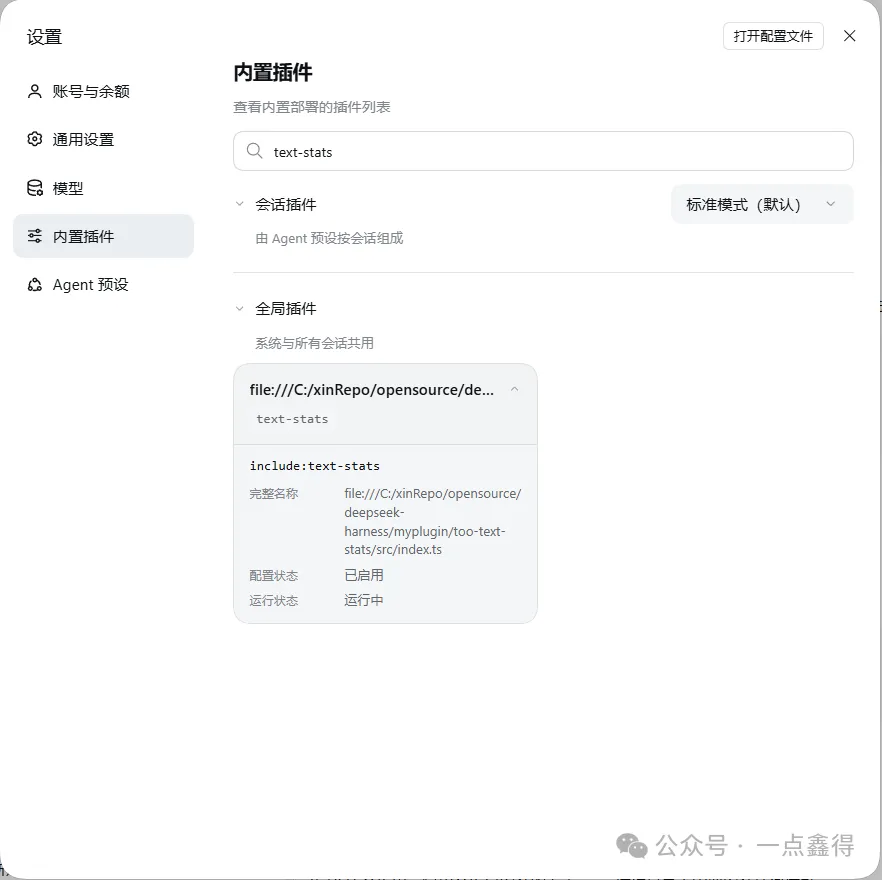
新建一个会话,输入使用text-stats统计+一段文本,验证模型能否正确调用工具并返回统计结果。 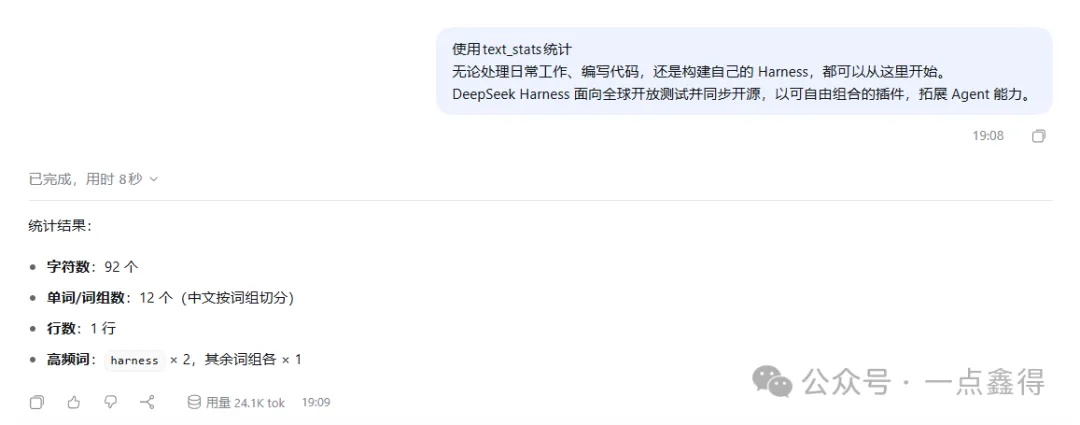
轨迹视图下能够看到工具调用的详情。 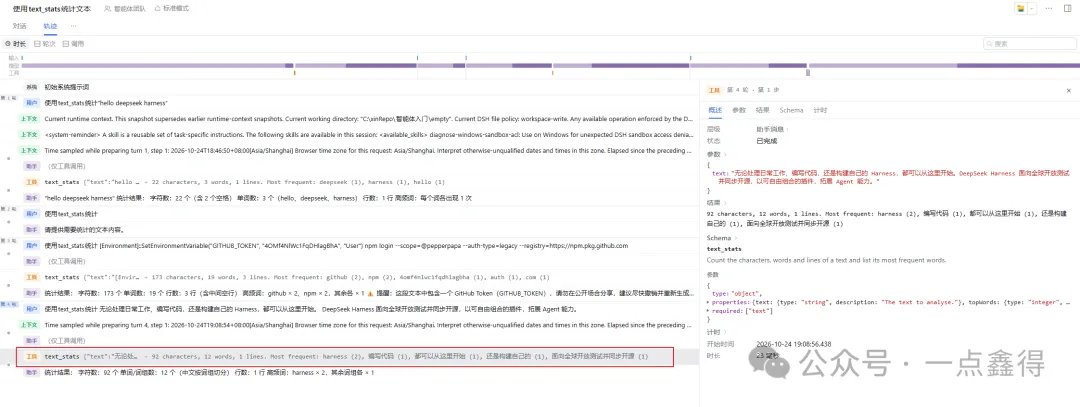
前面使用的patch方式加载插件仅限于开发模式下,插件开发完成后还需要构建为bundle组合包才能实现插件的安装与打包分发。在cordis.yml相同目录下创建cordis.patch.yml、package.json(或者执行pnpm init自动生成后修改)、tsdown.config.ts(构建配置)三个文件。 cordis.patch.yml的内容如下,和cordis.yml文件内容唯一的不同是name不再指向ts源码,而是bundle组合包的名称。 package.json为npm包的元数据文件,dsh.bundle.patch为DSH特有的部分,声明这是一个bundle组合包,框架会读取patch指向的文件cordis.patch.yml的并注册插件到cordis。 关键配置说明: tsdown.config.ts为使用tsdown打包的配置文件,可以从仓库内复用 以上文件准备好之后cd到tool-text-stats目录依次执行pnpm install安装唯一依赖tsdown,pnpm run build执行打包。打包成功后将会产生lib/index.js的JavaScript代码(node只能执行js代码),新增node_modules为安装依赖目录。 刚接触DSH会遇到很多让人困惑的概念,比如前面已经出现的bundle表示组合包,接下来我们需要把bundle包安装到profile,profile是一种可以自由组合的产品形态,比如web和桌面版就是两个不同的profile。可以把bundle类比为餐厅研制的某个菜品,profile类比为为顾客定制的套餐,不同的菜品(bundle)组合形成了定制的套餐(profile)。 完成了前面的打包步骤之后,执行如下命令将其安装到web这个profile中。 然后运行pnpm dsh web就可以打开web,搜索本地插件可以发现tool-text-stats已经在运行中,不再需要使用patch显示加载了,我们开发的tool-text-stats这道菜已经加入web套餐了。 cd %USERPROFILE%/.dsh/profiles/web目录查看package.json文件内容,应该可以看到dsh.profile.bundles下多出一个dsh-tool-text-stats的配置项。node_modules目录下也会多出一个dsh-tool-text-stats目录,不过是链接形式指向源码目录。 完成构建后可以直接在tool-text-stats目录下执行pnpm pack就会在同目录下打包生成一个dsh-tool-text-stats-0.1.0.tgz的本地包,包的内容就是lib+cordis.patch.yml+package.json+README.md。 可以直接安装tarball到profile,这种方式和前面唯一的不同是node_modules目录下直接是复制的文件目录,而不再是链接。 说明:需要执行pnpm dsh plugin --profile web remove dsh-tool-text-stats先卸载已安装过的插件,删除node_modules目录下的dsh-tool-text-stats文件夹,否则会出现报错。 npm官网账号总是注册不了,这里演示将npm包发布到GitHub Packages,需要先申请一个token,进入settings->Developer Settings,进入Personal access tokens (classic)点击Generate new token(classic)申请token,scopes主要勾选repo、write:packages、delete:packages。 首先cd %USERPROFILE%到用户目录下创建.npmrc文件,写入如下内容,目的是指定发布npm包的地址,提供认证信息: 发布到GitHub Packages有一个强制约束就是必须要加GitHub域前缀,package.json、cordis.patch.yml中的name需要由tool-dsh-text-stats改为@pepperpapa/tool-dsh-text-stats,注意要改为自己的域。 npm包每次发布都需要修改版本号,需要做好严格的版本管理,以上涉及的修改需要加入git暂存区并commit,否则发布会校验不通过。 在tool-text-stats目录下执行pnpm publish执行发布,如果发布成功,登录GitHub可以在Packages下看到发布的包信息。 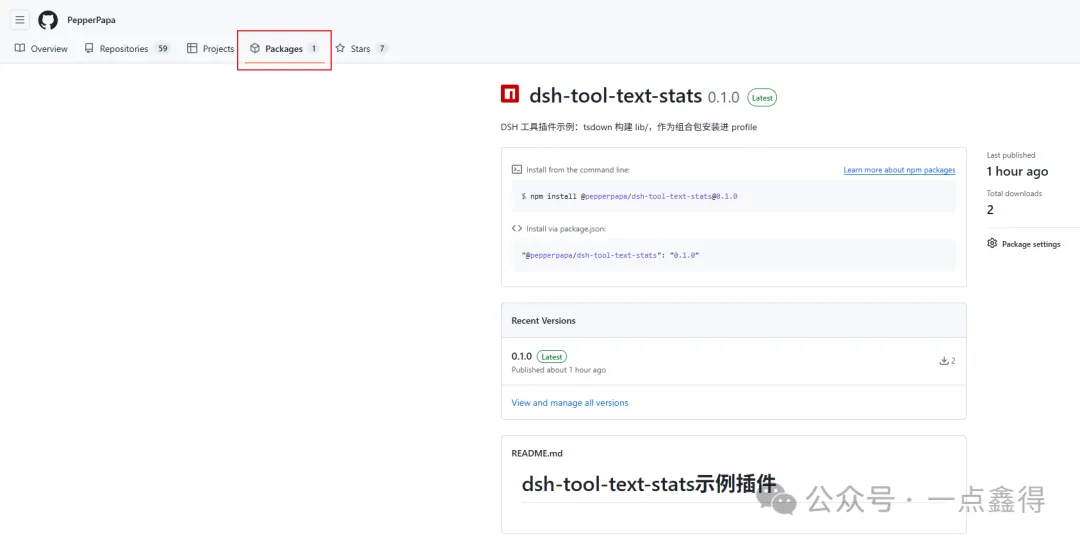
5. 执行命令pnpm dsh plugin --profile web add @pepperpapa/dsh-tool-text-stats@0.1.0可以直接安装此npm包。 这种方式就是直接将源码(忽略构建的lib、node_modules、tgz文件)发布到GitHub仓库,插件安装界面直接输入仓库地址就可以自动安装,安装过程也会执行prepare脚本进行构建,如果不希望发布源码可以选择npm包的方式发布。
开发一个Tool插件
import type { Context } from '@deepseek-ai/cordis'import { defineTool } from '@deepseek-ai/dsh-tools'import Schema from '@deepseek-ai/schemastery'// 工具名export const name = 'text-stats'// 配置需要的依赖export const inject = ['tools']export interfaceConfig{defaultTopWords: numbercaseSensitive: boolean}// 定义配置约束,凡是需要用户设置的内容官方都建议做成参数// cordis.yml、cordis.patch.yml中进行配置参数设定export const Config: Schema<Config> = Schema.object({defaultTopWords: Schema.natural().min(1).max(20).default(5),caseSensitive: Schema.boolean().default(false),})... // 省略代码export function analyse(text: string, topWords: number, caseSensitive: boolean): TextStats {... // 省略代码}/*** 注册 `text_stats` 工具。注册是副作用:dispose 插件 fiber 即注销该工具。* @param ctx - 插件上下文,`inject` 保证 `ctx.tools` 可用。* @param config - 已按 `Config` schema 校验并填好默认值的部署配置。*/export function apply(ctx: Context, config: Config) {// 注册工具ctx.tools.register(defineTool({name: 'text_stats',description: 'Count the characters, words and lines of a text and list its most frequent words.',// 入参parameters: {text: { type: 'string', required: true, description: 'The text to analyse.' },topWords: { type: 'integer', description: 'How many frequent words to list, 1-20. Defaults to the plugin configuration.' },},// 返回值output: {schema: {// 返回值为对象type: 'object',// 返回对象结构定义properties: {characters: { type: 'integer', required: true, description: 'Number of Unicode code points.' },words: { type: 'integer', required: true },lines: { type: 'integer', required: true },topWords: {type: 'array',required: true,items: {type: 'object',additionalProperties: false,properties: {word: { type: 'string', required: true },count: { type: 'integer', required: true },},},},},additionalProperties: false,},// 模型只看到这里返回的内容;规范值本身仍供程序化调用方读取。render: (_args, value) => {const summary = `${value.characters} characters, ${value.words} words, ${value.lines} lines`if(value.topWords.length === 0) return [{ type: 'text', text: summary }]const frequent = value.topWords.map(entry => `${entry.word} (${entry.count})`).join(', ')return [{ type: 'text', text: `${summary}. Most frequent: ${frequent}` }]},},// 参数已由 defineTool 按上面的 parameters 校验,这里只需处理 schema 表达不了的约束。async execute(args) {const requested = args.topWords ?? config.defaultTopWords// 限制top数量的范围在1-20const topWords = Math.min(20, Math.max(1, Math.trunc(requested)))return analyse(args.text, topWords, config.caseSensitive)},}))}
- insert:- id: text-statsname: './src/index.ts'config:defaultTopWords: 5caseSensitive: false
源码加载工具
pnpm dsh web --patch .\myplugin\tool-text-stats\cordis.yml构建bundle组合包
- insert:- id: text-statsname: dsh-tool-text-statsconfig:defaultTopWords: 5caseSensitive: false
{"name": "dsh-tool-text-stats","version": "0.1.0","description": "DSH 工具插件示例:tsdown 构建 lib/,作为组合包安装进 profile","type": "module","main": "lib/index.js","exports": {".": "./lib/index.js","./cordis.patch.yml": "./cordis.patch.yml","./package.json": "./package.json"},"files": ["lib","cordis.patch.yml","README.md"],"license": "MIT","engines": {"dsh": ">=0.2.0 <0.3.0"},"dsh": {"bundle": {"patch": "./cordis.patch.yml"}},"scripts": {"build": "tsdown","prepare": "tsdown","typecheck": "tsc -p tsconfig.json"},"peerDependencies": {"@deepseek-ai/cordis": "~4.0.5","@deepseek-ai/dsh-tools": "~0.2.1-rc.1","@deepseek-ai/schemastery": "~3.18.5"},"devDependencies": {"tsdown": "^0.22.2"}}
main:node查找文件的入口; exports:只允许导入指定的路径; files:只打包指定的文件和目录; dsh:框架特有,声明bundle; scripts:脚本,build-打包、prepare-本地pnpm install、pnpm publish之前触发执行,目的是别人安装这个包或你发布这个包时一定是构建好的、typecheck-类型检查,不产出文件; peerDependencies:表示由宿主DSH提供这些依赖,插件本身不安装; devDependencies:构建依赖工具
import { dirname, resolve } from 'node:path'import { fileURLToPath } from 'node:url'import { defineConfig } from 'tsdown'// 入口与输出都用本文件位置推导,因此从仓库根目录还是插件目录调用结果一致。const packageRoot = dirname(fileURLToPath(import.meta.url))/*** 从 src/ 直接构建发布入口。只转译、不做类型检查、不依赖项目引用,* 因此 `prepare` 在 git 安装后的孤立目录里也能跑通。*/export default defineConfig({entry: [resolve(packageRoot, 'src/index.ts')],outDir: resolve(packageRoot, 'lib'),format: ['esm'],platform: 'node',target: 'es2024',fixedExtension: false,dts: false,clean: true,// dsh 本体包必须留在外部,运行时由当前安装提供同一份实例。deps: { neverBundle: [/^@deepseek-ai\//] },})
pnpm installpnpm run build
安装进profile
pnpm dsh plugin --profile web add .\myplugin\tool-text-stats{"name": "dsh-profile-web","private": true,"dsh": {"profile": {"bundles": ["@deepseek-ai/dsh-base","@deepseek-ai/dsh-web-app","dsh-tool-text-stats"],"patchReload": "live"}},"dependencies": {"dsh-tool-text-stats": "link:C:/xinRepo/opensource/deepseek-harness/myplugin/tool-text-stats"}}
分发的三种形式
1. tarball
pnpm dsh plugin --profile web add .\myplugin\tool-text-stats\dsh-tool-text-stats-0.1.0.tgz2. npm
@你的github账号名:registry=https://npm.pkg.github.com//npm.pkg.github.com/:_authToken=你申请的token
pnpm publish$ tsdownℹ tsdown v0.22.14 powered by rolldown v1.2.15ℹ config file: C:\xinRepo\opensource\deepseek-harness\myplugin\tool-text-stats\tsdown.config.tsℹ entry: src\index.tsℹ target: es2024ℹ tsconfig: ..\..\tsconfig.jsonℹ Build startℹ Cleaning 2 filesℹ lib\index.js 3.35 kB │ gzip: 1.64 kBℹ 1 files, total: 3.35 kB✔ Build complete in 25ms📦 @pepperpapa/dsh-tool-text-stats@0.1.0 → https://npm.pkg.github.com/✅ Published package @pepperpapa/dsh-tool-text-stats@0.1.0