 夜雨聆风
夜雨聆风常用命令 + 问题排查,一篇搞定!
📦 一、快速检查
1.1 查看状态
# 检查 OpenClaw 整体状态openclaw status# 检查 Gateway 服务openclaw gateway status正常输出示例:
✅ Gateway: Running✅ Node: Connected✅ Session: Active1.2 查看版本
# 查看 OpenClaw 版本openclaw --version🚀 二、服务管理
2.1 Gateway 启停
# 启动 Gatewayopenclaw gateway start# 停止 Gatewayopenclaw gateway stop# 重启 Gatewayopenclaw gateway restart2.2 查看日志
# 实时查看日志openclaw logs --follow# 查看最近 100 行openclaw logs --limit 100💡 技巧: 遇到问题先查日志,90% 的问题都能在日志里找到线索!
🔐 三、模型管理
3.1 查看已配置模型
# 列出所有模型openclaw models list
3.2 模型认证
# 登录模型 provideropenclaw models auth login --provider qwen-portal🧩 四、Skills 管理
4.1 查看已安装 Skills
# 列出所有 skillsopenclaw skills list# 查看 skill 详情openclaw skills info wechat-publisher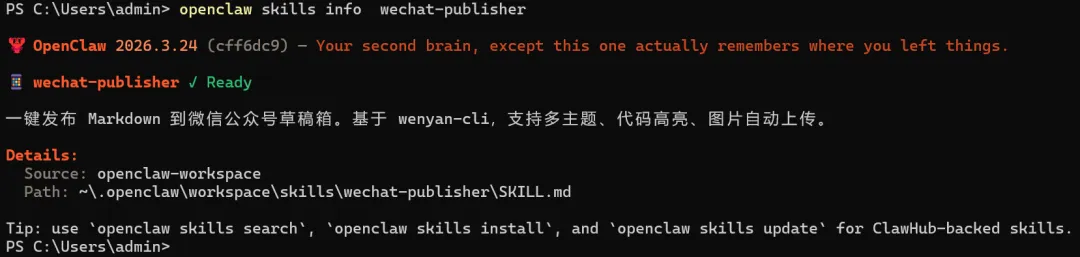
4.2 安装/更新 Skills
# 从 ClawHub 安装clawhub install weatherclawhub install wechat-publisher# 更新所有 skillsclawhub update --all# 更新指定 skillclawhub update weather# 卸载 skillclawhub uninstall weather4.3 发布自己的 Skill
# 发布到 ClawHubclawhub publish ./my-skill📝 五、会话管理
5.1 查看会话
# 列出所有会话openclaw sessions⏰ 六、定时任务(Cron)
6.1 查看定时任务
# 列出所有 cron 任务openclaw cron list# 查看任务运行历史openclaw cron runs --jobId <job-id>6.2 管理定时任务
# 添加定时任务openclaw cron add --name "daily-check" --schedule "0 9 * * *" --command"check-system"# 启用/禁用任务openclaw cron enable <job-id>openclaw cron disable <job-id># 删除任务openclaw cron remove <job-id># 手动触发任务openclaw cron run <job-id>🔍 七、问题排查
7.1 常见问题速查
openclaw gateway status | ||
openclaw models auth refresh | ||
openclaw skills list | ||
openclaw sessions list | ||
openclaw cron list |
7.2 日志分析
# 查找错误日志openclaw logs --level error --since 1h# 查找特定关键词openclaw logs --grep "connection"# 导出日志openclaw logs --output logs.txt7.3 网络连接检查
# 检查 Gateway 连接curl http://localhost:8080/health# 检查模型 APIopenclaw models test# 检查 ClawHub 连接clawhub status🛠️ 八、高级运维
8.1 配置管理
# 查看配置文件路径openclaw config file8.2 数据备份
# 备份 workspacecp -r ~/.openclaw/workspace ~/backup/workspace-$(date +%Y%m%d)# 备份记忆cp -r ~/.openclaw/workspace/memory ~/backup/memory-$(date +%Y%m%d)# 备份配置cp ~/.openclaw/config.json ~/backup/config-$(date +%Y%m%d).json8.3 清理缓存
# 清理临时文件openclaw clean --temp# 清理旧日志openclaw clean --logs --days 7# 清理缓存openclaw clean --cache📊 九、性能监控
9.1 资源使用
# 查看内存使用openclaw status --memory# 查看 CPU 使用openclaw status --cpu# 查看磁盘使用openclaw status --disk9.2 会话统计
# 查看会话数量openclaw sessions count# 查看活跃会话openclaw sessions active# 查看会话时长openclaw sessions stats🆘 十、急救命令
10.1 重置操作
# 重置 Gatewayopenclaw gateway reset# 重置模型配置openclaw models reset# 完全重置(慎用!)openclaw reset --all10.2 安全模式
# 安全模式启动openclaw start --safe-mode# 最小化启动openclaw start --minimal10.3 诊断报告
# 生成诊断报告openclaw diagnose > report.txt# 提交问题openclaw report --file report.txt📋 十一、运维检查清单
每日检查
openclaw gateway status- 服务状态openclaw logs --level error --since 24h- 错误日志openclaw models current- 模型状态
每周检查
clawhub update- 更新 skillsopenclaw clean --cache- 清理缓存备份重要数据
每月检查
检查磁盘空间 审查日志文件 更新 OpenClaw 版本
💡 十二、实用技巧
技巧 1:快速重启
# 一键重启 Gatewayopenclaw gateway restart && openclaw logs --follow技巧 2:日志监控
# 实时监控错误日志openclaw logs --follow --level error技巧 3:批量操作
# 批量更新所有 skillsclawhub list | grep -v "^$" | xargs -I {} clawhub update {}技巧 4:环境检查
# 一键检查环境openclaw status && openclaw models list && openclaw skills list🎯 总结
gateway start/stop/restart | ||
logs --follow | ||
models auth/login/use | ||
clawhub install/update | ||
sessions list/history | ||
cron list/run |
📞 获取帮助
注意: OpenClaw的版本不同,运维相关的命令可能也会有差别,最稳妥的方式是通过help(-h --help)命令查看当前版本的具体命令。
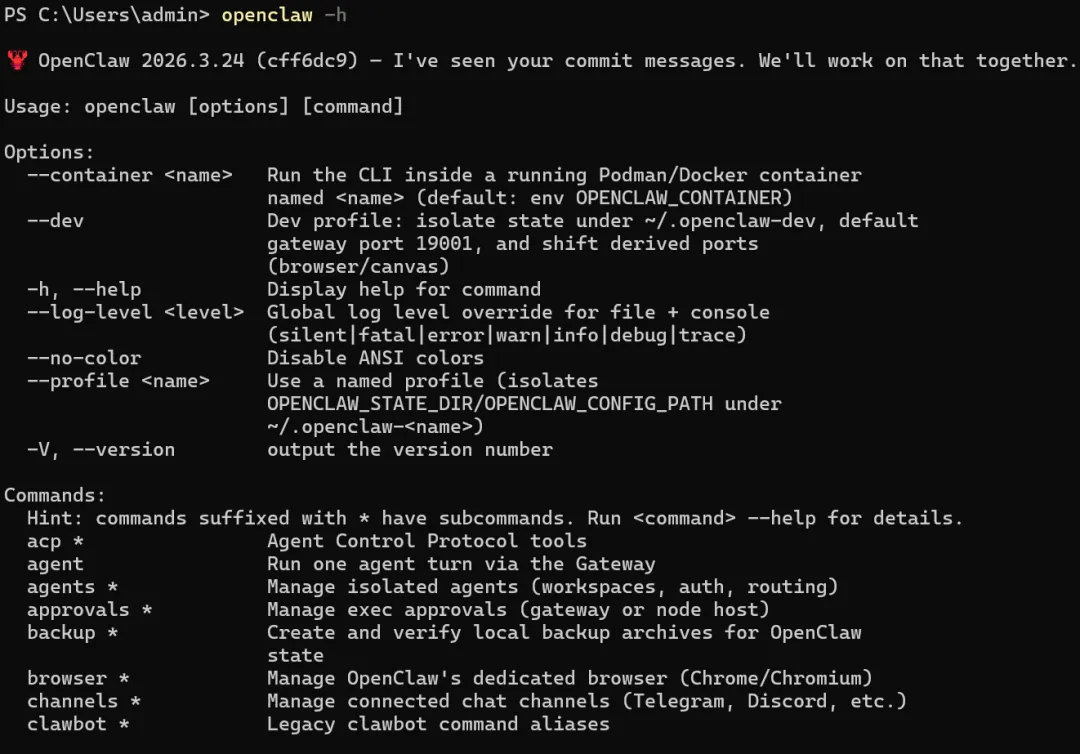
# 查看帮助openclaw --helpopenclaw <command> --help# 在线文档https://docs.openclaw.ai# 社区支持https://discord.com/invite/clawd运维不难,关键是多动手!遇到问题先查日志,再看文档,最后问AI、社区。 🚀