 夜雨聆风
夜雨聆风
个人主页:云纳星辰怀自在
座右铭:“所谓坚持,就是觉得还有希望!”
引言
背景介绍:简述Excel在数据处理中的广泛应用,以及自动生成音标的需求场景(如语言学习、翻译辅助、数据分析)。 问题陈述:Excel本身不提供直接音标生成功能,如何通过技术手段实现自动化。 文章目标:提供实用方法,帮助用户高效集成音标生成到Excel工作流。 关键概念:解释音标(如国际音标IPA)的基本知识,及其在单词发音表示中的重要性。
实现方法概览
总体思路:介绍三种主要实现途径——使用Excel公式、VBA宏编程、以及外部API集成。
方法:使用VBA宏编程(进阶方法)
原理:通过VBA编写宏,调用外部词典API获取音标数据。 步骤详解:
创建宏模块:在VBA编辑器中新建模块。 编写HTTP请求代码:使用 XMLHTTP对象发送请求到API,获取JSON响应。解析音标数据:从JSON中提取音标字段(如IPA符号)。 自动化流程:将音标写入指定单元格。 准备工作:启用Excel宏功能(文件 > 选项 > 信任中心)。 VBA基础:简要介绍VBA编辑器界面和基本语法。 集成API:选择免费词典API(如Oxford Dictionaries API或Merriam-Webster API),注册获取API密钥。 宏编写步骤: 示例代码:提供简单VBA代码片段(非完整代码,仅示意)。 Sub GetPhonetic()Dim word As Stringword = Range("A2").Value ' 假设A2为输入单词' 发送API请求并解析音标' ...(省略具体代码)Range("B2").Value = phonetic ' 将音标输出到B2End Sub
错误处理:添加代码处理API失败或无效单词的情况。 优缺点:自动化程度高,可处理动态数据,但需要编程技能和API依赖。 适用场景:中大型项目或需要实时更新的应用。
使用外部工具或插件(简化方法)
原理:利用现成的Excel插件或第三方工具实现音标生成。 步骤详解: 插件推荐:介绍可用工具(如Kutools for Excel或自定义插件),说明安装步骤。 集成方法:演示如何通过插件界面输入单词并自动生成音标。 数据同步:确保插件与Excel数据无缝连接。 优缺点:用户友好,免编程,但可能涉及成本或兼容性问题。 适用场景:非技术用户或快速部署需求。
数据处理与优化
音标显示:讨论如何在Excel中格式化音标(如使用特殊字体或Unicode字符)。 性能优化:处理大数据集时的技巧(如批量处理、缓存机制)。 错误排查:常见问题解决方案(如API限流、单词拼写错误)。
优缺点总结与最佳实践
总结:对比各方法的适用性,推荐VBA+API组合作为高效解决方案。 最佳实践:建议定期更新API密钥、备份数据,并测试不同单词类型。 局限性与改进:讨论方法限制(如API免费版功能有限),提出未来扩展(如集成AI模型)。 核心收获:强调Excel作为灵活工具,可通过技术扩展实现音标自动化生成。
很多时候,Excel借助API和插件可以极大提高工作效率,本文将会详细阐述如何在Excel中实现单词和句式的自动翻译,包括自动生成单词的音标。
一、在Excel中维护英语词库,现在希望:
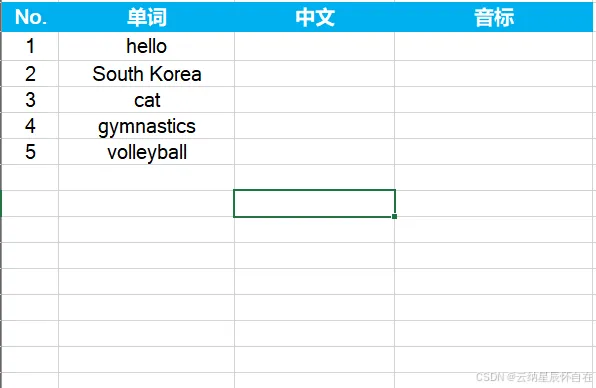
将这些单词的音标自动注解在单词右侧。 自动翻译这些单词
如下图所示,
二、在Excel中通过自动翻译文本
支持多种语言,如下图所示。

1. 自动生成音标
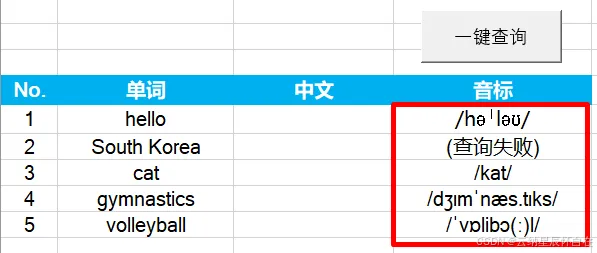
以下表格为例,希望将英语单词全部自动生成音标。需要借助VBA完成。当然,存在很多种方式,譬如:有道云API等各种,但大都需要付费,本文选择一款免费API,但是功能也首先,无法支持词组。
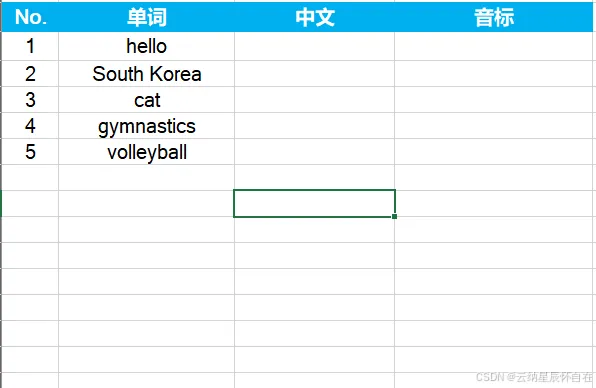
VBA源码
Option Explicit' ===================================================' 主程序:优化版音标查询 (完整调试信息)' ===================================================Sub FetchPhonetic_Fast()Dim ws As WorksheetDim lastRow As Long, i As Long, successCount As Long, failCount As LongDim word As String, url As String, jsonResponse As StringDim phonetic As StringDim startTime As SingleDim totalWords As Long, processedCount As Long' 初始化Set ws = ThisWorkbook.ActiveSheetApplication.ScreenUpdating = FalseApplication.Calculation = xlCalculationManualApplication.EnableEvents = FalsestartTime = Timer' 找到B列最后一行lastRow = ws.Cells(ws.Rows.Count, "B").End(xlUp).RowIf lastRow < 5 ThenMsgBox "请在B列从第5行开始输入单词。", vbExclamationGoTo CleanExitEnd If' 清空D列(音标列)旧数据ws.Range("D5:D" & lastRow).ClearContents' 初始化计数器successCount = 0failCount = 0processedCount = 0totalWords = lastRow - 4' 主循环For i = 5 To lastRowword = Trim(ws.Cells(i, "B").Value)' 空单元格快速跳过机制If word = "" Thenws.Cells(i, "D").Value = "(空)"Application.StatusBar = "跳过空行: " & i - 4 & "/" & totalWordsDoEventsGoTo NextRowEnd If' 处理非空单词processedCount = processedCount + 1phonetic = ""' 更新状态栏Application.StatusBar = "[" & processedCount & "个词/" & totalWords & "行] " & word' === 调试信息:显示当前处理的行和单词 ===Debug.Print "========================================"Debug.Print "【主程序】第 " & i & " 行 | 单词: """ & word & """"Debug.Print "----------------------------------------"' 构建请求URL并获取数据url = "https://api.dictionaryapi.dev/api/v2/entries/en/" & EncodeURIComponent(word)Debug.Print "【主程序】请求URL: " & urljsonResponse = HttpGetWithTimeout(url, 5000) ' 5秒超时' === 调试信息:显示API返回状态 ===Debug.Print "【主程序】API返回状态: " & Left(jsonResponse, 150)Debug.Print "----------------------------------------"' 智能解析音标phonetic = ExtractPhoneticFromJSON(jsonResponse, word)' 更新计数器Select Case phoneticCase "不支持", "(查询失败)", "(查询超时)"failCount = failCount + 1Case ElsesuccessCount = successCount + 1End Select' 写入结果ws.Cells(i, "D").Value = phonetic' === 调试信息:显示最终结果 ===Debug.Print "【主程序】写入单元格结果: """ & phonetic & """"Debug.Print "【主程序】成功数: " & successCount & " | 失败数: " & failCountDebug.Print "========================================"Debug.Print ""' 关键:让Excel处理其它事件DoEvents' 智能延迟If i < lastRow ThenIf phonetic = "(查询超时)" Or phonetic = "(查询失败)" ThenWaitSeconds 0.8ElseIf successCount Mod 5 = 0 And successCount > 0 ThenWaitSeconds 0.3End IfEnd IfNextRow:Next i' 完成报告Dim timeCost As SingletimeCost = Timer - startTimeMsgBox "查询完成!" & vbNewLine & _"表格总行数: " & totalWords & vbNewLine & _"实际处理单词: " & processedCount & vbNewLine & _"成功获取音标: " & successCount & vbNewLine & _"查询失败/不支持: " & failCount & vbNewLine & _"空单元格跳过: " & (totalWords - processedCount) & vbNewLine & _"总耗时: " & Format(timeCost, "0.0") & " 秒", _vbInformation, "完成报告"CleanExit:' 恢复Excel设置Application.StatusBar = FalseApplication.ScreenUpdating = TrueApplication.Calculation = xlCalculationAutomaticApplication.EnableEvents = TrueEnd Sub' ===================================================' 核心函数1:增强调试版HTTP GET请求' ===================================================Private Function HttpGetWithTimeout(url As String, timeoutMs As Long) As StringDim http As ObjectDim startTime As SingleDim errMsg As StringOn Error GoTo ErrorHandler' 记录开始时间startTime = TimerDebug.Print " 【HTTP】开始请求,超时: " & timeoutMs & "ms"Debug.Print " 【HTTP】目标URL: " & url' 尝试多种HTTP对象(按兼容性排序)Set http = CreateObject("MSXML2.ServerXMLHTTP.6.0")If http Is Nothing ThenDebug.Print " 【HTTP】ServerXMLHTTP.6.0 创建失败,尝试XMLHTTP"Set http = CreateObject("MSXML2.XMLHTTP")End IfIf http Is Nothing ThenDebug.Print " 【HTTP】XMLHTTP 创建失败,尝试Microsoft.XMLHTTP"Set http = CreateObject("Microsoft.XMLHTTP")End IfIf http Is Nothing ThenerrMsg = "[ERROR]: 无法创建任何HTTP对象"Debug.Print " 【HTTP】" & errMsgHttpGetWithTimeout = errMsgExit FunctionEnd IfDebug.Print " 【HTTP】对象创建成功: " & TypeName(http)' 设置超时http.setTimeouts timeoutMs, timeoutMs, timeoutMs, timeoutMs' 发送请求http.Open "GET", url, FalseDebug.Print " 【HTTP】连接已打开,准备发送..."http.sendDebug.Print " 【HTTP】请求已发送,等待响应..."' 等待响应Do While http.readyState <> 4DoEventsIf (Timer - startTime) * 1000 > timeoutMs ThenerrMsg = "[TIMEOUT]: 超过" & timeoutMs & "毫秒未响应"Debug.Print " 【HTTP】" & errMsgHttpGetWithTimeout = errMsgExit FunctionEnd IfLoopDim elapsedTime As SingleelapsedTime = (Timer - startTime) * 1000Debug.Print " 【HTTP】请求完成,耗时: " & Format(elapsedTime, "0") & "ms"Debug.Print " 【HTTP】HTTP状态码: " & http.Status & " " & http.statusTextDebug.Print " 【HTTP】readyState: " & http.readyState' 检查HTTP状态码If http.Status = 200 ThenDim responseText As StringresponseText = http.responseTextDebug.Print " 【HTTP】响应长度: " & Len(responseText) & " 字符"If Len(responseText) > 0 ThenDebug.Print " 【HTTP】响应前200字符: " & Left(responseText, 200)ElseDebug.Print " 【HTTP】响应内容为空"End If' 检测是否为"未找到定义"的错误If InStr(1, responseText, """No Definitions Found""", vbTextCompare) > 0 ThenHttpGetWithTimeout = "[NO_DEFINITION]"ElseHttpGetWithTimeout = responseTextEnd IfElse' 记录详细的HTTP错误信息errMsg = "[ERROR]: HTTP " & http.Status & " - " & http.statusTextDebug.Print " 【HTTP】" & errMsg' 如果是403/404等常见错误,尝试获取更多信息If http.Status >= 400 ThenDim errorBody As StringerrorBody = http.responseTextIf Len(errorBody) > 0 ThenDebug.Print " 【HTTP】错误详情: " & Left(errorBody, 200)End IfEnd IfHttpGetWithTimeout = errMsgEnd If' 清理对象Set http = NothingExit FunctionErrorHandler:' 捕获并记录VBA错误errMsg = "[ERROR]: " & Err.Number & " - " & Err.DescriptionDebug.Print " 【HTTP】VBA错误发生!"Debug.Print " 【HTTP】错误号: " & Err.NumberDebug.Print " 【HTTP】错误描述: " & Err.DescriptionDebug.Print " 【HTTP】错误来源: " & Err.SourceIf Not http Is Nothing ThenDebug.Print " 【HTTP】HTTP对象状态 - readyState: " & http.readyStateEnd IfHttpGetWithTimeout = errMsgEnd Function' ===================================================' 核心函数2:智能音标提取 (优先phonetic,其次phonetics[1].text)' ===================================================Private Function ExtractPhoneticFromJSON(jsonText As String, word As String) As String' 步骤0:处理特殊标记If jsonText = "[NO_DEFINITION]" ThenDebug.Print " 【解析】API返回: 单词未找到定义"ExtractPhoneticFromJSON = "不支持"Exit FunctionEnd IfIf Left(jsonText, 7) = "[ERROR]" ThenDebug.Print " 【解析】HTTP请求失败: " & jsonTextExtractPhoneticFromJSON = "(查询失败)"Exit FunctionEnd IfIf jsonText = "[TIMEOUT]" ThenDebug.Print " 【解析】请求超时"ExtractPhoneticFromJSON = "(查询超时)"Exit FunctionEnd If' 检查是否为有效的JSON(以 [ 或 { 开头)If Len(jsonText) < 10 ThenDebug.Print " 【解析】响应文本过短,长度: " & Len(jsonText)ExtractPhoneticFromJSON = "(查询失败)"Exit FunctionEnd IfDim firstChar As StringfirstChar = Left(jsonText, 1)If firstChar <> "[" And firstChar <> "{" ThenDebug.Print " 【解析】无效JSON响应,开头字符: """ & firstChar & """"Debug.Print " 【解析】响应开头: " & Left(jsonText, 100)ExtractPhoneticFromJSON = "(查询失败)"Exit FunctionEnd IfDebug.Print " 【解析】开始解析JSON,长度: " & Len(jsonText) & " 字符"Debug.Print " 【解析】JSON开头: " & Left(jsonText, 80) & "..."' === 策略1:优先查找顶层的 "phonetic": "/.../" 字段(如gymnastics、cat) ===Dim phonetic As Stringphonetic = FindJsonValueByKey(jsonText, "phonetic")If phonetic <> "" ThenDebug.Print " 【解析】找到顶层phonetic字段: """ & phonetic & """"If InStr(phonetic, "/") > 0 ThenDebug.Print " 【解析】? 有效音标格式,使用顶层phonetic"ExtractPhoneticFromJSON = phoneticExit FunctionElseDebug.Print " 【解析】? phonetic字段不含音标符号/,继续查找"End IfElseDebug.Print " 【解析】未找到顶层phonetic字段"End If' === 策略2:查找 phonetics 数组中的 text 字段 ===Debug.Print " 【解析】开始搜索phonetics数组..."' 首先检查phonetics数组是否存在If InStr(1, jsonText, """phonetics"":", vbTextCompare) = 0 ThenDebug.Print " 【解析】JSON中未找到phonetics字段"ExtractPhoneticFromJSON = "不支持"Exit FunctionEnd If' 尝试查找第一个text字段 (索引0)Dim textFromArray As StringtextFromArray = FindTextInPhoneticsArray(jsonText, 0)If textFromArray <> "" And InStr(textFromArray, "/") > 0 ThenDebug.Print " 【解析】找到phonetics[0].text: """ & textFromArray & """"ExtractPhoneticFromJSON = textFromArrayExit FunctionEnd If' 尝试查找第二个text字段 (索引1) - 针对hello这类单词textFromArray = FindTextInPhoneticsArray(jsonText, 1)If textFromArray <> "" And InStr(textFromArray, "/") > 0 ThenDebug.Print " 【解析】找到phonetics[1].text: """ & textFromArray & """"ExtractPhoneticFromJSON = textFromArrayExit FunctionEnd If' 通用查找:尝试查找任何text字段Debug.Print " 【解析】尝试通用查找任何text字段..."textFromArray = FindAnyTextInPhonetics(jsonText)If textFromArray <> "" And InStr(textFromArray, "/") > 0 ThenDebug.Print " 【解析】通用查找到text: """ & textFromArray & """"ExtractPhoneticFromJSON = textFromArrayExit FunctionEnd IfDebug.Print " 【解析】? 未找到任何有效音标字段"Debug.Print " 【解析】JSON中包含phonetics但无有效text字段"ExtractPhoneticFromJSON = "不支持"End Function' ===================================================' 辅助函数1:通用的JSON键值查找' ===================================================Private Function FindJsonValueByKey(jsonText As String, key As String) As StringDim searchKey As String, posStart As Long, posEnd As Long' 模式1: "key": "value" (带空格)searchKey = """" & key & """: """posStart = InStr(1, jsonText, searchKey, vbTextCompare)If posStart > 0 ThenposStart = posStart + Len(searchKey)posEnd = InStr(posStart, jsonText, """", vbTextCompare)If posEnd > posStart ThenFindJsonValueByKey = Mid(jsonText, posStart, posEnd - posStart)Exit FunctionEnd IfEnd If' 模式2: "key":"value" (无空格)searchKey = """" & key & """:"""posStart = InStr(1, jsonText, searchKey, vbTextCompare)If posStart > 0 ThenposStart = posStart + Len(searchKey)posEnd = InStr(posStart, jsonText, """", vbTextCompare)If posEnd > posStart ThenFindJsonValueByKey = Mid(jsonText, posStart, posEnd - posStart)Exit FunctionEnd IfEnd If' 模式3: "key": value (值可能无引号,但音标通常有引号)searchKey = """" & key & """:"posStart = InStr(1, jsonText, searchKey, vbTextCompare)If posStart > 0 ThenposStart = posStart + Len(searchKey)' 跳过空格Do While posStart <= Len(jsonText) And Mid(jsonText, posStart, 1) = " "posStart = posStart + 1LoopIf posStart <= Len(jsonText) ThenIf Mid(jsonText, posStart, 1) = """" ThenposStart = posStart + 1posEnd = InStr(posStart, jsonText, """", vbTextCompare)If posEnd > posStart ThenFindJsonValueByKey = Mid(jsonText, posStart, posEnd - posStart)End IfEnd IfEnd IfEnd IfEnd Function' ===================================================' 辅助函数2:在phonetics数组中查找指定索引的text字段(已修复循环)' ===================================================Private Function FindTextInPhoneticsArray(jsonText As String, targetIndex As Long) As StringDim searchKey As StringDim posStart As Long, currentPos As LongDim foundCount As LongDim inPhoneticsArray As Boolean' 查找 "phonetics": 的位置searchKey = """phonetics"":"posStart = InStr(1, jsonText, searchKey, vbTextCompare)If posStart = 0 ThenExit FunctionEnd IfcurrentPos = posStart + Len(searchKey)foundCount = -1 ' 从-1开始,找到第一个"text":"时变为0inPhoneticsArray = False' 查找数组开始位置 [Do While currentPos <= Len(jsonText)If Mid(jsonText, currentPos, 1) = "[" TheninPhoneticsArray = TruecurrentPos = currentPos + 1Exit DoEnd IfcurrentPos = currentPos + 1LoopIf Not inPhoneticsArray ThenExit FunctionEnd If' 在数组内查找 - 使用Do While...Loop结构(支持Exit Do)Do While currentPos <= Len(jsonText) And inPhoneticsArray' 检查是否遇到数组结束If Mid(jsonText, currentPos, 1) = "]" TheninPhoneticsArray = FalseExit DoEnd If' 查找 "text":" 模式If Mid(jsonText, currentPos, 8) = """text"":""" ThenfoundCount = foundCount + 1If foundCount = targetIndex Then' 找到目标索引的text字段posStart = currentPos + 8 ' 跳过 """text"":"""Dim posEnd As LongposEnd = InStr(posStart, jsonText, """", vbTextCompare)If posEnd > posStart ThenFindTextInPhoneticsArray = Mid(jsonText, posStart, posEnd - posStart)Exit FunctionEnd IfEnd If' 跳过这个text值,继续查找下一个currentPos = currentPos + 8ElsecurrentPos = currentPos + 1End IfLoopFindTextInPhoneticsArray = ""End Function' ===================================================' 辅助函数3:通用查找phonetics中的任何text字段' ===================================================Private Function FindAnyTextInPhonetics(jsonText As String) As StringDim posStart As Long, posEnd As Long' 直接查找第一个 "text":"/.../" 模式posStart = InStr(1, jsonText, """text"":""/", vbTextCompare)If posStart = 0 Then' 尝试查找 "text":" 后接任何内容posStart = InStr(1, jsonText, """text"":""", vbTextCompare)End IfIf posStart > 0 ThenposStart = posStart + 8 ' 跳过 """text"":"""posEnd = InStr(posStart, jsonText, """", vbTextCompare)If posEnd > posStart ThenFindAnyTextInPhonetics = Mid(jsonText, posStart, posEnd - posStart)End IfEnd IfEnd Function' ===================================================' 辅助函数4:URL编码' ===================================================Private Function EncodeURIComponent(text As String) As StringDim encoded As String, i As Long, ch As String, ascVal As Integerencoded = ""For i = 1 To Len(text)ch = Mid(text, i, 1)Select Case chCase "A" To "Z", "a" To "z", "0" To "9", "-", "_", ".", "~"encoded = encoded & chCase " "encoded = encoded & "%20"Case ElseascVal = AscW(ch)If ascVal < 0 Then ascVal = ascVal + 65536encoded = encoded & "%" & Hex(ascVal)End SelectNext iDebug.Print " 【编码】原始: """ & text & """ -> 编码: """ & encoded & """"EncodeURIComponent = encodedEnd Function' ===================================================' 辅助函数5:精确等待' ===================================================Private Sub WaitSeconds(seconds As Single)Dim startTime As SinglestartTime = TimerDo While Timer < startTime + secondsDoEventsLoopEnd Sub
操作步骤
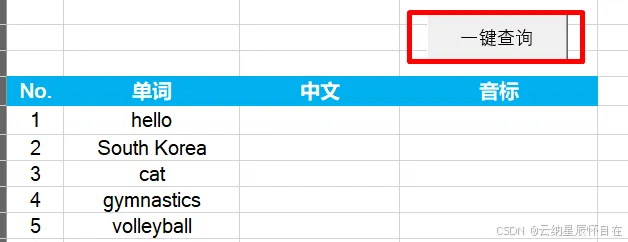
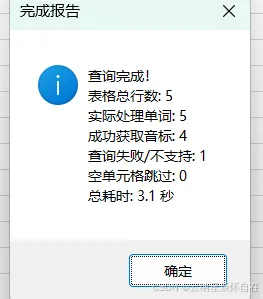
点击“一键查询”按钮,开始执行,完成后弹出右侧提示窗。结果如下:
2.自动翻译
下载安装“方方格子”插件
下载链接:http://www.ffcell.com/home/ffcell.aspx
选择适合电脑版本,下载安装,安装成功后如下图所示。

操作步骤
按如下图步骤进行操作
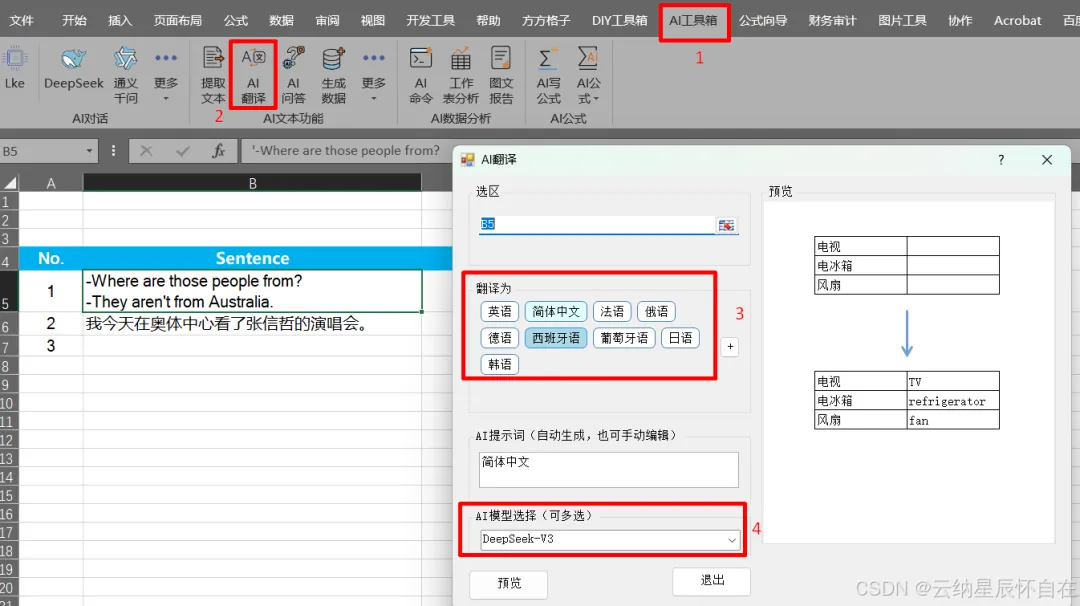
自动翻译结果如下:

资源<Excel文档>: 基于VBA调用API在Excel中自动生成音标和翻译
参考文章
微电网系列之分布式发电定义与特性 微电网系列之微电网分类定义 微电网系列之微电网控制 微电网系列之潮流方向 微电网系列之微电网关键技术和规划 微电网系列之微电网的运行控制 微电网系列之规划和运行控制 微电网系列之微电网的孤岛运行 微电网系列之微电网的故障检测与接入标准 微电网系列之变流器分类 微电网系列之PQ控制基本原理 微电网系列之PQ控制实现
