夜雨聆风
夜雨聆风

Python,速成心法
敲代码,查资料,问度娘
练习,探索,总结,优化

★★★★★博文创作不易,源码使用过程中,如有疑问的地方,欢迎大家指正留言交流。喜欢的老铁可以多多点赞+收藏分享+置顶,小红牛在此表示感谢。★★★★★
-------★Tkinter系列教程★--------
Tkinter教程44:对Canvas表格姓名和工资整列,做样式标记
Tkinter教程43:root.after定时器函数的示例用法
Tkinter教程42:复制treeview表格,选中的行内容
Tkinter教程41:ttk.Treeview带指示符(▲/▼)的表格排序示例
Tkinter教程39:常用tk组件综合示例,3分钟带你速学速成,安排 !!
Tkinter教程37:Treeview 中可用的内置图标有哪些?
Tkinter教程34:绘制高级Canvas表格(高亮颜色标记+排序+编辑功能)
Tkinter教程28:ttk.Style()有哪些内置的主题样式?
Python项目28:设计日志管理系统2.0(Tkinter+Json)
Tkinter教程26:Text组件绑定Scrollbar滚动条+font设置字体属性+复制粘贴,撤销恢复操作
Tkinter教程25:Text控件中,文本存在某个关键字的将被高亮显示(标记颜色+字体加粗)
Tkinter教程24:4种布局管理控件,Frame框架+LabelFrame标签+PanedWindow窗格+Toplevel
Tkinter教程23:Entry输入框+Label标签+Text文本框的示例用法
Tkinter教程22:DataFrame数据加入到treeview树视图(含横纵滚动条+正反向排序)
Tkinter教程21:Listbox列表框+OptionMenu选项菜单+Combobox下拉列表框控件的使用+绑定事件
Tkinter教程20:treeview树视图组件,表格数据的插入与表头排序
Python教程57:tkinter中如何执行,单击按钮的单线程操作
Python教程56:tkinter中如何隐藏/去掉最大化窗口
教你使用Pyinstaller将Python源码打包成可执行程序exe的方法
Python项目源码06:简单计算器源码1.0(tkinter)
1.生成授权码的源码(供授权方使用):授权方需要获取用户的机器码+使用相同密钥计算签名。
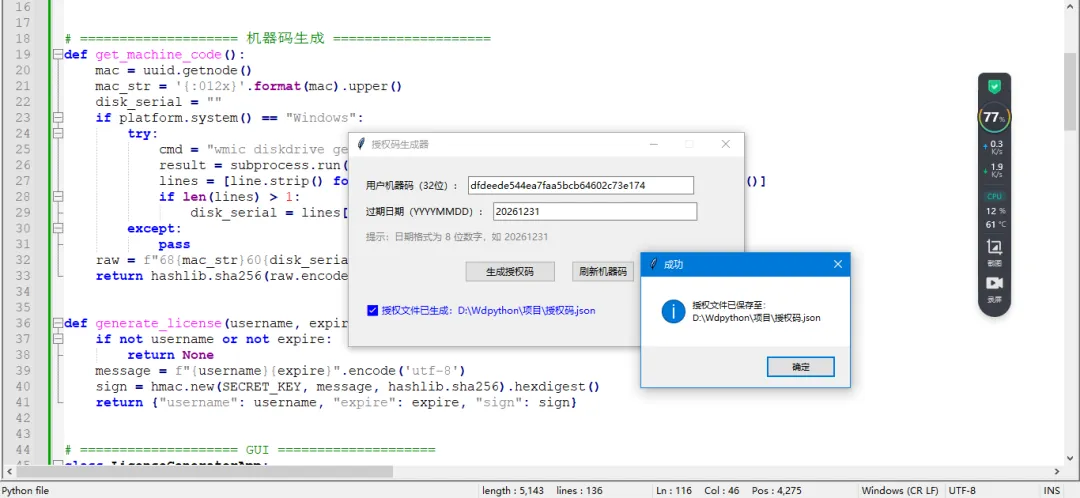
# -*- coding: utf-8 -*-# @Author : 小红牛# 微信公众号:wdPythonimport tkinter as tkfrom tkinter import ttk, messageboximport jsonimport hmacimport hashlibimport osimport uuidimport platformimport subprocess# ==================== 固定密钥 ====================SECRET_KEY = b"wdpython2026_key888"# ==================== 机器码生成 ====================def get_machine_code():mac = uuid.getnode()mac_str = '{:012x}'.format(mac).upper()disk_serial = ""if platform.system() == "Windows":try:cmd = "wmic diskdrive get SerialNumber"result = subprocess.run(cmd, shell=True, capture_output=True, text=True)lines = [line.strip() for line in result.stdout.splitlines() if line.strip()]if len(lines) > 1:disk_serial = lines[1].strip()except:passraw = f"68{mac_str}60{disk_serial}30{platform.node()}"return hashlib.sha256(raw.encode()).hexdigest()[:32]def generate_license(username, expire):if not username or not expire:return Nonemessage = f"{username}{expire}".encode('utf-8')sign = hmac.new(SECRET_KEY, message, hashlib.sha256).hexdigest()return {"username": username, "expire": expire, "sign": sign}# ==================== GUI ====================class LicenseGeneratorApp:def __init__(self, master):self.master = mastermaster.title("授权码生成器")master.geometry("500x240")master.resizable(False, False)# 居中master.update_idletasks()w, h = master.winfo_width(), master.winfo_height()x = (master.winfo_screenwidth() // 2) - (w // 2)y = (master.winfo_screenheight() // 2) - (h // 2)master.geometry(f"+{x}+{y}")# 主框架(pack 布局)main_frame = ttk.Frame(master, padding=20)main_frame.pack(fill=tk.BOTH, expand=True)# ---- 机器码行 ----row1 = ttk.Frame(main_frame)row1.pack(fill=tk.X, pady=5)ttk.Label(row1, text="用户机器码(32位):").pack(side=tk.LEFT)self.username_entry = ttk.Entry(row1, width=40)self.username_entry.pack(side=tk.LEFT, padx=5)# ---- 过期日期行 ----row2 = ttk.Frame(main_frame)row2.pack(fill=tk.X, pady=5)ttk.Label(row2, text="过期日期(YYYYMMDD):").pack(side=tk.LEFT)self.expire_entry = ttk.Entry(row2, width=36)self.expire_entry.pack(side=tk.LEFT, padx=5)self.expire_entry.insert(0, "20261231")# ---- 提示 ----ttk.Label(main_frame, text="提示:日期格式为 8 位数字,如 20261231", foreground="gray").pack(anchor="w", pady=5)# ---- 按钮 ----btn_frame = ttk.Frame(main_frame)btn_frame.pack(pady=15)ttk.Button(btn_frame, text="生成授权码", command=self.generate, width=15).pack(side=tk.LEFT, padx=15)ttk.Button(btn_frame, text="刷新机器码", command=self.read_machine_code, width=10).pack(side=tk.LEFT, padx=5)# ---- 状态栏 ----self.status_var = tk.StringVar()self.status_var.set("就绪")ttk.Label(main_frame, textvariable=self.status_var, foreground="blue").pack(anchor="w", pady=10)# 启动自动读取self.read_machine_code()def read_machine_code(self):code = get_machine_code()self.username_entry.delete(0, tk.END)self.username_entry.insert(0, code)self.status_var.set(f"已读取机器码:{code}")def generate(self):username = self.username_entry.get().strip()expire = self.expire_entry.get().strip()if not username:messagebox.showerror("错误", "请先获取机器码")returnif len(username) != 32:messagebox.showerror("错误", "机器码应为32位字符")returnif not expire.isdigit() or len(expire) != 8:messagebox.showerror("错误", "日期必须为8位数字(YYYYMMDD)")returnlic_data = generate_license(username, expire)if not lic_data:messagebox.showerror("错误", "生成授权数据失败")return# 直接写入当前目录(脚本所在目录)file_path = os.path.join(os.path.dirname(os.path.abspath(__file__)), "授权码.json")try:with open(file_path, 'w', encoding='utf-8') as f:json.dump(lic_data, f, indent=2, ensure_ascii=False)self.status_var.set(f"✅ 授权文件已生成:{file_path}")messagebox.showinfo("成功", f"授权文件已保存至:\n{file_path}")except Exception as e:messagebox.showerror("保存失败", f"写入文件时出错:{e}")self.status_var.set("保存失败")if __name__ == "__main__":root = tk.Tk()app = LicenseGeneratorApp(root)root.mainloop()
2.登入验证源码:软件里面增加登入系统验证,判断授权码的是否正确,正确就可以登入软件,不正确就不能使用软件。如下所示
# -*- coding: utf-8 -*-"""授权验证图形化示例(无登录窗口)功能:启动后直接验证授权,弹出新窗口显示结果依赖:tkinter(内置)"""import osimport jsonimport hashlibimport hmacimport uuidimport platformimport subprocessfrom datetime import datetimeimport tkinter as tk# ------------------- 授权核心 -------------------SECRET_KEY = b"wdpython2026_key888"def get_machine_code():"""生成机器码(32位十六进制)"""mac = uuid.getnode()mac_str = '{:012x}'.format(mac).upper()disk_serial = ""if platform.system() == "Windows":try:cmd = "wmic diskdrive get SerialNumber"result = subprocess.run(cmd, shell=True, capture_output=True, text=True)lines = [line.strip() for line in result.stdout.splitlines() if line.strip()]if len(lines) > 1:disk_serial = lines[1].strip()except:passraw = f"68{mac_str}60{disk_serial}30{platform.node()}"machine_code = hashlib.sha256(raw.encode()).hexdigest()[:32]return machine_codedef verify_license(license_path="授权码.json"):"""验证授权文件,返回(是否有效, 过期日期或None)"""if not os.path.exists(license_path):return False, Nonetry:with open(license_path, 'r', encoding='utf-8') as f:lic = json.load(f)username = lic.get("username")expire = lic.get("expire")sign = lic.get("sign")if not all([username, expire, sign]):return False, Noneif username != get_machine_code():return False, Nonetoday = datetime.now().strftime("%Y%m%d")if expire < today:return False, expiremessage = f"{username}{expire}".encode('utf-8')expected_sign = hmac.new(SECRET_KEY, message, hashlib.sha256).hexdigest()if hmac.compare_digest(expected_sign, sign):return True, expireelse:return False, Noneexcept Exception:return False, None# ------------------- 授权结果窗口 -------------------class AuthWindow:"""授权验证结果窗口"""def __init__(self):self.win = tk.Tk()self.win.title("授权验证")self.win.geometry("450x280")self.win.resizable(False, False)# 显示机器码machine = get_machine_code()tk.Label(self.win, text=f"机器码: {machine}", font=("Arial", 10)).pack(pady=10)# 执行验证success, expire = verify_license()if success:expire_display = f"{expire[:4]}-{expire[4:6]}-{expire[6:8]}"status = f"✅ 授权有效\n到期时间: {expire_display}"color = "green"else:if expire:expire_display = f"{expire[:4]}-{expire[4:6]}-{expire[6:8]}"status = f"❌ 授权已过期\n到期日: {expire_display}"else:status = "❌ 授权验证失败\n可能原因:授权文件不存在、机器码不匹配或签名无效。"color = "red"# 显示结果label_status = tk.Label(self.win, text=status, font=("Arial", 12), fg=color, justify="left")label_status.pack(pady=20)# 退出按钮btn_quit = tk.Button(self.win, text="退出", command=self.win.destroy, width=10)btn_quit.pack(pady=20)self.win.mainloop()# ------------------- 启动入口 -------------------if __name__ == "__main__":AuthWindow()
完毕!!感谢您的收看
--------★★历史博文集合★★--------