 夜雨聆风
夜雨聆风





从零手搓一个AI Agent:从单工具到多工具注册+任务规划状态管理
本文是Agent系列的第二篇,重点讲解Agent02相比Agent01的进化:多工具注册中心、任务规划状态管理、以及智能提醒机制。如果你还没看过第一篇,建议先看第一篇,了解基础设计。
从零手搓一个AI Agent:Java版对话+工具调用实战解析
大家好!在上一篇文章中,我们实现了一个基础的AI Agent,它只有一个bash工具。今天我们来聊聊Agent02,它带来了三个重大升级:
-
多工具注册中心:从硬编码分支到统一接口+注册表 -
任务规划状态管理:引入todo工具管理多步任务 -
智能提醒机制:当Agent忘记更新计划时主动提醒

一、Agent01 vs Agent02:核心差异对比
|
|
|
|
|---|---|---|
|
|
|
|
|
|
|
|
|
|
|
|
|
|
|
|
|
|
|
|
二、核心升级点详解
2.1 Tool接口:统一工具契约
Agent01中,ToolExecutor里硬编码了bash工具的判断逻辑。Agent02引入了Tool接口,所有工具都实现这个统一契约。
设计亮点:每个工具同时提供OpenAI Function声明(name/description/parametersSchema)和本地执行逻辑(execute),新增工具只需实现接口并注册,无需修改执行器代码。
public interface Tool { // OpenAI Function名称 String name(); // 供模型阅读的描述 String description(); // 参数Schema(OpenAI JSON Schema格式) JsonObject parametersSchema(); // 执行工具逻辑 String execute(String argumentsJson); // 默认方法:组装为OpenAI兼容的tools声明 default JsonObject toOpenAiToolDeclaration() { JsonObject fn = new JsonObject(); fn.addProperty("name", name()); fn.addProperty("description", description()); fn.add("parameters", parametersSchema()); JsonObject outer = new JsonObject(); outer.addProperty("type", "function"); outer.add("function", fn); return outer; } // 工具类通用辅助方法 static JsonObject stringProperty(String description) { ... } default Path resolveUnderCwd(String userPath) { ... } // 路径安全校验}2.2 ToolRegistry:工具注册中心
ToolRegistry是工具的统一管理中心,负责维护工具列表、生成OpenAI声明、按名分发执行。
关键设计:声明与执行同源。AgentConfig.tools()直接调用ToolRegistry.openAiTools(),保证”模型看到的工具”和”服务端能执行的工具”完全一致。
public final class ToolRegistry { // 标准工具声明列表(类加载时初始化) private static final ListSTANDARD_DECLARATIONS = Collections.unmodifiableList(Arrays.asList( new BashTool(), new ReadFileTool(), new WriteFileTool(), new EditFileTool(), new TodoTool(new TodoManager()) // 仅用于Schema生成 )); // 缓存的OpenAI tools声明 private static final JsonArray OPENAI_TOOLS = buildOpenAiTools(STANDARD_DECLARATIONS); private final MaptoolsByName; // 按名分发执行 public String dispatch(String name, String argumentsJson) { Tool tool = toolsByName.get(name); if (tool == null) { return "Error: unsupported tool " + name; } try { return tool.execute(argumentsJson); } catch (Exception e) { return "Error: " + e.getMessage(); } } // 创建带会话级TodoManager的注册表 public static ToolRegistry withStandardTools(TodoManager todoManager) { ToolRegistry r = new ToolRegistry(); Liststandard = Arrays.asList( new BashTool(), new ReadFileTool(), new WriteFileTool(), new EditFileTool(), new TodoTool(todoManager) // 注入会话级状态管理器 ); for (Tool t : standard) { r.register(t); } return r; } // 供AgentConfig使用的静态声明 public static JsonArray openAiTools() { return OPENAI_TOOLS; }} 2.3 TodoManager:任务规划状态管理
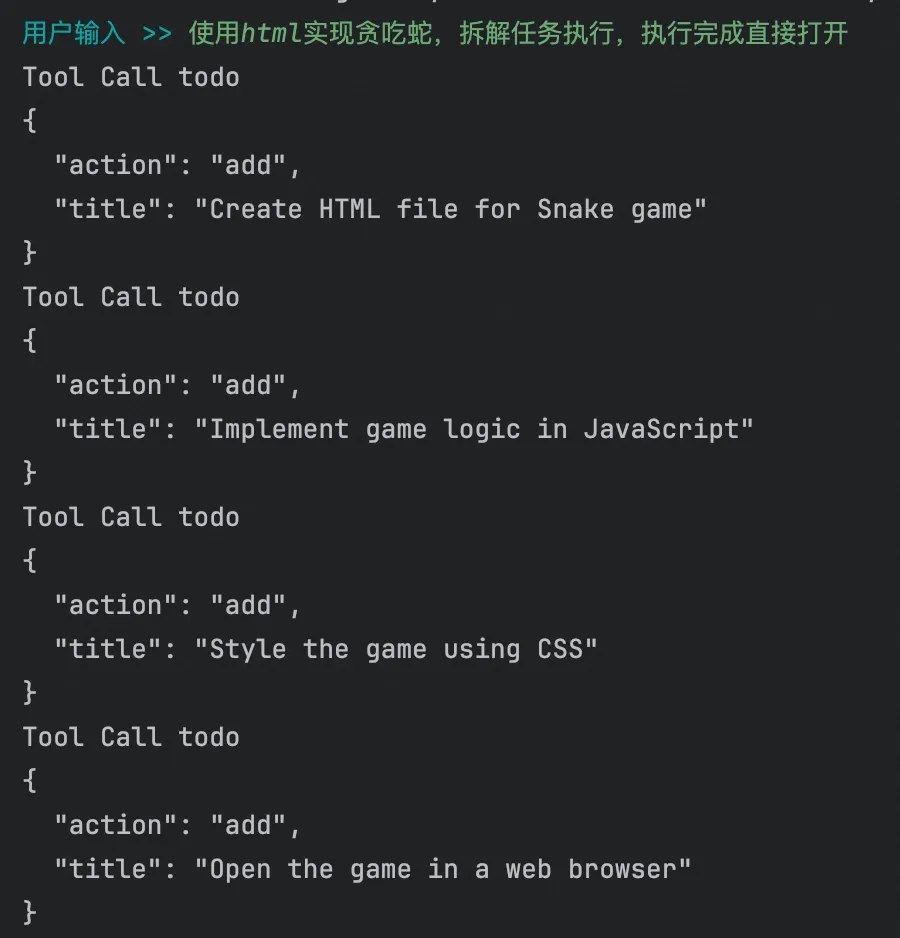
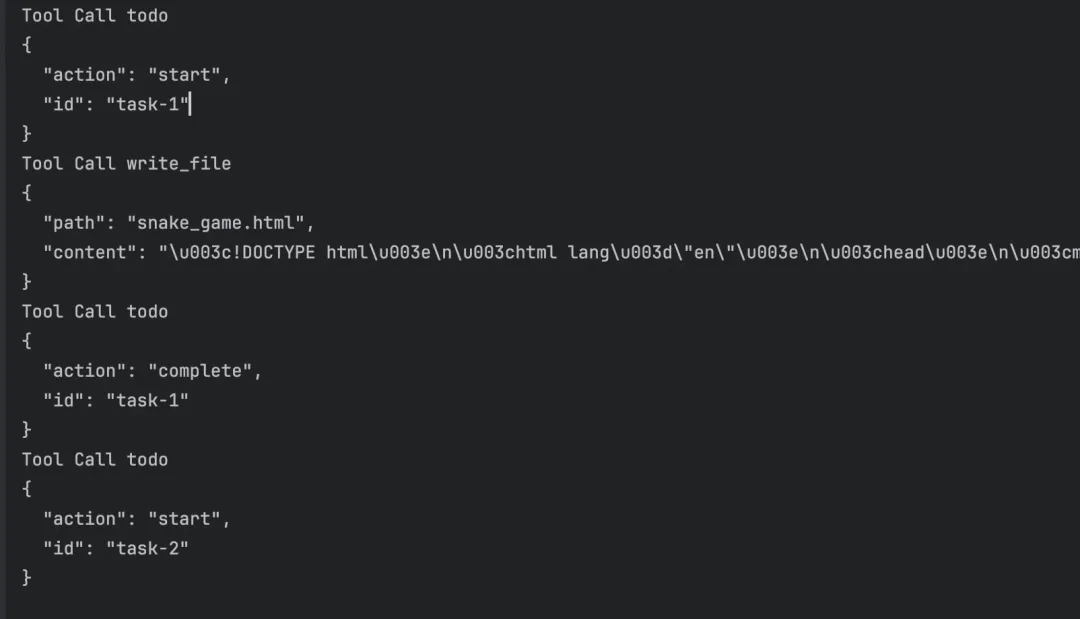
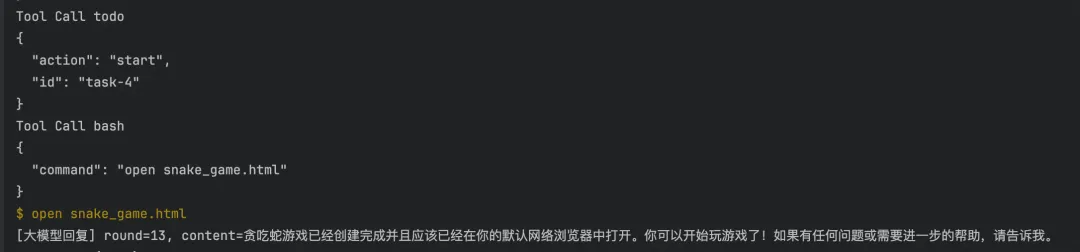
这是Agent02最重磅的新功能!TodoManager实现了会话级的任务计划管理,强制同一时间只能有一个in_progress任务,引导模型按步骤推进。
状态流转:PENDING(待办)→ IN_PROGRESS(进行中)→ COMPLETED(完成)。start()方法会检查是否已有进行中任务,complete()要求任务必须是进行中状态,防止跳步。
public final class TodoManager { public enum Status { PENDING, IN_PROGRESS, COMPLETED, CANCELLED } public static final class TodoItem { private final String id; private String title; private Status status; // ... } private final Listitems = new ArrayList<>(); private int nextId = 1; // 新增任务 public synchronized TodoItem add(String title) { TodoItem item = new TodoItem("task-" + nextId++, title); items.add(item); return item; } // 启动任务:强制同一时间只有一个in_progress public synchronized TodoItem start(String id) { TodoItem target = findById(id); TodoItem inProgress = findInProgress(); if (inProgress != null && !inProgress.id.equals(target.id)) { throw new IllegalStateException( "another task already in_progress: " + inProgress.id); } target.status = Status.IN_PROGRESS; return target; } // 完成任务:必须先in_progress才能complete public synchronized TodoItem complete(String id) { TodoItem target = findById(id); if (target.status != Status.IN_PROGRESS) { throw new IllegalStateException( "task must be in_progress before complete: " + target.id); } target.status = Status.COMPLETED; return target; } // 生成快照供模型查看 public synchronized JsonObject snapshot() { JsonObject out = new JsonObject(); JsonArray arr = new JsonArray(); // 统计各状态数量... out.add("items", arr); out.addProperty("summary", summaryText()); return out; }} 2.4 TodoTool:任务规划工具
TodoTool是模型用来操作任务计划的工具接口,支持add、update、start、complete、set_status、list等操作。
public final class TodoTool implements Tool { private final TodoManager todoManager; public TodoTool(TodoManager todoManager) { this.todoManager = todoManager; } @Override public String name() { return "todo"; } @Override public String description() { return "Manage a step-by-step plan with stateful todo items."; } @Override public JsonObject parametersSchema() { JsonObject props = new JsonObject(); props.add("action", Tool.stringProperty( "One of: add, update, start, complete, set_status, list")); props.add("id", Tool.stringProperty( "Todo item id, required for update/start/complete/set_status")); props.add("title", Tool.stringProperty( "Todo title, required for add or update")); props.add("status", Tool.stringProperty( "Status for set_status: pending/in_progress/completed/cancelled")); return objectSchema(props, "action"); } @Override public String execute(String argumentsJson) { JsonObject o = parseObject(argumentsJson); String action = str(o, "action").trim().toLowerCase(); try { switch (action) { case "add": return ok("added", todoManager.add(str(o, "title")).getId()); case "start": return ok("started", todoManager.start(str(o, "id")).getId()); case "complete": return ok("completed", todoManager.complete(str(o, "id")).getId()); case "list": return listOnly(); // ... } } catch (Exception e) { return error(e.getMessage()); } }}2.5 智能提醒机制(Nag)
Agent02引入了一个非常实用的功能:当模型连续多轮没有调用todo工具时,系统会自动注入提醒文案,督促模型更新计划。
提醒阈值:TODO_NAG_THRESHOLD = 3,即连续3轮未调用todo工具时触发提醒。提醒内容会附加到第一条tool消息的content中。
public final class AgentLoop { private static final int TODO_NAG_THRESHOLD = 3; private int roundsSinceTodo; // 计数器 public void run(JsonArray messages, LLMClient llm) throws IOException { // ... boolean calledTodo = containsTodoCall(toolCalls); if (calledTodo) { roundsSinceTodo = 0; // 重置计数器 } else { roundsSinceTodo++; } // 检查是否需要提醒 String nagReminder = shouldInjectNag(calledTodo) ? buildNagReminder() : ""; // 执行工具调用 boolean nagInjected = false; for (JsonElement tc : toolCalls) { JsonObject toolMessage = tools.executeToolCall(tc.getAsJsonObject()); // 将提醒附加到第一条tool消息 if (!nagInjected && !nagReminder.isEmpty()) { String original = str(toolMessage, "content"); toolMessage.addProperty("content", original + "\n\n" + nagReminder); nagInjected = true; } messages.add(toolMessage); } } private boolean shouldInjectNag(boolean calledTodoInRound) { return !calledTodoInRound && roundsSinceTodo >= TODO_NAG_THRESHOLD; } private String buildNagReminder() { return "[REMINDER] You have gone " + roundsSinceTodo + " rounds without calling todo. Update the plan before proceeding. " + "Current todo snapshot: " + todoManager.summaryText(); }}2.6 文件操作工具集
Agent02新增了三个文件操作工具,都通过resolveUnderCwd限制在工作目录内,防止越权访问。
|
|
|
|
|---|---|---|
|
|
|
|
|
|
|
|
|
|
|
|
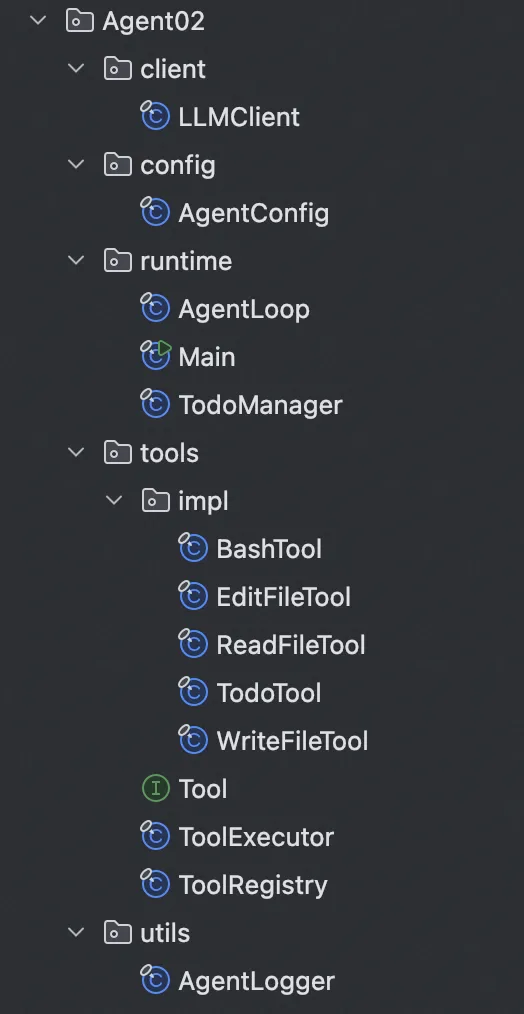
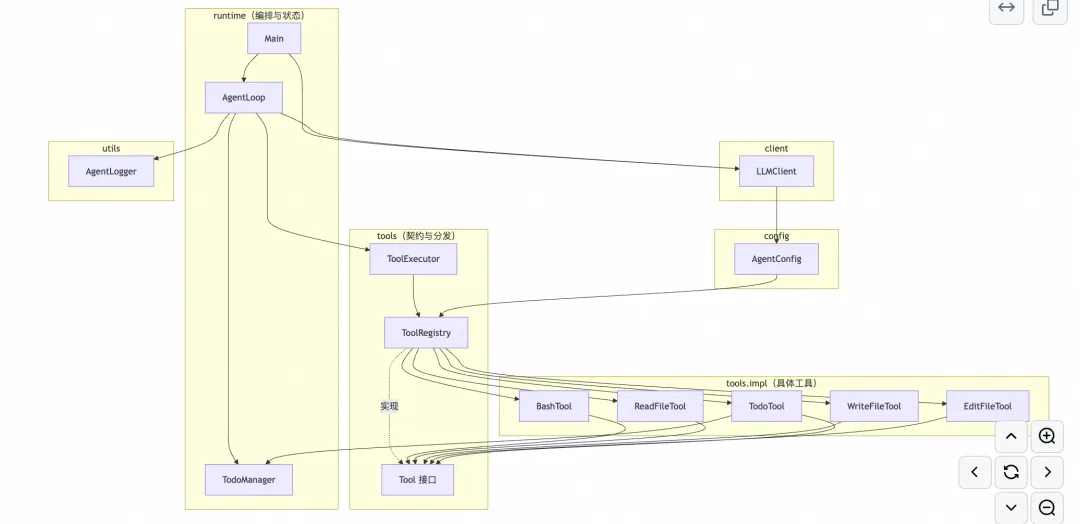
三、类结构依赖图
Agent02采用了更清晰的分层架构:
-
runtime层:Main、AgentLoop、TodoManager(编排与状态) -
client层:LLMClient(网关通信) -
config层:AgentConfig(配置管理) -
tools层:Tool接口、ToolRegistry、ToolExecutor(契约与分发) -
tools.impl层:各工具具体实现 -
utils层:AgentLogger(日志封装)
四、如何扩展新工具?
相比Agent01需要修改ToolExecutor的if-else分支,Agent02的扩展方式优雅多了:
-
创建新类实现Tool接口 -
在ToolRegistry.withStandardTools()中注册实例 -
如需在API声明中展示,同步添加到STANDARD_DECLARATIONS列表
完全不需要修改AgentLoop、LLMClient、ToolExecutor的核心逻辑!这就是接口+注册表架构的威力。
五、总结
Agent02在Agent01的基础上完成了三个重要进化:
-
工具架构升级:从硬编码到接口+注册表,扩展性大幅提升 -
任务规划能力:TodoManager实现状态管理,强制单任务进行中的约束 -
智能提醒机制:防止模型”忘记”更新计划,主动纠偏
这些改进让Agent从一个简单的”命令执行器”进化成了具备规划能力和自我纠正的智能助手。如果你想构建更强大的AI Agent,Agent02的架构设计非常值得参考!
下一篇文章我们将继续探索引入子agent和技能的实现。敬请期待!
本篇以及历史的代码放在了👇
https://github.com/laixiaoxing2026/learn-java-agent/tree/main/src/main/java/com/learn/javaagent/Agent02
参考项目:learn-java-agent/Agent02核心类:Tool.java、ToolRegistry.java、TodoManager.java、AgentLoop.java