 夜雨聆风
夜雨聆风


10分钟爬完官方文档,我用Olostep替代了Scrapy和Selenium
昨天想给团队的知识库喂点官方文档,一搜教程全是Scrapy和Selenium。结果光是处理嵌套页面、剔除导航栏就折腾了一下午。后来发现个叫Olostep的玩意儿,10分钟就把整个docs站爬干净了,还自动转成了Markdown。
- 一个API搞定爬取、清洗、格式化,不用自己拼凑工具链
- 直接输出Markdown/JSON,LLM拿来就能用,省去大量预处理
- 内置去重、处理JS页面,比Scrapy+Selenium组合省心80%
为什么选Olostep不选老牌工具?
Scrapy确实强大,但它是完整的爬虫框架。你想啊,文档爬取这种相对简单的需求,为了它去学一套框架、写一堆中间件,是不是有点杀鸡用牛刀?Selenium更偏浏览器自动化,拿来爬JS重的页面可以,但它本身不是为文档爬取工作流设计的,你得自己处理数据提取和清洗。
Olostep的卖点就很直接:通过一个API,完成搜索、爬取、抓取、结构化数据。关键是它原生支持LLM友好的输出格式,比如Markdown、文本、HTML和结构化JSON。这意味着你不需要手动把发现、提取、格式化和下游AI使用这几个环节拼起来。对文档站点来说,从URL到可用内容的路径会快得多。
三行命令把环境搭起来
先装包,官方SDK要求Python 3.11或更高版本。
pip install olostep python-dotenv tqdm

这几个包分工明确:olostep连接你的脚本到Olostep API,python-dotenv从.env文件加载你的API密钥,tqdm加个进度条让你能看到保存了多少页面。
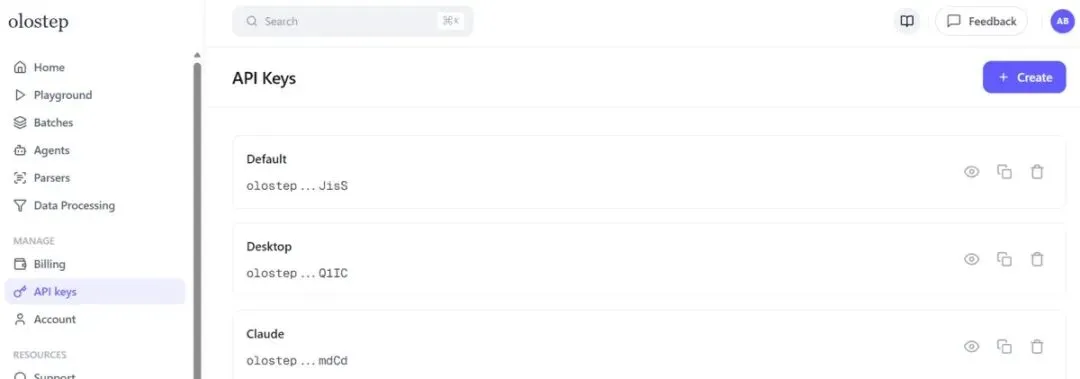
接着去Olostep官网注册个免费账户,在仪表盘里生成个API密钥。然后在项目文件夹里创建个.env文件:
OLOSTEP_API_KEY=your_real_api_key_here
这样密钥和代码分开,既干净又安全。
核心爬虫脚本长这样
先建个项目文件夹,在里面新建个Python文件,名字就叫crawl_docs_with_olostep.py。然后一步步往里加代码。
第一部分定义爬取设置:起始URL、最大页面数、爬取深度、包含和排除规则,还有输出文件夹。
import os
import re
from pathlib import Path
from urllib.parse import urlparsefrom dotenv import load_dotenv
from tqdm import tqdm
from olostep import OlostepSTART_URL = “https://docs.olostep.com/”
MAX_PAGES = 10
MAX_DEPTH = 1INCLUDE_URLS = [
“/**”
]EXCLUDE_URLS = []
OUTPUT_DIR = Path(“olostep_docs_output”)
接着写个辅助函数,把URL转成文件系统安全的文件名,避免斜杠、符号这些字符出问题。
def slugify_url(url: str) -> str:
parsed = urlparse(url)
path = parsed.path.strip(“/”)if not path:
path = “index”filename = re.sub(r”[^a-zA-Z0-9/_-]+”, “-“, path)
filename = filename.replace(“/”, “__”).strip(“-_”)return f”{filename or ‘page’}.md”
再写个清洗Markdown的函数,去掉多余的界面文本、重复空行、反馈提示这些不想要的东西。
def clean_markdown(markdown: str) -> str:
text = markdown.replace(“\r\n”, “\n”).strip()
text = re.sub(r”\[\s*\u200b?\s*\]\(#.*?\)”, “”, text, flags=re.DOTALL)lines = [line.rstrip() for line in text.splitlines()]
start_index = 0
for index in range(len(lines) – 1):
title = lines[index].strip()
underline = lines[index + 1].strip()
if title and underline and set(underline) == {“=”}:
start_index = index
break
else:
for index, line in enumerate(lines):
if line.lstrip().startswith(“# “):
start_index = index
breaklines = lines[start_index:]
for index, line in enumerate(lines):
if line.strip() == “Was this page helpful?”:
lines = lines[:index]
breakcleaned_lines: list[str] = []
for line in lines:
stripped = line.strip()
if stripped in {“Copy page”, “YesNo”, “⌘I”}:
continue
if not stripped and cleaned_lines and not cleaned_lines[-1]:
continue
cleaned_lines.append(line)return “\n”.join(cleaned_lines).strip()

最后是保存Markdown的函数,把清洗好的内容存到输出文件夹,并在文件顶部加上源URL。
def save_markdown(output_dir: Path, url: str, markdown: str) -> None:
output_dir.mkdir(parents=True, exist_ok=True)
filepath = output_dir / slugify_url(url)content = f”””—
source_url: {url}
—{markdown}
“””
filepath.write_text(content, encoding=”utf-8″)
主函数把这些都串起来:加载API密钥、创建Olostep客户端、启动爬取、等它完成、获取每个页面、清洗、保存。
def main() -> None:
load_dotenv()
api_key = os.getenv(“OLOSTEP_API_KEY”)if not api_key:
raise RuntimeError(“Missing OLOSTEP_API_KEY in your .env file.”)client = Olostep(api_key=api_key)
crawl = client.crawls.create(
start_url=START_URL,
max_pages=MAX_PAGES,
max_depth=MAX_DEPTH,
include_urls=INCLUDE_URLS,
exclude_urls=EXCLUDE_URLS,
include_external=False,
include_subdomain=False,
follow_robots_txt=
留言聊聊
你平时爬文档更习惯用Scrapy、Selenium,还是直接上现成API服务?