夜雨聆风
夜雨聆风


网络设备一键巡检(五):“AI巡检系统”终极进化 →自动推送到企微+安全脱敏–以h3c+Fortinet为例(附完整源码)
 点击关注,一起学习更多IT知识。
-
上期我们做了“网络设备一键巡检(四):我把网络设备巡检->升级成“会思考的AI系统”–以h3c+Fortinet为例(附源码)”,但是: 1.出问题时,人不在电脑前告警太多,看不过来。 2.只知道“哪里坏了”,不知道“为什么坏”。 3.推送消息存在安全隐患。 -
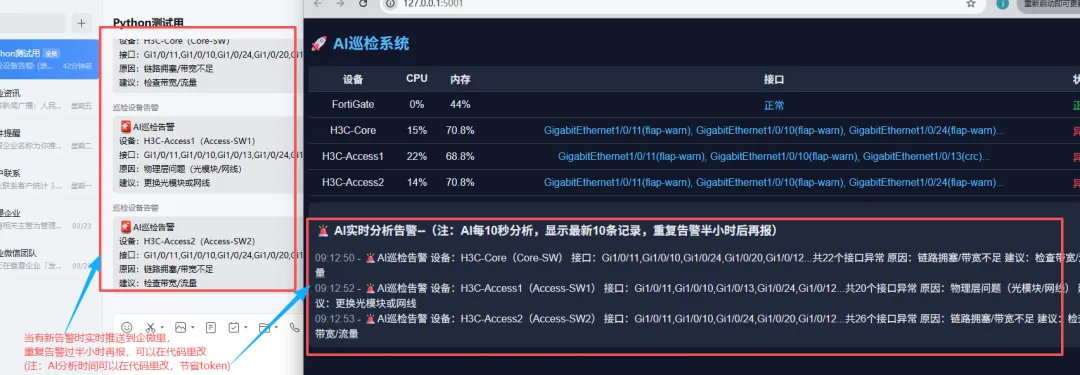
这期我们进行升级:重点升级了4个核心能力:Webhook告警 + AI分析建议 + 安全脱敏 + 告警降噪。 -
整个流程:
-
设备巡检: → 数据采集(CPU/内存/接口) → 异常识别(drop / CRC / flap 等) → 告警聚合(按设备合并后,涉及到设备信息也做脱敏处理。) → 程序将采集、处理好的错误信息交给AI → AI根因分析(为什么出问题) → AI生成处理建议 → 安全脱敏(对外数据保护) → Webhook推送 → 前端展示 / 报告输出。 -
注:有条件的还是建议接入本地部署的大模型。最大程度确保数据安全。(现在很多公司都有自己的AI)
-
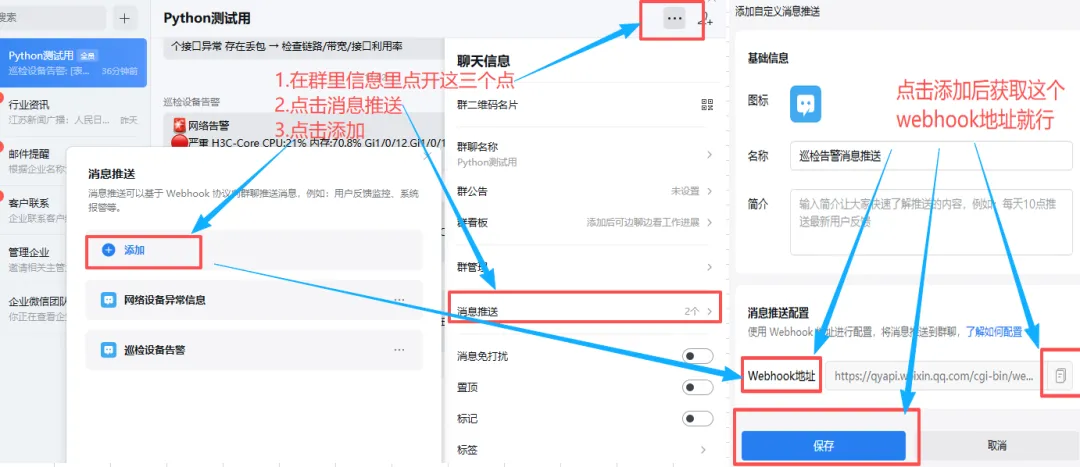
获取方式:打开企微 → 群聊 → 消息推送 → 获取Webhook地址。 -
请看以下是webhook获取截图:
-
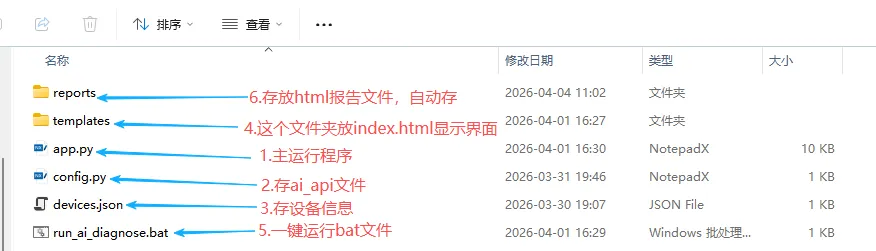
1、建立文件目录,请看以下截图详细介绍:
-
2、设备信息–“device.json”,请看以下代码(注:除了设备类型是要根据设备来填,其它信息根据实际情况填):
[{"name": "FortiGate","device_type": "fortinet","host": "192.168.31.254","username": "admin","password": "Password"},{"name": "H3C-Core","device_type": "hp_comware","host": "192.168.31.253","username": "admin","password": "Password"}]
-
3、存放ai_api代码–“config.py”(注:以阿里云ai_api为例):
API_KEY = "你的ai_api"BASE_URL = "https://dashscope.aliyuncs.com/compatible-mode/v1"MODEL = "qwen-plus"
-
4、主程序–“app.py”代码(注:由于代码过长,我放以下链接里了,请复制以下链接到浏览器后,直接可打开代码。将webhook地址改成你获取的就行。):
https://gitee.com/IT_pangge/it-explorer-fat-brother/raw/master/AI%20%E7%BD%91%E7%BB%9C%E4%B8%80%E9%94%AE%E5%B7%A1%E6%A3%80/app.py-
注:以下是“app.py”代码展示:
# -*- coding: utf-8 -*-from flask import Flask, render_template, jsonify, requestimport json, time, re, webbrowser, requests, osfrom threading import Threadfrom netmiko import ConnectHandlerfrom functools import wrapsapp = Flask(__name__)# ================= 配置 =================DEBUG_MODE = TrueAPI_TOKEN = "default_token_123"WEBHOOK_URL = "你的webhook地址"REPORT_DIR = "reports"device_stats = []event_log = []last_alerts = {}IGNORE_PORTS = ["port2", "port3"]# ================= ✅ 设备别名(脱敏但可识别) =================DEVICE_ALIAS = {"H3C-Core": "Core-SW","H3C-Access1": "Access-SW1","H3C-Access2": "Access-SW2","FortiGate": "FW"}defmask_device(name):return DEVICE_ALIAS.get(name, name)# ================= 初始化 =================definit():ifnot os.path.exists(REPORT_DIR): os.makedirs(REPORT_DIR)# ================= Token =================defrequire_token(f): @wraps(f)defwrapper(*args, **kwargs):if DEBUG_MODE:return f(*args, **kwargs) token = request.headers.get("X-Token")if token != API_TOKEN:return jsonify({"error": "Unauthorized"}), 403return f(*args, **kwargs)return wrapper# ================= 工具 =================defshort_list(lst):return"正常"ifnot lst else", ".join(lst[:3]) + ("..."if len(lst) > 3else"")defgen_issue_key(name):return name # 聚合到设备# ================= H3C =================defparse_h3c_cpu(text): m = re.search(r'(\d+)%\s+in last 5 seconds', text)return int(m.group(1)) if m elseNonedefparse_h3c_mem(text): total_total, total_used = 0, 0for line in text.splitlines(): parts = line.split()if len(parts) >= 7:try: total_total += int(parts[2]) total_used += int(parts[3])except:continuereturn round(total_used / total_total * 100, 1) if total_total elseNonedefparse_h3c_interface(text): issues, port = [], ""for line in text.splitlines():if re.match(r'^\S+Ethernet', line): port = line.split()[0]continueif"Last link flapping"in line: m = re.search(r'(\d+)', line)if m: minutes = int(m.group(1))if minutes < 1: issues.append(f"{port}(flap-critical)")elif minutes < 5: issues.append(f"{port}(flap-warn)")if"CRC"in line: m = re.search(r'(\d+)', line)if m and int(m.group(1)) > 1000: issues.append(f"{port}(crc)")if"drops"in line.lower(): m = re.search(r'(\d+)', line)if m and int(m.group(1)) > 1000: issues.append(f"{port}(drop)")return list(set(issues))# ================= Fortinet =================defparse_forti_cpu(text): m = re.search(r'(\d+)%\s*idle', text)return100 - int(m.group(1)) if m elseNonedefparse_forti_mem(text): m = re.search(r'used \((\d+(?:\.\d+)?)%\)', text)return int(float(m.group(1))) if m elseNonedefparse_forti_interface(text): issues, port = [], ""for line in text.splitlines():if line.startswith("name:"): port = line.split(":")[1].strip()if"link:"in line.lower(): status = line.split(":")[1].strip().lower()if port in IGNORE_PORTS:continueif status == "down": issues.append(f"{port}(down)")return list(set(issues))# ================= 状态 =================defevaluate(cpu, mem, iface):if cpu isNoneor mem isNone:return"异常"if cpu > 90or mem > 90:return"异常"if any("(drop)"in i or"(crc)"in i for i in iface):return"异常"if any("flap"in i for i in iface):return"警告"return"正常"# ================= AI根因分析 =================defanalyze_root_cause(device): iface_list = device['iface_list'] cpu = device['cpu'] mem = device['mem'] drop = [i for i in iface_list if"(drop)"in i] crc = [i for i in iface_list if"(crc)"in i] flap = [i for i in iface_list if"flap"in i]if drop:return"链路拥塞/带宽不足", "检查带宽/流量"if crc:return"物理层问题(光模块/网线)", "更换光模块或网线"if len(flap) >= 5:return"疑似环路/STP震荡", "检查二层环路/STP"if flap:return"链路不稳定", "检查对端设备/协商"if isinstance(cpu, (int, float)) and cpu > 90:return"CPU过高", "检查流量/攻击"if isinstance(mem, (int, float)) and mem > 90:return"内存异常", "检查进程"returnNone, None# ================= 🚨 告警(最终版) =================defbuild_alert(device): name = device['name'] safe_name = mask_device(name) iface_list = device['iface_list'] reason, suggestion = analyze_root_cause(device)ifnot reason:returnNone# 👉 接口展示(关键) iface_show = []for i in iface_list[:5]: iface_show.append(i.split("(")[0].replace("GigabitEthernet", "Gi")) iface_str = ",".join(iface_show)if len(iface_list) > 5: iface_str += f"...共{len(iface_list)}个接口异常"returnf"""🚨AI巡检告警设备:{name}({safe_name})接口:{iface_str}原因:{reason}建议:{suggestion}"""# ================= Webhook =================defsend_webhook(msg):ifnot WEBHOOK_URL ornot msg:returntry: print("📤 Webhook:", msg) requests.post(WEBHOOK_URL, json={"msgtype": "text","text": {"content": msg} }, timeout=5)except Exception as e: print("Webhook失败:", e)# ================= HTML =================defgenerate_html(): html = "<html><body><h2>AI巡检报告</h2><table border='1'>" html += "<tr><th>设备</th><th>CPU</th><th>内存</th><th>接口</th><th>状态</th></tr>"for d in device_stats: html += f"<tr><td>{d['name']}</td><td>{d['cpu']}%</td><td>{d['mem']}%</td><td>{d['iface']}</td><td>{d['status']}</td></tr>" html += "</table></body></html>"return html# ================= 主循环 =================defcollect():global device_statswhileTrue: new_stats = [] alerts = [] devices = json.load(open("devices.json", encoding="utf-8"))for d in devices: dev = d.copy() name = dev.pop("name", dev.get("host"))try: conn = ConnectHandler(**dev)if dev["device_type"] == "hp_comware": cpu = parse_h3c_cpu(conn.send_command("display cpu-usage")) mem = parse_h3c_mem(conn.send_command("display memory summary")) iface = parse_h3c_interface(conn.send_command("display interface"))elif dev["device_type"] == "fortinet": perf = conn.send_command("get system performance status") cpu = parse_forti_cpu(perf) mem = parse_forti_mem(perf) iface = parse_forti_interface(conn.send_command("get system interface physical"))else: cpu, mem, iface = None, None, [] conn.disconnect() status = evaluate(cpu, mem, iface) device = {"name": name,"cpu": cpu if cpu isnotNoneelse"-","mem": mem if mem isnotNoneelse"-","iface": short_list(iface),"iface_list": iface,"status": status } new_stats.append(device)if status != "正常": alerts.append(device)except Exception as e: error_msg = str(e) new_stats.append({"name": name,"cpu": "-","mem": "-","iface": f"错误:{error_msg}","iface_list": [],"status": "异常" }) print(f"❌ {name} 出错:", error_msg) device_stats[:] = new_stats now = time.time()for device in alerts: key = gen_issue_key(device['name'])if key in last_alerts and now - last_alerts[key] < 1800:continue alert_text = build_alert(device)ifnot alert_text:continue send_webhook(alert_text) event_log.append({"time": time.strftime("%H:%M:%S"),"event": alert_text }) print("🔥 告警:", alert_text) last_alerts[key] = now event_log[:] = event_log[-10:] time.sleep(5)# ================= API =================@app.route("/")defindex():return render_template("index.html")@app.route("/api/data")@require_tokendefdata():return jsonify({"devices": device_stats})@app.route("/api/events")@require_tokendefevents():return jsonify(event_log)# ================= 启动 =================if __name__ == "__main__": init() Thread(target=collect, daemon=True).start()defopen_browser(): time.sleep(2) webbrowser.open("http://127.0.0.1:5001") Thread(target=open_browser).start() app.run(host="127.0.0.1", port=5001)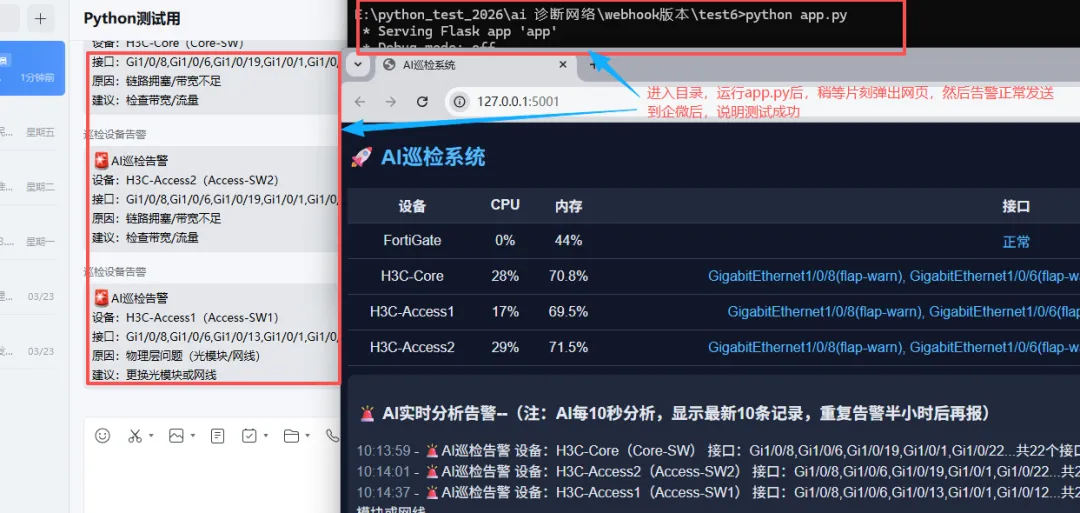
-
注:测试完就可以建立bat文件一键运行,以下是示例代码:
@echo offcd /d E:\python_test_2026\ai 诊断网络\webhook版本\test6python app.py
-
这一版实际上主要升级解决了4个问题:
-
不可能一直盯系统-> 自动推送到企微。
-
告警降噪: 之前:一个设备 → 十几条接口告警。现在:一个设备 → 一条总结告警。告警减少80%,不刷屏,更聚焦问题。
-
“可控脱敏”(比上一版增强):内部人员能识别、外部不会暴露架构、可接Webhook / AI。(注:能接入本地部署的AI最稳)
-
AI自动分析原因 + 建议。注:文中部分代码由AI辅助生成。
-
启示:当然这自建的版本有很多地方待完善优化;也没法和市面上专业网络监控相比。但希望可以给也在探索与尝试的朋友们,提供更多思路。后续将做更多优化分享,感谢关注