ARTICLE · 1068672
微软在线预览把我坑了三次,最后我把 Office 渲染搬回了前端
知识库模块需要在页面内预览用户上传的 Office 文档(doc / docx / xls / xlsx / ppt / pptx)。最初的实现很直接:采用微软 Office Online 在线预览,把文件 URL 拼进嵌入端点,再用 iframe 加载。
https://view.officeapps.live.com/op/embed.aspx?src=<encodeURIComponent(fileUrl)>这个方案在生产环境暴露出三个绕不过去的问题:
psg4-word-view.officeapps.live.com 这类子域,该链路在国内网络环境下频繁连接重置(Chrome 提示「意外终止了连接」,即 ERR_CONNECTION_CLOSED)。文件越大失败率越高,用户往往要强刷好几次才能看到内容。load 事件。宿主根本分不清成功与失败,自动重试、降级、上报统统无从下手。+),回源就是 404。三个问题的根因只有一个:对一个不可控的外部服务形成了强依赖。治本方案也只有一条——把文档解析与渲染收回前端本地完成。
围绕「纯前端能不能扛住」这个核心问题,对比了三条路线:
| ✅ 采用 | |
| ❌ 放弃 | |
| ❌ 放弃 |
fetch 到文件二进制。实测文件所在的 OSS 域名已返回 access-control-allow-origin: *,无需任何后端改造。迁移前务必先验证这一点,否则要先配置存储桶的 CORS 规则(允许前端域名 GET)。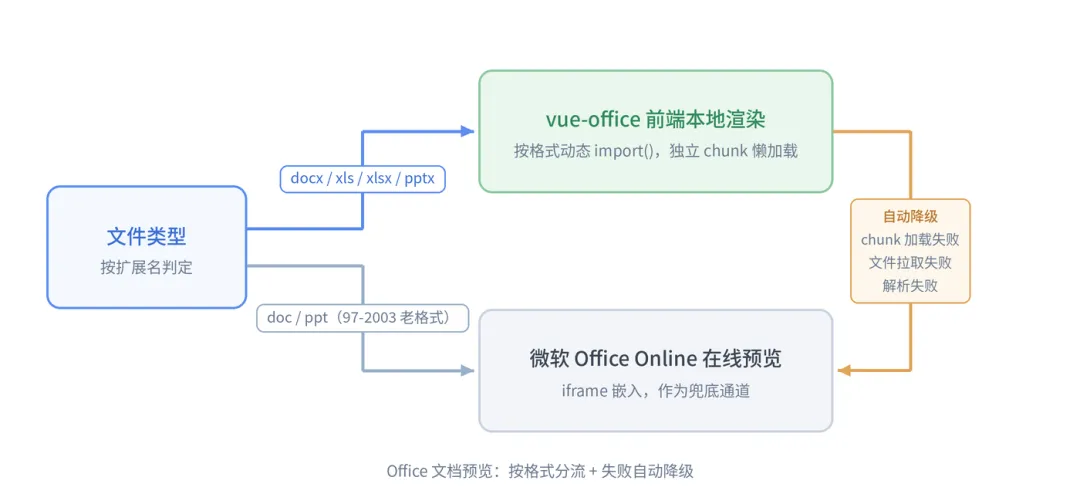
整体上有三个设计点:
import() 拆成独立 chunk,只在真正预览到对应格式时才拉取,不影响首屏;pnpm add @vue-office/docx @vue-office/excel @vue-office/pptx
先根据扩展名算出「理论上」该用哪种预览器:
typeViewerKind = "pdf" | "docx" | "excel" | "pptx" | "office" | "image" | "text" | "unsupported";const LOCAL_OFFICE: ViewerKind[] = ["docx", "excel", "pptx"]; // 本地渲染const LEGACY_OFFICE = ["doc", "ppt"]; // 97-2003 老格式,无前端解析库const viewerKind = computed<ViewerKind>(() => { consttype = fileType.value; if (type === "pdf") return"pdf"; if (type === "docx") return"docx"; if (type === "xls" || type === "xlsx") return"excel"; if (type === "pptx") return"pptx"; if (LEGACY_OFFICE.includes(type)) return"office"; // ... image / text / unsupported});
降级状态与分流逻辑完全独立,effectiveKind 才是模板真正消费的预览方式:
// 本地渲染失败(chunk 加载 / 文件拉取 / 解析)时自动降级在线预览const localRenderFailed = ref(false);watch(encodedUrl, () => (localRenderFailed.value = false)); // 换文件时复位const fallbackToOffice = (e?: unknown) => { if (e) console.error("[knowledgeBase/preview] 本地渲染失败,降级在线预览:", e); localRenderFailed.value = true; };// 实际生效的预览方式:仅本地渲染类会降级const effectiveKind = computed<ViewerKind>(() => localRenderFailed.value && LOCAL_OFFICE.includes(viewerKind.value) ? "office" : viewerKind.value );
在 defineAsyncComponent 的 loader 里捕获加载异常——弱网下渲染引擎的 chunk 拉不下来,同样触发降级,而不是白屏:
const lazyViewer = (loader: () => Promise<{ default: Component }>) => defineAsyncComponent(async () => { try { return (awaitloader()).default; } catch (e) { fallbackToOffice(e); return () => null; // 返回空渲染组件,模板随 effectiveKind 切走 } });const VueOfficeDocx = lazyViewer(() => import("@vue-office/docx/lib/index.css").then(() => import("@vue-office/docx")));const VueOfficeExcel = lazyViewer(() => import("@vue-office/excel/lib/index.css").then(() => import("@vue-office/excel")));const VueOfficePptx = lazyViewer(() => import("@vue-office/pptx")); // pptx 无独立样式文件
注意 docx / excel 的样式文件也走动态 import,和组件 chunk 同批加载。
vue-office 组件统一暴露 src(文件 URL,组件内部自行 fetch)、@rendered(渲染完成)、@error(拉取 / 解析失败)三个接口:
<VueOfficeDocxv-if="effectiveKind === 'docx'"class="kb-office-local":src="encodedUrl"@rendered="stopLoading"@error="fallbackToOffice"/><VueOfficeExcelv-else-if="effectiveKind === 'excel'"class="kb-office-local":src="encodedUrl"@rendered="stopLoading"@error="fallbackToOffice"/><VueOfficePptxv-else-if="effectiveKind === 'pptx'"class="kb-office-local":src="encodedUrl"@rendered="stopLoading"@error="fallbackToOffice"/><!-- doc / ppt 与降级路径:维持原在线预览 --><iframev-else-if="effectiveKind === 'office'"class="kb-file-frame":src="officeUrl"@load="stopLoading"@error="stopLoading"></iframe>
加载态复用原有的 loading 遮罩:监听 effectiveKind 变化(包括降级切换)时重置为加载中,@rendered / iframe @load 时关闭,另设超时兜底,防止转圈卡死。
.kb-office-local { width: 100%; height: 72vh; // 固定高度必须给:Excel 的表格画布按容器高度初始化,无高度会渲染成 0 overflow: auto; // docx/pptx 长内容在容器内滚动 background: #ffffff; border-radius: 10px; }
以编程方式生成的 docx(python-docx 等库,以及各类 AI 导出工具的产物)经常缺失页边距定义(sectPr 里没有 pgMar)。Word 系引擎会隐式补上默认值,docx-preview 则忠实于文档声明、不写 padding,内容会顶满整张纸。利用「内联样式优先于外部 CSS」这一条规则,就能精确兜底:
// docx-preview 仅在文档带 pgMar 时写 padding 内联样式,// 故本条只对缺失页边距的文档生效(正常文档的内联优先级更高).kb-office-local :deep(.docx-wrapper > section.docx) { padding: 72pt90pt; // Word 默认页边距:上下 2.54cm,左右 3.18cm}
排查线上问题时,需要知道一次预览实际走了哪条通道:
if (LOCAL_OFFICE.includes(effectiveKind.value)) { console.info(`[knowledgeBase/preview] ${fileType.value} → vue-office 前端本地渲染`); } elseif (effectiveKind.value === "office") { const reason = LOCAL_OFFICE.includes(viewerKind.value) ? "本地渲染失败降级" : "97-2003 老格式无前端解析库"; console.info(`[knowledgeBase/preview] ${fileType.value} → 微软在线预览(${reason})`); }
上线后 docx / xlsx / pptx 预览秒开,连接重置问题随着外部依赖一并消失;弱网、坏文件、老格式依然有在线预览兜底。
两点注意事项:
!important 的规则,优先级高于文档的内联样式)、通配 reset 都可能污染文档版式。接入前应审计宿主的全局样式,必要时对渲染容器做选择器豁免,或者用 Shadow DOM 彻底隔离。