ARTICLE · 1348056
点「卸载」没反应之后:我把鲁大师拆开看了一遍
双11活动新买的笔记本电脑,收到货后从网上下载了鲁大师评测,查看电脑配置是否正品,但在测评完后电脑上出现了一堆乱七八糟的软件,又是系统管家,又是强力清扫等,统统提示要充值,用自带的卸载程序和360软件管家,都没什么用,卸载后又自动出来了,一点办法没有,怀疑是安装了盗版的鲁大师,捆绑了一系列的流氓软件 。没辙了,想到可否由WorkBuddy帮我卸载这些流氓软件.这篇文章不复述「换个管家强力卸载」,而是把整个过程拆开:先看它为什么卸不掉,再一层层把锁拆掉。文末附一份经过实战验证的完整脚本,两个文件、双击一次即可,可直接复制保存使用。
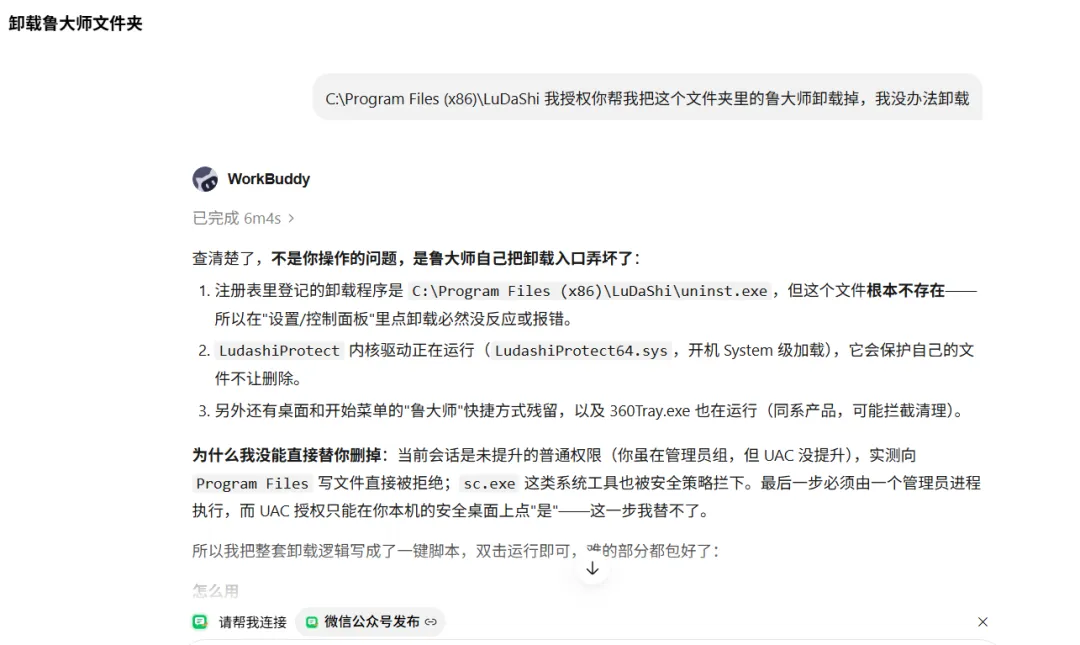
于是,在workbuddy中,我先是复制了鲁大师的安装路径,然后在Workbuddy新建任务,简单输入了下面这段话,烦心的事让WorkBuddy帮我去办了。
C:\Program Files (x86)\LuDaShi 我授权你帮我把这个文件夹里的鲁大师卸载掉,我没办法卸载
385 个文件,401 MB。
这是第一轮清理跑完之后,C:\Program Files (x86)\LuDaShi 里剩下的东西。
日志里还有一行更刺眼的:
[22:13:03] Queued 0 file(s) and folders for deletion at next reboot.排了 0 个。连「重启之后自动删」都没生效。
我原本以为这只是个权限问题。查完才发现:权限是最后一堵墙,前面还站着四层。
一、第一层:卸载按钮指向一个不存在的文件
Windows 的「程序和功能」不会自己去删文件。它读注册表里的卸载命令,然后照着执行。
这条记录在:
HKLM\SOFTWARE\WOW6432Node\Microsoft\Windows\CurrentVersion\Uninstall\Ludashi_is1里面 UninstallString 写的是:
C:\Program Files (x86)\LuDaShi\uninst.exe去文件夹里看一眼——uninst.exe根本不存在。
所以「点卸载没反应」既不是卡顿,也不是权限不足。系统只是忠实地执行了一个指向空气的命令。
排查这类问题,第一条命令就够:
Get-ItemProperty 'HKLM:\SOFTWARE\WOW6432Node\Microsoft\Windows\CurrentVersion\Uninstall\Ludashi_is1' | Select-Object DisplayName, UninstallString拿到路径之后,先 Test-Path 一下那个文件还在不在。别急着找卸载工具。
「卸载不掉」的第一层原因,常常不是它太强,而是它把自己的卸载入口弄丢了。先确认卸载项指向的文件是否真实存在,再决定动不动手。
二、第二层:一个开机就加载的驱动,把门从里面锁上
目录里躺着一排 .sys:LudashiProtect64.sys、ProtectFilter64.sys、HardwareProtectEx_x64.sys……
查驱动状态:
Get-CimInstance Win32_SystemDriver | Where-Object { $_.PathName -match 'LuDaShi' } | Select-Object Name, State, StartMode, PathName结果里最要紧的一行:
LudashiProtect Running System \??\C:\Program Files (x86)\LuDaShi\LudashiProtect64.sysStartMode = System 意味着它在开机很早的阶段就加载了,比绝大多数清理工具都早。这类自我保护驱动会拦住对自己文件的删除——你看到的「访问被拒绝」,未必是 ACL,可能就是它在内核里挡了一下。
另一个 ProtectFilter 是 Manual / Stopped,顺手一起处理。
判断一个残留文件有没有风险,别看名字吓不吓人,看三件事:有没有进程在加载它、有没有服务或启动项指向它、注册表里还有没有入口。三样都没有,它就只是一块占空间的砖头。
三、第三层:资源管理器里塞进来的两个 DLL
第一轮脚本跑完,日志写着 Processes stopped: 0。看起来很干净,可文件还是删不掉。
问题出在看进程的方式上。之前只按「可执行文件路径」找,当然找不到——因为加载鲁大师 DLL 的,是 explorer.exe,它明明在 C:\Windows 下。
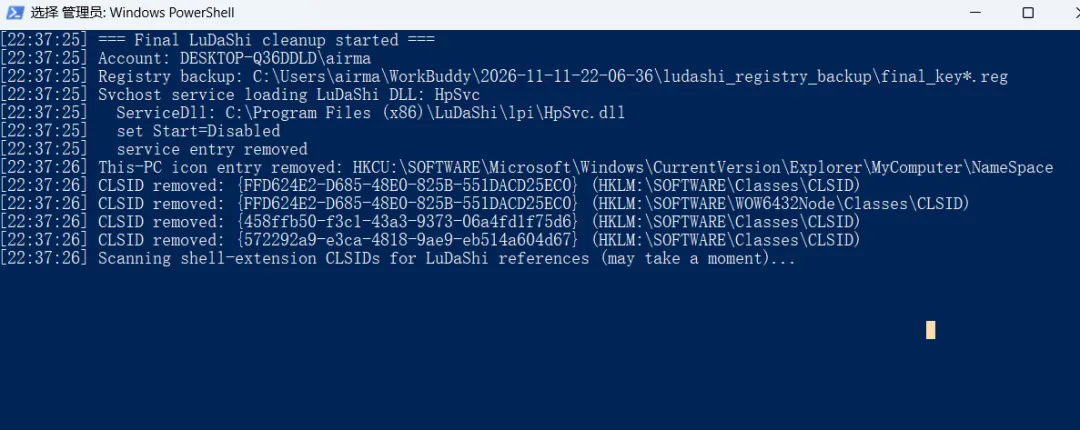
换成按「加载的模块」查:
foreach ($p in Get-Process) { try { foreach ($m in $p.Modules) { if ($m.FileName -like 'C:\Program Files (x86)\LuDaShi\*') { "$($p.ProcessName) ($($p.Id)) -> $($m.FileName)" } } } catch { }}答案出来了:两个 explorer.exe 进程(PID 2360、7944),都加载着
...\LuDaShi\Utils\master_bho_x64.dll...\LuDaShi\Utils\product_helper_x64.dll外壳扩展 / 浏览器辅助对象。只要资源管理器还活着,这两个 DLL 就一直被锁着。而更常见的失败是:删除命令撞上第一个被锁文件就整批中止,后面 384 个文件连试都没试。
清理脚本里最贵的一个教训:Remove-Item -Recurse -Force -ErrorAction Stop 遇到第一个锁文件就抛异常退出。改成逐文件删除、单独计数,385 个文件里往往只有一两个真的删不掉。
四、第四层:伪装成「硬件保护服务」的隐藏自启项
最麻烦的一个,藏得最深。这个真是太坏了,估计真的是不小心安装了被动了手脚的鲁大师。靠手工根本没法完全清理。
服务名 HpSvcDisplayName Hardware Protection ServiceStart 2(自动启动)ObjectName LocalSystemImagePath C:\windows\System32\svchost.exe -k netsvcsServiceDll C:\Program Files (x86)\LuDaShi\lpi\HpSvc.dll看 ImagePath:写的是 svchost.exe,一个字都不含 LuDaShi。所以任何「按 ImagePath 过滤服务」的清理脚本,都会 100% 漏掉它。
真正的入口藏在子项 Parameters\ServiceDll 里。查它的正确姿势:
Get-ChildItem 'HKLM:\SYSTEM\CurrentControlSet\Services' | ForEach-Object { $par = Join-Path $_.PSPath 'Parameters' if (Test-Path $par) { $dll = (Get-Item $par).GetValue('ServiceDll') if ("$dll" -match 'LuDaShi') { "$($_.PSChildName) -> $dll" } }}查询时它的状态是 Start Pending,自动启动、以系统最高权限运行、指向那个删不掉的 HpSvc.dll。这就是最后四个文件的元凶,也是当时唯一还「活着」的自启组件。
顺带把四个残留文件都验了一遍签名:Get-AuthenticodeSignature 显示签名者均为「成都鲁易科技有限公司」,状态 Valid。也就是说,它们是官方组件,不是被掉包的木马。风险不来自文件本身,而来自还有没有入口能让它跑起来。 把 HpSvc 拆掉之后,剩下三个就是没有引线的炸药。
看到 LocalSystem + Auto + 一个指向已卸载软件目录的 ServiceDll,不要只删文件。先把服务禁用、删掉服务项,否则重启之后它会重新把文件加载回来。
五、附带收获:「此电脑」里那个删不掉的 C盘瘦身
同一系列还有个更迷惑的东西:打开「此电脑」,里面挂着一个「C盘瘦身」图标,右键「删除」怎么点都没反应。
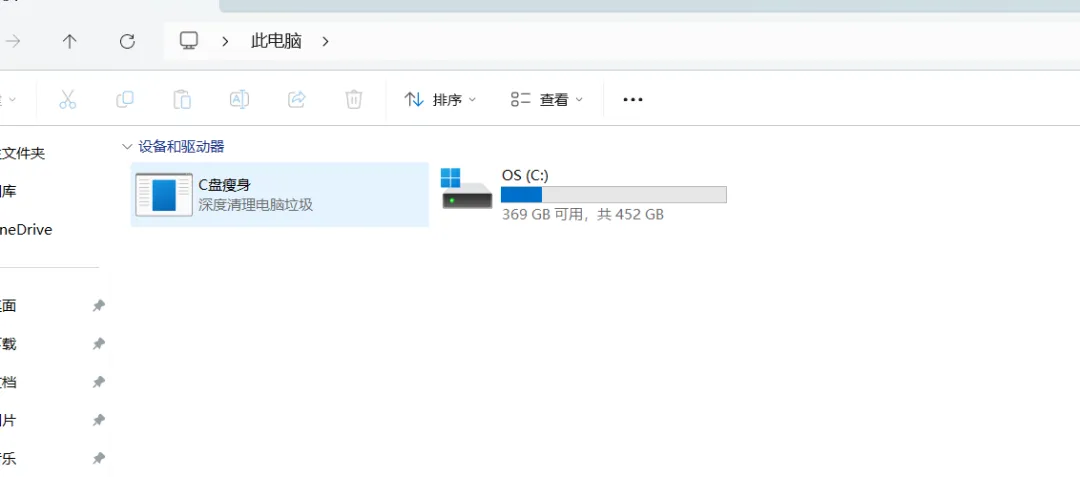
它不是文件夹,也不是快捷方式,而是 Shell 命名空间里的一个虚拟项:
HKCU\SOFTWARE\Microsoft\Windows\CurrentVersion\Explorer\MyComputer\NameSpace\{FFD624E2-D685-48E0-825B-551DACD25EC0}配套的 CLSID 里写着:
DefaultIcon = C:\Program Files (x86)\LdsCClean\cclean.exeShell\Delete\Command = "...\cclean.exe" --del_res_mgr_entryShell\Open\Command = "...\cclean.exe" --res_mgr_entry也就是说,你点的「删除」,其实是让这个软件自己删掉自己。而 LdsCClean 目录早就不存在了——一个指向不存在程序的删除命令,当然点不动。
程序没了,图标还在。删掉 NameSpace 项和两个 CLSID 项,刷新资源管理器,图标就消失了。同一个目录里还查到两个指向已删除 master_bho_x64.dll 的 CLSID 死引用,一并清掉。
六、把分析写成脚本:六个不能省的设计
知道锁在哪之后,写脚本反倒成了最不需要动脑子的一步。真正决定成败的是这六条:
第 5 条是我第一版栽的跟头。MoveFileEx 配 MOVEFILE_DELAY_UNTIL_REBOOT 时传了 \\?\ 前缀,全部调用静默失败,于是日志里留下那句 Queued 0。去掉前缀、改成普通完整路径,队列才真正排上。
至于「删除」本身,顺序是固定的:先断自启(服务 / 启动项 / CLSID),再释放占用(进程 / 模块),最后才删文件。 反过来做,只会一遍遍撞在同一堵墙上。
七、怎么用:两个文件,双击一次
脚本会永久删除 C:\Program Files (x86)\LuDaShi 及若干注册表项,不可撤销。它会自动备份涉及的注册表键,但仍请确认该目录里没有你需要保留的东西。运行过程中桌面与任务栏会闪一下(脚本重启 explorer),已打开的文件夹窗口会关闭。
新建一个文件夹,把下面两段代码分别保存为 remove_ludashi.bat和remove_ludashi.ps1,放在同一个目录。双击 .bat,UAC 弹窗点「是」。等窗口跑完,重启一次电脑。 如果目录还在,再双击运行一次即可,脚本可重复执行。
看到 SUCCESS: LuDaShi folder fully removed and This-PC icon cleared. 就是干净了。日志写在 %TEMP%\remove_ludashi.log。若个别项报失败,多半是 360 主动防御(ZhuDongFangYu.exe / 360Tray.exe)在拦,临时退出后重跑一次。
脚本刻意不删AppData\Roaming\LuDaShi 这类用户数据目录,只在日志里列出来,删不删由你自己决定。
文件 1:remove_ludashi.bat
@echo offtitle Remove LuDaShipowershell.exe -NoProfile -ExecutionPolicy Bypass -NoLogo -File "%~dp0remove_ludashi.ps1"if errorlevel 1 pause文件 2:remove_ludashi.ps1
param([switch]$NoPause)# remove_ludashi.ps1 - one-shot removal for a stubborn LuDaShi installation.# Launch it with remove_ludashi.bat (which requests administrator rights).# Pure ASCII source, so Windows PowerShell 5.1 reads it without encoding issues.# Idempotent: safe to run again after a reboot.$ErrorActionPreference = 'Continue'$Target = 'C:\Program Files (x86)\LuDaShi'$LogPath = Join-Path $env:TEMP 'remove_ludashi.log'$Backup = Join-Path $PSScriptRoot 'ludashi_backup'$SvcRoot = 'HKLM:\SYSTEM\CurrentControlSet\Services'$IconGuid = '{FFD624E2-D685-48E0-825B-551DACD25EC0}'$BhoGuids = @('{458ffb50-f3c1-43a3-9373-06a4fd1f75d6}', '{572292a9-e3ca-4818-9ae9-eb514a604d67}')$ClsRoots = @('HKLM:\SOFTWARE\Classes\CLSID', 'HKLM:\SOFTWARE\WOW6432Node\Classes\CLSID', 'HKCU:\SOFTWARE\Classes\CLSID')$NsRoots = @( 'HKCU:\SOFTWARE\Microsoft\Windows\CurrentVersion\Explorer\MyComputer\NameSpace', 'HKLM:\SOFTWARE\Microsoft\Windows\CurrentVersion\Explorer\MyComputer\NameSpace', 'HKLM:\SOFTWARE\WOW6432Node\Microsoft\Windows\CurrentVersion\Explorer\MyComputer\NameSpace')try { Remove-Item -LiteralPath $LogPath -Force -ErrorAction SilentlyContinue } catch { }function Say([string]$m) { $line = '[{0}] {1}' -f (Get-Date -Format 'HH:mm:ss'), $m Write-Host $line try { Add-Content -LiteralPath $LogPath -Value $line -Encoding UTF8 } catch { }}# ---- 0. Elevate (UAC) ----$principal = New-Object Security.Principal.WindowsPrincipal([Security.Principal.WindowsIdentity]::GetCurrent())if (-not $principal.IsInRole([Security.Principal.WindowsBuiltInRole]::Administrator)) { Write-Host 'Requesting administrator rights - click Yes on the UAC prompt.' $argLine = '-NoProfile -ExecutionPolicy Bypass -NoLogo -File "{0}" -NoPause' -f $PSCommandPath try { Start-Process -FilePath 'powershell.exe' -ArgumentList $argLine -Verb RunAs -Wait -ErrorAction Stop } catch { Write-Host ('Elevation failed: ' + $_.Exception.Message) Write-Host 'Right-click remove_ludashi.bat and choose "Run as administrator".' Read-Host 'Press Enter to exit' exit 1 } Write-Host '' if (Test-Path -LiteralPath $LogPath) { Get-Content -LiteralPath $LogPath } Write-Host '' Write-Host ('Log: ' + $LogPath) Read-Host 'Press Enter to exit' exit 0}Say '=== LuDaShi removal started ==='Say ('Account: ' + [Security.Principal.WindowsIdentity]::GetCurrent().Name)# ---- 1. Back up every registry key we are about to delete ----try { New-Item -ItemType Directory -Path $Backup -Force -ErrorAction Stop | Out-Null $bk = @( 'HKLM\SOFTWARE\WOW6432Node\Microsoft\Windows\CurrentVersion\Uninstall\Ludashi_is1', 'HKLM\SOFTWARE\WOW6432Node\Ludashi', 'HKLM\SYSTEM\CurrentControlSet\Services\LudashiProtect', 'HKLM\SYSTEM\CurrentControlSet\Services\ProtectFilter', 'HKLM\SYSTEM\CurrentControlSet\Services\HpSvc', "HKLM\SOFTWARE\Classes\CLSID\$IconGuid", "HKLM\SOFTWARE\WOW6432Node\Classes\CLSID\$IconGuid", "HKCU\SOFTWARE\Microsoft\Windows\CurrentVersion\Explorer\MyComputer\NameSpace\$IconGuid" ) $i = 0 foreach ($k in $bk) { $i++ & reg.exe export $k (Join-Path $Backup ("key{0}.reg" -f $i)) /y 2>&1 | Out-Null } Say ('Registry backup saved to: ' + $Backup)} catch { Say ('Backup warning: ' + $_.Exception.Message) }# ---- 2. Stop LuDaShi executables ----$namePattern = '^(ComputerZ|computercenter|LiveUpdate360|independent_update|ModuleUpdate|Ldshelper|LdsRepair|QClean).*\.exe$'$procs = @(Get-CimInstance Win32_Process -ErrorAction SilentlyContinue | Where-Object { ($_.ExecutablePath -and $_.ExecutablePath.StartsWith($Target, [StringComparison]::OrdinalIgnoreCase)) -or ($_.Name -match $namePattern)})$stopped = 0foreach ($p in $procs) { try { Stop-Process -Id $p.ProcessId -Force -ErrorAction Stop; $stopped++ } catch { }}Say ('Processes stopped: ' + $stopped + ' / ' + $procs.Count)# ---- 3. Release DLLs injected into other processes (shell extensions in explorer) ----# Checking only executable paths misses this: explorer.exe loads LuDaShi DLLs.$holders = @()foreach ($p in @(Get-Process -ErrorAction SilentlyContinue)) { try { foreach ($m in $p.Modules) { if ($m.FileName -like "$Target\*") { $holders += $p; break } } } catch { }}$holders = @($holders | Sort-Object -Property Id -Unique)if ($holders.Count -gt 0) { $desc = ($holders | ForEach-Object { $_.ProcessName + '(' + $_.Id + ')' }) -join ', ' Say ('Processes holding LuDaShi DLLs: ' + $desc) $hadExplorer = @($holders | Where-Object { $_.ProcessName -eq 'explorer' }).Count -gt 0 foreach ($p in $holders) { try { Stop-Process -Id $p.Id -Force -ErrorAction Stop } catch { } } if ($hadExplorer) { Start-Sleep -Milliseconds 1200 if (-not (Get-Process -Name explorer -ErrorAction SilentlyContinue)) { try { Start-Process -FilePath (Join-Path $env:WINDIR 'explorer.exe') } catch { } } Say 'explorer.exe restarted (desktop/taskbar may flicker briefly).' }} else { Say 'No process holds LuDaShi DLLs.'}# ---- 4. Disable and remove BOTH kinds of services ----# (a) drivers whose ImagePath points into the folder# (b) svchost services whose Parameters\ServiceDll points into the folder (HpSvc)$svcKeys = @()foreach ($svc in @(Get-ChildItem -LiteralPath $SvcRoot -ErrorAction SilentlyContinue)) { $p = Get-ItemProperty -LiteralPath $svc.PSPath -ErrorAction SilentlyContinue if ($p -and $p.ImagePath -match 'LuDaShi|LdsCClean') { $svcKeys += $svc.PSPath } $par = Join-Path $svc.PSPath 'Parameters' if (Test-Path -LiteralPath $par) { $dll = '' try { $dll = (Get-Item -LiteralPath $par).GetValue('ServiceDll') } catch { } if ("$dll" -match 'LuDaShi|LdsCClean') { $svcKeys += $svc.PSPath } }}foreach ($k in ($svcKeys | Select-Object -Unique)) { $name = Split-Path -Leaf $k Say ('Service found: ' + $name) try { Set-ItemProperty -LiteralPath $k -Name Start -Value 4 -ErrorAction Stop; Say ' set Start=Disabled' } catch { } # Deliberately NOT Stop-Service: shared svchost.exe may hang in Start Pending. # Disabling + reboot unloads it safely. try { Remove-Item -LiteralPath $k -Recurse -Force -ErrorAction Stop; Say ' service entry removed' } catch { Say ' entry kept but disabled (re-run after reboot)' }}if ($svcKeys.Count -eq 0) { Say 'No LuDaShi services left.' }# ---- 5. Registry cleanup: uninstall entries, vendor keys, Run values ----foreach ($r in @('HKLM:\SOFTWARE\Microsoft\Windows\CurrentVersion\Uninstall', 'HKLM:\SOFTWARE\WOW6432Node\Microsoft\Windows\CurrentVersion\Uninstall', 'HKCU:\SOFTWARE\Microsoft\Windows\CurrentVersion\Uninstall')) { Get-ChildItem -LiteralPath $r -ErrorAction SilentlyContinue | ForEach-Object { $sub = $_ $p = Get-ItemProperty -LiteralPath $sub.PSPath -ErrorAction SilentlyContinue if (($sub.PSChildName -match 'Ludashi|LuDaShi') -or ($p -and $p.UninstallString -match 'LuDaShi|Ludashi')) { Remove-Item -LiteralPath $sub.PSPath -Recurse -Force -ErrorAction SilentlyContinue Say ('Uninstall entry removed: ' + $sub.PSChildName) } }}foreach ($k in @('HKLM:\SOFTWARE\WOW6432Node\Ludashi', 'HKLM:\SOFTWARE\Ludashi', 'HKCU:\SOFTWARE\Ludashi', 'HKCU:\SOFTWARE\WOW6432Node\Ludashi')) { if (Test-Path -LiteralPath $k) { Remove-Item -LiteralPath $k -Recurse -Force -ErrorAction SilentlyContinue Say ('Registry key removed: ' + $k) }}foreach ($rk in @('HKLM:\SOFTWARE\Microsoft\Windows\CurrentVersion\Run', 'HKLM:\SOFTWARE\WOW6432Node\Microsoft\Windows\CurrentVersion\Run', 'HKCU:\SOFTWARE\Microsoft\Windows\CurrentVersion\Run')) { $p = Get-ItemProperty -LiteralPath $rk -ErrorAction SilentlyContinue if ($p) { foreach ($prop in $p.PSObject.Properties) { if ($prop.Name -notmatch '^PS' -and $prop.Value -match 'LuDaShi|ComputerZ') { Remove-ItemProperty -LiteralPath $rk -Name $prop.Name -ErrorAction SilentlyContinue Say ('Startup entry removed: ' + $prop.Name) } } }}# ---- 6. Remove the "This PC" virtual icon and orphaned CLSIDs ----foreach ($r in $NsRoots) { $p = Join-Path $r $IconGuid if (Test-Path -LiteralPath $p) { Remove-Item -LiteralPath $p -Recurse -Force -ErrorAction SilentlyContinue Say ('This-PC icon entry removed: ' + $r) }}foreach ($g in (@($IconGuid) + $BhoGuids)) { foreach ($r in $ClsRoots) { $p = Join-Path $r $g if (Test-Path -LiteralPath $p) { Remove-Item -LiteralPath $p -Recurse -Force -ErrorAction SilentlyContinue Say ('CLSID removed: ' + $g) } }}Say 'Scanning CLSIDs for leftover LuDaShi references (may take a moment)...'$orphans = 0foreach ($r in $ClsRoots) { if (-not (Test-Path -LiteralPath $r)) { continue } foreach ($c in @(Get-ChildItem -LiteralPath $r -ErrorAction SilentlyContinue)) { $hit = $false foreach ($sub in @('InprocServer32', 'LocalServer32', 'DefaultIcon')) { $sp = Join-Path $c.PSPath $sub if (Test-Path -LiteralPath $sp) { try { if ((Get-Item -LiteralPath $sp).GetValue('') -match 'LuDaShi|LdsCClean') { $hit = $true } } catch { } } } if ($hit) { Remove-Item -LiteralPath $c.PSPath -Recurse -Force -ErrorAction SilentlyContinue $orphans++ } }}Say ('Orphaned CLSIDs removed: ' + $orphans)# ---- 7. Shortcuts and scheduled tasks ----try { $shell = New-Object -ComObject WScript.Shell $lnkDirs = @( (Join-Path $env:PUBLIC 'Desktop'), (Join-Path $env:USERPROFILE 'Desktop'), (Join-Path $env:ProgramData 'Microsoft\Windows\Start Menu\Programs'), (Join-Path $env:APPDATA 'Microsoft\Windows\Start Menu\Programs') ) $menuDirs = @() foreach ($d in $lnkDirs) { Get-ChildItem -LiteralPath $d -Filter '*.lnk' -Recurse -Force -ErrorAction SilentlyContinue | ForEach-Object { $lnk = $_ try { $tp = $shell.CreateShortcut($lnk.FullName).TargetPath if ($tp -match 'LuDaShi|LdsCClean|ComputerZ') { $menuDirs += $lnk.DirectoryName Remove-Item -LiteralPath $lnk.FullName -Force -ErrorAction Stop Say ('Shortcut removed: ' + $lnk.Name) } } catch { } } } foreach ($md in ($menuDirs | Select-Object -Unique)) { if ($md -match 'Start Menu\\Programs\\' -and (Test-Path -LiteralPath $md)) { if (-not (Get-ChildItem -LiteralPath $md -Force -ErrorAction SilentlyContinue)) { Remove-Item -LiteralPath $md -Recurse -Force -ErrorAction SilentlyContinue } } }} catch { Say ('Shortcut cleanup warning: ' + $_.Exception.Message) }try { Get-ScheduledTask -ErrorAction Stop | ForEach-Object { $t = $_ $hit = $false foreach ($a in @($t.Actions)) { if ($a -and "$($a.Execute) $($a.Arguments)" -match 'LuDaShi|LdsCClean') { $hit = $true } } if ($hit) { Unregister-ScheduledTask -TaskName $t.TaskName -TaskPath $t.TaskPath -Confirm:$false -ErrorAction SilentlyContinue Say ('Scheduled task removed: ' + $t.TaskName) } }} catch { }# ---- 8. Delete files ONE BY ONE (never let one locked file abort the rest) ----if (Test-Path -LiteralPath $Target) { $files = @(Get-ChildItem -LiteralPath $Target -Recurse -Force -File -ErrorAction SilentlyContinue) Say ('Files in folder: ' + $files.Count) $deleted = 0 $locked = @() foreach ($f in $files) { try { Remove-Item -LiteralPath $f.FullName -Force -ErrorAction Stop; $deleted++ } catch { $locked += $f } } Say ('Deleted: ' + $deleted + ' / still locked: ' + $locked.Count) $dirs = @(Get-ChildItem -LiteralPath $Target -Recurse -Force -Directory -ErrorAction SilentlyContinue | Sort-Object { $_.FullName.Length } -Descending) foreach ($d in $dirs) { try { Remove-Item -LiteralPath $d.FullName -Recurse -Force -ErrorAction Stop } catch { } } try { Remove-Item -LiteralPath $Target -Recurse -Force -ErrorAction Stop } catch { } if ($locked.Count -gt 0 -and (Test-Path -LiteralPath $Target)) { Say ('Queueing ' + $locked.Count + ' locked file(s) for deletion on next reboot...') try { if (-not ('WbPendingDelete' -as [type])) { Add-Type -TypeDefinition @'using System;using System.Runtime.InteropServices;public static class WbPendingDelete { [DllImport("kernel32.dll", CharSet = CharSet.Unicode, SetLastError = true)] public static extern bool MoveFileEx(string existing, string replacement, uint flags);}'@ -ErrorAction Stop } # IMPORTANT: no \\?\ prefix - DELAY_UNTIL_REBOOT rejects long-path prefixes. $queued = 0 $lastErr = 0 foreach ($f in $locked) { if ([WbPendingDelete]::MoveFileEx($f.FullName, $null, 4)) { $queued++ } else { $lastErr = [Runtime.InteropServices.Marshal]::GetLastWin32Error() } } $leftDirs = @(Get-ChildItem -LiteralPath $Target -Recurse -Force -Directory -ErrorAction SilentlyContinue | Sort-Object { $_.FullName.Length } -Descending) foreach ($d in $leftDirs) { [void][WbPendingDelete]::MoveFileEx($d.FullName, $null, 4) } [void][WbPendingDelete]::MoveFileEx($Target, $null, 4) Say ('Queued for reboot: ' + $queued + ' / ' + $locked.Count + '; last Win32Error=' + $lastErr) } catch { Say ('Could not queue reboot deletion: ' + $_.Exception.Message) } }} else { Say 'Install folder already gone.'}# ---- 9. Refresh the shell so the "This PC" icon disappears ----try { $ex = @(Get-Process -Name explorer -ErrorAction SilentlyContinue) if ($ex.Count -gt 0) { foreach ($p in $ex) { try { Stop-Process -Id $p.Id -Force -ErrorAction Stop } catch { } } Start-Sleep -Milliseconds 1200 if (-not (Get-Process -Name explorer -ErrorAction SilentlyContinue)) { try { Start-Process -FilePath (Join-Path $env:WINDIR 'explorer.exe') } catch { } } Say 'explorer.exe restarted to refresh This PC.' }} catch { }# ---- 10. Report (user data folders are NEVER auto-deleted) ----foreach ($d in @((Join-Path $env:APPDATA 'LuDaShi'), (Join-Path $env:APPDATA 'Ludashi'), (Join-Path $env:APPDATA 'lds'), (Join-Path $env:LOCALAPPDATA 'LuDaShi'))) { if (Test-Path -LiteralPath $d) { Say ('Data folder kept (not deleted): ' + $d) }}Say '=== Summary ==='if (Test-Path -LiteralPath $Target) { $remain = @(Get-ChildItem -LiteralPath $Target -Recurse -Force -File -ErrorAction SilentlyContinue) Say ('Install folder still has ' + $remain.Count + ' file(s).') Say '>>> RESTART Windows once. If the folder remains, run this script ONE more time.'} else { Say 'SUCCESS: LuDaShi folder fully removed and This-PC icon cleared.'}Say ('Log file: ' + $LogPath)if (-not $NoPause) { Read-Host 'Press Enter to exit' }八、写在最后
这件事值得记下的不是「鲁大师怎么卸」,而是那条排查链:
卸载项 → 驱动服务 → 进程模块 → svchost 的 ServiceDll → Shell 命名空间 → 文件占用每往前走一步,都是因为上一层的解释已经不够用了。
所谓「强力卸载」,多数时候不是去找一个更狠的工具,而是把「到底是谁在拦着我」问清楚。工具只会执行你给它的路径,判断得你自己做。
你遇到过怎么都删不掉的软件吗?最终解决方法告诉你了。告诉Workbuddy其余的按照提示操作就可以了。