 夜雨聆风
夜雨聆风


保护你的系统:合理配置 OpenClaw,避免数据丢失和系统风险









{..."gateway": {..."mode": "local","bind": "loopback"}}
{..."gateway": {..."tailscale": {"mode": "off","resetOnExit": false}}}
{..."tools": {..."web": {"search": {"enabled": false},"fetch": {"enabled": false}}}}



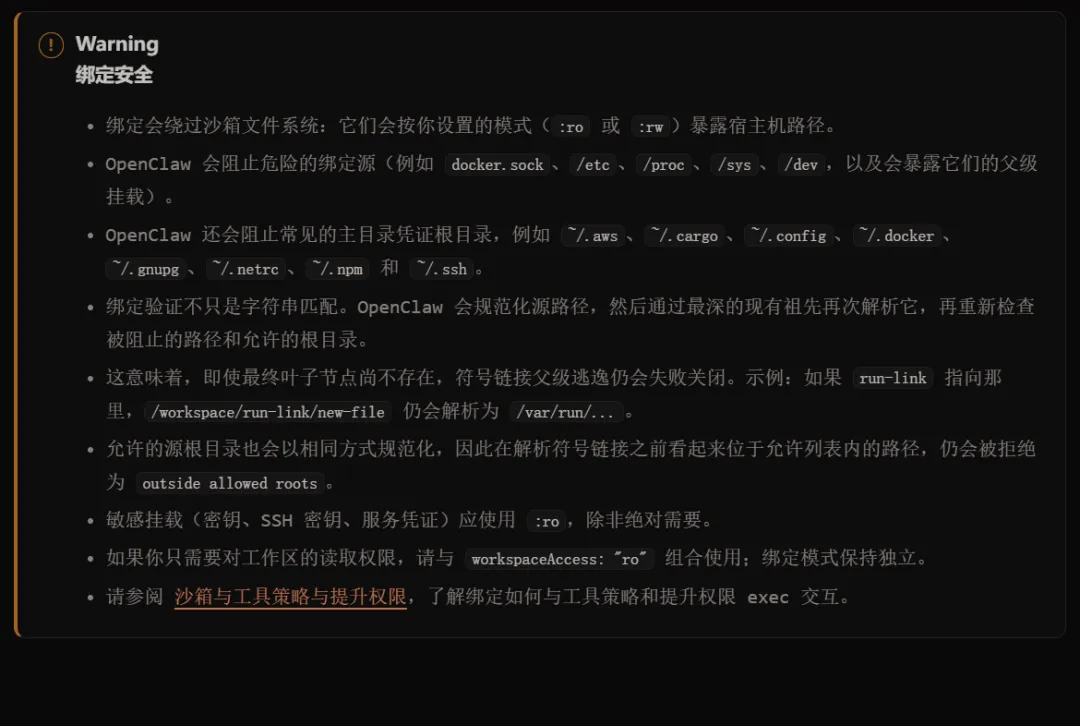
{agents: {defaults: {sandbox: {mode: "all", // off | non-main | allbackend: "docker", // docker | ssh | openshellscope: "shared", // session | agent | sharedworkspaceAccess: "none", // none | ro | rwworkspaceRoot: "~/.openclaw/sandboxes",docker: {image: "openclaw-sandbox:bookworm-slim",containerPrefix: "openclaw-sbx-",workdir: "/workspace",readOnlyRoot: true,tmpfs: ["/tmp", "/var/tmp", "/run"],network: "none",user: "1000:1000",capDrop: ["ALL"],env: { LANG: "C.UTF-8" },// setupCommand: "apt-get update && apt-get install -y git curl jq",pidsLimit: 256,memory: "1g",memorySwap: "2g",cpus: 1,ulimits: {nofile: { soft: 1024, hard: 2048 },nproc: 256,},// seccompProfile: "/path/to/seccomp.json",// apparmorProfile: "openclaw-sandbox",dns: ["1.1.1.1", "8.8.8.8"],extraHosts: ["internal.service:10.0.0.5"],// binds: ["/home/user/source:/source:rw"],},prune: {idleHours: 24,maxAgeDays: 7,},},},},tools: {sandbox: {tools: {allow: ["exec","process","read","write","edit","apply_patch","sessions_list","sessions_history","sessions_send","sessions_spawn","session_status",],deny: ["browser", "canvas", "nodes", "cron", "discord", "gateway"],},},},}



-
readOnlyRoot 改为 false -
network 改为 bridge -
user 改为 0:0,对应 root 用户的用户 ID 和组 ID -
capDrop 改为 [] 或者直接删掉 capDrop 对应项
-
N<1024:创建的新进程或者现有进程还能继续打开文件,不会出现任何问题。 -
1024≤N<2048:创建的新进程或者现有进程默认不能继续打开文件,尝试打开会收到错误但进程本身不会终止,如何处理收到的错误取决于该进程对应代码的实现,有的是关闭一些已经打开但最近都没用的文件,有的是提高自己的 soft 子字段的值(但不能超过 hard 子字段的值),有的是在不能打开新文件的情况下继续运行。 -
N=2048:不管是创建的新进程还是现有进程,都不能继续打开文件,除非是特权用户,比如 root,才能在 Docker 沙箱容器内提高这个上限使得 N 可以大于 2048,从而继续打开文件。但是,在不提升上限的情况下,进程打开文件失败并不意味着会死掉,而是收到错误之后依旧继续运行,如何处理收到的错误参考上一种情况。
-
max(N1, N2, N3)≤128 -
N1+N2+N3≤256
-
两个配置文件必须位于 Docker 沙箱容器的外面,即 WSL2 的 Ubuntu 26.04 里面 -
seccompProfile 子字段需要通过绝对路径来定位文件,因为不支持 shell 展开 -
apparmorProfile 子字段只需要指定文件名,然而,这并不意味着它会在当前目录下找对应文件,而是去指定目录下找对应文件,指定目录默认是 /etc/apparmor.d 目录
-
write 工具会清除现有内容并重新写入新的内容,edit 工具会在现有内容的基础上做修改 -
write 工具在文件不存在的情况下会自动创建,edit 工具在这种情况下会直接报错
|
|
|
|
|
|
|---|---|---|---|---|
|
|
|
|
|
|
|
|
|
|
|
|
|
|
|
|
|
|
|
|
|
|
|
|
|
|
|
|
|
|
|
|
|
|
|
|






点个在看你最好看