ARTICLE · 1246929
用 AIPerf 找推理服务的"最优性能点":从单点压测到一条命令搜出 SLA 最优并发

用 AIPerf 找推理服务的"最优性能点":从单点压测到一条命令搜出 SLA 最优并发
大模型推理压测,最难的从来不是"跑起来",而是回答一个问题:在满足延迟要求的前提下,这套部署最多能扛多少? 本文用 NVIDIA 开源的 AIPerf,把这个问题拆成几种社区里最常用的玩法。
01 AIPerf 是什么
AIPerf 是 NVIDIA 在 ai-dynamo 组织下开源的生成式 AI 推理压测工具,是 GenAI-Perf 的继任者(Apache-2.0)。
• 面向 OpenAI 兼容接口:vLLM、SGLang、TensorRT-LLM、TGI、Dynamo 都能直接压 • 多进程架构(多个服务通过 ZMQ 通信),压测端不容易先成为瓶颈 • 三种界面: dashboard实时 TUI /simple进度条 /none无界面• 负载模式:固定并发、固定速率、速率+并发上限、trace 回放 • 内置 扫参(sweep)、贝叶斯搜索、SLA 搜索配方(search recipe)、出图(aiperf plot)
pip install aiperf项目地址:https://github.com/ai-dynamo/aiperf
02 第一步:单点压测,读懂这张表
aiperf profile \
  --model Qwen3-32B \
  --url http://127.0.0.1:8000 \
  --endpoint-type chat \
  --streaming \
  --concurrency 64 \
  --synthetic-input-tokens-mean 2048 \
  --output-tokens-mean 512 \
  --extra-inputs ignore_eos:true \
  --warmup-request-count 32 \
  --request-count 640
输出是一张 LLM Metrics 表,每项给出 avg / min / max / p99 / p90 / p50 / std:
💡 两个必加参数
1. --extra-inputs ignore_eos:true:不加的话模型可能提前结束,OSL 达不到设定值,吞吐数据失真(官方 Known Issues 明确提到)。2. --warmup-request-count:排除冷启动,否则首批请求的 TTFT 会拉高统计。
结果默认落在 artifacts/<run名>/,包括 profile_export_aiperf.json/csv 和逐请求的 profile_export.jsonl。
03 玩法一:并发扫描 + 一键出 Pareto 图
找最优性能最经典的做法:固定输入输出长度,扫并发,画"吞吐-延迟"曲线,找拐点。
for c in 1 4 16 32 64 128 256; do
  aiperf profile --model Qwen3-32B --url http://127.0.0.1:8000 \
    --endpoint-type chat --streaming \
    --concurrency $c --request-count $((c*10)) \
    --synthetic-input-tokens-mean 2048 --output-tokens-mean 512 \
    --extra-inputs ignore_eos:true \
    --artifact-dir artifacts/sweep_qwen/c$c
done

aiperf plot artifacts/sweep_qwen
aiperf plot 会自动识别"多次运行对比"模式,默认生成:
• ttft_vs_throughput.png:TTFT 随吞吐变化,TTFT 突然陡升说明 prefill 或调度开始拥塞• pareto_curve_throughput_per_gpu_vs_latency.png:单卡吞吐 vs 延迟的 Pareto 前沿• pareto_curve_throughput_per_gpu_vs_interactivity.png:单卡吞吐 vs 交互性,找"膝点"• latency_throughput_uncertainty.png:带 95% 置信椭圆的延迟-吞吐图
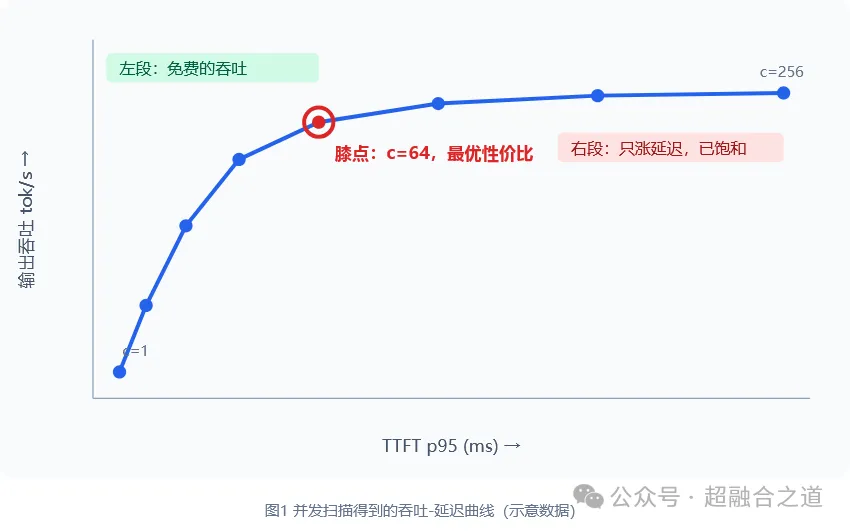
怎么读这张图:
• 曲线左段平坦:加并发几乎不涨延迟,"免费"的吞吐 • 曲线拐弯处(膝点):性价比最高的并发 • 右段陡峭:吞吐几乎不涨,延迟暴涨,已经饱和
💡 小技巧
aiperf plot <path> --dashboard会起一个本地交互看板(默认 8050 端口),可以切换 avg/p50/p90/p99、勾选对比哪些 run、点数据点看完整配置。远程机器用ssh -L 8050:localhost:8050转发即可。--theme dark出深色图,适合放 PPT。
做 A/B 对比(比如 PD 分离 vs 不分离)时,可在 ~/.aiperf/plot_config.yaml 里配置 experiment classification:baseline 自动灰色,treatment 自动绿色,一张图看清差异。
04 玩法二:一条命令搜出"SLA 下的最优并发"
手动扫并发有两个问题:点取得太粗会错过拐点,取得太细又太费时间。AIPerf 的 Search Recipe 把这件事自动化了。
4.1 TTFT 约束下吞吐最大化
aiperf profile --model Qwen3-32B --url http://127.0.0.1:8000 \
  --endpoint-type chat --streaming --request-count 1000 \
  --search-recipe max-throughput-ttft-sla --ttft-sla-ms 2000
它会在并发 1~1000 区间做贝叶斯优化:目标是最大化 output_token_throughput.avg,约束是 TTFT p95 < 2000ms。违反 SLA 的点会被惩罚,最后结果写在 search_history.json 的 best_trials 里,直接告诉你"并发设多少"。
搜索过程大致是这样(官方文档示例节选,数值为示意):
[BO iter 0] concurrency=  47 -> throughput=2143  TTFT.p95= 87  feasible
[BO iter 1] concurrency= 891 -> throughput=2890  TTFT.p95=412  infeasible
[BO iter 2] concurrency= 312 -> throughput=3120  TTFT.p95=178  feasible
[BO iter 4] concurrency= 401 -> throughput=3290  TTFT.p95=193  feasible  best so far
[BO iter 12] no improvement for 7 iterations — stopping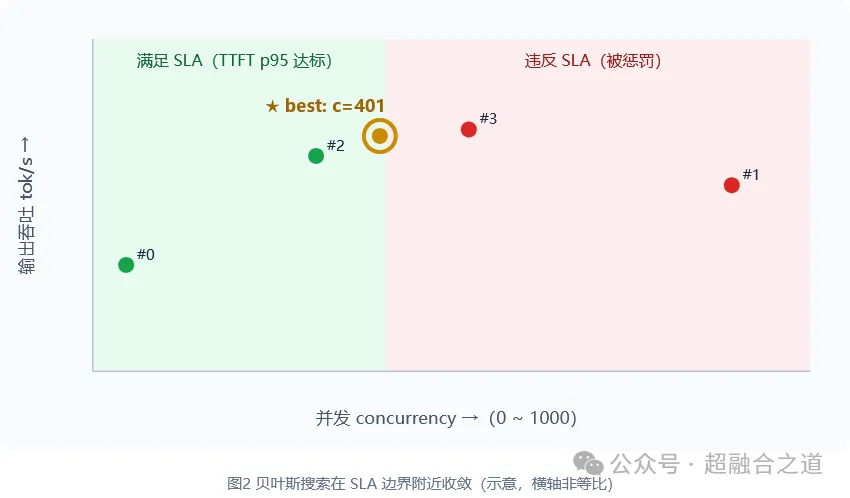
4.2 其他常用配方
max-throughput-ttft-sla | |
max-throughput-itl-sla | |
max-concurrency-under-sla | |
max-goodput-under-slo | |
concurrency-ramp | |
prefill-ttft-curve | |
decode-itl-curve | |
pareto-sweep |
max-concurrency-under-sla 默认用 smooth_isotonic(单调回归 + 插值求根),抗噪性比简单二分更好;也可选 monotonic(指数探测 + 二分,等价于 perf_analyzer 的 --binary-search)。
aiperf profile --model Qwen3-32B --url http://127.0.0.1:8000 --streaming \
  --search-recipe max-concurrency-under-sla \
  --ttft-sla-ms 2000 --tpot-sla-ms 50
05 玩法三:用 Goodput 衡量"有效吞吐"
纯吞吐容易误导:并发拉满时吞吐很高,但大量请求其实已经超时、体验很差。学术界(DistServe,OSDI'24)更推荐 goodput:只统计同时满足 TTFT、TPOT、端到端延迟三个阈值的请求。
aiperf profile --model Qwen3-32B --url http://127.0.0.1:8000 --streaming \
  --search-recipe max-goodput-under-slo \
  --ttft-sla-ms 500 --tpot-sla-ms 15 --e2e-sla-ms 2000 \
  --slo-attainment-fraction 0.95
这对 PD 分离 评估尤其合适:PD 分离的价值正是在 SLO 约束下提升 goodput,而不是单纯拉高峰值吞吐。
06 玩法四:多形态 Pareto 前沿,一张图讲清容量
真实业务不只有一种请求形态:短对话、RAG、长文摘要混在一起。pareto-sweep 让输入/输出长度成对绑定,再与并发组合:
aiperf profile --model Qwen3-32B --url http://127.0.0.1:8000 \
  --endpoint-type chat --streaming \
  --search-recipe pareto-sweep \
  --isl-osl-pairs 128/128,2048/512,16000/1000 \
  --concurrency 1,4,16,64,256
3 种形态 × 5 个并发 = 15 次压测,结果在 sweep_aggregate/pareto_sweep.json,每个点带 pareto_optimal 标记(横轴 TTFT p95,纵轴输出吞吐 avg)。这个文件 aiperf plot 暂不直接渲染,官方文档给了一段 matplotlib 脚本按形态分组画图,几行就能出图。
⚠️ 注意
并发列表太稀(比如 64 直接跳到 256)会错过真实膝点。先粗扫定位拐点,再在拐点附近加密,如--concurrency 16,32,48,64,96,128。
07 玩法五:拟合公式,给容量规划用
prefill-ttft-curve 在并发 1 下扫输入长度(默认 256~32768),自动拟合 TTFT = a × ISL + b,线性拟合 r² 不足 0.85 时改用二次拟合:
aiperf profile --model Qwen3-32B --url http://127.0.0.1:8000 --streaming \
  --search-recipe prefill-ttft-curve --isl-min 256 --isl-max 32768
得到的公式可以直接塞进容量估算表:给定业务的平均输入长度,就能估出首字延迟下限。
concurrency-ramp 则在 1~1000 之间对数取 8 个并发点,找出 p99 延迟比基线劣化超过阈值的第一个并发,结果在 degradation_knee.json:
aiperf profile --model Qwen3-32B --url http://127.0.0.1:8000 \
  --search-recipe concurrency-ramp --degradation-threshold 0.20
08 玩法六:单次运行的"体检"
找到最优并发后,还要确认它稳不稳。对单次运行目录执行 aiperf plot,会得到时间序列图:
• ttft_over_time:开头尖刺 = 冷启动,稳态出现尖刺 = 资源争抢或调度抖动• timeslices_ttft / timeslices_itl:按时间窗口分桶(压测时加--slice-duration),ITL 逐渐上升往往是 KV cache 压力• ttft_timeline:每个请求一条线,看并发是否真的打满• gpu_utilization_and_throughput_over_time:需要 DCGM 遥测
09 实战建议(SGLang / vLLM / PD 分离)
1. 长度一定要锁死: --extra-inputs ignore_eos:true,必要时加min_tokens2. 每轮之间清缓存:AIPerf 的 Control Hooks 支持在压测阶段前后重置 KV cache,官方有 vLLM / SGLang / TensorRT-LLM 的路径映射文档,避免前缀缓存让后续轮次"虚高" 3. 长上下文用 prefill concurrency:16k 这种长输入,限制同时 prefill 的请求数,避免把显存打爆 4. 多次重复取置信区间: --num-profile-runs N跑多轮,看结果波动,别只信一次5. 对比要单变量:比较 PD 分离 vs 合并部署时,只改部署方式,输入输出长度、请求数、warmup 全部一致 6. 超高并发注意端口:并发超过约 15000 可能出现端口耗尽,需要调系统参数
10 一张流程图总结
单点压测(确认链路、锁定长度)
      ↓
粗扫并发 + aiperf plot(看 Pareto 曲线形状)
      ↓
SLA 配方自动搜索(max-throughput-*-sla / max-goodput-under-slo)
      ↓
最优点长时间复测(timeslice + GPU 遥测,确认稳定)
      ↓
输出结论:在 TTFT p95 < X、TPOT < Y 下,最优并发 N,吞吐 T tok/s
参考资料
• AIPerf 仓库:https://github.com/ai-dynamo/aiperf • 可视化文档:https://github.com/ai-dynamo/aiperf/blob/main/docs/tutorials/plot.md • Search Recipes:https://github.com/ai-dynamo/aiperf/blob/main/docs/sweeping/search-recipes.md • DistServe 论文:https://www.usenix.org/system/files/osdi24-zhong-yinmin.pdf
注:文中曲线图为示意图,具体数值以实际压测为准;命令参数以 aiperf profile --help 为准。