 夜雨聆风
夜雨聆风2023年1月开始,药品注册申报全面电子化,绝大多数文件以PDF的格式递交,Word转PDF成了RA人的高频操作。利用周末的时间,把之前开发的“iReg小程序:Word批量转PDF”代码做了重写,解决了之前Word页眉的横线转PDF之后消失的bug,重新分享给大家。小程序在Windows平台使用,可以把指定文件夹及其子文件夹下所有Word文件(包含doc和docx格式)批量转换为PDF,并把Word中的标题转换为PDF的书签。小程序基于Word VBA开发,使用起来非常方便,演示如下:
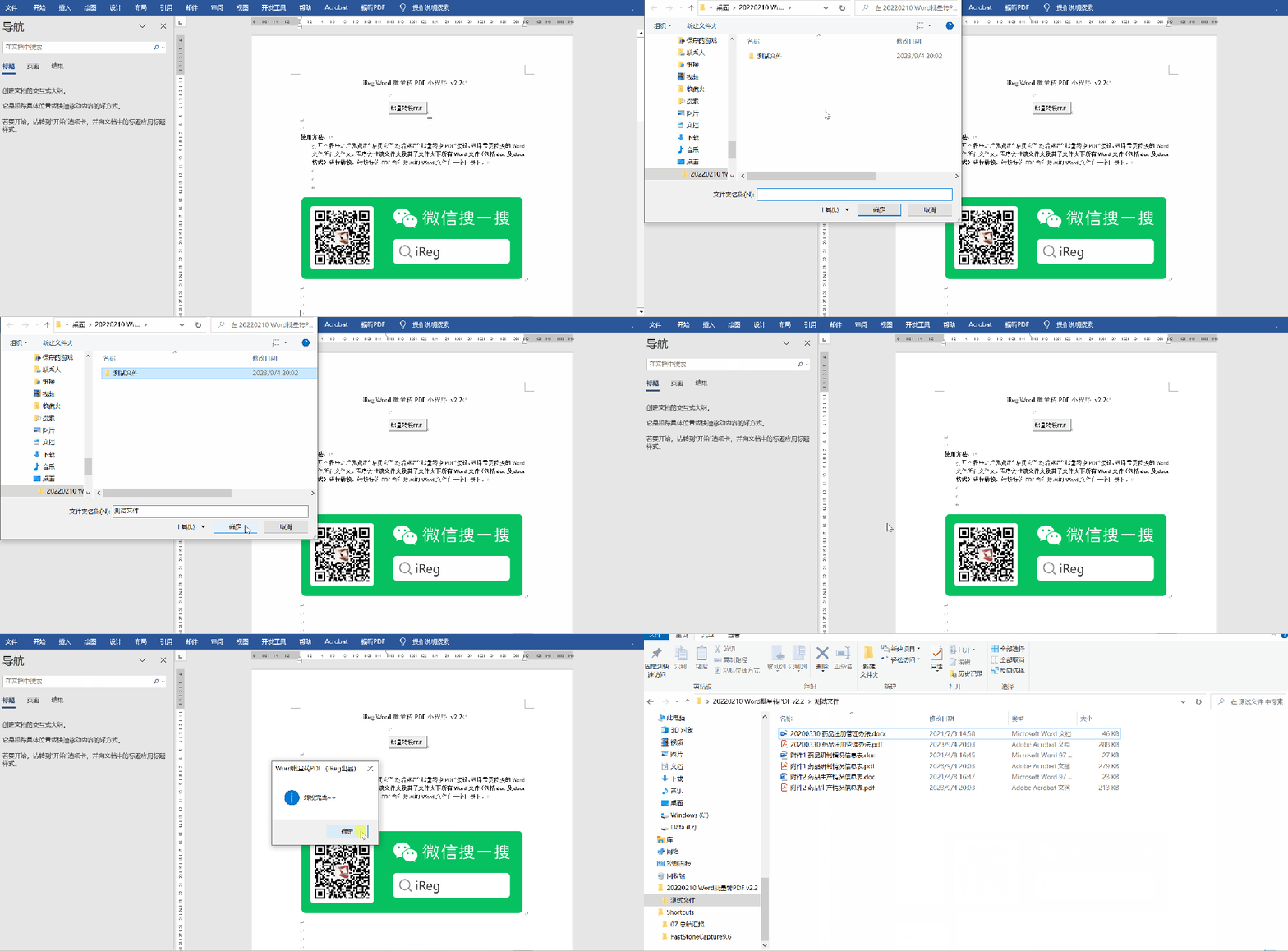
小程序、测试文件下载链接(自带提取码)及二维码如下:
https://pan.baidu.com/s/1VNo4svu81kGq5MldCVrQcQ?pwd=iReg

小程序使用VBA编写,把源代码分享如下,欢迎大家提出宝贵意见,大家工作中有特别重复繁琐的操作,也可以在评论区提出来~~
Private Sub CommandButton1_Click()' 定义变量Dim fso As ObjectDim sourceFolder As StringDim targetParentFolder As String' 创建文件系统对象Set fso = CreateObject("Scripting.FileSystemObject")' 让用户选择源文件夹(包含要转换的doc和docx文件)With Application.FileDialog(msoFileDialogFolderPicker).Title = "iReg小程序:选择包含.doc文件的文件夹"If .Show <> -1 Then Exit Sub ' 用户取消了操作sourceFolder = .SelectedItems(1)End With' 在源文件夹的同级目录创建目标总文件夹(如果不存在)targetParentFolder = sourceFolder & "_ConvertedPDF"If Not fso.FolderExists(targetParentFolder) Thenfso.CreateFolder targetParentFolderEnd If' 开始递归转换ConvertDocsInFolder fso, sourceFolder, targetParentFolder' 完成提示MsgBox "iReg小程序:转换完成,转换后的文件保存在:" & vbCrLf & targetParentFolderEnd SubSub ConvertDocsInFolder(fso As Object, currentFolderPath As String, currentTargetParent As String)' 变量定义Dim folder As ObjectDim subFolder As ObjectDim file As ObjectDim docFile As ObjectDim targetFilePath As StringDim doc As Document' 获取当前文件夹对象Set folder = fso.GetFolder(currentFolderPath)' 在当前文件夹对应的目标父目录下,创建相同的子文件夹结构Dim relativePath As StringrelativePath = Mid(currentFolderPath, Len(fso.GetParentFolderName(currentTargetParent)) + 2)Dim targetFolderPath As StringtargetFolderPath = fso.BuildPath(currentTargetParent, relativePath)If Not fso.FolderExists(targetFolderPath) Thenfso.CreateFolder targetFolderPathEnd If' 遍历当前文件夹中的所有文件For Each file In folder.Files' 检查文件扩展名是否为doc或docx(不区分大小写)If LCase(fso.GetExtensionName(file.Name)) Like "doc*" Then' 构建目标文件路径(将扩展名改为.docx)targetFilePath = fso.BuildPath(targetFolderPath, fso.GetBaseName(file.Name) & ".pdf")' 转换文件On Error Resume Next ' 错误处理,如文件损坏或正在被使用则跳过Set doc = Documents.Open(file.Path, False, True, False) ' 以只读方式打开,避免锁定原文件'转换为PDF之前锁定所有域For Each fieldLoop In doc.FieldsfieldLoop.Locked = TrueNext fieldLoopIf Not doc Is Nothing Then' 使用ExportAsFixedFormat2方法将Word转为PDFdoc.ExportAsFixedFormat2 _OutputFileName:=targetFilePath, _ExportFormat:=wdExportFormatPDF, _CreateBookmarks:=wdExportCreateHeadingBookmarksdoc.Close SaveChanges:=FalseEnd IfOn Error GoTo 0 ' 恢复错误处理End IfNext file' 递归处理所有子文件夹For Each subFolder In folder.SubFoldersConvertDocsInFolder fso, subFolder.Path, currentTargetParentNext subFolderEnd Sub