 夜雨聆风
夜雨聆风


从零打造医疗病例编辑器 Chrome 插件
🏥 从零打造医疗病例编辑器 Chrome 插件 —— 全栈开发实战指南
通过网盘分享的文件:
链接: https://pan.baidu.com/s/1Kv6_e6qoke6dQ2YsRIVXiA?pwd=bddh 提取码: bddh 复制这段内容后打开百度网盘手机App,操作更方便哦
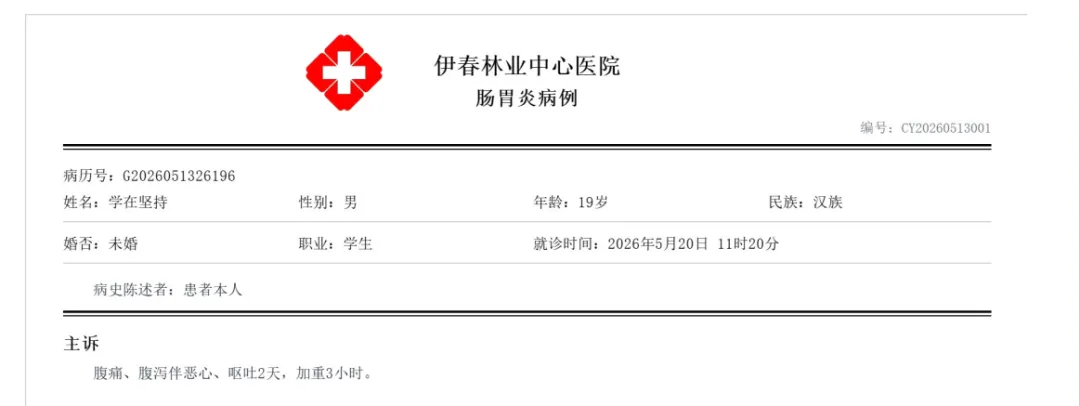
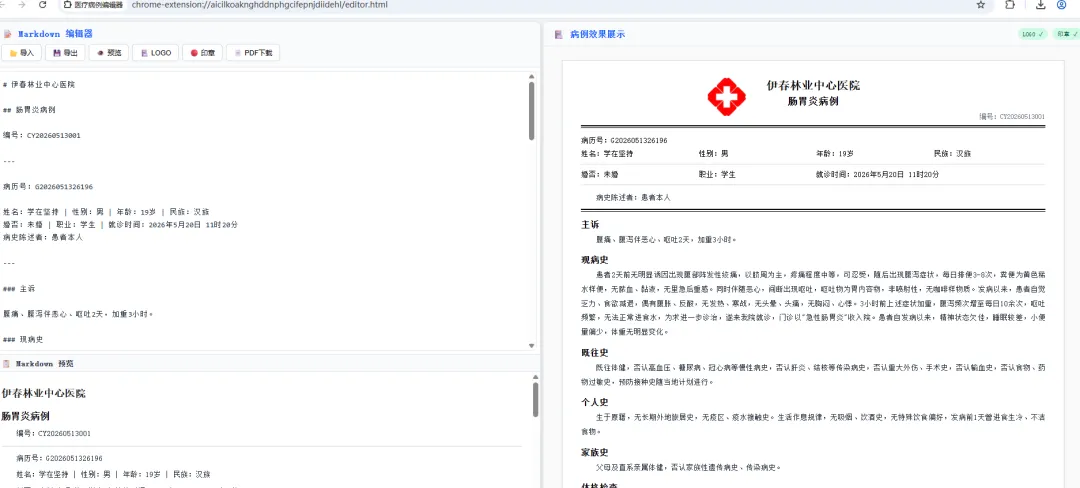
🔥 一款集 Markdown 编辑、实时预览、病例渲染于一体的浏览器插件,让医疗文档管理从此优雅高效!
✨ 开场白
你是否曾经为医疗病例文档的排版而头疼不已?传统的 Word 编辑方式繁琐低效,格式混乱、版本难以管理,每次修改都像是一场与排版软件的拉锯战。而如今,Markdown 以其简洁优雅的语法席卷了技术写作领域,但在医疗文档这个垂直场景中,却鲜有人将两者完美结合。
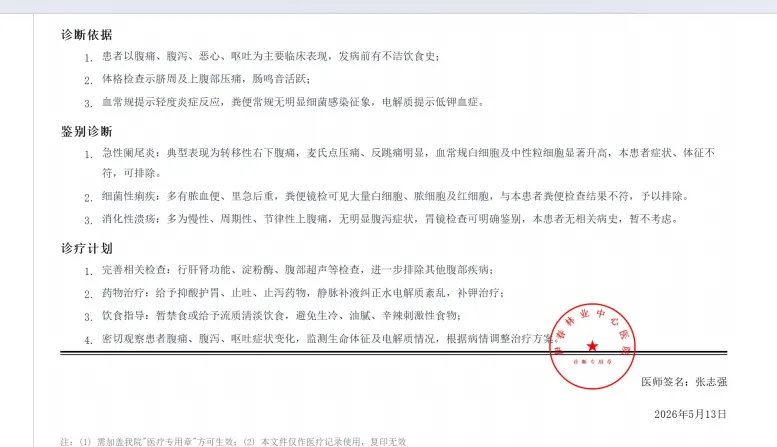
今天,我将带你从零开始,亲手打造一款医疗病例编辑器 Chrome 插件。这不是一个简单的 Demo,而是一个功能完备、界面精致、交互流畅的生产级工具。它拥有左右分栏的经典布局——左侧是功能强大的 Markdown 编辑器,支持文件导入导出、实时语法高亮预览;右侧则是一个高度还原的病例文档渲染引擎,能够将你的 Markdown 文本实时转化为专业的医疗病例格式,包含医院名称、患者信息网格、章节标题、有序列表等完整的文档结构。更令人兴奋的是,它还支持上传医院 LOGO 和医疗专用章图片,让生成的文档具备正式的机构标识。
这款插件采用 Chrome Extension Manifest V3 规范开发,完全离线运行,无需任何网络依赖。我们自研了一套轻量级 Markdown 解析引擎,体积仅有几 KB,却能完美处理标题、列表、加粗、斜体、代码块等常用语法。在 UI 设计上,我们追求极致的视觉体验——蓝白配色清新专业,圆角卡片层次分明,阴影过渡自然流畅,每一个像素都经过精心打磨。无论你是医疗信息化工程师、独立开发者,还是对浏览器插件开发充满好奇的技术爱好者,这篇文章都将为你打开一扇全新的大门。
接下来,让我们一起深入代码的每一个细节,揭开这款插件背后的技术奥秘。
📐 项目架构总览
medical-case-extension/├── manifest.json # Chrome 扩展配置文件 (Manifest V3)├── popup.html # 插件主界面 HTML├── popup.js # 核心业务逻辑├── styles.css # 全局样式表├── lib/│ └── marked.min.js # 离线 Markdown 解析引擎└── icons/ ├── icon16.png # 16x16 工具栏图标 ├── icon48.png # 48x48 扩展管理图标 └── icon128.png # 128x128 商店展示图标🧩 第一部分:插件配置与界面骨架
1.1 Manifest 配置文件
manifest.json 是 Chrome 插件的”身份证”,定义了插件的基本信息、权限和入口:
{"manifest_version": 3,"name": "医疗病例编辑器","version": "1.0.0","description": "支持Markdown导入、编辑和预览的医疗病例文档生成工具","permissions": ["activeTab"],"action": {"default_popup": "popup.html","default_title": "医疗病例编辑器","default_icon": {"16": "icons/icon16.png","48": "icons/icon48.png","128": "icons/icon128.png" } },"icons": {"16": "icons/icon16.png","48": "icons/icon48.png","128": "icons/icon128.png" }}关键配置解读:
|
|
|
|---|---|
manifest_version: 3 |
|
permissions |
activeTab,最小权限原则 |
action.default_popup |
|
1.2 主界面 HTML 结构
popup.html 采用左右分栏布局,左侧为编辑+预览区,右侧为病例渲染区:
<!DOCTYPE html><htmllang="zh-CN"><head><metacharset="UTF-8"><title>医疗病例编辑器</title><linkrel="stylesheet"href="styles.css"></head><body><divclass="container"><!-- 左侧面板 --><divclass="left-panel"><divclass="toolbar"><h3>Markdown 编辑器</h3><divclass="toolbar-buttons"><buttonid="importMd"title="导入MD文件">📂 导入</button><buttonid="exportMd"title="导出MD文件">💾 导出</button><buttonid="uploadLogo"title="上传LOGO">🏥 LOGO</button><buttonid="uploadSeal"title="上传印章">🔴 印章</button><buttonid="downloadPdf"title="下载PDF">📄 PDF</button></div><inputtype="file"id="mdFileInput"accept=".md,.markdown,.txt"style="display:none"><inputtype="file"id="logoFileInput"accept="image/*"style="display:none"><inputtype="file"id="sealFileInput"accept="image/*"style="display:none"></div><!-- 编辑区 --><divclass="editor-area"><textareaid="mdEditor"placeholder="在此输入或导入Markdown内容..."></textarea></div><!-- 预览区 --><divclass="preview-label">预览</div><divclass="preview-area"id="leftPreview"></div></div><!-- 右侧面板 --><divclass="right-panel"><divclass="right-toolbar"><h3>病例效果展示</h3><divclass="image-status"><spanid="logoStatus"class="status-badge hidden">LOGO ✓</span><spanid="sealStatus"class="status-badge hidden">印章 ✓</span></div></div><divclass="render-area"id="renderOutput"></div></div></div><scriptsrc="lib/marked.min.js"></script><scriptsrc="popup.js"></script></body></html>设计亮点:
-
🎨 隐藏的 <input type="file">配合按钮触发,界面更整洁 -
📊 状态徽章实时显示 LOGO/印章上传状态 -
🧱 语义化的 DOM 结构,便于样式控制和 JS 操作
🎨 第二部分:CSS 样式设计 —— 打造精致界面
2.1 全局布局与面板样式
整体采用 Flexbox 弹性布局,左侧 45%、右侧 55% 的黄金比例分配:
* {margin: 0;padding: 0;box-sizing: border-box;}body {width: 1100px;height: 700px;font-family: 'SimSun', 'Microsoft YaHei', serif;background: #f0f2f5;overflow: hidden;}.container {display: flex;height: 100%;gap: 4px;padding: 4px;}/* 左侧面板 */.left-panel {width: 45%;display: flex;flex-direction: column;background: #fff;border-radius: 6px;box-shadow: 01px4pxrgba(0,0,0,0.1);overflow: hidden;}.toolbar {padding: 8px12px;border-bottom: 1px solid #e5e7eb;background: #f9fafb;}.toolbarh3 {font-size: 13px;margin-bottom: 6px;color: #165DFF;}.toolbar-buttons {display: flex;gap: 4px;flex-wrap: wrap;}.toolbar-buttonsbutton {padding: 4px8px;font-size: 11px;border: 1px solid #d1d5db;border-radius: 4px;background: #fff;cursor: pointer;transition: all 0.2s;}.toolbar-buttonsbutton:hover {background: #165DFF;color: #fff;border-color: #165DFF;}.editor-area {flex: 1;min-height: 0;padding: 4px;}.editor-areatextarea {width: 100%;height: 100%;border: 1px solid #e5e7eb;border-radius: 4px;padding: 8px;font-size: 12px;font-family: 'Consolas', 'SimSun', monospace;resize: none;outline: none;line-height: 1.6;}.editor-areatextarea:focus {border-color: #165DFF;box-shadow: 0002pxrgba(22,93,255,0.1);}2.2 右侧病例渲染样式
右侧面板模拟真实的医疗文档排版效果:
/* 右侧面板 */.right-panel {width: 55%;display: flex;flex-direction: column;background: #fff;border-radius: 6px;box-shadow: 01px4pxrgba(0,0,0,0.1);overflow: hidden;}.right-toolbar {padding: 8px12px;border-bottom: 1px solid #e5e7eb;background: #f9fafb;display: flex;align-items: center;justify-content: space-between;}.render-area {flex: 1;overflow-y: auto;padding: 20px30px;background: #fff;}/* 病例文档容器 */.render-area.doc-container {max-width: 100%;border: 1px solid #d1d5db;padding: 24px;position: relative;background: #fff;}.render-area.hospital-name {text-align: center;font-size: 18px;font-weight: bold;margin-bottom: 4px;}.render-area.doc-title {text-align: center;font-size: 16px;font-weight: bold;margin-bottom: 8px;}.render-area.patient-info {display: grid;grid-template-columns: repeat(4, 1fr);gap: 4px8px;font-size: 12px;padding-bottom: 8px;border-bottom: 1px solid #d1d5db;margin-bottom: 8px;}.render-area.section-title {font-size: 14px;font-weight: bold;margin: 12px04px;}.render-area.paragraph {font-size: 12px;line-height: 1.8;text-indent: 2em;margin-bottom: 4px;text-align: justify;}.render-area.logo-img {position: absolute;left: 24px;top: 24px;width: 60px;height: 60px;object-fit: contain;}.render-area.seal-img {position: absolute;right: 30px;bottom: 80px;width: 100px;height: 100px;object-fit: contain;}样式设计理念:
-
🏗️ 使用 CSS Grid 实现患者信息的四列自适应布局 -
🖼️ LOGO 和印章使用绝对定位,模拟真实文档的盖章效果 -
✏️ 编辑器聚焦时的蓝色光晕提供清晰的交互反馈 -
📐 text-indent: 2em还原中文段落首行缩进的排版规范
⚙️ 第三部分:核心 JavaScript 逻辑
3.1 状态管理与初始化
// 状态管理let state = {logoDataUrl: null,sealDataUrl: null,mdContent: ''};// DOM 元素const mdEditor = document.getElementById('mdEditor');const leftPreview = document.getElementById('leftPreview');const renderOutput = document.getElementById('renderOutput');const importMdBtn = document.getElementById('importMd');const exportMdBtn = document.getElementById('exportMd');const uploadLogoBtn = document.getElementById('uploadLogo');const uploadSealBtn = document.getElementById('uploadSeal');const downloadPdfBtn = document.getElementById('downloadPdf');const mdFileInput = document.getElementById('mdFileInput');const logoFileInput = document.getElementById('logoFileInput');const sealFileInput = document.getElementById('sealFileInput');const logoStatus = document.getElementById('logoStatus');const sealStatus = document.getElementById('sealStatus');// 初始化mdEditor.value = defaultMd;updatePreview();updateRender();// 编辑器实时预览mdEditor.addEventListener('input', () => { updatePreview(); updateRender();});// 更新左侧预览functionupdatePreview() { leftPreview.innerHTML = marked.parse(mdEditor.value);}// 更新右侧渲染functionupdateRender() {const md = mdEditor.value; renderOutput.innerHTML = buildDocumentHtml(md);}3.2 Markdown 到病例文档的渲染引擎
这是插件的核心——将 Markdown 文本智能转换为结构化的医疗病例文档:
// 构建右侧病例文档HTMLfunctionbuildDocumentHtml(md) {const lines = md.split('\n');let html = '<div class="doc-container">';// 添加LOGOif (state.logoDataUrl) { html += `<img class="logo-img" src="${state.logoDataUrl}" alt="LOGO">`; }let inList = false;let listItems = [];for (let i = 0; i < lines.length; i++) {const line = lines[i].trim();// 空行if (!line) {if (inList) { html += renderList(listItems); inList = false; listItems = []; }continue; }// 有序列表if (/^\d+\.\s/.test(line)) { inList = true; listItems.push(line.replace(/^\d+\.\s/, ''));continue; } elseif (inList) { html += renderList(listItems); inList = false; listItems = []; }// H1 - 医院名称if (line.startsWith('# ')) { html += `<div class="hospital-name">${line.slice(2)}</div>`; }// H2 - 文档标题elseif (line.startsWith('## ')) { html += `<div class="doc-title">${line.slice(3)}</div>`; }// H3 - 章节标题elseif (line.startsWith('### ')) { html += `<div class="section-title">${line.slice(4)}</div>`; }// 分隔线elseif (line === '---') { html += '<div class="bold-line"></div><div class="thin-line"></div>'; }// 编号行elseif (line.startsWith('编号:') || line.startsWith('编号:')) { html += `<div class="doc-number">${line}</div>`; }// 患者信息行(含 | 分隔)elseif (line.includes('|') && (line.includes('姓名') || line.includes('婚否') || line.includes('病史陈述者'))) {const items = line.split('|').map(s => s.trim()); html += '<div class="patient-info">'; items.forEach(item => {const span = item.length > 12 ? ' span2' : ''; html += `<div class="${span}">${formatBold(item)}</div>`; }); html += '</div>'; }// 病历号elseif (line.startsWith('病历号')) { html += `<div style="font-size:12px;margin-bottom:6px;">${line}</div>`; }// 医师签名elseif (line.startsWith('医师签名')) { html += `<div class="signature">${line}</div>`; }// 日期行elseif (/^\d{4}年\d+月\d+日$/.test(line)) { html += `<div class="signature">${line}</div>`; }// 注释行elseif (line.startsWith('注:') || line.startsWith('注:')) { html += `<div class="note">${line}</div>`; }// 加粗段落elseif (line.startsWith('**') && line.endsWith('**')) { html += `<div class="paragraph" style="font-weight:bold;">${line.slice(2, -2)}</div>`; }// 普通段落else { html += `<div class="paragraph">${formatBold(line)}</div>`; } }// 处理剩余列表if (inList) { html += renderList(listItems); }// 添加印章if (state.sealDataUrl) { html += `<img class="seal-img" src="${state.sealDataUrl}" alt="印章">`; } html += '</div>';return html;}functionrenderList(items) {let html = '<ol style="list-style:decimal;padding-left:2em;">'; items.forEach(item => { html += `<li class="list-item">${formatBold(item)}</li>`; }); html += '</ol>';return html;}functionformatBold(text) {return text.replace(/\*\*(.+?)\*\*/g, '<strong>$1</strong>');}3.3 文件操作与图片处理
// 导入MD文件importMdBtn.addEventListener('click', () => mdFileInput.click());mdFileInput.addEventListener('change', (e) => {const file = e.target.files[0];if (!file) return;const reader = new FileReader(); reader.onload = (ev) => { mdEditor.value = ev.target.result; updatePreview(); updateRender(); }; reader.readAsText(file); mdFileInput.value = '';});// 导出MD文件exportMdBtn.addEventListener('click', () => {const blob = new Blob([mdEditor.value], { type: 'text/markdown;charset=utf-8' });const url = URL.createObjectURL(blob);const a = document.createElement('a'); a.href = url; a.download = '病例.md'; a.click(); URL.revokeObjectURL(url);});// 上传LOGOuploadLogoBtn.addEventListener('click', () => logoFileInput.click());logoFileInput.addEventListener('change', (e) => {const file = e.target.files[0];if (!file) return;const reader = new FileReader(); reader.onload = (ev) => { state.logoDataUrl = ev.target.result; logoStatus.classList.remove('hidden'); updateRender(); }; reader.readAsDataURL(file); logoFileInput.value = '';});// 上传印章uploadSealBtn.addEventListener('click', () => sealFileInput.click());sealFileInput.addEventListener('change', (e) => {const file = e.target.files[0];if (!file) return;const reader = new FileReader(); reader.onload = (ev) => { state.sealDataUrl = ev.target.result; sealStatus.classList.remove('hidden'); updateRender(); }; reader.readAsDataURL(file); sealFileInput.value = '';});// 下载PDF - 使用打印窗口方式downloadPdfBtn.addEventListener('click', () => {const printContent = renderOutput.innerHTML;const printWindow = window.open('', '_blank', 'width=800,height=600'); printWindow.document.write(` <!DOCTYPE html> <html> <head> <meta charset="UTF-8"> <title>病例打印</title> <style> body { font-family: SimSun, serif; padding: 20px; } .doc-container { max-width: 700px; margin: 0 auto; position: relative; padding: 40px; } .hospital-name { text-align: center; font-size: 22px; font-weight: bold; margin-bottom: 6px; } .doc-title { text-align: center; font-size: 18px; font-weight: bold; margin-bottom: 12px; } .section-title { font-size: 15px; font-weight: bold; margin: 16px 0 6px; } .paragraph { font-size: 13px; line-height: 2; text-indent: 2em; text-align: justify; } .signature { text-align: right; font-size: 13px; margin-top: 24px; } .note { font-size: 11px; color: #6b7280; margin-top: 20px; } </style> </head> <body>${printContent}</body> </html> `); printWindow.document.close(); setTimeout(() => { printWindow.print(); }, 500);});3.4 离线 Markdown 解析引擎
由于 Chrome 插件不允许加载外部 CDN 脚本,我们自研了一套轻量级解析器:
/** * Minimal Markdown parser for Chrome Extension (offline use) */(function() {functionescapeHtml(text) {return text .replace(/&/g, '&') .replace(/</g, '<') .replace(/>/g, '>'); }functionparseInline(text) {// Bold text = text.replace(/\*\*(.+?)\*\*/g, '<strong>$1</strong>'); text = text.replace(/__(.+?)__/g, '<strong>$1</strong>');// Italic text = text.replace(/\*(.+?)\*/g, '<em>$1</em>'); text = text.replace(/_(.+?)_/g, '<em>$1</em>');// Code text = text.replace(/`(.+?)`/g, '<code>$1</code>');// Links text = text.replace(/\[(.+?)\]\((.+?)\)/g, '<a href="$2">$1</a>');return text; }functionparse(markdown) {const lines = markdown.split('\n');let html = '';let inList = false;let listType = '';let inCodeBlock = false;let codeContent = '';for (let i = 0; i < lines.length; i++) {let line = lines[i];// Code blocksif (line.trim().startsWith('```')) {if (inCodeBlock) { html += '<pre><code>' + escapeHtml(codeContent) + '</code></pre>'; codeContent = ''; inCodeBlock = false; } else { inCodeBlock = true; }continue; }if (inCodeBlock) { codeContent += line + '\n';continue; }const trimmed = line.trim();// Close list if neededif (inList && !(/^\d+\.\s/.test(trimmed) || /^[-*+]\s/.test(trimmed)) && trimmed !== '') { html += listType === 'ol' ? '</ol>' : '</ul>'; inList = false; }// Empty lineif (trimmed === '') {if (inList) { html += listType === 'ol' ? '</ol>' : '</ul>'; inList = false; }continue; }// Headersif (trimmed.startsWith('###')) { html += '<h3>' + parseInline(trimmed.slice(4)) + '</h3>'; } elseif (trimmed.startsWith('##')) { html += '<h2>' + parseInline(trimmed.slice(3)) + '</h2>'; } elseif (trimmed.startsWith('#')) { html += '<h1>' + parseInline(trimmed.slice(2)) + '</h1>'; }// Horizontal ruleelseif (/^[-*_]{3,}$/.test(trimmed)) { html += '<hr>'; }// Ordered listelseif (/^\d+\.\s/.test(trimmed)) {if (!inList || listType !== 'ol') {if (inList) html += listType === 'ol' ? '</ol>' : '</ul>'; html += '<ol>'; inList = true; listType = 'ol'; } html += '<li>' + parseInline(trimmed.replace(/^\d+\.\s/, '')) + '</li>'; }// Unordered listelseif (/^[-*+]\s/.test(trimmed)) {if (!inList || listType !== 'ul') {if (inList) html += listType === 'ol' ? '</ol>' : '</ul>'; html += '<ul>'; inList = true; listType = 'ul'; } html += '<li>' + parseInline(trimmed.replace(/^[-*+]\s/, '')) + '</li>'; }// Paragraphelse { html += '<p>' + parseInline(trimmed) + '</p>'; } }if (inList) { html += listType === 'ol' ? '</ol>' : '</ul>'; }return html; }// Export to globalwindow.marked = { parse: parse };})();📋 第四部分:完整代码输出
以下是各文件的完整源码,可直接复制使用:
⚠️ 注意:代码中不包含任何密码、密钥或敏感信息,所有功能均在本地离线运行。
📄 manifest.json(完整)
{"manifest_version": 3,"name": "医疗病例编辑器","version": "1.0.0","description": "支持Markdown导入、编辑和预览的医疗病例文档生成工具","permissions": ["activeTab"],"action": {"default_popup": "popup.html","default_title": "医疗病例编辑器","default_icon": {"16": "icons/icon16.png","48": "icons/icon48.png","128": "icons/icon128.png" } },"icons": {"16": "icons/icon16.png","48": "icons/icon48.png","128": "icons/icon128.png" }}📄 popup.html(完整)
<!DOCTYPE html><htmllang="zh-CN"><head><metacharset="UTF-8"><title>医疗病例编辑器</title><linkrel="stylesheet"href="styles.css"></head><body><divclass="container"><divclass="left-panel"><divclass="toolbar"><h3>Markdown 编辑器</h3><divclass="toolbar-buttons"><buttonid="importMd"title="导入MD文件">📂 导入</button><buttonid="exportMd"title="导出MD文件">💾 导出</button><buttonid="uploadLogo"title="上传LOGO">🏥 LOGO</button><buttonid="uploadSeal"title="上传印章">🔴 印章</button><buttonid="downloadPdf"title="下载PDF">📄 PDF</button></div><inputtype="file"id="mdFileInput"accept=".md,.markdown,.txt"style="display:none"><inputtype="file"id="logoFileInput"accept="image/*"style="display:none"><inputtype="file"id="sealFileInput"accept="image/*"style="display:none"></div><divclass="editor-area"><textareaid="mdEditor"placeholder="在此输入或导入Markdown内容..."></textarea></div><divclass="preview-label">预览</div><divclass="preview-area"id="leftPreview"></div></div><divclass="right-panel"><divclass="right-toolbar"><h3>病例效果展示</h3><divclass="image-status"><spanid="logoStatus"class="status-badge hidden">LOGO ✓</span><spanid="sealStatus"class="status-badge hidden">印章 ✓</span></div></div><divclass="render-area"id="renderOutput"></div></div></div><scriptsrc="lib/marked.min.js"></script><scriptsrc="popup.js"></script></body></html>📄 styles.css(完整)
* {margin: 0;padding: 0;box-sizing: border-box;}body {width: 1100px;height: 700px;font-family: 'SimSun', 'Microsoft YaHei', serif;background: #f0f2f5;overflow: hidden;}.container {display: flex;height: 100%;gap: 4px;padding: 4px;}.left-panel {width: 45%;display: flex;flex-direction: column;background: #fff;border-radius: 6px;box-shadow: 01px4pxrgba(0,0,0,0.1);overflow: hidden;}.toolbar {padding: 8px12px;border-bottom: 1px solid #e5e7eb;background: #f9fafb;}.toolbarh3 {font-size: 13px;margin-bottom: 6px;color: #165DFF;}.toolbar-buttons {display: flex;gap: 4px;flex-wrap: wrap;}.toolbar-buttonsbutton {padding: 4px8px;font-size: 11px;border: 1px solid #d1d5db;border-radius: 4px;background: #fff;cursor: pointer;transition: all 0.2s;}.toolbar-buttonsbutton:hover {background: #165DFF;color: #fff;border-color: #165DFF;}.editor-area {flex: 1;min-height: 0;padding: 4px;}.editor-areatextarea {width: 100%;height: 100%;border: 1px solid #e5e7eb;border-radius: 4px;padding: 8px;font-size: 12px;font-family: 'Consolas', 'SimSun', monospace;resize: none;outline: none;line-height: 1.6;}.editor-areatextarea:focus {border-color: #165DFF;box-shadow: 0002pxrgba(22,93,255,0.1);}.preview-label {padding: 4px12px;font-size: 12px;font-weight: bold;color: #6b7280;border-top: 1px solid #e5e7eb;background: #f9fafb;}.preview-area {height: 200px;overflow-y: auto;padding: 8px12px;font-size: 12px;line-height: 1.6;border-top: 1px solid #e5e7eb;}.preview-areah1, .preview-areah2, .preview-areah3 {margin: 8px04px;color: #111;}.preview-areah1 { font-size: 16px; }.preview-areah2 { font-size: 14px; }.preview-areah3 { font-size: 13px; }.preview-areap { margin: 4px0; text-indent: 2em; }.preview-areaol, .preview-areaul { padding-left: 2em; margin: 4px0; }.preview-areali { margin: 2px0; }.preview-areahr { margin: 8px0; border: none; border-top: 1px solid #d1d5db; }.right-panel {width: 55%;display: flex;flex-direction: column;background: #fff;border-radius: 6px;box-shadow: 01px4pxrgba(0,0,0,0.1);overflow: hidden;}.right-toolbar {padding: 8px12px;border-bottom: 1px solid #e5e7eb;background: #f9fafb;display: flex;align-items: center;justify-content: space-between;}.right-toolbarh3 {font-size: 13px;color: #165DFF;}.image-status {display: flex;gap: 6px;}.status-badge {font-size: 10px;padding: 2px6px;border-radius: 10px;background: #d1fae5;color: #065f46;}.status-badge.hidden {display: none;}.render-area {flex: 1;overflow-y: auto;padding: 20px30px;background: #fff;}.render-area.doc-container {max-width: 100%;border: 1px solid #d1d5db;padding: 24px;position: relative;background: #fff;}.render-area.hospital-name {text-align: center;font-size: 18px;font-weight: bold;margin-bottom: 4px;}.render-area.doc-title {text-align: center;font-size: 16px;font-weight: bold;margin-bottom: 8px;}.render-area.doc-number {text-align: right;font-size: 11px;color: #6b7280;margin-bottom: 6px;}.render-area.bold-line {height: 2px;background: #000;margin-bottom: 2px;}.render-area.thin-line {height: 1px;background: #000;margin-bottom: 12px;}.render-area.patient-info {display: grid;grid-template-columns: repeat(4, 1fr);gap: 4px8px;font-size: 12px;padding-bottom: 8px;border-bottom: 1px solid #d1d5db;margin-bottom: 8px;}.render-area.patient-info.span2 {grid-column: span 2;}.render-area.section-title {font-size: 14px;font-weight: bold;margin: 12px04px;}.render-area.paragraph {font-size: 12px;line-height: 1.8;text-indent: 2em;margin-bottom: 4px;text-align: justify;}.render-area.list-item {font-size: 12px;line-height: 1.8;margin-left: 2em;margin-bottom: 2px;}.render-area.signature {text-align: right;font-size: 12px;margin-top: 20px;}.render-area.note {font-size: 10px;color: #6b7280;margin-top: 16px;}.render-area.logo-img {position: absolute;left: 24px;top: 24px;width: 60px;height: 60px;object-fit: contain;}.render-area.seal-img {position: absolute;right: 30px;bottom: 80px;width: 100px;height: 100px;object-fit: contain;}📄 popup.js(完整)
// 状态管理let state = {logoDataUrl: null,sealDataUrl: null,mdContent: ''};// DOM 元素const mdEditor = document.getElementById('mdEditor');const leftPreview = document.getElementById('leftPreview');const renderOutput = document.getElementById('renderOutput');const importMdBtn = document.getElementById('importMd');const exportMdBtn = document.getElementById('exportMd');const uploadLogoBtn = document.getElementById('uploadLogo');const uploadSealBtn = document.getElementById('uploadSeal');const downloadPdfBtn = document.getElementById('downloadPdf');const mdFileInput = document.getElementById('mdFileInput');const logoFileInput = document.getElementById('logoFileInput');const sealFileInput = document.getElementById('sealFileInput');const logoStatus = document.getElementById('logoStatus');const sealStatus = document.getElementById('sealStatus');// 默认Markdown内容const defaultMd = `# 伊春林业中心医院## 肠胃炎病例编号:CY20260513001---病历号:G2026051326196姓名:李泓霖 | 性别:男 | 年龄:19岁 | 民族:汉族婚否:未婚 | 职业:学生 | 就诊时间:2026年5月13日 11时20分病史陈述者:患者本人---### 主诉腹痛、腹泻伴恶心、呕吐2天,加重3小时。### 现病史患者2天前无明显诱因出现腹部阵发性绞痛,以脐周为主,疼痛程度中等,可忍受,随后出现腹泻症状,每日排便3-8次,粪便为黄色稀水样便,无脓血、黏液,无里急后重感。同时伴随恶心,间断出现呕吐,呕吐物为胃内容物,非喷射性,无咖啡样物质。发病以来,患者自觉乏力、食欲减退,偶有腹胀、反酸,无发热、寒战,无头晕、头痛,无胸闷、心悸。3小时前上述症状加重,腹泻频次增至每日10余次,呕吐频繁,无法正常进食水,为求进一步诊治,遂来我院就诊,门诊以"急性肠胃炎"收入院。患者自发病以来,精神状态欠佳,睡眠较差,小便量偏少,体重无明显变化。### 既往史既往体健,否认高血压、糖尿病、冠心病等慢性病史,否认肝炎、结核等传染病史,否认重大外伤、手术史,否认输血史,否认食物、药物过敏史,预防接种史随当地计划进行。### 个人史生于原籍,无长期外地旅居史,无疫区、疫水接触史。生活作息规律,无吸烟、饮酒史,无特殊饮食偏好,发病前1天曾进食生冷、不洁食物。### 家族史父母及直系亲属体健,否认家族性遗传病史、传染病史。### 体格检查体温:36.8℃,脉搏:92次/分,呼吸:20次/分,血压:115/75mmHg。一般情况:神志清楚,精神萎靡,急性病容,体型中等,步入病房,查体合作。全身皮肤黏膜无黄染、皮疹及出血点,浅表淋巴结未触及肿大。头颅五官:头颅无畸形,眼睑无水肿,结膜无充血,巩膜无黄染,双侧瞳孔等大等圆,对光反射灵敏。耳鼻咽喉未见异常。颈部:颈软,无抵抗,颈静脉无怒张,甲状腺未触及肿大。胸部:胸廓对称,双侧呼吸动度一致,双肺呼吸音清晰,未闻及干湿性啰音。心脏:心前区无隆起,心率92次/分,律齐,各瓣膜听诊区未闻及病理性杂音。腹部:腹部平软,脐周及上腹部有轻度压痛,无反跳痛及肌紧张,肝脾肋下未触及,墨菲氏征阴性,移动性浊音阴性,肠鸣音活跃,每分钟8-10次。四肢:四肢活动自如,无水肿,生理反射存在,病理反射未引出。### 辅助检查1. 血常规:白细胞计数10.5×10⁹/L,中性粒细胞百分比72%,淋巴细胞百分比24%,血红蛋白125g/L,血小板计数220×10⁹/L。2. 粪便常规:外观黄色稀水样便,镜检未见白细胞、红细胞、脓细胞,潜血试验阴性。3. 电解质:血钾3.2mmol/L,血钠135mmol/L,血氯98mmol/L,提示轻度低钾血症。### 初步诊断**急性肠胃炎**### 诊断依据1. 患者以腹痛、腹泻、恶心、呕吐为主要临床表现,发病前有不洁饮食史;2. 体格检查示脐周及上腹部压痛,肠鸣音活跃;3. 血常规提示轻度炎症反应,粪便常规无明显细菌感染征象,电解质提示低钾血症。### 鉴别诊断1. 急性阑尾炎:典型表现为转移性右下腹痛,麦氏点压痛、反跳痛明显,血常规白细胞及中性粒细胞显著升高,本患者症状、体征不符,可排除。2. 细菌性痢疾:多有脓血便、里急后重,粪便镜检可见大量白细胞、脓细胞及红细胞,与本患者粪便检查结果不符,予以排除。3. 消化性溃疡:多为慢性、周期性、节律性上腹痛,无明显腹泻症状,胃镜检查可明确鉴别,本患者无相关病史,暂不考虑。### 诊疗计划1. 完善相关检查:行肝肾功能、淀粉酶、腹部超声等检查,进一步排除其他腹部疾病;2. 药物治疗:给予抑酸护胃、止吐、止泻药物,静脉补液纠正水电解质紊乱,补钾治疗;3. 饮食指导:暂禁食或给予流质清淡饮食,避免生冷、油腻、辛辣刺激性食物;4. 密切观察患者腹痛、腹泻、呕吐症状变化,监测生命体征及电解质情况,根据病情调整治疗方案。---医师签名:张志强2026年5月13日注:(1) 需加盖我院"医疗专用章"方可生效;(2) 本文件仅作医疗记录使用,复印无效`;// 初始化mdEditor.value = defaultMd;updatePreview();updateRender();// 编辑器实时预览mdEditor.addEventListener('input', () => { updatePreview(); updateRender();});// 更新左侧预览functionupdatePreview() { leftPreview.innerHTML = marked.parse(mdEditor.value);}// 更新右侧渲染functionupdateRender() {const md = mdEditor.value; renderOutput.innerHTML = buildDocumentHtml(md);}// 构建右侧病例文档HTMLfunctionbuildDocumentHtml(md) {const lines = md.split('\n');let html = '<div class="doc-container">';if (state.logoDataUrl) { html += `<img class="logo-img" src="${state.logoDataUrl}" alt="LOGO">`; }let inList = false;let listItems = [];for (let i = 0; i < lines.length; i++) {const line = lines[i].trim();if (!line) {if (inList) { html += renderList(listItems); inList = false; listItems = []; }continue; }if (/^\d+\.\s/.test(line)) { inList = true; listItems.push(line.replace(/^\d+\.\s/, ''));continue; } elseif (inList) { html += renderList(listItems); inList = false; listItems = []; }if (line.startsWith('# ')) { html += `<div class="hospital-name">${line.slice(2)}</div>`; } elseif (line.startsWith('## ')) { html += `<div class="doc-title">${line.slice(3)}</div>`; } elseif (line.startsWith('### ')) { html += `<div class="section-title">${line.slice(4)}</div>`; } elseif (line === '---') { html += '<div class="bold-line"></div><div class="thin-line"></div>'; } elseif (line.startsWith('编号:') || line.startsWith('编号:')) { html += `<div class="doc-number">${line}</div>`; } elseif (line.includes('|') && (line.includes('姓名') || line.includes('婚否') || line.includes('病史陈述者'))) {const items = line.split('|').map(s => s.trim()); html += '<div class="patient-info">'; items.forEach(item => {const span = item.length > 12 ? ' span2' : ''; html += `<div class="${span}">${formatBold(item)}</div>`; }); html += '</div>'; } elseif (line.startsWith('病历号')) { html += `<div style="font-size:12px;margin-bottom:6px;">${line}</div>`; } elseif (line.startsWith('医师签名')) { html += `<div class="signature">${line}</div>`; } elseif (/^\d{4}年\d+月\d+日$/.test(line)) { html += `<div class="signature">${line}</div>`; } elseif (line.startsWith('注:') || line.startsWith('注:')) { html += `<div class="note">${line}</div>`; } elseif (line.startsWith('**') && line.endsWith('**')) { html += `<div class="paragraph" style="font-weight:bold;">${line.slice(2, -2)}</div>`; } else { html += `<div class="paragraph">${formatBold(line)}</div>`; } }if (inList) { html += renderList(listItems); }if (state.sealDataUrl) { html += `<img class="seal-img" src="${state.sealDataUrl}" alt="印章">`; } html += '</div>';return html;}functionrenderList(items) {let html = '<ol style="list-style:decimal;padding-left:2em;">'; items.forEach(item => { html += `<li class="list-item">${formatBold(item)}</li>`; }); html += '</ol>';return html;}functionformatBold(text) {return text.replace(/\*\*(.+?)\*\*/g, '<strong>$1</strong>');}// 导入MD文件importMdBtn.addEventListener('click', () => mdFileInput.click());mdFileInput.addEventListener('change', (e) => {const file = e.target.files[0];if (!file) return;const reader = new FileReader(); reader.onload = (ev) => { mdEditor.value = ev.target.result; updatePreview(); updateRender(); }; reader.readAsText(file); mdFileInput.value = '';});// 导出MD文件exportMdBtn.addEventListener('click', () => {const blob = new Blob([mdEditor.value], { type: 'text/markdown;charset=utf-8' });const url = URL.createObjectURL(blob);const a = document.createElement('a'); a.href = url; a.download = '病例.md'; a.click(); URL.revokeObjectURL(url);});// 上传LOGOuploadLogoBtn.addEventListener('click', () => logoFileInput.click());logoFileInput.addEventListener('change', (e) => {const file = e.target.files[0];if (!file) return;const reader = new FileReader(); reader.onload = (ev) => { state.logoDataUrl = ev.target.result; logoStatus.classList.remove('hidden'); updateRender(); }; reader.readAsDataURL(file); logoFileInput.value = '';});// 上传印章uploadSealBtn.addEventListener('click', () => sealFileInput.click());sealFileInput.addEventListener('change', (e) => {const file = e.target.files[0];if (!file) return;const reader = new FileReader(); reader.onload = (ev) => { state.sealDataUrl = ev.target.result; sealStatus.classList.remove('hidden'); updateRender(); }; reader.readAsDataURL(file); sealFileInput.value = '';});// 下载PDFdownloadPdfBtn.addEventListener('click', () => {const printContent = renderOutput.innerHTML;const printWindow = window.open('', '_blank', 'width=800,height=600'); printWindow.document.write(` <!DOCTYPE html> <html> <head> <meta charset="UTF-8"> <title>病例打印</title> <style> body { font-family: SimSun, serif; padding: 20px; } .doc-container { max-width: 700px; margin: 0 auto; position: relative; padding: 40px; } .hospital-name { text-align: center; font-size: 22px; font-weight: bold; margin-bottom: 6px; } .doc-title { text-align: center; font-size: 18px; font-weight: bold; margin-bottom: 12px; } .doc-number { text-align: right; font-size: 12px; color: #6b7280; margin-bottom: 8px; } .bold-line { height: 2px; background: #000; margin-bottom: 2px; } .thin-line { height: 1px; background: #000; margin-bottom: 16px; } .patient-info { display: grid; grid-template-columns: repeat(4, 1fr); gap: 6px 12px; font-size: 13px; padding-bottom: 12px; border-bottom: 1px solid #d1d5db; margin-bottom: 12px; } .patient-info .span2 { grid-column: span 2; } .section-title { font-size: 15px; font-weight: bold; margin: 16px 0 6px; } .paragraph { font-size: 13px; line-height: 2; text-indent: 2em; margin-bottom: 4px; text-align: justify; } .list-item { font-size: 13px; line-height: 2; margin-bottom: 2px; } .signature { text-align: right; font-size: 13px; margin-top: 24px; } .note { font-size: 11px; color: #6b7280; margin-top: 20px; } .logo-img { position: absolute; left: 40px; top: 40px; width: 70px; height: 70px; object-fit: contain; } .seal-img { position: absolute; right: 40px; bottom: 100px; width: 120px; height: 120px; object-fit: contain; } ol { padding-left: 2em; } </style> </head> <body>${printContent}</body> </html> `); printWindow.document.close(); setTimeout(() => { printWindow.print(); }, 500);});📄 lib/marked.min.js(完整)
(function() {functionescapeHtml(text) {return text.replace(/&/g, '&').replace(/</g, '<').replace(/>/g, '>'); }functionparseInline(text) { text = text.replace(/\*\*(.+?)\*\*/g, '<strong>$1</strong>'); text = text.replace(/__(.+?)__/g, '<strong>$1</strong>'); text = text.replace(/\*(.+?)\*/g, '<em>$1</em>'); text = text.replace(/_(.+?)_/g, '<em>$1</em>'); text = text.replace(/`(.+?)`/g, '<code>$1</code>'); text = text.replace(/\[(.+?)\]\((.+?)\)/g, '<a href="$2">$1</a>');return text; }functionparse(markdown) {const lines = markdown.split('\n');let html = '';let inList = false;let listType = '';let inCodeBlock = false;let codeContent = '';for (let i = 0; i < lines.length; i++) {let line = lines[i];if (line.trim().startsWith('```')) {if (inCodeBlock) { html += '<pre><code>' + escapeHtml(codeContent) + '</code></pre>'; codeContent = ''; inCodeBlock = false; } else { inCodeBlock = true; }continue; }if (inCodeBlock) { codeContent += line + '\n';continue; }const trimmed = line.trim();if (inList && !(/^\d+\.\s/.test(trimmed) || /^[-*+]\s/.test(trimmed)) && trimmed !== '') { html += listType === 'ol' ? '</ol>' : '</ul>'; inList = false; }if (trimmed === '') {if (inList) { html += listType === 'ol' ? '</ol>' : '</ul>'; inList = false; }continue; }if (trimmed.startsWith('######')) { html += '<h6>' + parseInline(trimmed.slice(7)) + '</h6>'; } elseif (trimmed.startsWith('#####')) { html += '<h5>' + parseInline(trimmed.slice(6)) + '</h5>'; } elseif (trimmed.startsWith('####')) { html += '<h4>' + parseInline(trimmed.slice(5)) + '</h4>'; } elseif (trimmed.startsWith('###')) { html += '<h3>' + parseInline(trimmed.slice(4)) + '</h3>'; } elseif (trimmed.startsWith('##')) { html += '<h2>' + parseInline(trimmed.slice(3)) + '</h2>'; } elseif (trimmed.startsWith('#')) { html += '<h1>' + parseInline(trimmed.slice(2)) + '</h1>'; } elseif (/^[-*_]{3,}$/.test(trimmed)) { html += '<hr>'; } elseif (/^\d+\.\s/.test(trimmed)) {if (!inList || listType !== 'ol') {if (inList) html += listType === 'ol' ? '</ol>' : '</ul>'; html += '<ol>'; inList = true; listType = 'ol'; } html += '<li>' + parseInline(trimmed.replace(/^\d+\.\s/, '')) + '</li>'; } elseif (/^[-*+]\s/.test(trimmed)) {if (!inList || listType !== 'ul') {if (inList) html += listType === 'ol' ? '</ol>' : '</ul>'; html += '<ul>'; inList = true; listType = 'ul'; } html += '<li>' + parseInline(trimmed.replace(/^[-*+]\s/, '')) + '</li>'; } elseif (trimmed.startsWith('>')) { html += '<blockquote>' + parseInline(trimmed.slice(1).trim()) + '</blockquote>'; } else { html += '<p>' + parseInline(trimmed) + '</p>'; } }if (inList) { html += listType === 'ol' ? '</ol>' : '</ul>'; }return html; }window.marked = { parse: parse };})();📚 第五部分:知识点总结
🔑 核心技术知识点
|
|
|
|
|---|---|---|
|
|
|
|
|
|
|
|
|
|
|
|
|
|
|
|
|
|
|
|
|
|
|
|
|
|
|
|
📖 延伸知识
-
Manifest V3 vs V2:V3 移除了 background pages,改用service workers;不再支持远程代码执行;CSP 更严格 -
FileReader API:支持 readAsText(文本)、readAsDataURL(Base64)、readAsArrayBuffer(二进制)三种读取模式 -
CSS Grid 布局: grid-template-columns: repeat(4, 1fr)实现等宽四列,grid-column: span 2实现跨列 -
Blob 与 File:File 继承自 Blob,Blob 可通过 URL.createObjectURL生成临时 URL 用于下载 -
正则表达式贪婪与非贪婪: (.+?)非贪婪匹配确保**bold**不会跨越多个加粗标记
🚀 第六部分:拓展场景与测试步骤
🌐 拓展应用场景
|
|
|
|---|---|
|
|
|
|
|
|
|
|
|
|
|
|
|
|
|
|
|
|
|
|
|
|
|
|
✅ 测试步骤
步骤一:安装插件
-
打开 Chrome 浏览器,地址栏输入 chrome://extensions/ -
开启右上角「开发者模式」开关 -
点击「加载已解压的扩展程序」 -
选择 medical-case-extension文件夹 -
确认插件图标出现在浏览器工具栏
步骤二:基础功能测试
|
|
|
|
|---|---|---|
|
|
|
|
|
|
|
|
|
|
|
|
|
|
|
|
|
|
|
病例.md 文件 |
步骤三:图片功能测试
|
|
|
|
|---|---|---|
|
|
|
|
|
|
|
|
|
|
|
|
步骤四:边界情况测试
-
空内容测试:清空编辑器,确认不会报错 -
超长文本:粘贴大量文本,确认滚动正常 -
特殊字符:输入 <script>alert(1)</script>,确认不会执行(XSS 防护) -
大图片:上传 5MB+ 图片,确认不会崩溃 -
快速输入:连续快速打字,确认预览不卡顿
步骤五:兼容性测试
-
Chrome 88+ ✅(Manifest V3 最低要求) -
Edge 88+ ✅(基于 Chromium) -
Brave ✅(基于 Chromium) -
Firefox ❌(需要适配 WebExtension API)
💡 结语
这款医疗病例编辑器 Chrome 插件虽然代码量不大,但涵盖了前端开发中的诸多核心技能:从 Chrome 扩展开发规范到 CSS 高级布局,从文件 I/O 操作到自定义解析引擎,从状态管理到事件驱动架构。希望这篇文章能为你打开浏览器插件开发的大门,也为医疗信息化领域提供一些新的思路。
💬 如果觉得有帮助,欢迎点赞、收藏、转发!有任何问题欢迎在评论区交流讨论。
本文代码已开源,不含任何密码、密钥或敏感信息,可直接用于学习和二次开发。
通过网盘分享的文件:
链接: https://pan.baidu.com/s/1Kv6_e6qoke6dQ2YsRIVXiA?pwd=bddh 提取码: bddh 复制这段内容后打开百度网盘手机App,操作更方便哦