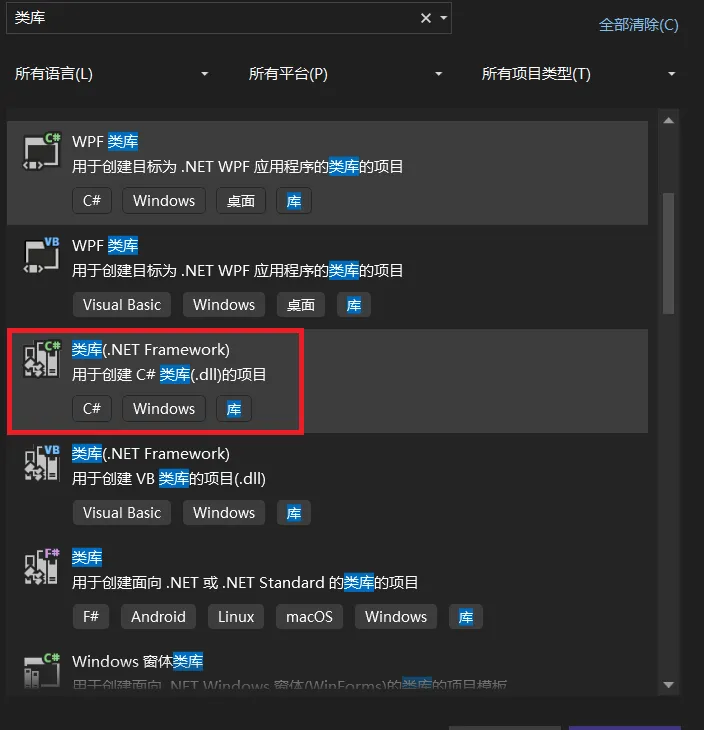
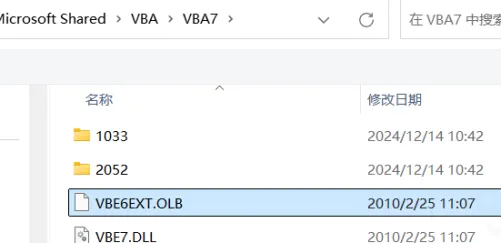
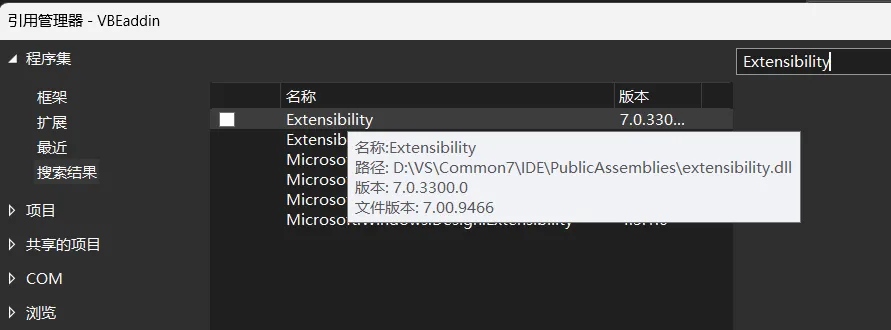
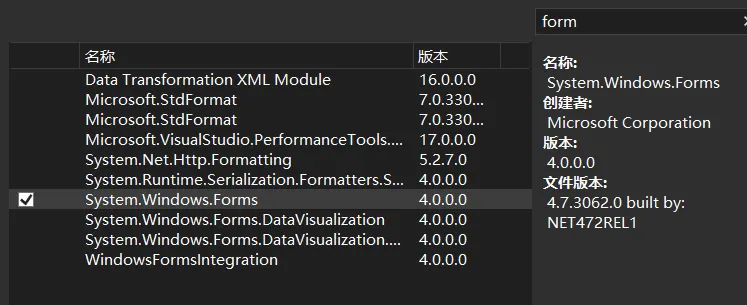
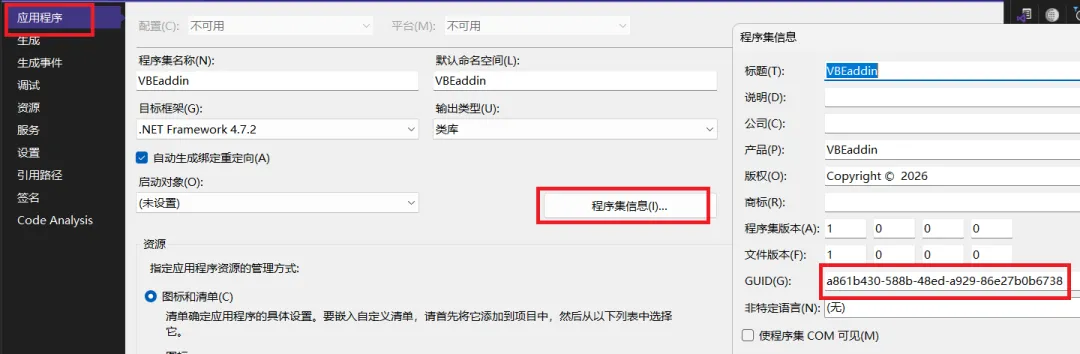
一、用Visual Studio创建一个类库(.net framework类库)项目,如下图。这里以创建的项目名称为VBEaddin为例。1、通过浏览添加VBE6EXT.OLB。这个文件一般是位于:C:\Program Files (x86)\Common Files\Microsoft Shared\VBA\VBA7,或者C:\Program Files (x86)\Common Files\Microsoft Shared\VBA\VBA62、通过搜索框里输入extensibility找到如下图这个引用(根据VS的安装路径,每台电脑可能都不相同),勾选添加它。3、再搜索添加System.Windows.Forms这个引用,因为后续需要用它做对话框和窗体。三、在项目的属性中,点击“程序集信息”,找到项目的GUID编号,复制它。修改项目自动创建的类Class1的名称,改为Connect然后把复制得到的GUID编号写入Connect类的顶部,并给这个类取一个唯一的Id名称“MnVBEaddin.Connect”,再添加一个ComVisible的属性,如下:using System;using System.Runtime.InteropServices;namespace VBEaddin{ [Guid("a861b430-588b-48ed-a929-86e27b0b6738")] [ProgId("MnVBEaddin.Connect")] [ComVisible(true)] public class Connect { }}
三、编写程序代码,Connect这个类必须继承IDTExtensibility2这个类,并实现其所有方法,代码改写成下面这样:using System;using System.Reflection;using System.Runtime.InteropServices;using Extensibility;using Microsoft.Office.Core;using Microsoft.Vbe.Interop;namespace VBEaddin{ [Guid("a861b430-588b-48ed-a929-86e27b0b6738")] [ProgId("MnVBEaddin.Connect")] [ComVisible(true)] public class Connect : IDTExtensibility2 { private VBE _vbe; private CommandBarPopup _myMenu; private CommandBarButton _button; void IDTExtensibility2.OnConnection(object Application, ext_ConnectMode ConnectMode, object AddInInst, ref Array custom) { _vbe = (VBE)Application; CommandBar mainMenuBar = _vbe.CommandBars[1]; _myMenu = (CommandBarPopup)mainMenuBar.Controls.Add( MsoControlType.msoControlPopup, Missing.Value, Missing.Value, Missing.Value, true); _myMenu.Caption = "全栈开发的码农(&M)"; _button = (CommandBarButton)_myMenu.Controls.Add( MsoControlType.msoControlButton, Missing.Value, Missing.Value, Missing.Value, true); _button.Caption = "Hello World(&H)"; _button.Click += (CommandBarButton Ctrl, ref bool CancelDefault) => { System.Windows.Forms.MessageBox.Show("Hello World!"); }; } void IDTExtensibility2.OnDisconnection(ext_DisconnectMode RemoveMode, ref Array custom) { // ✅ 清理:先删除按钮,再删除菜单 if (_button != null) { _button.Delete(); Marshal.ReleaseComObject(_button); _button = null; } if (_myMenu != null) { _myMenu.Delete(); Marshal.ReleaseComObject(_myMenu); _myMenu = null; } } void IDTExtensibility2.OnAddInsUpdate(ref Array custom) { } void IDTExtensibility2.OnStartupComplete(ref Array custom) { } void IDTExtensibility2.OnBeginShutdown(ref Array custom) { } }}
因为功能比较简单,只显示一个Hello world的提示框,所以这个插件就这样完工了,现在可以编译程序。编译后得到一个VBEaddin.dll文件。最后,还需要将这个插件程序注册到电脑里,你可以手工注册,但是操作起来比较麻烦,为此,我写了一个注册的VB脚本,全部代码如下,把这段代码保存成*.vbs文件,放在和VBEaddin.dll相同的文件夹内,点击运行它,就完成插件程序的注册。' 检查是否以管理员权限运行If Not WScript.Arguments.Named.Exists("elevated") Then CreateObject("Shell.Application").ShellExecute WScript.FullName, """" & WScript.ScriptFullName & """ /elevated", "", "runas", 1 WScript.QuitEnd If' 主程序Dim currentDir, dllPath, regasmPath, objShell, objFSO, strCommand, intReturnDim pluginProgId, pluginName, pluginDesc, regPath32, regPath64' ========== 配置区域(请根据你的插件修改) ==========pluginProgId = "MnVBEaddin.Connect" ' ProgId,与代码中的 [ProgId] 保持一致pluginName = "全栈码农的插件" ' 外接程序管理器中显示的名称pluginDesc = "演示VBE插件的最简示例" ' 描述信息' ====================================================Set objShell = CreateObject("WScript.Shell")Set objFSO = CreateObject("Scripting.FileSystemObject")' 获取当前脚本所在目录currentDir = objFSO.GetParentFolderName(WScript.ScriptFullName) & "\"dllPath = currentDir & "VBEaddin.dll"' 检查 DLL 是否存在If Not objFSO.FileExists(dllPath) Then Call ShowError("错误:当前目录下未找到 VBEaddin.dll!") WScript.Quit 1End If' 自动选择 RegAsm 路径(32位或64位)If objFSO.FileExists("C:\Windows\Microsoft.NET\Framework64\v4.0.30319\RegAsm.exe") Then regasmPath = "C:\Windows\Microsoft.NET\Framework64\v4.0.30319\RegAsm.exe"ElseIf objFSO.FileExists("C:\Windows\Microsoft.NET\Framework\v4.0.30319\RegAsm.exe") Then regasmPath = "C:\Windows\Microsoft.NET\Framework\v4.0.30319\RegAsm.exe"Else Call ShowError("错误:未找到 RegAsm.exe!请确保已安装 .NET Framework 4.0 或更高版本。") WScript.Quit 1End If' ========================================' 第一步:注册 COM 组件' ========================================objShell.Popup "正在注册 COM 组件...", 2, "提示", 64strCommand = Chr(34) & regasmPath & Chr(34) & " " & Chr(34) & dllPath & Chr(34) & " /codebase"intReturn = objShell.Run(strCommand, 0, True)If intReturn <> 0 Then Call ShowError("COM 注册失败!请检查错误信息。") WScript.Quit 1End IfobjShell.Popup "COM 组件注册成功!", 1, "成功", 64' ========================================' 第二步:添加 VBE 插件注册表项(32位和64位)' ========================================' 32位 VBE 注册表路径regPath32 = "HKCU\Software\Microsoft\VBA\VBE\6.0\Addins\" & pluginProgId' 64位 VBE 注册表路径(64位 Office 需要)regPath64 = "HKCU\Software\Microsoft\VBA\VBE\6.0\Addins64\" & pluginProgIdOn Error Resume Next' 创建32位注册表项Call AddVBERegistryEntry(regPath32)If Err.Number <> 0 Then Call ShowError("无法创建32位 VBE 注册表项:" & Err.Description) WScript.Quit 1End If' 创建64位注册表项Call AddVBERegistryEntry(regPath64)If Err.Number <> 0 Then Call ShowError("无法创建64位 VBE 注册表项:" & Err.Description) WScript.Quit 1End If' 检查是否所有写入都成功If Err.Number = 0 Then objShell.Popup "VBE 插件注册表项添加成功!" & vbCrLf & _ "32位路径:" & vbCrLf & regPath32 & vbCrLf & vbCrLf & _ "64位路径:" & vbCrLf & regPath64, 5, "成功", 64Else Call ShowError("VBE 注册表项写入失败:" & Err.Description) WScript.Quit 1End IfOn Error GoTo 0' ========================================' 完成提示' ========================================Dim finalMsgfinalMsg = "插件安装成功!" & vbCrLf & vbCrLf & _ "请按以下步骤验证:" & vbCrLf & _ "1. 重新启动 Excel" & vbCrLf & _ "2. 按 Alt+F11 打开 VBA 编辑器" & vbCrLf & _ "3. 点击【工具】→【外接程序管理器】" & vbCrLf & _ "4. 找到 """ & pluginName & """,确认已勾选"objShell.Popup finalMsg, 5, "安装完成", 64' ========================================' 子函数:添加 VBE 注册表项' ========================================Sub AddVBERegistryEntry(regPath) ' 创建插件注册表项 objShell.RegWrite regPath, "", "REG_SZ" ' 写入 FriendlyName objShell.RegWrite regPath & "\FriendlyName", pluginName, "REG_SZ" ' 写入 Description objShell.RegWrite regPath & "\Description", pluginDesc, "REG_SZ" ' 写入 LoadBehavior(3 = 启动时加载并已加载) objShell.RegWrite regPath & "\LoadBehavior", 3, "REG_DWORD"End Sub' 显示错误信息的函数Sub ShowError(message) Dim errorCmd errorCmd = "PowerShell -Command Write-Host '" & message & "' -ForegroundColor Red" objShell.Run errorCmd, 0, True objShell.Popup message, 0, "错误", 16End Sub
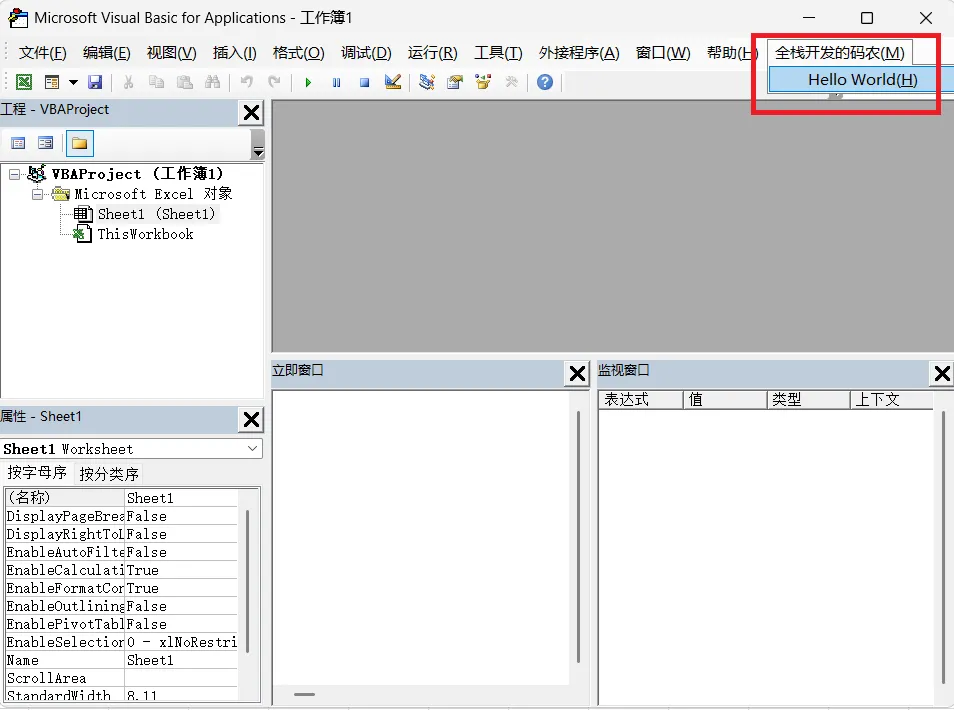
注册后,打开Excel或solidworks,进入“开发工具”或编辑宏,启动VBE,就发现VBE的主菜单多了一个菜单项,点击它就会弹出信息框。最后,为了卸载这个插件,也同样写一个VB脚本来快速卸载,卸载脚本的全部代码如下:' UninstallVBEAddin.vbs' 卸载 VBEaddin 插件(COM注册 + VBE注册表项)' 检查是否以管理员权限运行If Not WScript.Arguments.Named.Exists("elevated") Then CreateObject("Shell.Application").ShellExecute WScript.FullName, """" & WScript.ScriptFullName & """ /elevated", "", "runas", 1 WScript.QuitEnd If' ========== 配置区域(与安装时保持一致) ==========pluginProgId = "MnVBEaddin.Connect" ' ProgId' =================================================Dim currentDir, dllPath, regasmPath, objShell, objFSO, strCommand, intReturnDim regPath32, regPath64, confirmSet objShell = CreateObject("WScript.Shell")Set objFSO = CreateObject("Scripting.FileSystemObject")' 获取当前脚本所在目录currentDir = objFSO.GetParentFolderName(WScript.ScriptFullName) & "\"dllPath = currentDir & "VBEaddin.dll"' 确认卸载confirm = objShell.Popup("确定要卸载 VBEaddin 插件吗?" & vbCrLf & vbCrLf & _ "此操作将:" & vbCrLf & _ "1. 从 COM 注册表中注销插件 DLL" & vbCrLf & _ "2. 从 VBE 外接程序管理器中移除插件(32位和64位)", _ 0, "确认卸载", vbYesNo + vbQuestion)If confirm <> vbYes Then WScript.QuitEnd If' 自动选择 RegAsm 路径If objFSO.FileExists("C:\Windows\Microsoft.NET\Framework64\v4.0.30319\RegAsm.exe") Then regasmPath = "C:\Windows\Microsoft.NET\Framework64\v4.0.30319\RegAsm.exe"ElseIf objFSO.FileExists("C:\Windows\Microsoft.NET\Framework\v4.0.30319\RegAsm.exe") Then regasmPath = "C:\Windows\Microsoft.NET\Framework\v4.0.30319\RegAsm.exe"Else Call ShowError("错误:未找到 RegAsm.exe!") WScript.Quit 1End If' ========================================' 第一步:卸载 COM 组件' ========================================If objFSO.FileExists(dllPath) Then objShell.Popup "正在卸载 COM 组件...", 1, "提示", 64 strCommand = Chr(34) & regasmPath & Chr(34) & " " & Chr(34) & dllPath & Chr(34) & " /u" intReturn = objShell.Run(strCommand, 0, True)End If' ========================================' 第二步:删除 VBE 插件注册表项(32位和64位)' ========================================regPath32 = "HKCU\Software\Microsoft\VBA\VBE\6.0\Addins\" & pluginProgIdregPath64 = "HKCU\Software\Microsoft\VBA\VBE\6.0\Addins64\" & pluginProgIdOn Error Resume Next' 删除32位注册表项(使用 DeleteKey 方法删除整个项)Call DeleteVBERegistryEntry(regPath32, "32位注册表项")' 删除64位注册表项Call DeleteVBERegistryEntry(regPath64, "64位注册表项")On Error GoTo 0' ========================================' 完成提示' ========================================objShell.Popup "插件卸载完成!请重新启动 Excel 后生效。", 3, "卸载完成", 64' ========================================' 子函数:删除整个 VBE 注册表项' ========================================Sub DeleteVBERegistryEntry(regPath, pathName) Dim psCmd ' 使用 PowerShell 的 Remove-Item 删除整个注册表项(递归删除) psCmd = "PowerShell -Command ""Remove-Item -Path 'HKCU:\Software\Microsoft\VBA\VBE\6.0\Addins\" & pluginProgId & "' -Recurse -Force -ErrorAction SilentlyContinue""" objShell.Run psCmd, 0, True psCmd = "PowerShell -Command ""Remove-Item -Path 'HKCU:\Software\Microsoft\VBA\VBE\6.0\Addins64\" & pluginProgId & "' -Recurse -Force -ErrorAction SilentlyContinue""" objShell.Run psCmd, 0, TrueEnd Sub' 显示错误信息的函数Sub ShowError(message) Dim errorCmd errorCmd = "PowerShell -Command Write-Host '" & message & "' -ForegroundColor Red" objShell.Run errorCmd, 0, True objShell.Popup message, 0, "错误", 16End Sub
 夜雨聆风
夜雨聆风