ARTICLE · 945987
DSH 插件生态上手从侧边栏到持久记忆:11 个 DSH 插件正在重做 Agent 工作台
已经有人分享安装命令和插件合集,也有人演示二次元皮肤、微信遥控、浏览器自动化和跨会话记忆。
DSH 把 “Everything is a plugin” 写进了运行时结构里。
一条命令就能给指定 Profile 挂载插件:
dsh plugin --profile web add github:owner/repo一
DSH 插件怎么工作?
插件会写入 dsh.profile.bundles,再通过 Cordis patch 层加载。它们按 Profile 隔离,支持热更新,也能按层叠优先级处理覆盖关系。
DSH 目前支持三种插件形态:Bundle、Skill 和 Skin / Theme。
• Bundle 是 npm 或 GitHub 包,通过 dsh.bundle 声明,可以同时包含 Node 和 Browser 侧代码。
• Skill 不用打包,把带有 SKILL.md 的目录放进 Skills 目录即可。
• Skin / Theme 负责 UI 皮肤和主题切换。
这种结构方便切换、排查冲突和回滚。官方没有给插件增加沙箱限制,安装前需要检查文件读取和网络访问权限。
二
工作台和界面插件
dsh-web-ui
它给 Web 端增加 Task board、Git 图面板、侧边栏和皮肤中心。项目 Star 数超过 3,000,在 X 社区经常被提到。
dsh plugin --profile web add github:zhu1090093659/dsh-web-uiDSH-better-sidebar
DSH-better-sidebar 把右侧栏和底部面板做成一套工作台,内置文件管理、CodeMirror 编辑与预览、内嵌浏览器、真实终端、Git 面板和后台任务。
它开放了 ctx.betterSidebar 服务,其他插件可以注册新的 Tab 和文件预览器。启动时只加载约 325 KB 基础代码,其余依赖用到时再加载。
dsh plugin --profile web add dsh-better-sidebar@latest插件要求 Node.js 20 及以上、pnpm 10 及以上。安装后需要硬刷新浏览器。它与 dsh-web-ui 家族的右侧面板互斥,同时安装时要在设置里选择一个面板。
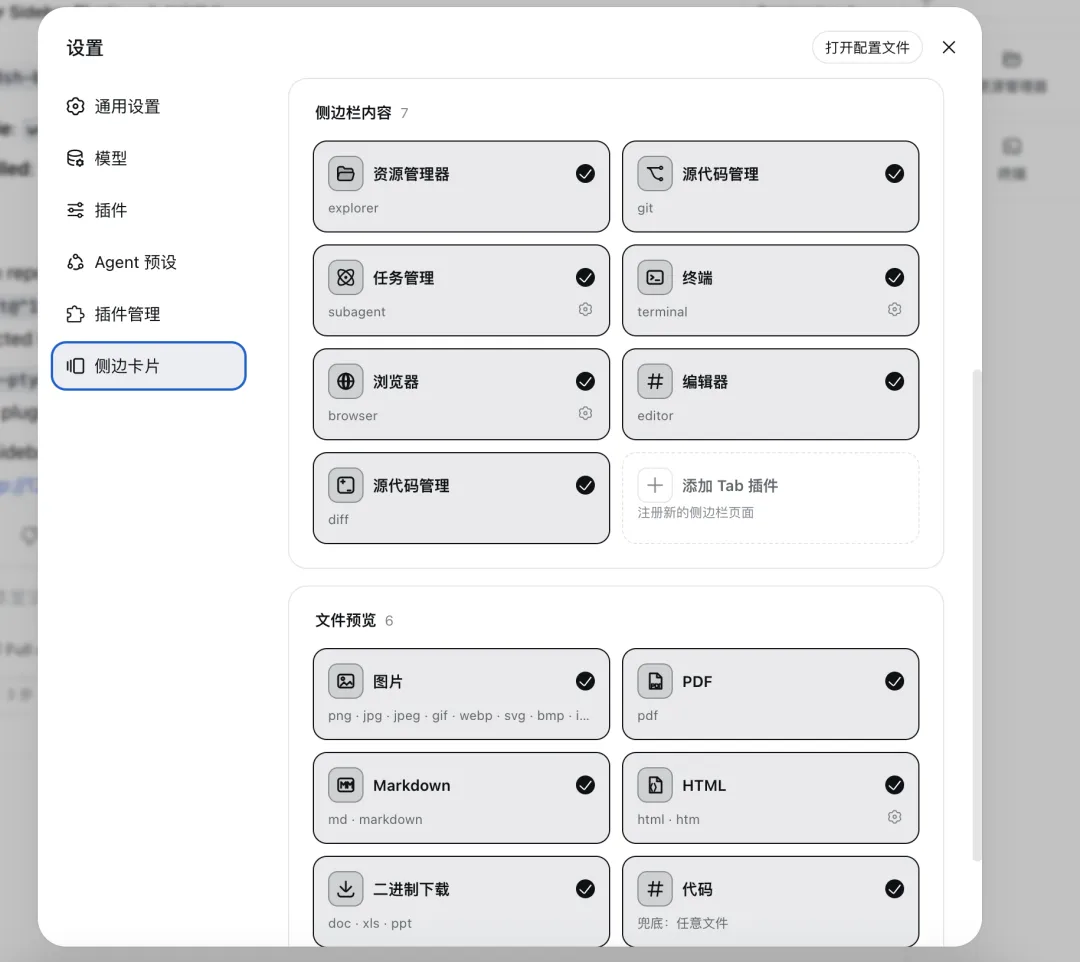 DSH-better-sidebar 界面截图
dsh-market / dsh-plugin-store
两个插件市场都支持搜索、安装、升级、卸载和备份。新用户可以直接在设置页浏览插件。
dsh plugin --profile web add dshmarket也可以安装 @0xKcyzz/dsh-plugin-store。
dsh-TUI
dsh-TUI 提供 Claude Code 风格的终端界面,包括流式思考、工具审批和双栏 Diff。Star 数约为 1,700。
npm install -g @deepseek-harness-tui/dsh-tui
dsh-tui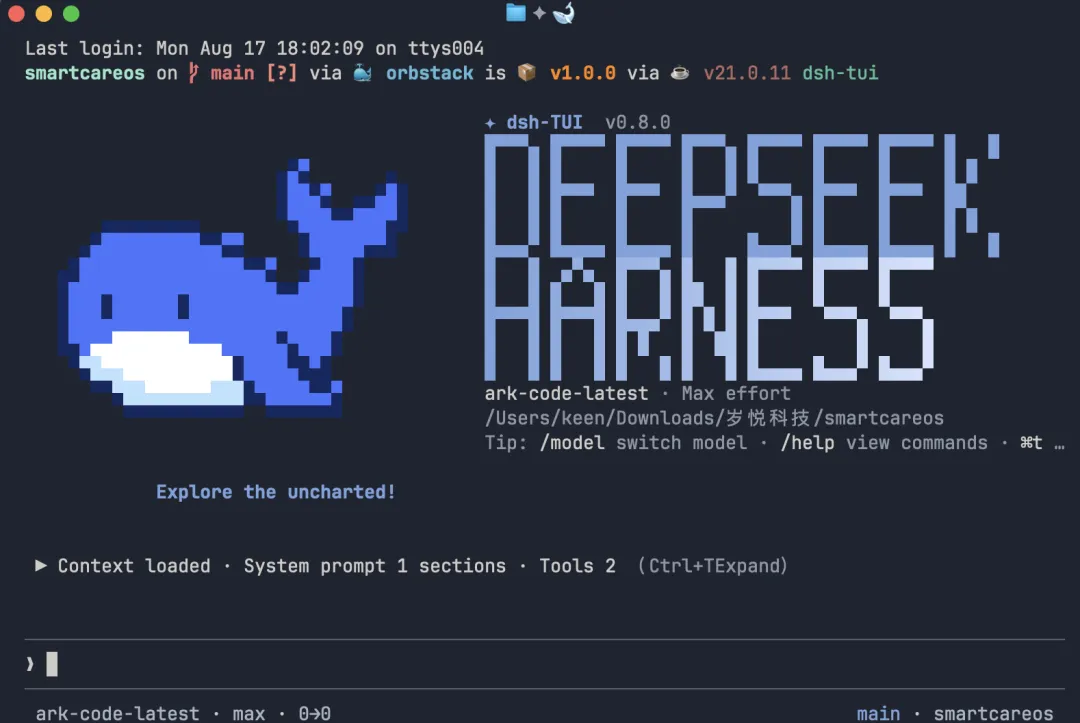 Dsh-TUI 的界面截图
三
输入、多模态、记忆和自动化
dsh-at-file
在输入框中用 @ 引用文件或目录,并提供交互式选择。
dsh plugin --profile web add github:omdsh-dev/dsh-at-filedsh-vision-router / modlens
支持图片问答、OCR、截图分析和本地 Ollama。相关项目 Star 数超过 2,000。
dsh plugin --profile web add github:liustack/modlensdsh-deep-whale / whale-girl
加入二次元桌面宠物、滑动变梁器等交互,另一个选择是 vlln/whale-girl。
dsh plugin --profile web add github:Small-tailqwq/dsh-deep-whaledsh-chat-import
导入 Claude、Cursor、ChatGPT 等工具里的历史对话。
dsh plugin --profile web add dsh-chat-importdsh-plugin-toggle
提供插件开关面板、模糊搜索、实时 start / stop 和操作历史。
dsh plugin --profile web add github:DamonKoy/dsh-plugin-toggleTabbit Browser
让 DSH 在真实浏览器里执行任务,并根据页面上下文完成自动化操作。
dsh plugin --profile web add github:Tabbit-Browser/dsh-pluginEverOS / dsh-memory-director
负责跨会话持久记忆和自适应信息提取。EverOS 在 X 的一份榜单中排到第 8 位。
dsh plugin --profile web add evermind/EverOS另外,ouroboros 通过苏格拉底式访谈提取隐性知识;dsh-oomol 连接 Gmail、Notion、Figma 等 1,400 多个 SaaS;dsh-openpencil 和 dsh-crew 处理多 Agent 调度与协作。
四
安装前后要检查什么?
安装 DSH 后,可以先装 dsh-market 或 dsh-plugin-store,再从设置页浏览插件。遇到加载问题时,用下面的命令查看实际配置:
dsh --profile web --dump-config插件冲突可以用 remove 命令排查:
dsh plugin --profile web remove <plugin>准备自己写插件时,可以看 awesome-dsh-plugin 的贡献指南,或者参考 Electricitysheep/dsh-handbook 中文手册。
7,000 多个相关仓库里会有重复项目和短期实验。Profile 隔离、Bundle 与 Skill 并存的设计,已经降低了改造 Agent 工作流的成本。
如果这份插件清单对你有帮助,欢迎点个【在看】,也可以转发给正在使用 DSH 的朋友。
你还用过哪些值得加入清单的 DSH 插件?欢迎在评论区留下仓库地址和使用感受。
免责声明:本文根据公开仓库、社区讨论和 2026 年 8 月的数据整理。插件版本、Star 数和安装方式可能变化,安装前请核对仓库说明并检查权限。
▼
-END-
往期回顾:
> Deepseek API 涨价了,Harness开源:开发者如何选?从价格屠夫到Agent基建,DeepSeek下半场怎么打?
> DeepSeek Harness 押注“一切皆插件”:开发者如何选模型、工具和成本
> 好消息 Deepseek-v4-pro全面上线,Harness agent 内部已在用v4 进行训练,另外API定价涨幅翻翻了