 夜雨聆风
夜雨聆风


从 Chat 到真正的 AI 助手:OpenClaw 架构拆解
你用过 ChatGPT.
打开网页,输入问题,得到答案。
但每次对话都是新的开始。它不记得你昨天说了什么,不知道你在做什么项目,更不会主动帮你做任何事。
这就是问题所在。
AI 被困在了浏览器标签页里。
真正的助手应该是什么样?
想象一下:
早上 7 点,AI 主动给你发消息,总结今天的日程。
你在 Telegram 上问它一个问题,它记住了。
晚上你在 Discord 上继续这个话题,它还记得。
它可以帮你运行命令、控制浏览器、监控邮件。
它不是一个聊天窗口,而是一个真正的助手。
这就是 OpenClaw 要解决的问题。
《You Could’ve Invented OpenClaw》
Nader Dabit 写了一篇教程,叫《You Could’ve Invented OpenClaw》。
核心思路很简单:从最基础的 Telegram 机器人开始,一步步添加功能,最后得到一个完整的持久化 AI 助手架构。
没有复杂的框架。
没有玄学。
只有实实在在的问题和解决方案。
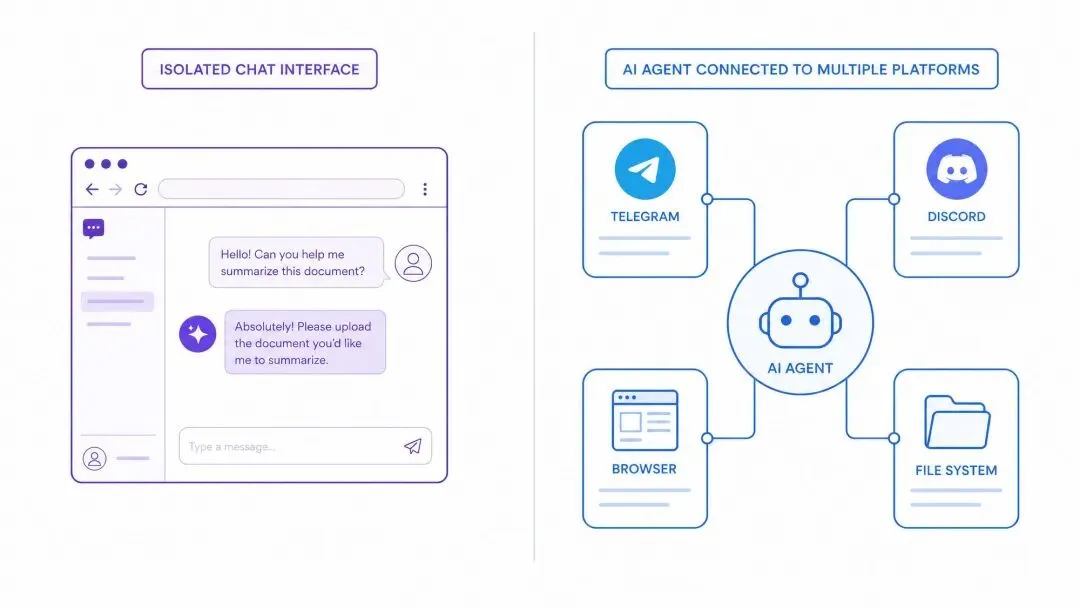
图注:从被动工具到主动助手
Agent 的核心架构是如何演进的?
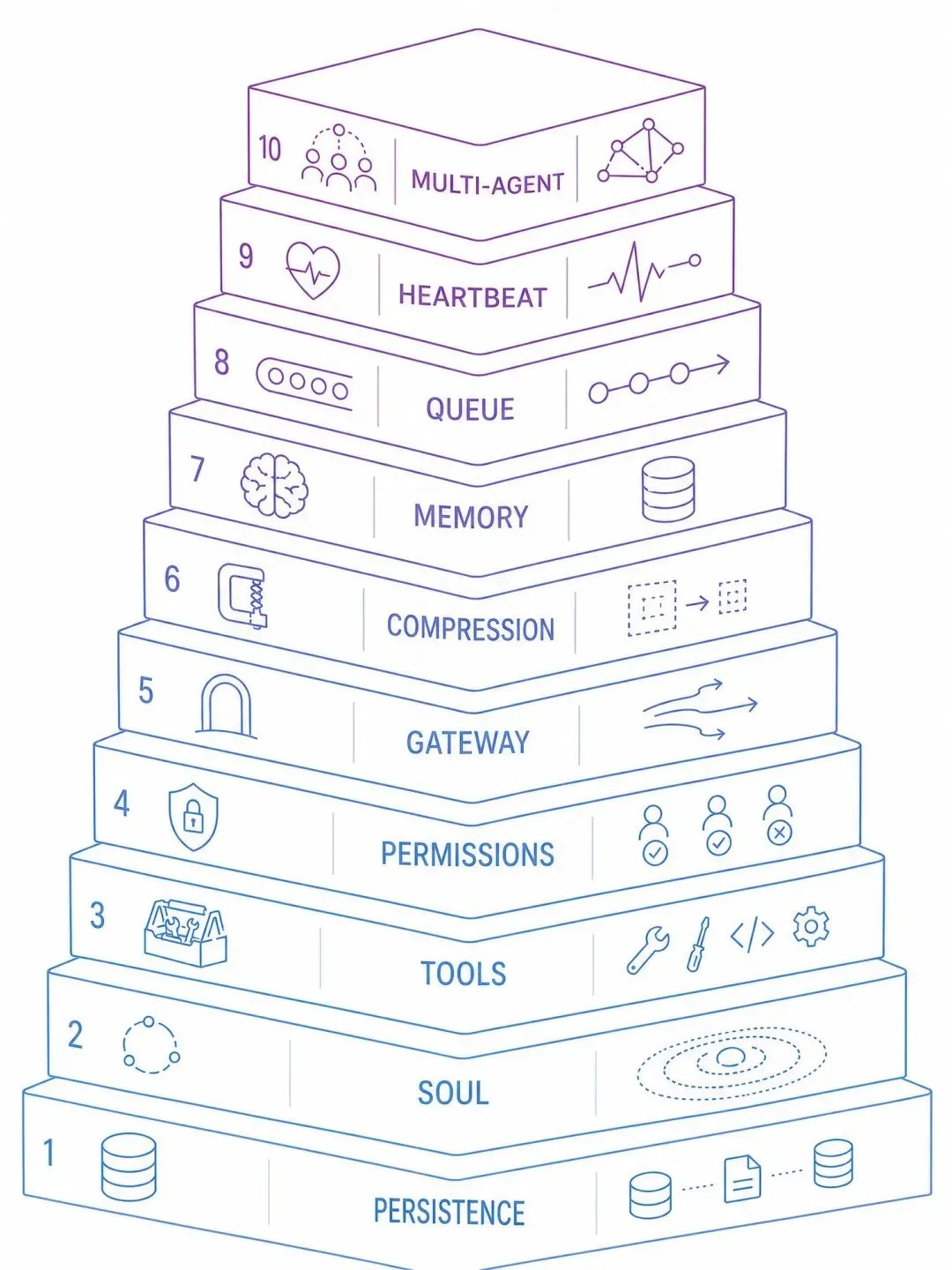
第一步:持久化会话
最简单的机器人是无状态的。每条消息都是新对话。
解决方案?JSONL 文件。
每行一条消息,只追加不修改。进程崩溃?最多丢一行。
重启后,所有对话历史都还在。
这就是 OpenClaw 的会话管理基础。
第二步:给它一个人格
通用 AI 助手很无聊。
OpenClaw 用一个 SOUL.md 文件定义智能体的身份、行为准则和风格。
这个文件会被注入到每次 API 调用的系统提示词里。
你可以让它成为 Jarvis,成为研究助手,或者任何你想要的角色。
第三步:工具调用
只会说话的 AI 没什么用。
真正的助手需要做事情。
OpenClaw 的做法:定义结构化的工具(函数),让 AI 决定何时调用。
工具可以是:
-
运行 Shell 命令
-
搜索文件
-
控制浏览器
-
保存记忆
AI 看到工具描述,决定调用哪个,传什么参数。
你执行工具,把结果返回给 AI。
它综合结果,给出自然语言回复。
这就是 Agent Loop(智能体循环)。
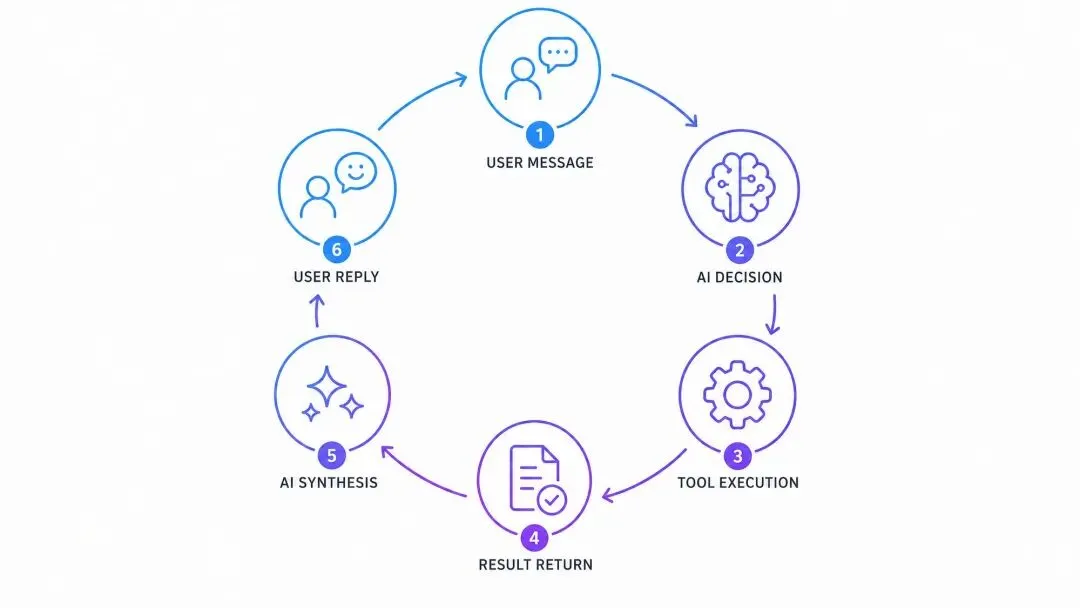
图注:这个循环让 AI 从“说”变成“做”
第四步:权限控制
从 Telegram 消息执行 Shell 命令?
这很危险。
OpenClaw 的方案:审批白名单。
危险命令需要你明确批准。批准后记录到 exec-approvals.json。
同样的命令不会问第二次。
安全和便利的平衡。
第五步:网关模式
你想在 Telegram、Discord、WhatsApp 上都能用这个 AI.
怎么办?
写三个独立的机器人?那会有三份独立的会话历史。
更好的方案:网关。
一个中心进程,管理所有渠道。
Telegram、Discord、HTTP API——它们都连接到同一个智能体,共享同一份会话和记忆。
你在 Telegram 上告诉 AI 你的名字。
通过 HTTP API 查询,它还记得。
这就是统一体验的关键。
第六步:上下文压缩
对话越来越长。
最终会超过模型的上下文窗口。
怎么办?
总结旧消息,保留新消息。
OpenClaw 会定期检查会话长度。
超过阈值时,把旧消息总结成一段话,替换掉原始消息。
AI 还记得关键信息,但 token 数量大幅减少。
第七步:长期记忆
会话历史是短期记忆。
重置会话,一切归零。
真正的助手需要长期记忆。
OpenClaw 的做法:给 AI 两个工具。
save_memory:保存重要信息到文件。
search_memory:搜索已保存的记忆。
记忆独立于会话存储。
重启进程,换个会话,记忆还在。
第八步:命令队列
两条消息同时到达会怎样?
都尝试读写同一个会话文件,数据就乱了。
解决方案:每个会话一把锁。
同一用户的消息排队处理。
不同用户的消息并行执行。
五行代码,解决竞态问题。
第九步:定时任务
到目前为止,AI 只能被动响应。
你问它,它才回答。
真正的助手应该能主动做事。
OpenClaw 支持 Heartbeats(心跳任务)。
定时触发,执行预设任务。
每天早上 7:30 总结日程。
每小时检查一次邮件。
每个心跳有独立的会话 key(cron: morning-briefing),不会污染主对话。
第十步:多智能体
一个智能体做所有事情?
不现实。
研究助手需要深度思考。
通用助手需要快速响应。
它们的人格、工具集、指令都不一样。
OpenClaw 支持多智能体配置。
每个智能体有自己的 SOUL、会话、工具。
根据消息内容路由到不同智能体。
它们通过共享记忆文件协作。
Scout 保存研究发现,Jarvis 可以搜索使用。
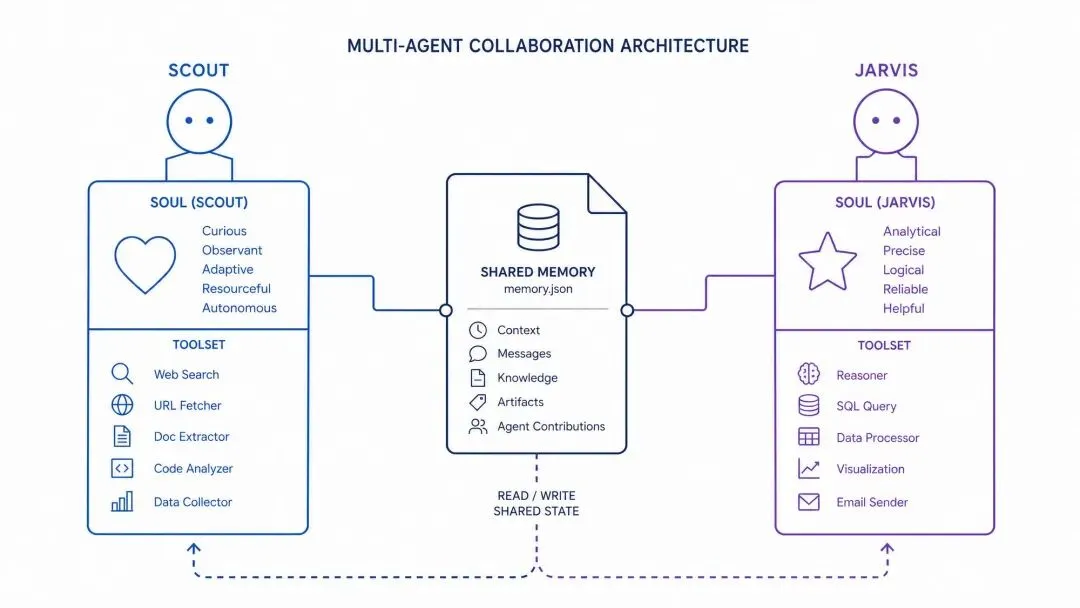
400 行代码的完整实现
Nader 把所有这些概念整合成一个 400 行的 mini-openclaw.py。
包含:
-
会话管理
-
SOUL 系统
-
工具调用
-
权限控制
-
上下文压缩
-
长期记忆
-
命令队列
-
定时任务
-
多智能体路由
可以直接运行。
这不是玩具代码,而是真正可用的架构原型。
生产级扩展
OpenClaw 的生产版本在此基础上做了更多优化:
浏览器语义快照。不发送截图(5MB),而是发送页面的可访问性树文本表示(约 50KB)。每个交互元素有编号,AI 说“点击 ref=1”就能精确操作。
向量记忆搜索。不只是关键词匹配,还支持语义相似度搜索。“auth bug”能匹配到“authentication issues”。
渠道插件系统。每个消息平台是一个适配器,统一消息格式。添加新渠道不需要改动智能体逻辑。
子智能体生成。父智能体可以动态生成子智能体处理专门任务,完成后返回结果。
为什么这篇文章值得读?
因为它不是在讲框架。
它在讲思维方式。
每个功能都源于一个真实问题:
-
“AI 记不住东西” → 会话
-
“它像个机器人” → SOUL
-
“它只会说不会做” → 工具
-
“它会执行危险命令” → 权限
-
“我想在所有平台用它” → 网关
-
“对话太长了” → 压缩
-
“它忘记了重要信息” → 记忆
-
“两条消息冲突了” → 队列
-
“我想让它自动做事” → 心跳
-
“一个智能体做不好所有事” → 多智能体
这就是从第一性原理出发的工程实践。
不预设架构,而是让架构从问题中自然生长。
如果你想构建自己的 AI Agent,从这篇教程开始。你会理解每一行代码为什么存在。
附 1:原文:You Could’ve Invented OpenClaw
https://gist.github.com/dabit3/bc60d3bea0b02927995cd9bf53c3db32
附 2:中文译文:你本可以发明 OpenClaw
在这篇文章中,我将从零开始,逐步构建出 OpenClaw 的架构,向你展示如何仅凭第一性原理——使用消息 API、一个 LLM,以及让 AI 在聊天窗口之外真正变得有用的渴望——就能自己发明出它。
最终目标:理解持久化 AI 助手的工作原理,这样你就可以构建自己的(或成为 OpenClaw 的高级用户)。
首先,让我们明确问题
当你在浏览器中使用 ChatGPT 或 Claude 时,存在以下几个局限:
它是无状态的。 每次对话都从零开始。它不知道你的名字、你的偏好、你昨天问了什么、或者你正在做什么项目。你总是在反复解释上下文。
它是被动的。 你去找它,它不会主动来找你。它不能在早上 7 点醒来为你简报日程、监控你的邮件、或运行定期任务。只有当你坐在它面前时它才能工作。
它是孤立的。 它不能在你的机器上运行命令、替你浏览网页、控制你的应用、或代表你发送消息。它住在一个文本框里,没有“手”。
它是单通道的。 你的真实生活发生在 WhatsApp、Telegram、Discord、Slack、iMessage 等各种平台上——但 AI 却住在自己独立的标签页里。你没法在你已经在用的地方发消息给它,更不用说让它在所有这些平台上保持一个连续的统一记忆。
如果反过来,你拥有一个这样的 AI:
-
住在你已经在用的消息应用中——所有平台,共享记忆
-
跨会话记住你的偏好、你的项目和你的历史对话
-
能在你的电脑上运行命令、浏览网页、控制真实浏览器
-
按计划定时醒来处理定期任务,无需你提醒
-
在你自己的硬件上运行——你的笔记本、VPS、Mac Mini——始终在线,完全由你控制
这就是 OpenClaw 所做的。它不是聊天机器人——它是一个拥有持久身份、工具和跨通道存在感的个人 AI 助手。
让我们从零开始构建一个。
最简单的机器人
让我们从绝对最小化开始:一个能回复 Telegram 消息的 AI。
import os
import anthropic
from telegram import Update
from telegram.ext import Application, MessageHandler, filters
client = anthropic.Anthropic()
asyncdefhandle_message(update: Update, context):
user_message = update.message.text
response = client.messages.create(
model="claude-sonnet-4-5-20250929",
max_tokens=1024,
messages=[{"role": "user", "content": user_message}]
)
await update.message.reply_text(response.content[0].text)
app = Application.builder().token(os.getenv("TELEGRAM_BOT_TOKEN")).build()
app.add_handler(MessageHandler(filters.TEXT, handle_message))
app.run_polling()
运行它,在 Telegram 上发一条消息,AI 就会回复。很简单。
但这基本上是 Claude 网页界面的一个更差版本。每条消息都是独立的。没有记忆。没有工具。没有个性。
如果我们给它加上记忆呢?
目标:持久化会话
我们简单机器人的一个问题是无状态性。每条消息都是一次全新的对话。问它“我刚才说了什么?”它完全不知道。
解决方案是会话(Session)。为每个用户维护一份对话历史。
import json
import os
import anthropic
from telegram import Update
from telegram.ext import Application, MessageHandler, filters
client = anthropic.Anthropic()
SESSIONS_DIR = "./sessions"
os.makedirs(SESSIONS_DIR, exist_ok=True)
defget_session_path(user_id):
return os.path.join(SESSIONS_DIR, f"{user_id}.jsonl")
defload_session(user_id):
"""Load conversation history from disk."""
path = get_session_path(user_id)
messages = []
if os.path.exists(path):
withopen(path, "r") as f:
for line in f:
if line.strip():
messages.append(json.loads(line))
return messages
defappend_to_session(user_id, message):
"""Append a single message to the session file."""
path = get_session_path(user_id)
withopen(path, "a") as f:
f.write(json.dumps(message) + "")
defsave_session(user_id, messages):
"""Overwrite the session file with the full message list."""
path = get_session_path(user_id)
withopen(path, "w") as f:
for message in messages:
f.write(json.dumps(message) + "")
asyncdefhandle_message(update: Update, context):
user_id = str(update.effective_user.id)
user_message = update.message.text
# Load existing conversation
messages = load_session(user_id)
# Add new user message
user_msg = {"role": "user", "content": user_message}
messages.append(user_msg)
append_to_session(user_id, user_msg)
# Call the AI with full history
response = client.messages.create(
model="claude-sonnet-4-5-20250929",
max_tokens=4096,
messages=messages
)
# Save assistant response
assistant_msg = {"role": "assistant", "content": response.content[0].text}
append_to_session(user_id, assistant_msg)
await update.message.reply_text(response.content[0].text)
app = Application.builder().token(os.getenv("TELEGRAM_BOT_TOKEN")).build()
app.add_handler(MessageHandler(filters.TEXT, handle_message))
app.run_polling()
现在你可以进行真正的对话了:
You: My name is Nader
Bot: Nice to meet you, Nader!
[hours later...]
You: What's my name?Bot: Your name is Nader!
关键洞察是 JSONL 格式。每行是一条消息。只追加写入。如果进程在写入中途崩溃,你最多丢失一行。这正是 OpenClaw 用于会话记录的格式:
~/.openclaw/agents/<agentid>/sessions/<sessionid>.jsonl
</sessionid></agentid>
每个会话对应一个文件。每个文件就是一段对话。重启进程,一切都还在。
但我们会遇到一个问题:对话会越来越长。最终会超出模型的上下文窗口。我们稍后会回到这个问题。
目标:添加个性(SOUL.md)
我们的机器人可以工作了,但它没有个性。它是一个通用的 AI 助手。如果我们想让它成为某个特定的角色呢?
OpenClaw 用 SOUL.md 来解决这个问题:一个定义 Agent 身份、行为和边界的 Markdown 文件。
SOUL = """
# Who You Are
**Name:** Jarvis
**Role:** Personal AI assistant
## Personality
- Be genuinely helpful, not performatively helpful
- Skip the "Great question!" - just help
- Have opinions. You're allowed to disagree
- Be concise when needed, thorough when it matters
## Boundaries
- Private things stay private
- When in doubt, ask before acting externally
- You're not the user's voice - be careful about sending messages on their behalf
## Memory
Remember important details from conversations.
Write them down if they matter.
"""
async def handle_message(update: Update, context): user_id = str(update.effective_user.id) messages = load_session(user_id) user_msg = {"role": "user", "content": update.message.text}
messages.append(user_msg) append_to_session(user_id, user_msg)
response = client.messages.create( model="claude-sonnet-4-5-20250929", max_tokens=4096, system=SOUL, # <-- personality injected here messages=messages )
assistant_msg = {"role": "assistant", "content": response.content[0].text} append_to_session(user_id, assistant_msg)
await update.message.reply_text(response.content[0].text)
现在你不再是和一个通用助手对话,而是在和 Jarvis 对话。SOUL 会在每次 API 调用时作为系统提示词注入。
在 OpenClaw 中,SOUL.md 存放在 Agent 的工作区中:
~/.openclaw/workspace/SOUL.md
它会在会话开始时加载并注入系统提示词。你可以在里面写任何内容。给 Agent 写一个起源故事、定义它的核心理念、列出它的行为规则。
你的 SOUL 越具体,Agent 的行为就越一致。“要有帮助”太模糊了。“做一个你真正愿意对话的助手。需要简洁时简洁,重要时详尽。不是企业话术机器人,不是谄媚者。就是……好用。”——这才是模型能够理解并执行的指令。
目标:添加工具
一个只会说话的机器人是很有限的。如果它能做事呢?
核心思路:给 AI 提供结构化的工具,让 AI 自己决定何时使用它们。
import subprocess
TOOLS = [
{
"name": "run_command",
"description": "Run a shell command on the user's computer",
"input_schema": {
"type": "object",
"properties": {
"command": {"type": "string", "description": "The command to run"}
},
"required": ["command"]
}
},
{
"name": "read_file",
"description": "Read a file from the filesystem",
"input_schema": {
"type": "object",
"properties": {
"path": {"type": "string", "description": "Path to the file"}
},
"required": ["path"]
}
},
{
"name": "write_file",
"description": "Write content to a file",
"input_schema": {
"type": "object",
"properties": {
"path": {"type": "string", "description": "Path to the file"},
"content": {"type": "string", "description": "Content to write"}
},
"required": ["path", "content"]
}
},
{
"name": "web_search",
"description": "Search the web for information",
"input_schema": {
"type": "object",
"properties": {
"query": {"type": "string", "description": "Search query"}
},
"required": ["query"]
}
}
]
defexecute_tool(name, input):
if name == "run_command":
result = subprocess.run(
input["command"], shell=True,
capture_output=True, text=True, timeout=30
)
return result.stdout + result.stderr
elif name == "read_file":
withopen(input["path"], "r") as f:
return f.read()
elif name == "write_file":
withopen(input["path"], "w") as f:
f.write(input["content"])
returnf"Wrote to {input['path']}"
elif name == "web_search":
# Simplified - use a real search API in practice
returnf"Search results for: {input['query']}"
returnf"Unknown tool: {name}"
现在我们需要 Agent 循环。当 AI 想要使用工具时,我们执行它并将结果反馈回去:
defserialize_content(content):
"""Convert API response content blocks to JSON-serializable dicts."""
serialized = []
for block in content:
ifhasattr(block, "text"):
serialized.append({"type": "text", "text": block.text})
elif block.type == "tool_use":
serialized.append({
"type": "tool_use",
"id": block.id,
"name": block.name,
"input": block.input
})
return serialized
defrun_agent_turn(messages, system_prompt):
"""Run one full agent turn (may involve multiple tool calls)."""
whileTrue:
response = client.messages.create(
model="claude-sonnet-4-5-20250929",
max_tokens=4096,
system=system_prompt,
tools=TOOLS,
messages=messages
)
content = serialize_content(response.content)
# If the AI is done (no tool use), return the text
if response.stop_reason == "end_turn":
text = ""
for block in response.content:
ifhasattr(block, "text"):
text += block.text
messages.append({"role": "assistant", "content": content})
return text, messages
# Process tool calls
if response.stop_reason == "tool_use":
messages.append({"role": "assistant", "content": content})
tool_results = []
for block in response.content:
if block.type == "tool_use":
print(f" Tool: {block.name}({json.dumps(block.input)})")
result = execute_tool(block.name, block.input)
tool_results.append({
"type": "tool_result",
"tool_use_id": block.id,
"content": str(result)
})
messages.append({"role": "user", "content": tool_results})
现在我们更新 handle_message,使用 Agent 循环来代替直接调用 API:
asyncdefhandle_message(update: Update, context):
user_id = str(update.effective_user.id)
messages = load_session(user_id)
messages.append({"role": "user", "content": update.message.text})
response_text, messages = run_agent_turn(messages, SOUL)
save_session(user_id, messages)
await update.message.reply_text(response_text)
现在你可以给机器人发消息了:
You: Create a file called hello.py that prints hello world, then run it
Bot: [uses write_file to create hello.py]
[uses run_command to execute it]
Done! I created hello.py and ran it. Output: "hello world"
AI 自己决定了使用哪些工具、以什么顺序使用,并将结果综合成自然的回复。全部通过一条 Telegram 消息完成。
OpenClaw 的生产工具目录要大得多——浏览器自动化、Agent 间消息传递、子 Agent 生成等等——但每个工具都遵循完全相同的模式:一个 Schema、一段描述、一个执行函数。
目标:权限控制
我们正在执行来自 Telegram 消息的命令。这很可怕。如果有人获取了你的 Telegram 账号权限,让机器人执行 rm -rf / 怎么办?
我们需要一个权限系统。OpenClaw 的方案:一个记住你已授权内容的审批白名单。
我们在现有代码旁添加这些辅助函数,然后更新 execute_tool 中的 run_command 分支来使用它们:
import re
SAFE_COMMANDS = {"ls", "cat", "head", "tail", "wc", "date", "whoami", "echo"}
DANGEROUS_PATTERNS = [r"\brm\b", r"\bsudo\b", r"\bchmod\b", r"\bcurl.*\|.*sh"]
# Persistent allowlist
APPROVALS_FILE = "./exec-approvals.json"
defload_approvals():
if os.path.exists(APPROVALS_FILE):
withopen(APPROVALS_FILE) as f:
return json.load(f)
return {"allowed": [], "denied": []}
defsave_approval(command, approved):
approvals = load_approvals()
key = "allowed"if approved else"denied"
if command notin approvals[key]:
approvals[key].append(command)
withopen(APPROVALS_FILE, "w") as f:
json.dump(approvals, f, indent=2)
defcheck_command_safety(command):
"""Returns 'safe', 'approved', or 'needs_approval'."""
base_cmd = command.strip().split()[0] if command.strip() else""
if base_cmd in SAFE_COMMANDS:
return"safe"
approvals = load_approvals()
if command in approvals["allowed"]:
return"approved"
for pattern in DANGEROUS_PATTERNS:
if re.search(pattern, command):
return"needs_approval"
return"needs_approval"
现在更新 execute_tool 中的 run_command 分支,在执行前检查权限:
if name == "run_command":
cmd = input["command"]
safety = check_command_safety(cmd)
if safety == "needs_approval":
# In a real bot, you'd prompt the user via Telegram
# and wait for their response. For simplicity, we log and deny.
print(f" ⚠️ Blocked: {cmd} (needs approval)")
return"Permission denied. Command requires approval."
result = subprocess.run(
cmd, shell=True, capture_output=True,
text=True, timeout=30
)
return result.stdout + result.stderr
当命令安全或之前已被授权时,它会立即执行。当未被授权时,Agent 会收到“权限被拒绝”的回复,可以尝试其他方案。授权会被持久化到 exec-approvals.json,所以同一条命令你永远不会被问两次。
OpenClaw 在此基础上扩展了 glob 模式(一次性授权 git *)和三级模型:“ask”(询问用户)、“record”(记录但允许)、“ignore”(自动允许)。
目标:网关(Gateway)
这里开始变得有趣了。到目前为止我们有了一个 Telegram 机器人。但如果你还想在 Discord、WhatsApp 和 Slack 上使用 AI 呢?
你可以为每个平台分别写一个机器人。但那样你就会有各自独立的会话、独立的记忆、独立的配置。Telegram 上的 AI 不知道你在 Discord 上讨论了什么。
解决方案:一个网关。一个管理所有通道的中央进程。
看看我们已经有什么。我们的 run_agent_turn 函数对 Telegram 一无所知。它接收消息并返回文本。这就是关键——Agent 逻辑已经与通道解耦了。
为了证明这一点,让我们添加第二个接口。我们在 Telegram 机器人旁边添加一个简单的 HTTP API,两者都与同一个 Agent 和同一个会话对话:
from flask import Flask, request, jsonify
import threading
flask_app = Flask(__name__)
@flask_app.route("/chat", methods=["POST"])
defchat():
data = request.json
user_id = data["user_id"]
messages = load_session(user_id)
messages.append({"role": "user", "content": data["message"]})
response_text, messages = run_agent_turn(messages, SOUL)
save_session(user_id, messages)
return jsonify({"response": response_text})
# Run the HTTP API in a background thread
threading.Thread(target=lambda: flask_app.run(port=5000), daemon=True).start()
# Telegram bot runs as before
app = Application.builder().token(os.getenv("TELEGRAM_BOT_TOKEN")).build()
app.add_handler(MessageHandler(filters.TEXT, handle_message))
app.run_polling()
试一试: 在 Telegram 上告诉机器人你的名字。然后使用相同的用户 ID(你的 Telegram 用户 ID)通过 HTTP 查询,来证明会话是共享的:
# Via Telegram
You: My name is Nader
Bot: Nice to meet you, Nader!
# Via HTTP — use your Telegram user ID so it hits the same session
curl -X POST http://127.0.0.1:5000/chat \
-H "Content-Type: application/json" \
-d '{"user_id": "YOUR_TELEGRAM_USER_ID", "message": "What is my name?"}'
{"response": "Your name is Nader!"}
同一个 Agent,同一个会话,同一个记忆。两个不同的界面。这就是网关模式。
下一步是让这个配置驱动化——用一个 JSON 文件指定启动哪些通道以及如何认证。
这正是 OpenClaw 所做的:它的网关通过一个配置文件管理 Telegram、Discord、WhatsApp、Slack、Signal、iMessage 等。它还支持可配置的会话范围——按用户、按通道或单一共享会话——因此同一个人在不同通道上都能获得统一的体验。目前我们先保持简单的“用户 ID 即会话键”方案。
目标:上下文压缩
还记得我们之前提到的会话不断增长的问题吗?和你的机器人聊了几周之后,会话文件中有数千条消息。总 token 数量超出了模型的上下文窗口。怎么办?
解决方案:摘要旧消息,保留最近的消息。在现有代码旁添加这两个函数:
defestimate_tokens(messages):
"""Rough token estimate: ~4 chars per token."""
returnsum(len(json.dumps(m)) for m in messages) // 4
defcompact_session(user_id, messages):
"""Summarize old messages when context gets too long."""
if estimate_tokens(messages) < 100_000: # ~80% of a 128k window
return messages # No compaction needed
split = len(messages) // 2
old, recent = messages[:split], messages[split:]
print(" Compacting session history...")
summary = client.messages.create(
model="claude-sonnet-4-5-20250929",
max_tokens=2000,
messages=[{
"role": "user",
"content": (
"Summarize this conversation concisely. Preserve:"
"- Key facts about the user (name, preferences)"
"- Important decisions made"
"- Open tasks or TODOs"
f"{json.dumps(old, indent=2)}"
)
}]
)
compacted = [{
"role": "user",
"content": f"[Previous conversation summary]{summary.content[0].text}"
}] + recent
save_session(user_id, compacted)
return compacted
现在在 handle_message 的顶部(加载会话之后)添加压缩检查:
asyncdefhandle_message(update: Update, context):
user_id = str(update.effective_user.id)
messages = load_session(user_id)
messages = compact_session(user_id, messages) # <-- add this line
messages.append({"role": "user", "content": update.message.text})
response_text, messages = run_agent_turn(messages, SOUL)
save_session(user_id, messages)
await update.message.reply_text(response_text)
试一试: 要测试压缩而不用聊几个小时,可以临时降低阈值:
if estimate_tokens(messages) < 1000: # lowered for testing
进行 10-15 条消息的对话,然后观察旧消息被替换为摘要。机器人仍然记得关键信息,但会话文件变小了很多。
OpenClaw 的压缩机制更加精细——它按 token 数量将消息分成多个块,分别对每个块进行摘要,并为估算误差预留安全余量——但核心思路完全一致。
目标:长期记忆
会话历史给了你对话记忆。但当你重置会话或开始一个新会话时会发生什么?一切都没了。
我们需要一个独立的记忆系统——在会话重置后仍然存在的持久化知识。方案:给 Agent 提供保存和搜索记忆的工具,这些记忆以文件形式存储。
将这两个工具添加到 TOOLS 列表中:
{
"name": "save_memory",
"description": "Save important information to long-term memory. Use for user preferences, key facts, and anything worth remembering across sessions.",
"input_schema": {
"type": "object",
"properties": {
"key": {
"type": "string",
"description": "Short label, e.g. 'user-preferences', 'project-notes'"
},
"content": {
"type": "string",
"description": "The information to remember"
}
},
"required": ["key", "content"]
}
},
{
"name": "memory_search",
"description": "Search long-term memory for relevant information. Use at the start of conversations to recall context.",
"input_schema": {
"type": "object",
"properties": {
"query": {
"type": "string",
"description": "What to search for"
}
},
"required": ["query"]
}
}
将它们的执行逻辑添加到 execute_tool 中:
MEMORY_DIR = "./memory"
# Add these cases to execute_tool:
elif name == "save_memory":
os.makedirs(MEMORY_DIR, exist_ok=True)
filepath = os.path.join(MEMORY_DIR, f"{input['key']}.md")
withopen(filepath, "w") as f:
f.write(input["content"])
returnf"Saved to memory: {input['key']}"
elif name == "memory_search":
query = input["query"].lower()
results = []
if os.path.exists(MEMORY_DIR):
for fname in os.listdir(MEMORY_DIR):
if fname.endswith(".md"):
withopen(os.path.join(MEMORY_DIR, fname), "r") as f:
content = f.read()
ifany(word in content.lower() for word in query.split()):
results.append(f"--- {fname} ---{content}")
return"".join(results) if results else"No matching memories found."
最后,更新 SOUL,让 Agent 知道记忆系统的存在:
SOUL = """
# Who You Are
...existing personality...
## Memory
You have a long-term memory system.
- Use save_memory to store important information (user preferences, key facts, project details).- Use memory_search at the start of conversations to recall context from previous sessions.
Memory files are stored in ./memory/ as markdown files.
"""
试一试:
You: Remember that my favorite restaurant is Elvies and I prefer to go on weekends.
Bot: [uses save_memory to write nader-profile.md]
Got it — saved your restaurant preference.
[Reset the session or restart the bot]
You: Where should we go for dinner?
Bot: [uses memory_search for"restaurant dinner favorite"]
How about Elvies? I know it's your favorite. Want to go this weekend?
记忆之所以能持久存在,是因为它存储在文件中,而不是会话中。重置会话、重启机器人——记忆都还在。
OpenClaw 的生产级记忆使用了基于 Embedding 的向量搜索来实现语义匹配(所以“auth bug”能匹配到“authentication issues”),但我们的关键词搜索对于入门来说已经很好用了。
目标:命令队列
这里有一个微妙但关键的问题:当两条消息同时到达时会发生什么?
假设你同时在 Telegram 上发送了“查看我的日历”,通过 HTTP API 发送了“天气怎么样”。两者都试图加载同一个会话,都试图向其中追加内容,结果就是数据损坏。
解决方案很简单:为每个会话加一个锁。同一会话每次只处理一条消息。不同会话仍然可以并行运行。
# Add to your bot
from collections import defaultdict
session_locks = defaultdict(threading.Lock)
现在用锁包裹 handle_message 的主体:
asyncdefhandle_message(update: Update, context):
user_id = str(update.effective_user.id)
with session_locks[user_id]:
messages = load_session(user_id)
messages = compact_session(user_id, messages)
messages.append({"role": "user", "content": update.message.text})
response_text, messages = run_agent_turn(messages, SOUL)
save_session(user_id, messages)
await update.message.reply_text(response_text)
对 /chat HTTP 端点做同样的处理:
@flask_app.route("/chat", methods=["POST"])
defchat():
data = request.json
user_id = data["user_id"]
with session_locks[user_id]:
messages = load_session(user_id)
messages = compact_session(user_id, messages)
messages.append({"role": "user", "content": data["message"]})
response_text, messages = run_agent_turn(messages, SOUL)
save_session(user_id, messages)
return jsonify({"response": response_text})
就这么简单——五行设置。同一用户的消息会排队。不同用户的消息并行运行。没有竞态条件。
OpenClaw 在此基础上扩展了基于通道(lane)的队列(消息、定时任务和子 Agent 分开排队),这样心跳任务永远不会阻塞实时对话。
目标:定时任务(Heartbeats)
到目前为止,我们的 Agent 只有在你和它说话时才会响应。但如果你想让它每天早上检查你的邮件呢?或者在会议前帮你总结日历呢?
你需要定时执行。让我们添加心跳——按计划触发的定时任务,让 Agent 在定时器上触发。
import schedule
import time
defsetup_heartbeats():
"""Configure recurring agent tasks."""
defmorning_briefing():
print("⏰ Heartbeat: morning briefing")
# Use an isolated session key so cron doesn't pollute main chat
session_key = "cron:morning-briefing"
with session_locks[session_key]:
messages = load_session(session_key)
messages.append({
"role": "user",
"content": "Good morning! Check today's date and give me a motivational quote."
})
response_text, messages = run_agent_turn(messages, SOUL)
save_session(session_key, messages)
print(f"🤖 {response_text}")
# In production, you'd send this to Telegram/Discord too
schedule.every().day.at("07:30").do(morning_briefing)
# Run the scheduler in a background thread
defscheduler_loop():
whileTrue:
schedule.run_pending()
time.sleep(60)
threading.Thread(target=scheduler_loop, daemon=True).start()
# Call during startup, before run_polling()
setup_heartbeats()
关键洞察:每个心跳使用自己的会话键(cron: morning-briefing)。这让定时任务不会污染你的主对话历史。心跳调用的是同一个 run_agent_turn 函数——它只是一条消息,只不过由定时器触发而不是由人类触发。
试一试: 为了测试,把计划改为每分钟运行一次:
schedule.every(1).minutes.do(morning_briefing)
你会看到心跳在终端中触发,Agent 会做出响应。测试完成后改回每日计划。
OpenClaw 支持完整的 cron 表达式(30 7 * * *)并将心跳通过独立的命令队列通道路由,这样它们永远不会阻塞实时消息。
目标:多 Agent
一个 Agent 已经很有用了。但随着你添加更多任务,你会发现一个单一的人格和工具集无法很好地覆盖所有需求。一个研究助理需要的指令和一个通用助手不同。
解决方案:多 Agent 配置加路由。每个 Agent 有自己的 SOUL、自己的会话,根据消息内容切换。
AGENTS = {
"main": {
"name": "Jarvis",
"soul": SOUL, # our existing SOUL
"session_prefix": "agent:main",
},
"researcher": {
"name": "Scout",
"soul": """You are Scout, a research specialist.Your job: find information and cite sources. Every claim needs evidence.Use tools to gather data. Be thorough but concise.Save important findings to memory for other agents to reference.""",
"session_prefix": "agent:researcher",
},
}
defresolve_agent(message_text):
"""Route messages to the right agent based on prefix commands."""
if message_text.startswith("/research "):
return"researcher", message_text[len("/research "):]
return"main", message_text
更新 handle_message,将消息路由到正确的 Agent:
async def handle_message(update: Update, context):
user_id = str(update.effective_user.id)
agent_id, message_text = resolve_agent(update.message.text)
agent = AGENTS[agent_id]
session_key = f"{agent['session_prefix']}:{user_id}"
with session_locks[session_key]:
messages = load_session(session_key)
messages = compact_session(session_key, messages)
messages.append({"role": "user", "content": message_text})
response_text, messages = run_agent_turn(messages, agent["soul"])
save_session(session_key, messages)
await update.message.reply_text(f"[{agent['name']}] {response_text}")
试一试:
You: What's the weather like?[Jarvis] It's a nice day! I'd check a weather service for exact details.You: /research What are the best practices for Python async programming?[Scout] Here's what I found...
[uses web_search, save_memory to gather and store findings]
The key practices are: 1) Use asyncio.gather for concurrent tasks...
You: What did Scout find about Python async?
[Jarvis] [uses memory_search]
Scout's research found that the key async best practices are...
每个 Agent 都有自己的对话历史,但它们共享同一个记忆目录。Scout 保存研究发现;Jarvis 之后可以搜索这些发现。它们通过共享文件进行协作,而不需要直接通信。
OpenClaw 在此基础上扩展了子 Agent 生成(父 Agent 可以为一个专注任务生成子 Agent)和 Agent 间消息传递,但核心模式是相同的:每个 Agent 就是一个 SOUL + 会话 + 工具。
整合所有内容
让我们把构建的所有内容整合成一个可运行的单文件脚本。这是一个干净的独立 REPL,包含了教程中的每一个功能:会话、SOUL、工具、权限、压缩、记忆、命令队列、定时任务和多 Agent 路由。
我在这里用约 400 行代码组装了一个 mini-openclaw:
https://gist.github.com/dabit3/86ee04a1c02c839409a02b20fe99a492
保存为 mini-openclaw.py 并运行:
uv run --with anthropic --with schedule python mini-openclaw.py
一个会话看起来是这样的:
Mini OpenClaw
Agents: Jarvis, Scout
Workspace: ~/.mini-openclaw
Commands: /new (reset), /research <query>, /quit
You: Remember that my favorite restaurant is Hai Cenato and I prefer 7pm reservations
🔧 save_memory: {"key": "user-preferences", "content": "Favorite restaurant... → Saved to memory: user-preferences🤖 [Jarvis] Got it. Saved your restaurant preference - Hai Cenato, 7pm reservations.You: What's in my project directory? 🔧 run_command: {"command": "ls"} → src, package.json, README.md, node_modules, ...🤖 [Jarvis] Your project has a standard Node.js structure with src/, package.json, and the usual suspects.You: /new Session reset.You: Where do I like to eat? 🔧 memory_search: {"query": "restaurant favorite food"} → --- user-preferences.md --- Favorite restaurant: Hai Cenato...🤖 [Jarvis] You like Hai Cenato, and you prefer 7pm reservations.You: /research What are the latest trends in AI agents? 🔧 web_search: {"query": "AI agent trends 2025"} → Search results for: AI agent trends 2025 🔧 save_memory: {"key": "research-ai-agents", ...} → Saved to memory: research-ai-agents🤖 [Scout] Here's what I found on current AI agent trends...</query>
记忆跨会话持久存在。Agent 通过共享记忆文件进行协作。命令需要审批。心跳在后台运行。全部在约 400 行代码中实现。
我们学到了什么
从一个简单的 Telegram 机器人出发,我们构建了一个持久化 AI 助手的每一个主要组件:
持久化会话(JSONL 文件):崩溃安全的对话记忆。每个会话是一个文件,每行是一条消息。重启进程,一切都还在。
SOUL.md(系统提示词):一个将通用 AI 转变为具有一致行为、边界和风格的特定 Agent 的个性文件。
工具 + Agent 循环:结构化的工具定义,让 AI 自己决定何时行动。Agent 循环调用 LLM、执行请求的工具、将结果反馈回去,重复直到完成。
权限控制:安全命令白名单加上持久化授权,让危险操作需要明确的同意。
网关模式:一个中央 Agent 对应多个接口。Telegram、HTTP 或任何其他通道——它们都与同一个会话和同一个记忆对话。
上下文压缩:当对话超出上下文窗口时,摘要旧消息并保留最近的消息。机器人在不触及 token 限制的情况下保持知识。
长期记忆:基于文件的存储,配有保存和搜索工具。在会话重置后仍然存在的知识,对任何 Agent 都可访问。
命令队列:为每个会话加锁,防止多条消息同时到达时的竞态条件。
心跳:基于定时器的定期 Agent 运行,每个都有自己隔离的会话。Agent 醒来、完成任务、然后回去睡觉。
多 Agent 路由:具有不同 SOUL 和会话键的多个 Agent 配置,根据消息内容进行路由。Agent 通过共享记忆文件进行协作。
这些组件中的每一个都源于一个实际问题:
-
“AI 记不住任何东西” → 会话
-
“它像一个通用聊天机器人一样回复” → SOUL.md
-
“它只能说,不能做” → 工具 + Agent 循环
-
“它不问就执行危险命令” → 权限控制
-
“我想在所有消息应用上使用它” → 网关
-
“对话太长了” → 压缩
-
“它在会话之间会遗忘” → 记忆
-
“同时收到两条消息会导致数据损坏” → 命令队列
-
“我想让它自动做事” → 心跳
-
“一个 Agent 无法做好所有事” → 多 Agent
这就是你本可以发明 OpenClaw 的方式。
进一步探索
我们的原型涵盖了核心架构。以下是 OpenClaw 如何将每个想法扩展到生产级用途——当你超越了基础阶段后值得探索的功能。
浏览器与语义快照
大多数 AI 助手无法看到网页。OpenClaw 通过 Playwright 给 Agent 提供了一个浏览器,但它不发送截图(每张 5MB,token 成本高昂),而是使用语义快照——页面可访问性树的文本表示:
# Simplified concept
snapshot = page.accessibility.snapshot()
# Output:
# - heading "Welcome to GitHub"
# - button "Sign In" [ref=1]
# - textbox "Email" [ref=2]
# - link "Forgot password?" [ref=3]
每个可交互元素获得一个编号的 ref ID。当 Agent 想要点击某个东西时,它说“click ref=1”——这映射到页面上恰好一个元素。不需要猜测,不需要“点击顶部附近的蓝色按钮”。而且由于快照是文本而不是图片,它比截图大约小 100 倍,这意味着每个页面消耗的 token 少得多。
会话范围与身份链接
我们的原型使用用户 ID 作为会话键。OpenClaw 支持可配置的范围:
main(默认):所有私聊共享一个会话——简单,适合单用户设置。
per-peer:每个人在所有通道上共享一个会话。
per-channel-peer:每个人在每个通道上都有自己的会话。
身份链接让你可以为同一个人合并跨通道的会话,这样 Alice 的 Telegram 和 Discord 对话就共享相同的历史记录。
通道插件系统
我们的原型硬编码了 Telegram + HTTP。OpenClaw 使用插件架构,每个通道(Telegram、Discord、WhatsApp、Slack、Signal、iMessage)都是一个独立的适配器,将消息标准化为通用格式。添加新通道意味着写一个适配器,而不需要修改任何 Agent 逻辑。
向量记忆搜索
我们的关键词搜索能用,但会错过语义匹配(“auth bug” 无法匹配到 “authentication issues”)。OpenClaw 的生产级记忆使用混合方案:通过带 Embedding 扩展的 SQLite 进行向量搜索以实现语义相似度,加上 FTS5 进行精确关键词匹配。可配置的 Embedding 提供者包括 OpenAI、本地模型、Gemini 和 Voyage。
子 Agent 生成
我们的多 Agent 设置使用手动路由。OpenClaw 允许 Agent 以编程方式生成子 Agent——父 Agent 调用 sessions_spawn,子 Agent 在自己的上下文中运行并带有超时限制,然后将结果返回给父 Agent。这实现了“深入研究这个主题”之类的模式,主 Agent 将任务委派给专家,并在完成后继续。
下一步
如果你想构建自己的:
-
从一个通道开始:让 Telegram 或 Discord 机器人配合会话工作
-
逐步添加工具:从文件读写开始,然后添加 Shell 执行
-
需要时再添加记忆:一旦会话重置,你就会想要持久化记忆
-
超出单一通道时再添加通道:网关模式会自然地浮现
-
任务专业化时再添加 Agent:不要一开始就设 10 个 Agent,从 2 个开始
或者直接使用 OpenClaw。它是开源的,并且处理了所有我们略过的边界情况。但现在你知道它在底层是如何工作的了。