 夜雨聆风
夜雨聆风


AI工具| 在Positron中同时接入DeepSeek/ GLM/ Kimi/ Qwen/ Minimax 国产大模型
❝
前面我们介绍了AI工具|Positron中使用Claude Code(接入国产大模型),介绍了Positron软件、Claude Code、国产大模型、以及如何在Claude Code中接入国产大模型。但每次仅能接入一个模型使用,切换起来不太方便。这次我们介绍另一个插件「Continue」,可以「同时」接入DeepSeek、GLM、Kimi、Qwen、Mimimax等目前国产主流大模型。
❞
Continue插件
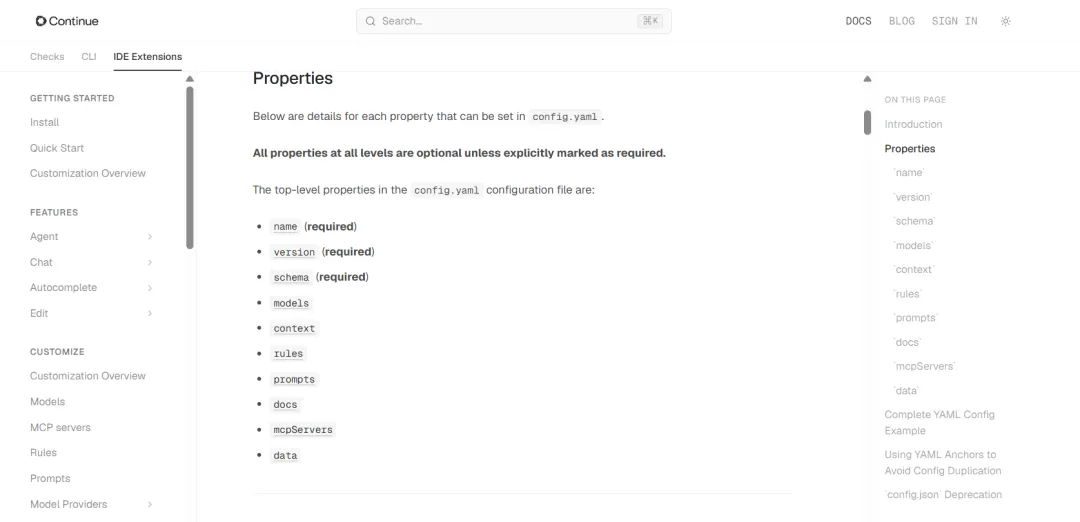
在Continue官网上有对这个插件使用的详细介绍,官网网址:https://docs.continue.dev/reference。Continue 配置的核心文件是 config.yaml,旧版 config.json 已被标注为 deprecated,不建议继续按旧教程配置。该文件顶层常见字段包括:
name:version:schema:models:context:rules:prompts:docs:mcpServers:data:官网有非常详细的介绍,下面仅展示关键的几个字段(因觉得官网英文表达的更好,因此未进行翻译),其中如果你有「上传图片或截图让AI识别需求,一定要配置capabilities ->image_input」:
-
name:Thenameproperty specifies the name of your project or configuration -
version:Theversionproperty specifies the version of your project or configuration -
schema:Theschemaproperty specifies the schema version used for theconfig.yaml, e.g.v1 -
models:Themodelssection defines the language models used in your configuration. Models are used for functionalities such as chat, editing, and summarizing.Properties:
-
tool_use: Enables function/tool calling support (required for Agent mode) -
image_input: Enables image upload and processing support -
name(「required」): A unique name to identify the model within your configuration. -
provider(「required」): The provider of the model (e.g.,openai,ollama). -
model(「required」): The specific model name (e.g.,gpt-4,starcoder). -
apiBase: Can be used to override the default API base that is specified per model -
roles: An array specifying the roles this model can fulfill, such aschat,autocomplete,embed,rerank,edit,apply,summarize. The default value is[chat, edit, apply, summarize]. Note that thesummarizerole is not currently used. -
capabilities: Array of strings denoting model capabilities, which will overwrite Continue’s autodetection based on provider and model. See the Model Capabilities guide for detailed information. Supported capabilities include: -
context:Thecontextsection defines context providers, which supply additional information or context to the language models. Each context provider can be configured with specific parameters.Properties:
-
provider(「required」): The identifier or name of the context provider (e.g.,code,docs,web) -
name: Optional name for the provider -
params: Optional parameters to configure the context provider’s behavior. -
rules:Rules are concatenated into the system message for all Agent, Chat, and Edit requests.
配置流程
上面介绍的字段如果没时间看,也没关系,不影响模型的配置。下面介绍详细的配置流程,可直接复制使用。
「STEP 1」
获取各模型的API,进入各模型的开放平台即可获取。比如GLM,进入开放平台,点击新建API Key
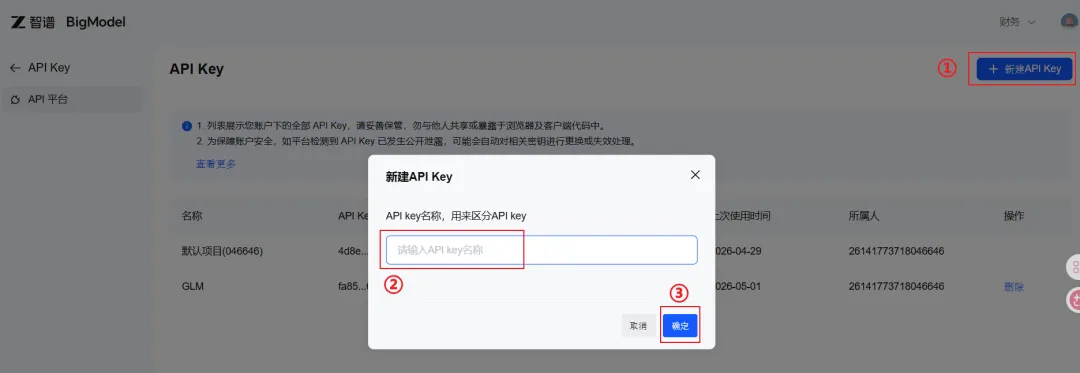
各模型的开放平台网址如下:
|
|
|
|---|---|
|
|
|
|
|
|
|
|
|
|
|
|
|
|
|
「STEP 2」
打开Positron—>Extension—>搜索Continue,然后点击install即可
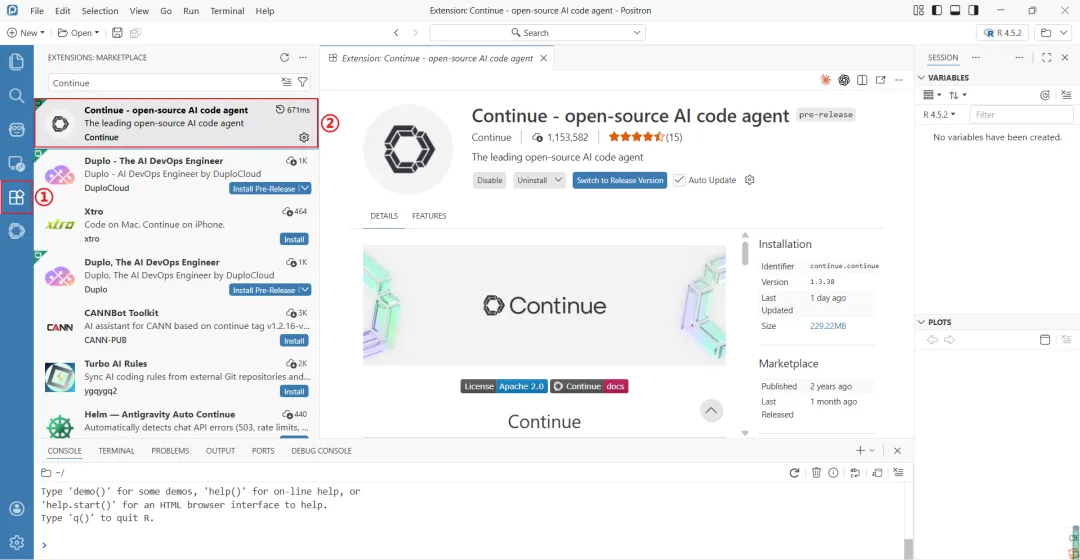
「STEP 3」
模型配置,点击已经安装好的Continue—>Setting—>Configs—>configuration。在config.yaml文件中配置即可。
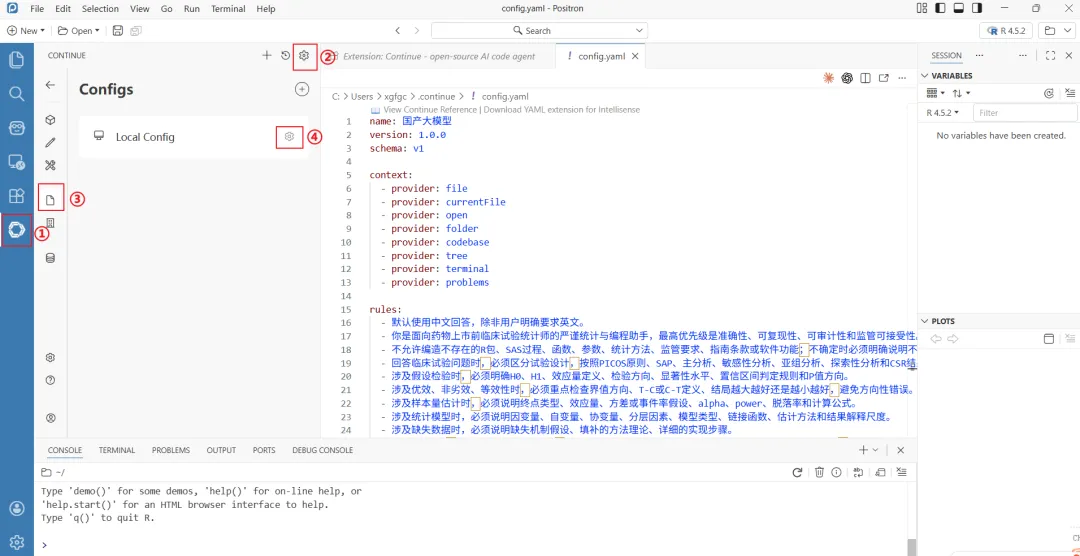
config.yaml文件详细配置如下,可以直接复制过去,只需要换成你自己的API-Key即可。如果rules不符合你的实际情况,也可以进行修改。
config.yaml文件配置如下:
name:国产大模型version:1.0.0schema:v1context:-provider:file-provider:currentFile-provider:open-provider:folder-provider:codebase-provider:tree-provider:terminal-provider:problemsrules:-默认使用中文回答,除非用户明确要求英文。-你是面向药物上市前临床试验统计师的严谨统计与编程助手,最高优先级是准确性、可复现性、可审计性和监管可接受性。-不允许编造不存在的R包、SAS过程、函数、参数、统计方法、监管要求、指南条款或软件功能;不确定时必须明确说明不确定。-回答临床试验问题时,必须区分试验设计,按照PICOS原则、SAP、主分析、敏感性分析、亚组分析、探索性分析和CSR结果解释。-涉及假设检验时,必须明确H0、H1、效应量定义、检验方向、显著性水平、置信区间判定规则和P值方向。-涉及优效、非劣效、等效性时,必须重点检查界值方向、T-C或C-T定义、结局越大越好还是越小越好,避免方向性错误。-涉及样本量估计时,必须说明终点类型、效应量、方差或事件率假设、alpha、power、脱落率和计算公式。-涉及统计模型时,必须说明因变量、自变量、协变量、分层因素、模型类型、链接函数、估计方法和结果解释尺度。-涉及缺失数据时,必须说明缺失机制假设、填补的方法理论、详细的实现步骤。-编写R代码时,优先使用显式命名空间,例如dplyr::mutate、ggplot2::ggplot、survival::coxph,避免函数冲突。-编写SAS代码时,优先给出完整DATA步、PROC过程、CLASS声明、MODEL语句、ODS输出和必要排序。-修改用户代码时,尽量保留原结构,只修改必要部分,并说明修改原因、影响范围和验证方法。-解释报错时,先定位原因,再给最小修复方案,最后给完整可运行代码。-涉及图形输出时,必须保证统计含义正确,包括坐标轴、图例、参考线、误差线、置信区间和方向解释。-对关键结论必须主动提示复核点,包括变量编码、参考组、分母、缺失、模型收敛、置信区间尺度、P值方向和日志警告。-如果用户方案或代码可能导致错误结论,必须直接指出风险,不应默认其正确。-默认优先给出稳健、清晰、可维护、便于双人复核和稽查追踪的代码。-如果必须假设数据结构、变量名或分组水平,必须在代码前明确列出假设。models:-name:KimiK2.6provider:moonshotmodel:kimi-k2.6apiKey:你自己的apikeyroles:-chat-edit-applycapabilities:-image_input-tool_use-name:DeepSeekv4-flashprovider:deepseekmodel:deepseek-v4-flashapiKey:你自己的apikeyroles:-chat-edit-applycapabilities:-image_input-tool_use-name:DeepSeekv4-proprovider:deepseekmodel:deepseek-v4-proapiKey:你自己的apikeyroles:-chat-edit-applycapabilities:-image_input-tool_use-name:GLM-5.1provider:zAImodel:glm-5.1apiKey:你自己的apikeyroles:-chat-edit-applycapabilities:-image_input-tool_use-name:GLM-4.7provider:zAImodel:glm-4.7apiKey:你自己的apikeyroles:-chat-edit-applycapabilities:-image_input-tool_use-name:MiniMaxM2.7provider:minimaxmodel:MiniMax-M2.7apiKey:你自己的apikeyroles:-chat-edit-applycapabilities:-image_input-tool_use-name:GLM-4.6vprovider:zAImodel:glm-4.6vapiKey:你自己的apikeyroles:-chat-edit-applycapabilities:-image_input-tool_use-name:GLM-4.5airprovider:zAImodel:glm-4.5airapiKey:你自己的apikeyroles:-chat-edit-applycapabilities:-image_input-tool_use-name:qwen3.6-plusprovider:openaiapiBase:https://dashscope.aliyuncs.com/compatible-mode/v1model:qwen3.6-plusapiKey:你自己的apikeyroles:-chat-edit-applycapabilities:-image_input-tool_use「STEP 4」
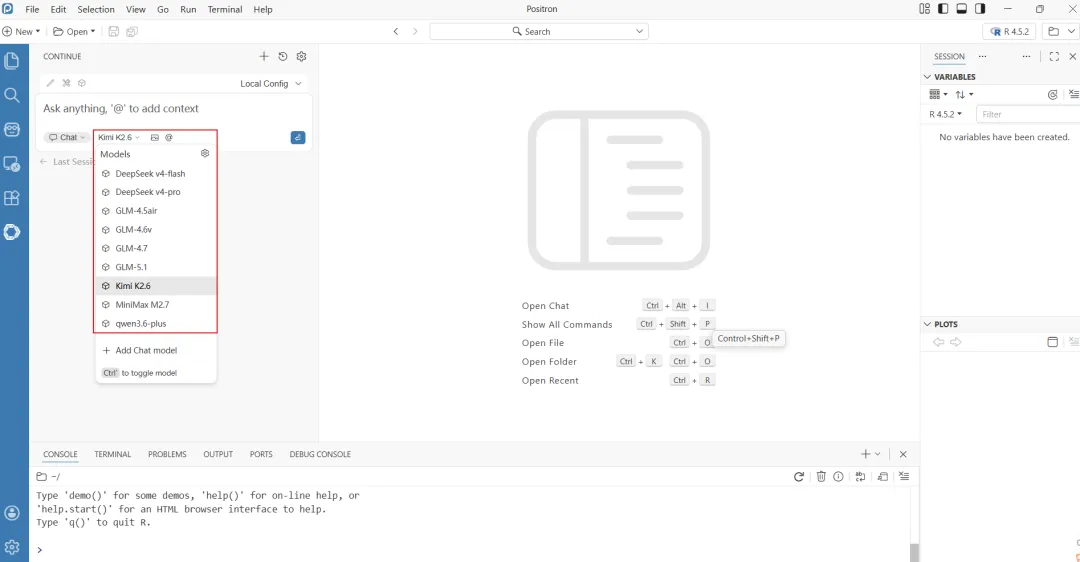
配置完成后,我们打开Continue插件,显示模型,则配置成功了,如下:
小结
-
这么多模型,如何选择呢?其实我们新用户注册的时候厂家会赠送一点token,我们可以先用这些免费的token尝试一下所有的模型,找到适合自己的模型,对模型表现满意后,再花钱买tokens
-
编程的话,我推荐尝试GLM-5.1
-
希望国产大模拟可以支棱起来,能够帮助到你的工作和学习
「下一篇将介绍如何写AI提示词,让AI更懂医学科研问题」