 夜雨聆风
夜雨聆风
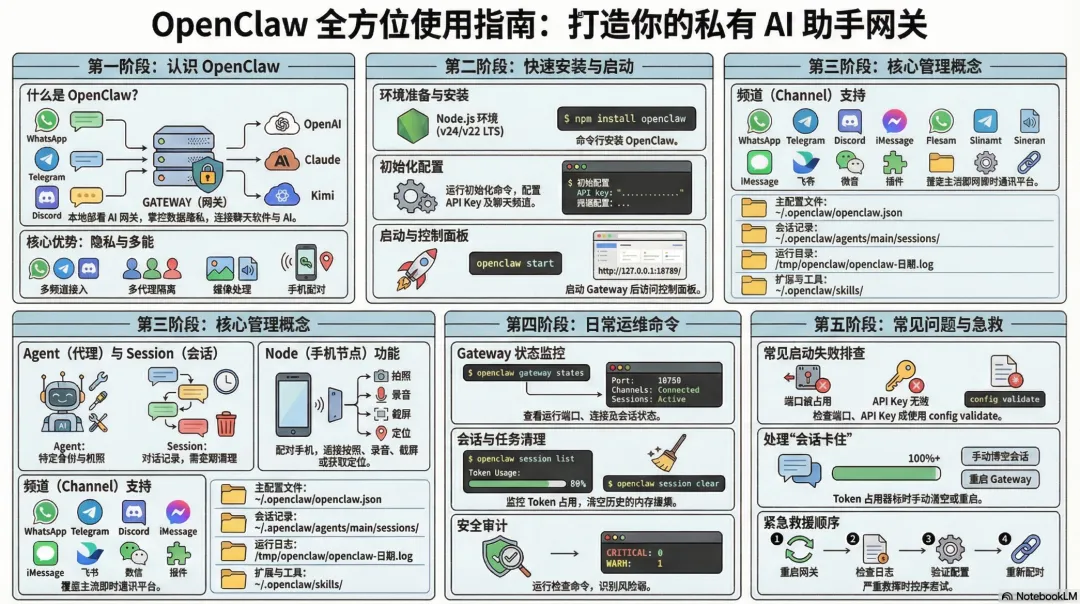
数据存在你自己的电脑上,不是存在别人的服务器
你自己控制谁能用、怎么用
不用依赖第三方服务,不用担心被封
开发者、技术爱好者
想要一个随时能用的 AI 助手(手机发消息就能用)
不想把数据交给大厂的人
macOS / Linuxcurl -fsSL https://openclaw.ai/install.sh | bashWindows (PowerShell)iwr -useb https://openclaw.ai/install.ps1 | iex初始化配置
用什么 AI 模型(OpenAI、Claude、Kimi、Minimax 等)
API Key 在哪里
要连接哪些聊天频道(WhatsApp、Telegram 等)
启动 Gateway前台运行(看日志) `openclaw gateway run` 或者后台运行 `openclaw gateway start` 打开控制面板
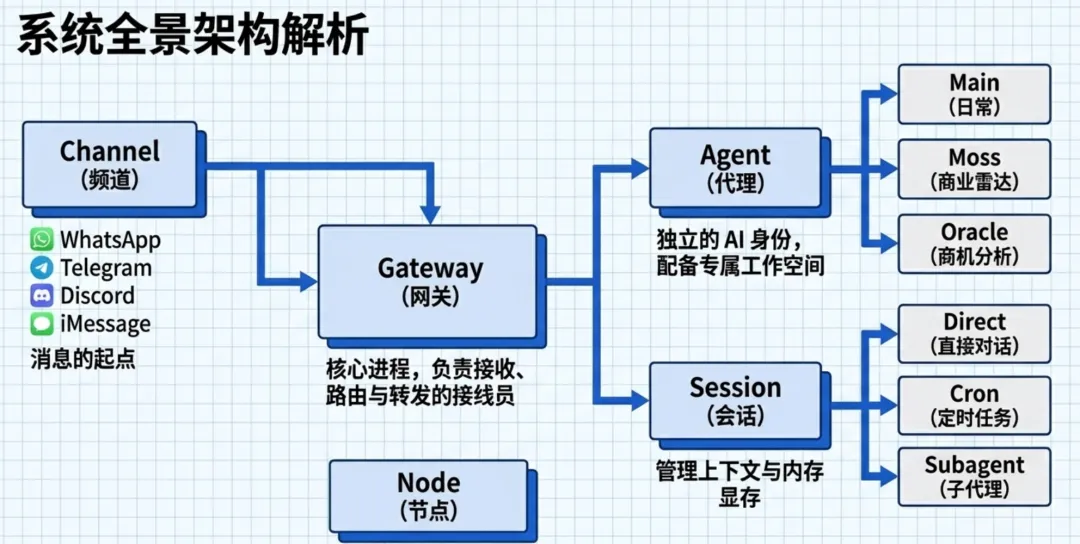
http://127.0.0.1:18789/接收来自各种聊天软件的消息
转发给 AI 处理
把 AI 的回复发回给用户
管理会话、记忆、定时任务
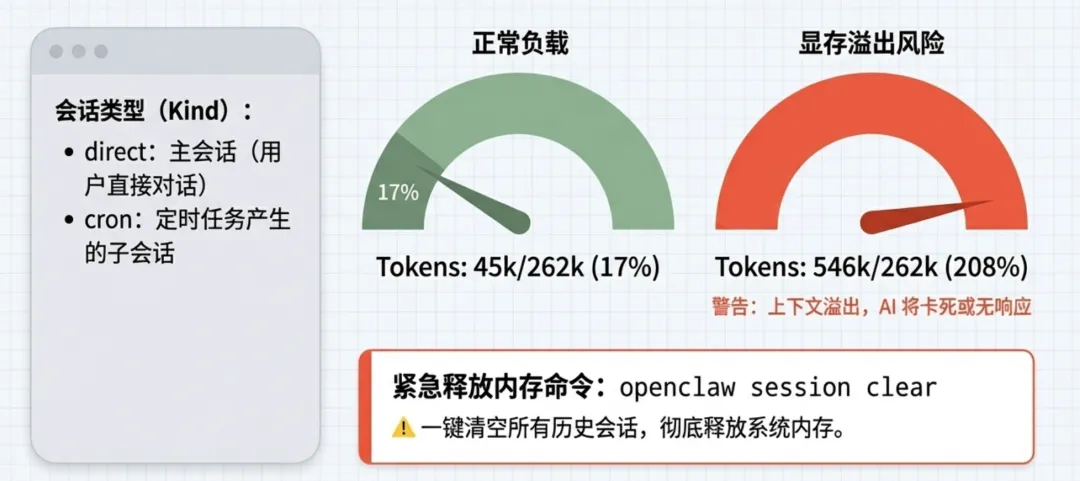
Main Session:你跟 OpenClaw 的直接对话
Cron Session:定时任务产生的子会话
Subagent Session:子代理产生的会话
Session 多了会占用内存
卡住的 Session 可能导致问题
定期清理可以保持系统健康
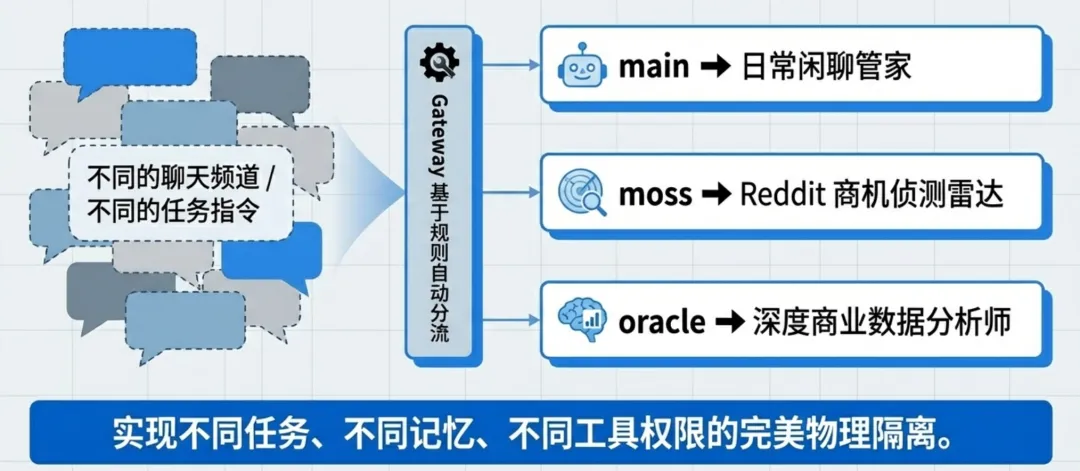
main:主代理,处理日常对话
mainmoss:专门处理 Reddit 商业雷达任务
mossoracle:专门做商机分析
oracle不同任务用不同代理,互相不干扰
可以给不同代理不同的工具权限
每个代理有自己的记忆和工作空间
WhatsApp
Telegram
Discord
iMessage
飞书 (Feishu)
微信 (通过插件)
用手机相机拍照传回
手机录语音
手机截屏
手机定位
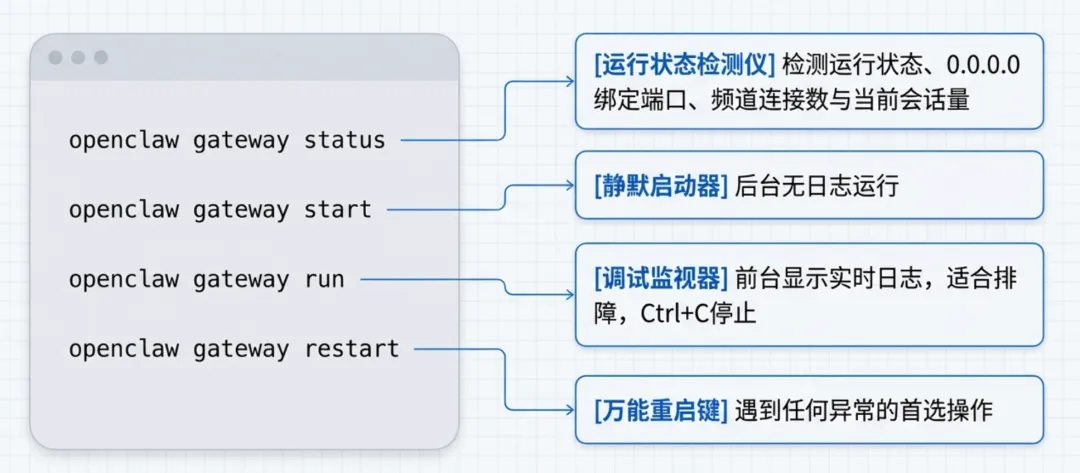
查看状态 `openclaw status`
启动 Gateway `openclaw gateway start`
openclaw gateway restart前台运行 Gateway `openclaw gateway run`
停止 Gateway `openclaw gateway stop`
重启 Gateway(最常用!) `openclaw gateway restart`
查看 Gateway 绑定地址 `openclaw config get gateway.bind`
0.0.0.0查看所有会话 `openclaw sessions`
Kind:direct = 主会话,cron = 定时任务
directcronAge:最后活跃时间
Tokens:上下文占用率,超过 100% 就是爆了
结束所有子代理会话 `openclaw sessions kill --all-subagents`
彻底清理所有会话(终极方案)
bashopenclaw gateway start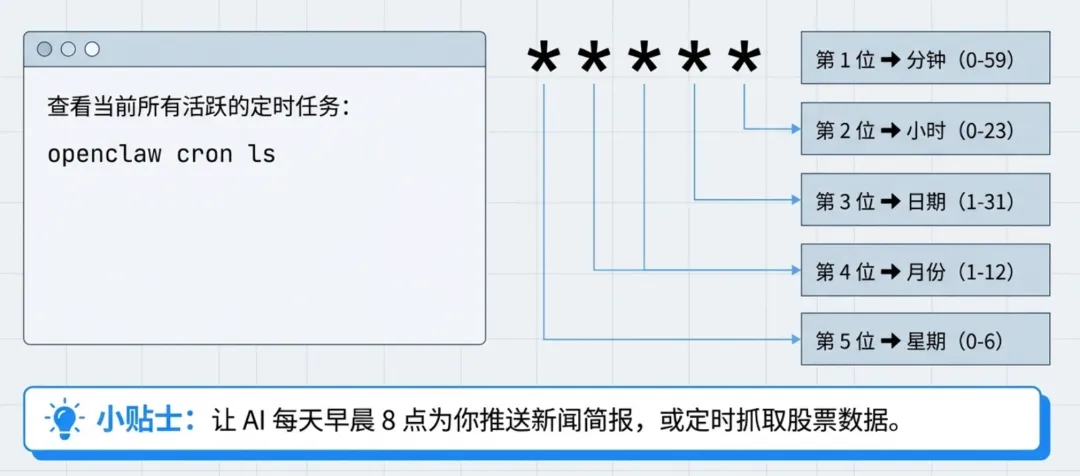
查看所有定时任务 `openclaw cron list`
name: "Reddit商业雷达"
暂停某个任务 `openclaw cron disable `
启用某个任务 `openclaw cron enable `
立即执行某个任务(测试用) `openclaw cron run `
暂停所有任务 `openclaw cron pause`
查看当前配置文件路径 `openclaw config file`
查看特定配置项
设置配置项 `openclaw config set agents.defaults.model "minimax/MiniMax-M2.7"`
删除配置项 `openclaw config unset `
验证配置是否正确 `openclaw config validate`
查看最近50行日志 `openclaw logs -l 50`
实时跟踪日志(像 tail -f) `openclaw logs --follow`
只看错误 `openclaw logs -l 100 | grep -i error`
日志文件位置 `/tmp/openclaw/openclaw-YYYY-MM-DD.log`
🔴 CRITICAL:必须立即修复(如未设置允许来源)
🟡 WARN:建议修复(如权限过于开放)
🟢 INFO:参考信息
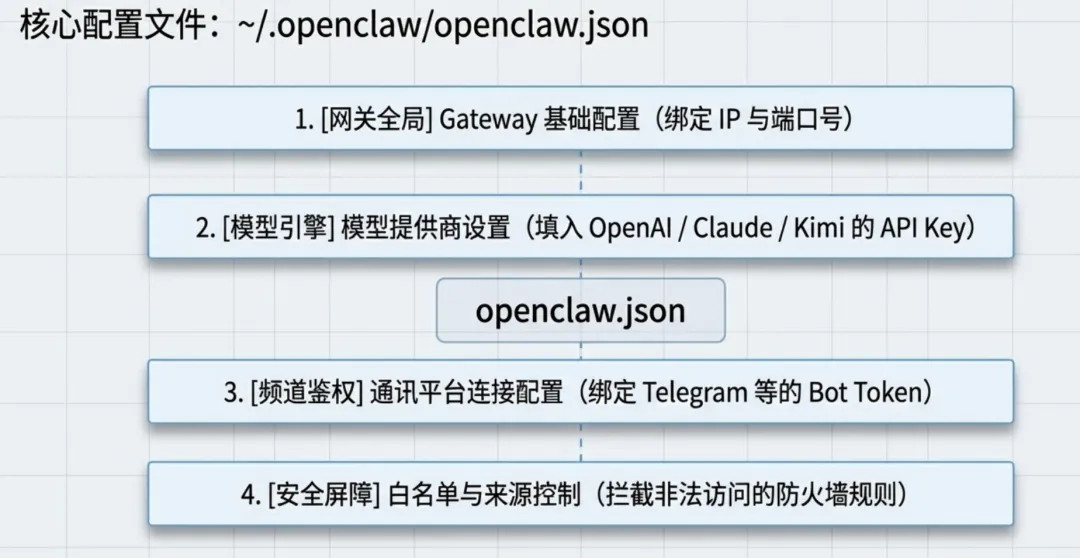
json模型配置
json频道配置(以 Telegram 为例)
json安全配置
json前台运行看详细错误 `openclaw gateway run` 检查端口占用 `lsof -i :18314` 检查配置文件语法 `openclaw config validate`
openclaw config validate端口被占用 → 换端口或杀掉占用进程
配置语法错误 → 用 `openclaw config validate` 检查
API Key 无效 → 检查 `models.providers.xxx.apiKey`
models.providers.xxx.apiKey重启 Gateway:`openclaw gateway restart` 换用其他模型(如从 Kimi 换成 Minimax) 检查网络(是否走了代理导致包乱序)
tokens: 546k/262k (208%)结束所有子代理 `openclaw sessions kill --all-subagents`
或彻底清理
bashAPI 调用太频繁被限流
任务执行超时
网络问题
等几分钟再试 `openclaw cron run ` 检查日志 `openclaw logs -l 50 | grep -i error`
`openclaw status # 看 Channels 部分是否显示 "Telegram: OK"` `openclaw logs -l 100 | grep -i telegram`
Token 无效
网络防火墙阻止
Bot 被禁言
agents.defaults.models添加模型到选择列表 `openclaw config set agents.defaults.models.kimi-coding/k2p5 '{"alias": "kimi-k2p5"}'` 重启生效 `openclaw gateway restart`
json在 Control UI 里生成配对码 手机 App 扫码配对
飞书文档操作
微信公众号发布
股票分析
天气查询
从 clawhub 安装 `openclaw skill install xxx`
或手动放到 `~/.openclaw/skills/`
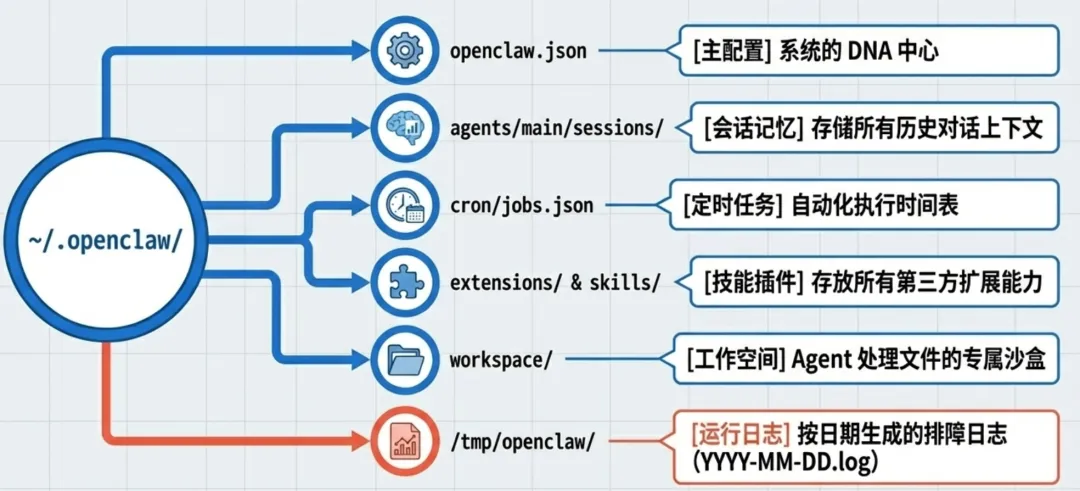
~/.openclaw/openclaw.json | ||
~/.openclaw/agents/main/sessions/ | ||
~/.openclaw/cron/jobs.json | ||
/tmp/openclaw/openclaw-YYYY-MM-DD.log | ||
~/.openclaw/extensions/ | ||
~/.openclaw/skills/ | ||
~/.openclaw/workspace/ |
重启 Gateway `openclaw gateway restart` 清理卡住的 Sessions `openclaw sessions kill --all-subagents` 看日志定位问题 `openclaw logs -l 100 | grep -i error` 验证配置 `openclaw config validate` 还不行?重置配置(谨慎!)
bash终极方案:彻底清理
bash`openclaw onboard`:交互式引导你完成首次安装、配置模型和通道,像新手向导一样一步步设置好整个系统。
`openclaw setup / configure`:快速初始化工作区或调整配置,适合非交互式或重新配置时使用。
`openclaw doctor`:一键诊断系统问题并自动修复,像医生检查AI助手健康状况(加--deep更彻底)。
`openclaw gateway`(或 gateway start/restart/stop):启动、停止或重启WebSocket网关服务,让AI代理持续在线运行。
`openclaw status / health`:查看AI助手当前运行状态、模型使用和健康情况,快速了解系统是否正常。
`openclaw logs`:实时查看运行日志,方便排查问题。
(Channels)`openclaw channels list / add / remove`:列出、管理连接的聊天通道(如添加飞书/微信),让AI能在你常用App里聊天。
`openclaw skills list / info`:列出或查看可用“技能”(自动化任务),了解AI能做什么。
`openclaw plugins list / install / uninstall`:管理插件扩展,安装新功能或移除不需要的。
`openclaw models status / list`:查看和管理连接的AI模型(如Claude/OpenAI),检查状态或切换使用。
`openclaw dashboard`:打开网页控制面板,图形化查看和管理系统。
`openclaw update`:检查并更新OpenClaw到最新版本。
`openclaw reset`:重置配置或会话(可指定范围),清理数据但不删核心文件。
`openclaw uninstall`:完全卸载OpenClaw。