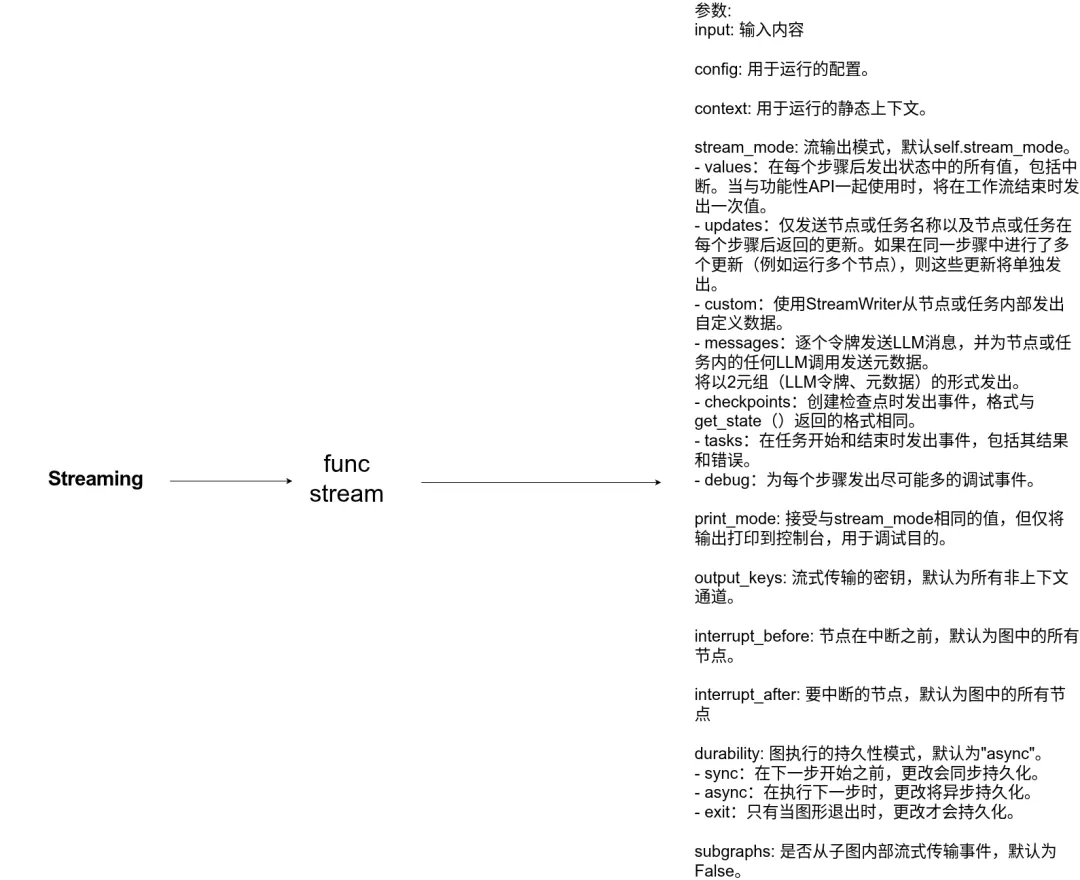
LangChain 源码剖析-流媒体系统方法详解(Streaming)
- 流媒体对于增强基于LLM构建的应用程序的响应能力至关重要。通过逐步显示输出,甚至在完整响应准备就绪之前,流式传输显著改善了用户体验(UX),特别是在处理LLM的延迟时。
概述
- LangChain的流媒体系统允许您将代理运行的实时反馈呈现给您的应用程序。
流代理进度(Stream agent progress)
- 要流式传输代理进度,请使用stream_mode=“updates”的流或astream方法。这将在每个代理步骤后发出一个事件。
- LLM node:带有工具调用请求的AIMessage
- Tool node:带执行结果的ToolMessage
from langchain.agents import create_agentdef get_weather(city: str) -> str: """Get weather for a given city.""" return f"It's always sunny in {city}!"agent = create_agent( model="gpt-5-nano", tools=[get_weather],)for chunk in agent.stream( {"messages": [{"role": "user", "content": "What is the weather in SF?"}]}, stream_mode="updates",): for step, data in chunk.items(): print(f"step: {step}") print(f"content: {data['messages'][-1].content_blocks}")
step: modelcontent: [{'type': 'tool_call', 'name': 'get_weather', 'args': {'city': 'San Francisco'}, 'id': 'call_OW2NYNsNSKhRZpjW0wm2Aszd'}]step: toolscontent: [{'type': 'text', 'text': "It's always sunny in San Francisco!"}]step: modelcontent: [{'type': 'text', 'text': 'It's always sunny in San Francisco!'}]
流式LLM令牌(Stream LLM tokens)
- 要在LLM生成令牌时对其进行流式传输,请使用stream_mode=“messages”。下面您可以看到代理流工具调用的输出和最终响应。
from langchain.agents import create_agentdef get_weather(city: str) -> str: """Get weather for a given city.""" return f"It's always sunny in {city}!"agent = create_agent( model="gpt-5-nano", tools=[get_weather],)for token, metadata in agent.stream( {"messages": [{"role": "user", "content": "What is the weather in SF?"}]}, stream_mode="messages",): print(f"node: {metadata['langgraph_node']}") print(f"content: {token.content_blocks}") print("\n")
node: modelcontent: [{'type': 'tool_call_chunk', 'id': 'call_vbCyBcP8VuneUzyYlSBZZsVa', 'name': 'get_weather', 'args': '', 'index': 0}]node: modelcontent: [{'type': 'tool_call_chunk', 'id': None, 'name': None, 'args': '{"', 'index': 0}]node: modelcontent: [{'type': 'tool_call_chunk', 'id': None, 'name': None, 'args': 'city', 'index': 0}]node: modelcontent: [{'type': 'tool_call_chunk', 'id': None, 'name': None, 'args': '":"', 'index': 0}]node: modelcontent: [{'type': 'tool_call_chunk', 'id': None, 'name': None, 'args': 'San', 'index': 0}]node: modelcontent: [{'type': 'tool_call_chunk', 'id': None, 'name': None, 'args': ' Francisco', 'index': 0}]node: modelcontent: [{'type': 'tool_call_chunk', 'id': None, 'name': None, 'args': '"}', 'index': 0}]node: modelcontent: []node: toolscontent: [{'type': 'text', 'text': "It's always sunny in San Francisco!"}]node: modelcontent: []node: modelcontent: [{'type': 'text', 'text': 'Here'}]node: modelcontent: [{'type': 'text', 'text': ''s'}]node: modelcontent: [{'type': 'text', 'text': ' what'}]node: modelcontent: [{'type': 'text', 'text': ' I'}]node: modelcontent: [{'type': 'text', 'text': ' got'}]node: modelcontent: [{'type': 'text', 'text': ':'}]node: modelcontent: [{'type': 'text', 'text': ' "'}]node: modelcontent: [{'type': 'text', 'text': "It's"}]node: modelcontent: [{'type': 'text', 'text': ' always'}]node: modelcontent: [{'type': 'text', 'text': ' sunny'}]node: modelcontent: [{'type': 'text', 'text': ' in'}]node: modelcontent: [{'type': 'text', 'text': ' San'}]node: modelcontent: [{'type': 'text', 'text': ' Francisco'}]node: modelcontent: [{'type': 'text', 'text': '!"\n\n'}]
流式自定义更新(Stream custom updates)
- 发出用户定义的信号(例如,“已提取10/100条记录”)。
- 要在工具执行时流式传输更新,可以使用get_stream_writer。
from langchain.agents import create_agentfrom langgraph.config import get_stream_writer def get_weather(city: str) -> str: """Get weather for a given city.""" writer = get_stream_writer() # stream any arbitrary data writer(f"Looking up data for city: {city}") writer(f"Acquired data for city: {city}") return f"It's always sunny in {city}!"agent = create_agent( model="claude-sonnet-4-5-20250929", tools=[get_weather],)for chunk in agent.stream( {"messages": [{"role": "user", "content": "What is the weather in SF?"}]}, stream_mode="custom"): print(chunk)
Looking up data for city: San FranciscoAcquired data for city: San Francisco
流式传输多种模式(Stream multiple modes)——从更新(代理进度)、消息(LLM令牌+元数据)或自定义(任意用户数据)中进行选择。
- 您可以通过以列表形式传递流模式来指定多种流模式:stream_mode=[“updates”, “custom”]:
from langchain.agents import create_agentfrom langgraph.config import get_stream_writerdef get_weather(city: str) -> str: """Get weather for a given city.""" writer = get_stream_writer() writer(f"Looking up data for city: {city}") writer(f"Acquired data for city: {city}") return f"It's always sunny in {city}!"agent = create_agent( model="gpt-5-nano", tools=[get_weather],)for stream_mode, chunk in agent.stream( {"messages": [{"role": "user", "content": "What is the weather in SF?"}]}, stream_mode=["updates", "custom"]): print(f"stream_mode: {stream_mode}") print(f"content: {chunk}") print("\n")
stream_mode: updatescontent: {'model': {'messages': [AIMessage(content='', response_metadata={'token_usage': {'completion_tokens': 280, 'prompt_tokens': 132, 'total_tokens': 412, 'completion_tokens_details': {'accepted_prediction_tokens': 0, 'audio_tokens': 0, 'reasoning_tokens': 256, 'rejected_prediction_tokens': 0}, 'prompt_tokens_details': {'audio_tokens': 0, 'cached_tokens': 0}}, 'model_provider': 'openai', 'model_name': 'gpt-5-nano-2025-08-07', 'system_fingerprint': None, 'id': 'chatcmpl-C9tlgBzGEbedGYxZ0rTCz5F7OXpL7', 'service_tier': 'default', 'finish_reason': 'tool_calls', 'logprobs': None}, id='lc_run--480c07cb-e405-4411-aa7f-0520fddeed66-0', tool_calls=[{'name': 'get_weather', 'args': {'city': 'San Francisco'}, 'id': 'call_KTNQIftMrl9vgNwEfAJMVu7r', 'type': 'tool_call'}], usage_metadata={'input_tokens': 132, 'output_tokens': 280, 'total_tokens': 412, 'input_token_details': {'audio': 0, 'cache_read': 0}, 'output_token_details': {'audio': 0, 'reasoning': 256}})]}}stream_mode: customcontent: Looking up data for city: San Franciscostream_mode: customcontent: Acquired data for city: San Franciscostream_mode: updatescontent: {'tools': {'messages': [ToolMessage(content="It's always sunny in San Francisco!", name='get_weather', tool_call_id='call_KTNQIftMrl9vgNwEfAJMVu7r')]}}stream_mode: updatescontent: {'model': {'messages': [AIMessage(content='San Francisco weather: It's always sunny in San Francisco!\n\n', response_metadata={'token_usage': {'completion_tokens': 764, 'prompt_tokens': 168, 'total_tokens': 932, 'completion_tokens_details': {'accepted_prediction_tokens': 0, 'audio_tokens': 0, 'reasoning_tokens': 704, 'rejected_prediction_tokens': 0}, 'prompt_tokens_details': {'audio_tokens': 0, 'cached_tokens': 0}}, 'model_provider': 'openai', 'model_name': 'gpt-5-nano-2025-08-07', 'system_fingerprint': None, 'id': 'chatcmpl-C9tljDFVki1e1haCyikBptAuXuHYG', 'service_tier': 'default', 'finish_reason': 'stop', 'logprobs': None}, id='lc_run--acbc740a-18fe-4a14-8619-da92a0d0ee90-0', usage_metadata={'input_tokens': 168, 'output_tokens': 764, 'total_tokens': 932, 'input_token_details': {'audio': 0, 'cache_read': 0}, 'output_token_details': {'audio': 0, 'reasoning': 704}})]}}
禁用流媒体(Disable streaming)
- 在某些应用程序中,您可能需要禁用给定模型的单个令牌流。
- 这在多代理系统中非常有用,可以控制哪些代理流式传输其输出。
 夜雨聆风
夜雨聆风