ARTICLE · 1094537
QT 读写 Word 文档详解
一、背景介绍
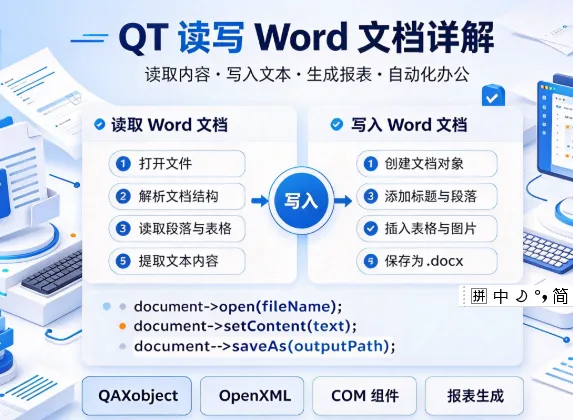
在实际开发中,经常需要通过程序操作 Microsoft Word 文档,比如自动生成报表、批量填充模板、读取文档内容等。在 Qt 中,主要有两种途径实现:
使用 QAxObject / QAxWidget 通过 COM/ActiveX 调用本地安装的 Word 使用第三方库(如 QXlsx 不适用、docx 库、LibreOffice UNO 等)直接解析 DOCX
本文重点讲解 第一种方式:通过 Qt 的 ActiveX 模块与 Windows 上的 Word 应用程序交互。Qt 5.11 之后对 QAxObject 模块的支持较为完善,是 Windows 平台下比较实用的方案。
⚠️ 注意:这种方式依赖本机安装 Microsoft Word,且只能在 Windows 平台上运行。跨平台需求建议使用 DOCX 解析库。
二、核心知识点
1. QAxWidget 与 QAxObject
QAxWidget | |
QAxObject |
要在 .pro 文件中启用 AxContainer 模块:
QT += axcontainer
2. 通过 CLSID 创建 Word 应用
QAxObject *wordApp = new QAxObject("Word.Application");
"Word.Application" 是 Word 的 ProgID,等同于 Word.Application.16 之类版本化的 ID。
3. 常用对象层级
Word.Application
    └── Documents (集合)
            └── Document (单个文档)
                    ├── Content (文档内容)
                    ├── Range (文本范围)
                    ├── Bookmarks (书签)
                    └── Tables (表格)
三、代码示例
示例 1:写入一个新 Word 文档
#include<QAxObject>
#include<QDebug>

voidwriteWord()
{
// 1. 启动 Word 应用
    QAxObject *wordApp = new QAxObject("Word.Application");
if (!wordApp || wordApp->isNull()) {
        qDebug() << "无法启动 Word,请检查是否安装!";
return;
    }
    wordApp->setProperty("Visible", false); // 后台运行

// 2. 新建文档
    QAxObject *documents = wordApp->querySubObject("Documents");
    documents->dynamicCall("Add()"); // 新建
    QAxObject *document = wordApp->querySubObject("ActiveDocument");

// 3. 获取 Range 并写入文本
    QAxObject *range = document->querySubObject("Range()");
    range->dynamicCall("SetText(QString)", "Hello, Qt Word 写入测试!");
    range->dynamicCall("SetBold(int)", 1);       // 加粗
    range->dynamicCall("SetFontSize(int)", 16);  // 字号

// 追加一段普通文本
    QAxObject *range2 = document->querySubObject("Range()");
    range2->dynamicCall("Collapse(int)", 0);     // 折叠到末尾
    range2->dynamicCall("InsertAfter(QString)",
"\n这是第二段普通文本。");

// 4. 另存为
    document->dynamicCall("SaveAs(const QString&)",
                          QString("D:/test_output.docx"));

// 5. 关闭文档并退出 Word
    document->dynamicCall("Close()");
    wordApp->dynamicCall("Quit()");

delete range2;
delete range;
delete document;
delete documents;
delete wordApp;

    qDebug() << "写入完成!";
}
示例 2:读取 Word 文档内容
QString readWord(const QString &filePath)
{
    QAxObject *wordApp = new QAxObject("Word.Application");
if (!wordApp || wordApp->isNull())
return QString();

    wordApp->setProperty("Visible", false);

    QAxObject *documents = wordApp->querySubObject("Documents");
// 打开指定文档
    documents->dynamicCall("Open(const QString&)", filePath);

    QAxObject *document = wordApp->querySubObject("ActiveDocument");
if (!document) {
        wordApp->dynamicCall("Quit()");
delete documents;
delete wordApp;
return QString();
    }

    QAxObject *content = document->querySubObject("Content");
    QString text = content->dynamicCall("Text()").toString();

    document->dynamicCall("Close()");
    wordApp->dynamicCall("Quit()");

delete content;
delete document;
delete documents;
delete wordApp;

return text;
}
示例 3:基于模板填充书签(报表常用)
假设你有一个 template.docx,里面预留了书签 {Name}、{Date}:
voidfillTemplate(const QString &tplPath,
const QString &savePath,
const QMap<QString, QString> &values)
{
    QAxObject *wordApp = new QAxObject("Word.Application");
    wordApp->setProperty("Visible", false);

    QAxObject *documents = wordApp->querySubObject("Documents");
    documents->dynamicCall("Open(const QString&)", tplPath);

    QAxObject *document = wordApp->querySubObject("ActiveDocument");
    QAxObject *bookmarks = document->querySubObject("Bookmarks");

for (auto it = values.begin(); it != values.end(); ++it) {
        QAxObject *bm = bookmarks->querySubObject("Item(const QString&)", it.key());
if (bm) {
            QAxObject *range = bm->querySubObject("Range");
            range->dynamicCall("SetText(QString)", it.value());
delete range;
delete bm;
        }
    }

    document->dynamicCall("SaveAs(const QString&)", savePath);
    document->dynamicCall("Close()");
    wordApp->dynamicCall("Quit()");

delete bookmarks;
delete document;
delete documents;
delete wordApp;
}
调用示例:
QMap<QString, QString> data;
data["Name"] = "张三";
data["Date"] = "2024-06-01";
fillTemplate("D:/template.docx", "D:/output.docx", data);
示例 4:在文档中插入表格
voidinsertTable(QAxObject *document, int rows, int cols)
{
    QAxObject *tables = document->querySubObject("Tables");
// 在文档末尾插入表格
    QAxObject *range = document->querySubObject("Range()");
    range->dynamicCall("Collapse(int)", 0); // 折叠到结尾

    QAxObject *table = tables->querySubObject(
"Add(QAxObject*, int, int)", range, rows, cols);

// 填充数据
for (int r = 1; r <= rows; ++r) {
for (int c = 1; c <= cols; ++c) {
            QAxObject *cell = table->querySubObject(
"Cell(int, int)", r, c);
            QAxObject *cellRange = cell->querySubObject("Range");
            cellRange->dynamicCall("SetText(QString)",
                QString("R%1C%2").arg(r).arg(c));
delete cellRange;
delete cell;
        }
    }

delete table;
delete range;
}
四、常见问题与注意事项
1. COM 初始化与线程
Qt 的 QAxObject 内部会自动调用 CoInitialize,但在非主线程使用 ActiveX 可能存在问题。推荐在主线程中调用,或使用 QAxObject 时确保线程已初始化为 STA 模式。
2. 释放资源顺序
必须按从内到外的顺序 delete:先删除 Range、Content,再删除 Document、Documents,最后删除 Application。忘记 Quit()会导致WINWORD.EXE进程残留在任务管理器里。
3. 常量参数问题
dynamicCall 中调用带 int 枚举的方法时,不能直接传 Qt 的类型,需要显式转换:
range->dynamicCall("Collapse(int)", 0); // 0 = wdCollapseEnd
常用的 Word 常量:
wdCollapseStart | ||
wdCollapseEnd | ||
wdFormatDocumentDefault | ||
wdFormatPDF |
4. 异常处理
dynamicCall 返回 QVariant,调用失败时可能返回空。建议对 querySubObject 的返回值做空指针判断:
QAxObject *doc = wordApp->querySubObject("ActiveDocument");
if (!doc) { /* 处理错误 */ }
5. 保存为 PDF
Word 本身可以另存为 PDF:
document->dynamicCall("SaveAs(const QString&, int)",
"D:/output.pdf", 17); // 17 = wdFormatPDF
6. 版本差异
不同 Word 版本 ProgID 略有不同:
Word.Application(自动匹配最新版)Word.Application.16(Office 2016+)Word.Application.15(Office 2013)
推荐用 Word.Application 让系统自动选择。
五、性能优化建议
批量操作前关闭屏幕刷新: wordApp->setProperty("ScreenUpdating", false);操作完再一次性保存,避免频繁 Save。尽量用 Range 而不是逐字 setText,效率更高。 复用 Word 实例:批量处理多个文档时,同一个 wordApp打开/关闭多个 Document。
六、替代方案简述
七、总结
使用 Qt 的 QAxObject 操作 Word 是 Windows 平台上一种成熟、功能完整的方案。核心步骤是:
new QAxObject("Word.Application")启动 WordDocuments->Open/Add打开或新建文档通过 Range、Content、Bookmarks、Tables操作内容SaveAs保存,Close关闭,Quit退出
只要注意 资源释放顺序、COM 线程问题 和 常量取值,就能稳定地实现 Word 文档的读写与模板填充,广泛应用于报表生成、合同批量生成、文档内容提取等场景。