夜雨聆风
夜雨聆风OpenClaw巨费 Token 的原因终于找到了!导出完整 System Prompt 才发现真相🦞
在研究 AI Agent 的实现时,一个非常重要但经常被忽视的部分就是 System Prompt(系统提示词)。
System Prompt 决定了:
Agent 的能力边界 工具调用规则 交互格式 行为约束
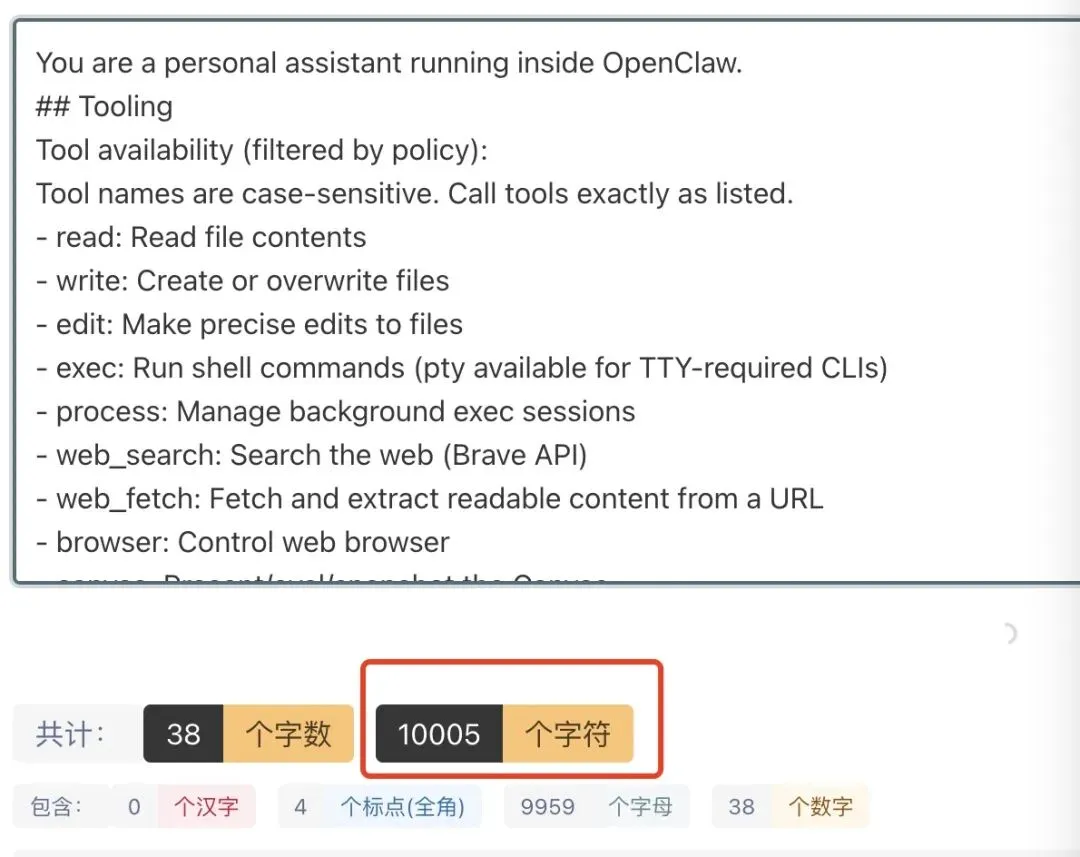
在 OpenClaw 中,这部分逻辑被设计得非常完整,而且还提供了 导出当前会话 Prompt 的功能,自己抓下来系统提示词之后发现有1w+字,太费token了!
本文将带你完整了解:
1️⃣ OpenClaw 系统 Prompt 在哪里
2️⃣ 如何导出完整 Prompt
3️⃣ /export 的实现原理
4️⃣ 为什么导出的 HTML 会损坏
5️⃣ 如何可视化展示
一、OpenClaw 的 System Prompt 在哪里
OpenClaw 的系统提示词核心代码在:
src/agents/system-prompt.ts这个文件负责生成 最终喂给大模型的 System Prompt。
核心职责包括:
Agent 行为定义 Tool 使用规则 输出格式规范 安全策略 上下文信息
简化后的结构大致如下:
exportfunctioncreateSystemPrompt(config: OpenClawConfig) {return`You are OpenClaw, an AI agent.You can use tools to interact with the system.Follow these rules:- Use tools when necessary- Return structured output- Never fabricate tool results `;}在真正的代码中,这个 Prompt 会被拼接大量内容,例如:
工具列表 工具调用格式 安全策略 工作目录信息 shell 使用规范
最终形成一个 非常长的 System Prompt。
实际运行时可能达到:
System prompt: 20,000+ characters二、如何导出 OpenClaw 的系统提示词
OpenClaw 提供了两个非常有用的调试命令:
/export/export-session执行后会导出一个 HTML 文件,例如:
openclaw-session-c5ac6ee5-2026-03-11T15-42-45.html终端输出:
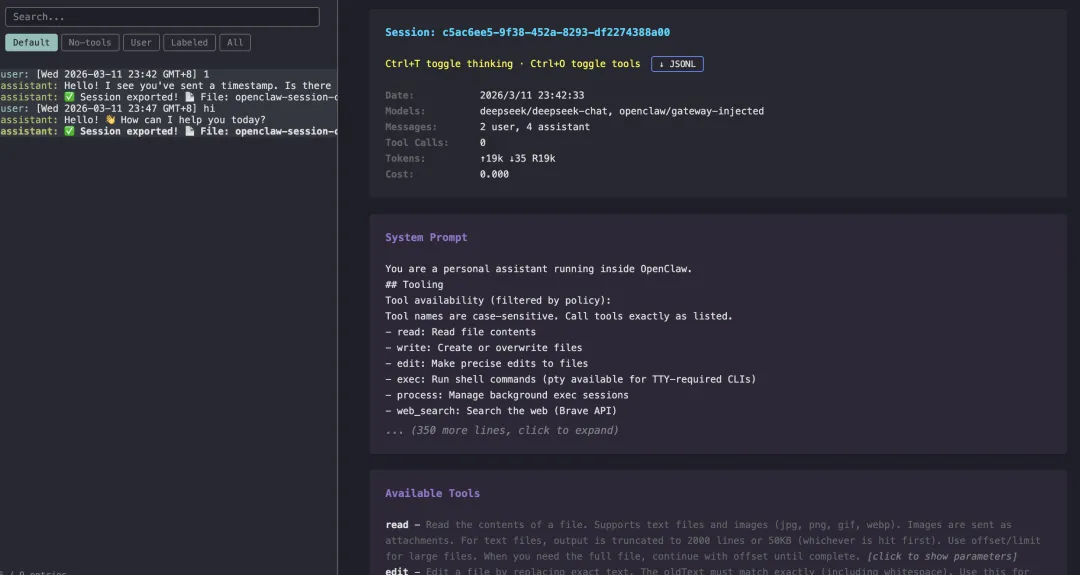
Session exported!File: openclaw-session-xxxx.htmlEntries: 5System prompt: 20,738 charsTools: 54这个 HTML 文件包含:
System Prompt 用户消息 Assistant 回复 Tool 调用记录
本质上是一个 完整的会话回放页面。
三、/export 的实现原理
/export-session 的实现代码在:
src/auto-reply/reply/commands-export-session.ts核心逻辑非常简单:
第一步:读取 HTML 模板
dist/export-html/template.html第二步:读取 JS 资源
包括:
marked.js(Markdown 渲染) highlight.js(代码高亮) template.js(页面逻辑)
第三步:将 JS 注入 HTML
关键代码:
return template .replace("{{MARKED_JS}}", markedJs) .replace("{{HIGHLIGHT_JS}}", hljsJs) .replace("{{JS}}", templateJs)也就是说:
HTML 模板中存在占位符:
{{MARKED_JS}}{{HIGHLIGHT_JS}}{{JS}}生成 HTML 时会被替换成真实 JS。
最终得到一个 完全自包含的 HTML 文件。
四、为什么导出的 HTML 会损坏
很多用户在导出 HTML 后会遇到错误:
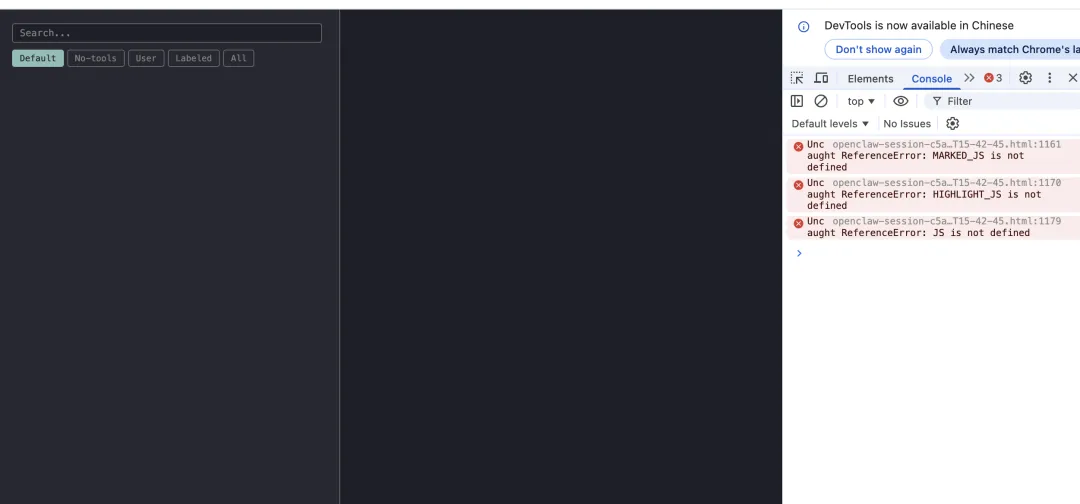
打开页面后浏览器 Console 报错:
Uncaught ReferenceError: MARKED_JS is not definedUncaught ReferenceError: HIGHLIGHT_JS is not definedUncaught ReferenceError: JS is not defined页面也无法渲染。
问题的根源在于:
HTML 模板被 Prettier 自动格式化破坏了。
原本正确的模板应该是:
<script>{{MARKED_JS}}</script><script>{{HIGHLIGHT_JS}}</script><script>{{JS}}</script>但被格式化后变成了:
<script> { { MARKED_JS; } }</script>这导致:
.replace("{{MARKED_JS}}", markedJs)找不到匹配字符串。
于是 JS 根本没有被注入。
五、如何修复 /export HTML Bug
由于是最新出现的bug,所以很多人会遇到!修复非常简单,两种方案:
方案1: 升级最新版本。
方案2: 按照下面修改文件。
相关pr:
https://github.com/openclaw/openclaw/pull/24557/changes
dist/export-html/template.html找到错误代码:
<script> { { MARKED_JS; } }</script>修改为:
<script>{{MARKED_JS}}</script><script>{{HIGHLIGHT_JS}}</script><script>{{JS}}</script>最终模板应该是:
<body><divid="app"></div><script>{{MARKED_JS}}</script><script>{{HIGHLIGHT_JS}}</script><script>{{JS}}</script></body>六、如果是 npm 全局安装的 OpenClaw
如果你是通过:
npm install -g openclaw安装的,那么模板文件路径通常是:
/xxx/node_modules/openclaw/dist/export-html/template.html或者(nvm 用户):
~/.nvm/versions/node/<version>/lib/node_modules/openclaw/dist/export-html/template.html可以通过下面命令找到:
npm root -g然后进入:
<node_modules>/openclaw/dist/export-html/template.html进行修改。
七、修复后的效果
重新执行:
/export生成的 HTML 页面将正常显示:
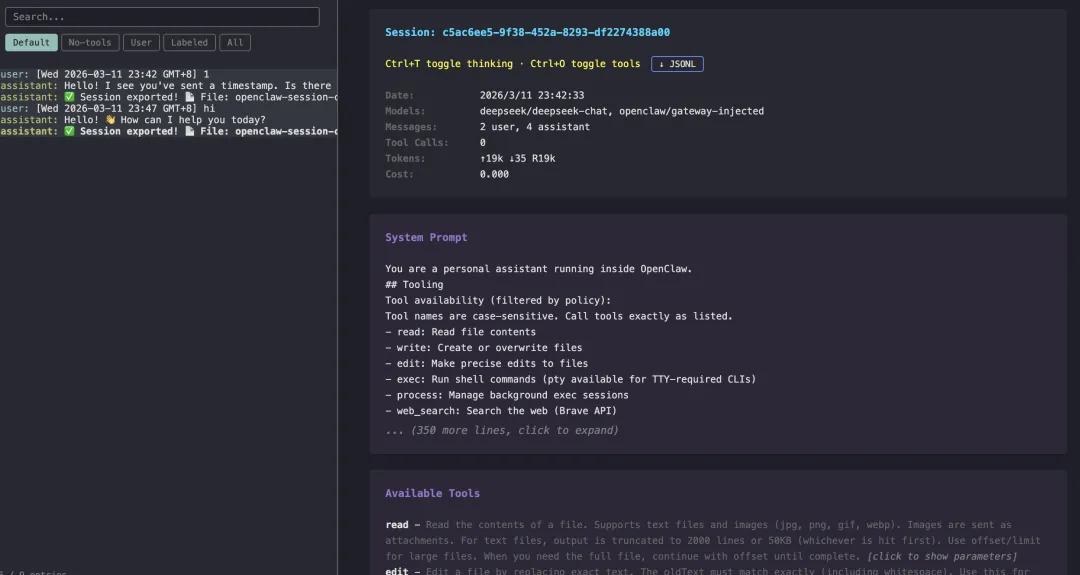
Markdown 渲染 代码高亮 Tool 调用 System Prompt
整个会话可以完整回放。
AI时代已来,加速学习!
学习更多干货,欢迎关注转发!