ARTICLE · 1103887
OpenAI 发布全天候智能体 dots
Dots are remarkably capable, always-on agents built to handle everything.
dots 是能力出众的常驻智能体(always-on agent),为接手一切而生。
◆ 一、头号发布 · The headline announcement
DevDay 2026 is our biggest yet, with more than 20 major announcements across ChatGPT, Codex, our models, and entirely new forms of working with AI.
DevDay 2026 是我们迄今规模最大的一届开发者大会,带来二十多项重要发布,横跨 ChatGPT、Codex、我们的模型,以及与 AI 协作的全新方式。
They're a whole new way to work with AI—one that gets to know what matters to you, is always working on your behalf, and takes important work off your plate so you get more of your time and attention back.
这是一种与 AI 协作的全新方式——它会渐渐懂得什么对你重要,始终代你行事,把重要的工作从你手上接走,让你的时间与注意力回到你自己身上。
◆ 二、它是什么 · What dots are
Dots are frontier intelligence that have your back. Powered by GPT-6 Astra, they have their own cloud computer, learn from feedback over time, and can work towards your goals 24/7.
dots 是站在你这边的尖端智能。它由 GPT-6 Astra 驱动,拥有自己的云端电脑,能从反馈中长期学习,一天二十四小时朝着你的目标工作。
Through our ecosystem of plugins, they can readily connect to over 4,000 apps, giving them the tools to help wherever you need them.
借助我们的插件生态,dots 可以轻松连接四千多个应用,在你需要的地方都有趁手的工具。
◆ 三、随叫随到 · Always within reach
Your dot is always within reach, whether it is through ChatGPT, Slack, or Teams.
无论在 ChatGPT、Slack 还是 Teams,你的 dot 总是一叫就到。
You can ask questions, explore ideas, and give feedback along the way; or you can simply hop on a voice call when you need to talk something out.
你可以随时提问、聊想法、给反馈;需要把事情说开时,直接发起语音通话就行。
The more you work together, the more your dot learns your preferences, how you think, and what good looks like to you.
你们协作得越多,你的 dot 就越了解你的偏好、你的思维方式,以及在你眼里什么才算「好」。
The magic of dots is when they bring you work done the way you would do it, sometimes before you even think to ask. With dots alongside you, ambitious ideas and projects you haven't had the time or support to pursue start to feel achievable.
dots 的魔力在于:它把活干完,用的是你会用的做法,有时甚至在你想到要开口之前。有 dots 在身边,那些一直没时间和人手去做的雄心与项目,开始变得够得着。
◆ 四、它怎么干活 · How dots work
Dots can do nearly anything using their own cloud computer, their own browser, and the apps you've connected.
dots 用自己的云端电脑、自己的浏览器和你连接的应用,几乎什么都能做。
You can open your dot's computer at any time to inspect its work. Dots can connect to other devices in addition to their own and you can also give your dot permission to connect and use your laptop, where it can then be useful directly alongside you.
你随时可以打开 dot 的电脑查看它的进展。除了自己的设备,dots 还能连接别的设备——你也可以授权它连上并使用你的笔记本,让它在你的身边直接帮上忙。
Your dot can take a project and run with it, even while it's working on several others. You can keep bringing it new tasks and ideas without having to juggle separate threads or direct every step.
你的 dot 可以接下一个项目独立推进,哪怕它同时在忙另外几件。你可以不断把新任务、新想法交给它,不必在多条线程间来回切换,也不用事事盯着。
◆ 五、实例 · Dots in practice
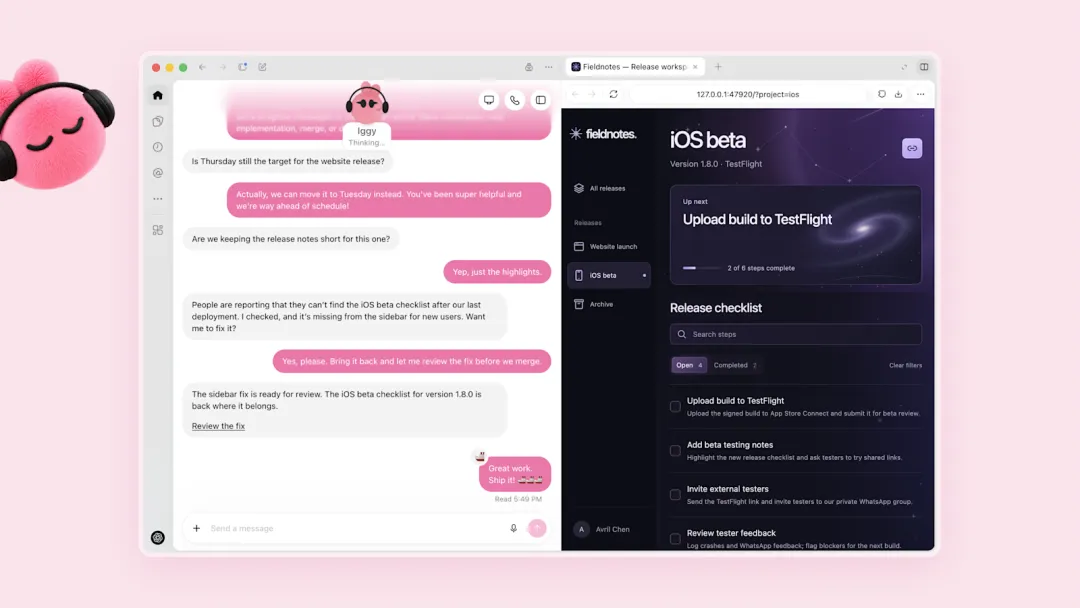
官方示意:dot「Iggy」在发布工作台旁准备一份 iOS 测试清单修复(OpenAI)
Inside OpenAI, we're getting a glimpse of what work looks like when intelligence is always working by your side. A bug appears in Slack, and dots immediately start investigating.
在 OpenAI 内部,我们得以一窥「智能始终在你身边工作」是什么样子。Slack 里出现一个 bug,dots 立刻开始排查。
A new design arrives, and dots turn it into a working app while the team focuses on customer feedback. A planning cycle gets underway, and dots keep everyone moving in sync toward the deadline.
一份新设计稿到位,dots 把它变成能跑的应用,团队则专心处理用户反馈。一轮规划周期启动,dots 让每个人朝着截止日保持同步。
Outside OpenAI, an early tester's dot noticed he'd forgotten to invoice a publication, prepared the invoice, and sent it after his approval.
在 OpenAI 之外,一位早期测试者的 dot 注意到他忘了给一家刊物开发票,于是把发票准备好,经他确认后发了出去。
◆ 六、主动但不越界 · Proactive, under your control
When you aren't actively working with it, your dot looks for ways to help in the background. We call this "proactive research".
当你没有在跟它协作时,你的 dot 会在后台寻找帮忙的机会。我们称之为「主动研究」(proactive research)。
It does this by using the apps you've already connected with tools that are restricted to be read-only, which means that they can't send messages, change app content, or control your browser or computer.
它用的是你已经连接的应用,且工具被限制为只读——也就是说,它不能发消息、不能改动应用内容,也不能控制你的浏览器或电脑。
Each dot works on its own cloud computer, while your computer and its contents stay separate unless you choose to connect it. For signing into supported websites, dots can use saved passwords without exposing them to the model.
每个 dot 都在自己的云端电脑上工作;你的电脑与其中的内容保持隔离,除非你主动选择连接。在受支持的网站登录时,dots 可以使用已保存的密码,而不把密码暴露给模型。
Security safeguards built into dots help defend against malicious instructions and monitor for potentially harmful behavior. If our monitoring system detects a safety concern, it can pause or stop the dot's work.
dots 内置的安全防护用于抵御恶意指令,并监测潜在的有害行为。一旦监测系统发现安全隐患,它可以暂停或终止 dot 正在进行的工作。
Dots start with built-in rules for when to act independently and when to ask for approval. Custom Rules let you allow specific actions, require approval, or block them.
dots 出厂即带内置规则,规定何时独立行动、何时请求批准。自定义规则(Custom Rules)让你允许特定操作、要求批准或直接禁止。
Built-in safety requirements always apply and you can follow progress, including background work, in Activity View and redirect dots as needed.
内置安全要求始终生效;你可以在活动视图(Activity View)里跟进包括后台工作在内的所有进展,并随时把 dots 拉回正轨。
Dots use auto-review to check actions that could affect your accounts or share information against your instructions, Custom Rules, and safety requirements. This helps determine what work can proceed, what needs approval, and what you must do yourself.
dots 用自动审查(auto-review)比对你的指示、自定义规则与安全要求,检查那些可能影响你的账户或对外分享信息的操作,从而判断哪些工作可以直接进行、哪些需要批准、哪些必须由你本人完成。
Certain sensitive tasks, such as changing a password, always stay with you.
某些敏感任务——比如修改密码——永远留在你手里。
Dots can still make mistakes, so always review consequential work.
dots 仍会出错,所以重要的工作成果请务必亲自过目。
We don't use content from ChatGPT Business, Enterprise, or Edu workspaces to improve our models by default.
默认情况下,我们不使用 ChatGPT Business、Enterprise 或 Edu 工作区的内容来改进我们的模型。
On personal ChatGPT plans, you can control whether dots' conversations and work are used to improve our models. We don't train directly on proactive research or your dot's notes to itself.
在个人版 ChatGPT 套餐里,你可以自行控制 dots 的对话与工作内容是否用于模型改进。对于「主动研究」和 dot 写给自己的备忘,我们不作直接训练。
◆ 七、组织里的专员 dots · Specialist dots
Your dot works on your behalf; specialist dots take on dedicated responsibilities within your organization. Your company sets up each dot with its own identity, credentials, and access to the systems it needs to complete its tasks.
你的 dot 为你个人办事;专员 dots(specialist dots)则在你的组织里承担专门职责。公司为每个 dot 配置独立的身份、凭证,以及完成任务所需的系统权限。
We're building on lessons from early testing inside OpenAI across procurement, invoice processing, email marketing, customer support, and commercial contracting.
我们的设计吸收了 OpenAI 内部早期测试的经验,覆盖采购、发票处理、邮件营销、客户支持与商务合同等领域。
We're also working with Microsoft to integrate specialist dots with their enterprise governance and security controls in Agent 365. The goal is to let businesses manage dots through the Microsoft tools they already use.
我们还在与微软合作,把专员 dots 接入 Agent 365 中的企业治理与安全管控。目标是让企业用已经熟悉的微软工具来管理 dots。
◆ 八、现在怎么用上 · Get started
Dots are rolling out today in ChatGPT to Pro and Business Premium users in eligible markets. Enterprise users (including Edu and Healthcare) can try the beta when their workspace admin enables it.
dots 即日起在 ChatGPT 开推,面向符合条件市场的 Pro 与 Business Premium 用户。Enterprise 用户(含 Edu 与 Healthcare)在工作区管理员开启后可试用测试版。
Your first dot is included in your Pro or Business Premium plan at no extra cost. It's available 24/7 to talk, help you think, and stay on top of what matters to you.
你的第一个 dot 已包含在 Pro 或 Business Premium 套餐里,不额外收费。它一天二十四小时都在,可以陪你聊、帮你理思路、盯住对你重要的事。
Your plan also includes an allowance for deeper work, with extended limits for the first month after launch.
套餐还包含用于更深度工作的额度;上线后的第一个月,额度有所放宽。
Conversations with your dot don't count toward your ChatGPT usage limits. When you ask your dot to start or manage tasks in Codex or ChatGPT Work, those tasks count toward your usage limits as usual.
与 dot 的对话不计入你的 ChatGPT 用量额度;当你让 dot 在 Codex 或 ChatGPT Work 里启动或管理任务时,这些任务照常计入用量。
To get started, create your first dot in the ChatGPT desktop app or your desktop browser, connect your apps, and let it introduce itself. After the initial setup, you'll be able to message it in the ChatGPT mobile app.
上手很简单:在 ChatGPT 桌面应用或桌面浏览器里创建你的第一个 dot,连好你的应用,让它作个自我介绍。初始设置完成后,你就可以在 ChatGPT 手机应用里给它发消息了。
来源:OpenAI ·《Introducing dots》;英文以原文为准