ARTICLE · 1317730
【YOLO 行人进出计数源码】AI 跨线客流统计,支持自定义检测线
【YOLO 行人进出计数源码】AI 跨线客流统计,支持自定义检测线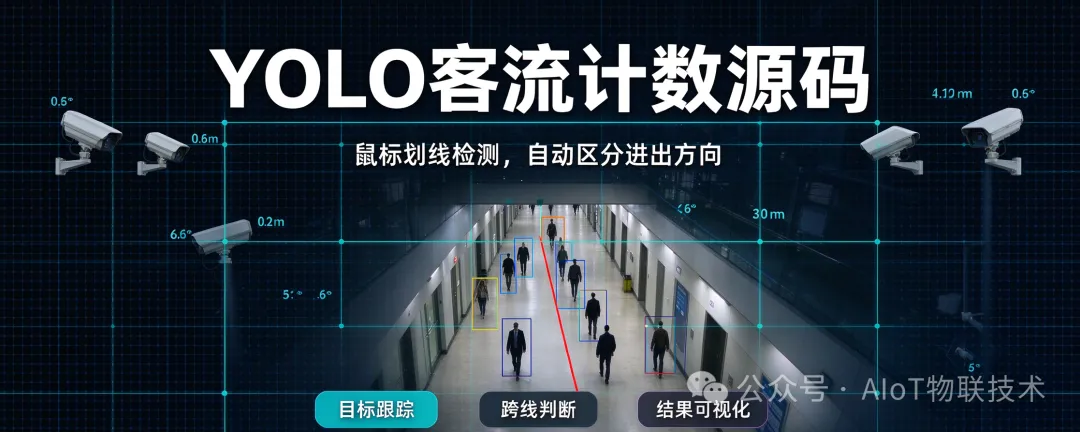
开箱即用|YOLO AI 行人跨线客流计数源码
做智慧园区、工地安防、商超客流统计、计算机视觉毕设的朋友,这套视觉计数方案很实用!
基于 YOLOv8 开发,支持自定义跨线检测,自动识别行人、区分进出方向,统计通行流量。很多安防、AI 视觉项目,都需要这类客流统计能力:门口、通道、楼道,统计人员进出数量。
关注
重播 分享 赞
这套源码的核心能力:
📌 支持鼠标自由绘制计数线,检测线位置按需调整,适配不同通道场景
📌 自带目标跟踪逻辑,稳定绑定行人 ID,减少重复计数、漏统计问题
📌 实时可视化:行人框、中心点、红色检测线、进出数量实时展示
📌 内置中文 UI 界面,同时搭配语音播报,有人进出实时提示
📌 可对接摄像头实时采集画面,也支持导入本地视频,用来提前调试、方案演示
import cv2import numpy as npfrom PIL import Image, ImageDraw, ImageFontfrom ultralytics import YOLOimport pyttsx3import threadingimport os# ==================== 配置区【这里切换源】====================SOURCE = 0 # 摄像头#SOURCE = "peopleinout.mp4" # 本地视频文件OUTPUT_VIDEO_PATH = "result_noaudio.mp4"TITLE = "AI进出计数系统"WINDOW_NAME = "AI_Counter"line_points = []count_line = NoneIN_COUNT = 0OUT_COUNT = 0track_history = {}# track:pid : (cx, cy, last_zone)# zone 0=左区,1=右区pid_counter = 1# 缓冲距离,抗抖动,单位像素BUFFER = 12# 最小框面积,过滤远处很小的人,根据画面调整!# 画面分辨率1280*720,推荐 350~600;4K画面调高MIN_BOX_AREA = 400model = YOLO("yolov8n.pt")speech_lock = threading.Lock()# ==================== 中文绘制 ====================def draw_chinese(img, text, x, y, color=(255, 255, 255), size=36):img_rgb = cv2.cvtColor(img, cv2.COLOR_BGR2RGB)pil_img = Image.fromarray(img_rgb)draw = ImageDraw.Draw(pil_img)try:font = ImageFont.truetype("simhei.ttf", size)except:font = ImageFont.truetype("msyh.ttc", size)draw.text((x, y), text, font=font, fill=color)return cv2.cvtColor(np.array(pil_img), cv2.COLOR_RGB2BGR)# ==================== 异步语音播报 ====================def async_speak(txt):def _run():with speech_lock:try:engine = pyttsx3.init()engine.setProperty('rate', 150)engine.setProperty('volume', 1.0)engine.say(txt)engine.runAndWait()del engineexcept Exception as e:print(f"语音播报异常: {e}")threading.Thread(target=_run, daemon=True).start()# ==================== 鼠标回调 ====================def mouse_cb(event, x, y, flags, param):global line_points, count_line, track_history, pid_counterif event == cv2.EVENT_LBUTTONDOWN:if len(line_points) < 2:line_points.append((x, y))print(f"✅ 拾取点:{x},{y}")if len(line_points) == 2 and count_line is None:count_line = (line_points[0], line_points[1])track_history.clear()pid_counter = 1print("✅ 计数线设置完成!")# 点到直线距离def point_dist_to_line(px, py, x1, y1, x2, y2):return abs((x2-x1)*(y1-py) - (y2-y1)*(x1-px)) / np.sqrt((x2-x1)**2 + (y2-y1)**2)# 判断点在中线的哪一侧def get_side(point, line_p1, line_p2):x, y = pointx1, y1 = line_p1x2, y2 = line_p2val = (x2 - x1) * (y - y1) - (y2 - y1) * (x - x1)return 0 if val < 0 else 1# ==================== 主程序 ====================def main():global IN_COUNT, OUT_COUNT, count_line, track_history, pid_counter, line_pointscap = cv2.VideoCapture(SOURCE)if not cap.isOpened():print("❌ 打开失败,请检查摄像头/视频路径!")returnfps = cap.get(cv2.CAP_PROP_FPS)w = int(cap.get(cv2.CAP_PROP_FRAME_WIDTH))h = int(cap.get(cv2.CAP_PROP_FRAME_HEIGHT))fourcc = cv2.VideoWriter_fourcc(*'mp4v')out = cv2.VideoWriter(OUTPUT_VIDEO_PATH, fourcc, fps, (w, h))cv2.namedWindow(WINDOW_NAME, cv2.WINDOW_NORMAL)cv2.setMouseCallback(WINDOW_NAME, mouse_cb)is_video_file = isinstance(SOURCE, str) and os.path.exists(SOURCE)# ========== 本地视频模式:停在第一帧,画线后空格启动 ==========if is_video_file:ret, first_frame = cap.read()if not ret:returnwhile True:frame = first_frame.copy()if len(line_points) == 1:cv2.circle(frame, line_points[0], 6, (0,0,255), -1)if count_line:cv2.line(frame, count_line[0], count_line[1], (0, 0, 255), 4)else:for p in line_points:cv2.circle(frame, p, 6, (0, 0, 255), -1)frame = draw_chinese(frame, TITLE, (w - 280) // 2, 20, (255, 255, 0), 42)frame = draw_chinese(frame, "请绘制计数线,空格开始检测 | r重置", 30, 80, (0, 255, 0), 32)cv2.imshow(WINDOW_NAME, frame)key = cv2.waitKey(1) & 0xFFif key == ord(' '):if count_line is not None:print("▶ 开始检测")breakelse:print("⚠ 请先画计数线!")if key == ord('r'):line_points = []count_line = NoneIN_COUNT = 0OUT_COUNT = 0track_history = {}print("🔄 重置画线和计数!")if key == ord('q'):cap.release()out.release()cv2.destroyAllWindows()return# ========== 摄像头模式:直接实时流,随时画线 ==========else:print("📷 摄像头模式,点击两点画线,r重置,q退出")# 循环检测while True:ret, frame = cap.read()if not ret:breakdraw_frame = frame.copy()if len(line_points) == 1:cv2.circle(draw_frame, line_points[0], 6, (0,0,255), -1)if count_line:cv2.line(draw_frame, count_line[0], count_line[1], (0, 0, 255), 4)results = model(frame, classes=0, conf=0.35, verbose=False)current_people = []for res in results:for box in res.boxes:x1, y1, x2, y2 = map(int, box.xyxy[0])bw = x2 - x1bh = y2 - y1area = bw * bh# 过滤过小框if area < MIN_BOX_AREA:continuecx = (x1 + x2) // 2cy = (y1 + y2) // 2current_people.append((cx, cy, x1, y1, x2, y2))new_tracks = {}for cx, cy, x1, y1, x2, y2 in current_people:best_id = Nonemin_dist = 250for pid, (px, py, last_zone) in track_history.items():dist = np.hypot(cx - px, cy - py)if dist < min_dist:min_dist = distbest_id = pidif count_line is None:if best_id is not None:new_tracks[best_id] = (cx, cy, -1)else:new_tracks[pid_counter] = (cx, cy, -1)pid_counter += 1cv2.rectangle(draw_frame, (x1, y1), (x2, y2), (0, 255, 0), 2)cv2.circle(draw_frame, (cx, cy), 5, (0, 0, 255), -1)continuenow_side = get_side((cx, cy), count_line[0], count_line[1])dist_line = point_dist_to_line(cx, cy, count_line[0][0], count_line[0][1], count_line[1][0], count_line[1][1])if dist_line < BUFFER:if best_id is not None:new_tracks[best_id] = (cx, cy, track_history[best_id][2])else:new_tracks[pid_counter] = (cx, cy, -1)pid_counter += 1cv2.rectangle(draw_frame, (x1, y1), (x2, y2), (0, 255, 0), 2)cv2.circle(draw_frame, (cx, cy), 5, (0, 0, 255), -1)continuecurrent_zone = now_sideif best_id is not None:last_zone = track_history[best_id][2]if last_zone != -1 and current_zone != last_zone:if last_zone == 0 and current_zone == 1:IN_COUNT += 1async_speak("进去加1")elif last_zone == 1 and current_zone == 0:OUT_COUNT += 1async_speak("出去加1")new_tracks[best_id] = (cx, cy, current_zone)else:new_tracks[pid_counter] = (cx, cy, current_zone)pid_counter += 1cv2.rectangle(draw_frame, (x1, y1), (x2, y2), (0, 255, 0), 2)cv2.circle(draw_frame, (cx, cy), 5, (0, 0, 255), -1)track_history = new_tracksdraw_frame = draw_chinese(draw_frame, TITLE, (w - 280) // 2, 20, (255, 255, 0), 42)draw_frame = draw_chinese(draw_frame, f"IN:{IN_COUNT}", 30, 85, (0, 255, 0), 38)draw_frame = draw_chinese(draw_frame, f"OUT:{OUT_COUNT}", 180, 85, (255, 0, 0), 38)draw_frame = draw_chinese(draw_frame, "r=重置 | q=退出", 30, 120, (200, 200, 200), 28)out.write(draw_frame)cv2.imshow(WINDOW_NAME, draw_frame)key = cv2.waitKey(1) & 0xFFif key == ord('q'):breakif key == ord('r'):line_points = []count_line = NoneIN_COUNT = 0OUT_COUNT = 0track_history = {}print("🔄 重置画线和计数!")cap.release()out.release()cv2.destroyAllWindows()print(f"✅ 处理完成,输出:{OUTPUT_VIDEO_PATH}")if __name__ == "__main__":main()
💡 技术说明:
基于 YOLOv8 + OpenCV 实现,轻量好部署,不需要复杂的跟踪框架,上手门槛低。
本地视频模式仅用于效果调试、方案演示;项目落地时,直接切换成摄像头实时采集即可。
适合这些场景:
🔹 计算机相关毕设、课程设计(目标检测、智能安防方向)
🔹 园区、工地、商铺通道客流统计
🔹 安防 AI 算法演示、项目投标方案展示
🔹 学习 YOLO 目标跟踪、跨线判断的底层原理
运行步骤
安装依赖:ultralytics、opencv-python、numpy、Pillow、pyttsx3 调试演示:放入测试视频,命名 peopeinout.mp4,和脚本放在同一目录 运行程序,鼠标两点绘制检测线,空格启动检测,按 q 退出,导出标注视频 正式部署:修改代码读取源,直接接入摄像头实时画面
拿到源码后可以二次开发,适配工地、小区、写字楼等各类通道场景。
👉 关注我,持续分享 YOLO 数据集、视觉检测源码、AIoT 落地项目!