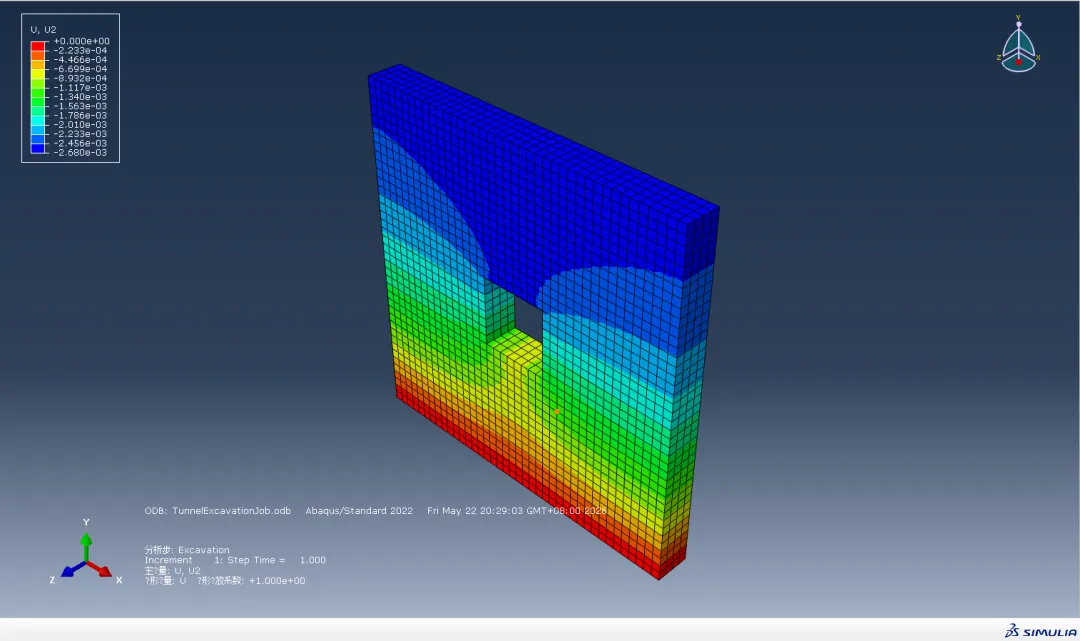
# -*- coding: mbcs -*-from abaqus import *from abaqusConstants import *import regionToolsetimport mesh# =========================================================# 参数# =========================================================modelName = 'TunnelModel'# 模型尺寸L = 20.0H = 20.0T = 2.0# 围岩参数(四级围岩参考值)density = 2400.0E = 1.5e9nu = 0.30cohesion = 0.8e6friction = 35.0dilation = 5.0# 网格尺寸meshSize = 0.5# =========================================================# 创建模型# =========================================================mdb.Model(name=modelName)model = mdb.models[modelName]# =========================================================# 创建土体# =========================================================s = model.ConstrainedSketch( name='SoilSketch', sheetSize=50.0)s.rectangle( point1=(-L/2.0, -H/2.0), point2=(L/2.0, H/2.0))soilPart = model.Part( name='Soil', dimensionality=THREE_D, type=DEFORMABLE_BODY)soilPart.BaseSolidExtrude( sketch=s, depth=T)# =========================================================# 材料# =========================================================mat = model.Material(name='Rock')# 密度mat.Density(table=((density,),))# 弹性mat.Elastic(table=((E, nu),))# Mohr-Coulombmat.MohrCoulombPlasticity( table=((friction, dilation),))mat.mohrCoulombPlasticity.MohrCoulombHardening( table=((cohesion, 0.0),))# =========================================================# 截面# =========================================================model.HomogeneousSolidSection( name='RockSection', material='Rock')cells = soilPart.cellsregion = regionToolset.Region(cells=cells)soilPart.SectionAssignment( region=region, sectionName='RockSection')# =========================================================# 网格划分# =========================================================soilPart.seedPart( size=meshSize, deviationFactor=0.1, minSizeFactor=0.1)elemType1 = mesh.ElemType( elemCode=C3D8R, elemLibrary=STANDARD)soilPart.setElementType( regions=(cells,), elemTypes=(elemType1,))soilPart.generateMesh()# =========================================================# 装配# =========================================================a = model.rootAssemblyinst = a.Instance( name='SoilInstance', part=soilPart, dependent=ON)a.regenerate()# =========================================================# 创建矩形隧道开挖区域# =========================================================# 隧道宽度TunnelWidth = 4.0# 隧道高度TunnelHeight = 4.0excElems = inst.elements.getByBoundingBox( xMin=-TunnelWidth/2.0, xMax= TunnelWidth/2.0, yMin=-TunnelHeight/2.0, yMax= TunnelHeight/2.0, zMin=-0.01, zMax=T+0.01)print 'Excavation elements number = ', len(excElems)a.Set( name='ExcavationSet', elements=excElems)# =========================================================# 分析步# =========================================================# 地应力平衡model.StaticStep( name='Geostatic', previous='Initial', nlgeom=ON)# 开挖model.StaticStep( name='Excavation', previous='Geostatic', nlgeom=ON)# =========================================================# 边界条件# =========================================================# 底部固定bottomFaces = inst.faces.getByBoundingBox( yMin=-H/2.0-0.01, yMax=-H/2.0+0.01)region = regionToolset.Region( faces=bottomFaces)model.DisplacementBC( name='BC-Bottom', createStepName='Initial', region=region, u1=0.0, u2=0.0, u3=0.0)# 左右约束 XleftFaces = inst.faces.getByBoundingBox( xMin=-L/2.0-0.01, xMax=-L/2.0+0.01)rightFaces = inst.faces.getByBoundingBox( xMin=L/2.0-0.01, xMax=L/2.0+0.01)region = regionToolset.Region( faces=leftFaces + rightFaces)model.DisplacementBC( name='BC-X', createStepName='Initial', region=region, u1=0.0)# 前后约束 ZfrontFaces = inst.faces.getByBoundingBox( zMin=-0.01, zMax=0.01)backFaces = inst.faces.getByBoundingBox( zMin=T-0.01, zMax=T+0.01)region = regionToolset.Region( faces=frontFaces + backFaces)model.DisplacementBC( name='BC-Z', createStepName='Initial', region=region, u3=0.0)# =========================================================# Step-1 重力# =========================================================model.Gravity( name='Gravity', createStepName='Geostatic', comp2=-9.81)# =========================================================# Step-2 开挖# =========================================================region = a.sets['ExcavationSet']model.ModelChange( name='Excavate', createStepName='Excavation', region=region, activeInStep=False)# =========================================================# 输出# =========================================================model.fieldOutputRequests['F-Output-1'].setValues( variables=( 'S', 'U', 'E', 'PE', 'PEEQ'))# =========================================================# 创建作业# =========================================================mdb.Job( name='TunnelExcavationJob', model=modelName, type=ANALYSIS, numCpus=4, numDomains=4)print '====================================='print 'Tunnel model created successfully!'print '====================================='mdb.jobs['TunnelExcavationJob'].submit()mdb.jobs['TunnelExcavationJob'].waitForCompletion()
 夜雨聆风
夜雨聆风