 夜雨聆风
夜雨聆风


OpenClaw系列第28课:多 Gateway 部署与远程访问
这是「OpenClaw 教程课程」第 28 课。 这一课是第六模块「安全与运维」的收束课。前面我们讲了权限、安全加固、日志排错,今天讲一个更偏架构和运维的问题:什么时候该用多个 Gateway,什么时候其实只需要多个 Node?
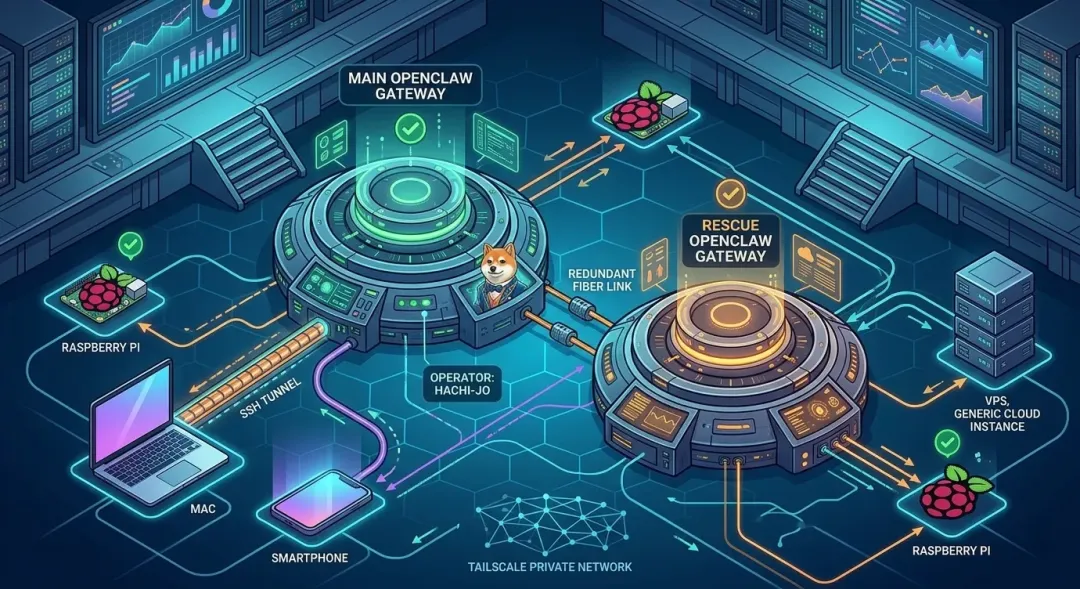
图:OpenClaw 默认建议一个 host 一个 Gateway;需要更强隔离或救援通道时,可以用不同 profile、不同端口、不同状态目录运行多个 Gateway。
很多人搭到后面,会自然冒出一个想法:
我能不能多开几个 Gateway?
比如:
-
一个 Gateway 给自己用 -
一个 Gateway 给家人用 -
一个 Gateway 专门做救援 bot -
一个 Gateway 跑在 VPS -
一个 Gateway 跑在家里 Mac -
一个 Gateway 接 Telegram -
一个 Gateway 接 WhatsApp -
一个 Gateway 专门跑浏览器自动化
这些想法不一定错。
但新手最容易把三个概念混在一起:
多 Agent多 Node多 Gateway它们不是一回事。
这一课我们先把边界讲清楚,再讲怎么安全地做多 Gateway 和远程访问。
一、先说结论:大多数人不需要多 Gateway
OpenClaw 文档里说得很直接:
Most setups should use one Gateway.
原因是:
一个 Gateway 已经可以处理多个消息连接和多个 Agent。
一个 Gateway 可以负责:
-
Telegram -
WhatsApp -
Discord -
Slack -
Signal -
WebChat -
多个 Agent -
多个会话 -
多个 Node -
cron / heartbeat / hooks -
browser / canvas / tools
所以大多数个人用户,不需要一开始就上多 Gateway。
更推荐的默认模型是:
一个长期运行的 Gateway多个 Agent多个 Node多个 channel也就是:
能用 Agent / Node / profile 隔离解决的,不要先拆 Gateway。
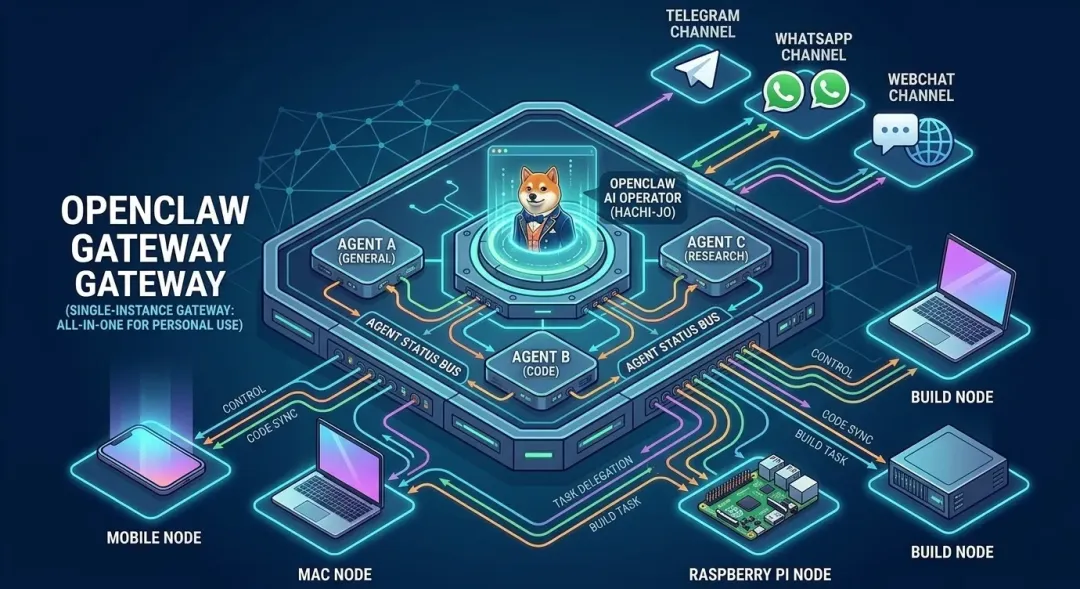
图:大多数个人部署,一个 Gateway 就可以连接多个 channel、多个 Agent 和多个 Node。
二、Gateway、Agent、Node 到底怎么分工?
先复习三句话。
Gateway 是中枢
Gateway 负责:
-
连接消息平台 -
管理 WebSocket 控制面 -
保存状态和会话 -
管理 pairing -
调度 Agent -
分发工具调用 -
接收 Node 连接
Agent 是工作人格 / 工作配置
Agent 负责:
-
使用某个模型 -
使用某套工具策略 -
使用某个 workspace -
按某种提示词和任务风格工作
你可以有多个 Agent。
比如:
-
tutor agent -
ops agent -
coding agent -
household agent
但它们仍然可以共用一个 Gateway。
Node 是外围能力
Node 负责:
-
手机摄像头 -
Mac 屏幕 -
树莓派本地脚本 -
headless node host 的 system.run -
浏览器所在机器的本地能力
Node 不是 Gateway。
它只是连接到 Gateway 的外围能力提供者。
一句话总结:
Gateway 管入口和编排,Agent 管任务风格,Node 管设备能力。三、多 Node 不等于多 Gateway
这是最重要的区别。
如果你的需求是:
-
想让 VPS Gateway 调用家里的树莓派 -
想让 Gateway 使用 Mac 浏览器登录态 -
想让手机节点拍照 -
想让 build server 跑测试 -
想让不同机器提供不同能力
那你需要的是:
多 Node。
不是多 Gateway。
第 21 课讲过,多节点模型是:
Telegram → Gateway → Agent → Node → 设备能力 → Gateway → 回复也就是说,所有节点围绕一个 Gateway 协作。
如果你只是为了“把能力分布到不同设备”,不要拆 Gateway。
拆 Gateway 反而会带来:
-
状态分散 -
channel 分散 -
credentials 分散 -
pairing 分散 -
日志分散 -
端口冲突风险 -
排错复杂度上升
四、什么时候真的需要多 Gateway?
多 Gateway 适合这些场景。
1)救援 bot / rescue bot
这是官方文档最推荐的多 Gateway 场景。
主 Gateway 坏了,你还可以通过 rescue bot 联系另一个 Gateway,查看状态、修配置、跑诊断。
比如:
main Gateway 挂了rescue Gateway 仍然可用你通过另一个 Telegram bot 发送命令rescue Gateway 帮你检查 main 的问题2)强隔离
比如你想完全分开:
-
个人助手 -
工作助手 -
家庭助手 -
实验环境 -
客户项目
而且不希望它们共享:
-
credentials -
sessions -
browser profile -
workspace -
channel token -
Gateway auth
这时可以考虑多 Gateway。
3)不同 trust boundary
如果是互不信任的人使用,不建议共享一个带工具权限的 Gateway。
更好的做法是:
-
单独 Gateway -
单独 OS 用户 -
单独 state dir -
单独 credentials -
单独 channel / bot token -
必要时单独主机或 VM
第 26 课讲过,OpenClaw 默认是 personal assistant trust model。
不要把一个 Gateway 当成 hostile multi-tenant 平台。
4)实验和生产隔离
比如:
-
main 用 stable channel -
dev gateway 测试新插件 -
ops gateway 专门跑诊断 -
beta gateway 测试新模型配置
这时多 Gateway 可以降低实验影响主服务的风险。
五、什么时候不应该多 Gateway?
下面这些需求,通常不该拆 Gateway。
1)只是想多接几个渠道
一个 Gateway 可以接多个 channel。
不用一个 Telegram 一个 Gateway,一个 WhatsApp 一个 Gateway。
2)只是想多几个人格
用多个 Agent。
不要为每个 Agent 开一个 Gateway。
3)只是想在另一台机器执行命令
用 Node host。
不要为了远程 exec 开一个 Gateway。
4)只是想远程访问 Control UI
用 SSH tunnel 或 Tailscale Serve。
不要在本地和远程各开一个 Gateway 来“同步”。
5)只是想避免主机睡眠
把 Gateway 放到长期在线机器上,然后其他设备作为 Node 连它。
不要每台设备都跑 Gateway。
六、多 Gateway 的核心原则:隔离 profile、端口、状态目录
如果你真的要多 Gateway,必须隔离。
文档里给了一个 isolation checklist。
每个 Gateway 至少要有独立的:
-
profile / config -
state directory -
workspace -
gateway port -
browser control port -
browser CDP range -
channel credentials -
bot token
如果这些共享,就会出问题。
比如:
-
两个 Gateway 抢同一个端口 -
两个 Gateway 写同一个 sessions store -
两个 Gateway 共享 WhatsApp 登录态 -
两个 Gateway 使用同一个 browser CDP port -
一个 Gateway 改配置影响另一个 -
日志和 state 混在一起难排查
所以多 Gateway 不是“多开一个进程”这么简单。
而是:
每个 Gateway 都是一套独立控制平面。
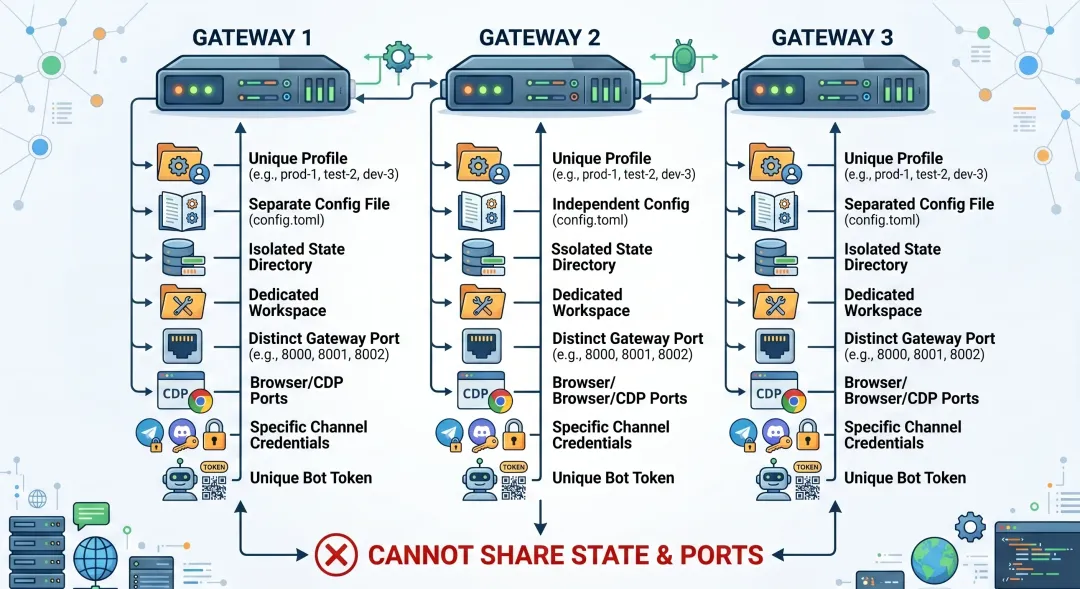
图:多 Gateway 必须隔离 profile、config、state、workspace、port、browser/CDP、channel token 和 credentials。
七、官方推荐:rescue bot 模式
文档里推荐的最简单 rescue bot 方案是:
-
main bot 用默认 profile -
rescue bot 用 --profile rescue -
rescue bot 用完全独立的 Telegram bot -
rescue bot 用不同 base port,例如 19789 -
base port 之间至少间隔 20 个端口,避免派生端口冲突
示例:
openclaw --profile rescue onboardopenclaw --profile rescue gateway install --port 19789如果 onboarding 已经帮你安装了 rescue service,第二步可能不需要。
为什么要独立 Telegram bot?
因为 rescue bot 要在主 bot 坏掉时还能联系你。
所以它应该有:
-
独立 Telegram bot token -
独立 profile -
独立 state -
独立 workspace -
独立 service -
独立端口
如果 rescue bot 和 main bot 共享同一个 Telegram bot token,那就失去很多隔离意义。
为什么端口要隔开?
Gateway base port 默认是:
18789文档里建议 rescue 使用:
19789并且至少间隔 20 个端口。
原因是 OpenClaw 会从 base port 派生一些相关端口,例如 browser control / CDP 范围等。
如果端口太近,就可能冲突。
八、一般多 Gateway 启动方式
默认 main Gateway:
openclaw setupopenclaw gateway --port 18789额外 gateway:
openclaw --profile ops setupopenclaw --profile ops gateway --port 19789如果用服务方式:
openclaw gateway installopenclaw --profile ops gateway install --port 19789如果你想两个都显式命名 profile:
openclaw --profile main setupopenclaw --profile main gateway --port 18789openclaw --profile ops setupopenclaw --profile ops gateway --port 19789注意:
不要让两个 Gateway 使用同一个 base port。
九、手动环境变量方式
高级用户也可以手动指定 config / state。
示例:
OPENCLAW_CONFIG_PATH=~/.openclaw/main.json \OPENCLAW_STATE_DIR=~/.openclaw \openclaw gateway --port 18789OPENCLAW_CONFIG_PATH=~/.openclaw/rescue.json \OPENCLAW_STATE_DIR=~/.openclaw-rescue \openclaw gateway --port 19789这种方式更灵活,也更容易搞错。
新手优先用 --profile。
因为 profile 会帮你把 config、state、workspace、service 名称这些隔离开。
十、Gateway lock:为什么不能随便双开?
OpenClaw 有 Gateway lock 机制。
它的目标是:
同一个 host、同一个 base port 上,只允许一个 Gateway 实例。
如果另一个进程占用了端口,启动会报类似:
another gateway instance is already listening on ws://127.0.0.1:<port>底层机制是:
-
先获取 per-config lock file -
再探测配置端口是否已有 listener -
然后绑定 HTTP/WebSocket listener -
如果端口被占用,抛出 GatewayLockError
所以看到 EADDRINUSE 或 gateway lock 错误时,不要硬上。
先查:
openclaw gateway status --deeplsof -i :18789如果是 rescue:
openclaw --profile rescue gateway status --deeplsof -i :19789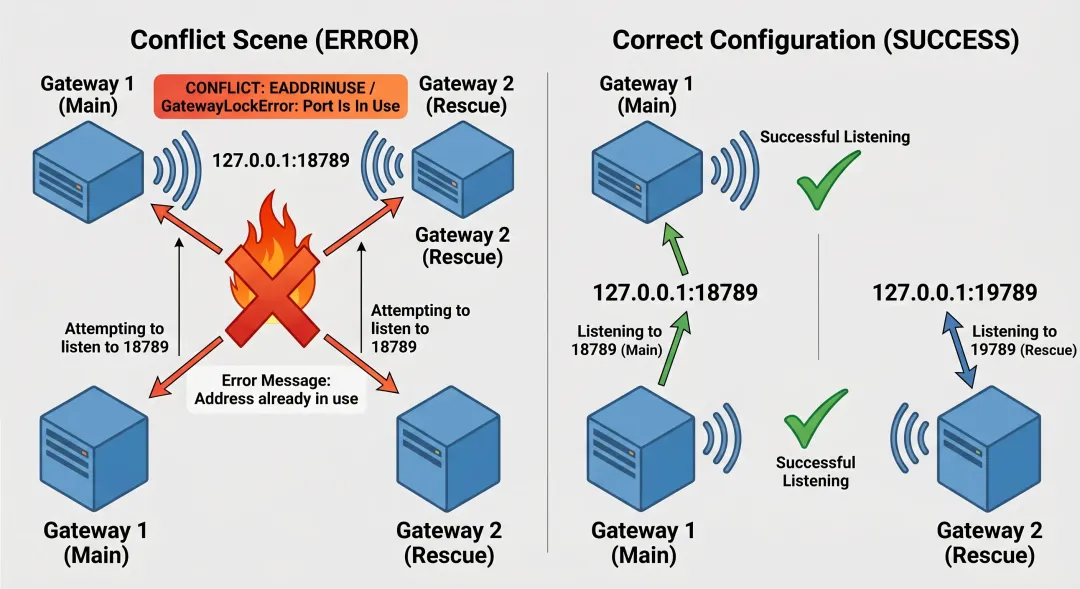
图:同一个 base port 只能有一个 Gateway。多 Gateway 必须使用不同 profile 和不同端口。
十一、WhatsApp 为什么尤其要小心?
文档里说:
One Gateway per host is recommended. It is the only process allowed to own the WhatsApp Web session.
WhatsApp Web 登录态比较特殊。
如果多个 Gateway 试图共享或争抢同一套 WhatsApp session,容易出现:
-
登录态混乱 -
重复连接 -
随机掉线 -
QR 重登 -
消息路由不可预测
所以如果你要多 Gateway:
-
不要共享 WhatsApp credentials -
不要让两个 Gateway 控制同一个 WhatsApp account -
rescue bot 推荐用 Telegram,不要用同一个 WhatsApp 登录态
一句话:
多 Gateway 场景下,WhatsApp 登录态必须严格隔离。
十二、Browser / CDP 端口也要隔离
浏览器自动化也容易冲突。
多 Gateway 时,不要把多个实例的:
-
browser.cdpUrl -
browser control port -
browser profile CDP port -
remote Chrome endpoint
都指到同一个地方。
文档提醒:
-
不要多个 instance pin 同一个 browser.cdpUrl -
每个 instance 需要自己的 browser control port 和 CDP range -
如果显式配置 CDP port,要 per instance 分开
否则你会看到非常诡异的问题:
-
A Gateway 操作了 B Gateway 的浏览器 -
登录态串了 -
refs / tabs 混乱 -
browser tool timeout -
截图来自错误页面
排错会非常痛苦。
十三、远程 Gateway:核心是一个 master Gateway
远程访问不等于多 Gateway。
文档里说,remote over SSH 的核心是:
保持一个 master Gateway 跑在专用主机上,其他客户端连接它。
比如:
VPS / home server: GatewayMac app / CLI / Web UI: clientPhone / Pi / Mac: Node所有控制面都连到这个 Gateway。
不要在每台设备上各跑一个 Gateway,然后试图同步状态。
正确模型是:
一个 Gateway 拥有 sessions、auth profiles、channels、state其他机器作为 client 或 node 连接它十四、SSH tunnel 远程访问
如果 Gateway 绑定 loopback,远程机器不能直接访问它。
这时可以用 SSH tunnel。
ssh -N -L 18789:127.0.0.1:18789 user@host意思是:
本机 127.0.0.1:18789 → 远程 host 的 127.0.0.1:18789隧道起来后,本机 CLI / app 访问:
ws://127.0.0.1:18789实际连的是远程 Gateway。
这时:
openclaw healthopenclaw status --deep也会通过本地转发访问远程 Gateway。
如果你显式传 --url,注意文档提醒:
CLI URL overrides 不会自动复用隐式 credentials,要显式带
--token或--password。
例如:
openclaw logs --url ws://127.0.0.1:18789 --token "$OPENCLAW_GATEWAY_TOKEN"十五、Tailscale Serve 远程访问
第 22 课已经讲过 Tailscale。
这里从多 Gateway 和远程访问角度再强调。
推荐模式:
{ gateway: { bind: "loopback", tailscale: { mode: "serve" } }}优点:
-
Gateway 仍然 loopback-only -
Tailnet 内访问 -
Tailscale 提供 HTTPS -
适合 Control UI / WebSocket -
手机 / 节点访问更顺
打开:
openclaw gateway --tailscale serve访问:
https://<magicdns>/注意:
-
Serve 是 tailnet-only -
Funnel 是公网,慎用 -
HTTP API 仍然遵循 Gateway 正常 auth -
node-role / 非 Control UI WebSocket 仍然走 pairing 和 auth
十六、远程 Gateway 的客户端配置
你可以在本地配置 remote target:
{ gateway: { mode: "remote", remote: { url: "ws://127.0.0.1:18789", token: "your-token" } }}如果 Gateway 是 loopback-only,通过 SSH tunnel 访问,就保持:
ws://127.0.0.1:18789因为本地这个地址会被 SSH 转发到远程。
macOS app 的 Remote over SSH 模式会帮你管理 tunnel。
文档里也提到:
-
gateway.remote.url仍然是本地 tunnel URL -
gateway.remote.sshTarget才是远程 gateway hostname
十七、远程 Gateway 与 Node 的关系
远程 Gateway 场景里,Node 仍然是外围设备。
比如:
VPS GatewayMac node host手机 node树莓派 nodeTelegram 消息进 VPS Gateway。
Gateway 再调用 Mac node、手机 node、树莓派 node。
这不是多 Gateway。
这是:
远程 Gateway + 多 Node如果你想让远程 Gateway 使用本地浏览器,不要在本地再跑一个 Gateway。
更推荐:
在本地浏览器机器上运行 node host,让 Gateway 通过 node proxy 浏览器动作。
文档也说:remote Gateway + local browser 的推荐方式是:
-
Gateway 在一台机器 -
browser 在另一台机器 -
browser 机器跑 node host -
二者在同一个 tailnet -
Gateway 代理 browser actions 到 node
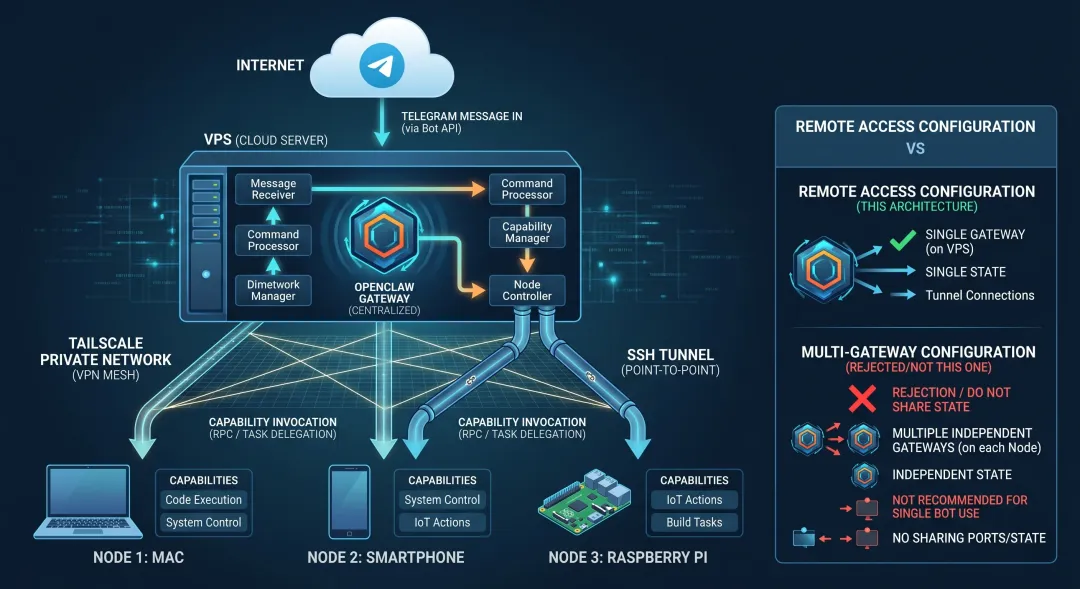
图:远程 Gateway 拥有状态和 channel,其他设备作为 client 或 node 连接它,不需要每台设备都跑 Gateway。
十八、Control UI、WebChat 和 Gateway WS
Gateway 的 Control UI / WebChat 都围绕 Gateway WebSocket 工作。
Canvas host 也在 Gateway HTTP server 上,使用同一个端口。
默认端口是:
18789所以远程访问 UI 时,本质也是访问 Gateway 的 HTTP / WS。
安全建议:
-
loopback + SSH tunnel -
loopback + Tailscale Serve -
tailnet bind + token/password -
不建议裸露公网无认证
如果是 Funnel,必须清楚它是 public internet。
新手默认不要用 Funnel。
十九、多 Gateway 的检查命令
如果你有 main + rescue:
openclaw gateway status --deepopenclaw --profile rescue gateway status --deepopenclaw --profile rescue gateway probeopenclaw statusopenclaw --profile rescue statusopenclaw --profile rescue browser status看什么?
-
每个 Gateway 是否运行 -
port 是否正确 -
profile 是否正确 -
service 是否指向正确 install -
browser port 是否冲突 -
status 是否读的是正确 profile -
probe 是否提示多个 reachable gateway
文档提到:
如果你故意运行多个 isolated gateway,
multiple reachable gateways detected这类提示可能是预期的。
关键是你要知道它为什么出现。
二十、常见错误和处理方向
1)两个 Gateway 抢同一个端口
表现:
EADDRINUSEanother gateway instance is already listening处理:
-
检查 gateway status --deep -
换不同 --port -
使用不同 profile -
不要同一 profile 起两个 service
2)rescue bot 和 main bot 混了
表现:
-
发给 rescue bot,main bot 回 -
status 读错 profile -
token / workspace 混乱
处理:
-
检查 --profile rescue -
确认 Telegram bot token 不同 -
确认 state dir 不同 -
确认 service 名称不同
3)浏览器自动化串台
表现:
-
截图来自错误浏览器 -
tabs 混乱 -
登录态不对 -
browser timeout
处理:
-
不要共享 cdpUrl -
确认 browser control port -
base port 至少间隔 20 -
每个 Gateway 用独立 profile / browser profile
4)远程 CLI 连接不上
表现:
-
health timeout -
auth missing -
token mismatch -
connection refused
处理:
-
SSH tunnel 是否运行 -
lsof -i :18789 -
gateway.remote.url是否指向本地 tunnel -
显式 --url时是否带--token -
Gateway 是否 loopback-only
5)节点连到了错误 Gateway
表现:
-
main 看不到 node -
rescue 里出现 node -
nodes status 不符合预期
处理:
-
检查 setup code / Gateway URL -
检查 node 配置 -
检查 pairing 属于哪个 Gateway -
删除错误 pairing 后重新配对
二十一、一个推荐架构:VPS Gateway + 本地 Nodes
这是最适合大多数进阶个人用户的架构。
VPS: - main Gateway - Telegram / Webhook / Cron / Heartbeat - Tailscale ServeHome Mac: - node host - browser / local files / desktop checksPhone: - camera / location / mobile contextRaspberry Pi: - LAN checks / sensors / local scripts这个架构只需要一个 Gateway。
优点:
-
Gateway 长久在线 -
Node 提供本地能力 -
状态集中 -
排错简单 -
不需要每台机器开 Gateway
二十二、一个推荐架构:main + rescue
如果你希望更可靠,可以加 rescue Gateway。
main Gateway: - default profile - port 18789 - main Telegram bot - primary workspacerescue Gateway: - profile rescue - port 19789 - separate Telegram bot - rescue workspace - minimal toolsrescue bot 的重点不是功能多。
而是:
-
主服务挂了还能联系你 -
能看状态 -
能跑只读诊断 -
必要时帮你修配置
所以 rescue bot 的 tool policy 应该更谨慎。
不要让 rescue bot 默认 full exec。
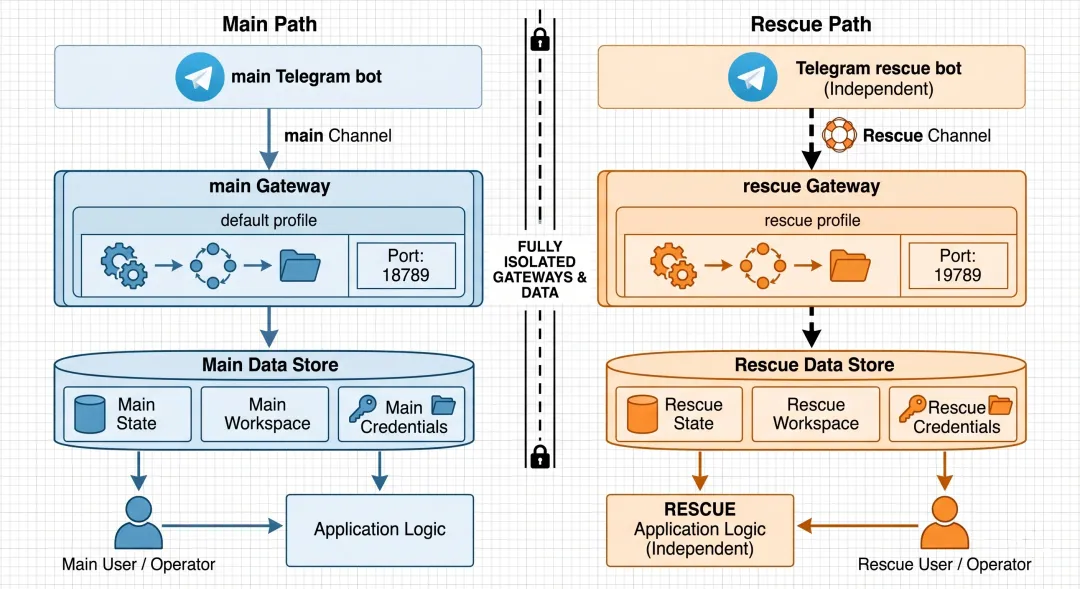
图:rescue bot 应该使用独立 profile、独立端口、独立 Telegram bot、独立 state 和 workspace,避免和 main Gateway 混用。
二十三、一个不推荐架构:每台设备一个 Gateway
不推荐:
VPS 一个 GatewayMac 一个 Gateway手机一个 Gateway树莓派一个 Gateway每个都接 Telegram问题很多:
-
不知道消息会进哪个 Gateway -
credentials 复制混乱 -
pairing 不通用 -
channel 登录态冲突 -
Node 能力无法统一编排 -
日志分散 -
排错困难
更好的做法:
一个主 Gateway + 多 Node二十四、适合新手的提问模板
1)判断是否需要多 Gateway
我现在有 VPS、Mac、手机和树莓派。请帮我判断应该用一个 Gateway + 多 Node,还是多 Gateway。优先给简单、安全、可维护的方案。2)设计 rescue bot
请帮我设计 OpenClaw rescue bot:使用 --profile rescue、独立 Telegram bot、独立端口 19789、独立 workspace,并说明和 main Gateway 的隔离项。3)排查端口冲突
OpenClaw Gateway 启动时报 EADDRINUSE。请帮我按 gateway lock、当前监听端口、profile、service、base port 派生端口冲突来排查。4)远程 Gateway 方案
我想把 Gateway 放 VPS,本地 Mac 只作为客户端和 node。请帮我设计 SSH tunnel / Tailscale Serve 两种远程访问方案,并说明推荐哪个。5)检查多 Gateway 是否隔离
请帮我检查 main 和 rescue 两个 Gateway 是否真正隔离:profile、config、state dir、workspace、port、Telegram bot token、browser/CDP 端口都要分别检查。6)避免浏览器串台
我有多个 Gateway 都需要 browser 工具。请帮我检查 browser control port、CDP range、browser profiles 是否冲突,不要让多个 Gateway 共享同一个 cdpUrl。二十五、这一课最值得记住的一句话
如果今天只记一句话:
多设备协作用多 Node,多信任边界或救援通道才考虑多 Gateway。
再记一句安全原则:
多 Gateway 必须隔离 profile、state、workspace、port、credentials 和 browser/CDP。
二十六、总结
今天这节课,我们讲清楚了多 Gateway 部署与远程访问:
-
大多数个人部署不需要多 Gateway。 -
一个 Gateway 可以管理多个 channel、Agent 和 Node。 -
多 Node 是扩展设备能力,多 Gateway 是拆控制平面。 -
真正需要多 Gateway 的场景包括 rescue bot、强隔离、不同 trust boundary、实验环境。 -
多 Gateway 必须隔离 profile、config、state、workspace、port、credentials。 -
rescue bot 推荐使用 --profile rescue、独立 Telegram bot、独立端口。 -
base port 至少间隔 20,避免派生 browser/CDP 端口冲突。 -
Gateway lock 会阻止同端口重复启动。 -
WhatsApp 登录态不要在多个 Gateway 间共享。 -
浏览器 CDP 和 browser profile 也要 per instance 隔离。 -
远程访问不等于多 Gateway,通常是一个 master Gateway + 多 client / node。 -
SSH tunnel 和 Tailscale Serve 是远程 Gateway 的安全默认路径。
第六模块到这里就完整了:
-
第 25 课:权限控制 -
第 26 课:安全加固 -
第 27 课:日志与调试 -
第 28 课:多 Gateway 部署与远程访问
接下来,我们进入第七模块:进阶开发。
下一课预告
下一课我们会讲:
第 29 课:自己写一个 Skill(skills 创作入门)
会重点讲:
-
Skill 到底是什么 -
SKILL.md 怎么写 -
什么时候该写 Skill,而不是只写 prompt -
如何给 Skill 加 examples / scripts / assets -
如何让 Skill 适合长期复用 -
写 Skill 时哪些安全边界要注意
🦞 本文由八条撰写,持续更新中。