夜雨聆风
夜雨聆风


无人值守 批处理:批量工程图转PDF(SolidWorks 宏工具)
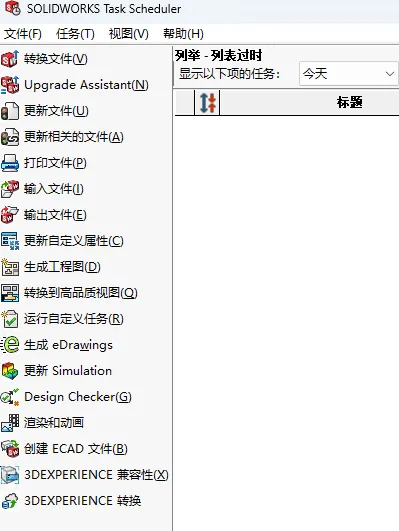
自带的小工具,SOLIDWORKS Task Scheduler可以实现批量打印,输出文件,更新属性等工作,大大提升了工作效率。那我们通过VBA的宏代码,是不是也可以实现类似的功能?
思路:遍历文件夹(子文件夹),查找所有.slddrw后缀文件,自动转换成pdf文件,输出转换日志
链接: https://pan.baidu.com/s/1P-vzBDli5Vnzo0YXSbQQOQ 提取码: uz9z
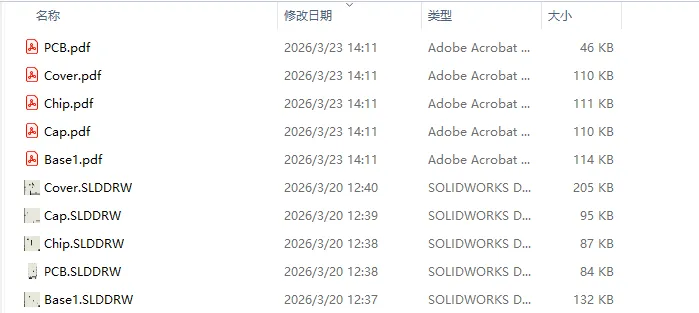
运行效果:
任务日志:
==== 开始导出 ====源目录:C:\Users\DR\Desktop\Electronics Enclosure覆盖成功:C:\Users\DR\Desktop\Electronics Enclosure\Base1.pdf覆盖成功:C:\Users\DR\Desktop\Electronics Enclosure\Cap.pdf覆盖成功:C:\Users\DR\Desktop\Electronics Enclosure\Chip.pdf覆盖成功:C:\Users\DR\Desktop\Electronics Enclosure\Cover.pdf覆盖成功:C:\Users\DR\Desktop\Electronics Enclosure\PCB.pdf==== 完成 ====总数:5成功:5失败:0
Option Explicit' ============================================================' DR-SW Tools | 批量工程图导出 PDF' ============================================================Const swDocDRAWING As Long = 3Const swOpenDocOptions_Silent As Long = 1Const swSaveAsOptions_Silent As Long = 1Const swSaveAsCurrentVersion As Long = 0Dim swApp As SldWorks.SldWorksDim gTotalCount As LongDim gSuccessCount As LongDim gFailCount As LongDim gSourceFolder As StringDim gOutputFolder As StringDim gUseSeparateOutputFolder As BooleanDim gIncludeSubFolders As BooleanDim gLog As StringDim gLogFilePath As StringSub BatchDrawingsToPDF_Auto()On Error GoTo EHSet swApp = Application.SldWorks' ===== 选择源文件夹 =====gSourceFolder = BrowseForFolder("请选择工程图文件夹")If gSourceFolder = "" Then Exit Sub' ===== 是否递归 =====gIncludeSubFolders = (MsgBox("是否递归子文件夹?", vbYesNo) = vbYes)' ===== 输出方式 =====gUseSeparateOutputFolder = (MsgBox("是否导出到单独文件夹?", vbYesNo) = vbYes)If gUseSeparateOutputFolder ThengOutputFolder = BrowseForFolder("请选择输出文件夹")If gOutputFolder = "" Then Exit SubElsegOutputFolder = gSourceFolderEnd If' ===== 初始化 =====gTotalCount = 0gSuccessCount = 0gFailCount = 0gLog = ""gLogFilePath = gOutputFolder & "\PDF_Export_Log_" & Format(Now, "yyyymmdd_HHNNSS") & ".txt"AppendLog "==== 开始导出 ===="AppendLog "源目录:" & gSourceFolderProcessFolder gSourceFolderAppendLog "==== 完成 ===="AppendLog "总数:" & gTotalCountAppendLog "成功:" & gSuccessCountAppendLog "失败:" & gFailCountWriteTextFile gLogFilePath, gLogMsgBox "完成!成功:" & gSuccessCount & " 失败:" & gFailCountExit SubEH:MsgBox "错误:" & Err.DescriptionEnd SubPrivate Sub ProcessFolder(folderPath As String)Dim fso As Object, f, subFSet fso = CreateObject("Scripting.FileSystemObject")For Each f In fso.GetFolder(folderPath).FilesIf LCase(fso.GetExtensionName(f.Name)) = "slddrw" ThengTotalCount = gTotalCount + 1ExportPDF f.pathEnd IfNextIf gIncludeSubFolders ThenFor Each subF In fso.GetFolder(folderPath).SubFoldersProcessFolder subF.pathNextEnd IfEnd SubPrivate Sub ExportPDF(drwPath As String)On Error GoTo EHDim fso As ObjectSet fso = CreateObject("Scripting.FileSystemObject")Dim swModel As SldWorks.ModelDoc2Dim errors As Long, warnings As LongDim pdfPath As StringDim fileName As StringfileName = fso.GetBaseName(drwPath) & ".pdf"If gUseSeparateOutputFolder ThenpdfPath = gOutputFolder & "\" & fileNameElsepdfPath = fso.GetParentFolderName(drwPath) & "\" & fileNameEnd If' ===== 打开 =====Set swModel = swApp.OpenDoc6(drwPath, swDocDRAWING, swOpenDocOptions_Silent, "", errors, warnings)If swModel Is Nothing ThengFailCount = gFailCount + 1AppendLog "打开失败:" & drwPathExit SubEnd If' ===== 直接覆盖保存 =====Dim ok As Booleanok = swModel.Extension.SaveAs(pdfPath, swSaveAsCurrentVersion, swSaveAsOptions_Silent, Nothing, 0, 0)swApp.CloseDoc swModel.GetTitleIf ok ThengSuccessCount = gSuccessCount + 1AppendLog "覆盖成功:" & pdfPathElsegFailCount = gFailCount + 1AppendLog "导出失败:" & drwPathEnd IfExit SubEH:gFailCount = gFailCount + 1AppendLog "异常:" & drwPath & " | " & Err.DescriptionEnd SubPrivate Function BrowseForFolder(title As String) As StringDim sh, fSet sh = CreateObject("Shell.Application")Set f = sh.BrowseForFolder(0, title, 0, 0)If Not f Is Nothing Then BrowseForFolder = f.Self.pathEnd FunctionPrivate Sub WriteTextFile(path As String, content As String)Dim fso, tsSet fso = CreateObject("Scripting.FileSystemObject")Set ts = fso.CreateTextFile(path, True)ts.Write contentts.CloseEnd SubPrivate Sub AppendLog(txt As String)If gLog = "" ThengLog = txtElsegLog = gLog & vbCrLf & txtEnd IfEnd Sub