 夜雨聆风
夜雨聆风


AI编程智能体的子智能体设计模式:上下文管理的黄金法则
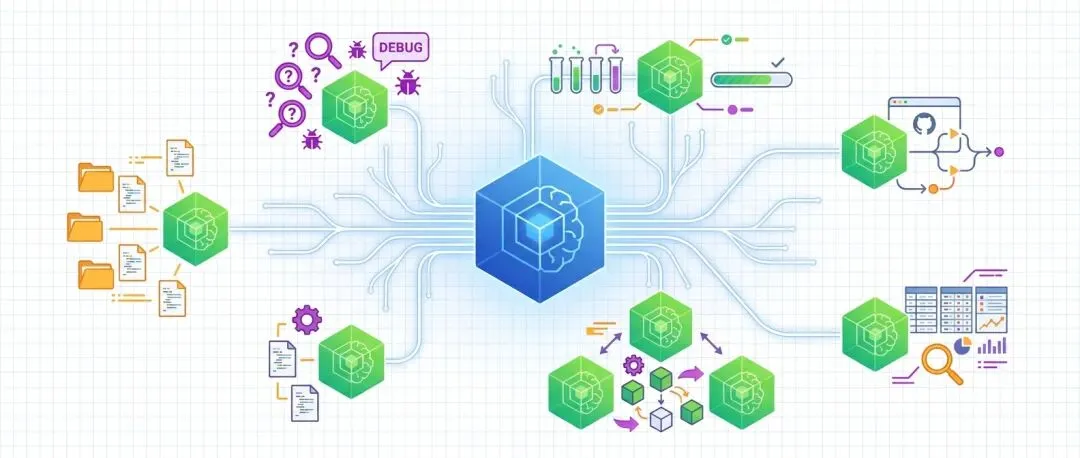
💡 核心观点:子智能体(Subagents)通过”分身术”解决LLM上下文限制问题,让编程智能体既能处理复杂任务,又能保持高质量输出——这是AI工程化的关键模式之一。
1. 引言与背景
🔴 痛点场景
你正在用一个AI编程智能体处理一个大型项目。任务很简单:”重构所有API接口,添加新的认证逻辑”。
智能体开始工作了,它阅读了项目结构、分析了代码、制定了计划……然后,你发现输出质量开始下降:它开始遗忘之前的决策,重复读取相同的文件,甚至做出相互矛盾的修改。
真相揭晓:这不是智能体”能力不足”,而是它的”记忆容量”被撑爆了。
🟢 解决方案
LLM有一个硬限制:上下文窗口(Context Window)——即它能同时”记住”的信息量。虽然模型能力在过去两年大幅提升,但上下文窗口的增长却相对停滞,通常上限在100万token左右,而最佳质量往往在20万token以下。
子智能体模式(Subagents)提供了一个精妙的解决方案:通过”分身术”,让主智能体派派临时助手处理特定任务,助手用全新的上下文窗口工作,完成后返回结果,主智能体继续推进。这就像项目经理派派专门的研究员去调研,既不占用自己的精力,又能获得精准的信息。
🎯 本文价值
本文将为你揭示:
-
• ✅ 核心原理:理解子智能体如何解决上下文限制问题 -
• ✅ 实战案例:Claude Code的Explore子智能体是如何工作的 -
• ✅ 进阶应用:并行子智能体和专家子智能体的使用策略 -
• ✅ 实践指南:如何在自己的项目中应用这一模式
2. 📌 核心概念:上下文限制的真相
2.1 上下文窗口的瓶颈
LLM受限于其上下文限制(Context Limit)——即在任何时刻能容纳在工作记忆中的token数量。
❝ These values have not increased much over the past two years even as the LLMs themselves have seen dramatic improvements in their abilities – they generally top out at around 1,000,000, and benchmarks frequently report better quality results below 200,000. ❞
— 虽然LLM的能力在过去两年有了显著提升,但这些上下文限制值并没有太大增长——它们通常上限在约100万token左右,而基准测试经常报告低于20万token时能获得更好的质量结果。
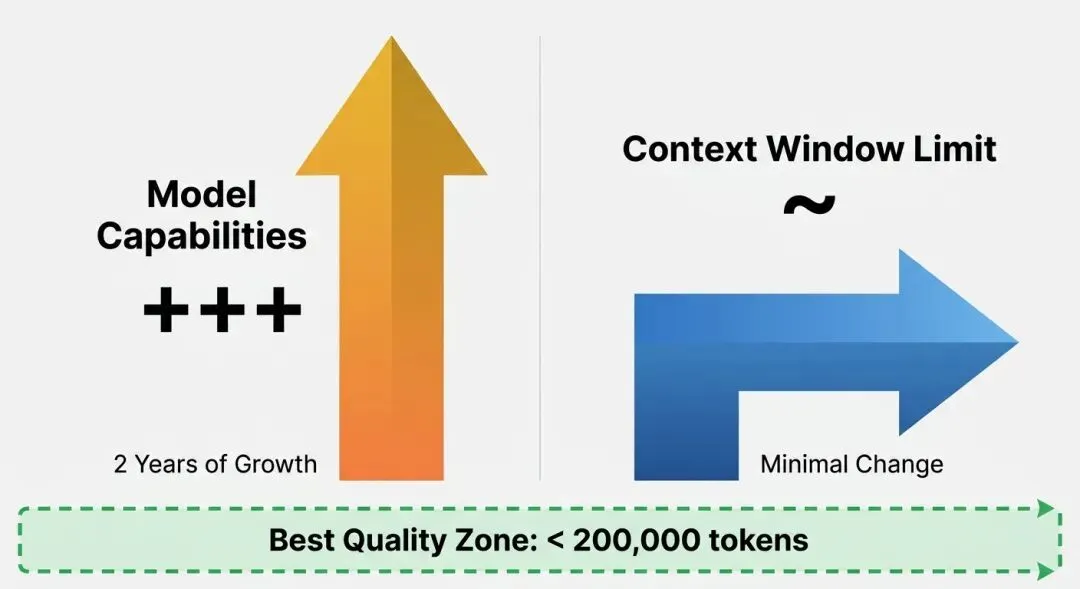
关键洞察:
-
• 📊 模型能力 ↑↑↑(大幅提升) -
• 📊 上下文窗口 →(相对停滞) -
• 📊 最佳质量区间:< 200,000 token
2.2 精心管理上下文的必要性
❝ Carefully managing the context such that it fits within those limits is critical to getting great results out of a model. ❞
— 精心管理上下文使其符合这些限制,是从模型获得优秀结果的关键。
管理策略:
-
• 🎯 避免”上下文溢出”(超出限制导致质量下降) -
• 🎯 避免”上下文污染”(无关信息占用宝贵空间) -
• 🎯 避免”上下文碎片化”(信息分散,难以综合判断)
3. 🧠 子智能体模式:分身术的艺术
3.1 核心原理
❝ Subagents provide a simple but effective way to handle larger tasks without burning through too much of the coding agent’s valuable top-level context. ❞
— 子智能体提供了一种简单而有效的方式来处理更大的任务,而不消耗太多编程智能体宝贵的顶级上下文。
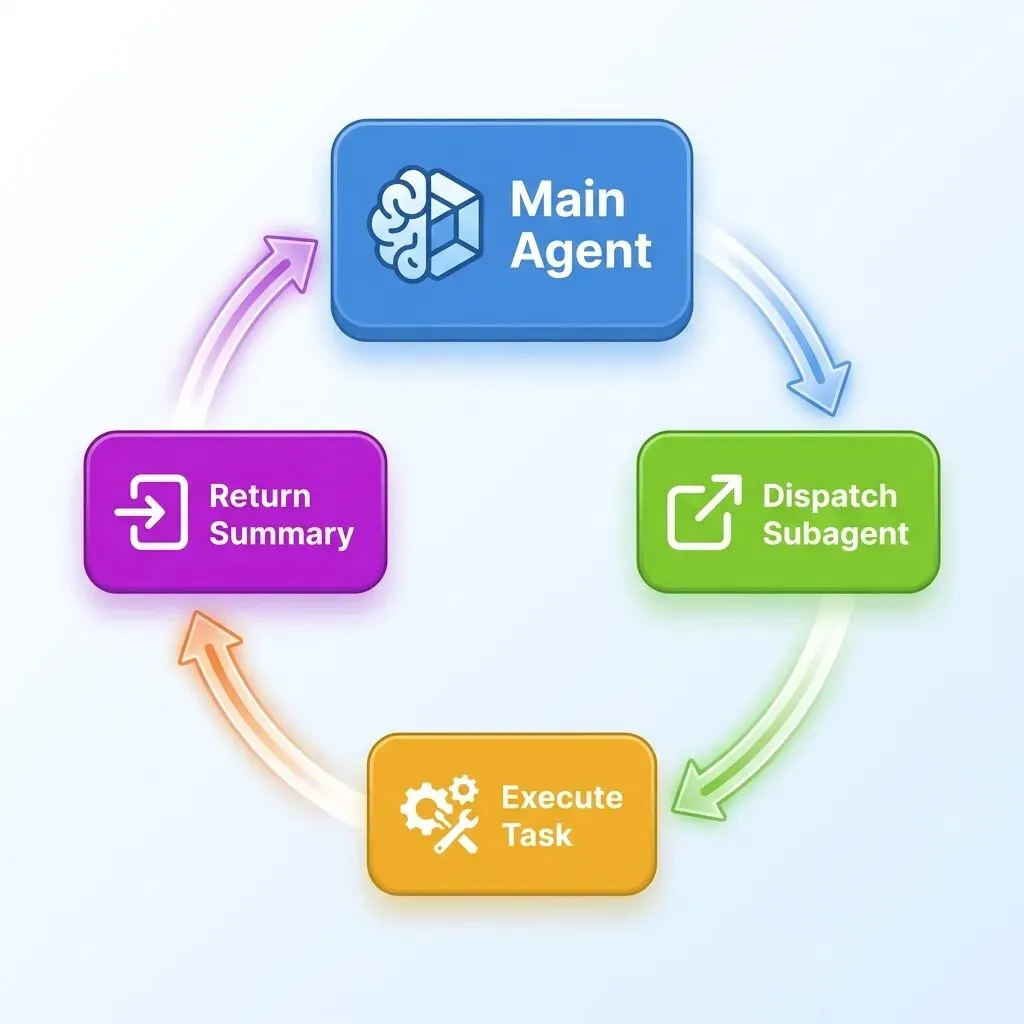
工作机制:
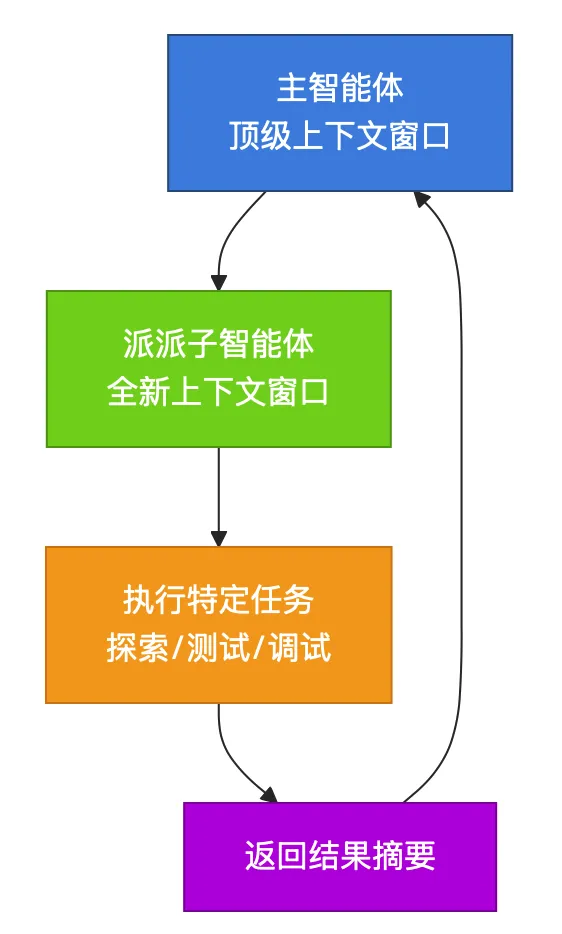
核心优势:
-
• 🔄 上下文隔离:子智能体使用全新的上下文窗口,不影响主智能体 -
• 🔄 任务聚焦:子智能体专注于单一任务,避免信息干扰 -
• 🔄 结果摘要:子智能体返回精炼的结果,而非原始过程数据
3.2 分派机制
❝ When a coding agent uses a subagent it effectively dispatches a fresh copy of itself to achieve a specified goal, with a new context window that starts with a fresh prompt. ❞
— 当编程智能体使用子智能体时,它实际上是派派一个新的自身副本去实现指定目标,该副本拥有一个新的上下文窗口,从一个全新的提示词开始。
类比理解:
-
• 🧩 主智能体 = 项目经理(统筹全局,保留决策权) -
• 🧩 子智能体 = 专门研究员(专注调研,返回摘要报告)
4. 📝 实战案例:Claude Code的Explore子智能体
4.1 使用场景
Claude Code广泛使用子智能体作为其标准工作方式的一部分。
❝ Any time you start a new task against an existing repo Claude Code first needs to explore that repo to figure out its general shape and find relevant information needed to achieve that task. ❞
— 每当你对现有仓库启动新任务时,Claude Code首先需要探索该仓库以了解其大致结构,并找到实现该任务所需的相关信息。
Explore子智能体的任务:
-
• 🗂️ 了解项目结构 -
• 🗂️ 找到相关文件 -
• 🗂️ 收集必要信息 -
• 🗂️ 返回探索报告
4.2 实际对话示例
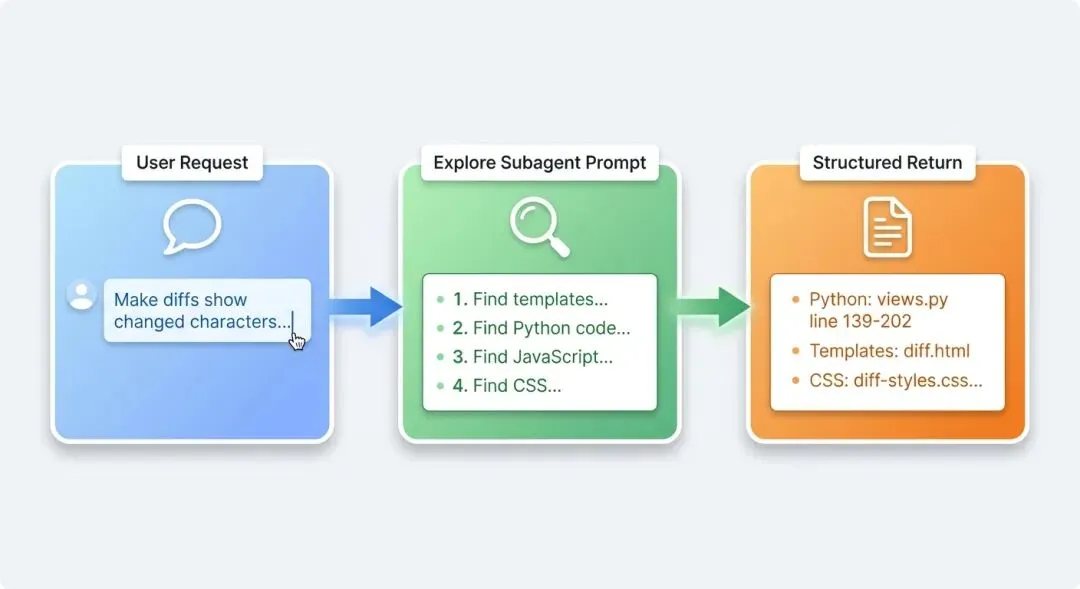
用户请求:
Make the chapter diffs also show which characters have changed in this diff view with a darker color of red or green for the individually changed segments of text within the line.
Claude Code的Explore子智能体提示词:
Find the code that implements the diff view for “chapters” in this Django blog. I need to find:
1. Templates that render diffs (look for diff-related HTML/CSS with red/green backgrounds) 2. Python code that generates diffs (look for difflib usage or similar) 3. Any JavaScript related to diff rendering 4. CSS styles for the diff view (red/green line backgrounds) Search thoroughly – check templates/, static/, blog/ directories. Look for keywords like “diff”, “chapter”, “revision”, “history”, “compare”.
关键观察:
-
• 📌 提示词结构清晰(列出4个具体目标) -
• 📌 搜索指令明确(指定目录、关键词) -
• 📌 期望结果清晰(返回位置和实现细节)
4.3 子智能体的返回
Explore子智能体工作几秒钟后,返回了结构化的结果:
❝ The full subagent response included all of the details the parent agent needed in order to start editing the code to address my original request. ❞
— 完整的子智能体响应包含了父智能体开始编辑代码以解决我原始请求所需的所有细节。
返回结果的结构:
-
• 📍 Python代码位置(文件路径、行号) -
• 📍 使用的库(difflib.unified_diff) -
• 📍 模板文件位置 -
• 📍 CSS样式定义 -
• 📍 JavaScript相关代码
价值体现:
-
• 主智能体无需亲自阅读所有文件 -
• 主智能体的上下文窗口保持清洁 -
• 主智能体可以直接开始编辑工作
4.4 工作原理类比
❝ Subagents work similar to any other tool call: the parent agent dispatches them just as they would any other tool and waits for the response. ❞
— 子智能体的工作方式类似于任何其他工具调用:父智能体派派它们就像派派任何其他工具一样,并等待响应。
有趣观察:
-
• 🧠 模型在为自己编写提示词 -
• 🧠 提示词策略显示出”良好的品味” -
• 🧩 工具调用的通用模式(派派 → 等待 → 接收)
5. 🔬 进阶应用:并行子智能体
5.1 性能提升潜力
❝ Subagents can also provide a significant performance boost by having the parent agent run multiple subagents at the same time, potentially also using faster and cheaper models such as Claude Haiku to accelerate those tasks. ❞
— 子智能体还可以通过让父智能体同时运行多个子智能体来提供显著的性能提升,甚至可以使用更快、更便宜的模型(如Claude Haiku)来加速这些任务。
并行优势:
-
• ⚡ 速度提升:多个任务同时执行 -
• ⚡ 成本优化:使用轻量级模型(如Claude Haiku) -
• ⚡ 资源节约:不占用主智能体上下文
5.2 使用建议
推荐的提示词模板:
Use subagents to find and update all of the templates that are affected by this change.适用场景:
-
• ✅ 需要编辑多个文件 -
• ✅ 文件之间相互独立(无依赖关系) -
• ✅ 任务性质相似(如批量查找、批量修改)
不适用场景:
-
• ❌ 文件之间有依赖关系(需要顺序处理) -
• ❌ 需要全局协调的任务 -
• ❌ 需要复杂决策的任务
6. 💡 专家子智能体:角色化分工
6.1 自定义角色
❝ Some coding agents allow subagents to run with further customizations, often in the form of a custom system prompt or custom tools or both, which allow those subagents to take on a different role. ❞
— 一些编程智能体允许子智能体以进一步的自定义方式运行,通常以自定义系统提示词或自定义工具的形式,或者两者兼有,这使这些子智能体能够承担不同的角色。
6.2 专家角色示例
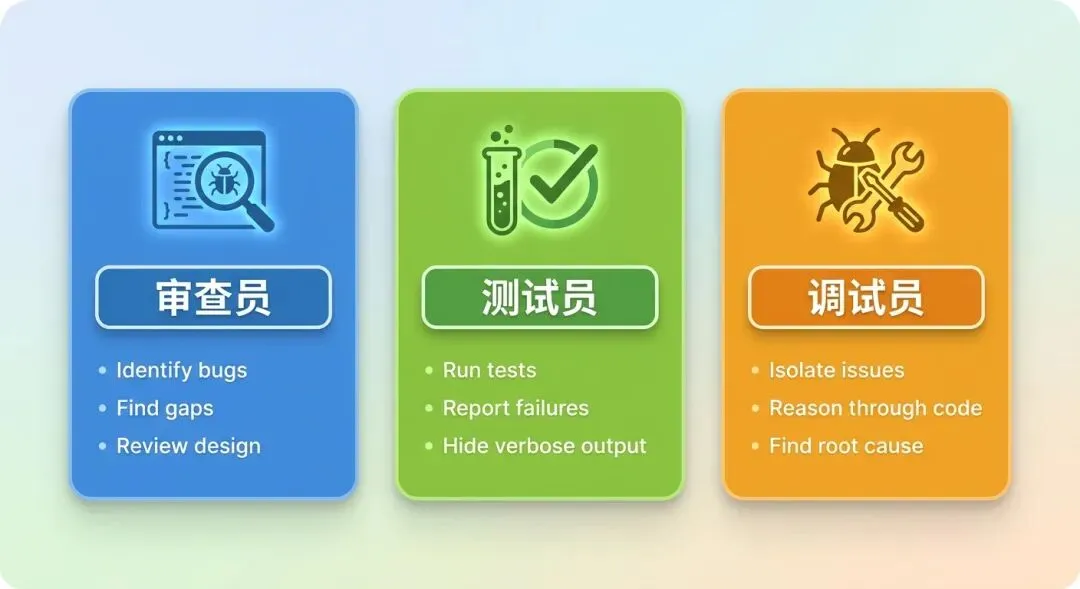
三种专家角色:
|
|
|
|
|---|---|---|
| 代码审查员(Code Reviewer) |
|
|
| 测试运行员(Test Runner) |
|
|
| 调试员(Debugger) |
|
|
6.3 使用警示
❝ While it can be tempting to go overboard breaking up tasks across dozens of different specialist subagents, it’s important to remember that the main value of subagents is in preserving that valuable root context and managing token-heavy operations. ❞
— 虽然可能很想过度将任务分散到几十个不同的专家子智能体中,但重要的是要记住,子智能体的主要价值在于保护那个宝贵的根上下文和管理token密集型操作。
核心提醒:
-
• ⚠️ 主智能体本身有能力进行调试或审查 -
• ⚠️ 关键是有足够的token可用 -
• ⚠️ 子智能体的价值是保护根上下文,而非替代能力
7. 总结与实践指南
7.1 核心要点回顾
子智能体模式的三大价值:
-
• 🎯 上下文隔离:避免主智能体上下文窗口溢出 -
• 🎯 任务聚焦:子智能体专注单一任务,质量更高 -
• 🎯 性能优化:并行执行,使用轻量级模型
7.2 实践建议
何时使用子智能体:
-
• ✅ 任务涉及大量文件探索 -
• ✅ 需要运行token密集型操作(如测试套件) -
• ✅ 多个独立任务可以并行执行 -
• ✅ 需要专家角色审查或调试
何时避免过度使用:
-
• ❌ 主智能体有充足token可用时 -
• ❌ 任务之间存在强依赖关系 -
• ❌ 简单任务不需要分派
7.3 提示词模板
# 探索型任务Use subagents to explore the codebase and find [specific component].# 并行编辑任务Use subagents to find and update all of the templates that are affected by this change.# 测试任务Use a subagent to run the test suite and report any failures.原文链接:https://simonwillison.net/guides/agentic-engineering-patterns/subagents/