 夜雨聆风
夜雨聆风pywebview 是一个轻量级的 BSD 许可证下的跨平台webview 组件。它允许在自身原生 GUI 窗口中显示 HTML 内容。它让您可以在桌面应用程序中使用WEB技术,同时隐藏 GUI 依赖浏览器的事实。 pywebview 集成了内置 HTTP 服务器、Python 中的 DOM 支持以及窗口管理功能。
pywebview,相信它会给你带来惊喜。| 本质 | |
| 界面层 | |
| 逻辑层 | |
| 输出 |
方案对比
| pywebview | ||||
| Electron | ||||
| Tauri | ||||
| PyQt/PySide | ||||
| Flet |
官方
如果你的核心逻辑在 Python(数据分析、AI、科学计算),而界面想用现代 Web 技术构建,pywebview 是非常务实的选择。
核心特点
1. 极轻量
不捆绑 Chromium(不像 Electron 打包 100MB+)
调用操作系统原生 Webview:
Windows: Edge/Chakra
macOS: WKWebView(Safari 内核)
Linux: GTK WebKit 或 Qt WebEngine
2. 双向通信
Python 和 JavaScript 可以互相调用:
Python 暴露 API 给 JS 调用
JS 触发事件通知 Python 处理
3. 无锁链依赖
纯 Python 库,安装即可用:
4. 支持前端框架
Vue、React、Svelte、纯 HTML 均可,开发体验与写网页完全一致。
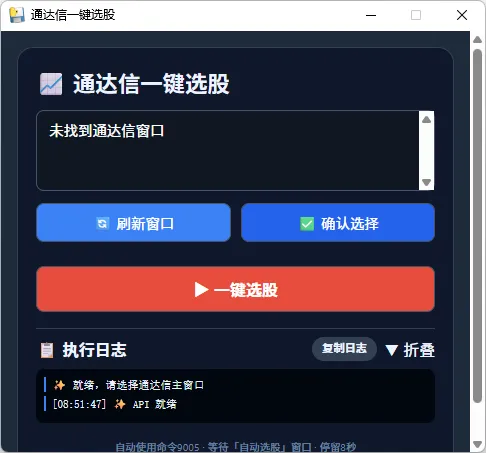
演示示例
高级版
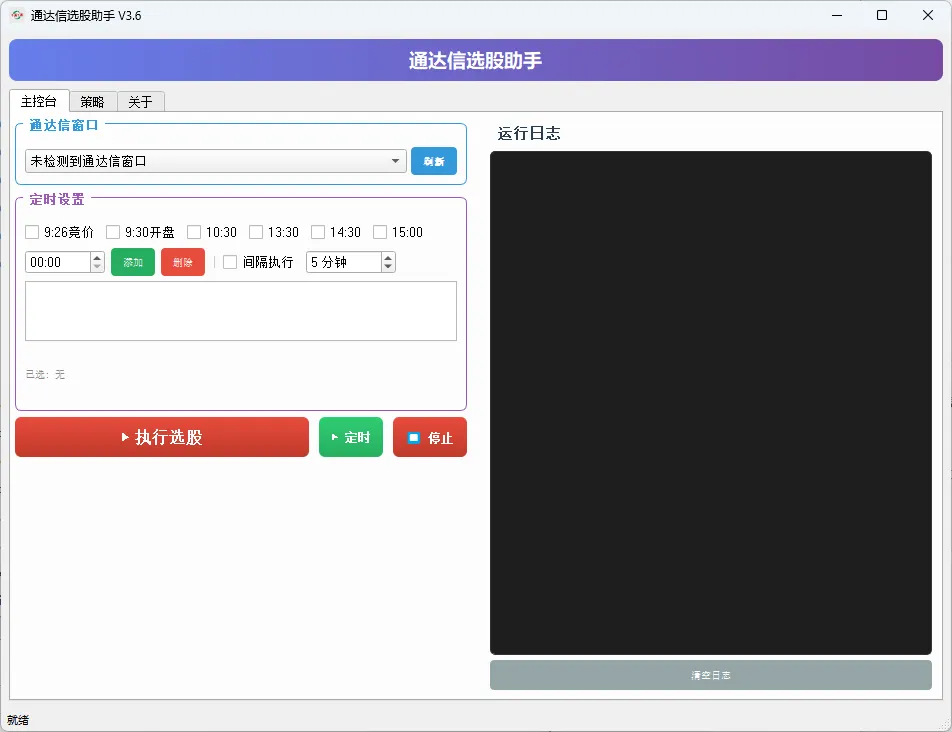
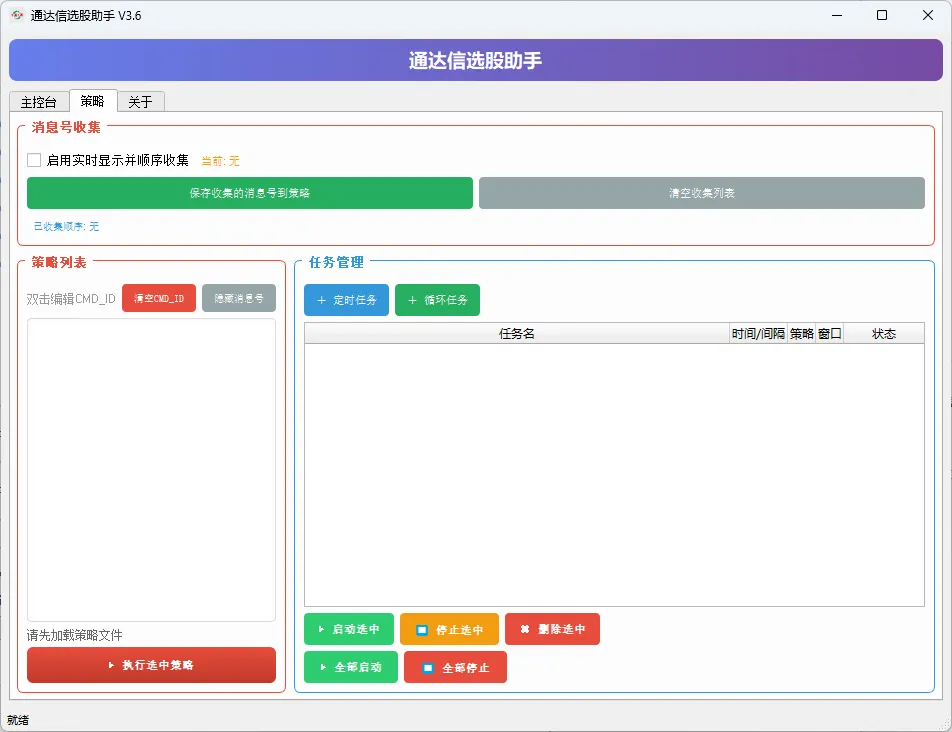
简化版源码
# -*- coding: utf-8 -*-"""通达信一键选股工具 - 极简版功能:过滤 tdxw.exe 进程,选择主窗口,一键选股,查看日志"""import threadingimport timeimport psutilfrom collections import dequeimport win32guiimport win32apiimport win32conimport win32processimport webview# ---------- 窗口操作辅助函数 ----------def get_tdx_windows():"""获取所有通达信进程窗口"""tdx_windows = []def enum_callback(hwnd, windows):if win32gui.IsWindowVisible(hwnd):try:_, pid = win32process.GetWindowThreadProcessId(hwnd)process = psutil.Process(pid)if 'tdxw' in process.name().lower():title = win32gui.GetWindowText(hwnd)if title:windows.append((hwnd, title, win32gui.GetClassName(hwnd)))except:passreturn Truewin32gui.EnumWindows(enum_callback, tdx_windows)return tdx_windowsdef find_window_by_title(title, max_wait=5):"""等待指定标题窗口出现"""start = time.time()while time.time() - start < max_wait:def enum_callback(hwnd, found):if win32gui.IsWindowVisible(hwnd) and title in win32gui.GetWindowText(hwnd):found[0] = hwndreturn Falsereturn Truefound = [0]try:win32gui.EnumWindows(enum_callback, found)if found[0]:return found[0]except:passtime.sleep(0.3)return Nonedef activate_window(hwnd):try:if win32gui.IsIconic(hwnd):win32gui.ShowWindow(hwnd, win32con.SW_RESTORE)win32gui.SetForegroundWindow(hwnd)time.sleep(0.2)return Trueexcept:return Falsedef send_command(hwnd, cmd_id):if not hwnd or not win32gui.IsWindow(hwnd):raise Exception("窗口无效")win32api.PostMessage(hwnd, win32con.WM_COMMAND, cmd_id, 0)def close_window(hwnd):if hwnd and win32gui.IsWindow(hwnd):win32api.PostMessage(hwnd, win32con.WM_CLOSE, 0, 0)return Truereturn False# ---------- 后端 API ----------class AutoSelectAPI:def __init__(self):self._log_queue = deque()self._running = Falseself._lock = threading.Lock()self._selected_hwnd = Nonedef _add_log(self, msg):with self._lock:self._log_queue.append(msg)def get_new_logs(self):with self._lock:logs = list(self._log_queue)self._log_queue.clear()return logsdef get_windows(self):return [{"hwnd": h, "title": t, "class": c, "display": f"{t} (句柄:{h})"}for h, t, c in get_tdx_windows()]def select_window(self, hwnd):hwnd = int(hwnd)if win32gui.IsWindow(hwnd):self._selected_hwnd = hwndtitle = win32gui.GetWindowText(hwnd)self._add_log(f"✅ 已选择窗口:{title} (句柄 {hwnd})")return Trueself._add_log("❌ 窗口无效")return Falsedef run_auto_select(self):"""一键选股,固定参数"""with self._lock:if self._running:self._add_log("⚠️ 已有任务执行中")returnself._running = Truedef task():try:self._execute()except Exception as e:self._add_log(f"❌ 异常: {e}")finally:with self._lock:self._running = Falseself._add_log("✅ 任务结束")threading.Thread(target=task, daemon=True).start()def _execute(self):if not self._selected_hwnd:self._add_log("❌ 请先选择窗口")returnif not win32gui.IsWindow(self._selected_hwnd):self._add_log("❌ 窗口已关闭,请重新选择")self._selected_hwnd = Nonereturntitle = win32gui.GetWindowText(self._selected_hwnd)self._add_log(f"🚀 目标: {title}")activate_window(self._selected_hwnd)time.sleep(0.3)self._add_log("📡 发送一键选股命令 (9005)")send_command(self._selected_hwnd, 9005)self._add_log("⏳ 等待「自动选股」窗口...")target = find_window_by_title("自动选股", max_wait=8)if not target:self._add_log("⚠️ 未找到「自动选股」窗口,请检查通达信版本")returnself._add_log("📂 窗口已打开,停留8秒执行选股")for i in range(8, 0, -1):self._add_log(f"⏳ 剩余 {i} 秒")time.sleep(1)close_window(target)self._add_log("🔒 窗口已关闭")# ---------- 极简 HTML 界面 ----------HTML = """<!DOCTYPE html><html><head><metacharset="UTF-8"><title>通达信一键选股</title><style>* { margin: 0; padding: 0; box-sizing: border-box; }body {font-family: 'Segoe UI', sans-serif;background: #1e2a3a;padding: 16px;color: #eef4ff;}.container {max-width: 550px;margin: 0 auto;background: #0f172a;border-radius: 16px;padding: 18px;border: 1px solid #334155;}h1 { font-size: 1.4rem; margin-bottom: 12px; }select, button {background: #0f1722;border: 1px solid #475569;border-radius: 8px;padding: 8px 12px;color: white;font-size: 0.9rem;}select {width: 100%;margin-bottom: 12px;}.flex-row {display: flex;gap: 10px;margin-bottom: 16px;}.flex-row button {flex: 1;background: #3b82f6;cursor: pointer;}.flex-row button:hover { background: #2563eb; }.primary {width: 100%;background: #e74c3c;padding: 10px;font-weight: bold;font-size: 1rem;margin-top: 8px;}.primary:hover { background: #c0392b; }.log-header {display: flex;justify-content: space-between;margin-top: 16px;padding: 8px 0;cursor: pointer;border-top: 1px solid #334155;user-select: none;}.log-header span:first-child { font-weight: bold; }.copy-btn {background: #334155;padding: 2px 10px;border-radius: 12px;font-size: 0.7rem;cursor: pointer;}.log-content {background: #01060e;border-radius: 8px;font-family: monospace;font-size: 11px;padding: 8px;max-height: 200px;overflow-y: auto;user-select: text;}.log-content div {border-left: 2px solid #3b82f6;padding-left: 6px;margin-bottom: 4px;}.collapsed { display: none; }footer {font-size: 0.65rem;text-align: center;margin-top: 16px;color: #6c86a3;}</style></head><body><divclass="container"><h1>📈 通达信一键选股</h1><selectid="winSelect"size="3"><option>-- 点击刷新 --</option></select><divclass="flex-row"><buttonid="refreshBtn">🔄 刷新窗口</button><buttonid="confirmBtn"style="background:#2563eb;">✅ 确认选择</button></div><buttonid="runBtn"class="primary">▶ 一键选股</button><divclass="log-header"id="logHeader"><span>📋 执行日志</span><divstyle="display:flex; gap:8px;"><spanclass="copy-btn"id="copyLogBtn">复制日志</span><spanid="toggleIcon">▼ 折叠</span></div></div><divid="logBox"class="log-content"><div>✨ 就绪,请选择通达信主窗口</div></div><footer>自动使用命令9005 · 等待「自动选股」窗口 · 停留8秒</footer></div><script>let pollInterval = null;let selectedHwnd = null;let logCollapsed = false;// 等待 pywebview 就绪的可靠方法function whenReady(callback) {if (window.pywebview && window.pywebview.api) {callback();} else {const check = setInterval(() => {if (window.pywebview && window.pywebview.api) {clearInterval(check);callback();}}, 50);}}function addLog(msg) {const box = document.getElementById('logBox');const div = document.createElement('div');div.textContent = `[${newDate().toLocaleTimeString()}] ${msg}`;box.appendChild(div);div.scrollIntoView({ behavior: 'smooth', block: 'nearest' });}function copyLog() {const box = document.getElementById('logBox');let text = '';for (let child of box.children) text += child.textContent + '\\n';navigator.clipboard.writeText(text).then(() => addLog('📋 日志已复制')).catch(() => alert('复制失败'));}async function refresh() {if (!window.pywebview?.api) { addLog('⏳ API 未就绪'); return; }const select = document.getElementById('winSelect');select.innerHTML = '<option>加载中...</option>';try {const wins = await pywebview.api.get_windows();select.innerHTML = '';if (!wins.length) { select.innerHTML = '<option>未找到通达信窗口</option>'; return; }for (let w of wins) {let opt = document.createElement('option');opt.value = w.hwnd;opt.text = w.display;select.appendChild(opt);}addLog(`📋 找到 ${wins.length} 个通达信窗口`);} catch(e) {select.innerHTML = '<option>加载失败</option>';addLog(`❌ 刷新失败: ${e.message || e}`);}}async function confirm() {if (!window.pywebview?.api) { addLog('⏳ API 未就绪'); return; }const select = document.getElementById('winSelect');const hwnd = select.value;if (!hwnd || hwnd.includes('未找到')) { addLog('⚠️ 请先刷新并选择窗口'); return; }try {const ok = await pywebview.api.select_window(parseInt(hwnd));if (ok) { selectedHwnd = hwnd; addLog(`✅ 已确认窗口 ${hwnd}`); }else addLog('❌ 选择失败');} catch(e) { addLog(`❌ 确认出错: ${e.message}`); }}async function run() {if (!window.pywebview?.api) { addLog('⏳ API 未就绪'); return; }const btn = document.getElementById('runBtn');if (btn.disabled) return;if (!selectedHwnd) { addLog('⚠️ 请先确认窗口'); return; }btn.disabled = true;btn.textContent = '⏳ 执行中...';addLog('🔧 开始一键选股');try {await pywebview.api.run_auto_select();} catch(e) {addLog(`❌ 执行失败: ${e.message}`);btn.disabled = false;btn.textContent = '▶ 一键选股';}}async function pollLogs() {if (!window.pywebview?.api) return;try {const logs = await pywebview.api.get_new_logs();if (logs && logs.length) {for (let log of logs) {addLog(log);if (log.includes('任务结束')) {const btn = document.getElementById('runBtn');btn.disabled = false;btn.textContent = '▶ 一键选股';}}}} catch(e) { console.error(e); }}function toggleLog() {const box = document.getElementById('logBox');const icon = document.getElementById('toggleIcon');if (logCollapsed) {box.classList.remove('collapsed');icon.innerHTML = '▼ 折叠';} else {box.classList.add('collapsed');icon.innerHTML = '▶ 展开';}logCollapsed = !logCollapsed;}// 初始化whenReady(() => {addLog('✨ API 就绪');refresh();if (pollInterval) clearInterval(pollInterval);pollInterval = setInterval(pollLogs, 600);});document.getElementById('refreshBtn').onclick = refresh;document.getElementById('confirmBtn').onclick = confirm;document.getElementById('runBtn').onclick = run;document.getElementById('logHeader').onclick = (e) => { if (e.target.id !== 'copyLogBtn') toggleLog(); };document.getElementById('copyLogBtn').onclick = (e) => { e.stopPropagation(); copyLog(); };</script></body></html>"""def main():api = AutoSelectAPI()webview.create_window(title="通达信一键选股",html=HTML,js_api=api,width=500,height=460,resizable=False)webview.start(debug=False, http_server=True)if __name__ == "__main__":main()
好多粉丝后台咨询悬浮球助手,高级版是基于PyQT5开发,演示示例源码简化版免费,是基于pywebview开发。也仅仅支持一键选股。粉丝福利,后续功能可以自己扩展。
功能
功能扩展
根据上面提供的源码进行打包成本地运行的exe文件
pyinstaller --onefile --windowed your_script.py开源地址
https://github.com/r0x0r/pywebview官网
https://pywebview.flowrl.com/感兴趣的自行研究。技术就是不断学习才能收获。
股市有风险,投资需谨慎。任何技术指标都存在局限性、滞后性及失效的可能。历史走势不代表未来表现。请您独立进行思考和分析,切勿盲目根据公式或他人的分析进行投资决策。据此操作,风险自负。