夜雨聆风
夜雨聆风


微内核/插件化架构 – 插件通信管理、插件生命周期 等的实现
/*pluginManager.js*/import { EventBus } from './eventBus.js';export class PluginManager {constructor() {this.plugins = new Map();this.eventBus = new EventBus();}// 注册插件use(plugin) {this.plugins.set(plugin.name, plugin);// 实现插件的生命周期管理,调用插件的初始化钩子函数。// 同时把 eventBus 传递给插件,使得插件之间可以通过事件总线进行通信。if (plugin.init) {plugin.init({ctx: this,eventBus: this.eventBus});}// 实现插件间的通信和协作// 在插件注册后,触发一个事件,通知其他插件该插件已经初始化完成。this.eventBus.emit(`${plugin.name}:init`, plugin);// 模拟插件的 mount 生命周期钩子函数,在插件注册后触发一个事件,通知其他插件该插件已经挂载完成。if (plugin.mount) {plugin.mount({ctx: this,eventBus: this.eventBus});this.eventBus.emit(`${plugin.name}:mount`, plugin);}}// 应用插件apply(pluginName) {const plugin = this.plugins.get(pluginName);if (plugin && plugin.apply) {plugin.apply({ctx: this,eventBus: this.eventBus});}}// 卸载插件dispose(pluginName) {const plugin = this.plugins.get(pluginName);if (plugin && plugin.onUnmount) {plugin.onUnmount({ctx: this,eventBus: this.eventBus});}}}
/*eventBus.js*/export class EventBus {constructor() {this.events = {};}// on方法接受事件名称和回调函数,并将回调函数存储在events对象中,以便在事件触发时调用。on(eventName, callback) {if(!this.events[eventName]) {this.events[eventName] = [];}this.events[eventName].push(callback);}// emit方法接受事件名称和任意数量的参数,并调用所有注册的回调函数,传递这些参数。emit(eventName, ...args) {if(this.events[eventName]) {this.events[eventName].forEach(callback => {callback.call(null, ...args)});}}}
/*文件路径:plugins/htmlPlugin.js*/import fs from "node:fs";// 设计插件协议export class HtmlPlugin {constructor() {this.name = "HtmlPlugin";}// init 生命周期钩子函数init({ ctx, eventBus }) {eventBus.on("MdPlugin:init", () => {console.log("我是 HtmlPlugin, 我发现 MdPlugin 始化 init 了");});console.log("HtmlPlugin init ... ");}// mount 生命周期钩子函数onMount() {console.log("HtmlPlugin onMount");}// unmount 生命周期钩子函数onUmount() {console.log("HtmlPlugin onUnmount");}// apply 方法是插件的核心方法,可以在这里实现插件的主要功能。apply({ ctx, eventBus }) {// 类似 webpack 获取到 ctx(compiler) 以后可以订阅事件,处理资源,生成文件等。console.log("HtmlPlugin 执行了,拿到了上下文对象:", ctx);// 创建一个文件fs.writeFileSync("dist/index.html", "<div>Hello htmlPlugin</div>");}}
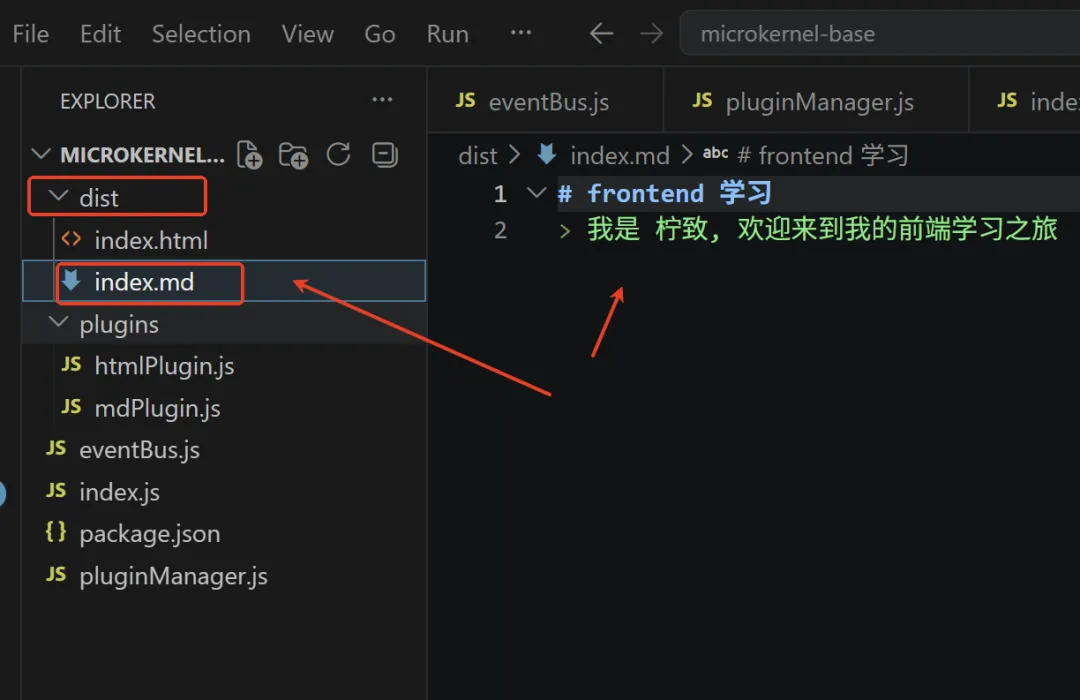
/*文件路径:plugins/mdPlugin.js*/import fs from "node:fs";export class MdPlugin {constructor() {this.name = "MdPlugin";}init({ compiler, eventBus }) {eventBus.emit("MdPlugin:init");console.log("MdPlugin init");}onMount() {console.log("MdPlugin onMount");}onUmount() {console.log("MdPlugin onUnmount");}apply({ctx, eventBus}) {console.log("MdPlugin 插件执行了,拿到上下文对象:", ctx);fs.writeFileSync("dist/index.md",`# frontend 学习\n> 我是 柠致, 欢迎来到我的前端学习之旅`);}}
/*index.js*/import { PluginManager } from './pluginManager.js';import { HtmlPlugin } from './plugins/htmlPlugin.js';import { MdPlugin } from './plugins/mdPlugin.js';// 创建插件管理器实例const pluginManager = new PluginManager();// 注册插件pluginManager.use(new HtmlPlugin());pluginManager.use(new MdPlugin());// 应用插件pluginManager.apply("HtmlPlugin");pluginManager.apply("MdPlugin");// 2000 ms 后,卸载 HtmlPlugin 插件setTimeout(() => {pluginManager.dispose("HtmlPlugin");}, 2000);