 夜雨聆风
夜雨聆风


OpenCode插件系列: notifier
类型:通知插件
仓库:https://github.com/mohak34/opencode-notifier
NPM:
@mohak34/opencode-notifier星标:239+ ⭐
1. 这个插件是什么?
opencode-notifier 是一个当你的 OpenCode session 中有重要事件发生时,提供桌面通知 + 声音的插件。支持 macOS、Linux 和 Windows。
想法很简单:当 AI agent 在处理长时间任务时,你可以去做其他事情,等任务完成或需要你的授权时再回来。
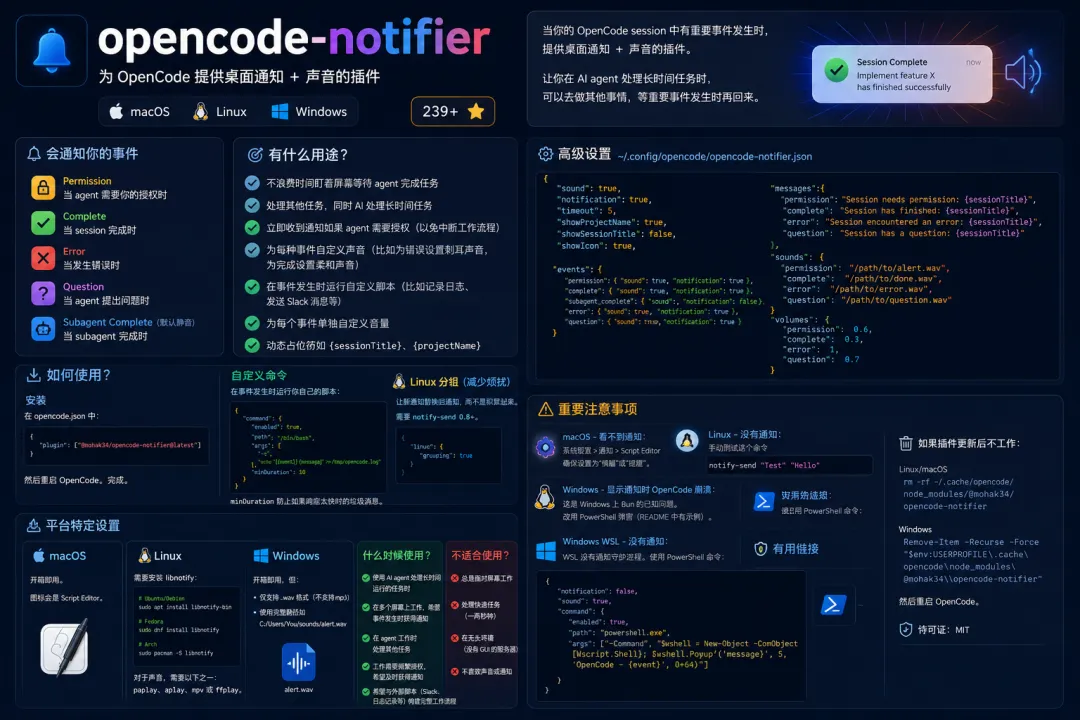
会通知你的事件:
-
🔔 Permission — 当 agent 需要你的授权来执行某些操作时 -
✅ Complete — 当 session 完成时 -
❌ Error — 当发生错误时 -
❓ Question — 当 agent 提出问题时 -
🤖 Subagent Complete(默认静音)— 当 subagent 完成时
2. 有什么用途?
使用它来:
-
✅ 不浪费时间盯着屏幕等待 agent 完成任务 -
✅ 处理其他任务,同时 AI 处理长时间任务 -
✅ 立即收到通知如果 agent 需要授权(以免中断工作流程) -
✅ 为每种事件自定义声音(比如为错误设置刺耳声音,为完成设置柔和声音) -
✅ 在事件发生时运行自定义脚本(比如记录日志、发送 Slack 消息等) -
✅ 为每个事件单独自定义音量 -
✅ 动态占位符如 {sessionTitle}、{projectName}
3. 如何使用?
安装
在 opencode.json 中:
{
"plugin": ["@mohak34/opencode-notifier@latest"]
}
然后重启 OpenCode。完成。
平台特定设置
macOS:
开箱即用。图标会是 Script Editor。
Linux:
需要安装 libnotify:
# Ubuntu/Debian
sudo apt install libnotify-bin
# Fedora
sudo dnf install libnotify
# Arch
sudo pacman -S libnotify
对于声音,需要以下之一:paplay、aplay、mpv 或 ffplay。
Windows:
开箱即用,但:
-
仅支持 .wav格式(不支持 mp3) -
使用完整路径如 C:/Users/You/sounds/alert.wav
高级设置
创建文件 ~/.config/opencode/opencode-notifier.json:
{
"sound": true,
"notification": true,
"timeout": 5,
"showProjectName": true,
"showSessionTitle": false,
"showIcon": true,

"events": {
"permission": { "sound": true, "notification": true },
"complete": { "sound": true, "notification": true },
"subagent_complete": { "sound": false, "notification": false },
"error": { "sound": true, "notification": true },
"question": { "sound": true, "notification": true }
  },

"messages": {
"permission": "Session needs permission: {sessionTitle}",
"complete": "Session has finished: {sessionTitle}",
"error": "Session encountered an error: {sessionTitle}",
"question": "Session has a question: {sessionTitle}"
  },

"sounds": {
"permission": "/path/to/alert.wav",
"complete": "/path/to/done.wav",
"error": "/path/to/error.wav",
"question": "/path/to/question.wav"
  },

"volumes": {
"permission": 0.6,
"complete": 0.3,
"error": 1,
"question": 0.7
  }
}
自定义命令
可以在事件发生时运行你自己的脚本:
{
"command": {
"enabled": true,
"path": "/bin/bash",
"args": [
"-c",
"echo '[{event}] {message}' >> /tmp/opencode.log"
    ],
"minDuration": 10
  }
}
minDuration 防止如果响应太快时的垃圾消息。
Linux 分组(减少烦扰):
{
"linux": {
"grouping": true
  }
}
这会让新通知替换旧通知,而不是积累起来。需要 notify-send 0.8+。
4. 什么时候使用?
请在以下情况使用:
-
✅ 使用 AI agent 处理长时间运行的任务时 -
✅ 在多个屏幕上工作,希望事件发生时获得通知 -
✅ 在 agent 工作时处理其他任务 -
✅ 工作需要频繁授权,希望及时获得通知 -
✅ 希望与外部脚本(Slack、日志记录等)构建完整工作流程
不要在以下情况下使用:
-
❌ 总是面对屏幕工作 -
❌ 处理快速任务(一两秒钟) -
❌ 在无头环境(没有 GUI 的服务器)工作 -
❌ 不喜欢声音或通知
⚠️ 重要注意事项
常见故障排除:
macOS – 看不到通知:
系统设置 > 通知 > Script Editor — 确保设置为”横幅”或”提醒”。
Linux – 没有通知:
# 手动测试这个命令
notify-send "Test""Hello"
Windows – 显示通知时 OpenCode 崩溃:
这是 Windows 上 Bun 的已知问题。改用 PowerShell 弹窗(README 中有示例)。
Windows WSL – 没有通知:
WSL 没有通知守护进程。使用 PowerShell 命令:
{
"notification": false,
"sound": true,
"command": {
"enabled": true,
"path": "powershell.exe",
"args": ["-Command", "$wshell = New-Object -ComObject [Wscript.Shell](<http://Wscript.Shell>); $wshell.Popup('{message}', 5, 'OpenCode - {event}', 0+64)"]
  }
}
如果插件更新后不工作:
# Linux/macOS
rm -rf ~/.cache/opencode/node_modules/@mohak34/opencode-notifier
# Windows
Remove-Item -Recurse -Force "$env:USERPROFILE\\.cache\\opencode\\node_modules\\@mohak34\\opencode-notifier"
然后重启 OpenCode。
许可证:MIT
🔗 有用链接
-
README:https://github.com/mohak34/opencode-notifier -
NPM:https://www.npmjs.com/package/@mohak34/opencode-notifier -
更新日志:https://github.com/mohak34/opencode-notifier/blob/main/CHANGELOG.md