 夜雨聆风
夜雨聆风





H5版圆形印章生成工具 使用文档
圆形印章生成工具 使用文档
学在坚持公众号 出品
工具简介
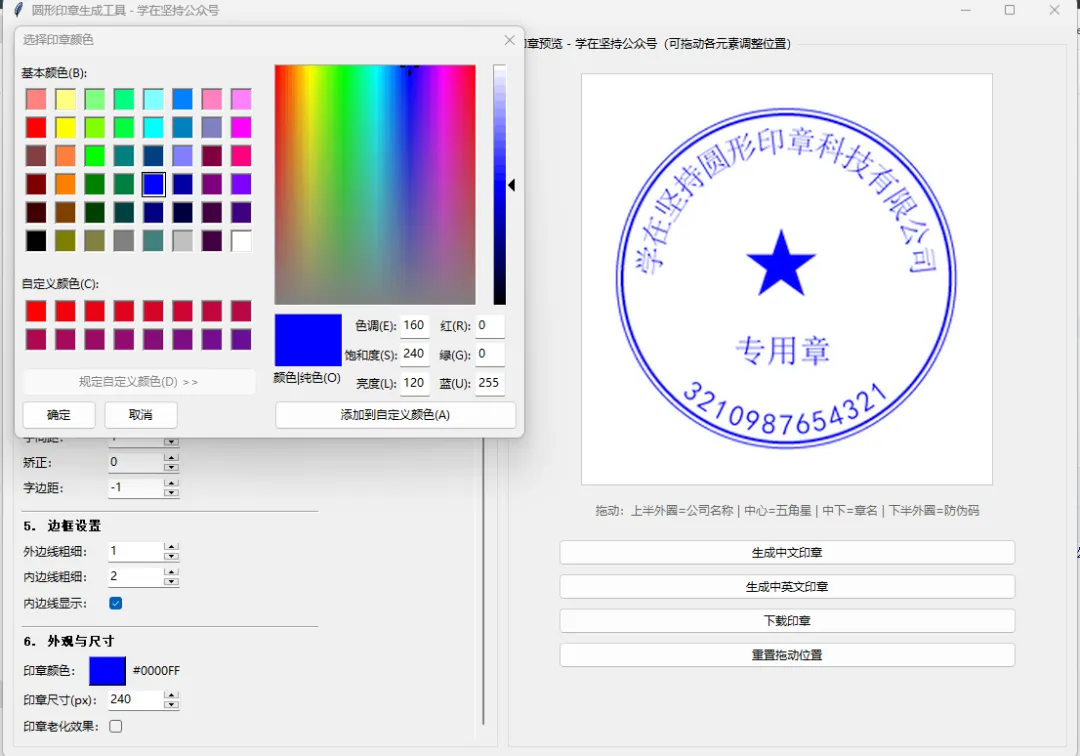
圆形印章生成工具提供两种使用方式:
-
Python 桌面版( 圆形印章生成工具.py):基于 Tkinter + Pillow,支持 4 倍超采样高清渲染 -
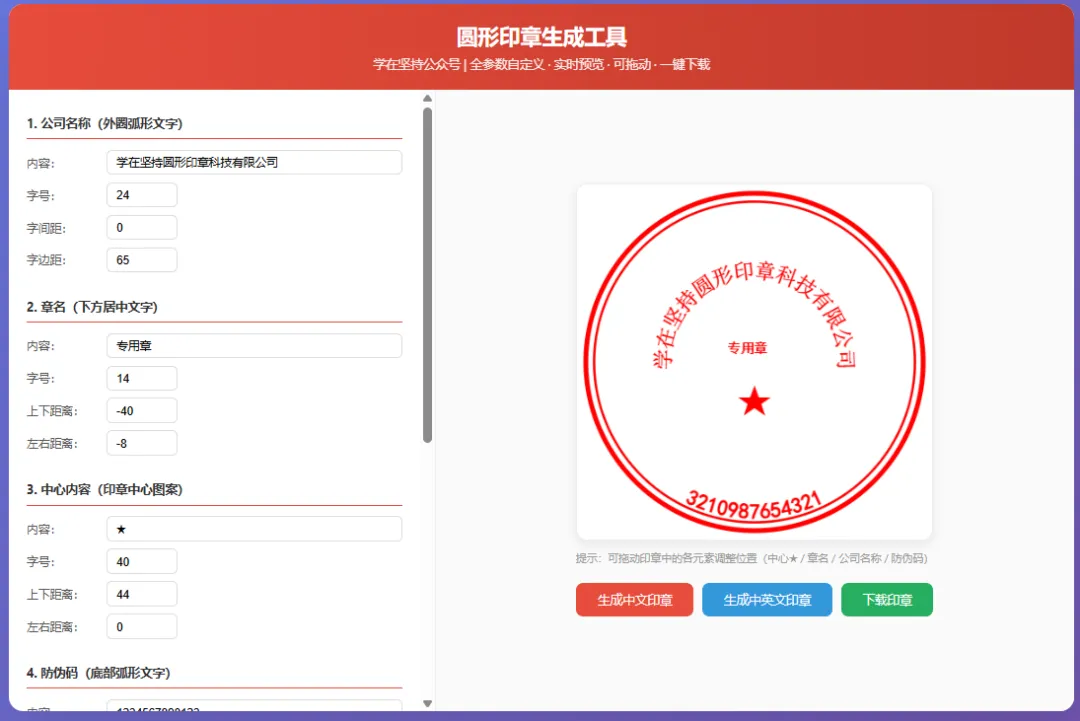
H5 网页版( 圆形印章生成工具.html):纯前端 Canvas 实现,双击即可在浏览器中使用,无需安装任何依赖
两个版本功能一致:可视化制作中文/中英文圆形公章,支持全参数自定义、各元素可拖动调整位置、实时预览、一键下载透明底印章图片。
版本对比
|
|
|
|
|---|---|---|
|
|
python 圆形印章生成工具.py |
|
|
|
|
|
|
|
|
|
|
|
|
|
|
|
|
|
|
|
|
|
|
|
|
|
|
|
|
|
|
|
|
|
快速开始
Python 桌面版
pip install Pillow
python 圆形印章生成工具.py
H5 网页版
直接双击 圆形印章生成工具.html 文件,在浏览器中打开即可使用。
界面布局
两个版本均采用左右分栏布局:
-
左侧(40%):参数配置面板,带滚动条 -
右侧(60%):印章实时预览区,支持鼠标拖动各元素
拖动功能说明
右侧预览区的印章各元素可以直接用鼠标拖动调整位置:
|
|
|
|
|---|---|---|
|
|
|
|
|
|
|
|
|
|
|
|
|
|
|
|
拖动时左侧对应参数值会实时同步更新。点击”重置拖动位置”可恢复默认。
参数配置详解
1. 公司名称(外圈弧形文字)
沿印章外圈弧形排列的主体文字。
|
|
|
|
|---|---|---|
|
|
|
|
|
|
|
|
|
|
|
|
|
|
|
|
2. 章名(下方居中文字)
|
|
|
|
|---|---|---|
|
|
|
|
|
|
|
|
|
|
|
|
|
|
|
|
3. 中心内容(印章中心图案)
|
|
|
|
|---|---|---|
|
|
|
|
|
|
|
|
|
|
|
|
|
|
|
|
4. 防伪码(底部弧形文字)
|
|
|
|
|---|---|---|
|
|
|
|
|
|
|
|
|
|
|
|
|
|
|
|
|
|
|
|
5. 边框设置
|
|
|
|
|---|---|---|
|
|
|
|
|
|
|
|
|
|
|
|
6. 外观与尺寸
|
|
|
|
|---|---|---|
|
|
|
|
|
|
|
|
|
|
|
|
操作流程
1. 打开工具(Python版运行py / H5版双击html)
   ↓
2. 左侧面板调整参数(或右侧直接拖动元素)
   ↓
3. 实时预览自动更新
   ↓
4. 满意后点击"下载印章"保存 PNG 文件
输出格式
|
|
|
|---|---|
|
|
|
|
|
|
|
|
|
|
|
|
功能按钮
|
|
|
|---|---|
|
|
|
|
|
|
|
|
|
|
|
|
项目文件
圆形印章生成工具.py     # Python 桌面版(Tkinter GUI)
圆形印章生成工具.html   # H5 网页版(纯前端 Canvas)
圆形印章生成工具.md     # 本文档
Python 版代码架构
|
|
|
|---|---|
|
|
|
|
|
|
|
|
|
H5 版技术栈
-
纯 HTML + CSS + JavaScript -
Canvas 2D API 绘制印章 -
鼠标事件实现拖动 -
toDataURL()导出 PNG
常见问题
Q: Python 版字体显示不正确?
A: 确保 Windows 系统已安装宋体、黑体、楷体等字体(系统自带)。
Q: H5 版字体和 Python 版不一样?
A: H5 版使用浏览器字体渲染,效果可能略有差异,但功能一致。
Q: 文字重叠怎么办?
A: 调整字间距、字边距或字号,或直接拖动元素调整位置。
Q: 如何去掉防伪码?
A: 将防伪码的”内容”清空即可。
Q: 参数有上限吗?
A: 没有最大上限,可以自由输入任意数值。
注意事项
-
本工具仅供学习和演示用途,请勿用于制作伪造公章等违法行为 -
生成的印章为模拟效果,不具有法律效力 -
Python 版建议在 Windows 系统下使用以获得最佳字体支持 -
H5 版建议使用 Chrome / Edge / Firefox 等现代浏览器
版本信息
-
版本:2.0.0 -
作者:学在坚持公众号 -
Python 版:Tkinter + Pillow -
H5 版:HTML5 Canvas -
许可证:MIT License
圆形印章生成工具 - 学在坚持公众号* { margin: 0; padding: 0; box-sizing: border-box; }body {font-family: -apple-system, BlinkMacSystemFont, 'Segoe UI', 'Microsoft YaHei', sans-serif;background: linear-gradient(135deg, #667eea 0%, #764ba2 100%);min-height: 100vh; padding: 20px;}.container {max-width: 1200px; margin: 0 auto;background: #fff; border-radius: 16px;box-shadow: 0 20px 60px rgba(0,0,0,0.15);overflow: hidden;}.header {background: linear-gradient(90deg, #e74c3c, #c0392b);color: #fff; padding: 20px 30px; text-align: center;}.header h1 { font-size: 24px; margin-bottom: 5px; }.header p { font-size: 14px; opacity: 0.9; }.main { display: flex; min-height: 600px; }.left-panel {flex: 2; padding: 20px; overflow-y: auto;max-height: 700px; border-right: 1px solid #eee;}.right-panel {flex: 3; padding: 30px; display: flex;flex-direction: column; align-items: center; justify-content: center;background: #fafafa;}.section { margin-bottom: 20px; }.section-title {font-size: 14px; font-weight: bold; color: #333;padding: 8px 0; border-bottom: 2px solid #e74c3c;margin-bottom: 12px;}.form-row {display: flex; align-items: center;margin-bottom: 8px; gap: 10px;}.form-row label {min-width: 80px; font-size: 13px; color: #555;}.form-row input[type="text"],.form-row input[type="number"],.form-row select {flex: 1; padding: 6px 10px; border: 1px solid #ddd;border-radius: 6px; font-size: 13px; outline: none;transition: border-color 0.2s;}.form-row input:focus, .form-row select:focus {border-color: #e74c3c;}.form-row input[type="number"] { width: 80px; flex: none; }.form-row input[type="checkbox"] { width: 18px; height: 18px; }.form-row input[type="color"] {width: 40px; height: 30px; border: none;border-radius: 4px; cursor: pointer;}#preview-canvas {background: #fff; border: 2px solid #eee;border-radius: 12px; box-shadow: 0 4px 12px rgba(0,0,0,0.08);cursor: move;}.btn-group { margin-top: 20px; display: flex; gap: 10px; flex-wrap: wrap; justify-content: center; }.btn {padding: 10px 24px; border: none; border-radius: 8px;font-size: 14px; cursor: pointer; font-weight: 500;transition: all 0.2s;}.btn-primary { background: #e74c3c; color: #fff; }.btn-primary:hover { background: #c0392b; transform: translateY(-1px); }.btn-success { background: #27ae60; color: #fff; }.btn-success:hover { background: #219a52; transform: translateY(-1px); }.btn-info { background: #3498db; color: #fff; }.btn-info:hover { background: #2980b9; transform: translateY(-1px); }.drag-tip {margin-top: 12px; font-size: 12px; color: #999; text-align: center;}@media (max-width: 768px) {.main { flex-direction: column; }.left-panel { max-height: none; border-right: none; border-bottom: 1px solid #eee; }.right-panel { padding: 20px; }}圆形印章生成工具学在坚持公众号 | 全参数自定义 · 实时预览 · 可拖动 · 一键下载1. 公司名称(外圈弧形文字)内容:字号:字间距:字边距:2. 章名(下方居中文字)内容:字号:上下距离:左右距离:3. 中心内容(印章中心图案)内容:字号:上下距离:左右距离:4. 防伪码(底部弧形文字)内容:字号:字间距:矫正:字边距:5. 边框设置外边线粗细:内边线粗细:内边线显示:6. 外观与尺寸印章颜色:印章尺寸:老化效果:提示:可拖动印章中的各元素调整位置(中心★ / 章名 / 公司名称 / 防伪码)生成中文印章生成中英文印章下载印章const canvas = document.getElementById('preview-canvas');const ctx = canvas.getContext('2d');// 拖动状态let dragging = null;let dragStart = {x: 0, y: 0};functiongetParams() {return {companyName: document.getElementById('companyName').value,companyFontSize: parseInt(document.getElementById('companyFontSize').value) || 20,companySpacing: parseInt(document.getElementById('companySpacing').value) || 0,companyMargin: parseInt(document.getElementById('companyMargin').value) || 0,sealName: document.getElementById('sealName').value,nameFontSize: parseInt(document.getElementById('nameFontSize').value) || 14,nameOffsetY: parseInt(document.getElementById('nameOffsetY').value) || 0,nameOffsetX: parseInt(document.getElementById('nameOffsetX').value) || 0,centerContent: document.getElementById('centerContent').value,centerFontSize: parseInt(document.getElementById('centerFontSize').value) || 40,centerOffsetY: parseInt(document.getElementById('centerOffsetY').value) || 0,centerOffsetX: parseInt(document.getElementById('centerOffsetX').value) || 0,codeText: document.getElementById('codeText').value,codeFontSize: parseInt(document.getElementById('codeFontSize').value) || 9,codeSpacing: parseInt(document.getElementById('codeSpacing').value) || 0,codeCorrection: parseInt(document.getElementById('codeCorrection').value) || 0,codeMargin: parseInt(document.getElementById('codeMargin').value) || 0,outerBorder: parseInt(document.getElementById('outerBorder').value) || 4,innerBorder: parseInt(document.getElementById('innerBorder').value) || 2,innerBorderShow: document.getElementById('innerBorderShow').checked,sealColor: document.getElementById('sealColor').value,sealSize: parseInt(document.getElementById('sealSize').value) || 300,agingEffect: document.getElementById('agingEffect').checked,};}functiongenerateSeal() {const p = getParams();const size = 400; // canvas固定400const scale = size / p.sealSize;ctx.clearRect(0, 0, size, size);const cx = size / 2;const cy = size / 2;const radius = (size - 20) / 2;// 外边框ctx.beginPath();ctx.arc(cx, cy, radius, 0, Math.PI * 2);ctx.strokeStyle = p.sealColor;ctx.lineWidth = p.outerBorder * scale;ctx.stroke();// 内边框if (p.innerBorderShow) {const innerRadius = radius - (p.outerBorder * scale + 4);ctx.beginPath();ctx.arc(cx, cy, innerRadius, 0, Math.PI * 2);ctx.lineWidth = p.innerBorder * scale;ctx.stroke();}// 外圈弧形文字(公司名称)drawArcTextTop(ctx, cx, cy, radius, p);// 中心内容drawCenterContent(ctx, cx, cy, p);// 章名drawBottomText(ctx, cx, cy, p);// 防伪码drawArcTextBottom(ctx, cx, cy, radius, p);// 老化效果if (p.agingEffect) {applyAging(ctx, size);}}functiondrawArcTextTop(ctx, cx, cy, radius, p) {const text = p.companyName;if (!text) return;const fontSize = p.companyFontSize;const spacing = p.companySpacing;const margin = p.companyMargin;const textRadius = radius - margin - fontSize / 2 - 10;ctx.font = `bold ${fontSize}px SimSun, serif`;ctx.fillStyle = p.sealColor;ctx.textAlign = 'center';ctx.textBaseline = 'middle';// 计算每个字符的角度let charWidths = [];let totalWidth = 0;for (let char of text) {const w = ctx.measureText(char).width + spacing;charWidths.push(w);totalWidth += w;}const totalAngle = totalWidth / textRadius;let startAngle = -Math.PI / 2 - totalAngle / 2;let currentAngle = startAngle;for (let i = 0; i < text.length; i++) {const charAngle = charWidths[i] / textRadius;const angle = currentAngle + charAngle / 2;const x = cx + textRadius * Math.cos(angle);const y = cy + textRadius * Math.sin(angle);ctx.save();ctx.translate(x, y);ctx.rotate(angle + Math.PI / 2);ctx.fillText(text[i], 0, 0);ctx.restore();currentAngle += charAngle;}}functiondrawCenterContent(ctx, cx, cy, p) {const text = p.centerContent;if (!text) return;const fontSize = p.centerFontSize;ctx.font = `bold ${fontSize}px SimSun, serif`;ctx.fillStyle = p.sealColor;ctx.textAlign = 'center';ctx.textBaseline = 'middle';ctx.fillText(text, cx + p.centerOffsetX, cy + p.centerOffsetY);}functiondrawBottomText(ctx, cx, cy, p) {const text = p.sealName;if (!text) return;const fontSize = p.nameFontSize;ctx.font = `bold ${fontSize}px SimSun, serif`;ctx.fillStyle = p.sealColor;ctx.textAlign = 'center';ctx.textBaseline = 'middle';ctx.fillText(text, cx + p.nameOffsetX, cy + fontSize + 10 + p.nameOffsetY);}functiondrawArcTextBottom(ctx, cx, cy, radius, p) {const text = p.codeText;if (!text) return;const fontSize = p.codeFontSize;const spacing = p.codeSpacing;const margin = p.codeMargin;const correction = p.codeCorrection;const textRadius = radius - margin - fontSize / 2 - 10;ctx.font = `bold ${fontSize}px KaiTi, serif`;ctx.fillStyle = p.sealColor;ctx.textAlign = 'center';ctx.textBaseline = 'middle';let charWidths = [];let totalWidth = 0;for (let char of text) {const w = ctx.measureText(char).width + spacing;charWidths.push(w);totalWidth += w;}const totalAngle = totalWidth / textRadius;let startAngle = Math.PI / 2 - totalAngle / 2;let currentAngle = startAngle;for (let i = 0; i < text.length; i++) {const charAngle = charWidths[i] / textRadius;const angle = currentAngle + charAngle / 2;const x = cx + textRadius * Math.cos(angle);const y = cy + textRadius * Math.sin(angle) + correction;ctx.save();ctx.translate(x, y);ctx.rotate(angle - Math.PI / 2);ctx.fillText(text[i], 0, 0);ctx.restore();currentAngle += charAngle;}}functionapplyAging(ctx, size) {const imageData = ctx.getImageData(0, 0, size, size);const data = imageData.data;const pixelCount = size * size;// 随机去除像素for (let i = 0; i < pixelCount * 0.03; i++) {const idx = Math.floor(Math.random() * pixelCount) * 4;if (data[idx + 3] > 0) {data[idx + 3] = 0;}}ctx.putImageData(imageData, 0, 0);}functiondownloadSeal() {generateSeal();const link = document.createElement('a');link.download = '印章.png';link.href = canvas.toDataURL('image/png');link.click();}// 拖动功能functiongetElementAt(x, y) {const cx = 200, cy = 200;const rx = x - cx, ry = y - cy;const dist = Math.sqrt(rx * rx + ry * ry);const radius = 190;if (dist > radius) return null;if (dist < radius * 0.25) return 'center';if (dist < radius * 0.55 && ry > 0) return 'name';if (dist >= radius * 0.55 && ry < 0) return 'company';if (dist >= radius * 0.55 && ry > 0) return 'code';return 'center';}canvas.addEventListener('mousedown', function(e) {const rect = canvas.getBoundingClientRect();const x = e.clientX - rect.left;const y = e.clientY - rect.top;dragging = getElementAt(x, y);dragStart = {x: e.clientX, y: e.clientY};});canvas.addEventListener('mousemove', function(e) {if (!dragging) {const rect = canvas.getBoundingClientRect();const x = e.clientX - rect.left;const y = e.clientY - rect.top;canvas.style.cursor = getElementAt(x, y) ? 'move' : 'default';return;}const dx = e.clientX - dragStart.x;const dy = e.clientY - dragStart.y;dragStart = {x: e.clientX, y: e.clientY};if (dragging === 'center') {const el = document.getElementById('centerOffsetX');const el2 = document.getElementById('centerOffsetY');el.value = parseInt(el.value) + Math.round(dx);el2.value = parseInt(el2.value) + Math.round(dy);} else if (dragging === 'name') {const el = document.getElementById('nameOffsetX');const el2 = document.getElementById('nameOffsetY');el.value = parseInt(el.value) + Math.round(dx);el2.value = parseInt(el2.value) + Math.round(dy);} else if (dragging === 'company') {const el = document.getElementById('companyMargin');el.value = parseInt(el.value) + Math.round(dy);} else if (dragging === 'code') {const el = document.getElementById('codeMargin');el.value = parseInt(el.value) - Math.round(dy);}generateSeal();});canvas.addEventListener('mouseup', function() { dragging = null; });canvas.addEventListener('mouseleave', function() { dragging = null; });// 实时渲染:监听所有输入变化let renderTimer = null;functionscheduleRender() {if (renderTimer) clearTimeout(renderTimer);renderTimer = setTimeout(generateSeal, 100);}document.querySelectorAll('input, select').forEach(el => {el.addEventListener('input', scheduleRender);el.addEventListener('change', scheduleRender);});// 初始渲染window.addEventListener('load', generateSeal);