ARTICLE · 1328258
FastAdmin Excel 批量导入方案|先预览校验、临时文件中转,解决 POST 超长限制,支持 10000 + 条数据导入

大家好,这里是 FastAdmin 手记。 很多开发做 Excel 导入预览功能,都会踩同一个大坑: ✅ 上传解析 Excel → 把所有数据返回前端预览 ❌ 用户核对完成,点击确认,把上万行表格 JSON 通过 POST 再传回后端
问题根源:Nginx 默认 client_max_body_size、请求 POST 体长度有限制,1 万条带字段的数据序列化后体积非常大,直接 POST 提交,会出现 413 Request Entity Too Large、请求截断、丢数据。
👉 正确思路:文件只上传一次,后端落地临时文件,预览、入库两次操作都读取这个临时文件,前后端只传递【临时文件标识 token】,不传递表格明细。
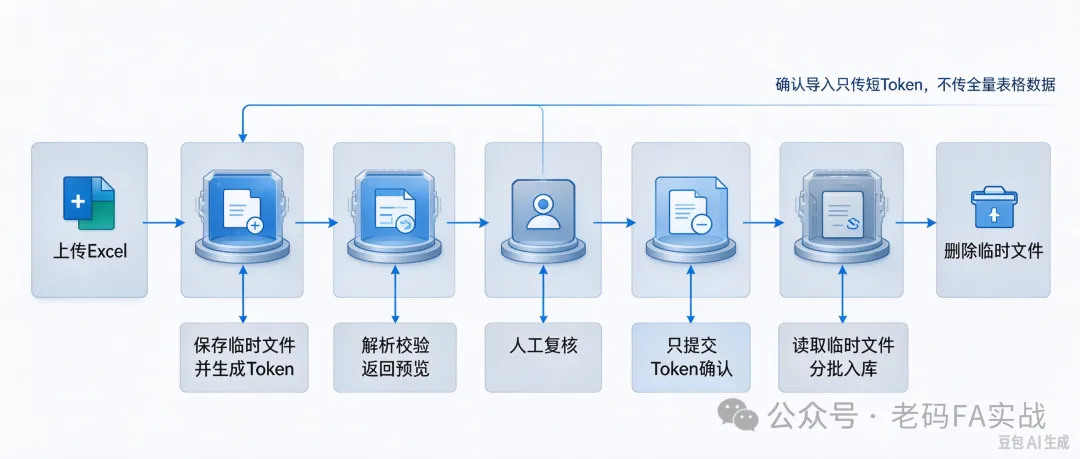
整体流程: 上传 Excel → 后端保存到临时目录,生成唯一 token → 读取 Excel,解析校验,返回预览数据给前端(仅本次预览渲染) 前端展示预览表格、标记错误行 → 用户确认导入 前端只携带 token 提交确认请求 → 后端根据 token 找到临时文件,重新读取 Excel、分批入库 入库完成、超时自动清理临时文件
优点:POST 参数永远只有一个短 token,不存在大数据提交,支持几万条导入。

一、新版业务流程图
前端上传Excel文件↓后端接收文件,移动到临时目录,生成唯一导入token↓后端读取临时Excel,解析+字段校验↓返回预览数据给前端渲染(用于展示,前端不保存全量数据)↓管理员复核页面,查看标红错误行↓点击【确认导入】,仅提交token(短字符串)↓后端通过token找到临时文件,再次读取Excel,分块事务入库↓入库成功后删除临时文件;超时自动清理过期临时文件
二、依赖与环境前置
依旧使用 phpoffice/phpspreadsheet
composer require phpoffice/phpspreadsheetphp.ini 配置(大 Excel 解析)
memory_limit = 512Mmax_execution_time = 300
Nginx 注意区分两个配置:
client_max_body_size:控制上传文件本身大小 POST 请求体限制:本次方案确认导入只有 token,不受这个限制
重点区分:文件上传是 multipart/form-data 上传文件;确认导入只是普通 POST,参数极少。
三、目录约定
临时文件目录,放在项目 runtime 下,方便统一清理:runtime/importtemp/需要给目录读写权限;支持定时清理超过 2 小时的临时文件,防止磁盘堆积。
四、前端代码(改动重点:确认导入只传 token,不传 rows 明细)
导入按钮、上传弹窗不变。 上传成功接口返回 token 和预览数据;预览弹窗确认时,只提交 token。
<aclass="btn btn-success btn-import"><iclass="fa fa-upload"></i> 批量导入Excel</a>$('.btn-import').on('click',function(){Fast.api.open('demo/import/upload','上传Excel导入',{width:500,height:300})});
上传接口回调,拿到 token,传入预览弹窗:
// 预览弹窗渲染表格,标记错误行function showPreview(data){var importToken = data.token; // 拿到临时文件标识var list = data.list;var html = '<table class="layui-table">';html += '<thead><tr><th>姓名</th><th>手机号</th><th>金额</th><th>状态</th></tr></thead><tbody>';$.each(list,function(i,row){var errClass = row.is_error ? 'style="background:#ffecec"' : '';html += `<tr ${errClass}><td>${row.name}</td><td>${row.mobile}</td><td>${row.money}</td><td>${row.err_msg||'正常'}</td></tr>`;})html += '</tbody></table>';layer.confirm(html,{title:'预览数据(共'+data.total+'条)',area:['80%','70%']},function(index){// ✅ 关键:只传token,不再传全部rows数组Fast.api.ajax({url:'demo/import/save',data:{token: importToken}},function(res){Toastr.success('导入完成!成功:'+res.success+'条,失败:'+res.fail+'条');table.bootstrapTable('refresh');layer.close(index);})})}
<?phpnamespace app\demo\controller;use PhpOffice\PhpSpreadsheet\IOFactory;use think\Controller;use think\facade\Cache;classImportextendsController{// 临时文件根目录protected $tempPath = RUNTIME_PATH . 'importtemp/';public functioninitialize(){parent::initialize();if (!is_dir($this->tempPath)) {mkdir($this->tempPath, 0755, true);}// 顺便清理2小时前的过期临时文件$this->clearExpireFile();}// 上传Excel,生成临时文件,返回预览数据+tokenpublic functionupload(){$file = $this->request->file('file');if(!$file){$this->error('请上传Excel文件');}$info = $file->validate(['ext'=>'xlsx,xls'])->move($this->tempPath);if(!$info){$this->error($file->getError());}// 生成唯一token$token = md5(uniqid(mt_rand(),true));$tempFile = $info->getRealPath();// 缓存token和真实文件路径,有效期2小时Cache::set('import_'.$token, $tempFile, 7200);// 读取Excel,解析校验,返回预览$spreadsheet = IOFactory::load($tempFile);$sheet = $spreadsheet->getActiveSheet();$rows = $sheet->toArray();$list = [];foreach ($rows as $k=>$v){if($k == 0) continue; //跳过表头$row = ['name' => trim($v[0]??''),'mobile'=> trim($v[1]??''),'money' => floatval($v[2]??0),'is_error' => false,'err_msg' => ''];//字段校验if(empty($row['name'])){$row['is_error'] = true;$row['err_msg'] = '姓名不能为空';}if(!preg_match('/^1[3-9]\d{9}$/',$row['mobile'])){$row['is_error'] = true;$row['err_msg'] = '手机号格式错误';}$list[] = $row;}$this->success('解析成功',['token'=>$token,'list'=>$list,'total'=>count($list)]);}
六、后端第二步:确认导入接口,根据 token 读取临时文件,分批入库
重点:这个接口不再接收 rows,只拿 token,从缓存拿到文件路径,重新读取 Excel
// 确认入库,只接收tokenpublic functionsave(){$token = $this->request->post('token','');if(empty($token)) $this->error('导入标识缺失');$tempFile = Cache::get('import_'.$token);if(!$tempFile || !is_file($tempFile)){$this->error('文件已过期或者不存在,请重新上传');}$spreadsheet = IOFactory::load($tempFile);$sheet = $spreadsheet->getActiveSheet();$rows = $sheet->toArray();$success = 0;$fail = 0;$insertAllData = [];$model = new \app\demo\model\User();foreach ($rows as $k=>$v){if($k == 0) continue;$name = trim($v[0]??'');$mobile= trim($v[1]??'');$money = floatval($v[2]??0);//同样校验if(empty($name) || !preg_match('/^1[3-9]\d{9}$/',$mobile)){$fail++;continue;}$insertAllData[] = ['name'=>$name,'mobile'=>$mobile,'money'=>$money,'createtime'=>time()];$success++;}// 分批入库,每批500条$chunkList = array_chunk($insertAllData,500);foreach ($chunkList as $chunk){$model->startTrans();try{$model->insertAll($chunk);$model->commit();}catch (\Exception $e){$model->rollback();$fail += count($chunk);$success -= count($chunk);}}//导入完成,清理缓存+删除临时文件Cache::delete('import_'.$token);@unlink($tempFile);$this->success('导入完成',compact('success','fail'));}
七、清理过期文件方法
上面代码已经调用 clearExpireFile(),实现方法:
// 清理超过2小时的临时文件protected functionclearExpireFile(){$files = glob($this->tempPath.'*.{xlsx,xls}',GLOB_BRACE);$expireTime = time() - 7200;foreach ($files as $file){if(is_file($file) && filemtime($file) < $expireTime){@unlink($file);}}}
八、新旧方案对比 & 坑点说明
额外注意点:
并发导入:每个用户的 Excel 独立临时文件 + 独立 token,互不干扰 安全性:token 随机 md5,缓存绑定文件路径,不能直接被前端猜到文件地址 大文件内存:超过 3 万条,如果内存压力大,可以改用 Spout流式读取 Excel,不用一次性 toArray 全加载预览只是展示,前端修改预览表格里的数据是无效的(进阶:如果需要前端修改后导入,要额外提交修改差异,业务更复杂) 超时:token2 小时有效期,防止垃圾文件堆积
九、进阶扩展
前端预览分页渲染(1 万行一次性渲染表格页面卡顿) 使用 Box/Spout 流式读取,降低 PHP 内存占用,支持十万级 Excel 加入异步队列:超大文件导入丢队列,后台跑任务,前端轮询进度 导入日志记录,记录 token、文件名、操作人、成功失败数量