 夜雨聆风
夜雨聆风


这个文档解析模型刚刚颠覆了商业 OCR 与 VLM——96.33 SOTA、仅 0.9B 参数、完全开源
字数 2524,阅读大约需 7 分钟
目录
-
• 1 PaddleOCR-VL-1.6 功能特性 -
• 2 PaddleOCR-VL-1.6 架构 -
• 3 PaddleOCR-VL-1.6 演示 -
• 4 本地部署 -
• 5 总结
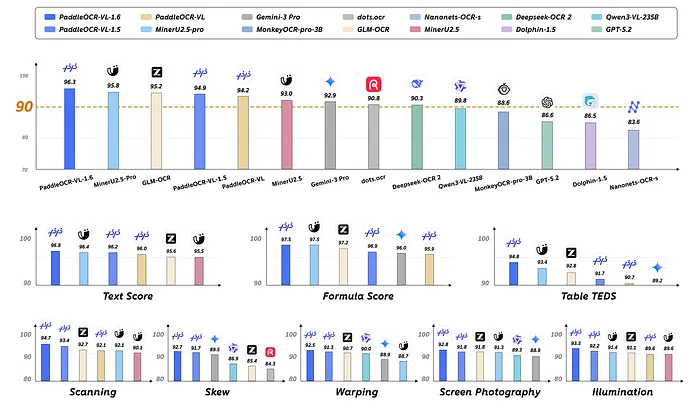
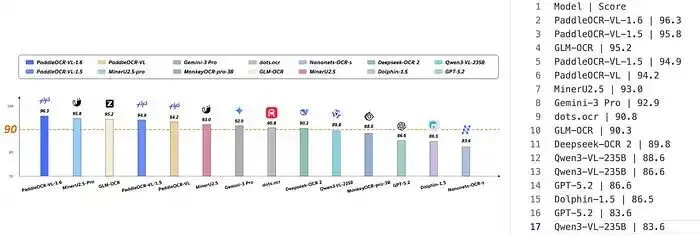
这个开源模型以仅 0.9B 参数在 SOTA 上达到 96.33,全面超越 Gemini 3 Pro 和 Qwen3-VL-235B。
近期,PaddlePaddle 团队发布了最新的文档解析模型——PaddleOCR-VL-1.6。该模型拥有 0.9B 参数,是 PaddleOCR-VL-1.5 的升级版。它在 OmniDocBench v1.6 上取得了 96.33 的最高分,超越了 1.2B 参数的 MinerU2.5-Pro 模型的 95.69 分,同时也在 OmniDocBench v1.5 和 Real5-OmniDocBench 上刷新了记录。
PaddleOCR-VL-1.6 功能特性
-
• 支持文字行定位与识别,同时支持印章识别。 -
• 在文本、公式和表格识别方面达到新的 SOTA 精度,性能卓越。 -
• 支持不规则形状定位,即使文档发生倾斜、弯曲等变形,也能准确实现多边形检测。 -
• 支持跨页表格自动合并与跨页段落标题识别,解决了处理长文档时内容碎片化的问题。
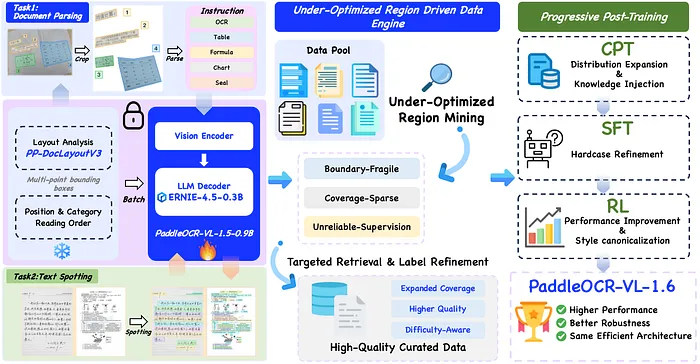
PaddleOCR-VL-1.6 架构
PaddleOCR-VL-1.6 演示
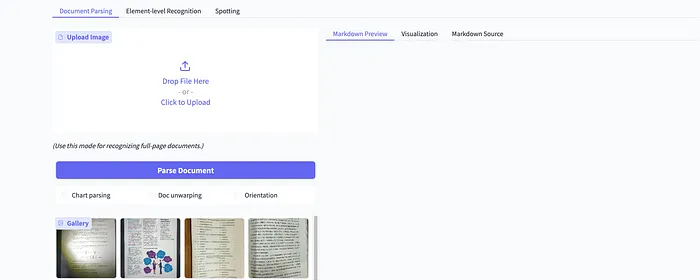
在浏览器中访问 https://huggingface.co/spaces/PaddlePaddle/PaddleOCR-VL-1.6_Online_Demo,上传本地图片或选择已有样例图片,然后点击页面上的”Parse Document”按钮,即可体验 PaddleOCR-VL-1.6 模型提供的文档解析能力。
本地部署
PaddleOCR-VL-1.6 官方文档详细介绍了如何使用 PaddlePaddle 和 CUDA 运行该模型。下面将介绍如何在 macOS 上使用 mlx-vlm 在本地部署 PaddleOCR-VL-1.6 模型。
-
1. 配置虚拟环境
python3 -m venv .venvsource .venv/bin/activate-
2. 安装 mlx-vlm
pip install mlx-vlm-
3. 下载模型
这里使用 hf download 命令将 Hugging Face 在线模型下载到指定的本地目录。
hf download PaddlePaddle/PaddleOCR-VL-1.6 --local-dir model/PaddleOCR-VL-1.6-
4. 运行 PaddleOCR-VL-1.6 模型
from mlx_vlm import load, generatefrom mlx_vlm.prompt_utils import apply_chat_templatemodel, processor = load("model/PaddleOCR-VL-1.6")image = ["ocr.png"]prompt = "OCR:"formatted_prompt = apply_chat_template( processor, model.config, prompt, num_images=len(image),)result = generate( model=model, processor=processor, prompt=formatted_prompt, image=image, max_tokens=512, temperature=0.0,)print(result.text)PaddleOCR-VL-1.6 模型支持基础 OCR、表格识别、公式识别以及图表理解等任务。在上面的代码中,我们通过 prompt 参数将当前任务设置为 OCR。你可以将 prompt 参数的值改为 "Table Recognition:"、"Formula Recognition:" 或 "Chart Recognition:" 等。
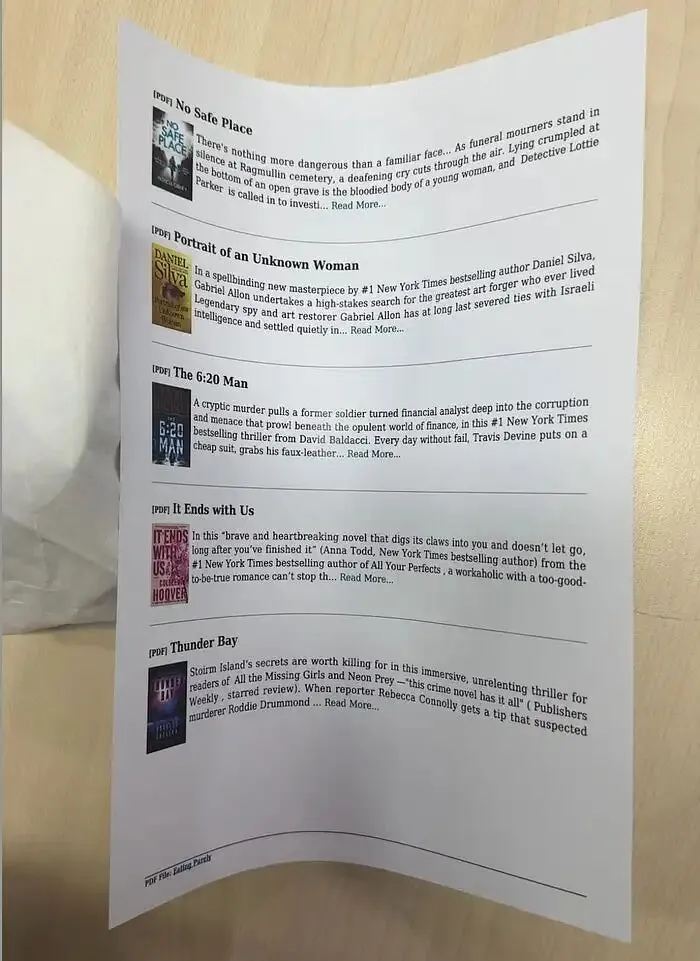
4.0 OCR
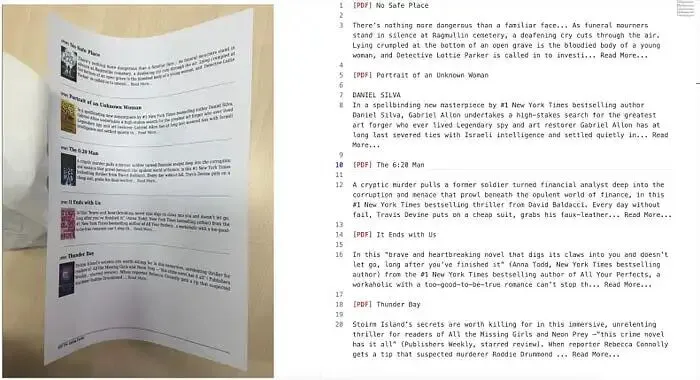
prompt = "OCR:"输入图片:
识别结果:
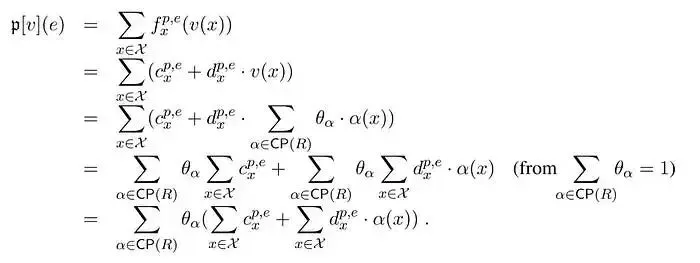
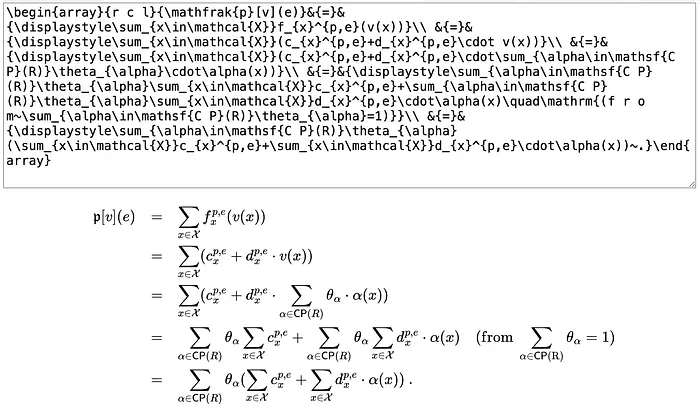
4.1 公式识别
prompt = "Formula Recognition:"输入图片:
4.2 表格识别
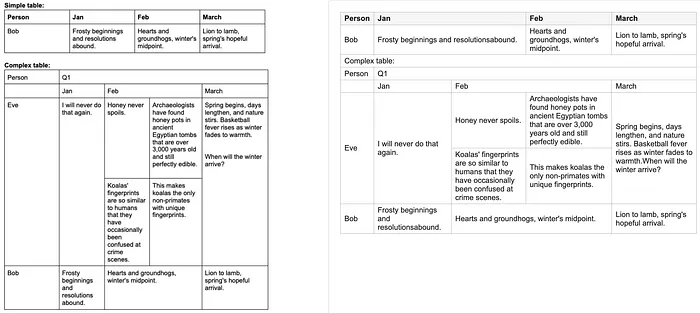
from html import escapefrom pathlib import PathFCEL = "<fcel>"LCEL = "<lcel>"NL = "<nl>"UCEL = "<ucel>"ECEL = "<ecel>"DEFAULT_IMAGE_PATH = "complex-table.jpg"DEFAULT_MODEL_PATH = "model/PaddleOCR-VL-1.6"DEFAULT_OUTPUT_PATH = "table.html"DEFAULT_PROMPT = "Table Recognition:"def _new_cell(text: str = "", kind: str = "cell") -> dict[str, str | int]: return {"kind": kind, "text": text.strip(), "colspan": 1, "rowspan": 1}def _parse_cells(row: str) -> list[dict[str, str | int]]: """Parse PaddleOCR-VL table tokens into cells and merge markers.""" row = row.strip() cells = [] index = 0 while index < len(row): if row.startswith(FCEL, index): index += len(FCEL) next_index = len(row) for token in (FCEL, LCEL, UCEL, ECEL): token_index = row.find(token, index) if token_index != -1: next_index = min(next_index, token_index) cells.append(_new_cell(row[index:next_index])) index = next_index elif row.startswith(LCEL, index): if cells: cells[-1]["colspan"] += 1 index += len(LCEL) elif row.startswith(UCEL, index): cells.append(_new_cell(kind="up")) index += len(UCEL) elif row.startswith(ECEL, index): cells.append(_new_cell()) index += len(ECEL) else: next_index = len(row) for token in (FCEL, LCEL, UCEL, ECEL): token_index = row.find(token, index) if token_index != -1: next_index = min(next_index, token_index) text = row[index:next_index].strip() if text: cells.append(_new_cell(text)) index = next_index return cellsdef paddle_table_to_html(text: str) -> str: rows = [row for row in text.strip().split(NL) if row.strip()] if not rows: return "<table></table>" parsed_rows = [_parse_cells(row) for row in rows] header = parsed_rows[0] body_rows = parsed_rows[1:] rowspan_by_col = {} last_cell_by_col = {} html_rows = [] for cells in body_rows: row_index = len(html_rows) html_rows.append([]) col_index = 0 for cell in cells: colspan = int(cell["colspan"]) if cell["kind"] == "up": for covered_col in range(col_index, col_index + colspan): if covered_col in rowspan_by_col: rowspan_by_col[covered_col] += 1 col_index += colspan continue for covered_col in range(col_index, col_index + colspan): if covered_col in last_cell_by_col: last_row_index, last_cell_index = last_cell_by_col[covered_col] html_rows[last_row_index][last_cell_index]["rowspan"] = ( rowspan_by_col.pop(covered_col, 1) ) last_cell_by_col[col_index] = ( row_index, len(html_rows[row_index])) html_rows[row_index].append( {"text": cell["text"], "colspan": colspan, "rowspan": 1} ) for covered_col in range(col_index, col_index + colspan): last_cell_by_col[covered_col] = ( row_index, len(html_rows[row_index]) - 1 ) rowspan_by_col[covered_col] = 1 col_index += colspan for col_index, rowspan in rowspan_by_col.items(): last_row_index, last_cell_index = last_cell_by_col[col_index] html_rows[last_row_index][last_cell_index]["rowspan"] = rowspan lines = ["<table>", " <thead>", " <tr>"] for cell in header: colspan_attr = ( f' colspan="{cell["colspan"]}"' if cell["colspan"] > 1 else "" ) lines.append(f' <th{colspan_attr}>{escape(cell["text"])}</th>') lines.extend([" </tr>", " </thead>", " <tbody>"]) for row in html_rows: lines.append(" <tr>") for cell in row: colspan_attr = ( f' colspan="{cell["colspan"]}"' if cell["colspan"] > 1 else "" ) rowspan_attr = ( f' rowspan="{cell["rowspan"]}"' if cell["rowspan"] > 1 else "" ) lines.append( f' <td{colspan_attr}{rowspan_attr}>{escape(cell["text"])}</td>' ) lines.append(" </tr>") lines.extend([" </tbody>", "</table>"]) return "\n".join(lines)def recognize_table( image_path: str = DEFAULT_IMAGE_PATH, model_path: str = DEFAULT_MODEL_PATH, prompt: str = DEFAULT_PROMPT, max_tokens: int = 1024,) -> str: from mlx_vlm import generate, load from mlx_vlm.prompt_utils import apply_chat_template model, processor = load(model_path) image = [image_path] formatted_prompt = apply_chat_template( processor, model.config, prompt, num_images=len(image), ) result = generate( model=model, processor=processor, prompt=formatted_prompt, image=image, max_tokens=max_tokens, temperature=0.0, ) print(result.text) return result.textdef build_html_page(table_html: str) -> str: return f"""<!doctype html><html lang="en"><head> <meta charset="utf-8"> <meta name="viewport" content="width=device-width, initial-scale=1"> <title>Table Recognition</title> <style>body{{margin:24px;font-family:Arial,sans-serif;color:#222}}table{{border-collapse:collapse}}th,td{{border:1px solid #999;padding:4px 8px;text-align:left;vertical-align:middle}}th{{background:#f5f5f5;font-weight:600}}</style></head><body>{table_html}</body></html>"""def main() -> : raw_table = recognize_table() table_html = paddle_table_to_html(raw_table) html_page = build_html_page(table_html) Path(DEFAULT_OUTPUT_PATH).write_text(html_page, encoding="utf-8")if __name__ == "__main__": main()输入图片:
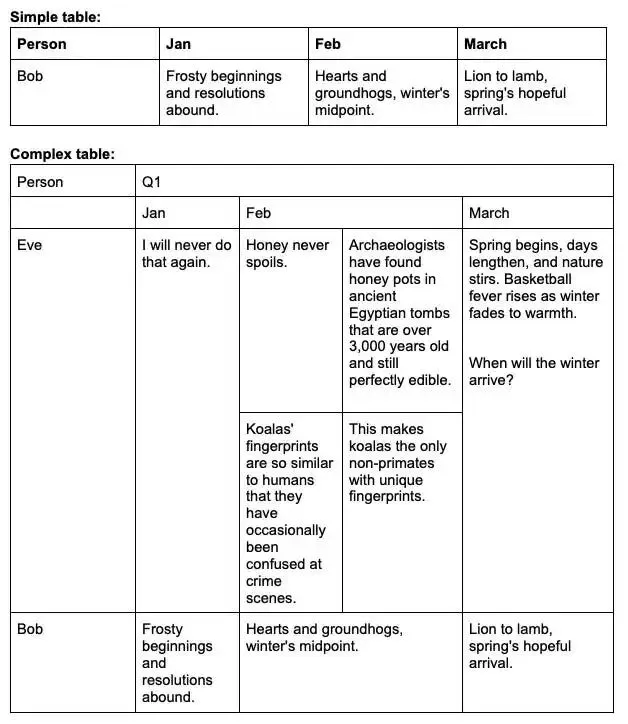
识别结果:
4.3 手写识别
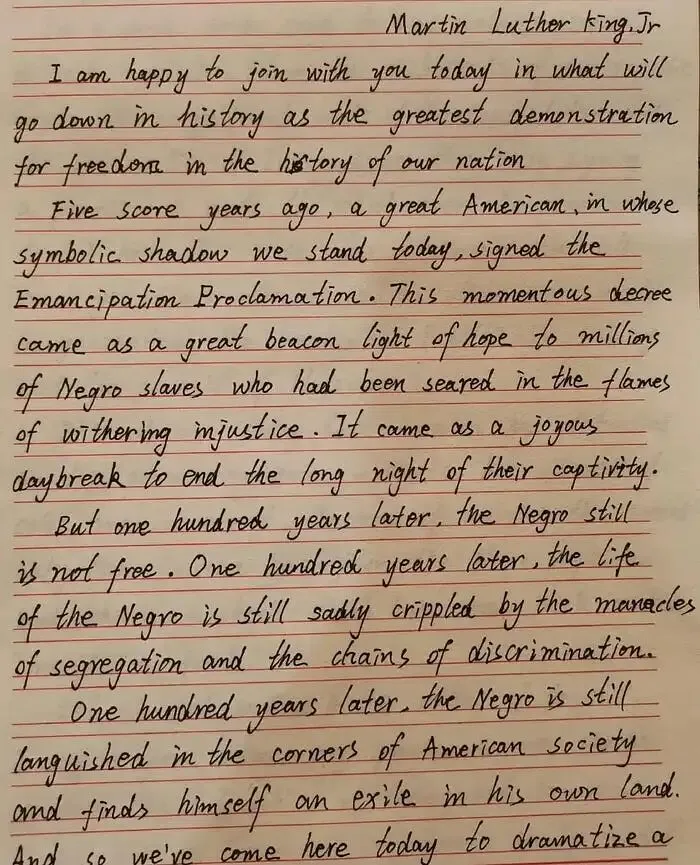
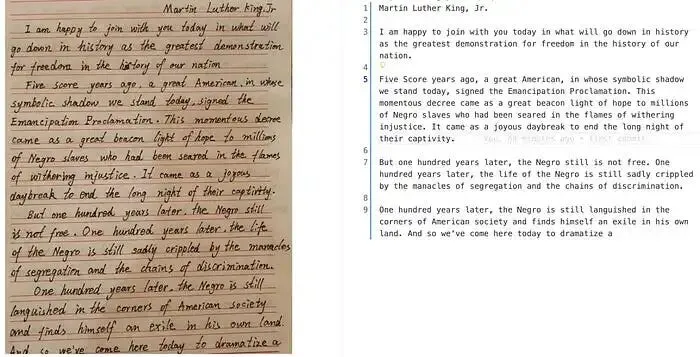
prompt = "OCR:"输入图片:
识别结果:
4.4 图表理解
prompt = "Chart Recognition:"输入图片:
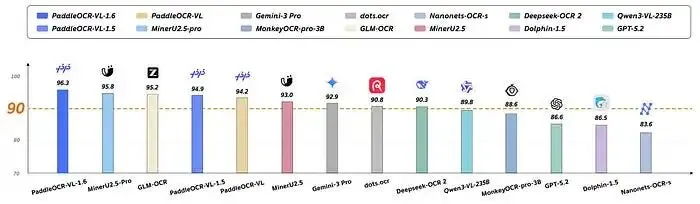
识别结果:
总结
PaddleOCR-VL-1.6 模型在处理含有倾斜、畸变等问题的图像方面表现出色。然而,测试中发现,mlx-vlm 提供的 PaddleOCR-VL 实现在识别复杂表格时存在文字合并错误的问题,而官方 PaddleOCR-VL-1.6 在线服务则能正确处理。此外,表格识别过程会输出 <fcel>、<lcel>、<ecel>、<nl>、<ucel> 和 <xcel> 等特殊 token,需要开发者自行实现对应的表格标签映射逻辑。
在图表理解测试中也发现了数据错误。你可以使用自己的图片测试集来评估该模型的能力;如果该模型无法满足你的需求,可以尝试测试得分为 95.69、参数量为 1.2B 的 MinerU2.5-Pro 模型。